305MB Temporary files won't delete!


BrianInEngland

Well-known member
Pro User
VIP
Local time
12:53 AM
Posts
3,200
OS
Windows 11 Pro 25H2 (RP channel)
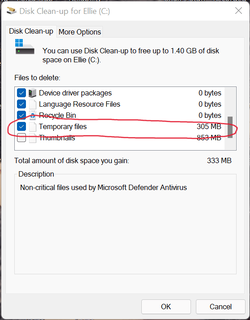
Every time I run Disk Cleanup it shows 305MB of Temporary files. Running the tool appears to delete them but it's always showing again next time I run, and always exactly 305MB.
My Temp folders are NOT stored on the C: drive, I changed them in the Environment Variables.

Treesize doesn't appear to indicate anything, not that I can find anyway. Recycle bin is empty, no pagefile.sys on the C: drive. Also no System restore points.
Disk Cleanup is run as Admin

Any ideas?
 

Attachments
  • Screenshot 2022-04-12 213838.png
    Screenshot 2022-04-12 213838.png
    16.7 KB · Views: 3

My Computer My Computer

At a glance

Windows 11 Pro 25H2 (RP channel)AMD Ryzen 7 9800X3D 8-core64GB Corsair Titanium 6000/CL30MSI Suprim 5080 SOC
OS
Windows 11 Pro 25H2 (RP channel)
Computer type
PC/Desktop
Manufacturer/Model
MSI
CPU
AMD Ryzen 7 9800X3D 8-core
Motherboard
MEG X870E Godlike
Memory
64GB Corsair Titanium 6000/CL30
Graphics Card(s)
MSI Suprim 5080 SOC
Sound Card
Soundblaster AE-9
Monitor(s) Displays
ASUS TUF Gaming VG289Q
Screen Resolution
3840x2160
Hard Drives
Samsung 9100 Pro 4TB (gen 5 x4, system drive/games)
Samsung 990 Pro 2TB
Samsung 980 Pro 2TB
Samsung 870 Evo 4TB
Samsung 870 Evo 2TB
Samsung T9 4TB
PSU
Seasonic PX-2200
Case
Bequiet! Dark Base Pro 901
Cooling
Noctua NH-D15S Chromax black
Keyboard
Logitech G915 X (wired)
Mouse
Logitech G903 with PowerPlay charger
Internet Speed
900Mb/sec
Browser
Microsoft Edge
Antivirus
Windows Defender
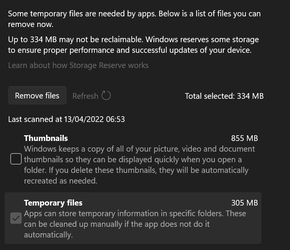
Have tried the Settings app > System > Storage > Temporary files to see what that says about temporary files?
 

My Computer My Computer

At a glance

Windows 11 Pro 22H2, build: 22621.521Intel i7-12700K 3.6GHz Base (5.0GHz Turbo)64GB DDR 3600MhzAsus Tuff RTX 3080 10GB OC
OS
Windows 11 Pro 22H2, build: 22621.521
Computer type
PC/Desktop
Manufacturer/Model
Scan 3XS Custom 1700
CPU
Intel i7-12700K 3.6GHz Base (5.0GHz Turbo)
Motherboard
Asus ProArt Creator B660 D4
Memory
64GB DDR 3600Mhz
Graphics Card(s)
Asus Tuff RTX 3080 10GB OC
Sound Card
Onboard Realtek
Monitor(s) Displays
Gigabyte G32QC 32inch 16:9 curved @2560 x 1440p 165Hz Freesync Premium Pro/ Dell SE2422H 24inch 16:9 1920 x 1080p 75Hz Freesync
Screen Resolution
2560 x 1440p & 1920 x 1080p
Hard Drives
WD SN570 1TB NVME (Boot), Samsung 870QVO 1TB (SSD), SanDisk 3D Ultra 500Gb (SSD) x2, Seagate 3Tb Expansion Desk (Ext HDD), 2x Toshiba 1Tb P300 (Ext HDD)
PSU
Corsair RM1000X Modular
Case
Corsair 4000D Airflow Desktop
Cooling
Corsair Hydro H150i RGB Pro XT 360mm Liquid Cooler, 3 x 120mm fans, 1x Exhaust
Keyboard
Microsoft Ergonomic
Mouse
Logitech G402
Internet Speed
800Mbs
Browser
Edge Chromium
Antivirus
Defender, Malwarebytes
According to that screenshot those files are Windows Defender files. Defender would probably have to be turned off before they can be deleted.
305 mb is not enough space that I would worry about. However, you can run disk cleanup at boot if it bothers you. See instructions in this article.

Note: Unless you want to retain the task to run at every boot, be sure and delete the task after you are finished with it.
 

My Computers My Computers

  • At a glance

    Windows 11 Pro 25H2 26200.9168i9-10900 10 core 20 threads32 gbnone-Intel UHD Graphics 630
    OS
    Windows 11 Pro 25H2 26200.9168
    Computer type
    PC/Desktop
    Manufacturer/Model
    Dell Optiplex 7080
    CPU
    i9-10900 10 core 20 threads
    Motherboard
    DELL 0J37VM
    Memory
    32 gb
    Graphics Card(s)
    none-Intel UHD Graphics 630
    Sound Card
    Integrated Realtek
    Monitor(s) Displays
    Benq 27
    Screen Resolution
    2560x1440
    Hard Drives
    2x1tb Solidigm m.2 nvme /External drives 512gb Samsung m.2 sata+2tb Kingston m2.nvme
    PSU
    500w
    Case
    MT
    Cooling
    Dell Premium
    Keyboard
    Logitech wired
    Mouse
    Logitech wireless
    Internet Speed
    so slow I'm too embarrassed to tell
    Browser
    #1 Edge #2 Firefox
    Antivirus
    Defender+MWB Premium
  • At a glance

    Windows 11 Pro 24H2 26200.9168AMD Ryzen 7 6800U32 gbintegrated
    Operating System
    Windows 11 Pro 24H2 26200.9168
    Computer type
    PC/Desktop
    Manufacturer/Model
    Beelink Mini PC SER5
    CPU
    AMD Ryzen 7 6800U
    Memory
    32 gb
    Graphics card(s)
    integrated
    Sound Card
    integrated
    Monitor(s) Displays
    Benq 27
    Screen Resolution
    2560x1440
    Hard Drives
    1TB Crucial nvme
    Keyboard
    Logitech wired
    Mouse
    Logitech wireless
    Internet Speed
    still too embarrassed to tell
    Browser
    Firefox
    Antivirus
    Defender
  • System 3 is non compliant Dell 9020 i7-4770/24gb ram Win11 PRO 26200.9168
Have tried the Settings app > System > Storage > Temporary files to see what that says about temporary files?
Yes it's showing the same and they won't delete there either, 305MB
 

Attachments

  • Screenshot 2022-04-13 065423.png
    Screenshot 2022-04-13 065423.png
    23.3 KB · Views: 3

My Computer My Computer

At a glance

Windows 11 Pro 25H2 (RP channel)AMD Ryzen 7 9800X3D 8-core64GB Corsair Titanium 6000/CL30MSI Suprim 5080 SOC
OS
Windows 11 Pro 25H2 (RP channel)
Computer type
PC/Desktop
Manufacturer/Model
MSI
CPU
AMD Ryzen 7 9800X3D 8-core
Motherboard
MEG X870E Godlike
Memory
64GB Corsair Titanium 6000/CL30
Graphics Card(s)
MSI Suprim 5080 SOC
Sound Card
Soundblaster AE-9
Monitor(s) Displays
ASUS TUF Gaming VG289Q
Screen Resolution
3840x2160
Hard Drives
Samsung 9100 Pro 4TB (gen 5 x4, system drive/games)
Samsung 990 Pro 2TB
Samsung 980 Pro 2TB
Samsung 870 Evo 4TB
Samsung 870 Evo 2TB
Samsung T9 4TB
PSU
Seasonic PX-2200
Case
Bequiet! Dark Base Pro 901
Cooling
Noctua NH-D15S Chromax black
Keyboard
Logitech G915 X (wired)
Mouse
Logitech G903 with PowerPlay charger
Internet Speed
900Mb/sec
Browser
Microsoft Edge
Antivirus
Windows Defender
According to that screenshot those files are Windows Defender files. Defender would probably have to be turned off before they can be deleted.
305 mb is not enough space that I would worry about. However, you can run disk cleanup at boot if it bothers you. See instructions in this article.

Note: Unless you want to retain the task to run at every boot, be sure and delete the task after you are finished with it.
They're not Defender files, that's what was highlighted in the window,. this is what it shows
 

Attachments

  • Screenshot 2022-04-13 065539.png
    Screenshot 2022-04-13 065539.png
    14.9 KB · Views: 4

My Computer My Computer

At a glance

Windows 11 Pro 25H2 (RP channel)AMD Ryzen 7 9800X3D 8-core64GB Corsair Titanium 6000/CL30MSI Suprim 5080 SOC
OS
Windows 11 Pro 25H2 (RP channel)
Computer type
PC/Desktop
Manufacturer/Model
MSI
CPU
AMD Ryzen 7 9800X3D 8-core
Motherboard
MEG X870E Godlike
Memory
64GB Corsair Titanium 6000/CL30
Graphics Card(s)
MSI Suprim 5080 SOC
Sound Card
Soundblaster AE-9
Monitor(s) Displays
ASUS TUF Gaming VG289Q
Screen Resolution
3840x2160
Hard Drives
Samsung 9100 Pro 4TB (gen 5 x4, system drive/games)
Samsung 990 Pro 2TB
Samsung 980 Pro 2TB
Samsung 870 Evo 4TB
Samsung 870 Evo 2TB
Samsung T9 4TB
PSU
Seasonic PX-2200
Case
Bequiet! Dark Base Pro 901
Cooling
Noctua NH-D15S Chromax black
Keyboard
Logitech G915 X (wired)
Mouse
Logitech G903 with PowerPlay charger
Internet Speed
900Mb/sec
Browser
Microsoft Edge
Antivirus
Windows Defender
I have noticed similar behaviour normally related to temporary internet files, they are flagged as delete able but remain regardless, Defender files tend to show up but not be able to delete either, I think this is a conflict between how disk cleanup/ storage sense determine what is a temporary file and what the individual apps see as a temporary file.
Try using Treesize Free run as Admin to scan your drive and sort results by size, but first turn on Show hidden files and folders, you should be able to track down the errant files at least.
Post Treesize result windows, use paint or similar app to mask out any sensitive descriptions first, but try to leave the folder names. main parent and sizes as much as possible.
 

My Computer My Computer

At a glance

Windows 11 Pro 22H2, build: 22621.521Intel i7-12700K 3.6GHz Base (5.0GHz Turbo)64GB DDR 3600MhzAsus Tuff RTX 3080 10GB OC
OS
Windows 11 Pro 22H2, build: 22621.521
Computer type
PC/Desktop
Manufacturer/Model
Scan 3XS Custom 1700
CPU
Intel i7-12700K 3.6GHz Base (5.0GHz Turbo)
Motherboard
Asus ProArt Creator B660 D4
Memory
64GB DDR 3600Mhz
Graphics Card(s)
Asus Tuff RTX 3080 10GB OC
Sound Card
Onboard Realtek
Monitor(s) Displays
Gigabyte G32QC 32inch 16:9 curved @2560 x 1440p 165Hz Freesync Premium Pro/ Dell SE2422H 24inch 16:9 1920 x 1080p 75Hz Freesync
Screen Resolution
2560 x 1440p & 1920 x 1080p
Hard Drives
WD SN570 1TB NVME (Boot), Samsung 870QVO 1TB (SSD), SanDisk 3D Ultra 500Gb (SSD) x2, Seagate 3Tb Expansion Desk (Ext HDD), 2x Toshiba 1Tb P300 (Ext HDD)
PSU
Corsair RM1000X Modular
Case
Corsair 4000D Airflow Desktop
Cooling
Corsair Hydro H150i RGB Pro XT 360mm Liquid Cooler, 3 x 120mm fans, 1x Exhaust
Keyboard
Microsoft Ergonomic
Mouse
Logitech G402
Internet Speed
800Mbs
Browser
Edge Chromium
Antivirus
Defender, Malwarebytes
I have noticed similar behaviour normally related to temporary internet files, they are flagged as delete able but remain regardless, Defender files tend to show up but not be able to delete either, I think this is a conflict between how disk cleanup/ storage sense determine what is a temporary file and what the individual apps see as a temporary file.
Try using Treesize Free run as Admin to scan your drive and sort results by size, but first turn on Show hidden files and folders, you should be able to track down the errant files at least.
Post Treesize result windows, use paint or similar app to mask out any sensitive descriptions first, but try to leave the folder names. main parent and sizes as much as possible.
I've had a look at that, show hidden files and folders is always active. Nothing I've seen in there seems to show what these files are or where they are
 

My Computer My Computer

At a glance

Windows 11 Pro 25H2 (RP channel)AMD Ryzen 7 9800X3D 8-core64GB Corsair Titanium 6000/CL30MSI Suprim 5080 SOC
OS
Windows 11 Pro 25H2 (RP channel)
Computer type
PC/Desktop
Manufacturer/Model
MSI
CPU
AMD Ryzen 7 9800X3D 8-core
Motherboard
MEG X870E Godlike
Memory
64GB Corsair Titanium 6000/CL30
Graphics Card(s)
MSI Suprim 5080 SOC
Sound Card
Soundblaster AE-9
Monitor(s) Displays
ASUS TUF Gaming VG289Q
Screen Resolution
3840x2160
Hard Drives
Samsung 9100 Pro 4TB (gen 5 x4, system drive/games)
Samsung 990 Pro 2TB
Samsung 980 Pro 2TB
Samsung 870 Evo 4TB
Samsung 870 Evo 2TB
Samsung T9 4TB
PSU
Seasonic PX-2200
Case
Bequiet! Dark Base Pro 901
Cooling
Noctua NH-D15S Chromax black
Keyboard
Logitech G915 X (wired)
Mouse
Logitech G903 with PowerPlay charger
Internet Speed
900Mb/sec
Browser
Microsoft Edge
Antivirus
Windows Defender
Every time I run Disk Cleanup it shows 305MB of Temporary files. Running the tool appears to delete them but it's always showing again next time I run, and always exactly 305MB.
My Temp folders are NOT stored on the C: drive, I changed them in the Environment Variables.

Treesize doesn't appear to indicate anything, not that I can find anyway. Recycle bin is empty, no pagefile.sys on the C: drive. Also no System restore points.
Disk Cleanup is run as Admin

Any ideas?

That's normal.

If you actually navigate to your temp folder and manually delete everything, you'll also get a bunch of files (and a folder or two) that cannot be deleted - because the files are currently in use. And, I'm not trying to be rude, but if 305 MB of space means that much, you have larger problems than those files in use by the OS.

For example, for a 10 GB drive (which is too small for *just* Windows these days) that 305 MB represents roughly 3% of your total drive space. If you have a 100 GB HD, that's 0.3%. And if you have a 1 TB drive, that is 0.03% of your space.
 

My Computers My Computers

  • At a glance

    Windows 11 23H2 Current buildAMD Ryzen 9 3950X4 * 32 GB - Corsair Vengeance 3600 MHzEVGA GeForce RTX 3080 Ti XC3 ULTRA GAMING (12...
    OS
    Windows 11 23H2 Current build
    Computer type
    PC/Desktop
    Manufacturer/Model
    HomeBrew
    CPU
    AMD Ryzen 9 3950X
    Motherboard
    MSI MEG X570 GODLIKE
    Memory
    4 * 32 GB - Corsair Vengeance 3600 MHz
    Graphics Card(s)
    EVGA GeForce RTX 3080 Ti XC3 ULTRA GAMING (12G-P5-3955-KR)
    Sound Card
    Realtek® ALC1220 Codec
    Monitor(s) Displays
    2x Eve Spectrum ES07D03 4K Gaming Monitor (Matte) | Eve Spectrum ES07DC9 4K Gaming Monitor (Glossy)
    Screen Resolution
    3x 3840 x 2160
    Hard Drives
    3x Samsung 980 Pro NVMe PCIe 4 M.2 2 TB SSD (MZ-V8P2T0B/AM) } 3x Sabrent Rocket NVMe 4.0 1 TB SSD (USB)
    PSU
    PC Power & Cooling’s Silencer Series 1050 Watt, 80 Plus Platinum
    Case
    Fractal Design Define 7 XL Dark ATX Full Tower Case
    Cooling
    Arctic Liquid Freezer III 420 RGB + Air 3x 140mm case fans (pull front) + 1x 120 mm (push back) and 1 x 120 mm (pull bottom)
    Keyboard
    SteelSeries Apex Pro Wired Gaming Keyboard
    Mouse
    Logitech MX Master 3S | MX Master 3 for Business
    Internet Speed
    AT&T LightSpeed Gigabit Duplex Ftth
    Browser
    Nightly (default) + Firefox (stable), Chrome, Edge , Arc
    Antivirus
    Defender + MB 5 Beta
  • At a glance

    ChromeOS Flex Dev Channel (current)Intel(R) Core(TM) i5-6300U CPU @ 2.40GHz, 250...16 GBIntel(R) HD Graphics 520
    Operating System
    ChromeOS Flex Dev Channel (current)
    Computer type
    Laptop
    Manufacturer/Model
    Dell Latitude E5470
    CPU
    Intel(R) Core(TM) i5-6300U CPU @ 2.40GHz, 2501 Mhz, 2 Core(s), 4 Logical Processor(s)
    Motherboard
    Dell
    Memory
    16 GB
    Graphics card(s)
    Intel(R) HD Graphics 520
    Sound Card
    Intel(R) HD Graphics 520 + RealTek Audio
    Monitor(s) Displays
    Dell laptop display 15"
    Screen Resolution
    1920 * 1080
    Hard Drives
    Toshiba 128GB M.2 22300 drive
    INTEL Cherryville 520 Series SSDSC2CW180A 180 GB SATA III SSD
    PSU
    Dell
    Case
    Dell
    Cooling
    Dell
    Keyboard
    Dell
    Mouse
    Logitech MX Master 3S (shared w. Sys 1) | Dell TouchPad
    Internet Speed
    AT&T LightSpeed Gigabit Duplex Ftth
That's normal.

If you actually navigate to your temp folder and manually delete everything, you'll also get a bunch of files (and a folder or two) that cannot be deleted - because the files are currently in use. And, I'm not trying to be rude, but if 305 MB of space means that much, you have larger problems than those files in use by the OS.

For example, for a 10 GB drive (which is too small for *just* Windows these days) that 305 MB represents roughly 3% of your total drive space. If you have a 100 GB HD, that's 0.3%. And if you have a 1 TB drive, that is 0.03% of your space.
It's not a problem, I was just curious as to where the files are and what they're used for. My Windows drive is 256GB. As I said in my original post, the Temp files folder is NOT on the C: drive so it's not those using the space - both User and System temp are on a different partition.
 

My Computer My Computer

At a glance

Windows 11 Pro 25H2 (RP channel)AMD Ryzen 7 9800X3D 8-core64GB Corsair Titanium 6000/CL30MSI Suprim 5080 SOC
OS
Windows 11 Pro 25H2 (RP channel)
Computer type
PC/Desktop
Manufacturer/Model
MSI
CPU
AMD Ryzen 7 9800X3D 8-core
Motherboard
MEG X870E Godlike
Memory
64GB Corsair Titanium 6000/CL30
Graphics Card(s)
MSI Suprim 5080 SOC
Sound Card
Soundblaster AE-9
Monitor(s) Displays
ASUS TUF Gaming VG289Q
Screen Resolution
3840x2160
Hard Drives
Samsung 9100 Pro 4TB (gen 5 x4, system drive/games)
Samsung 990 Pro 2TB
Samsung 980 Pro 2TB
Samsung 870 Evo 4TB
Samsung 870 Evo 2TB
Samsung T9 4TB
PSU
Seasonic PX-2200
Case
Bequiet! Dark Base Pro 901
Cooling
Noctua NH-D15S Chromax black
Keyboard
Logitech G915 X (wired)
Mouse
Logitech G903 with PowerPlay charger
Internet Speed
900Mb/sec
Browser
Microsoft Edge
Antivirus
Windows Defender
You temp folder is in your \Users tree - specifically, \Users\{account name}\AppData\Local\Temp - no matter which drive it is on. I use the tutorial from here / 10 forums / forums to move the \Users tree to my second drive during installation every single time. the files are there - and if you navigate to that folder, you'll find that you cannot delete some files because they are currently in use by the system.

As long as it is not a problem, exploring and trying to understand something is, in my book, always a good thing. I'd try going to that folder and manually deleting, as you can probably get it to be a smaller value (in terms of space) but I've never, not once, ever been able to delete everything there when logged in to that account.

Booting an alternate OS, though, will usually let you clean that folder entirely - which is what I usually do before making my \Users folder backups before reinstallation - so all that junk isn't also backed up.
 
Last edited:

My Computers My Computers

  • At a glance

    Windows 11 23H2 Current buildAMD Ryzen 9 3950X4 * 32 GB - Corsair Vengeance 3600 MHzEVGA GeForce RTX 3080 Ti XC3 ULTRA GAMING (12...
    OS
    Windows 11 23H2 Current build
    Computer type
    PC/Desktop
    Manufacturer/Model
    HomeBrew
    CPU
    AMD Ryzen 9 3950X
    Motherboard
    MSI MEG X570 GODLIKE
    Memory
    4 * 32 GB - Corsair Vengeance 3600 MHz
    Graphics Card(s)
    EVGA GeForce RTX 3080 Ti XC3 ULTRA GAMING (12G-P5-3955-KR)
    Sound Card
    Realtek® ALC1220 Codec
    Monitor(s) Displays
    2x Eve Spectrum ES07D03 4K Gaming Monitor (Matte) | Eve Spectrum ES07DC9 4K Gaming Monitor (Glossy)
    Screen Resolution
    3x 3840 x 2160
    Hard Drives
    3x Samsung 980 Pro NVMe PCIe 4 M.2 2 TB SSD (MZ-V8P2T0B/AM) } 3x Sabrent Rocket NVMe 4.0 1 TB SSD (USB)
    PSU
    PC Power & Cooling’s Silencer Series 1050 Watt, 80 Plus Platinum
    Case
    Fractal Design Define 7 XL Dark ATX Full Tower Case
    Cooling
    Arctic Liquid Freezer III 420 RGB + Air 3x 140mm case fans (pull front) + 1x 120 mm (push back) and 1 x 120 mm (pull bottom)
    Keyboard
    SteelSeries Apex Pro Wired Gaming Keyboard
    Mouse
    Logitech MX Master 3S | MX Master 3 for Business
    Internet Speed
    AT&T LightSpeed Gigabit Duplex Ftth
    Browser
    Nightly (default) + Firefox (stable), Chrome, Edge , Arc
    Antivirus
    Defender + MB 5 Beta
  • At a glance

    ChromeOS Flex Dev Channel (current)Intel(R) Core(TM) i5-6300U CPU @ 2.40GHz, 250...16 GBIntel(R) HD Graphics 520
    Operating System
    ChromeOS Flex Dev Channel (current)
    Computer type
    Laptop
    Manufacturer/Model
    Dell Latitude E5470
    CPU
    Intel(R) Core(TM) i5-6300U CPU @ 2.40GHz, 2501 Mhz, 2 Core(s), 4 Logical Processor(s)
    Motherboard
    Dell
    Memory
    16 GB
    Graphics card(s)
    Intel(R) HD Graphics 520
    Sound Card
    Intel(R) HD Graphics 520 + RealTek Audio
    Monitor(s) Displays
    Dell laptop display 15"
    Screen Resolution
    1920 * 1080
    Hard Drives
    Toshiba 128GB M.2 22300 drive
    INTEL Cherryville 520 Series SSDSC2CW180A 180 GB SATA III SSD
    PSU
    Dell
    Case
    Dell
    Cooling
    Dell
    Keyboard
    Dell
    Mouse
    Logitech MX Master 3S (shared w. Sys 1) | Dell TouchPad
    Internet Speed
    AT&T LightSpeed Gigabit Duplex Ftth
You temp folder is in your \Users tree - specifically, \Users\{account name}\AppData\Local\Temp - no matter which drive it is on. I use the tutorial from here / 10 forums / forums to move the \Users tree to my second drive during installation every single time. the files are there - and if you navigate to that folder, you'll find that you cannot delete some files because they are currently in use by the system.

As long as it is not a problem, exploring and trying to understand something is, in my book, always a good thing. I'd try going to that folder and manually deleting, as you can probably get it to be a smaller value (in terms of space) but I've never, not once, ever been able to delete everything there when logged in to that account.

Booting an alternate OS, though, will usually let you clean that folder entirely - which is what I usually do before making my \Users folder backups before reinstallation - so all that junk isn't also backed up.
No, my AppData\Local\Temp folder is completely empty, I just checked. I have it in E:\UserTemp (moved with Environment Variables) which is not empty and over 1GB in size.
 

My Computer My Computer

At a glance

Windows 11 Pro 25H2 (RP channel)AMD Ryzen 7 9800X3D 8-core64GB Corsair Titanium 6000/CL30MSI Suprim 5080 SOC
OS
Windows 11 Pro 25H2 (RP channel)
Computer type
PC/Desktop
Manufacturer/Model
MSI
CPU
AMD Ryzen 7 9800X3D 8-core
Motherboard
MEG X870E Godlike
Memory
64GB Corsair Titanium 6000/CL30
Graphics Card(s)
MSI Suprim 5080 SOC
Sound Card
Soundblaster AE-9
Monitor(s) Displays
ASUS TUF Gaming VG289Q
Screen Resolution
3840x2160
Hard Drives
Samsung 9100 Pro 4TB (gen 5 x4, system drive/games)
Samsung 990 Pro 2TB
Samsung 980 Pro 2TB
Samsung 870 Evo 4TB
Samsung 870 Evo 2TB
Samsung T9 4TB
PSU
Seasonic PX-2200
Case
Bequiet! Dark Base Pro 901
Cooling
Noctua NH-D15S Chromax black
Keyboard
Logitech G915 X (wired)
Mouse
Logitech G903 with PowerPlay charger
Internet Speed
900Mb/sec
Browser
Microsoft Edge
Antivirus
Windows Defender

Latest Support Threads

Back
Top Bottom