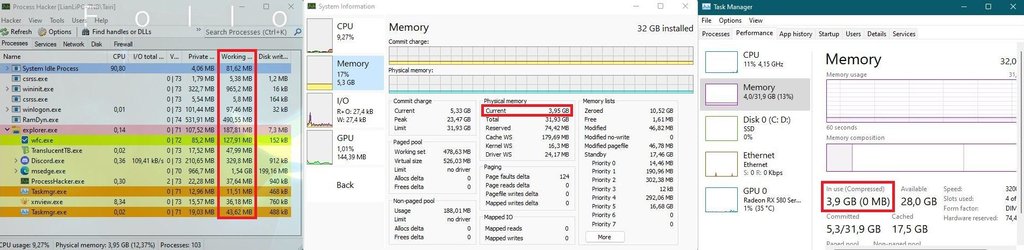
A lot of junk processes in memory


As for TabletInputService, maybe those policies stop it?
Code:
reg add "HKCU\Software\Microsoft\Input" /v "IsInputAppPreloadEnabled" /t REG_DWORD /d "0" /f
reg add "HKCU\Software\Microsoft\Input\TIPC" /v "Enabled" /t REG_DWORD /d "0" /f
sc config TabletInputService start= disabled
It seems, this advice helped as well!
 

My Computer

System One

  • OS
    Windows 11
So, how can I get rid of SearchHost that currently takes 70 MB?
 

My Computer

System One

  • OS
    Windows 11

My Computers

System One System Two

  • OS
    Windows 11 Pro x64
    Computer type
    PC/Desktop
    Manufacturer/Model
    📷🔈🎧 🪛 DIY Photoshop/Audio/Game/tinker
    CPU
    i9 14900K P/E 5.8/4.5 GHz, cache 5.0 GHz
    Motherboard
    Asus ROG Maximus Z790 Dark Hero
    Memory
    🐏 96GB (2x48) G.skill Ripjaws 6800 MT/s
    Graphics Card(s)
    Asus ROG Strix 4070 Ti OC
    Sound Card
    🔊Bowers & Wilkins 606 S3 speakers; Audiolabs 7000a integrated amp; RSL 10S Mk2 sub; Creative Pebble Pro Minimilist
    Monitor(s) Displays
    🖥️🖥️ Eizo CG2730 ColorEdge, ViewSonic VP2768
    Screen Resolution
    🖥️🖥️ 2560 x 1440p x 2
    Hard Drives
    💾 WDC SN850X 4TB nvme, SN850 1TB nvme, SK-Hynix 2 TB P41 nvme,. Sabrent USB-C DS-SC5B 5-bay docking station: 6TB WDC Black, 6TB Ironwolf Pro; 2x 2TB WDC Black HDD
    PSU
    ⚡️ 850W Seasonic Vertex PX-850 ATX 3.0/PCI-E 5.0
    Case
    Fractal Design North XL Mesh, Black Walnut
    Cooling
    ❄️ EK Nucleus black 360 AIO w/Phanteks T30-120 fans, 2 Noctua NF-A14 Chromax case fan, 1 T30-120 fan cooling memory
    Keyboard
    ⌨️ Keychron Q3 Max TKL with custom GMK Redsuns Red Samuri keycaps, TX Stabs
    Mouse
    🖱️ Logitech G305 wireless gaming
    Internet Speed
    ⬇️ 500 Mb/s ⬆️ 12 Mb/s
    Browser
    🔥🦊 Firefox
    Antivirus
    🦺 Defender, Macrium Reflect X 🏆
    Other Info
    Phangkey Amaterasu V2 Desk Mat
  • Computer type
    Laptop
    Manufacturer/Model
    💻 Apple 13" Macbook Pro 2020 (m1)

    CPU
    Apple M1
    Screen Resolution
    2560x1600
    Browser
    Firefox
don't think I have done anything special:

View attachment 11057
Task manager does not show real memory usage. Working Set is the closest you get to the real usage, if you count working set of all processes you get all used RAM. A suspended process takes RAM as well, it is like a started but stopped car, but it is still using fuel.

capture_10232021_132601.jpg

capture-10212021-222001.jpg
 

My Computer

System One

  • OS
    Home26H2Can
    Computer type
    PC/Desktop
    CPU
    AMD Ryzen 5 8600G (07/24)
    Motherboard
    ASROCK B650M-HDV/M.2 (07/24) BIOS 4.21 AGESA ComboAM5 1.3.0.1 (04/26)
    Memory
    2x32GB Kingston FURY DDR5 5600 MHz CL36 @5200 CL36 (07/24)
    Graphics Card(s)
    ASROCK Radeon RX 6600 Challenger D 8G @48FPS (08/24)
    Sound Card
    Creative Sound BlasterX AE-5 Plus (05/24)
    Monitor(s) Displays
    24" Philips 24M1N3200ZS/00 (05/24)
    Screen Resolution
    1920×1080@165Hz via DP1.4
    Hard Drives
    Kingston KC3000 NVMe 2TB (05/24)
    ADATA XPG GAMMIX S11 Pro 512GB (07/19)
    PSU
    Seasonic Core GM 550 Gold (04/24)
    Case
    Fractal Design Define 7 Mini with 3x Noctua NF-P14s/12@555rpm (04/24)
    Cooling
    Noctua NH-U12S with Noctua NF-P12 (04/24)
    Keyboard
    HP Pavilion Wired Keyboard 300 (07/24) + Rabalux 76017 Parker (01/24)
    Mouse
    Logitech M330 Silent Plus (01/26)
    Internet Speed
    500/100 Mbps via RouterOS (05/21) & TCP Optimizer
    Browser
    Edge, Brave for YouTube, LibreWolf for FB
    Antivirus
    NextDNS blocking 1/3 Traffic
    Other Info
    Phone: Motorola Moto G86 (02/26)
    Backup: Hasleo Backup Suite (PreOS)
    Headphones: Sennheiser RS170 (09/10)
    Chair: Huzaro Force 4.4 Grey Mesh (05/24)
    Notifier: Xiaomi Mi Band 9 Milanese (10/24)
    FlexCore USB-C 3.2 Gen 1 (M) to LAN (F) (08/25)
1634989338996.png

By the way, this is another junk process: HelpPane.exe. I killed it yesterday before making the list.
 

My Computer

System One

  • OS
    Windows 11
Task manager does not show real memory usage. Working Set is the closest you get to the real usage, if you count working set of all processes you get all used RAM. A suspended process takes RAM as well, it is like a started but stopped car, but it is still using fuel.

View attachment 11081

View attachment 11082

IMO the "private working set" (not to be confused with "private bytes") is a better measure of a process's memory footprint. The rest of the working set for the process is shared or sharable with other processes (shared dll etc.), so basically if a process has a private working set of 0, it has little or no no impact as far as memory consumption is concerned. A process "working set" includes both "private working set" and "shared working set" , so if you add the "working set" for two processes, you double count any they may share. You can display any of these working sets as columns in the Windows task manager Details tab.

The task manager has two different columns you can view for private working set: "Memory (active private working set)" and "Memory (private working set)". The only difference I can see is that for a suspended process, the "Memory (active private working set)" is 0. I wonder why, so I put on memory pressure (a memory stress test that takes up all free memory), and I find that suspended processes' private working sets drop to near zero while others processes do not. So I suspect this reporting for active private memory set of 0 is intended to reflect the low impact of suspended processes.

Screenshot 2021-10-23 143418.jpg
 

My Computers

System One System Two

  • OS
    Windows 11 Pro x64
    Computer type
    PC/Desktop
    Manufacturer/Model
    📷🔈🎧 🪛 DIY Photoshop/Audio/Game/tinker
    CPU
    i9 14900K P/E 5.8/4.5 GHz, cache 5.0 GHz
    Motherboard
    Asus ROG Maximus Z790 Dark Hero
    Memory
    🐏 96GB (2x48) G.skill Ripjaws 6800 MT/s
    Graphics Card(s)
    Asus ROG Strix 4070 Ti OC
    Sound Card
    🔊Bowers & Wilkins 606 S3 speakers; Audiolabs 7000a integrated amp; RSL 10S Mk2 sub; Creative Pebble Pro Minimilist
    Monitor(s) Displays
    🖥️🖥️ Eizo CG2730 ColorEdge, ViewSonic VP2768
    Screen Resolution
    🖥️🖥️ 2560 x 1440p x 2
    Hard Drives
    💾 WDC SN850X 4TB nvme, SN850 1TB nvme, SK-Hynix 2 TB P41 nvme,. Sabrent USB-C DS-SC5B 5-bay docking station: 6TB WDC Black, 6TB Ironwolf Pro; 2x 2TB WDC Black HDD
    PSU
    ⚡️ 850W Seasonic Vertex PX-850 ATX 3.0/PCI-E 5.0
    Case
    Fractal Design North XL Mesh, Black Walnut
    Cooling
    ❄️ EK Nucleus black 360 AIO w/Phanteks T30-120 fans, 2 Noctua NF-A14 Chromax case fan, 1 T30-120 fan cooling memory
    Keyboard
    ⌨️ Keychron Q3 Max TKL with custom GMK Redsuns Red Samuri keycaps, TX Stabs
    Mouse
    🖱️ Logitech G305 wireless gaming
    Internet Speed
    ⬇️ 500 Mb/s ⬆️ 12 Mb/s
    Browser
    🔥🦊 Firefox
    Antivirus
    🦺 Defender, Macrium Reflect X 🏆
    Other Info
    Phangkey Amaterasu V2 Desk Mat
  • Computer type
    Laptop
    Manufacturer/Model
    💻 Apple 13" Macbook Pro 2020 (m1)

    CPU
    Apple M1
    Screen Resolution
    2560x1600
    Browser
    Firefox
TextInputHost.exe is not only for the Softkeyboard. It also hosts the Windows Emoji Menu. But there's another thing to consider, this executable has been of several heated discussions on the Windows Terminal GitHub. Many users say they lose the ability to type in the terminal if this isn't running. MS devs have said "Even though it's named "touch keyboard and handwriting". The name is no longer fitting: it is designed to handle all input for all XAML/UWP applications. It should be renamed!" So they even admit that it's name alone, makes people want to disable it but most people don't actually realize what it's for.
 

My Computer

System One

  • OS
    Windows 11 Pro 25H2
    Computer type
    Laptop
    Manufacturer/Model
    Acer Predator Helios Ai
    CPU
    Intel 275HX
    Motherboard
    Acer Proprietary
    Memory
    32gb DDR5-6400
    Graphics Card(s)
    NVIDIA RTX5090 Mobile
    Sound Card
    Onboard
    Monitor(s) Displays
    LG Ultragear 48"
    Screen Resolution
    3840x2160
    Hard Drives
    1TB Gen5 NVME Sk Hynix
    2TB Gen4 NVME 990pro
    PSU
    330w
    Cooling
    IETS GT600
    Keyboard
    LG G512 Carbon
    Mouse
    LG G502 Hero
    Browser
    FireFox
    Antivirus
    Defender
Many users say they lose the ability to type in the terminal if this isn't running.
This issue is fixed in 22H2, ctfmon.exe is running nonstop and it can not be terminated.
If he process is removed, the user will not be able to login, it results in a blank lockscreen.
The service has been also renamed to Text Input Management Service to prevent old tweaks.
 

My Computer

System One

  • OS
    Home26H2Can
    Computer type
    PC/Desktop
    CPU
    AMD Ryzen 5 8600G (07/24)
    Motherboard
    ASROCK B650M-HDV/M.2 (07/24) BIOS 4.21 AGESA ComboAM5 1.3.0.1 (04/26)
    Memory
    2x32GB Kingston FURY DDR5 5600 MHz CL36 @5200 CL36 (07/24)
    Graphics Card(s)
    ASROCK Radeon RX 6600 Challenger D 8G @48FPS (08/24)
    Sound Card
    Creative Sound BlasterX AE-5 Plus (05/24)
    Monitor(s) Displays
    24" Philips 24M1N3200ZS/00 (05/24)
    Screen Resolution
    1920×1080@165Hz via DP1.4
    Hard Drives
    Kingston KC3000 NVMe 2TB (05/24)
    ADATA XPG GAMMIX S11 Pro 512GB (07/19)
    PSU
    Seasonic Core GM 550 Gold (04/24)
    Case
    Fractal Design Define 7 Mini with 3x Noctua NF-P14s/12@555rpm (04/24)
    Cooling
    Noctua NH-U12S with Noctua NF-P12 (04/24)
    Keyboard
    HP Pavilion Wired Keyboard 300 (07/24) + Rabalux 76017 Parker (01/24)
    Mouse
    Logitech M330 Silent Plus (01/26)
    Internet Speed
    500/100 Mbps via RouterOS (05/21) & TCP Optimizer
    Browser
    Edge, Brave for YouTube, LibreWolf for FB
    Antivirus
    NextDNS blocking 1/3 Traffic
    Other Info
    Phone: Motorola Moto G86 (02/26)
    Backup: Hasleo Backup Suite (PreOS)
    Headphones: Sennheiser RS170 (09/10)
    Chair: Huzaro Force 4.4 Grey Mesh (05/24)
    Notifier: Xiaomi Mi Band 9 Milanese (10/24)
    FlexCore USB-C 3.2 Gen 1 (M) to LAN (F) (08/25)
In build 708 again appeared smartscreen.exe. How to get rid of it (smartscreen functionality is disabled but the process still resides).
 

My Computer

System One

  • OS
    Windows 11
How to get rid of it (smartscreen functionality is disabled but the process still resides).
I remove it, smartscreen in Edge and Store will still work, it will just appear as enabled.
Code:
takeown /s %computername% /u %username% /f "%WinDir%\System32\smartscreen.exe"
icacls "%WinDir%\System32\smartscreen.exe" /grant:r %username%:F
taskkill /im smartscreen.exe /f
del "%WinDir%\System32\smartscreen.exe" /s /f /q
 

Attachments

  • capture_05292022_153509.jpg
    capture_05292022_153509.jpg
    70 KB · Views: 5

My Computer

System One

  • OS
    Home26H2Can
    Computer type
    PC/Desktop
    CPU
    AMD Ryzen 5 8600G (07/24)
    Motherboard
    ASROCK B650M-HDV/M.2 (07/24) BIOS 4.21 AGESA ComboAM5 1.3.0.1 (04/26)
    Memory
    2x32GB Kingston FURY DDR5 5600 MHz CL36 @5200 CL36 (07/24)
    Graphics Card(s)
    ASROCK Radeon RX 6600 Challenger D 8G @48FPS (08/24)
    Sound Card
    Creative Sound BlasterX AE-5 Plus (05/24)
    Monitor(s) Displays
    24" Philips 24M1N3200ZS/00 (05/24)
    Screen Resolution
    1920×1080@165Hz via DP1.4
    Hard Drives
    Kingston KC3000 NVMe 2TB (05/24)
    ADATA XPG GAMMIX S11 Pro 512GB (07/19)
    PSU
    Seasonic Core GM 550 Gold (04/24)
    Case
    Fractal Design Define 7 Mini with 3x Noctua NF-P14s/12@555rpm (04/24)
    Cooling
    Noctua NH-U12S with Noctua NF-P12 (04/24)
    Keyboard
    HP Pavilion Wired Keyboard 300 (07/24) + Rabalux 76017 Parker (01/24)
    Mouse
    Logitech M330 Silent Plus (01/26)
    Internet Speed
    500/100 Mbps via RouterOS (05/21) & TCP Optimizer
    Browser
    Edge, Brave for YouTube, LibreWolf for FB
    Antivirus
    NextDNS blocking 1/3 Traffic
    Other Info
    Phone: Motorola Moto G86 (02/26)
    Backup: Hasleo Backup Suite (PreOS)
    Headphones: Sennheiser RS170 (09/10)
    Chair: Huzaro Force 4.4 Grey Mesh (05/24)
    Notifier: Xiaomi Mi Band 9 Milanese (10/24)
    FlexCore USB-C 3.2 Gen 1 (M) to LAN (F) (08/25)
If I delete or rename it, it re-appears. Nearly instantly.
 

My Computer

System One

  • OS
    Windows 11
Now, tried another approach: removed the rights to execute it from all users and groups. Will watch the result.
 

My Computer

System One

  • OS
    Windows 11
If you uninstall game bar, it might disappear.
Code:
winget uninstall "xbox game bar"
winget uninstall "xbox game bar plugin"
winget uninstall "xbox game speech window"
It automatically reappeared after uninstall after upgrade to build 708. Is there a way to uninstall it permanently?
 

My Computer

System One

  • OS
    Windows 11
Even worse: i have just uninstalled GameBar again, killed the process, but it appeared again.
 

My Computer

System One

  • OS
    Windows 11
So, how can I get rid of SearchHost that currently takes 70 MB?

This still works on 25H2

vivetool.exe /disable /id:37926450
(lookup vivetool if you don't know what it is)

Note that you won't have access to web search anymore, it completely eradicates EdgeWebView from search, which switches back to the good old on device search.
 

My Computer

System One

  • OS
    Windows 11
    Computer type
    PC/Desktop
    CPU
    Intel i7 7820X
    Motherboard
    MSI X299 SLI PLUS
    Memory
    32 GB DDR4 3400
    Graphics Card(s)
    Nvidia RTX 3080 Ti
    Monitor(s) Displays
    LG 27UK650W
    Screen Resolution
    3840x2160
    Hard Drives
    Nvme 1TB
    Sata SSD 256 GB
    HDD 1 TB
    HDD 4 TB
    PSU
    Corsair RM 750x
Back
Top Bottom