

Hi everybody,
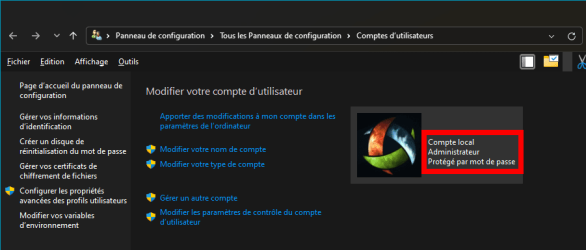
I have Windows 11 23H2 Professional, with a local administrator account (screen caps are in french but you'll understand them):

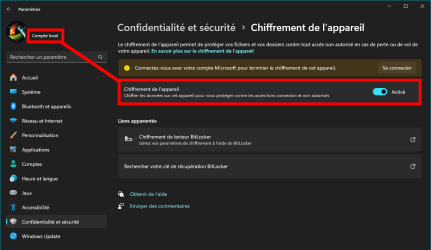
To my surprise, I have just discovered TODAY that Device Encryption is turned on by default :
:
(it says that I have to connect using my Microsoft account -which I don't have- to finish the encryption)
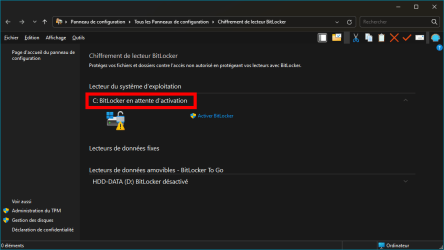
My C: system drive seems to be "waiting for BitLocker activation" (not activated yet apparently ):
):
And of course I don't have any BitLocker password, nor do I remember being shown any during installation.
I'm a bit worried by this situation, so here are my questions:
I really need the answer to these questions to move forward. Thanks in advance for your help.
I have Windows 11 23H2 Professional, with a local administrator account (screen caps are in french but you'll understand them):
To my surprise, I have just discovered TODAY that Device Encryption is turned on by default
:(it says that I have to connect using my Microsoft account -which I don't have- to finish the encryption)
My C: system drive seems to be "waiting for BitLocker activation" (not activated yet apparently
):And of course I don't have any BitLocker password, nor do I remember being shown any during installation.
I'm a bit worried by this situation, so here are my questions:
- My computer runs fine, but in the event of an unauthorized hacking attempt, may I be asked for such password? Or is "Device Encryption" different from BitLocker and it doesn't require a password? I don't want to be locked out of my own Windows 11. It's heavily customized and I just can't afford a complete reinstall.
- Should I turn "Device Encryption" off by clicking on the option?
- If I turn it off, will it ask me for a password?

- If I turn it off, how long will it take? My C: drive is 2 TB, but it only has 250 GB or data. It's a Samsung 990 Pro.
- If I turn it off, given that it's the system drive, will it require a reboot? And again, just to be sure, WILL IT ASK ME FOR A PASSWORD?...

I really need the answer to these questions to move forward. Thanks in advance for your help.
My Computer
At a glance
Windows 11AMD Ryzen 7700DDR5 = 32 GB = 2x16 GB (Corsair Dominator - D...Not yet
- OS
- Windows 11
- Computer type
- PC/Desktop
- Manufacturer/Model
- Personal build
- CPU
- AMD Ryzen 7700
- Motherboard
- Asus TUF Gaming B650M-Plus WiFi
- Memory
- DDR5 = 32 GB = 2x16 GB (Corsair Dominator - DDR5 RGB - 6000 MT/s)
- Graphics Card(s)
- Not yet
- Sound Card
- No
- Monitor(s) Displays
- Philips BDM3270QP2
- Screen Resolution
- 2560x1440
- Hard Drives
- M.2 = 2 TB (Samsung 990 Pro)
SATA = 12 TB (Western Digital Red - WD120EFAX - 5400 rpm)
- PSU
- Corsair RM850e (850W - ATX 3.0)
- Case
- Corsair Crystal 280X TG (White, RGB)
- Cooling
- Intake = 2x120mm fans (Corsair LL120 RGB) / Exhaust = 2x120mm AIO (Aerocool Mirage L240)
- Keyboard
- Corsair K55 RGB
- Mouse
- Vertical mouse from AliExpress, very good for the price and a lifesaver for my wrist :)
- Internet Speed
- Fiber
- Browser
- Firefox, Brave, Tor
- Antivirus
- Windows Defender
- Other Info
- UPS = 1000VA (Nitram PB1000 LCD), protecting PC + Monitor + Speakers





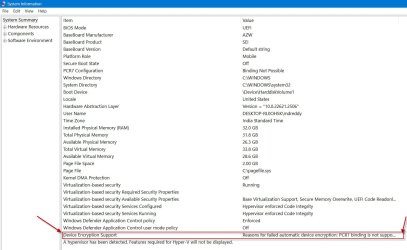

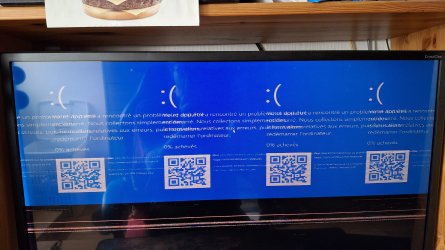


 , but I'm genuinely traumatized by this experience, expecting my screen to go blue at any moment. Is there a good shrink in the audience? I could use one right now.
 And instead of saying "you can keep using Windows normally", why not say "this is a dangerous process, that can result in multiple BSODs and can brick your computer - Please close all applications, backup all your data, say a little prayer, put yourself in fetal position and hope for the best"?...






