About Device Encryption


Jose Hidalgo

Active member
Member
Local time
10:23 PM
Posts
150
Location
France
OS
Windows 11
Hi everybody,

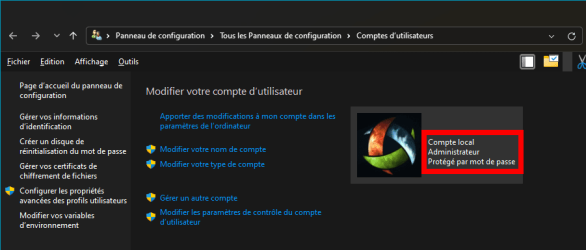
I have Windows 11 23H2 Professional, with a local administrator account (screen caps are in french but you'll understand them):

2024.09.28 - 13.07.png

2024.09.28 - 13.07.png

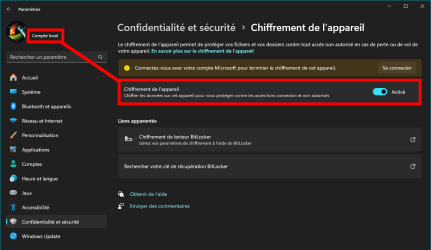
To my surprise, I have just discovered TODAY that Device Encryption is turned on by default :what::
(it says that I have to connect using my Microsoft account -which I don't have- to finish the encryption)
2024.09.28 - 13.08.png

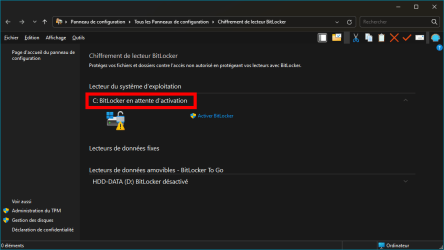
My C: system drive seems to be "waiting for BitLocker activation" (not activated yet apparently 😅):

2024.09.28 - 13.10.png

And of course I don't have any BitLocker password, nor do I remember being shown any during installation. 🤷‍♂️

I'm a bit worried by this situation, so here are my questions:
  1. My computer runs fine, but in the event of an unauthorized hacking attempt, may I be asked for such password? Or is "Device Encryption" different from BitLocker and it doesn't require a password? I don't want to be locked out of my own Windows 11. It's heavily customized and I just can't afford a complete reinstall.
  2. Should I turn "Device Encryption" off by clicking on the option?
  3. If I turn it off, will it ask me for a password? 😱
  4. If I turn it off, how long will it take? My C: drive is 2 TB, but it only has 250 GB or data. It's a Samsung 990 Pro.
  5. If I turn it off, given that it's the system drive, will it require a reboot? And again, just to be sure, WILL IT ASK ME FOR A PASSWORD?... 😂

I really need the answer to these questions to move forward. Thanks in advance for your help. 🙏
 

My Computer My Computer

At a glance

Windows 11AMD Ryzen 7700DDR5 = 32 GB = 2x16 GB (Corsair Dominator - D...Not yet
OS
Windows 11
Computer type
PC/Desktop
Manufacturer/Model
Personal build
CPU
AMD Ryzen 7700
Motherboard
Asus TUF Gaming B650M-Plus WiFi
Memory
DDR5 = 32 GB = 2x16 GB (Corsair Dominator - DDR5 RGB - 6000 MT/s)
Graphics Card(s)
Not yet
Sound Card
No
Monitor(s) Displays
Philips BDM3270QP2
Screen Resolution
2560x1440
Hard Drives
M.2 = 2 TB (Samsung 990 Pro)
SATA = 12 TB (Western Digital Red - WD120EFAX - 5400 rpm)
PSU
Corsair RM850e (850W - ATX 3.0)
Case
Corsair Crystal 280X TG (White, RGB)
Cooling
Intake = 2x120mm fans (Corsair LL120 RGB) / Exhaust = 2x120mm AIO (Aerocool Mirage L240)
Keyboard
Corsair K55 RGB
Mouse
Vertical mouse from AliExpress, very good for the price and a lifesaver for my wrist :)
Internet Speed
Fiber
Browser
Firefox, Brave, Tor
Antivirus
Windows Defender
Other Info
UPS = 1000VA (Nitram PB1000 LCD), protecting PC + Monitor + Speakers
1. Automatic device encryption is not activated until you sign in with a Microsoft Account (when the recovery key is automatically saved), so you will not be asked for a password or recovery key.

2. Yes, if you don't intend to use a Microsoft Account or device encryption. (But it's useful on a laptop which travels.)

3. No: Option Two: Turn Off Device Encryption

4. My guess is minutes rather than hours (and in the background).

5. No reboot and no password.
 

My Computer My Computer

At a glance

Windows 11
OS
Windows 11
Computer type
Laptop
I have Windows 11 23H2 Professional, with a local administrator account.....
.....To my surprise, I have just discovered TODAY that Device Encryption is turned on by default :what::
(it says that I have to connect using my Microsoft account -which I don't have- to finish the encryption)
Device Encryption and Bitlocker are not the same thing. Device Encryption is the first step to enabling Bitlocker. The drive is encrypted but left 'open', there is no key until if/when you enable Bitlocker.

Automatic device encryption is only enabled by default on certain devices, in particular those that support Modern Standby. I have one such device which only uses local accounts. The first thing I did was turn off its unwanted device encryption ;)


My Computers My Computers

  • At a glance

    Windows 11 HomeAMD Athlon Silver 3050U8GBRadeon Graphics
    OS
    Windows 11 Home
    Computer type
    Laptop
    Manufacturer/Model
    Acer Aspire 3 A315-23-R9VY
    CPU
    AMD Athlon Silver 3050U
    Memory
    8GB
    Graphics Card(s)
    Radeon Graphics
    Monitor(s) Displays
    laptop screen
    Screen Resolution
    1366x768 native resolution, up to 2560x1440 with Radeon Virtual Super Resolution
    Hard Drives
    1TB Samsung EVO 870 SSD (from April 2026: 250GB EVO 850)
    Internet Speed
    150 Mbps
    Browser
    Edge, Firefox
    Antivirus
    Defender
    Other Info
    fully 'Windows 11 ready' laptop. Windows 10 C: partition migrated from my old unsupported 'main machine' then upgraded to 11. A test migration ran Insider builds for 2 months. When 11 was released on 5th October 2021 it was re-imaged back to 10 and was offered the upgrade in Windows Update on 20th October. Windows Update offered the 22H2 Feature Update on 20th September 2022. It got the 23H2 Feature Update on 4th November 2023 through Windows Update, 24H2 on 3rd October 2024 through Windows Update by setting the Target Release Version for 24H2, and 25H2 on 30th September 2025 through Windows Update by setting the Target Release Version for 25H2.

    UPDATE - 11 April 2026: due to mechanical deterioration this PC has been retired from active duty. The OS with all software and files has been migrated to my System Seven in 'Other systems' to carry on as my general purpose 'main machine'.
  • At a glance

    Windows 11 ProIntel® Core™ i5-520M8GB(integrated graphics) Intel HD Graphics
    Operating System
    Windows 11 Pro
    Computer type
    Laptop
    Manufacturer/Model
    Dell Latitude E4310
    CPU
    Intel® Core™ i5-520M
    Motherboard
    0T6M8G
    Memory
    8GB
    Graphics card(s)
    (integrated graphics) Intel HD Graphics
    Screen Resolution
    1366x768
    Hard Drives
    500GB Crucial MX500 SSD
    Browser
    Firefox, Edge
    Antivirus
    Defender
    Other Info
    unsupported machine: Legacy bios, MBR, TPM 1.2, upgraded from W10 to W11 using W10/W11 hybrid install media workaround.

    In-place upgrade to 22H2 using ISO and a workaround.
    Feature Update to 23H2 by manually installing the Enablement Package.
    In-place upgrade to 24H2 using hybrid 23H2/24H2 install media.
    Upgraded to 25H2 by Enablement Package.

    Also running Insider Dev, and Canary builds and Windows 10 as native boot .vhdx.
  • My SYSTEM THREE is a Dell Latitude 5410, i7-10610U, 32GB RAM, 512GB NVMe ssd, supported device running Windows 11 Pro.

    My SYSTEM FOUR is a 2-in-1 convertible Lenovo Yoga 11e 20DA, Celeron N2930, 8GB RAM, 256GB ssd. Unsupported device: currently running Win10 Pro, plus Win11 Pro RTM and Insider Dev, Beta, and RP 24H2 as native boot vhdx.

    My SYSTEM FIVE is a Dell Latitude 3190 2-in-1, Pentium Silver N5030, 8GB RAM, 1TB NVMe ssd, supported device running Windows 11 Pro, plus Insider Beta, Dev, and Canary builds (and a few others) as a native boot .vhdx.

    My SYSTEM SIX is a Dell Latitude 5550, Core Ultra 7 165H, 64GB RAM, 1TB NVMe SSD, supported device, Windows 11 Pro 24H2, Hyper-V host machine. Updated to 25H2 on 30th September 2025.

    My SYSTEM SEVEN is a Lenovo Thinkpad T580, Intel Core i7-8650U, 16GB RAM, 512GB NVMe SSD + 2nd 512GB NVMe SSD, a supported device for Windows 11. This is my current general purpose 'main machine'. The installed Windows 11 Home from my System One has been migrated to this machine.
Automatic device encryption is only enabled by default on certain devices, in particular those that support Modern Standby.

Modern Standby was removed as a prerequisite about a year ago, as explained at your link:

Starting with Windows 11 build 25905, Microsoft have adjusted the prerequisites (removal of Modern Standby/HSTI validation and untrusted DMA ports check) for enabling device encryption so that it is automatically enabled when doing clean installs of Windows 11.
 

My Computer My Computer

At a glance

Windows 11
OS
Windows 11
Computer type
Laptop
in the event of an unauthorized hacking attempt, may I be asked for such password?
Device encryption on its own is no protection against a hacker who gets hold of your PC. If they can boot it they can see the drive contents. The only protection it affords is if the drive is removed and attempted to be read on another PC. As such, unless you intend to use Bitlocker there's little advantage in leaving device encryption enabled.

Modern Standby was removed as a prerequisite about a year ago, as explained at your link:
Ah, I got my Modern Standby device three years ago ;)
 

My Computers My Computers

  • At a glance

    Windows 11 HomeAMD Athlon Silver 3050U8GBRadeon Graphics
    OS
    Windows 11 Home
    Computer type
    Laptop
    Manufacturer/Model
    Acer Aspire 3 A315-23-R9VY
    CPU
    AMD Athlon Silver 3050U
    Memory
    8GB
    Graphics Card(s)
    Radeon Graphics
    Monitor(s) Displays
    laptop screen
    Screen Resolution
    1366x768 native resolution, up to 2560x1440 with Radeon Virtual Super Resolution
    Hard Drives
    1TB Samsung EVO 870 SSD (from April 2026: 250GB EVO 850)
    Internet Speed
    150 Mbps
    Browser
    Edge, Firefox
    Antivirus
    Defender
    Other Info
    fully 'Windows 11 ready' laptop. Windows 10 C: partition migrated from my old unsupported 'main machine' then upgraded to 11. A test migration ran Insider builds for 2 months. When 11 was released on 5th October 2021 it was re-imaged back to 10 and was offered the upgrade in Windows Update on 20th October. Windows Update offered the 22H2 Feature Update on 20th September 2022. It got the 23H2 Feature Update on 4th November 2023 through Windows Update, 24H2 on 3rd October 2024 through Windows Update by setting the Target Release Version for 24H2, and 25H2 on 30th September 2025 through Windows Update by setting the Target Release Version for 25H2.

    UPDATE - 11 April 2026: due to mechanical deterioration this PC has been retired from active duty. The OS with all software and files has been migrated to my System Seven in 'Other systems' to carry on as my general purpose 'main machine'.
  • At a glance

    Windows 11 ProIntel® Core™ i5-520M8GB(integrated graphics) Intel HD Graphics
    Operating System
    Windows 11 Pro
    Computer type
    Laptop
    Manufacturer/Model
    Dell Latitude E4310
    CPU
    Intel® Core™ i5-520M
    Motherboard
    0T6M8G
    Memory
    8GB
    Graphics card(s)
    (integrated graphics) Intel HD Graphics
    Screen Resolution
    1366x768
    Hard Drives
    500GB Crucial MX500 SSD
    Browser
    Firefox, Edge
    Antivirus
    Defender
    Other Info
    unsupported machine: Legacy bios, MBR, TPM 1.2, upgraded from W10 to W11 using W10/W11 hybrid install media workaround.

    In-place upgrade to 22H2 using ISO and a workaround.
    Feature Update to 23H2 by manually installing the Enablement Package.
    In-place upgrade to 24H2 using hybrid 23H2/24H2 install media.
    Upgraded to 25H2 by Enablement Package.

    Also running Insider Dev, and Canary builds and Windows 10 as native boot .vhdx.
  • My SYSTEM THREE is a Dell Latitude 5410, i7-10610U, 32GB RAM, 512GB NVMe ssd, supported device running Windows 11 Pro.

    My SYSTEM FOUR is a 2-in-1 convertible Lenovo Yoga 11e 20DA, Celeron N2930, 8GB RAM, 256GB ssd. Unsupported device: currently running Win10 Pro, plus Win11 Pro RTM and Insider Dev, Beta, and RP 24H2 as native boot vhdx.

    My SYSTEM FIVE is a Dell Latitude 3190 2-in-1, Pentium Silver N5030, 8GB RAM, 1TB NVMe ssd, supported device running Windows 11 Pro, plus Insider Beta, Dev, and Canary builds (and a few others) as a native boot .vhdx.

    My SYSTEM SIX is a Dell Latitude 5550, Core Ultra 7 165H, 64GB RAM, 1TB NVMe SSD, supported device, Windows 11 Pro 24H2, Hyper-V host machine. Updated to 25H2 on 30th September 2025.

    My SYSTEM SEVEN is a Lenovo Thinkpad T580, Intel Core i7-8650U, 16GB RAM, 512GB NVMe SSD + 2nd 512GB NVMe SSD, a supported device for Windows 11. This is my current general purpose 'main machine'. The installed Windows 11 Home from my System One has been migrated to this machine.
1. Automatic device encryption is not activated until you sign in with a Microsoft Account (when the recovery key is automatically saved), so you will not be asked for a password or recovery key.

2. Yes, if you don't intend to use a Microsoft Account or device encryption. (But it's useful on a laptop which travels.)

3. No: Option Two: Turn Off Device Encryption

4. My guess is minutes rather than hours (and in the background).

5. No reboot and no password.
Thank you @BruceR , really great support! :D
I'll turn it off this WE and hope for the best :-)
I have a desktop PC and it runs on an UPS, so I guess the risk is minimal.
 

My Computer My Computer

At a glance

Windows 11AMD Ryzen 7700DDR5 = 32 GB = 2x16 GB (Corsair Dominator - D...Not yet
OS
Windows 11
Computer type
PC/Desktop
Manufacturer/Model
Personal build
CPU
AMD Ryzen 7700
Motherboard
Asus TUF Gaming B650M-Plus WiFi
Memory
DDR5 = 32 GB = 2x16 GB (Corsair Dominator - DDR5 RGB - 6000 MT/s)
Graphics Card(s)
Not yet
Sound Card
No
Monitor(s) Displays
Philips BDM3270QP2
Screen Resolution
2560x1440
Hard Drives
M.2 = 2 TB (Samsung 990 Pro)
SATA = 12 TB (Western Digital Red - WD120EFAX - 5400 rpm)
PSU
Corsair RM850e (850W - ATX 3.0)
Case
Corsair Crystal 280X TG (White, RGB)
Cooling
Intake = 2x120mm fans (Corsair LL120 RGB) / Exhaust = 2x120mm AIO (Aerocool Mirage L240)
Keyboard
Corsair K55 RGB
Mouse
Vertical mouse from AliExpress, very good for the price and a lifesaver for my wrist :)
Internet Speed
Fiber
Browser
Firefox, Brave, Tor
Antivirus
Windows Defender
Other Info
UPS = 1000VA (Nitram PB1000 LCD), protecting PC + Monitor + Speakers
Device encryption on its own is no protection against a hacker who gets hold of your PC. If they can boot it they can see the drive contents.

How?
 

My Computer My Computer

At a glance

Windows 11
OS
Windows 11
Computer type
Laptop
Device Encryption is inherently tied up to the user's Microsoft Account. If the user logs in with his MS account Password everytime, the disk is automatically decrypted. So only the user can access the disk and nobody else, without knowing the User's MS account Password.. If on the other hand the user has setup automatic login without password using netplwiz, then anybody can login and access the disk. In this case Device Encryption does not serve its purpose.
 
Last edited:

My Computers My Computers

  • At a glance

    Windows 11 Pro Version:25H2 OS Build: 26200.865512th Gen Intel core i5-1235U(Alder16*2 (32 GB) DDR 4-3200(1600MHz) Crucial Tech...Intel Iris Xe Graphics (Internal)
    OS
    Windows 11 Pro Version:25H2 OS Build: 26200.8655
    Computer type
    PC/Desktop
    Manufacturer/Model
    Beelink Mini PC Model: SEi12
    CPU
    12th Gen Intel core i5-1235U(Alder
    Motherboard
    SEi (manufactured by AZW)
    Memory
    16*2 (32 GB) DDR 4-3200(1600MHz) Crucial Technology
    Graphics Card(s)
    Intel Iris Xe Graphics (Internal)
    Sound Card
    Internal
    Monitor(s) Displays
    BenQ GW2283
    Screen Resolution
    1920*1080
    Hard Drives
    500GB NVME (Kingston SNV2S500G)
    1TB (Crucial CT1000BX500SSD1)
    PSU
    Power Brick 19V-6.32A , 120.08W
    Keyboard
    Dell KB3322Wi (Wireless)
    Mouse
    Dell WM118t (Wireless)
    Internet Speed
    4G/5G
    Browser
    MS Edge, Chrome
    Antivirus
    Malwarebytes Premium - Subscription
  • At a glance

    Windows 11 Home Version 25H2 Build 26200.8655Intel Core i3 8145UIntel Optane 16GB module + DDR 4 16GB (Optane...Intel UHD Graphics 620
    Operating System
    Windows 11 Home Version 25H2 Build 26200.8655
    Computer type
    PC/Desktop
    Manufacturer/Model
    Dell Inspiron 3280 AIO 22"
    CPU
    Intel Core i3 8145U
    Motherboard
    Dell inc. 027W48
    Memory
    Intel Optane 16GB module + DDR 4 16GB (Optane disabled.)
    Graphics card(s)
    Intel UHD Graphics 620
    Sound Card
    Internal
    Monitor(s) Displays
    Dell Monitor 22"
    Screen Resolution
    1920x1080
    Hard Drives
    Crucial CT1000BX500SSD1 ; 1000,2 GB
    PSU
    Power Brick
    Case
    All-in one
    Keyboard
    Dell Wireless KM636
    Mouse
    Dell Wireless KM 636
    Internet Speed
    4G
    Browser
    Edge, Chrome
    Antivirus
    Malwarebytes
    Other Info
    Upgraded from Windows 10 Home to Windows 11 Home on 28 Oct 2023
Device Encryption is inherently tied up to the user's Microsoft Account. If the user logs in with his MS account Password everytime, the disk is automatically decrypted.

Not for me or the OP. We both found automatic device encryption was on by default, despite only having a local account.
I have Windows 11 23H2 Professional, with a local administrator account....
....To my surprise, I have just discovered TODAY that Device Encryption is turned on by default :what:

I posted this three years ago....
Imagine my surprise and concern then. My clean install of 11 Pro that had bitlocker encrypted my drives without asking was done with a local account only. With no MS account and no record anywhere of the key I could really have been sitting on an accident waiting to happen.:scream:
...that was when I found out all about the differences between device encryption and Bitlocker ;)
 

My Computers My Computers

  • At a glance

    Windows 11 HomeAMD Athlon Silver 3050U8GBRadeon Graphics
    OS
    Windows 11 Home
    Computer type
    Laptop
    Manufacturer/Model
    Acer Aspire 3 A315-23-R9VY
    CPU
    AMD Athlon Silver 3050U
    Memory
    8GB
    Graphics Card(s)
    Radeon Graphics
    Monitor(s) Displays
    laptop screen
    Screen Resolution
    1366x768 native resolution, up to 2560x1440 with Radeon Virtual Super Resolution
    Hard Drives
    1TB Samsung EVO 870 SSD (from April 2026: 250GB EVO 850)
    Internet Speed
    150 Mbps
    Browser
    Edge, Firefox
    Antivirus
    Defender
    Other Info
    fully 'Windows 11 ready' laptop. Windows 10 C: partition migrated from my old unsupported 'main machine' then upgraded to 11. A test migration ran Insider builds for 2 months. When 11 was released on 5th October 2021 it was re-imaged back to 10 and was offered the upgrade in Windows Update on 20th October. Windows Update offered the 22H2 Feature Update on 20th September 2022. It got the 23H2 Feature Update on 4th November 2023 through Windows Update, 24H2 on 3rd October 2024 through Windows Update by setting the Target Release Version for 24H2, and 25H2 on 30th September 2025 through Windows Update by setting the Target Release Version for 25H2.

    UPDATE - 11 April 2026: due to mechanical deterioration this PC has been retired from active duty. The OS with all software and files has been migrated to my System Seven in 'Other systems' to carry on as my general purpose 'main machine'.
  • At a glance

    Windows 11 ProIntel® Core™ i5-520M8GB(integrated graphics) Intel HD Graphics
    Operating System
    Windows 11 Pro
    Computer type
    Laptop
    Manufacturer/Model
    Dell Latitude E4310
    CPU
    Intel® Core™ i5-520M
    Motherboard
    0T6M8G
    Memory
    8GB
    Graphics card(s)
    (integrated graphics) Intel HD Graphics
    Screen Resolution
    1366x768
    Hard Drives
    500GB Crucial MX500 SSD
    Browser
    Firefox, Edge
    Antivirus
    Defender
    Other Info
    unsupported machine: Legacy bios, MBR, TPM 1.2, upgraded from W10 to W11 using W10/W11 hybrid install media workaround.

    In-place upgrade to 22H2 using ISO and a workaround.
    Feature Update to 23H2 by manually installing the Enablement Package.
    In-place upgrade to 24H2 using hybrid 23H2/24H2 install media.
    Upgraded to 25H2 by Enablement Package.

    Also running Insider Dev, and Canary builds and Windows 10 as native boot .vhdx.
  • My SYSTEM THREE is a Dell Latitude 5410, i7-10610U, 32GB RAM, 512GB NVMe ssd, supported device running Windows 11 Pro.

    My SYSTEM FOUR is a 2-in-1 convertible Lenovo Yoga 11e 20DA, Celeron N2930, 8GB RAM, 256GB ssd. Unsupported device: currently running Win10 Pro, plus Win11 Pro RTM and Insider Dev, Beta, and RP 24H2 as native boot vhdx.

    My SYSTEM FIVE is a Dell Latitude 3190 2-in-1, Pentium Silver N5030, 8GB RAM, 1TB NVMe ssd, supported device running Windows 11 Pro, plus Insider Beta, Dev, and Canary builds (and a few others) as a native boot .vhdx.

    My SYSTEM SIX is a Dell Latitude 5550, Core Ultra 7 165H, 64GB RAM, 1TB NVMe SSD, supported device, Windows 11 Pro 24H2, Hyper-V host machine. Updated to 25H2 on 30th September 2025.

    My SYSTEM SEVEN is a Lenovo Thinkpad T580, Intel Core i7-8650U, 16GB RAM, 512GB NVMe SSD + 2nd 512GB NVMe SSD, a supported device for Windows 11. This is my current general purpose 'main machine'. The installed Windows 11 Home from my System One has been migrated to this machine.
Not for me or the OP. We both found automatic device encryption was on by default, despite only having a local account.

On, but not activated:

!Note

BitLocker automatic device encryption starts during Out-of-box (OOBE) experience. However, protection is enabled (armed) only after users sign in with a Microsoft Account or an Azure Active Directory account. Until that, protection is suspended and data is not protected. BitLocker automatic device encryption is not enabled with local accounts, in which case BitLocker can be manually enabled using the BitLocker Control Panel.

BitLocker automatic device encryption [for OEMs]


Imagine my surprise and concern then. My clean install of 11 Pro that had bitlocker encrypted my drives without asking was done with a local account only. With no MS account and no record anywhere of the key I could really have been sitting on an accident waiting to happen.:scream:

Without a Microsoft Account there was no recovery key to record:

Unlike a standard BitLocker implementation, device encryption is enabled automatically so that the device is always protected. When a clean installation of Windows is completed and the out-of-box experience is finished, the device is prepared for first use. As part of this preparation, device encryption is initialized on the OS drive and fixed data drives on the computer with a clear key that is the equivalent of standard BitLocker suspended state. In this state, the drive is shown with a warning icon in Windows Explorer. The yellow warning icon is removed after the TPM protector is created and the recovery key is backed up.
...
  • If the device isn't Microsoft Entra joined or Active Directory domain joined, a Microsoft account with administrative privileges on the device is required. When the administrator uses a Microsoft account to sign in, the clear key is removed, a recovery key is uploaded to the online Microsoft account, and a TPM protector is created. Should a device require the recovery key, the user is guided to use an alternate device and navigate to a recovery key access URL to retrieve the recovery key by using their Microsoft account credentials
  • If a device uses only local accounts, then it remains unprotected even though the data is encrypted
BitLocker overview - Device Encryption
 

My Computer My Computer

At a glance

Windows 11
OS
Windows 11
Computer type
Laptop
Without a Microsoft Account there was no recovery key to record:
Yes, I learned all that later. As I intended to boot from usb drives for things like making system images I decided to just turn off device encryption. This PC never leaves the house anyway, so Bitlocker would have been a bit over the top ;)
 

My Computers My Computers

  • At a glance

    Windows 11 HomeAMD Athlon Silver 3050U8GBRadeon Graphics
    OS
    Windows 11 Home
    Computer type
    Laptop
    Manufacturer/Model
    Acer Aspire 3 A315-23-R9VY
    CPU
    AMD Athlon Silver 3050U
    Memory
    8GB
    Graphics Card(s)
    Radeon Graphics
    Monitor(s) Displays
    laptop screen
    Screen Resolution
    1366x768 native resolution, up to 2560x1440 with Radeon Virtual Super Resolution
    Hard Drives
    1TB Samsung EVO 870 SSD (from April 2026: 250GB EVO 850)
    Internet Speed
    150 Mbps
    Browser
    Edge, Firefox
    Antivirus
    Defender
    Other Info
    fully 'Windows 11 ready' laptop. Windows 10 C: partition migrated from my old unsupported 'main machine' then upgraded to 11. A test migration ran Insider builds for 2 months. When 11 was released on 5th October 2021 it was re-imaged back to 10 and was offered the upgrade in Windows Update on 20th October. Windows Update offered the 22H2 Feature Update on 20th September 2022. It got the 23H2 Feature Update on 4th November 2023 through Windows Update, 24H2 on 3rd October 2024 through Windows Update by setting the Target Release Version for 24H2, and 25H2 on 30th September 2025 through Windows Update by setting the Target Release Version for 25H2.

    UPDATE - 11 April 2026: due to mechanical deterioration this PC has been retired from active duty. The OS with all software and files has been migrated to my System Seven in 'Other systems' to carry on as my general purpose 'main machine'.
  • At a glance

    Windows 11 ProIntel® Core™ i5-520M8GB(integrated graphics) Intel HD Graphics
    Operating System
    Windows 11 Pro
    Computer type
    Laptop
    Manufacturer/Model
    Dell Latitude E4310
    CPU
    Intel® Core™ i5-520M
    Motherboard
    0T6M8G
    Memory
    8GB
    Graphics card(s)
    (integrated graphics) Intel HD Graphics
    Screen Resolution
    1366x768
    Hard Drives
    500GB Crucial MX500 SSD
    Browser
    Firefox, Edge
    Antivirus
    Defender
    Other Info
    unsupported machine: Legacy bios, MBR, TPM 1.2, upgraded from W10 to W11 using W10/W11 hybrid install media workaround.

    In-place upgrade to 22H2 using ISO and a workaround.
    Feature Update to 23H2 by manually installing the Enablement Package.
    In-place upgrade to 24H2 using hybrid 23H2/24H2 install media.
    Upgraded to 25H2 by Enablement Package.

    Also running Insider Dev, and Canary builds and Windows 10 as native boot .vhdx.
  • My SYSTEM THREE is a Dell Latitude 5410, i7-10610U, 32GB RAM, 512GB NVMe ssd, supported device running Windows 11 Pro.

    My SYSTEM FOUR is a 2-in-1 convertible Lenovo Yoga 11e 20DA, Celeron N2930, 8GB RAM, 256GB ssd. Unsupported device: currently running Win10 Pro, plus Win11 Pro RTM and Insider Dev, Beta, and RP 24H2 as native boot vhdx.

    My SYSTEM FIVE is a Dell Latitude 3190 2-in-1, Pentium Silver N5030, 8GB RAM, 1TB NVMe ssd, supported device running Windows 11 Pro, plus Insider Beta, Dev, and Canary builds (and a few others) as a native boot .vhdx.

    My SYSTEM SIX is a Dell Latitude 5550, Core Ultra 7 165H, 64GB RAM, 1TB NVMe SSD, supported device, Windows 11 Pro 24H2, Hyper-V host machine. Updated to 25H2 on 30th September 2025.

    My SYSTEM SEVEN is a Lenovo Thinkpad T580, Intel Core i7-8650U, 16GB RAM, 512GB NVMe SSD + 2nd 512GB NVMe SSD, a supported device for Windows 11. This is my current general purpose 'main machine'. The installed Windows 11 Home from my System One has been migrated to this machine.
Yes, I learned all that later. As I intended to boot from usb drives for things like making system images I decided to just turn off device encryption. This PC never leaves the house anyway, so Bitlocker would have been a bit over the top :wink:

Device encryption doesn't prevent booting from USB drives.

And you were never sitting on an accident waiting to happen.
 

My Computer My Computer

At a glance

Windows 11
OS
Windows 11
Computer type
Laptop
Not for me or the OP. We both found automatic device encryption was on by default, despite only having a local account
May be true. I now vaguely remember having read somewhere and sometime in the recent past that Microsoft is making encryption compulsory for all.
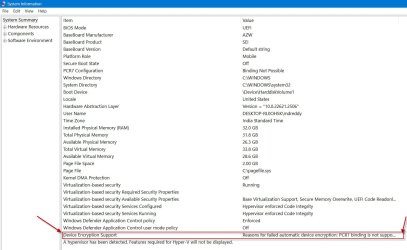
Just out of curiosity I peeped into the System Information of Beelink SEi12 MiniPC running Windows 11 Pro ( in which Secure Boot is disabled)
and I could see "Device Encryption Support - Reasons for failed automatic device encryption: PCR7 binding is not supported"

So obviously automatic Device Encryption is there in Windows 11 Pro and I am hearing about it now :-).

Anyway, I am also not interested in any encryption and Device Encryption is turned off on my Dell Inspiron 3280 running 11 Home.

28-09-2024 22-37-19.jpg
 

My Computers My Computers

  • At a glance

    Windows 11 Pro Version:25H2 OS Build: 26200.865512th Gen Intel core i5-1235U(Alder16*2 (32 GB) DDR 4-3200(1600MHz) Crucial Tech...Intel Iris Xe Graphics (Internal)
    OS
    Windows 11 Pro Version:25H2 OS Build: 26200.8655
    Computer type
    PC/Desktop
    Manufacturer/Model
    Beelink Mini PC Model: SEi12
    CPU
    12th Gen Intel core i5-1235U(Alder
    Motherboard
    SEi (manufactured by AZW)
    Memory
    16*2 (32 GB) DDR 4-3200(1600MHz) Crucial Technology
    Graphics Card(s)
    Intel Iris Xe Graphics (Internal)
    Sound Card
    Internal
    Monitor(s) Displays
    BenQ GW2283
    Screen Resolution
    1920*1080
    Hard Drives
    500GB NVME (Kingston SNV2S500G)
    1TB (Crucial CT1000BX500SSD1)
    PSU
    Power Brick 19V-6.32A , 120.08W
    Keyboard
    Dell KB3322Wi (Wireless)
    Mouse
    Dell WM118t (Wireless)
    Internet Speed
    4G/5G
    Browser
    MS Edge, Chrome
    Antivirus
    Malwarebytes Premium - Subscription
  • At a glance

    Windows 11 Home Version 25H2 Build 26200.8655Intel Core i3 8145UIntel Optane 16GB module + DDR 4 16GB (Optane...Intel UHD Graphics 620
    Operating System
    Windows 11 Home Version 25H2 Build 26200.8655
    Computer type
    PC/Desktop
    Manufacturer/Model
    Dell Inspiron 3280 AIO 22"
    CPU
    Intel Core i3 8145U
    Motherboard
    Dell inc. 027W48
    Memory
    Intel Optane 16GB module + DDR 4 16GB (Optane disabled.)
    Graphics card(s)
    Intel UHD Graphics 620
    Sound Card
    Internal
    Monitor(s) Displays
    Dell Monitor 22"
    Screen Resolution
    1920x1080
    Hard Drives
    Crucial CT1000BX500SSD1 ; 1000,2 GB
    PSU
    Power Brick
    Case
    All-in one
    Keyboard
    Dell Wireless KM636
    Mouse
    Dell Wireless KM 636
    Internet Speed
    4G
    Browser
    Edge, Chrome
    Antivirus
    Malwarebytes
    Other Info
    Upgraded from Windows 10 Home to Windows 11 Home on 28 Oct 2023
I have Win11 Home, and I was about to ask the same things.

I know on pro editions of Win10 you had bitlocker for full drive encryption, but what does that mean for those editions of Win11? Does device encryption need to be on and signed in to a microsoft account to activate bitlocker? My Win11 wouldn't let me complete installation/setup without signing in to my Windows account.

This is a strange way for Microsoft to do things. His bitlocker needs to be activated, but his device encryption is turned on, but needs to be signed in to complete encryption, and then Bitlocker can be activated?

There is no key until Bitlocker is turned on? So what does that mean for PCs that came with Win11 home? Bitlocker doesn't come with that edition, but my device encryption was turned on by default during installation (as I said Microsoft account sign in during install.) There is an option to back up bitlocker keys - And according to my Microsoft account there is a key for my Win11 Home Laptop C Drive.
 

My Computer My Computer

At a glance

Windows 11
OS
Windows 11
Computer type
Laptop
Manufacturer/Model
ASUS ROG Strix G18
Because contents are automatically unencrypted when a user logs in.

A strong Windows password is still your primary defense..
 

My Computer My Computer

At a glance

Windows 11 Pro + Win11 Canary VM.I9 13th gen i9-13900H 2.60 GHZ16 GB solderedIntegrated Intel Iris XE
OS
Windows 11 Pro + Win11 Canary VM.
Computer type
Laptop
Manufacturer/Model
ASUS Zenbook 14
CPU
I9 13th gen i9-13900H 2.60 GHZ
Motherboard
Yep, Laptop has one.
Memory
16 GB soldered
Graphics Card(s)
Integrated Intel Iris XE
Sound Card
Realtek built in
Monitor(s) Displays
laptop OLED screen
Screen Resolution
2880x1800 touchscreen
Hard Drives
1 TB NVME SSD (only weakness is only one slot)
PSU
Internal + 65W thunderbolt USB4 charger
Case
Yep, got one
Cooling
Stella Artois (UK pint cans - 568 ml) - extra cost.
Keyboard
Built in UK keybd
Mouse
Bluetooth , wireless dongled, wired
Internet Speed
900 mbs (ethernet), wifi 6 typical 350-450 mb/s both up and down
Browser
Edge
Antivirus
Defender
Other Info
TPM 2.0, 2xUSB4 thunderbolt, 1xUsb3 (usb a), 1xUsb-c, hdmi out, 3.5 mm audio out/in combo, ASUS backlit trackpad (inc. switchable number pad)

Macrium Reflect Home V8
Office 365 Family (6 users each 1TB onedrive space)
Hyper-V (a vm runs almost as fast as my older laptop)
I have Win11 Home, and I was about to ask the same things.

I know on pro editions of Win10 you had bitlocker for full drive encryption, but what does that mean for those editions of Win11? Does device encryption need to be on and signed in to a microsoft account to activate bitlocker? My Win11 wouldn't let me complete installation/setup without signing in to my Windows account.

No, Bitlocker and Device Encryption are related but independent alternatives.

This is a strange way for Microsoft to do things. His bitlocker needs to be activated, but his device encryption is turned on, but needs to be signed in to complete encryption, and then Bitlocker can be activated?

Microsoft want to encourage disk encryption so have automated Device Encryption setup, but don't finalize it until a recovery key has been automatically stored in an administrator's Microsoft Account. (Bitlocker on Pro doesn't require a Microsoft Account.)

There is no key until Bitlocker is turned on? So what does that mean for PCs that came with Win11 home? Bitlocker doesn't come with that edition, but my device encryption was turned on by default during installation (as I said Microsoft account sign in during install.) There is an option to back up bitlocker keys - And according to my Microsoft account there is a key for my Win11 Home Laptop C Drive.

So automatic Device Encryption worked as intended for you, and you're safer from identity theft if your laptop gets lost or stolen.
 

My Computer My Computer

At a glance

Windows 11
OS
Windows 11
Computer type
Laptop
So automatic Device Encryption worked as intended for you, and you're safer from identity theft if your laptop gets lost or stolen.
True enough but laptop owner can mitigate risks by using strong passwords or other strong security measures like biometric methods.

Device encryption does not eliminate risk but certainly makes accessing data much harder IF thief cannot login to your Windows.

Of course, the best protection is not to store valuable data on laptop in the first place.

Fortunately most laptop thieves are cash opportunists and are not normally after your data, so they would most likely just wipe drive to onsell pc.
 

My Computer My Computer

At a glance

Windows 11 Pro + Win11 Canary VM.I9 13th gen i9-13900H 2.60 GHZ16 GB solderedIntegrated Intel Iris XE
OS
Windows 11 Pro + Win11 Canary VM.
Computer type
Laptop
Manufacturer/Model
ASUS Zenbook 14
CPU
I9 13th gen i9-13900H 2.60 GHZ
Motherboard
Yep, Laptop has one.
Memory
16 GB soldered
Graphics Card(s)
Integrated Intel Iris XE
Sound Card
Realtek built in
Monitor(s) Displays
laptop OLED screen
Screen Resolution
2880x1800 touchscreen
Hard Drives
1 TB NVME SSD (only weakness is only one slot)
PSU
Internal + 65W thunderbolt USB4 charger
Case
Yep, got one
Cooling
Stella Artois (UK pint cans - 568 ml) - extra cost.
Keyboard
Built in UK keybd
Mouse
Bluetooth , wireless dongled, wired
Internet Speed
900 mbs (ethernet), wifi 6 typical 350-450 mb/s both up and down
Browser
Edge
Antivirus
Defender
Other Info
TPM 2.0, 2xUSB4 thunderbolt, 1xUsb3 (usb a), 1xUsb-c, hdmi out, 3.5 mm audio out/in combo, ASUS backlit trackpad (inc. switchable number pad)

Macrium Reflect Home V8
Office 365 Family (6 users each 1TB onedrive space)
Hyper-V (a vm runs almost as fast as my older laptop)
Guys, I have to share this, so others can benefit from it. 🙏

This was supposed to be a simple operation. As simple as clicking on "Device encryption" to turn it off, and waiting a bit.
Well, it wasn't.

Merely a couple minutes after the decryption started, this was how my screen looked like:

20240929_164110.jpg

Can you imagine the sudden stress? 😅 But wait, it gets worse.

The PC rebooted automatically. After reboot, it went straight into BIOS.
So I pressed F10 to exit without saving.
It rebooted again... and it went straight into BIOS... AGAIN! Endless loop! 😱

I couldn't access Windows anymore. Then it hit me: what if all my C: drive was corrupt? What if I had lost EVERYTHING? 😭
That thought was just unbearable to me. Of course I have backups of all my data, but I don't have a full system backup yet (*)
(*) It's planned by the end of the year (my idea is to make a full C: image on a spare SSD and update it incrementally on a regular basis).

I was thinking "Oh, how stupid I was! I should have waited! I should have been more careful!".
At that point I was in shock, literally shaking. I have rarely been so afraid of something in my entire life. Except maybe of my ex-GF. 😅

Desperately, I forcefully turned the PC off. Then I waited 5 minutes or so, not really knowing what to do. Then I turned it on again.
To my big surprise, this time it didn't go straight into BIOS. Instead, it booted into... Windows logon streen! 😳

But I knew something was wrong. I logged into my session, then I went into my preferences to check the decryption status.
It had resumed automatically, possibly where it left off. Maybe there was still hope. 🤨

Well, that hope only lasted for a couple of minutes. The PC went into the blue screen of death AGAIN! :facepalm:
And again into the BIOS... and again impossible to just exit the BIOS... so I had to forcecully turn it off again... etc.

Long story short, this happened THREE TIMES during the decryption process, which took about 45 mins for my 250 GB of C: data.
In the end, the decryption ended up successfully (well, if we can call that mess of a decryption a "success").

Now everything seems to be running normally :crossed, but I'm genuinely traumatized by this experience, expecting my screen to go blue at any moment. Is there a good shrink in the audience? I could use one right now. 🤪

Thanks Microsoft for all the bad memories! 😝 And instead of saying "you can keep using Windows normally", why not say "this is a dangerous process, that can result in multiple BSODs and can brick your computer - Please close all applications, backup all your data, say a little prayer, put yourself in fetal position and hope for the best"?...

PS: does Windows indicate somewhere the errors that have led to the three BSODs? I'd like to understand what has happened, if possible.
 

My Computer My Computer

At a glance

Windows 11AMD Ryzen 7700DDR5 = 32 GB = 2x16 GB (Corsair Dominator - D...Not yet
OS
Windows 11
Computer type
PC/Desktop
Manufacturer/Model
Personal build
CPU
AMD Ryzen 7700
Motherboard
Asus TUF Gaming B650M-Plus WiFi
Memory
DDR5 = 32 GB = 2x16 GB (Corsair Dominator - DDR5 RGB - 6000 MT/s)
Graphics Card(s)
Not yet
Sound Card
No
Monitor(s) Displays
Philips BDM3270QP2
Screen Resolution
2560x1440
Hard Drives
M.2 = 2 TB (Samsung 990 Pro)
SATA = 12 TB (Western Digital Red - WD120EFAX - 5400 rpm)
PSU
Corsair RM850e (850W - ATX 3.0)
Case
Corsair Crystal 280X TG (White, RGB)
Cooling
Intake = 2x120mm fans (Corsair LL120 RGB) / Exhaust = 2x120mm AIO (Aerocool Mirage L240)
Keyboard
Corsair K55 RGB
Mouse
Vertical mouse from AliExpress, very good for the price and a lifesaver for my wrist :)
Internet Speed
Fiber
Browser
Firefox, Brave, Tor
Antivirus
Windows Defender
Other Info
UPS = 1000VA (Nitram PB1000 LCD), protecting PC + Monitor + Speakers

I now vaguely remember having read somewhere and sometime in the recent past that Microsoft is making encryption compulsory for all.
No, Microsoft is making BitLocker Device Encryption (not to be confused with BitLocker Drive Encryption) automatically enabled by default for all who do a clean install of Windows 11. The user can still turn it off after the encryption is done. Alternatively, it also is possible to, before it happens, prevent it from automatically getting enabled by Windows Setup during the install. (See this thread.)
 

My Computers My Computers

  • At a glance

    11 Homei7 13650HX16GB DDR5GeForce RTX 4060 Mobile
    OS
    11 Home
    Computer type
    Laptop
    Manufacturer/Model
    Asus TUF Gaming F16 (2024)
    CPU
    i7 13650HX
    Memory
    16GB DDR5
    Graphics Card(s)
    GeForce RTX 4060 Mobile
    Sound Card
    Eastern Electric MiniMax DAC Supreme; Emotiva UMC-200; Astell & Kern AK240
    Monitor(s) Displays
    Sony Bravia XR-55X90J
    Screen Resolution
    3840×2160
    Hard Drives
    512GB SSD internal
    37TB external
    PSU
    Li-ion
    Cooling
    2× Arc Flow Fans, 4× exhaust vents, 5× heatpipes
    Keyboard
    Logitech K800
    Mouse
    Logitech G402
    Internet Speed
    30Mbit/s up, 500Mbit/s down
    Browser
    FF
    Antivirus
    What's an antivirus?
  • At a glance

    11 Homei5 1135G716GB DDR4Intel Iris Xe
    Operating System
    11 Home
    Computer type
    Laptop
    Manufacturer/Model
    Medion S15450
    CPU
    i5 1135G7
    Memory
    16GB DDR4
    Graphics card(s)
    Intel Iris Xe
    Sound Card
    Eastern Electric MiniMax DAC Supreme; Emotiva UMC-200; Astell & Kern AK240
    Monitor(s) Displays
    Sony Bravia XR-55X90J
    Screen Resolution
    3840×2160
    Hard Drives
    2TB SSD internal
    37TB external
    PSU
    Li-ion
    Keyboard
    Logitech K800
    Mouse
    Logitech G402
    Internet Speed
    30Mbit/s up, 500Mbit/s down
    Browser
    FF
Back
Top Bottom