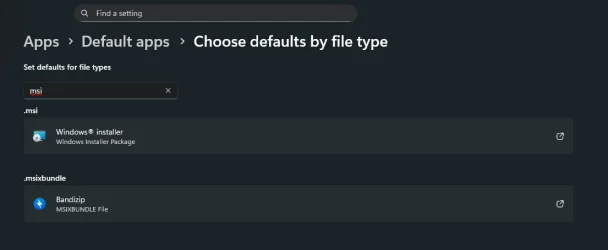
Accidentally opened an .MSIEX installer file with BandiZip - How do I get it back to windows installer?


paradoxum

Sublimed
Member
Local time
6:40 AM
Posts
187
OS
Windows 11 [22H2] [22621.2428]
1766537297688.webp
 
Windows Build/Version
W11 26220.7344

My Computer

System One

  • OS
    Windows 11 [22H2] [22621.2428]
    Computer type
    PC/Desktop
    Manufacturer/Model
    Culture-Virus v7.0
    CPU
    Intel Core i9-14900K 3.2 GHz 24-Core Processor
    Motherboard
    Asus ROG MAXIMUS Z790 APEX ENCORE ATX LGA1700 Motherboard
    Memory
    G.Skill Trident Z5 RGB 32 GB (2 x 16 GB) DDR5-7200 CL34 Memory
    Graphics Card(s)
    AMD Radeon RX 6950 XT
    Monitor(s) Displays
    AOC CQ27G2U/BK
    Screen Resolution
    2560x1440
    Hard Drives
    M.2 1: Samsung SSD 990 PRO 2TB
    M.2 2: Samsung SSD 970 EVO Plus 2TB
    PSU
    Corsair RM1000X SHIFT
    Case
    Phanteks NV9
    Cooling
    Custom Water / Direct-Die Cooling
    Keyboard
    Corsair K95 RGB PLATINUM XT Wired Gaming Keyboard
    Mouse
    ROCCAT LEADR Optical
    Internet Speed
    500mb Direct Fiber
    Browser
    Chrome
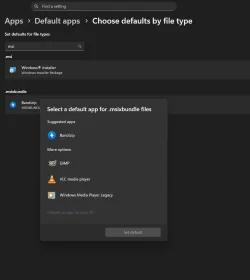
If you click on the Bandizip association there, does it give you the option to change it to App Installer?
 

My Computer

System One

  • OS
    Windows 11 Pro 25H2
    Computer type
    PC/Desktop
    Manufacturer/Model
    Intel NUC12WSHi7
    CPU
    12th Gen Core i7-1260P
    Motherboard
    NUC12WSBi7
    Memory
    64 GB Micron PC4-25600
    Graphics Card(s)
    Intel Iris Xe Graphics
    Sound Card
    on-board Realtek HD Audio
    Monitor(s) Displays
    Dell U3219Q
    Screen Resolution
    3840 x 2160
    Hard Drives
    Samsung SSD 990 PRO 1TB
    Crucial MX500 2 TB
    Antivirus
    Microsoft Defender
1766538478721.webp
 

My Computer

System One

  • OS
    Windows 11 [22H2] [22621.2428]
    Computer type
    PC/Desktop
    Manufacturer/Model
    Culture-Virus v7.0
    CPU
    Intel Core i9-14900K 3.2 GHz 24-Core Processor
    Motherboard
    Asus ROG MAXIMUS Z790 APEX ENCORE ATX LGA1700 Motherboard
    Memory
    G.Skill Trident Z5 RGB 32 GB (2 x 16 GB) DDR5-7200 CL34 Memory
    Graphics Card(s)
    AMD Radeon RX 6950 XT
    Monitor(s) Displays
    AOC CQ27G2U/BK
    Screen Resolution
    2560x1440
    Hard Drives
    M.2 1: Samsung SSD 990 PRO 2TB
    M.2 2: Samsung SSD 970 EVO Plus 2TB
    PSU
    Corsair RM1000X SHIFT
    Case
    Phanteks NV9
    Cooling
    Custom Water / Direct-Die Cooling
    Keyboard
    Corsair K95 RGB PLATINUM XT Wired Gaming Keyboard
    Mouse
    ROCCAT LEADR Optical
    Internet Speed
    500mb Direct Fiber
    Browser
    Chrome
Use RevoUninstaller to remove Bandizip. Make sure you use the Advanced option to remove all leftover files/folders registry entries

Install and run RevoUninstaller (freeware version)
Options tab (along the top) > Uninstaller (LH column)
Untick Make a Restore Point before uninstall
Tick Checkmark all leftovers by default
Uninstaller
tab > Double click the desired program
Run the uninstallation process
IMPORTANT DO NOT reboot even if prompted when completed (Cancel if prompted)
Select the Advanced button and then run the process to remove all leftover files/folders/registry entries left behind after a normal default uninstall process
If prompted at any stage previously, now do the reboot

Check the file association. If Bandizip has gone, just re-install it (it shouldn't re-associate itself)
 

My Computers

System One System Two

  • OS
    Windows 11 2xH2 (latest update ... forever anal)
    Computer type
    PC/Desktop
    Manufacturer/Model
    HP Slim S01
    CPU
    Intel i5-12400
    Memory
    8GB
    Graphics Card(s)
    NVIDIA GeForce GT730
    Sound Card
    OOBE
    Monitor(s) Displays
    Acer 32"
    Screen Resolution
    1920x1080
    Hard Drives
    512GB KIOXIA NVMe
    1TB SATA SSD
    PSU
    OOBE
    Case
    OOBE
    Cooling
    OOBE
    Keyboard
    BT
    Mouse
    BT
    Browser
    Brave FFox Chrome Opera
    Antivirus
    KIS
  • Operating System
    Windows 11 Pro 2xH2 (latest update ... 4ever anal)
    Computer type
    Laptop
    Manufacturer/Model
    HP Pavillion 15
    CPU
    i7-1165G7 @ 2.80GHz
    Graphics card(s)
    Intel Iris Xe Graphics
    Hard Drives
    Samsung NVMe 512GB
    + numerous/multiple SSD Type C USB enclosures
    Internet Speed
    NBN FTTN 50
    Browser
    Brave
    Antivirus
    KIS
Normally the .msixbundle file association belongs to App Installer (also called "DesktopApp Installer").
 

My Computer

System One

  • OS
    Windows 7
The App Installer option should be available, even if you associate msixbundle files with Crash Bandicoot. Try resetting the App Installer, since yours is missing...

Powershell:
Get-AppxPackage 'Microsoft.DesktopAppInstaller' | Reset-AppxPackage


View attachment 157907
 

My Computer

System One

  • OS
    Windows 11 Pro 25H2
    Computer type
    PC/Desktop
    Manufacturer/Model
    Intel NUC12WSHi7
    CPU
    12th Gen Core i7-1260P
    Motherboard
    NUC12WSBi7
    Memory
    64 GB Micron PC4-25600
    Graphics Card(s)
    Intel Iris Xe Graphics
    Sound Card
    on-board Realtek HD Audio
    Monitor(s) Displays
    Dell U3219Q
    Screen Resolution
    3840 x 2160
    Hard Drives
    Samsung SSD 990 PRO 1TB
    Crucial MX500 2 TB
    Antivirus
    Microsoft Defender
Back
Top Bottom