- Local time
- 4:09 PM
- Posts
- 81
- OS
- Windows 11 Pro
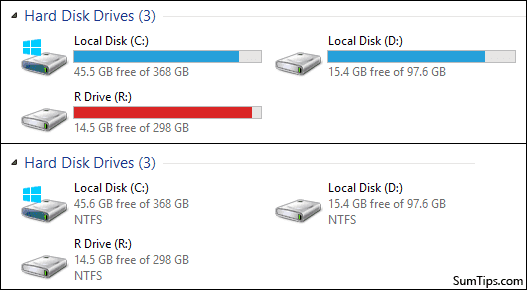
One of my drives is filling up quite nicely.

Is there any way to change the color to say orange or something? Hardly alarming red needed with 177 GB to go...
Is there any way to change the color to say orange or something? Hardly alarming red needed with 177 GB to go...
- Windows Build/Version
- 22621.819
My Computers
-
At a glance
Windows 11 ProIntel Core i5-10600K32 GB (G.Skill Ripjaws V F4-3600C16D-32GVKC)MSI GeForce RTX 3070 Gaming Z Trio- OS
- Windows 11 Pro
- Computer type
- PC/Desktop
- CPU
- Intel Core i5-10600K
- Motherboard
- Gigabyte Aorus Z490 Elite AC
- Memory
- 32 GB (G.Skill Ripjaws V F4-3600C16D-32GVKC)
- Graphics Card(s)
- MSI GeForce RTX 3070 Gaming Z Trio
- Monitor(s) Displays
- LG UltraGear 32GR93U
- Screen Resolution
- 4K
- Hard Drives
- Lexar NM790 2TB; Lexar NM790 2TB; Seagate Barracuda Compute 8TB
- PSU
- be quiet! Straight Power 11 750W
- Case
- be quiet! Silent Base 801
-
At a glance
Windows 11 ProIntel Core i5-1155G78 GBIntel Iris Xᵉ- Operating System
- Windows 11 Pro
- Computer type
- Laptop
- CPU
- Intel Core i5-1155G7
- Memory
- 8 GB
- Graphics card(s)
- Intel Iris Xᵉ
- Screen Resolution
- 1920 x 1080