Apps Add or Remove Widgets on Widgets Board in Windows 11

  • Thread starter Thread starter Brink
  • Start date Published: Start date Updated Updated:
  • Tags Tags
    widgets

WidgetBoard_header.webp

This tutorial will show you how to add (pin) or remove (unpin) widgets on the Widgets board for your account in Windows 11.

Widgets in Windows are interactive elements that display dynamic content and provide quick access to various apps and features. You can view your location's current weather conditions directly on the taskbar and hover over the icon to see concise, scannable information on topics like sports, stocks, local news, and breaking headlines. Widgets are designed to help you staying informed and organized by presenting personalized information at a glance.

Widgets are displayed on the Widgets board, which contains a collection of cards, each representing a widget with relevant information and actions related to an app. On the Widgets board you can discover, pin, unpin, arrange, resize, and customize widgets to reflect your interests.

Starting with Windows 11 build 26220.7523 (Dev and Beta), Microsoft is introducing a new Discover Windows widget on Windows 11. This widget helps you learn about Windows features with short, helpful tips that appear right when you need them. What it shows:
  • Quick, actionable tips from the Windows Tips website—covering things like shortcuts, productivity tricks, and security reminders.
  • Tips update automatically throughout the day to match common usage moments.
You can customize your Widgets board by adding and removing Widgets you want.

Reference:


Contents


Option One

Add (pin) Widget to Widgets Board


1 Open Widgets (Win+W).

2 Click/tap on Widgets in the left pane, and click/tap on the Add Widgets (+) button at the top right. (see screenshot below)

Add_widgets-1.webp

3 Select a widget (ex: "Weather) you want to add in the left pane, click/tap on the Add widget button. (see screenshot below)

A grayed out Add widget button indicates the widget is already added.

You can click/tap on the Find more widgets link to install more widgets from the Microsoft Store to have available to add.


Add_widgets-2.webp

4 You can now resize, move, or customize the widget on the Widgets board.

Add_widgets-3.webp


Option Two

Remove (unpin) Widget from Widgets Board


1 Open Widgets (Win+W).

2 Click/tap on Widgets in the left pane. (see screenshot below)

3 Click/tap on the More options (3 dots) button on the upper right corner of the widget you want to remove, and click/tap on Remove. (see screenshot below)

Remove_widgets.webp


That's it,
Shawn Brink


Last edited:
It would be nice if there was a way to block all that news crap(and ads).
I tried to find a hosts file list on the net to block Microsofts servers for these, but in this case search results only show tutorials on how to use hosts files:(
 

My Computer

System One

  • OS
    Win10 Pro, Win10 Pro N, Win10 Home, Windows 8.1 Pro, Ubuntu
    Computer type
    PC/Desktop
    Manufacturer/Model
    ۞ΞЖ†ԘΜΞ۞
    CPU
    Intel Core i9 9900K
    Motherboard
    ASUS ROG Maximus X Hero
    Memory
    32 GB Quad Kit, G.Skill Trident Z RGB Series schwarz, DDR4-3866, 18-19-19-39-2T
    Graphics Card(s)
    ASUS GeForce RTX 3090 ROG Strix O24G, 24576 MB GDDR6X
    Sound Card
    (1) HD Webcam C270 (2) NVIDIA High Definition Audio (3) Realtek High Definition Audio
    Monitor(s) Displays
    BenQ BL2711U(4K) and a hp 27vx(1080p)
    Hard Drives
    C: Samsung 960 EVO NVMe M.2 SSD
    E: & O: Libraries & OneDrive-> Samsung 850 EVO 1TB
    D: Hyper-V VM's -> Samsung PM951 Client M.2 512Gb SSD
    G: System Images -> Samsung 860 Pro 2TB
    PSU
    Corsair HX1000i High Performance ATX Power Supply 80+ Platinum
    Case
    Phanteks Enthoo Pro TG
    Cooling
    Thermaltake Floe Riing RGB TT Premium-Edition 360mm and 2x120 Phantek& Halo front, and 1x140 Phanteks
    Keyboard
    Trust GTX THURA
    Mouse
    Trust GTX 148
    Internet Speed
    25+/5+ (+usually faster)
    Browser
    Edge; Chrome;
    Antivirus
    Windows Defender of course & Malwarebytes Anti-Exploit as an added layer between browser & OS
    Other Info
    Router: FRITZ!Box 7590 AX V2
    Sound system: SHARP HT-SBW460 Dolby Atmos Soundbar
    Webcam: Logitech BRIO ULTRA HD PRO WEBCAM 4K webcam with HDR
It would be nice if there was a way to block all that news crap(and ads).
I tried to find a hosts file list on the net to block Microsofts servers for these, but in this case search results only show tutorials on how to use hosts files:(
Hey Cliff, :-)

I'm not sure about "Top Stories", but you can click on the "X" at the top right corner of each story to hide them.

Hopefully, more control will be available soon.
 

My Computers

System One System Two

  • OS
    Windows 11 Pro for Workstations
    Computer type
    PC/Desktop
    Manufacturer/Model
    Custom self build
    CPU
    Intel i7-8700K 5 GHz
    Motherboard
    ASUS ROG Maximus XI Formula Z390
    Memory
    64 GB (4x16GB) G.SKILL TridentZ RGB DDR4 3600 MHz (F4-3600C18D-32GTZR)
    Graphics Card(s)
    ASUS ROG-STRIX-GTX1080TI-O11G-GAMING (11GB GDDR5X)
    Sound Card
    Integrated Digital Audio (S/PDIF)
    Monitor(s) Displays
    2 x Samsung Odyssey G75 27"
    Screen Resolution
    2560x1440
    Hard Drives
    1TB Samsung 990 PRO M.2,
    4TB Samsung 990 PRO M.2,
    TerraMaster F8 SSD Plus NAS
    PSU
    Seasonic Prime Titanium 850W
    Case
    Thermaltake Core P3 wall mounted
    Cooling
    Corsair Hydro H115i
    Keyboard
    Amazon Basics Wired Full Keyboard MD005
    Mouse
    Logitech MX Master 4
    Internet Speed
    2 Gbps Download and 100 Mbps Upload
    Browser
    Chrome and Edge
    Antivirus
    Microsoft Defender
    Other Info
    Logitech Z625 speaker system,
    Logitech BRIO 4K Pro webcam,
    HP Color LaserJet Pro MFP M477fdn,
    CyberPower CP1500PFCLCD
    Galaxy S23 Plus phone
  • Operating System
    Windows 11 Pro
    Computer type
    Laptop
    Manufacturer/Model
    Surface Laptop 7 Copilot+ PC
    CPU
    Snapdragon X Elite (12 core) 3.42 GHz
    Memory
    16 GB LPDDR5x-7467 MHz
    Monitor(s) Displays
    15" HDR
    Screen Resolution
    2496 x 1664
    Hard Drives
    1 TB SSD
    Internet Speed
    Wi-Fi 7 and Bluetooth 5.4
    Browser
    Chrome and Edge
    Antivirus
    Microsoft Defender
Hey Cliff, :)

I'm not sure about "Top Stories", but you can click on the "X" at the top right corner of each story to hide them.

Hopefully, more control will be available soon.
Problem is then they show other stuff, I want all news to be gone, and only have my time and weather(I also find the other widgets pretty useless, except TODO, but I try NOT to have a busy life, just work, and go home to my PC:D).
 

My Computer

System One

  • OS
    Win10 Pro, Win10 Pro N, Win10 Home, Windows 8.1 Pro, Ubuntu
    Computer type
    PC/Desktop
    Manufacturer/Model
    ۞ΞЖ†ԘΜΞ۞
    CPU
    Intel Core i9 9900K
    Motherboard
    ASUS ROG Maximus X Hero
    Memory
    32 GB Quad Kit, G.Skill Trident Z RGB Series schwarz, DDR4-3866, 18-19-19-39-2T
    Graphics Card(s)
    ASUS GeForce RTX 3090 ROG Strix O24G, 24576 MB GDDR6X
    Sound Card
    (1) HD Webcam C270 (2) NVIDIA High Definition Audio (3) Realtek High Definition Audio
    Monitor(s) Displays
    BenQ BL2711U(4K) and a hp 27vx(1080p)
    Hard Drives
    C: Samsung 960 EVO NVMe M.2 SSD
    E: & O: Libraries & OneDrive-> Samsung 850 EVO 1TB
    D: Hyper-V VM's -> Samsung PM951 Client M.2 512Gb SSD
    G: System Images -> Samsung 860 Pro 2TB
    PSU
    Corsair HX1000i High Performance ATX Power Supply 80+ Platinum
    Case
    Phanteks Enthoo Pro TG
    Cooling
    Thermaltake Floe Riing RGB TT Premium-Edition 360mm and 2x120 Phantek& Halo front, and 1x140 Phanteks
    Keyboard
    Trust GTX THURA
    Mouse
    Trust GTX 148
    Internet Speed
    25+/5+ (+usually faster)
    Browser
    Edge; Chrome;
    Antivirus
    Windows Defender of course & Malwarebytes Anti-Exploit as an added layer between browser & OS
    Other Info
    Router: FRITZ!Box 7590 AX V2
    Sound system: SHARP HT-SBW460 Dolby Atmos Soundbar
    Webcam: Logitech BRIO ULTRA HD PRO WEBCAM 4K webcam with HDR
Yes, I had asked about being able to remove all news and just show weather (or whatever) in another thread, but looks like it isn't possible. I wouldn't mind using the widgets, but not if they force the news on us.
 

My Computer

System One

  • OS
    Windows 11
Hi Brink.

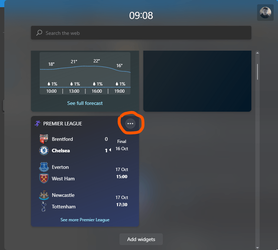
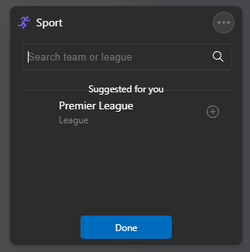
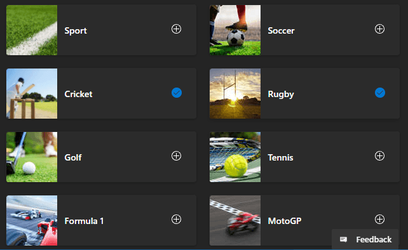
Can you figure out why the "Sports" widget is even called the "Sports" widget, when it only gives the choice of "Premiere League"?

When I add "Sports", and click the ellipses menu to get to "Customize widget", the only recommended option is Premiere League:
Screenshot 2021-10-17 090902.png
Screenshot 2021-10-17 091207.png
Screenshot 2021-10-17 091526.png

And from there, searching for a particular team either yields no results, or completely irrelevant results:
Screenshot 2021-10-17 091351.png
Screenshot 2021-10-17 091453.png

Adjusting settings in "Microsoft Start" has no effect whatsoever:
Screenshot 2021-10-17 092048.png
 

My Computers

System One System Two

  • OS
    Windows 10 Professional
    Computer type
    PC/Desktop
    Manufacturer/Model
    Custom Build
    CPU
    AMD A10-7850K Radeon R7, 12 Compute Cores 4C+8G 3.70
    Motherboard
    MSI A88X-G43
    Memory
    24GB
    Monitor(s) Displays
    2
    Screen Resolution
    1920x1080
  • Operating System
    Windows 11 Home
    Computer type
    Laptop
    Manufacturer/Model
    Lenovo Ideapad S145 15IIL
    CPU
    Intel Core i7-1065G7
    Memory
    8GB, DDR4
    Hard Drives
    Transcend 256GB M.2 NVMe
    Toshiba 1TB SATA-III HDD
Hello @Dzomlija, :-)

I'm seeing the same thing. I suppose it's from being limited right now, and hopefully will have more added in the future.
 

My Computers

System One System Two

  • OS
    Windows 11 Pro for Workstations
    Computer type
    PC/Desktop
    Manufacturer/Model
    Custom self build
    CPU
    Intel i7-8700K 5 GHz
    Motherboard
    ASUS ROG Maximus XI Formula Z390
    Memory
    64 GB (4x16GB) G.SKILL TridentZ RGB DDR4 3600 MHz (F4-3600C18D-32GTZR)
    Graphics Card(s)
    ASUS ROG-STRIX-GTX1080TI-O11G-GAMING (11GB GDDR5X)
    Sound Card
    Integrated Digital Audio (S/PDIF)
    Monitor(s) Displays
    2 x Samsung Odyssey G75 27"
    Screen Resolution
    2560x1440
    Hard Drives
    1TB Samsung 990 PRO M.2,
    4TB Samsung 990 PRO M.2,
    TerraMaster F8 SSD Plus NAS
    PSU
    Seasonic Prime Titanium 850W
    Case
    Thermaltake Core P3 wall mounted
    Cooling
    Corsair Hydro H115i
    Keyboard
    Amazon Basics Wired Full Keyboard MD005
    Mouse
    Logitech MX Master 4
    Internet Speed
    2 Gbps Download and 100 Mbps Upload
    Browser
    Chrome and Edge
    Antivirus
    Microsoft Defender
    Other Info
    Logitech Z625 speaker system,
    Logitech BRIO 4K Pro webcam,
    HP Color LaserJet Pro MFP M477fdn,
    CyberPower CP1500PFCLCD
    Galaxy S23 Plus phone
  • Operating System
    Windows 11 Pro
    Computer type
    Laptop
    Manufacturer/Model
    Surface Laptop 7 Copilot+ PC
    CPU
    Snapdragon X Elite (12 core) 3.42 GHz
    Memory
    16 GB LPDDR5x-7467 MHz
    Monitor(s) Displays
    15" HDR
    Screen Resolution
    2496 x 1664
    Hard Drives
    1 TB SSD
    Internet Speed
    Wi-Fi 7 and Bluetooth 5.4
    Browser
    Chrome and Edge
    Antivirus
    Microsoft Defender
Thanks, Brink. I guess this is one of those little things that early adopters have to cope with....
 

My Computers

System One System Two

  • OS
    Windows 10 Professional
    Computer type
    PC/Desktop
    Manufacturer/Model
    Custom Build
    CPU
    AMD A10-7850K Radeon R7, 12 Compute Cores 4C+8G 3.70
    Motherboard
    MSI A88X-G43
    Memory
    24GB
    Monitor(s) Displays
    2
    Screen Resolution
    1920x1080
  • Operating System
    Windows 11 Home
    Computer type
    Laptop
    Manufacturer/Model
    Lenovo Ideapad S145 15IIL
    CPU
    Intel Core i7-1065G7
    Memory
    8GB, DDR4
    Hard Drives
    Transcend 256GB M.2 NVMe
    Toshiba 1TB SATA-III HDD
Hi Brink.

It's my first time to use Win 11 and I'm so confused, my widget only shows news. there's no search, weather nor option to add widgets. there's no profile picture too at the right top, although it said that I'm already logged in. Did I miss something? is it a limited features for windows 11 pro?

ss.PNG
 
Last edited:

My Computer

System One

  • OS
    windows 11
The only widgets I find useful are those in guinness cans which create the head to be as close to that in a draught pint.
 

My Computer

System One

  • OS
    Windows 11 Pro + Win11 Canary VM.
    Computer type
    Laptop
    Manufacturer/Model
    ASUS Zenbook 14
    CPU
    I9 13th gen i9-13900H 2.60 GHZ
    Motherboard
    Yep, Laptop has one.
    Memory
    16 GB soldered
    Graphics Card(s)
    Integrated Intel Iris XE
    Sound Card
    Realtek built in
    Monitor(s) Displays
    laptop OLED screen
    Screen Resolution
    2880x1800 touchscreen
    Hard Drives
    1 TB NVME SSD (only weakness is only one slot)
    PSU
    Internal + 65W thunderbolt USB4 charger
    Case
    Yep, got one
    Cooling
    Stella Artois (UK pint cans - 568 ml) - extra cost.
    Keyboard
    Built in UK keybd
    Mouse
    Bluetooth , wireless dongled, wired
    Internet Speed
    900 mbs (ethernet), wifi 6 typical 350-450 mb/s both up and down
    Browser
    Edge
    Antivirus
    Defender
    Other Info
    TPM 2.0, 2xUSB4 thunderbolt, 1xUsb3 (usb a), 1xUsb-c, hdmi out, 3.5 mm audio out/in combo, ASUS backlit trackpad (inc. switchable number pad)

    Macrium Reflect Home V8
    Office 365 Family (6 users each 1TB onedrive space)
    Hyper-V (a vm runs almost as fast as my older laptop)
Hi Brink.

It's my first time to use Win 11 and I'm so confused, my widget only shows news. there's no search, weather nor option to add widgets. there's no profile picture too at the right top, although it said that I'm already logged in. Did I miss something? is it a limited features for windows 11 pro?

Hello, :-)

Interesting. What build of Windows 11 do you have installed?

Could be a regional issue of what's available.
 

My Computers

System One System Two

  • OS
    Windows 11 Pro for Workstations
    Computer type
    PC/Desktop
    Manufacturer/Model
    Custom self build
    CPU
    Intel i7-8700K 5 GHz
    Motherboard
    ASUS ROG Maximus XI Formula Z390
    Memory
    64 GB (4x16GB) G.SKILL TridentZ RGB DDR4 3600 MHz (F4-3600C18D-32GTZR)
    Graphics Card(s)
    ASUS ROG-STRIX-GTX1080TI-O11G-GAMING (11GB GDDR5X)
    Sound Card
    Integrated Digital Audio (S/PDIF)
    Monitor(s) Displays
    2 x Samsung Odyssey G75 27"
    Screen Resolution
    2560x1440
    Hard Drives
    1TB Samsung 990 PRO M.2,
    4TB Samsung 990 PRO M.2,
    TerraMaster F8 SSD Plus NAS
    PSU
    Seasonic Prime Titanium 850W
    Case
    Thermaltake Core P3 wall mounted
    Cooling
    Corsair Hydro H115i
    Keyboard
    Amazon Basics Wired Full Keyboard MD005
    Mouse
    Logitech MX Master 4
    Internet Speed
    2 Gbps Download and 100 Mbps Upload
    Browser
    Chrome and Edge
    Antivirus
    Microsoft Defender
    Other Info
    Logitech Z625 speaker system,
    Logitech BRIO 4K Pro webcam,
    HP Color LaserJet Pro MFP M477fdn,
    CyberPower CP1500PFCLCD
    Galaxy S23 Plus phone
  • Operating System
    Windows 11 Pro
    Computer type
    Laptop
    Manufacturer/Model
    Surface Laptop 7 Copilot+ PC
    CPU
    Snapdragon X Elite (12 core) 3.42 GHz
    Memory
    16 GB LPDDR5x-7467 MHz
    Monitor(s) Displays
    15" HDR
    Screen Resolution
    2496 x 1664
    Hard Drives
    1 TB SSD
    Internet Speed
    Wi-Fi 7 and Bluetooth 5.4
    Browser
    Chrome and Edge
    Antivirus
    Microsoft Defender
@Kyrielle

It looks like you still have an older version of Widgets for some reason despite having the latest build of Windows 11 installed.
 

My Computers

System One System Two

  • OS
    Windows 11 Pro for Workstations
    Computer type
    PC/Desktop
    Manufacturer/Model
    Custom self build
    CPU
    Intel i7-8700K 5 GHz
    Motherboard
    ASUS ROG Maximus XI Formula Z390
    Memory
    64 GB (4x16GB) G.SKILL TridentZ RGB DDR4 3600 MHz (F4-3600C18D-32GTZR)
    Graphics Card(s)
    ASUS ROG-STRIX-GTX1080TI-O11G-GAMING (11GB GDDR5X)
    Sound Card
    Integrated Digital Audio (S/PDIF)
    Monitor(s) Displays
    2 x Samsung Odyssey G75 27"
    Screen Resolution
    2560x1440
    Hard Drives
    1TB Samsung 990 PRO M.2,
    4TB Samsung 990 PRO M.2,
    TerraMaster F8 SSD Plus NAS
    PSU
    Seasonic Prime Titanium 850W
    Case
    Thermaltake Core P3 wall mounted
    Cooling
    Corsair Hydro H115i
    Keyboard
    Amazon Basics Wired Full Keyboard MD005
    Mouse
    Logitech MX Master 4
    Internet Speed
    2 Gbps Download and 100 Mbps Upload
    Browser
    Chrome and Edge
    Antivirus
    Microsoft Defender
    Other Info
    Logitech Z625 speaker system,
    Logitech BRIO 4K Pro webcam,
    HP Color LaserJet Pro MFP M477fdn,
    CyberPower CP1500PFCLCD
    Galaxy S23 Plus phone
  • Operating System
    Windows 11 Pro
    Computer type
    Laptop
    Manufacturer/Model
    Surface Laptop 7 Copilot+ PC
    CPU
    Snapdragon X Elite (12 core) 3.42 GHz
    Memory
    16 GB LPDDR5x-7467 MHz
    Monitor(s) Displays
    15" HDR
    Screen Resolution
    2496 x 1664
    Hard Drives
    1 TB SSD
    Internet Speed
    Wi-Fi 7 and Bluetooth 5.4
    Browser
    Chrome and Edge
    Antivirus
    Microsoft Defender
So there is no way to remove "Feeds" (News and Interest on the right) and keep just the widgets I want + weather?
 

My Computer

System One

  • OS
    Windows 11 Home
    Computer type
    Laptop
    Manufacturer/Model
    ASUS ROG SCAR 18
    CPU
    Intel i9-13980HX
    Memory
    32GB DDR5 5600MHz
    Graphics Card(s)
    NVidia GTX 4090 Laptop 256bit 16GB 175W
    Sound Card
    Realtek ALC285 + Dolby Atmos
    Monitor(s) Displays
    G-Sync NE180QDM-NZ2 18" 16:10, FreeSync Premium XiaoMi Mi 34" 21:9
    Screen Resolution
    2560x1600@240Hz (internal), 3440x1440@144Hz (external)
    Hard Drives
    NVMe Lexar NM790 1TB 6GB/s, NVMe Lexar NM790 4TB 6GB/s
    PSU
    330W (laptop PSU)
    Mouse
    ROG Strix Carry Wireless-BT mouse
    Other Info
    4K UHD USB Archgon Star Blu-Ray 4K UHD,
    8BitDo Arcade Stick,
    Vader 4 Pro controller
So there is no way to remove "Feeds" (News and Interest on the right) and keep just the widgets I want + weather?
Hello mate, :alien:

There is a way below, but it's not available to the public builds yet. Hopefully soon.


My Computers

System One System Two

  • OS
    Windows 11 Pro for Workstations
    Computer type
    PC/Desktop
    Manufacturer/Model
    Custom self build
    CPU
    Intel i7-8700K 5 GHz
    Motherboard
    ASUS ROG Maximus XI Formula Z390
    Memory
    64 GB (4x16GB) G.SKILL TridentZ RGB DDR4 3600 MHz (F4-3600C18D-32GTZR)
    Graphics Card(s)
    ASUS ROG-STRIX-GTX1080TI-O11G-GAMING (11GB GDDR5X)
    Sound Card
    Integrated Digital Audio (S/PDIF)
    Monitor(s) Displays
    2 x Samsung Odyssey G75 27"
    Screen Resolution
    2560x1440
    Hard Drives
    1TB Samsung 990 PRO M.2,
    4TB Samsung 990 PRO M.2,
    TerraMaster F8 SSD Plus NAS
    PSU
    Seasonic Prime Titanium 850W
    Case
    Thermaltake Core P3 wall mounted
    Cooling
    Corsair Hydro H115i
    Keyboard
    Amazon Basics Wired Full Keyboard MD005
    Mouse
    Logitech MX Master 4
    Internet Speed
    2 Gbps Download and 100 Mbps Upload
    Browser
    Chrome and Edge
    Antivirus
    Microsoft Defender
    Other Info
    Logitech Z625 speaker system,
    Logitech BRIO 4K Pro webcam,
    HP Color LaserJet Pro MFP M477fdn,
    CyberPower CP1500PFCLCD
    Galaxy S23 Plus phone
  • Operating System
    Windows 11 Pro
    Computer type
    Laptop
    Manufacturer/Model
    Surface Laptop 7 Copilot+ PC
    CPU
    Snapdragon X Elite (12 core) 3.42 GHz
    Memory
    16 GB LPDDR5x-7467 MHz
    Monitor(s) Displays
    15" HDR
    Screen Resolution
    2496 x 1664
    Hard Drives
    1 TB SSD
    Internet Speed
    Wi-Fi 7 and Bluetooth 5.4
    Browser
    Chrome and Edge
    Antivirus
    Microsoft Defender
I have two Copilot widgets enabled by default. One is simply called Copilot, and the other is called M365 Copilot. Both look pretty useless to me.

When I pin them, they're called Image Generation and Microsoft 365 Copilot.

Copilot - Widgets List A.webp
Copilot Widgets.webp
 

My Computers

System One System Two

  • OS
    Windows 11 Pro
    Computer type
    PC/Desktop
    Manufacturer/Model
    Stigg's Build
    CPU
    Intel Core i9-10900X
    Motherboard
    GIGABYTE X299X DESIGNARE 10G
    Memory
    Corsair 64 GB (4 x 16 GB) CMW64GX4M4C3000C15 Vengeance RGB Pro 3000Mhz DDR4
    Graphics Card(s)
    GIGABYTE GeForce GTX 1660 Super Mini ITX 6 GB OC
    Sound Card
    Realtek ALC1220
    Monitor(s) Displays
    Samsung 27" FHD LED FreeSync Gaming Monitor (LS27F350FHEXXY)
    Screen Resolution
    1920 x 1080
    Hard Drives
    Samsung 970 Pro Series 1TB M.2 2280 NVMe SSD
    Western Digital Red Pro WD8003FFBX-68B9AN0 8 TB, 7200 RPM, SATA-III
    Western Digital Red Pro WD8003FFBX-68B9AN0 8 TB, 7200 RPM, SATA-III
    PSU
    Corsair HX1200 1200W 80 Plus Platinum
    Case
    Fractal Design Define 7 Black Solid Case
    Cooling
    Noctua NH-D15 Chromax Black
    Keyboard
    Razer Ornata V2
    Mouse
    Razer DeathAdder Essential
    Internet Speed
    FTTN 100Mbps / 40Mbps
    Browser
    Mozilla Firefox
    Antivirus
    N/A
    Other Info
    Logitech BRIO 4k Ultra HD USB-C Webcam
  • Operating System
    Windows 10 Pro
    Computer type
    Laptop
    Manufacturer/Model
    ASUS ROG Zephyrus M GM501GS
    CPU
    Core i7-8750H
    Motherboard
    Zephyrus M GM501GS
    Memory
    SK Hynix 32 GB (2 x 16 GB) HMA82GS6CJR8N-VK 16 GB DDR4-2666 DDR4 SDRAM
    Graphics card(s)
    NVIDIA GeForce GTX 1070
    Sound Card
    Realtek ALC294
    Monitor(s) Displays
    AU Optronics B156HAN07.1 [15.6" LCD]
    Screen Resolution
    1920 x 1080
    Hard Drives
    Samsung MZVKW512HMJP-00000 512 GB, PCI-E 3.0 x4
    Samsung SSD 860 QVO 4TB 4 TB, SATA-III
    PSU
    N/A
    Case
    N/A
    Cooling
    N/A
    Keyboard
    PC/AT Enhanced PS2 Keyboard (101/102-Key)
    Mouse
    Razer DeathAdder Essential
    Internet Speed
    FTTN 100Mbps / 40Mbps
    Browser
    Mozilla Firefox
    Antivirus
    N/A
    Other Info
    USB2.0 HD UVC Webcam

Latest Support Threads

Back
Top Bottom