Anker 737 Powerbank - What Cable Do I Need To Charge It?


Okay that is interesting then. By the way do you travel much or rarely? Do you bring your laptop outside normally or you pretty much use it inside only? Like bringing a laptop to a cafe or something like that.


I got to assume you never have a power issue at home right like with power outages? Do you an iphone or android phone?


I'm not sure how people get 7.5 hours on an xps or most laptops in general. When you say you were checking forums and writing on microsoft word with 70% brightness, you obviously were taking breaks during the entire time right? I can't imagine you were using it straight 7.5 hours web browsing and and writing? The thing is no laptop i ever bought ever came close to whatever is the battery estimate. Example chromebook they estimate 10 hours or more and rarely would I ever get more than 3.5 hours at the most. However, this is with me using it straight and brightness 100% though. The only way a chromebook would last very long is if I use it for a bit and then it gets idle repeated etc. I can't imagine a dell xps even last that long unless it was idle many times throughout. Even if you have brightness lowered, I don't know how this is possible unless it's like a macbook.
 

My Computer My Computer

At a glance

Windows 11 Pro
OS
Windows 11 Pro
Okay so I had to get another Anker 737 due to it old one not working.


So just to confirm, use that Apple 30 watt charger that you plug into the wall... then connect that USB cable that comes with the Anker 737 and connect to it right?


Or use it with my xps 15 9520 laptop charger to charge it much faster? My dell USB c charger with my xps 15 9520 is 130watts. The apple charger is 30 watts I believe. The thing is if I use the xps laptop charger to do this, I don't even need to use that USB cable that comes with the Anker 737?
 

My Computer My Computer

At a glance

Windows 11 Pro
OS
Windows 11 Pro
The cable that comes with the Anker 737 is a USB-C to USB-C cable. Nothing special about it.

You do however have to have a separate charger to charge the power bank. You can use any one you want. The higher the wattage of the charger, the faster you can recharge the power bank. The max power that the 737 can take on the charging input is 140w. If you were to find something with more than that, it just wouldn't use anything past 140w.

This video explains everything:
 

My Computers My Computers

  • At a glance

    Windows 11 ProIntel Core i5-8279u32GB DDR4 2666MhzIntel Iris Plus 655
    OS
    Windows 11 Pro
    Computer type
    PC/Desktop
    Manufacturer/Model
    Beelink SEI8
    CPU
    Intel Core i5-8279u
    Motherboard
    AZW SEI
    Memory
    32GB DDR4 2666Mhz
    Graphics Card(s)
    Intel Iris Plus 655
    Sound Card
    Intel SST
    Monitor(s) Displays
    Asus ProArt PA278QV
    Screen Resolution
    2560x1440
    Hard Drives
    512GB NVMe
    PSU
    NA
    Case
    NA
    Cooling
    NA
    Keyboard
    NA
    Mouse
    NA
    Internet Speed
    500/50
    Browser
    Edge
    Antivirus
    Defender
    Other Info
    Mini PC used for testing Windows 11.
  • At a glance

    Windows 10 ProRyzen 9 5900x64GB DDR4-3600EVGA GeForce 3080 FT3 Ultra
    Operating System
    Windows 10 Pro
    Computer type
    PC/Desktop
    Manufacturer/Model
    Custom
    CPU
    Ryzen 9 5900x
    Motherboard
    Asus Rog Strix X570-E Gaming
    Memory
    64GB DDR4-3600
    Graphics card(s)
    EVGA GeForce 3080 FT3 Ultra
    Sound Card
    Onboard
    Monitor(s) Displays
    ASUS TUF Gaming VG27AQ. ASUS ProArt Display PA278QV 27” WQHD
    Screen Resolution
    2560x1440
    Hard Drives
    2TB WD SN850 PCI-E Gen 4 NVMe
    2TB Sandisk Ultra 2.5" SATA SSD
    PSU
    Seasonic Focus 850
    Case
    Fractal Meshify S2 in White
    Cooling
    Dark Rock Pro CPU cooler, 3 x 140mm case fans
    Keyboard
    Corsiar K65 RGB Lux
    Mouse
    Logitech G9 Laser Mouse
    Internet Speed
    500/50
    Browser
    Chrome
    Antivirus
    Defender.
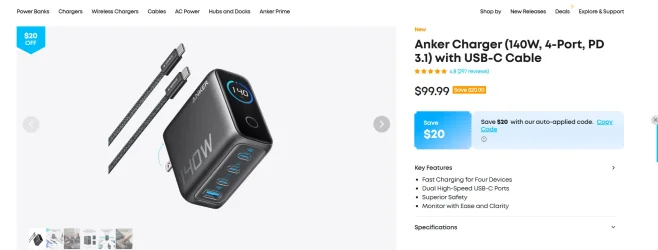
This charger can recharge that powerbank 737 in about 1 hour.

1762377704711.webp
 

My Computers My Computers

  • At a glance

    Windows 11 ProIntel Core i5-8279u32GB DDR4 2666MhzIntel Iris Plus 655
    OS
    Windows 11 Pro
    Computer type
    PC/Desktop
    Manufacturer/Model
    Beelink SEI8
    CPU
    Intel Core i5-8279u
    Motherboard
    AZW SEI
    Memory
    32GB DDR4 2666Mhz
    Graphics Card(s)
    Intel Iris Plus 655
    Sound Card
    Intel SST
    Monitor(s) Displays
    Asus ProArt PA278QV
    Screen Resolution
    2560x1440
    Hard Drives
    512GB NVMe
    PSU
    NA
    Case
    NA
    Cooling
    NA
    Keyboard
    NA
    Mouse
    NA
    Internet Speed
    500/50
    Browser
    Edge
    Antivirus
    Defender
    Other Info
    Mini PC used for testing Windows 11.
  • At a glance

    Windows 10 ProRyzen 9 5900x64GB DDR4-3600EVGA GeForce 3080 FT3 Ultra
    Operating System
    Windows 10 Pro
    Computer type
    PC/Desktop
    Manufacturer/Model
    Custom
    CPU
    Ryzen 9 5900x
    Motherboard
    Asus Rog Strix X570-E Gaming
    Memory
    64GB DDR4-3600
    Graphics card(s)
    EVGA GeForce 3080 FT3 Ultra
    Sound Card
    Onboard
    Monitor(s) Displays
    ASUS TUF Gaming VG27AQ. ASUS ProArt Display PA278QV 27” WQHD
    Screen Resolution
    2560x1440
    Hard Drives
    2TB WD SN850 PCI-E Gen 4 NVMe
    2TB Sandisk Ultra 2.5" SATA SSD
    PSU
    Seasonic Focus 850
    Case
    Fractal Meshify S2 in White
    Cooling
    Dark Rock Pro CPU cooler, 3 x 140mm case fans
    Keyboard
    Corsiar K65 RGB Lux
    Mouse
    Logitech G9 Laser Mouse
    Internet Speed
    500/50
    Browser
    Chrome
    Antivirus
    Defender.
I checked online and I have that Apple 20W usb-c wall charger that I bought from Apple years ago when I bought a new iphone. The new iphone didn't come with that wall charger. It came with a charging cable I believe only.


It's the charger that you connect to an outlet the Apple 20W one. That is what you mean right? But if I want to use that to charge the Anker 737, I need to use that usb-c to usb-c cable that came along with the Anker 737 right?


But if I want to use my xps 15 9520 charger that I use for my laptop, I can ask well since it's usb-c and it's 130W so it charges the Anker power bank faster right?
 

My Computer My Computer

At a glance

Windows 11 Pro
OS
Windows 11 Pro
It's the charger that you connect to an outlet the Apple 20W one. That is what you mean right? But if I want to use that to charge the Anker 737, I need to use that usb-c to usb-c cable that came along with the Anker 737 right?
Correct, it will just charge slow.
But if I want to use my xps 15 9520 charger that I use for my laptop, I can ask well since it's usb-c and it's 130W so it charges the Anker power bank faster right?
Correct.
 

My Computers My Computers

  • At a glance

    Windows 11 ProIntel Core i5-8279u32GB DDR4 2666MhzIntel Iris Plus 655
    OS
    Windows 11 Pro
    Computer type
    PC/Desktop
    Manufacturer/Model
    Beelink SEI8
    CPU
    Intel Core i5-8279u
    Motherboard
    AZW SEI
    Memory
    32GB DDR4 2666Mhz
    Graphics Card(s)
    Intel Iris Plus 655
    Sound Card
    Intel SST
    Monitor(s) Displays
    Asus ProArt PA278QV
    Screen Resolution
    2560x1440
    Hard Drives
    512GB NVMe
    PSU
    NA
    Case
    NA
    Cooling
    NA
    Keyboard
    NA
    Mouse
    NA
    Internet Speed
    500/50
    Browser
    Edge
    Antivirus
    Defender
    Other Info
    Mini PC used for testing Windows 11.
  • At a glance

    Windows 10 ProRyzen 9 5900x64GB DDR4-3600EVGA GeForce 3080 FT3 Ultra
    Operating System
    Windows 10 Pro
    Computer type
    PC/Desktop
    Manufacturer/Model
    Custom
    CPU
    Ryzen 9 5900x
    Motherboard
    Asus Rog Strix X570-E Gaming
    Memory
    64GB DDR4-3600
    Graphics card(s)
    EVGA GeForce 3080 FT3 Ultra
    Sound Card
    Onboard
    Monitor(s) Displays
    ASUS TUF Gaming VG27AQ. ASUS ProArt Display PA278QV 27” WQHD
    Screen Resolution
    2560x1440
    Hard Drives
    2TB WD SN850 PCI-E Gen 4 NVMe
    2TB Sandisk Ultra 2.5" SATA SSD
    PSU
    Seasonic Focus 850
    Case
    Fractal Meshify S2 in White
    Cooling
    Dark Rock Pro CPU cooler, 3 x 140mm case fans
    Keyboard
    Corsiar K65 RGB Lux
    Mouse
    Logitech G9 Laser Mouse
    Internet Speed
    500/50
    Browser
    Chrome
    Antivirus
    Defender.
That picture you posted, well I have the regular standard 20W Apple one. Then I have the Anker 737 usb-c to usb-c cable that came along with it. So that is fine but it will takes hour to charge. But since I have a dell xps usb-c charger that is 130W, as long as I'm not charging my laptop with that Dell usb-c 130W charger, I can use that charger instead right? So buying what you posted above wouldn't be necessary?
 

My Computer My Computer

At a glance

Windows 11 Pro
OS
Windows 11 Pro
Okay that makes sense. I don't remember if I actually did the Dell XPS usb-c 130W charger last time to the Anker 737 powerbank for some reason. If I did, it was only once. I was concerned it might cause it issues with it so I always used the Apple 20W one with it.


The thing is with that Dell XPS 15 9520 usb-c 130W charger, that is the only cable I need right? Plug that straight into the Anker 737 usb-c port? Whereas with the picture you posted above or the Apple 20W charger and the Anker 737 usb-c to usb-c cable provided by Anker, well you are like connecting 2 cables to each other before you connect the last one to the Anker 737 right? Thanks.
 

My Computer My Computer

At a glance

Windows 11 Pro
OS
Windows 11 Pro
That picture you posted, well I have the regular standard 20W Apple one. Then I have the Anker 737 usb-c to usb-c cable that came along with it. So that is fine but it will takes hour to charge. But since I have a dell xps usb-c charger that is 130W, as long as I'm not charging my laptop with that Dell usb-c 130W charger, I can use that charger instead right? So buying what you posted above wouldn't be necessary?
Yes that is correct, you can use the 20w apple charger and it will be slow. You can charge with 130w Dell charger and it will charge much faster.


No, you don't have to buy what I posted, that's just the fastest charger available from Anker that is made to charge that 737 powerbank in about 1 hour.
 

My Computers My Computers

  • At a glance

    Windows 11 ProIntel Core i5-8279u32GB DDR4 2666MhzIntel Iris Plus 655
    OS
    Windows 11 Pro
    Computer type
    PC/Desktop
    Manufacturer/Model
    Beelink SEI8
    CPU
    Intel Core i5-8279u
    Motherboard
    AZW SEI
    Memory
    32GB DDR4 2666Mhz
    Graphics Card(s)
    Intel Iris Plus 655
    Sound Card
    Intel SST
    Monitor(s) Displays
    Asus ProArt PA278QV
    Screen Resolution
    2560x1440
    Hard Drives
    512GB NVMe
    PSU
    NA
    Case
    NA
    Cooling
    NA
    Keyboard
    NA
    Mouse
    NA
    Internet Speed
    500/50
    Browser
    Edge
    Antivirus
    Defender
    Other Info
    Mini PC used for testing Windows 11.
  • At a glance

    Windows 10 ProRyzen 9 5900x64GB DDR4-3600EVGA GeForce 3080 FT3 Ultra
    Operating System
    Windows 10 Pro
    Computer type
    PC/Desktop
    Manufacturer/Model
    Custom
    CPU
    Ryzen 9 5900x
    Motherboard
    Asus Rog Strix X570-E Gaming
    Memory
    64GB DDR4-3600
    Graphics card(s)
    EVGA GeForce 3080 FT3 Ultra
    Sound Card
    Onboard
    Monitor(s) Displays
    ASUS TUF Gaming VG27AQ. ASUS ProArt Display PA278QV 27” WQHD
    Screen Resolution
    2560x1440
    Hard Drives
    2TB WD SN850 PCI-E Gen 4 NVMe
    2TB Sandisk Ultra 2.5" SATA SSD
    PSU
    Seasonic Focus 850
    Case
    Fractal Meshify S2 in White
    Cooling
    Dark Rock Pro CPU cooler, 3 x 140mm case fans
    Keyboard
    Corsiar K65 RGB Lux
    Mouse
    Logitech G9 Laser Mouse
    Internet Speed
    500/50
    Browser
    Chrome
    Antivirus
    Defender.
The thing is with that Dell XPS 15 9520 usb-c 130W charger, that is the only cable I need right? Plug that straight into the Anker 737 usb-c port?
Correct.
 

My Computers My Computers

  • At a glance

    Windows 11 ProIntel Core i5-8279u32GB DDR4 2666MhzIntel Iris Plus 655
    OS
    Windows 11 Pro
    Computer type
    PC/Desktop
    Manufacturer/Model
    Beelink SEI8
    CPU
    Intel Core i5-8279u
    Motherboard
    AZW SEI
    Memory
    32GB DDR4 2666Mhz
    Graphics Card(s)
    Intel Iris Plus 655
    Sound Card
    Intel SST
    Monitor(s) Displays
    Asus ProArt PA278QV
    Screen Resolution
    2560x1440
    Hard Drives
    512GB NVMe
    PSU
    NA
    Case
    NA
    Cooling
    NA
    Keyboard
    NA
    Mouse
    NA
    Internet Speed
    500/50
    Browser
    Edge
    Antivirus
    Defender
    Other Info
    Mini PC used for testing Windows 11.
  • At a glance

    Windows 10 ProRyzen 9 5900x64GB DDR4-3600EVGA GeForce 3080 FT3 Ultra
    Operating System
    Windows 10 Pro
    Computer type
    PC/Desktop
    Manufacturer/Model
    Custom
    CPU
    Ryzen 9 5900x
    Motherboard
    Asus Rog Strix X570-E Gaming
    Memory
    64GB DDR4-3600
    Graphics card(s)
    EVGA GeForce 3080 FT3 Ultra
    Sound Card
    Onboard
    Monitor(s) Displays
    ASUS TUF Gaming VG27AQ. ASUS ProArt Display PA278QV 27” WQHD
    Screen Resolution
    2560x1440
    Hard Drives
    2TB WD SN850 PCI-E Gen 4 NVMe
    2TB Sandisk Ultra 2.5" SATA SSD
    PSU
    Seasonic Focus 850
    Case
    Fractal Meshify S2 in White
    Cooling
    Dark Rock Pro CPU cooler, 3 x 140mm case fans
    Keyboard
    Corsiar K65 RGB Lux
    Mouse
    Logitech G9 Laser Mouse
    Internet Speed
    500/50
    Browser
    Chrome
    Antivirus
    Defender.
Yes so that is what I did the times that I used the Anker 737 and charged it. I used the 20W Apple Charger and the Anker supplied usb-c to usb-c cable and it took many hours to charge it to 100%.


I don't recall if I charged the Anker with the Dell XPS 15 9520 USB C 130W charger or not and if I did, I did it once maybe. I was concerned it might somehow cause damage so I didn't bother. But I just want to make sure if I do it now, it's like a direct connect and no other cables. Thanks for confirming that.


Yes that thing you posted, I recalled you mentioned last time people buy it to charge their Anker faster. But for me since I have an xps 15 9520 laptop that has a dell 130w usb-c charger, it wouldn't make sense right. I mainly use it and charge it inside the apartment. However, who is the people who buy it then? People who don't have a laptop charger that uses usb-c then? But people who want to charge their Anker 737 while outside their apartment into an outlet then? Since even if they do have a laptop charger, well that is heavy and that adapter isn't right?


I have noticed so many of these chargers and wondered why people pay so much for it. I always thought, couldn't you use the Apple 20W one but people want to charge faster right? I'm curious what devices are people charging? Because say my iPhone is low in battery. If I charged my iPhone with the Apple 20W charger and the charging cable for 30 minutes, it's going to charge up to at least 30% or more. Some people want it to charge even more to like 70% or more then right? For my iPhone, I think it takes like 1.5 hours if I want to charge it from 0% to 100%. To me, that isn't that bad. I mean it charging to 50% is already good enough for me. People just want it charged faster to 100% then right?


People with MacBooks buy this as well right? The other thing is I recall people saying this people with gaming laptops do as well so they don't have to carry the brick when they travel with it? So the other end of the gaming laptop charging cable they bring, then don't bring the brick and bring this right? Thing is it would still charge their gaming laptop to 100% right but it takes longer compared to say their 210W or 300W brick charger? I have zero experience with a gaming laptop as I only use Dell XPS and the chargers is always 130 W so I look at that as the standard.
 

My Computer My Computer

At a glance

Windows 11 Pro
OS
Windows 11 Pro

Latest Support Threads

Back
Top Bottom