Audio Issues


Gunner

Member
Member
Local time
4:29 PM
Posts
16
OS
Win 11 Pro 64 bit
1. I have not removed or installed anything new on my PC other than Win 11 cumulative update performed on 8-14-25.
2. At some point my audio out of my Klipsch ProMedia 2.1 THX became messed up.
3. Sound out of right speaker only, level is very low, it's all muffled, and like full bass.
4. The problem would come and go at will, sometimes it was good, then it would be messed up.
5. Currently I have one game installed, FS25 which has never caused problems in the past.
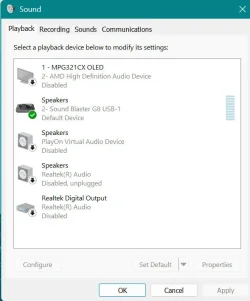
6. Lately sound is messed up all the time, I removed all Creative drivers (restarted), connected my speakers to my motherboards 3.5 audio out (Realtek), same audio issues.
7. SB G8 USB audio card lets me switch between speakers and headset, audio from headset is always good.
8. Audio is messed up from all sources, game, browsers, files on my PC, etc.

I have not had good audio through my speakers in about (3) days with multiple restarts or cold boots.
I connected the speakers to my laptop twice; audio was good both times.
I have not tried yet, but I have "never" had good results rolling back windows updates, either the rollback does not fix anything, or the rollback fails.

Sys Specs:

ASRock X870 PRO RS WiFi
AMD Ryzen 9 9950X3D
Memory - 64GB (32GBx2) - G.SKILL Trident Z5 Neo AMD EXPO Model F5-6000J3040G32GX2-TZ5NR
SSD - Crucial T700 Gen5 NVME M.2 SSD 2280 2TB PCI-Express 5.0
Sapphire NITRO+ RX 7900 XTX Vapor-X
Corsair HX1200 1200 Watt Power Supply
NZXT Kraken Z73 360 Liquid CPU Cooler
Sound Blaster G8 USB sound - Mobo = 7.1 CH HD Audio (Realtek ALC1220 Audio Codec)
MSI MPG 321CURX QD-OLED 32" UHD 240Hz Curved Gaming Monitor
Case - Corsair 7000D Airflow
Win 11 Pro 64bit
 
Windows Build/Version
24H2 Build 26100.4946

Attachments

  • speakers muffled.webp
    speakers muffled.webp
    31.5 KB · Views: 3

My Computer

System One

  • OS
    Win 11 Pro 64 bit
    Computer type
    PC/Desktop
    Manufacturer/Model
    Custom
    CPU
    AMD Ryzen 9 7900X3D
    Motherboard
    ASRock X870 PRO RS WiFi
    Memory
    G.SKILL Trident Z5 Neo AMD EXPO 32GB (2 x 32GB) DDR5 6000 (PC5 48000) Memory Model F5-6000J3038F16GX2-TZ5NR
    Graphics Card(s)
    Sapphire NITRO+ RX 7900 XTX Vapor-X
    Sound Card
    Sound Blaster G8 USB sound
    Monitor(s) Displays
    Sound Blaster G8 USB sound
    Screen Resolution
    2560 x 1440
    Hard Drives
    (Eternal) C-M.2 NVMe 2 TB - Crucial T700 Gen5, (2) WD gold 2TB, (1) SSD 1 TB. (External) 4TB, 14TB, 8TB and a 6TB
    PSU
    Corsair HX1200 1200 Watt
    Case
    Corsair 7000D Airflow
    Cooling
    NZXT Kraken Z73 360 Liquid CPU Cooler
    Keyboard
    Corsair K95 RGB
    Mouse
    Roccat Leadr
    Internet Speed
    Fiber 1GB symetrical
    Browser
    Brave, FF and Edge
    Antivirus
    Webroot, Malwarebytes
Check the cables from speaker so Sound card
 

My Computer

System One

  • OS
    Windows 11 Pro Insider 64 bit 25H2 26200.5742
    Computer type
    PC/Desktop
    Manufacturer/Model
    Gigabyte Z390 UD
    CPU
    Intel Core i7 9700K 3.60
    Motherboard
    Gigabyte Z390 UD
    Memory
    16 GB
    Graphics Card(s)
    nVidia GEForce RTX 2060 Super
    Sound Card
    onboard
    Monitor(s) Displays
    Two 27" Dell 4K monitors
    Screen Resolution
    3840 x 2160
    Hard Drives
    M.2 NVME SSD, 500 GB; Two 2TB Mechanical HDD's
    PSU
    850w PSU
    Case
    Cyberpower PC
    Cooling
    Water cooled
    Keyboard
    Backlit Cyberpower gaming keyboard
    Mouse
    Backlit Cyberpower gaming mouse
    Internet Speed
    1 GB mbps
    Browser
    Brave
    Antivirus
    Windows Security
@Gunner

I have the Klipsch Pro Media speakers too.
Neither the speakers or my system, were affected by the Aug 14th update.
So I would look for other causes.

And... here's ten points just for filling out your computer specs. :-)
 

My Computers

System One System Two

  • OS
    Win 11 Home ♦♦♦26200.8457 ♦♦♦♦♦♦♦25H2
    Computer type
    PC/Desktop
    Manufacturer/Model
    Built by Ghot® [May 2020]
    CPU
    AMD Ryzen 7 3700X
    Motherboard
    Asus Pro WS X570-ACE (BIOS 5302)
    Memory
    G.Skill (F4-3200C14D-16GTZKW)
    Graphics Card(s)
    EVGA RTX 2070 (08G-P4-2171-KR)
    Sound Card
    Realtek ALC1220P / ALC S1220A
    Monitor(s) Displays
    Dell U3011 30"
    Screen Resolution
    2560 x 1600
    Hard Drives
    2x Samsung 860 EVO 500GB,
    WD 4TB Black FZBX - SATA III,
    WD 8TB Black FZBX - SATA III,
    DRW-24B1ST CD/DVD Burner
    PSU
    PC Power & Cooling 750W Quad EPS12V
    Case
    Cooler Master ATCS 840 Tower
    Cooling
    CM Hyper 212 EVO (push/pull)
    Keyboard
    Ducky DK9008 Shine II Blue LED
    Mouse
    Logitech Optical M-100
    Internet Speed
    300/300
    Browser
    Firefox (latest)
    Antivirus
    Bitdefender Total Security
    Other Info
    Speakers: Klipsch Pro Media 2.1
  • Operating System
    Windows XP Pro 32bit w/SP3
    Computer type
    PC/Desktop
    Manufacturer/Model
    Built by Ghot® (not in use)
    CPU
    AMD Athlon 64 X2 5000+ (OC'd @ 3.2Ghz)
    Motherboard
    ASUS M2N32-SLI Deluxe Wireless Edition
    Memory
    TWIN2X2048-6400C4DHX (2 x 1GB, DDR2 800)
    Graphics card(s)
    EVGA 256-P2-N758-TR GeForce 8600GT SSC
    Sound Card
    Onboard
    Monitor(s) Displays
    ViewSonic G90FB Black 19" Professional (CRT)
    Screen Resolution
    up to 2048 x 1536
    Hard Drives
    WD 36GB 10,000rpm Raptor SATA
    Seagate 80GB 7200rpm SATA
    Lite-On LTR-52246S CD/RW
    Lite-On LH-18A1P CD/DVD Burner
    PSU
    PC Power & Cooling Silencer 750 Quad EPS12V
    Case
    Generic Beige case, 80mm fans
    Cooling
    ZALMAN 9500A 92mm CPU Cooler
    Keyboard
    Logitech Classic Keybooard 200
    Mouse
    Logitech Optical M-BT96a
    Internet Speed
    300/300
    Browser
    Firefox 3.x ??
    Antivirus
    Symantec (Norton)
    Other Info
    Still assembled, still runs. Haven't turned it on for 15 years?
Issue has nothing to do with connections of cables, one of the first things I checked.

BTW, at command prompt I ran a system scan, windows found some corrupt files, but this almost always happens as 11 is buggy.
Ran online cleanup-image restore health, restore finished with success, fixed nothing.

Just because your update didn't cause issues does not mean that updates affect everyone's system the same, my hardware and drivers / apps are totally different than yours Ghot, that's why PC's are so much harder to code for, it all the endless variables each system has.
 

My Computer

System One

  • OS
    Win 11 Pro 64 bit
    Computer type
    PC/Desktop
    Manufacturer/Model
    Custom
    CPU
    AMD Ryzen 9 7900X3D
    Motherboard
    ASRock X870 PRO RS WiFi
    Memory
    G.SKILL Trident Z5 Neo AMD EXPO 32GB (2 x 32GB) DDR5 6000 (PC5 48000) Memory Model F5-6000J3038F16GX2-TZ5NR
    Graphics Card(s)
    Sapphire NITRO+ RX 7900 XTX Vapor-X
    Sound Card
    Sound Blaster G8 USB sound
    Monitor(s) Displays
    Sound Blaster G8 USB sound
    Screen Resolution
    2560 x 1440
    Hard Drives
    (Eternal) C-M.2 NVMe 2 TB - Crucial T700 Gen5, (2) WD gold 2TB, (1) SSD 1 TB. (External) 4TB, 14TB, 8TB and a 6TB
    PSU
    Corsair HX1200 1200 Watt
    Case
    Corsair 7000D Airflow
    Cooling
    NZXT Kraken Z73 360 Liquid CPU Cooler
    Keyboard
    Corsair K95 RGB
    Mouse
    Roccat Leadr
    Internet Speed
    Fiber 1GB symetrical
    Browser
    Brave, FF and Edge
    Antivirus
    Webroot, Malwarebytes
If you have corrupted files, it is not Windows 11 or any other OS's problems.
It is most likely that your drive has Bad Sectors and the data that is on those sectors is corrupt.
Download DiskGenius and or Crystal Disk Info. both in my signature View the SMART Info for each of your drives separately If it is any less than GOOD the drive needs to be replaced.
You can also run a Surface Scan (View and Repair Bad Sectors) in DiskGenius
 

My Computer

System One

  • OS
    Windows 11 Pro Insider 64 bit 25H2 26200.5742
    Computer type
    PC/Desktop
    Manufacturer/Model
    Gigabyte Z390 UD
    CPU
    Intel Core i7 9700K 3.60
    Motherboard
    Gigabyte Z390 UD
    Memory
    16 GB
    Graphics Card(s)
    nVidia GEForce RTX 2060 Super
    Sound Card
    onboard
    Monitor(s) Displays
    Two 27" Dell 4K monitors
    Screen Resolution
    3840 x 2160
    Hard Drives
    M.2 NVME SSD, 500 GB; Two 2TB Mechanical HDD's
    PSU
    850w PSU
    Case
    Cyberpower PC
    Cooling
    Water cooled
    Keyboard
    Backlit Cyberpower gaming keyboard
    Mouse
    Backlit Cyberpower gaming mouse
    Internet Speed
    1 GB mbps
    Browser
    Brave
    Antivirus
    Windows Security
Spunk please read all of my original post, not going to find any bad sectors on SSD - Crucial T700 Gen5 NVME M.2.
 

My Computer

System One

  • OS
    Win 11 Pro 64 bit
    Computer type
    PC/Desktop
    Manufacturer/Model
    Custom
    CPU
    AMD Ryzen 9 7900X3D
    Motherboard
    ASRock X870 PRO RS WiFi
    Memory
    G.SKILL Trident Z5 Neo AMD EXPO 32GB (2 x 32GB) DDR5 6000 (PC5 48000) Memory Model F5-6000J3038F16GX2-TZ5NR
    Graphics Card(s)
    Sapphire NITRO+ RX 7900 XTX Vapor-X
    Sound Card
    Sound Blaster G8 USB sound
    Monitor(s) Displays
    Sound Blaster G8 USB sound
    Screen Resolution
    2560 x 1440
    Hard Drives
    (Eternal) C-M.2 NVMe 2 TB - Crucial T700 Gen5, (2) WD gold 2TB, (1) SSD 1 TB. (External) 4TB, 14TB, 8TB and a 6TB
    PSU
    Corsair HX1200 1200 Watt
    Case
    Corsair 7000D Airflow
    Cooling
    NZXT Kraken Z73 360 Liquid CPU Cooler
    Keyboard
    Corsair K95 RGB
    Mouse
    Roccat Leadr
    Internet Speed
    Fiber 1GB symetrical
    Browser
    Brave, FF and Edge
    Antivirus
    Webroot, Malwarebytes
In older or cheaper PC sound technologies, speakers and headphones use the same elctrical signal, headphones just don't have amplifier and they have higher impedance. Connecting the headphones flips a circuit and the same output is directed to the headphones instead of the speakers, or either the headphones are detected and you can set what happens. If there're differences like one of them sounding well and the other not, it's for the devices themselves or for the cables.

In one of my setups, this system doesn't work or is absent. The headphones have good sound if the speakers are off, and the speakers sound well if the headphones aren't connected, but using both at the same time produces the sound you describe. This could be the situation with your onboard sound, or either the sound cables and connections in your case aren't in good shape (in my case, it's an ancient PCI model w/o proper or modern frontal sound sytem, although it can be extracted from some pins with an ad hoc connector that I had to buy independently, for what is it and the low price I paid I think I've got a good result, the cards's a SB X-Fi XtremeMusic in an old Windows 7 system).

Your Sound Blaster G8 is more complicated b/c it has a very special amplifier that isn't valid for headphones, hence you have to choose manually which amplifier you use. I suspect the amplifier for speakers isn't working well.

If it helps, for installing a modern SB Audigy FX v2 in my most powerful computer (AMD FX8350 in a 970 board) with Windows 10, I uninstalled the onboard sound drivers, rebooted to the BIOS, disabled onboard sound (so I don't have a Realtek sound solution disabled or anything, it just doesn't exist for Windows, I'll confirm this when I use the said computer next time and I'll correct it if needed), booted up to Windows "for cleanness", shut down, installed the card, booted up and installed the drivers.
 

My Computer

System One

  • OS
    Windows 11
    Manufacturer/Model
    MeLE Quieter 2Q (fanless miniPC)
    CPU
    Celeron J4125 (10th gen)
    Memory
    8GB DDR4
    Monitor(s) Displays
    Samsung SyncMaster T260
    Screen Resolution
    1920x1200
    Hard Drives
    256GB eMMC (Windows)
    2TB USB3 HDD Toshiba (Data)
JLArranz;
The SB G8 is setup to handle headset or speakers, it has a switch that just turns one on and the other off, just like a TV when you switch the source for different video inputs.
Audio came back to my speakers today, all sudden it just started working, not reboots nothing.

As far as the Realtek onboard sound which has the same audio issues, only the speakers are connected, the headphones are not connected. This acts more like some type of driver conflict, I have run the same setup for (2) years on this PC, and it was right after I updated windows on the 14th that the problem started. I was watching some videos on youtube, audio was good, notification popped up for restart for windows update, I restarted, went into my game, audio was messed up. Exited the game and every audio source was messed up. Left the house, came back about (5) hours later and the audio was fine. This is just what it does, its like a switch is flipped, one minute audio is good, then its not.
 

My Computer

System One

  • OS
    Win 11 Pro 64 bit
    Computer type
    PC/Desktop
    Manufacturer/Model
    Custom
    CPU
    AMD Ryzen 9 7900X3D
    Motherboard
    ASRock X870 PRO RS WiFi
    Memory
    G.SKILL Trident Z5 Neo AMD EXPO 32GB (2 x 32GB) DDR5 6000 (PC5 48000) Memory Model F5-6000J3038F16GX2-TZ5NR
    Graphics Card(s)
    Sapphire NITRO+ RX 7900 XTX Vapor-X
    Sound Card
    Sound Blaster G8 USB sound
    Monitor(s) Displays
    Sound Blaster G8 USB sound
    Screen Resolution
    2560 x 1440
    Hard Drives
    (Eternal) C-M.2 NVMe 2 TB - Crucial T700 Gen5, (2) WD gold 2TB, (1) SSD 1 TB. (External) 4TB, 14TB, 8TB and a 6TB
    PSU
    Corsair HX1200 1200 Watt
    Case
    Corsair 7000D Airflow
    Cooling
    NZXT Kraken Z73 360 Liquid CPU Cooler
    Keyboard
    Corsair K95 RGB
    Mouse
    Roccat Leadr
    Internet Speed
    Fiber 1GB symetrical
    Browser
    Brave, FF and Edge
    Antivirus
    Webroot, Malwarebytes
Do you have a back up you can revert to?
 

My Computer

System One

  • OS
    Win 11 Pro
    Computer type
    PC/Desktop
    Manufacturer/Model
    N/A
    CPU
    AMD Ryzen 7 9700X
    Motherboard
    ASUS Crosshair Viii Hero Wi Fi
    Memory
    G.Skill Trident Z5 Neo RGB 64GB Kit (2x32GB) DDR5-6000 C30
    Graphics Card(s)
    PowerColor Radeon RX 9060 XT Reaper GDDR6 16GB
    Sound Card
    USB Out NAD M51 DAC with Adams A8 powered speakers
    Monitor(s) Displays
    Dell 3219Q
    Screen Resolution
    3840 x 2160
    Hard Drives
    5 x WD_BLACK SN850x PCIe Gen4 NVMe M.2 SSD - 4TB
    PSU
    be quiet! DARK POWER 13 1000W Titanium PCIe 5.0 ATX Modular PSU
    Case
    Fractal Design Define 7 Full Tower Case (Black)
    Cooling
    Noctua NH-D15 G2 LBC - High Performance Multi-Socket PWM CPU Cooler
    Keyboard
    Razer Huntsman V2
    Mouse
    Razer Viper Ultimate
    Internet Speed
    Starlink 94Mbps down 20Mbps up
    Browser
    Brave
    Antivirus
    ESET

My Computer

System One

  • OS
    Windows 11 Pro Insider 64 bit 25H2 26200.5742
    Computer type
    PC/Desktop
    Manufacturer/Model
    Gigabyte Z390 UD
    CPU
    Intel Core i7 9700K 3.60
    Motherboard
    Gigabyte Z390 UD
    Memory
    16 GB
    Graphics Card(s)
    nVidia GEForce RTX 2060 Super
    Sound Card
    onboard
    Monitor(s) Displays
    Two 27" Dell 4K monitors
    Screen Resolution
    3840 x 2160
    Hard Drives
    M.2 NVME SSD, 500 GB; Two 2TB Mechanical HDD's
    PSU
    850w PSU
    Case
    Cyberpower PC
    Cooling
    Water cooled
    Keyboard
    Backlit Cyberpower gaming keyboard
    Mouse
    Backlit Cyberpower gaming mouse
    Internet Speed
    1 GB mbps
    Browser
    Brave
    Antivirus
    Windows Security

My Computers

System One System Two

  • OS
    Windows 11 Pro 25H2
    Computer type
    PC/Desktop
    Manufacturer/Model
    Homebuilt
    CPU
    Intel Core i9 13900K
    Motherboard
    Asus ProArt Z790 Creator WiFi - Bios 3107
    Memory
    Corsair Dominator Platinum 64gb 5600MT/s DDR5 Dual Channel
    Graphics Card(s)
    Sapphire NITRO+ AMD Radeon RX 7900 XTX Vapor-X 24GB
    Sound Card
    External DAC: Cambridge Audio DACMagic200M - Headphone Amp: Topping L50
    Monitor(s) Displays
    Panasonic MX950 Mini LED 55" TV 120hz
    Screen Resolution
    3840 x 2160 120hz
    Hard Drives
    Samsung 980 Pro 2TB (OS)
    Samsung 980 Pro 1TB (Files)
    Lexar NZ790 4TB
    LaCie d2 Professional 6TB external - USB 3.1
    Seagate Expansion 16TB external - USB 3.2
    Seagate One Touch 18TB external HD - USB 3.0
    PSU
    Corsair RM1200x Shift
    Case
    Corsair RGB Smart Case 5000x (white)
    Cooling
    Corsair iCue H150i Elite Capellix XT
    Keyboard
    Incase Ergonomic USB (Microsoft clone)
    Mouse
    Logitech MX Master 3S
    Internet Speed
    Fibre 900/500 Mbps
    Browser
    Microsoft Edge Chromium
    Antivirus
    Bitdefender Total Security
    Other Info
    AMD Radeon Software & Drivers 26.1.1
    Hasleo Backup Suite
    Dashlane password manager
    Kensington Verimark fingerprint reader
    Logitech Brio 4K webcam
    Orico 10-port powered USB 3.0 hub
  • Operating System
    Windows 11 Pro 25H2
    Computer type
    Laptop
    Manufacturer/Model
    Asus Vivobook X1605VA
    CPU
    Intel® Core™ i9-13900H
    Motherboard
    Asus X1605VA bios 309
    Memory
    32GB DDR4-3200 Dual channel
    Graphics card(s)
    *Intel Iris Xᵉ Graphics G7
    Sound Card
    Realtek | Intel SST Bluetooth & USB
    Monitor(s) Displays
    16.0-inch, WUXGA 16:10 aspect ratio, IPS-level Panel
    Screen Resolution
    1920 x 1200 60hz
    Hard Drives
    512GB M.2 NVMe™ PCIe® 3.0 SSD
    Mouse
    Logitech MX Ergo Trackball
    Antivirus
    Bitdefender Total Security
    Other Info
    720p Webcam
    WiFi & USB to ethernet
Back
Top Bottom