Back button


modelman

Well-known member
Member
VIP
Local time
5:11 PM
Posts
117
OS
Windows11
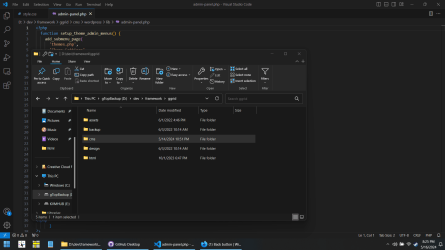
Following the latest update, I have now lost the back button on file explorer. I have also lost the file path.

Can anyone tell me how to get it back please/

Thank you.
 

My Computers My Computers

  • At a glance

    Windows11intel i12
    OS
    Windows11
    Computer type
    Laptop
    Manufacturer/Model
    Asus
    CPU
    intel i12
  • At a glance

    W11i5-124008GB
    Operating System
    W11
    Computer type
    PC/Desktop
    Manufacturer/Model
    HP
    CPU
    i5-12400
    Motherboard
    HP
    Memory
    8GB
    Internet Speed
    30mbps
    Browser
    Edge
    Antivirus
    Defender
Is the back button missing or is it grayed out? Would you please post a screenshot.
Have you recently installed any new software or do you have any 3rd party app installed that alters the GUI?
 

My Computers My Computers

  • At a glance

    Windows 11 Pro 25H2 26200.8655i9-10900 10 core 20 threads32 gbnone-Intel UHD Graphics 630
    OS
    Windows 11 Pro 25H2 26200.8655
    Computer type
    PC/Desktop
    Manufacturer/Model
    Dell Optiplex 7080
    CPU
    i9-10900 10 core 20 threads
    Motherboard
    DELL 0J37VM
    Memory
    32 gb
    Graphics Card(s)
    none-Intel UHD Graphics 630
    Sound Card
    Integrated Realtek
    Monitor(s) Displays
    Benq 27
    Screen Resolution
    2560x1440
    Hard Drives
    2x1tb Solidigm m.2 nvme /External drives 512gb Samsung m.2 sata+2tb Kingston m2.nvme
    PSU
    500w
    Case
    MT
    Cooling
    Dell Premium
    Keyboard
    Logitech wired
    Mouse
    Logitech wireless
    Internet Speed
    so slow I'm too embarrassed to tell
    Browser
    #1 Edge #2 Firefox
    Antivirus
    Defender+MWB Premium
  • At a glance

    Windows 11 Pro 24H2 26200.8457AMD Ryzen 7 6800U32 gbintegrated
    Operating System
    Windows 11 Pro 24H2 26200.8457
    Computer type
    PC/Desktop
    Manufacturer/Model
    Beelink Mini PC SER5
    CPU
    AMD Ryzen 7 6800U
    Memory
    32 gb
    Graphics card(s)
    integrated
    Sound Card
    integrated
    Monitor(s) Displays
    Benq 27
    Screen Resolution
    2560x1440
    Hard Drives
    1TB Crucial nvme
    Keyboard
    Logitech wired
    Mouse
    Logitech wireless
    Internet Speed
    still too embarrassed to tell
    Browser
    Firefox
    Antivirus
    Defender
    Other Info
    System 3 is non compliant Dell 9020 i7-4770/24gb ram Win11 PRO 26200.8457
Thank you for your reply. I have now uninstalled the updates and all is back to normal.

I will not install them again
 

My Computers My Computers

  • At a glance

    Windows11intel i12
    OS
    Windows11
    Computer type
    Laptop
    Manufacturer/Model
    Asus
    CPU
    intel i12
  • At a glance

    W11i5-124008GB
    Operating System
    W11
    Computer type
    PC/Desktop
    Manufacturer/Model
    HP
    CPU
    i5-12400
    Motherboard
    HP
    Memory
    8GB
    Internet Speed
    30mbps
    Browser
    Edge
    Antivirus
    Defender
It would be nice to know what updates your uninstalled. Someone else may benefit from the information.
 

My Computers My Computers

  • At a glance

    Windows 11 Home, 25H2, Latest OS BuildIntel(R) Core(TM) i3-8145U CPU @ 2.10GHz 2.30...8GB
    OS
    Windows 11 Home, 25H2, Latest OS Build
    Computer type
    Laptop
    Manufacturer/Model
    HP 15-dw0xx
    CPU
    Intel(R) Core(TM) i3-8145U CPU @ 2.10GHz 2.30 GHz
    Memory
    8GB
    Screen Resolution
    1366 x 768
    Hard Drives
    930 GB
    Keyboard
    Built In
    Mouse
    Wireless Logitech M325S
    Browser
    Chrome 139.0.7258.128
    Antivirus
    Windows Defender
    Other Info
    Cygwin64
  • At a glance

    Windows 10 Home, Version 22H2, Build19045.3693AMD E-300 with Radeon HD Graphics 1.30 GHz10GBRadeon HD Graphics 1.30 GHz
    Operating System
    Windows 10 Home, Version 22H2, Build19045.3693
    Computer type
    PC/Desktop
    Manufacturer/Model
    HP Pavilion
    CPU
    AMD E-300 with Radeon HD Graphics 1.30 GHz
    Memory
    10GB
    Graphics card(s)
    Radeon HD Graphics 1.30 GHz
    Sound Card
    Realtek
    Monitor(s) Displays
    15"
    Screen Resolution
    1280 x 1024
    Hard Drives
    700 GB
    Keyboard
    Wireless
    Mouse
    Wireless
    Browser
    Chrome
    Antivirus
    Windows Defender
    Other Info
    This computer is connected to my IC-735 radio.
I will not install them again
FYI While you can hide the update, if the problematic update was a cumulative update, that is not an ongoing solution without disabling all updates permanently.

Cumulative updates are just that. What is in this month's cumulative will also be in next month's cumulative.

If it is a cumulative and you are running the release version of 11, there is nothing wrong with the update as by now hundreds of thousands of us have downloaded the same update without issues. If the update caused a problem for you, that would point to something going on with your specific device. I would think you would want to solve exactly what that is.
 

My Computers My Computers

  • At a glance

    Windows 11 Pro 25H2 26200.8655i9-10900 10 core 20 threads32 gbnone-Intel UHD Graphics 630
    OS
    Windows 11 Pro 25H2 26200.8655
    Computer type
    PC/Desktop
    Manufacturer/Model
    Dell Optiplex 7080
    CPU
    i9-10900 10 core 20 threads
    Motherboard
    DELL 0J37VM
    Memory
    32 gb
    Graphics Card(s)
    none-Intel UHD Graphics 630
    Sound Card
    Integrated Realtek
    Monitor(s) Displays
    Benq 27
    Screen Resolution
    2560x1440
    Hard Drives
    2x1tb Solidigm m.2 nvme /External drives 512gb Samsung m.2 sata+2tb Kingston m2.nvme
    PSU
    500w
    Case
    MT
    Cooling
    Dell Premium
    Keyboard
    Logitech wired
    Mouse
    Logitech wireless
    Internet Speed
    so slow I'm too embarrassed to tell
    Browser
    #1 Edge #2 Firefox
    Antivirus
    Defender+MWB Premium
  • At a glance

    Windows 11 Pro 24H2 26200.8457AMD Ryzen 7 6800U32 gbintegrated
    Operating System
    Windows 11 Pro 24H2 26200.8457
    Computer type
    PC/Desktop
    Manufacturer/Model
    Beelink Mini PC SER5
    CPU
    AMD Ryzen 7 6800U
    Memory
    32 gb
    Graphics card(s)
    integrated
    Sound Card
    integrated
    Monitor(s) Displays
    Benq 27
    Screen Resolution
    2560x1440
    Hard Drives
    1TB Crucial nvme
    Keyboard
    Logitech wired
    Mouse
    Logitech wireless
    Internet Speed
    still too embarrassed to tell
    Browser
    Firefox
    Antivirus
    Defender
    Other Info
    System 3 is non compliant Dell 9020 i7-4770/24gb ram Win11 PRO 26200.8457

My Computers My Computers

  • At a glance

    Windows 11 Pro 25H2Intel Core i7-10700K16GB (8GB PC4-19200 DDR4 SDRAM x2)NVIDIA GeForce GTX 1050 TI
    OS
    Windows 11 Pro 25H2
    Computer type
    PC/Desktop
    Manufacturer/Model
    PowerSpec B746
    CPU
    Intel Core i7-10700K
    Motherboard
    ASRock Z490 Phantom Gaming 4/ax
    Memory
    16GB (8GB PC4-19200 DDR4 SDRAM x2)
    Graphics Card(s)
    NVIDIA GeForce GTX 1050 TI
    Sound Card
    Realtek Audio
    Monitor(s) Displays
    #1. LG ULTRAWIDE 34" #2. AOC Q32G2WG3 32"
    Screen Resolution
    #1. 3440 X 1440 #2. 1920 x 1080
    Hard Drives
    NVMe WDC WDS100T2B0C-00PXH0 1TB
    Samsung SSD 860 EVO 1TB
    PSU
    750 Watts (62.5A)
    Case
    PowerSpec/Lian Li ATX 205
    Keyboard
    Logitech K270
    Mouse
    Logitech M185
    Browser
    Microsoft Edge and Firefox
    Antivirus
    Webroot SecureAnywhere CE 26.1
  • At a glance

    Windows 11 Canary ChannelIntel Core i5-8400 CPU @ 2.80GHz16 MB DDR 4-2666
    Operating System
    Windows 11 Canary Channel
    Computer type
    PC/Desktop
    Manufacturer/Model
    PowerSpec G156
    CPU
    Intel Core i5-8400 CPU @ 2.80GHz
    Motherboard
    AsusTeK Prime B360M-A
    Memory
    16 MB DDR 4-2666
    Monitor(s) Displays
    23" Speptre HDMI 75Hz
    Screen Resolution
    1920x1080
    Hard Drives
    Samsung 970 EVO 500GB NVMe
    Keyboard
    Logitek K270
    Mouse
    Logitek M185
    Browser
    Firefox, Edge and Edge Canary
    Antivirus
    Windows Defender
As for the Back button in File Explorer, it doesn't show in mind until I click a folder or file in the right pane.

1715806839698.png
 

My Computers My Computers

  • At a glance

    Win11 Pro RTM Version 24H2 Build 26100.4202Intel Core i5 11th Gen. 2.40GHz12GB
    OS
    Win11 Pro RTM Version 24H2 Build 26100.4202
    Computer type
    Laptop
    Manufacturer/Model
    Dell Vostro 3400
    CPU
    Intel Core i5 11th Gen. 2.40GHz
    Memory
    12GB
    Hard Drives
    256GB SSD NVMe M.2
  • At a glance

    Win11 Pro RTM Version 24H2 Build 26100.4202Intel Core i5 10th Gen. 2.90GHz16GBOnboard, no VGA, using a DisplayPort-to-VGA a...
    Operating System
    Win11 Pro RTM Version 24H2 Build 26100.4202
    Computer type
    PC/Desktop
    Manufacturer/Model
    Dell Vostro 5890
    CPU
    Intel Core i5 10th Gen. 2.90GHz
    Memory
    16GB
    Graphics card(s)
    Onboard, no VGA, using a DisplayPort-to-VGA adapter
    Monitor(s) Displays
    24" Dell
    Hard Drives
    512GB SSD NVMe, 4TB Seagate HDD
    Browser
    Firefox, Edge
    Antivirus
    Windows Defender/Microsoft Security
I have currently blocked all updates. I do have Startallback installed, if this would cause the problem? I only really have it so I can have a small taskbar, as I don't like a big one, and the reg fix that was put on here ages ago no longer works.
The updates were KB5037591 and KB5037771 which I uninstalled to clear the problem. With them installed there was no way I could find to see the back button or address bar.
At 78 I am not as technically minded as most on here, so have to go with the easy option.
I have W11, version 10.0.22631
Thank you for your comments.
 

My Computers My Computers

  • At a glance

    Windows11intel i12
    OS
    Windows11
    Computer type
    Laptop
    Manufacturer/Model
    Asus
    CPU
    intel i12
  • At a glance

    W11i5-124008GB
    Operating System
    W11
    Computer type
    PC/Desktop
    Manufacturer/Model
    HP
    CPU
    i5-12400
    Motherboard
    HP
    Memory
    8GB
    Internet Speed
    30mbps
    Browser
    Edge
    Antivirus
    Defender
Just checked spec again. It is version 23H2 and build 22631.3447
 

My Computers My Computers

  • At a glance

    Windows11intel i12
    OS
    Windows11
    Computer type
    Laptop
    Manufacturer/Model
    Asus
    CPU
    intel i12
  • At a glance

    W11i5-124008GB
    Operating System
    W11
    Computer type
    PC/Desktop
    Manufacturer/Model
    HP
    CPU
    i5-12400
    Motherboard
    HP
    Memory
    8GB
    Internet Speed
    30mbps
    Browser
    Edge
    Antivirus
    Defender
Getting updates for Patch Tuesday now, latest is 22631.3593.
 

My Computers My Computers

  • At a glance

    Win11 Pro RTM Version 24H2 Build 26100.4202Intel Core i5 11th Gen. 2.40GHz12GB
    OS
    Win11 Pro RTM Version 24H2 Build 26100.4202
    Computer type
    Laptop
    Manufacturer/Model
    Dell Vostro 3400
    CPU
    Intel Core i5 11th Gen. 2.40GHz
    Memory
    12GB
    Hard Drives
    256GB SSD NVMe M.2
  • At a glance

    Win11 Pro RTM Version 24H2 Build 26100.4202Intel Core i5 10th Gen. 2.90GHz16GBOnboard, no VGA, using a DisplayPort-to-VGA a...
    Operating System
    Win11 Pro RTM Version 24H2 Build 26100.4202
    Computer type
    PC/Desktop
    Manufacturer/Model
    Dell Vostro 5890
    CPU
    Intel Core i5 10th Gen. 2.90GHz
    Memory
    16GB
    Graphics card(s)
    Onboard, no VGA, using a DisplayPort-to-VGA adapter
    Monitor(s) Displays
    24" Dell
    Hard Drives
    512GB SSD NVMe, 4TB Seagate HDD
    Browser
    Firefox, Edge
    Antivirus
    Windows Defender/Microsoft Security
Also experiencing this issue after the latest updated. Thought I was going crazy. The address/path bar and the nav buttons are just gone.
 

My Computer My Computer

At a glance

Windows 11Intel Core i7 11th Gen 11800H (2.30GHz)64GB DDR4NVIDIA GeForce RTX 3050 Laptop GPU 4 GB GDDR6
OS
Windows 11
Computer type
Laptop
Manufacturer/Model
MSI GF Series GF63 Thin 11UC-262
CPU
Intel Core i7 11th Gen 11800H (2.30GHz)
Memory
64GB DDR4
Graphics Card(s)
NVIDIA GeForce RTX 3050 Laptop GPU 4 GB GDDR6
Can you supply a screenshot? Also, what happens if you restart the explorer from task manager? What if you launch control panel and click the arrow on the left side of the address back and select an Explorer location from that drop down? Does it just glitch upon boot to cause fbis issue or is it actually broken after the update?
 

My Computer My Computer

At a glance

Windows 11 Pro
OS
Windows 11 Pro
Potential fix: I used to have StartAllBack installed, but had removed it. I noticed someone above had said much the same, so I re-installed it, and I have the address bar and nav buttons back again.

My bet is that the update wiped out some of the registry entries the 3rd party app had installed.

"Depending on third-party OS hacks" now added to the ever-growing list of "things that someone with 28 years of experience in IT should know better than doing."

*hides in shame*
 

Attachments

  • screen.png
    screen.png
    77.3 KB · Views: 2

My Computer My Computer

At a glance

Windows 11Intel Core i7 11th Gen 11800H (2.30GHz)64GB DDR4NVIDIA GeForce RTX 3050 Laptop GPU 4 GB GDDR6
OS
Windows 11
Computer type
Laptop
Manufacturer/Model
MSI GF Series GF63 Thin 11UC-262
CPU
Intel Core i7 11th Gen 11800H (2.30GHz)
Memory
64GB DDR4
Graphics Card(s)
NVIDIA GeForce RTX 3050 Laptop GPU 4 GB GDDR6
My bet is that the update wiped out some of the registry entries the 3rd party app had installed.
Good bet, some Version Upgrades and Build updates to them may reset things and disable customizations.
 

My Computers My Computers

  • At a glance

    Win11 Pro RTM Version 24H2 Build 26100.4202Intel Core i5 11th Gen. 2.40GHz12GB
    OS
    Win11 Pro RTM Version 24H2 Build 26100.4202
    Computer type
    Laptop
    Manufacturer/Model
    Dell Vostro 3400
    CPU
    Intel Core i5 11th Gen. 2.40GHz
    Memory
    12GB
    Hard Drives
    256GB SSD NVMe M.2
  • At a glance

    Win11 Pro RTM Version 24H2 Build 26100.4202Intel Core i5 10th Gen. 2.90GHz16GBOnboard, no VGA, using a DisplayPort-to-VGA a...
    Operating System
    Win11 Pro RTM Version 24H2 Build 26100.4202
    Computer type
    PC/Desktop
    Manufacturer/Model
    Dell Vostro 5890
    CPU
    Intel Core i5 10th Gen. 2.90GHz
    Memory
    16GB
    Graphics card(s)
    Onboard, no VGA, using a DisplayPort-to-VGA adapter
    Monitor(s) Displays
    24" Dell
    Hard Drives
    512GB SSD NVMe, 4TB Seagate HDD
    Browser
    Firefox, Edge
    Antivirus
    Windows Defender/Microsoft Security
Thank you for reply. I uninstalled Startall back, reinstalled the W11 updates, then reinstalled startallback, and everything is now as it was originally.
 

My Computers My Computers

  • At a glance

    Windows11intel i12
    OS
    Windows11
    Computer type
    Laptop
    Manufacturer/Model
    Asus
    CPU
    intel i12
  • At a glance

    W11i5-124008GB
    Operating System
    W11
    Computer type
    PC/Desktop
    Manufacturer/Model
    HP
    CPU
    i5-12400
    Motherboard
    HP
    Memory
    8GB
    Internet Speed
    30mbps
    Browser
    Edge
    Antivirus
    Defender
(y)
 

My Computers My Computers

  • At a glance

    Win11 Pro RTM Version 24H2 Build 26100.4202Intel Core i5 11th Gen. 2.40GHz12GB
    OS
    Win11 Pro RTM Version 24H2 Build 26100.4202
    Computer type
    Laptop
    Manufacturer/Model
    Dell Vostro 3400
    CPU
    Intel Core i5 11th Gen. 2.40GHz
    Memory
    12GB
    Hard Drives
    256GB SSD NVMe M.2
  • At a glance

    Win11 Pro RTM Version 24H2 Build 26100.4202Intel Core i5 10th Gen. 2.90GHz16GBOnboard, no VGA, using a DisplayPort-to-VGA a...
    Operating System
    Win11 Pro RTM Version 24H2 Build 26100.4202
    Computer type
    PC/Desktop
    Manufacturer/Model
    Dell Vostro 5890
    CPU
    Intel Core i5 10th Gen. 2.90GHz
    Memory
    16GB
    Graphics card(s)
    Onboard, no VGA, using a DisplayPort-to-VGA adapter
    Monitor(s) Displays
    24" Dell
    Hard Drives
    512GB SSD NVMe, 4TB Seagate HDD
    Browser
    Firefox, Edge
    Antivirus
    Windows Defender/Microsoft Security
Thank you for this post! I deeply appreciate it! ...dayum no back button! I thought it was intented lolll!
 

My Computer My Computer

At a glance

win1113th Gen Intel(R) Core(TM) i7-13700 2.10 GHz64.0 GB (63.7 GB usable)GTX3060
OS
win11
Computer type
PC/Desktop
Manufacturer/Model
Dell
CPU
13th Gen Intel(R) Core(TM) i7-13700 2.10 GHz
Memory
64.0 GB (63.7 GB usable)
Graphics Card(s)
GTX3060
Sound Card
RC505 Mk1
Monitor(s) Displays
3 screen
Screen Resolution
1080
Hard Drives
a few...
this change was so annoying, thankfully installing startallback again also worked for me, appreciate the advice in this thread
 

My Computer My Computer

At a glance

Windows 11 Home
OS
Windows 11 Home
Computer type
PC/Desktop

Latest Support Threads

Back
Top Bottom