Bad Disk Reported


Dark Knight

Well-known member
Member
Local time
3:29 PM
Posts
263
Location
The great state of Georgia
OS
Windows 11 Pro 25H2 v26200.7171
I have a Western Digital 4TB external drive , the drive has never gave me a problem and does not make any noise at all. I installed Minitool Partition Wizard Free and after installation upon opening the program the software was reporting my WD 4TB drive as a bad disk.

I ran the following: chkdsk I: /f /r

CHKDSK took 24 hours to run, no errors reported , no bad sectors reported , no fixes needed.
I also have a copy of Macorit Partition Expert Pro, it does not report any bad disks.
I have a copy of PC Internals that also reports the drive as fine.
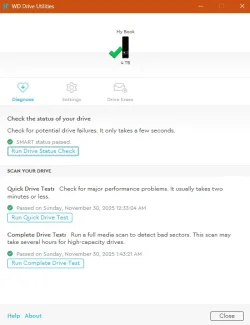
I also downloaded and ran WD Drive Utilities and ran a complete drive test and all is reported good.

Is it safe to say I can disregard what Minitool is reporting? or is there something else I can do to check the drive, like I said it is not giving me issues and makes no noise.
 
Windows Build/Version
Windows 11 25H2 26200.7309

My Computer

System One

  • OS
    Windows 11 Pro 25H2 v26200.7171
    Computer type
    PC/Desktop
    Manufacturer/Model
    self built
    CPU
    Intel I9-12900k Adler Lake
    Motherboard
    Gigabyte Z790 Gaming Plus AX
    Memory
    Corsair Vengeance 64GB DDR5
    Graphics Card(s)
    Realtek
    Monitor(s) Displays
    Samsung Curved 23"
    Screen Resolution
    1920x1080
    Hard Drives
    9 Drives total: Two 1TB M.2 SSD's, Three internal Seagate Barracuda 1TB HDD's , 4 Western Digital External removable drives , 3 @ 1TB each and 1 8TB
    Case
    Antec Flux Pro
    Cooling
    ID Cooling FX 240 Pro
    Browser
    Firefox
    Antivirus
    Bitdefender

My Computers

System One System Two

  • OS
    Win 11 Home ♦♦♦26200.8655 ♦♦♦♦♦♦♦25H2
    Computer type
    PC/Desktop
    Manufacturer/Model
    Built by Ghot® [May 2020]
    CPU
    AMD Ryzen 7 3700X
    Motherboard
    Asus Pro WS X570-ACE (BIOS 5302)
    Memory
    G.Skill (F4-3200C14D-16GTZKW)
    Graphics Card(s)
    EVGA RTX 2070 (08G-P4-2171-KR)
    Sound Card
    Realtek ALC1220P / ALC S1220A
    Monitor(s) Displays
    Dell U3011 30"
    Screen Resolution
    2560 x 1600
    Hard Drives
    2x Samsung 860 EVO 500GB,
    WD 4TB Black FZBX - SATA III,
    WD 8TB Black FZBX - SATA III,
    DRW-24B1ST CD/DVD Burner
    PSU
    PC Power & Cooling 750W Quad EPS12V
    Case
    Cooler Master ATCS 840 Tower
    Cooling
    CM Hyper 212 EVO (push/pull)
    Keyboard
    Ducky DK9008 Shine II Blue LED
    Mouse
    Logitech Optical M-100
    Internet Speed
    300/300
    Browser
    Firefox (latest)
    Antivirus
    Bitdefender Total Security
    Other Info
    Speakers: Klipsch Pro Media 2.1
  • Operating System
    Windows XP Pro 32bit w/SP3
    Computer type
    PC/Desktop
    Manufacturer/Model
    Built by Ghot® (not in use)
    CPU
    AMD Athlon 64 X2 5000+ (OC'd @ 3.2Ghz)
    Motherboard
    ASUS M2N32-SLI Deluxe Wireless Edition
    Memory
    TWIN2X2048-6400C4DHX (2 x 1GB, DDR2 800)
    Graphics card(s)
    EVGA 256-P2-N758-TR GeForce 8600GT SSC
    Sound Card
    Onboard
    Monitor(s) Displays
    ViewSonic G90FB Black 19" Professional (CRT)
    Screen Resolution
    up to 2048 x 1536
    Hard Drives
    WD 36GB 10,000rpm Raptor SATA
    Seagate 80GB 7200rpm SATA
    Lite-On LTR-52246S CD/RW
    Lite-On LH-18A1P CD/DVD Burner
    PSU
    PC Power & Cooling Silencer 750 Quad EPS12V
    Case
    Generic Beige case, 80mm fans
    Cooling
    ZALMAN 9500A 92mm CPU Cooler
    Keyboard
    Logitech Classic Keybooard 200
    Mouse
    Logitech Optical M-BT96a
    Internet Speed
    300/300
    Browser
    Firefox 3.x ??
    Antivirus
    Symantec (Norton)
    Other Info
    Still assembled, still runs. Haven't turned it on for 15 years?
Also, just an aside - the /f switch with chkdsk is redundant if you are running the /r switch (/r implies /f)
 

My Computer

System One

  • OS
    W11
    Computer type
    PC/Desktop
    Manufacturer/Model
    2 HP Desktops, 1 Dell Desktop, 2 Dell XPS Laptops, 1 HP Laptop
    Keyboard
    Logitech
    Mouse
    Logitech MX Master 4 & 3
    Internet Speed
    500 mps
    Browser
    Firefox
    Antivirus
    Bitdefender
@Dark Knight
A word of caution. What model is your WD 4TB HDD? Except the Elements model, My Passport and My Book models ( both Desktop and portable) are hardware encrypted by a chip in the SATA to USB bridge circuit inside the enclosure. If this bridge circuit fails as it happens most of the time, you won't be able to recover any data because it is encrypted.

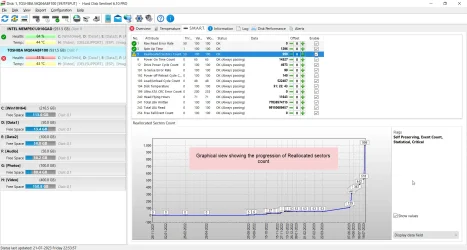
Irrespective of that, in your case I would suspect your HDD has developed many weak sectors and is on its way of developing bad sectors. I would recommend you to keep monitoring its health periodically with the trial version of Hard Disk Sentinel. In its Overview it will show whether any weak sectors are there and will caution you as and when bad sectors are found. Hard Disk Sentinel Trial version - HDD health and temperature monitoring

Screenshot of a failing HDD showing the progression of bad sectors in its SMART logged by Hard Disk Sentinel:

21-07-2023 22-59-26.webp
 
Last edited:

My Computers

System One System Two

  • OS
    Windows 11 Pro Version:25H2 OS Build: 26200.8524
    Computer type
    PC/Desktop
    Manufacturer/Model
    Beelink Mini PC Model: SEi12
    CPU
    12th Gen Intel core i5-1235U(Alder
    Motherboard
    SEi (manufactured by AZW)
    Memory
    16*2 (32 GB) DDR 4-3200(1600MHz) Crucial Technology
    Graphics Card(s)
    Intel Iris Xe Graphics (Internal)
    Sound Card
    Internal
    Monitor(s) Displays
    BenQ GW2283
    Screen Resolution
    1920*1080
    Hard Drives
    500GB NVME (Kingston SNV2S500G)
    1TB (Crucial CT1000BX500SSD1)
    PSU
    Power Brick 19V-6.32A , 120.08W
    Keyboard
    Dell KB3322Wi (Wireless)
    Mouse
    Dell WM118t (Wireless)
    Internet Speed
    4G/5G
    Browser
    MS Edge, Chrome
    Antivirus
    Malwarebytes Premium - Subscription
  • Operating System
    Windows 11 Home Version 25H2 Build 26200.8524
    Computer type
    PC/Desktop
    Manufacturer/Model
    Dell Inspiron 3280 AIO 22"
    CPU
    Intel Core i3 8145U
    Motherboard
    Dell inc. 027W48
    Memory
    Intel Optane 16GB module + DDR 4 16GB (Optane disabled.)
    Graphics card(s)
    Intel UHD Graphics 620
    Sound Card
    Internal
    Monitor(s) Displays
    Dell Monitor 22"
    Screen Resolution
    1920x1080
    Hard Drives
    Crucial CT1000BX500SSD1 ; 1000,2 GB
    PSU
    Power Brick
    Case
    All-in one
    Keyboard
    Dell Wireless KM636
    Mouse
    Dell Wireless KM 636
    Internet Speed
    4G
    Browser
    Edge, Chrome
    Antivirus
    Malwarebytes
    Other Info
    Upgraded from Windows 10 Home to Windows 11 Home on 28 Oct 2023
@Dark Knight
download and burn to USB using Rufus a live Linux distro
Ubuntu LTS is very good for testing and repairing Windows systems

link to Ubuntu LTS

link to Rufus

boot from the live Linux USB and when at the desktop of Ubuntu LTS
bottom left on the dock is the menu
within the menu in the accessories folder is 'Disks'

open disks which will give you details of your drive
up to and including if its failing.

the Ubuntu LTS live Linux distro will not install anything to your system
it runs totally from the USB stick drive.

best of luck Steve ..
 

My Computers

System One System Two

  • OS
    Debian Trixie KDE Windows 11 Home
    Computer type
    PC/Desktop
    Manufacturer/Model
    HP 24" AiO
    CPU
    Ryzen 7 5825u
    Motherboard
    HP
    Memory
    64GB DDR4 3200
    Graphics Card(s)
    Ryzen 7 5825u
    Sound Card
    RealTek
    Monitor(s) Displays
    24" HP AiO
    Screen Resolution
    1920 x 1080 @60 Hz
    Hard Drives
    1TB WD Blue SN580 M2 SSD Partitioned.
    2x 1TB USB HDD External Backup/Storage.
    PSU
    90W external power brick
    Case
    24" All in One
    Cooling
    Default Air Cooling
    Keyboard
    HP WiFi UK extended
    Mouse
    HP WiFi 3 Button
    Internet Speed
    1GB full fibre
    Browser
    Edge & Firefox
    Antivirus
    AVG Internet Security/Windows Defender
    Other Info
    Mainly Open Source Software
  • Operating System
    Ubuntu 22.04.5 LTS
    Computer type
    Laptop
    Manufacturer/Model
    Dell 13" Latitude 2017
    CPU
    i5 7200u
    Motherboard
    Dell
    Memory
    16GB DDR4
    Graphics card(s)
    Intel
    Sound Card
    Intel
    Monitor(s) Displays
    13" Dell Laptop
    Hard Drives
    250GB Crucial 2.5" SSD
    Mouse
    Generic WiFi 3 button
    Internet Speed
    WiFi only
    Browser
    Firefox
    Antivirus
    ClamAV TK
    Other Info
    Mainly Open Source Software
I installed Minitool Partition Wizard Free and after installation upon opening the program the software was reporting my WD 4TB drive as a bad disk.

Which Minitool Partition Wizard version and feature was used?

Was this a surface scan (green or red colors) or another type of drive test?


My Computer

System One

  • OS
    Windows 10
    Computer type
    Laptop
    Manufacturer/Model
    HP
    CPU
    Intel(R) Core(TM) i7-4800MQ CPU @ 2.70GHz
    Motherboard
    Product : 190A Version : KBC Version 94.56
    Memory
    16 GB Total: Manufacturer : Samsung MemoryType : DDR3 FormFactor : SODIMM Capacity : 8GB Speed : 1600
    Graphics Card(s)
    NVIDIA Quadro K3100M; Intel(R) HD Graphics 4600
    Sound Card
    IDT High Definition Audio CODEC; PNP Device ID HDAUDIO\FUNC_01&VEN_111D&DEV_76E0
    Hard Drives
    Model Hitachi HTS727575A9E364
    Antivirus
    Microsoft Defender
    Other Info
    Mobile Workstation
Which Minitool Partition Wizard version and feature was used?

Was this a surface scan (green or red colors) or another type of drive test?


I am using the most recent version of Minitool V13, Minitool wouldn't allow me to perform a surface scan on this drive , although using Macorit a surface scan showed no errors.
 

My Computer

System One

  • OS
    Windows 11 Pro 25H2 v26200.7171
    Computer type
    PC/Desktop
    Manufacturer/Model
    self built
    CPU
    Intel I9-12900k Adler Lake
    Motherboard
    Gigabyte Z790 Gaming Plus AX
    Memory
    Corsair Vengeance 64GB DDR5
    Graphics Card(s)
    Realtek
    Monitor(s) Displays
    Samsung Curved 23"
    Screen Resolution
    1920x1080
    Hard Drives
    9 Drives total: Two 1TB M.2 SSD's, Three internal Seagate Barracuda 1TB HDD's , 4 Western Digital External removable drives , 3 @ 1TB each and 1 8TB
    Case
    Antec Flux Pro
    Cooling
    ID Cooling FX 240 Pro
    Browser
    Firefox
    Antivirus
    Bitdefender
@Dark Knight
A word of caution. What model is your WD 4TB HDD? Except the Elements model, My Passport and My Book models ( both Desktop and portable) are hardware encrypted by a chip in the SATA to USB bridge circuit inside the enclosure. If this bridge circuit fails as it happens most of the time, you won't be able to recover any data because it is encrypted.

Irrespective of that, in your case I would suspect your HDD has developed many weak sectors and is on its way of developing bad sectors. I would recommend you to keep monitoring its health periodically with the trial version of Hard Disk Sentinel. In its Overview it will show whether any weak sectors are there and will caution you as and when bad sectors are found. Hard Disk Sentinel Trial version - HDD health and temperature monitoring

Screenshot of a failing HDD showing the progression of bad sectors in its SMART logged by Hard Disk Sentinel:

View attachment 155013

I Drive.webp

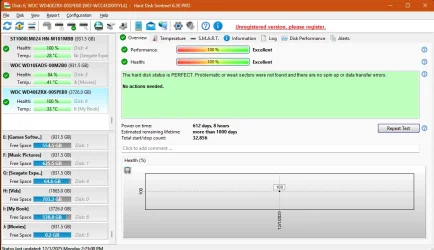
Hard Disk Sentinal shows no errors either on the drive , however is reporting errors on another drive that no other program is picking up, yet the drive gives me no issues :unsure:
 

My Computer

System One

  • OS
    Windows 11 Pro 25H2 v26200.7171
    Computer type
    PC/Desktop
    Manufacturer/Model
    self built
    CPU
    Intel I9-12900k Adler Lake
    Motherboard
    Gigabyte Z790 Gaming Plus AX
    Memory
    Corsair Vengeance 64GB DDR5
    Graphics Card(s)
    Realtek
    Monitor(s) Displays
    Samsung Curved 23"
    Screen Resolution
    1920x1080
    Hard Drives
    9 Drives total: Two 1TB M.2 SSD's, Three internal Seagate Barracuda 1TB HDD's , 4 Western Digital External removable drives , 3 @ 1TB each and 1 8TB
    Case
    Antec Flux Pro
    Cooling
    ID Cooling FX 240 Pro
    Browser
    Firefox
    Antivirus
    Bitdefender
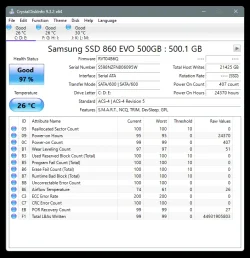
As per HD Sentinel...

My 2.5" SSD is 97%
My 4TB and 8TB WD Black HDDs are 100%


I'm so happy. LOL


But I knew that already...

Image1.webp
 

My Computers

System One System Two

  • OS
    Win 11 Home ♦♦♦26200.8655 ♦♦♦♦♦♦♦25H2
    Computer type
    PC/Desktop
    Manufacturer/Model
    Built by Ghot® [May 2020]
    CPU
    AMD Ryzen 7 3700X
    Motherboard
    Asus Pro WS X570-ACE (BIOS 5302)
    Memory
    G.Skill (F4-3200C14D-16GTZKW)
    Graphics Card(s)
    EVGA RTX 2070 (08G-P4-2171-KR)
    Sound Card
    Realtek ALC1220P / ALC S1220A
    Monitor(s) Displays
    Dell U3011 30"
    Screen Resolution
    2560 x 1600
    Hard Drives
    2x Samsung 860 EVO 500GB,
    WD 4TB Black FZBX - SATA III,
    WD 8TB Black FZBX - SATA III,
    DRW-24B1ST CD/DVD Burner
    PSU
    PC Power & Cooling 750W Quad EPS12V
    Case
    Cooler Master ATCS 840 Tower
    Cooling
    CM Hyper 212 EVO (push/pull)
    Keyboard
    Ducky DK9008 Shine II Blue LED
    Mouse
    Logitech Optical M-100
    Internet Speed
    300/300
    Browser
    Firefox (latest)
    Antivirus
    Bitdefender Total Security
    Other Info
    Speakers: Klipsch Pro Media 2.1
  • Operating System
    Windows XP Pro 32bit w/SP3
    Computer type
    PC/Desktop
    Manufacturer/Model
    Built by Ghot® (not in use)
    CPU
    AMD Athlon 64 X2 5000+ (OC'd @ 3.2Ghz)
    Motherboard
    ASUS M2N32-SLI Deluxe Wireless Edition
    Memory
    TWIN2X2048-6400C4DHX (2 x 1GB, DDR2 800)
    Graphics card(s)
    EVGA 256-P2-N758-TR GeForce 8600GT SSC
    Sound Card
    Onboard
    Monitor(s) Displays
    ViewSonic G90FB Black 19" Professional (CRT)
    Screen Resolution
    up to 2048 x 1536
    Hard Drives
    WD 36GB 10,000rpm Raptor SATA
    Seagate 80GB 7200rpm SATA
    Lite-On LTR-52246S CD/RW
    Lite-On LH-18A1P CD/DVD Burner
    PSU
    PC Power & Cooling Silencer 750 Quad EPS12V
    Case
    Generic Beige case, 80mm fans
    Cooling
    ZALMAN 9500A 92mm CPU Cooler
    Keyboard
    Logitech Classic Keybooard 200
    Mouse
    Logitech Optical M-BT96a
    Internet Speed
    300/300
    Browser
    Firefox 3.x ??
    Antivirus
    Symantec (Norton)
    Other Info
    Still assembled, still runs. Haven't turned it on for 15 years?
after installation upon opening the program the software was reporting my WD 4TB drive as a bad disk.


Did the software create a report / record?
False positive?


The WDC website link has their program for short and long generic tests.


Alternatively run the Sea Tools Long generic test:


Please run > post share links


a) chkdskfromevent


b) V2 log collector:


My Computer

System One

  • OS
    Windows 10
    Computer type
    Laptop
    Manufacturer/Model
    HP
    CPU
    Intel(R) Core(TM) i7-4800MQ CPU @ 2.70GHz
    Motherboard
    Product : 190A Version : KBC Version 94.56
    Memory
    16 GB Total: Manufacturer : Samsung MemoryType : DDR3 FormFactor : SODIMM Capacity : 8GB Speed : 1600
    Graphics Card(s)
    NVIDIA Quadro K3100M; Intel(R) HD Graphics 4600
    Sound Card
    IDT High Definition Audio CODEC; PNP Device ID HDAUDIO\FUNC_01&VEN_111D&DEV_76E0
    Hard Drives
    Model Hitachi HTS727575A9E364
    Antivirus
    Microsoft Defender
    Other Info
    Mobile Workstation
Did the software create a report / record?
False positive?


The WDC website link has their program for short and long generic tests.


Alternatively run the Sea Tools Long generic test:


Please run > post share links


a) chkdskfromevent


b) V2 log collector:

Minitool did not create a report or record, if I try to run a surface scan in minitool it will not let me but will on other drives, Macorit however lets me perform the scan .... without errors. WD utility , ran long scan and no errors, Seagate tools shows no error on the drive but will not run a short or extended scan , I get a popup that says something about a warranty , there is no longer a warranty on this drive.

FYI, I am not getting any BSOD's .

Here is the chdsk log from the drive in question ...
 

Attachments

My Computer

System One

  • OS
    Windows 11 Pro 25H2 v26200.7171
    Computer type
    PC/Desktop
    Manufacturer/Model
    self built
    CPU
    Intel I9-12900k Adler Lake
    Motherboard
    Gigabyte Z790 Gaming Plus AX
    Memory
    Corsair Vengeance 64GB DDR5
    Graphics Card(s)
    Realtek
    Monitor(s) Displays
    Samsung Curved 23"
    Screen Resolution
    1920x1080
    Hard Drives
    9 Drives total: Two 1TB M.2 SSD's, Three internal Seagate Barracuda 1TB HDD's , 4 Western Digital External removable drives , 3 @ 1TB each and 1 8TB
    Case
    Antec Flux Pro
    Cooling
    ID Cooling FX 240 Pro
    Browser
    Firefox
    Antivirus
    Bitdefender
DiskPart info log attached
 

Attachments

My Computer

System One

  • OS
    Windows 11 Pro 25H2 v26200.7171
    Computer type
    PC/Desktop
    Manufacturer/Model
    self built
    CPU
    Intel I9-12900k Adler Lake
    Motherboard
    Gigabyte Z790 Gaming Plus AX
    Memory
    Corsair Vengeance 64GB DDR5
    Graphics Card(s)
    Realtek
    Monitor(s) Displays
    Samsung Curved 23"
    Screen Resolution
    1920x1080
    Hard Drives
    9 Drives total: Two 1TB M.2 SSD's, Three internal Seagate Barracuda 1TB HDD's , 4 Western Digital External removable drives , 3 @ 1TB each and 1 8TB
    Case
    Antec Flux Pro
    Cooling
    ID Cooling FX 240 Pro
    Browser
    Firefox
    Antivirus
    Bitdefender
The chkdsk from 11/30 was good.

The V2 is a multipurpose log collector (the logs collected will be scanned for problems).
 

My Computer

System One

  • OS
    Windows 10
    Computer type
    Laptop
    Manufacturer/Model
    HP
    CPU
    Intel(R) Core(TM) i7-4800MQ CPU @ 2.70GHz
    Motherboard
    Product : 190A Version : KBC Version 94.56
    Memory
    16 GB Total: Manufacturer : Samsung MemoryType : DDR3 FormFactor : SODIMM Capacity : 8GB Speed : 1600
    Graphics Card(s)
    NVIDIA Quadro K3100M; Intel(R) HD Graphics 4600
    Sound Card
    IDT High Definition Audio CODEC; PNP Device ID HDAUDIO\FUNC_01&VEN_111D&DEV_76E0
    Hard Drives
    Model Hitachi HTS727575A9E364
    Antivirus
    Microsoft Defender
    Other Info
    Mobile Workstation
The chkdsk from 11/30 was good.

The V2 is a multipurpose log collector (the logs collected will be scanned for problems).
So it is safe to say I can ignore minitool's report of a bad disk?

Of all the tools I have downloaded and installed (WD Utilities, Sea Tools, Hard Disk Sentinel , Crystal Disk Info) , each give different reports on different drives, drives that give me no issues but yet DiskPartinfo shows all drives healthy? So my question is , which tool is to be relied on or does DiskPart override all?


wd.webp
 

My Computer

System One

  • OS
    Windows 11 Pro 25H2 v26200.7171
    Computer type
    PC/Desktop
    Manufacturer/Model
    self built
    CPU
    Intel I9-12900k Adler Lake
    Motherboard
    Gigabyte Z790 Gaming Plus AX
    Memory
    Corsair Vengeance 64GB DDR5
    Graphics Card(s)
    Realtek
    Monitor(s) Displays
    Samsung Curved 23"
    Screen Resolution
    1920x1080
    Hard Drives
    9 Drives total: Two 1TB M.2 SSD's, Three internal Seagate Barracuda 1TB HDD's , 4 Western Digital External removable drives , 3 @ 1TB each and 1 8TB
    Case
    Antec Flux Pro
    Cooling
    ID Cooling FX 240 Pro
    Browser
    Firefox
    Antivirus
    Bitdefender
There are multiple types of drive tests.

A drive can pass one type of test and fail on another test type.


The V2 will collect WER and other files which can be scanned.


Code:
TimeCreated : 11/30/2025 12:21:11 AM
Message     : Chkdsk was executed in read/write mode. 
              
              Checking file system on I:
              The type of the file system is NTFS.
              
              Chkdsk cannot run because the volume is in use by another
              process.  Chkdsk may run if this volume is dismounted first.
              ALL OPENED HANDLES TO THIS VOLUME WOULD THEN BE INVALID.
              Would you like to force a dismount on this volume? (Y/N) Volume dismounted.  All opened handles to this
              volume are now invalid.
              Volume label is My Book.
              
              Stage 1: Examining basic file system structure ...
                126208 file records processed.                                                       
              File verification completed.
               Phase duration (File record verification): 13.34 seconds.
                1 large file records processed.                                   
               Phase duration (Orphan file record recovery): 0.28 milliseconds.
                0 bad file records processed.                                     
               Phase duration (Bad file record checking): 0.25 milliseconds.
              
              Stage 2: Examining file name linkage ...
                3213 reparse records processed.                                     
                131522 index entries processed.                                                       
              Index verification completed.
               Phase duration (Index verification): 781.43 milliseconds.
                0 unindexed files scanned.                                       
               Phase duration (Orphan reconnection): 4.78 milliseconds.
                0 unindexed files recovered to lost and found.                   
               Phase duration (Orphan recovery to lost and found): 0.94 milliseconds.
                3213 reparse records processed.                                     
               Phase duration (Reparse point and Object ID verification): 9.32 milliseconds.
              
              Stage 3: Examining security descriptors ...
              Cleaning up 86 unused index entries from index $SII of file 0x9.
              Cleaning up 86 unused index entries from index $SDH of file 0x9.
              Cleaning up 86 unused security descriptors.
              Security descriptor verification completed.
               Phase duration (Security descriptor verification): 22.68 milliseconds.
                2658 data files processed.                                           
               Phase duration (Data attribute verification): 0.79 milliseconds.
              CHKDSK is verifying Usn Journal...
                41103536 USN bytes processed.                                                           
              Usn Journal verification completed.
               Phase duration (USN journal verification): 1.12 seconds.
              
              Stage 4: Looking for bad clusters in user file data ...
                126192 files processed.                                                               
              File data verification completed.
               Phase duration (User file recovery): 23.66 hours.
              
              Stage 5: Looking for bad, free clusters ...
                17911015 free clusters processed.                                                       
              Free space verification is complete.
               Phase duration (Free space recovery): 2.28 hours.
              
              Windows has scanned the file system and found no problems.
              No further action is required.
              
                 3815374 MB total disk space.
                 3255018 MB in 9879 files.
                   22752 KB in 2659 indexes.
                       0 KB in bad sectors.
                  629440 KB in use by the system.
                   65536 KB occupied by the log file.
               573152480 KB available on disk.
              
                   32768 bytes in each allocation unit.
               122091991 total allocation units on disk.
                17911015 allocation units available on disk.
              Total duration: 1.08 days (93455176 ms).


Code:
    Disk 0 : HDD. It has 2 partition(s). Model: ST2000DM006-2DM164   
    Disk 1 : HDD. It has 2 partition(s). Model: ST2000DM006-2DM164   
    Disk 2 : HDD. It has 1 partition(s). Model: ST1000DM003-1CH162   
    Disk 3 : SSD. It has 4 partition(s). Model: SPCC M.2 PCIe SSD
    Disk 4 : USB. It has 1 partition(s). Model: Seagate Expansion+   
    Disk 5 : USB. It has 1 partition(s). Model: WD 10EADS External 
    Disk 6 : HDD. It has 1 partition(s). Model: WD My Book 1230

    The script has found the above 7 storage device(s) in total.
=======================================================================

Microsoft DiskPart version 10.0.26100.1150

Copyright (C) Microsoft Corporation.
On computer: EDPC

  Disk ###  Status         Size     Free     Dyn  Gpt
  --------  -------------  -------  -------  ---  ---
  Disk 0    Online         1863 GB  7168 KB         
  Disk 1    Online         1863 GB      0 B        *
  Disk 2    Online          931 GB  7168 KB        *
  Disk 3    Online          953 GB  1024 KB        *
  Disk 4    Online          931 GB      0 B         
  Disk 5    Online          931 GB      0 B         
  Disk 6    Online         3725 GB      0 B         

  Volume ###  Ltr  Label        Fs     Type        Size     Status     Info
  ----------  ---  -----------  -----  ----------  -------  ---------  --------
  Volume 0     H   Vids         NTFS   Partition   1863 GB  Healthy           
  Volume 1     E   Games Softw  NTFS   Partition    931 GB  Healthy           
  Volume 2     F   Music Pictu  NTFS   Partition    931 GB  Healthy           
  Volume 3     D   Movies 2     NTFS   Partition    931 GB  Healthy           
  Volume 4     C                NTFS   Partition    953 GB  Healthy    Boot   
  Volume 5                      FAT32  Partition    100 MB  Healthy    System 
  Volume 6                      NTFS   Partition    772 MB  Healthy    Hidden 
  Volume 7     G   Seagate Exp  NTFS   Partition    931 GB  Healthy           
  Volume 8     J   Movies       NTFS   Partition    931 GB  Healthy           
  Volume 9     I   My Book      NTFS   Partition   3725 GB  Healthy           

Disk 0 is now the selected disk.

ST2000DM006-2DM164
Disk ID: 03B7376E
Type   : SATA
Status : Online
Path   : 4
Target : 0
LUN ID : 0
Location Path : PCIROOT(0)#PCI(1700)#ATA(C04T00L00)
Current Read-only State : No
Read-only  : No
Boot Disk  : No
Pagefile Disk  : No
Hibernation File Disk  : No
Crashdump Disk  : No
Clustered Disk  : No

  Volume ###  Ltr  Label        Fs     Type        Size     Status     Info
  ----------  ---  -----------  -----  ----------  -------  ---------  --------
  Volume 0     H   Vids         NTFS   Partition   1863 GB  Healthy           

  Partition ###  Type              Size     Offset
  -------------  ----------------  -------  -------
  Partition 0    Extended          1863 GB  8032 KB
  Partition 1    Logical           1863 GB  8064 KB

Partition 0 is now the selected partition.

Partition 0
Type  : 0F
Hidden: No
Active: No
Offset in Bytes: 8225280

There is no volume associated with this partition.

Partition 1 is now the selected partition.

Partition 1
Type  : 07
Hidden: No
Active: No
Offset in Bytes: 8257536

  Volume ###  Ltr  Label        Fs     Type        Size     Status     Info
  ----------  ---  -----------  -----  ----------  -------  ---------  --------
* Volume 0     H   Vids         NTFS   Partition   1863 GB  Healthy           

Disk 1 is now the selected disk.

ST2000DM006-2DM164
Disk ID: {174FE0C1-1300-40A8-9EB1-835E6187E4CE}
Type   : SATA
Status : Online
Path   : 6
Target : 0
LUN ID : 0
Location Path : PCIROOT(0)#PCI(1700)#ATA(C06T00L00)
Current Read-only State : No
Read-only  : No
Boot Disk  : No
Pagefile Disk  : No
Hibernation File Disk  : No
Crashdump Disk  : No
Clustered Disk  : No

  Volume ###  Ltr  Label        Fs     Type        Size     Status     Info
  ----------  ---  -----------  -----  ----------  -------  ---------  --------
  Volume 1     E   Games Softw  NTFS   Partition    931 GB  Healthy           
  Volume 2     F   Music Pictu  NTFS   Partition    931 GB  Healthy           

  Partition ###  Type              Size     Offset
  -------------  ----------------  -------  -------
  Partition 1    Primary            931 GB    17 KB
  Partition 2    Primary            931 GB   931 GB

Partition 1 is now the selected partition.

Partition 1
Type    : ebd0a0a2-b9e5-4433-87c0-68b6b72699c7
Hidden  : No
Required: No
Attrib  : 0000000000000000
Offset in Bytes: 17408

  Volume ###  Ltr  Label        Fs     Type        Size     Status     Info
  ----------  ---  -----------  -----  ----------  -------  ---------  --------
* Volume 1     E   Games Softw  NTFS   Partition    931 GB  Healthy           

Partition 2 is now the selected partition.

Partition 2
Type    : ebd0a0a2-b9e5-4433-87c0-68b6b72699c7
Hidden  : No
Required: No
Attrib  : 0000000000000000
Offset in Bytes: 1000199439360

  Volume ###  Ltr  Label        Fs     Type        Size     Status     Info
  ----------  ---  -----------  -----  ----------  -------  ---------  --------
* Volume 2     F   Music Pictu  NTFS   Partition    931 GB  Healthy           

Disk 2 is now the selected disk.

ST1000DM003-1CH162
Disk ID: {F18DB9BC-7062-4022-86F8-6B6D64CFB280}
Type   : SATA
Status : Online
Path   : 7
Target : 0
LUN ID : 0
Location Path : PCIROOT(0)#PCI(1700)#ATA(C07T00L00)
Current Read-only State : No
Read-only  : No
Boot Disk  : No
Pagefile Disk  : No
Hibernation File Disk  : No
Crashdump Disk  : No
Clustered Disk  : No

  Volume ###  Ltr  Label        Fs     Type        Size     Status     Info
  ----------  ---  -----------  -----  ----------  -------  ---------  --------
  Volume 3     D   Movies 2     NTFS   Partition    931 GB  Healthy           

  Partition ###  Type              Size     Offset
  -------------  ----------------  -------  -------
  Partition 1    Primary            931 GB  1024 KB

Partition 1 is now the selected partition.

Partition 1
Type    : ebd0a0a2-b9e5-4433-87c0-68b6b72699c7
Hidden  : No
Required: No
Attrib  : 0000000000000000
Offset in Bytes: 1048576

  Volume ###  Ltr  Label        Fs     Type        Size     Status     Info
  ----------  ---  -----------  -----  ----------  -------  ---------  --------
* Volume 3     D   Movies 2     NTFS   Partition    931 GB  Healthy           

Disk 3 is now the selected disk.

SPCC M.2 PCIe SSD
Disk ID: {26EBD578-5EBB-4B18-B253-BC50855F5A50}
Type   : NVMe
Status : Online
Path   : 0
Target : 0
LUN ID : 0
Location Path : PCIROOT(0)#PCI(0600)#PCI(0000)#NVME(P00T00L00)
Current Read-only State : No
Read-only  : No
Boot Disk  : Yes
Pagefile Disk  : Yes
Hibernation File Disk  : No
Crashdump Disk  : Yes
Clustered Disk  : No

  Volume ###  Ltr  Label        Fs     Type        Size     Status     Info
  ----------  ---  -----------  -----  ----------  -------  ---------  --------
  Volume 4     C                NTFS   Partition    953 GB  Healthy    Boot   
  Volume 5                      FAT32  Partition    100 MB  Healthy    System 
  Volume 6                      NTFS   Partition    772 MB  Healthy    Hidden 

  Partition ###  Type              Size     Offset
  -------------  ----------------  -------  -------
  Partition 1    System             100 MB  1024 KB
  Partition 2    Reserved            16 MB   101 MB
  Partition 3    Primary            953 GB   117 MB
  Partition 4    Recovery           772 MB   953 GB

Partition 1 is now the selected partition.

Partition 1
Type    : c12a7328-f81f-11d2-ba4b-00a0c93ec93b
Hidden  : Yes
Required: No
Attrib  : 0X8000000000000000
Offset in Bytes: 1048576

  Volume ###  Ltr  Label        Fs     Type        Size     Status     Info
  ----------  ---  -----------  -----  ----------  -------  ---------  --------
* Volume 5                      FAT32  Partition    100 MB  Healthy    System 

Partition 2 is now the selected partition.

Partition 2
Type    : e3c9e316-0b5c-4db8-817d-f92df00215ae
Hidden  : Yes
Required: No
Attrib  : 0X8000000000000000
Offset in Bytes: 105906176

There is no volume associated with this partition.

Partition 3 is now the selected partition.

Partition 3
Type    : ebd0a0a2-b9e5-4433-87c0-68b6b72699c7
Hidden  : No
Required: No
Attrib  : 0X8000000000000000
Offset in Bytes: 122683392

  Volume ###  Ltr  Label        Fs     Type        Size     Status     Info
  ----------  ---  -----------  -----  ----------  -------  ---------  --------
* Volume 4     C                NTFS   Partition    953 GB  Healthy    Boot   

Partition 4 is now the selected partition.

Partition 4
Type    : de94bba4-06d1-4d40-a16a-bfd50179d6ac
Hidden  : Yes
Required: Yes
Attrib  : 0X8000000000000001
Offset in Bytes: 1023398641664

  Volume ###  Ltr  Label        Fs     Type        Size     Status     Info
  ----------  ---  -----------  -----  ----------  -------  ---------  --------
* Volume 6                      NTFS   Partition    772 MB  Healthy    Hidden 

Disk 4 is now the selected disk.

Seagate Expansion+ SCSI Disk Device
Disk ID: A46F9BAE
Type   : USB
Status : Online
Path   : 0
Target : 0
LUN ID : 0
Location Path : UNAVAILABLE
Current Read-only State : No
Read-only  : No
Boot Disk  : No
Pagefile Disk  : No
Hibernation File Disk  : No
Crashdump Disk  : No
Clustered Disk  : No

  Volume ###  Ltr  Label        Fs     Type        Size     Status     Info
  ----------  ---  -----------  -----  ----------  -------  ---------  --------
  Volume 7     G   Seagate Exp  NTFS   Partition    931 GB  Healthy           

  Partition ###  Type              Size     Offset
  -------------  ----------------  -------  -------
  Partition 1    Primary            931 GB  1024 KB

Partition 1 is now the selected partition.

Partition 1
Type  : 07
Hidden: No
Active: No
Offset in Bytes: 1048576

  Volume ###  Ltr  Label        Fs     Type        Size     Status     Info
  ----------  ---  -----------  -----  ----------  -------  ---------  --------
* Volume 7     G   Seagate Exp  NTFS   Partition    931 GB  Healthy           

Disk 5 is now the selected disk.

WD 10EADS External USB Device
Disk ID: E8900690
Type   : USB
Status : Online
Path   : 0
Target : 0
LUN ID : 0
Location Path : UNAVAILABLE
Current Read-only State : No
Read-only  : No
Boot Disk  : No
Pagefile Disk  : No
Hibernation File Disk  : No
Crashdump Disk  : No
Clustered Disk  : No

  Volume ###  Ltr  Label        Fs     Type        Size     Status     Info
  ----------  ---  -----------  -----  ----------  -------  ---------  --------
  Volume 8     J   Movies       NTFS   Partition    931 GB  Healthy           

  Partition ###  Type              Size     Offset
  -------------  ----------------  -------  -------
  Partition 1    Primary            931 GB    31 KB

Partition 1 is now the selected partition.

Partition 1
Type  : 07
Hidden: No
Active: Yes
Offset in Bytes: 32256

  Volume ###  Ltr  Label        Fs     Type        Size     Status     Info
  ----------  ---  -----------  -----  ----------  -------  ---------  --------
* Volume 8     J   Movies       NTFS   Partition    931 GB  Healthy           

Disk 6 is now the selected disk.

WD My Book 1230 USB Device
Disk ID: 00000001
Type   : USB
Status : Online
Path   : 0
Target : 0
LUN ID : 0
Location Path : UNAVAILABLE
Current Read-only State : No
Read-only  : No
Boot Disk  : No
Pagefile Disk  : No
Hibernation File Disk  : No
Crashdump Disk  : No
Clustered Disk  : No

  Volume ###  Ltr  Label        Fs     Type        Size     Status     Info
  ----------  ---  -----------  -----  ----------  -------  ---------  --------
  Volume 9     I   My Book      NTFS   Partition   3725 GB  Healthy           

  Partition ###  Type              Size     Offset
  -------------  ----------------  -------  -------
* Partition 1    Primary           3725 GB      0 B

The arguments specified for this command are not valid.
For more information on the command type: HELP SELECT PARTITION

There is no partition selected.

===============================================================================

Windows Recovery Environment (Windows RE) and system reset configuration
Information:

    Windows RE status:         Enabled
    Windows RE location:       \\?\GLOBALROOT\device\harddisk3\partition4\Recovery\WindowsRE
    Boot Configuration Data (BCD) identifier: abcf91ae-1b09-11f0-89c8-c87764e05ae4
    Recovery image location:   
    Recovery image index:      0
    Custom image location:     
    Custom image index:        0

REAGENTC.EXE: Operation Successful.
    
===============================================================================

Firmware Boot Manager
---------------------
identifier              {fwbootmgr}
displayorder            {bootmgr}
timeout                 1

Windows Boot Manager
--------------------
identifier              {bootmgr}
device                  partition=\Device\HarddiskVolume1
path                    \EFI\Microsoft\Boot\bootmgfw.efi
description             Windows Boot Manager
locale                  en-US
inherit                 {globalsettings}
flightsigning           Yes
default                 {current}
resumeobject            {abcf91ab-1b09-11f0-89c8-c87764e05ae4}
displayorder            {current}
toolsdisplayorder       {memdiag}
timeout                 30

Windows Setup
-------------
identifier              {7254a080-1510-4e85-ac0f-e7fb3d444736}
device                  ramdisk=[C:]\$WINDOWS.~BT\Sources\SafeOS\winre.wim,{abcf91ad-1b09-11f0-89c8-c87764e05ae4}
bootstatdevice          partition=C:
custom:11000083         partition=C:
path                    \windows\system32\winload.efi
description             Windows Rollback
locale                  en-US
bootstatfilepath        \$WINDOWS.~BT\Sources\SafeOS\bootstat.dat
inherit                 {bootloadersettings}
restartonfailure        Yes
osdevice                ramdisk=[C:]\$WINDOWS.~BT\Sources\SafeOS\winre.wim,{abcf91ad-1b09-11f0-89c8-c87764e05ae4}
custom:21000152         partition=C:
systemroot              \windows
nx                      OptIn
bootmenupolicy          Standard
winpe                   Yes

Windows Boot Loader
-------------------
identifier              {abcf919d-1b09-11f0-89c8-c87764e05ae4}
device                  ramdisk=[unknown]\Recovery\WindowsRE\Winre.wim,{abcf919f-1b09-11f0-89c8-c87764e05ae4}
path                    \windows\system32\winload.efi
description             Windows Recovery Environment
locale                  en-US
inherit                 {bootloadersettings}
displaymessage          Recovery
osdevice                ramdisk=[unknown]\Recovery\WindowsRE\Winre.wim,{abcf919f-1b09-11f0-89c8-c87764e05ae4}
systemroot              \windows
nx                      OptIn
bootmenupolicy          Standard
winpe                   Yes

Windows Boot Loader
-------------------
identifier              {abcf91a7-1b09-11f0-89c8-c87764e05ae4}
device                  partition=C:
path                    \WINDOWS\system32\winload.efi
description             Windows 11
locale                  en-US
inherit                 {bootloadersettings}
recoverysequence        {abcf91a9-1b09-11f0-89c8-c87764e05ae4}
displaymessageoverride  Recovery
recoveryenabled         Yes
isolatedcontext         Yes
flightsigning           Yes
allowedinmemorysettings 0x15000075
osdevice                partition=C:
systemroot              \WINDOWS
resumeobject            {abcf91a6-1b09-11f0-89c8-c87764e05ae4}
nx                      OptIn
bootmenupolicy          Standard

Windows Boot Loader
-------------------
identifier              {abcf91a9-1b09-11f0-89c8-c87764e05ae4}
device                  ramdisk=[\Device\HarddiskVolume4]\Recovery\WindowsRE\Winre.wim,{abcf91aa-1b09-11f0-89c8-c87764e05ae4}
path                    \windows\system32\winload.efi
description             Windows Recovery Environment
locale                  en-US
inherit                 {bootloadersettings}
displaymessage          Recovery
osdevice                ramdisk=[\Device\HarddiskVolume4]\Recovery\WindowsRE\Winre.wim,{abcf91aa-1b09-11f0-89c8-c87764e05ae4}
systemroot              \windows
nx                      OptIn
bootmenupolicy          Standard
winpe                   Yes

Windows Boot Loader
-------------------
identifier              {current}
device                  partition=C:
path                    \WINDOWS\system32\winload.efi
description             Windows 11
locale                  en-US
inherit                 {bootloadersettings}
recoverysequence        {abcf91ae-1b09-11f0-89c8-c87764e05ae4}
displaymessageoverride  Recovery
recoveryenabled         Yes
isolatedcontext         Yes
flightsigning           Yes
allowedinmemorysettings 0x15000075
osdevice                partition=C:
systemroot              \WINDOWS
resumeobject            {abcf91ab-1b09-11f0-89c8-c87764e05ae4}
nx                      OptIn
bootmenupolicy          Standard

Windows Boot Loader
-------------------
identifier              {abcf91ae-1b09-11f0-89c8-c87764e05ae4}
device                  ramdisk=[\Device\HarddiskVolume4]\Recovery\WindowsRE\Winre.wim,{abcf91af-1b09-11f0-89c8-c87764e05ae4}
path                    \windows\system32\winload.efi
description             Windows Recovery Environment
locale                  en-US
inherit                 {bootloadersettings}
displaymessage          Recovery
osdevice                ramdisk=[\Device\HarddiskVolume4]\Recovery\WindowsRE\Winre.wim,{abcf91af-1b09-11f0-89c8-c87764e05ae4}
systemroot              \windows
nx                      OptIn
bootmenupolicy          Standard
winpe                   Yes

Resume from Hibernate
---------------------
identifier              {abcf91a6-1b09-11f0-89c8-c87764e05ae4}
device                  partition=C:
path                    \WINDOWS\system32\winresume.efi
description             Windows Resume Application
locale                  en-US
inherit                 {resumeloadersettings}
recoverysequence        {abcf91a9-1b09-11f0-89c8-c87764e05ae4}
recoveryenabled         Yes
isolatedcontext         Yes
allowedinmemorysettings 0x15000075
filedevice              partition=C:
custom:21000026         partition=C:
filepath                \hiberfil.sys
bootmenupolicy          Standard
debugoptionenabled      No

Resume from Hibernate
---------------------
identifier              {abcf91ab-1b09-11f0-89c8-c87764e05ae4}
device                  partition=C:
path                    \WINDOWS\system32\winresume.efi
description             Windows Resume Application
locale                  en-US
inherit                 {resumeloadersettings}
recoverysequence        {abcf91ae-1b09-11f0-89c8-c87764e05ae4}
recoveryenabled         Yes
isolatedcontext         Yes
allowedinmemorysettings 0x15000075
filedevice              partition=C:
custom:21000026         partition=C:
filepath                \hiberfil.sys
bootmenupolicy          Standard
debugoptionenabled      No

Windows Memory Tester
---------------------
identifier              {memdiag}
device                  partition=\Device\HarddiskVolume1
path                    \EFI\Microsoft\Boot\memtest.efi
description             Windows Memory Diagnostic
locale                  en-US
inherit                 {globalsettings}
badmemoryaccess         Yes

EMS Settings
------------
identifier              {emssettings}
bootems                 No

Debugger Settings
-----------------
identifier              {dbgsettings}
debugtype               Local

RAM Defects
-----------
identifier              {badmemory}

Global Settings
---------------
identifier              {globalsettings}
inherit                 {dbgsettings}
                        {emssettings}
                        {badmemory}

Boot Loader Settings
--------------------
identifier              {bootloadersettings}
inherit                 {globalsettings}
                        {hypervisorsettings}

Hypervisor Settings
-------------------
identifier              {hypervisorsettings}
hypervisordebugtype     Serial
hypervisordebugport     1
hypervisorbaudrate      115200

Resume Loader Settings
----------------------
identifier              {resumeloadersettings}
inherit                 {globalsettings}

Device options
--------------
identifier              {abcf91aa-1b09-11f0-89c8-c87764e05ae4}
description             Windows Recovery
ramdisksdidevice        partition=\Device\HarddiskVolume4
ramdisksdipath          \Recovery\WindowsRE\boot.sdi

Device options
--------------
identifier              {abcf91ad-1b09-11f0-89c8-c87764e05ae4}
description             Windows Setup
ramdisksdidevice        partition=C:
ramdisksdipath          \$WINDOWS.~BT\Sources\SafeOS\boot.sdi

Device options
--------------
identifier              {abcf91af-1b09-11f0-89c8-c87764e05ae4}
description             Windows Recovery
ramdisksdidevice        partition=\Device\HarddiskVolume4
ramdisksdipath          \Recovery\WindowsRE\boot.sdi
 

My Computer

System One

  • OS
    Windows 10
    Computer type
    Laptop
    Manufacturer/Model
    HP
    CPU
    Intel(R) Core(TM) i7-4800MQ CPU @ 2.70GHz
    Motherboard
    Product : 190A Version : KBC Version 94.56
    Memory
    16 GB Total: Manufacturer : Samsung MemoryType : DDR3 FormFactor : SODIMM Capacity : 8GB Speed : 1600
    Graphics Card(s)
    NVIDIA Quadro K3100M; Intel(R) HD Graphics 4600
    Sound Card
    IDT High Definition Audio CODEC; PNP Device ID HDAUDIO\FUNC_01&VEN_111D&DEV_76E0
    Hard Drives
    Model Hitachi HTS727575A9E364
    Antivirus
    Microsoft Defender
    Other Info
    Mobile Workstation
Here is the V2 log ....
 

Attachments

My Computer

System One

  • OS
    Windows 11 Pro 25H2 v26200.7171
    Computer type
    PC/Desktop
    Manufacturer/Model
    self built
    CPU
    Intel I9-12900k Adler Lake
    Motherboard
    Gigabyte Z790 Gaming Plus AX
    Memory
    Corsair Vengeance 64GB DDR5
    Graphics Card(s)
    Realtek
    Monitor(s) Displays
    Samsung Curved 23"
    Screen Resolution
    1920x1080
    Hard Drives
    9 Drives total: Two 1TB M.2 SSD's, Three internal Seagate Barracuda 1TB HDD's , 4 Western Digital External removable drives , 3 @ 1TB each and 1 8TB
    Case
    Antec Flux Pro
    Cooling
    ID Cooling FX 240 Pro
    Browser
    Firefox
    Antivirus
    Bitdefender
Please open administrative command prompt and copy and paste:

fsutil fsinfo volumeinfo I:

Post a share link.


Code:
Event[1623]
  Log Name: System
  Source: Microsoft-Windows-TPM-WMI
  Date: 2025-11-30T17:05:14.5250000Z
  Event ID: 1801
  Task: N/A
  Level: Error
  Opcode: Info 
  Keyword: N/A
  User: S-1-5-18
  User Name: NT AUTHORITY\SYSTEM
  Computer: EDPC
  Description:
Secure Boot certificates have been updated but are not yet applied to the device firmware. Review the published guidance to complete the update and ensure full protection. This device signature information is included here.
DeviceAttributes: BaseBoardManufacturer:Gigabyte Technology Co., Ltd.;FirmwareManufacturer:American Megatrends International, LLC.;FirmwareVersion:F6;OEMModelNumber:Z790 GAMING PLUS AX;OEMModelBaseBoard:Z790 GAMING PLUS AX;OEMModelSystemFamily:Z790 MB;OEMManufacturerName:Gigabyte Technology Co., Ltd.;OEMModelSKU:Default string;OSArchitecture:amd64;
BucketId: dbcf9c4ffa0d193a56f67e5687492d22aa6d0af09c58dd9541a9b6f87fa66041
BucketConfidenceLevel:
UpdateType:
For more information, please see https://go.microsoft.com/fwlink/?linkid=2301018.


Code:
Event[678]
  Log Name: System
  Source: Microsoft-Windows-Kernel-Power
  Date: 2025-11-27T23:21:29.9560000Z
  Event ID: 41
  Task: N/A
  Level: Critical
  Opcode: Info 
  Keyword: N/A
  User: S-1-5-18
  User Name: NT AUTHORITY\SYSTEM
  Computer: EDPC
  Description:
The system has rebooted without cleanly shutting down first. This error could be caused if the system stopped responding, crashed, or lost power unexpectedly.


Code:
Event[644]
  Log Name: System
  Source: EventLog
  Date: 2025-11-27T23:21:49.1990000Z
  Event ID: 6008
  Task: None
  Level: Error
  Opcode: N/A
  Keyword: Classic,
  User: N/A
  User Name: N/A
  Computer: EDPC
  Description:
The previous system shutdown at 11:00:36 PM on ?11/?27/?2025 was unexpected.
 

My Computer

System One

  • OS
    Windows 10
    Computer type
    Laptop
    Manufacturer/Model
    HP
    CPU
    Intel(R) Core(TM) i7-4800MQ CPU @ 2.70GHz
    Motherboard
    Product : 190A Version : KBC Version 94.56
    Memory
    16 GB Total: Manufacturer : Samsung MemoryType : DDR3 FormFactor : SODIMM Capacity : 8GB Speed : 1600
    Graphics Card(s)
    NVIDIA Quadro K3100M; Intel(R) HD Graphics 4600
    Sound Card
    IDT High Definition Audio CODEC; PNP Device ID HDAUDIO\FUNC_01&VEN_111D&DEV_76E0
    Hard Drives
    Model Hitachi HTS727575A9E364
    Antivirus
    Microsoft Defender
    Other Info
    Mobile Workstation
"Post a share link." ? please clarify
 

My Computer

System One

  • OS
    Windows 11 Pro 25H2 v26200.7171
    Computer type
    PC/Desktop
    Manufacturer/Model
    self built
    CPU
    Intel I9-12900k Adler Lake
    Motherboard
    Gigabyte Z790 Gaming Plus AX
    Memory
    Corsair Vengeance 64GB DDR5
    Graphics Card(s)
    Realtek
    Monitor(s) Displays
    Samsung Curved 23"
    Screen Resolution
    1920x1080
    Hard Drives
    9 Drives total: Two 1TB M.2 SSD's, Three internal Seagate Barracuda 1TB HDD's , 4 Western Digital External removable drives , 3 @ 1TB each and 1 8TB
    Case
    Antec Flux Pro
    Cooling
    ID Cooling FX 240 Pro
    Browser
    Firefox
    Antivirus
    Bitdefender
Code:
Microsoft Windows [Version 10.0.26200.7309]
(c) Microsoft Corporation. All rights reserved.

C:\Windows\System32>fsutil fsinfo volumeinfo I:
Volume Name : My Book
Volume Serial Number : 0x74531c90
Max Component Length : 255
File System Name : NTFS
Is ReadWrite
Not Thinly-Provisioned
Supports Case-sensitive filenames
Preserves Case of filenames
Supports Unicode in filenames
Preserves & Enforces ACL's
Supports Disk Quotas
Supports Sparse files
Supports Reparse Points
Returns Handle Close Result Information
Supports POSIX-style Unlink and Rename
Supports Bypass IO
Supports Case-Sensitive Directories
Supports Object Identifiers
Supports Encrypted File System
Supports Named Streams
Supports Transactions
Supports Hard Links
Supports Extended Attributes
Supports Open By FileID
Supports USN Journal

C:\Windows\System32>
 

My Computer

System One

  • OS
    Windows 11 Pro 25H2 v26200.7171
    Computer type
    PC/Desktop
    Manufacturer/Model
    self built
    CPU
    Intel I9-12900k Adler Lake
    Motherboard
    Gigabyte Z790 Gaming Plus AX
    Memory
    Corsair Vengeance 64GB DDR5
    Graphics Card(s)
    Realtek
    Monitor(s) Displays
    Samsung Curved 23"
    Screen Resolution
    1920x1080
    Hard Drives
    9 Drives total: Two 1TB M.2 SSD's, Three internal Seagate Barracuda 1TB HDD's , 4 Western Digital External removable drives , 3 @ 1TB each and 1 8TB
    Case
    Antec Flux Pro
    Cooling
    ID Cooling FX 240 Pro
    Browser
    Firefox
    Antivirus
    Bitdefender
1) Please open administrative PS and copy and paste:

get-disk

Post a share link.


Summary:


a) Opening post:
"Minitool Partition Wizard Free and after installation upon opening the program the software was reporting my WD 4TB drive as a bad disk."

b) Chkdsk /r I: > Windows has scanned the file system and found no problems.

c) HDS: SMART performance / health 100/100

d) Macrorit surface scan: reported in post #7 "without errors"

e) WD Long generic test: reported in post # 11 "ran long scan and no errors"


2) All of the drive tests on I: were without problems > MTPW appears as an anomaly
Only if it can be repeated would additional testing be performed.


3) The disk I: is 4 TB and was formated with MBR architecture.
This will limit its use to 2 GB.


4) If you want to be able to use the full drive and there is no important data then this will convert to GPT (to be able to use 4TB):

diskpart
sel dis 6
det dis (confirm WD My Book 1230)
clean
convert gpt
create partition primary
format quick fs=ntfs label="Data" (change data to your preferred label as needed)
exit


5) The drive that was reported in post #8: HDS "however is reporting errors on another drive that no other program is picking up, yet the drive gives me no issues"
Please post a share link displaying the HDS results.


6) There are multiple active EF threads on secure boot Event ID: 1801
 
Last edited:

My Computer

System One

  • OS
    Windows 10
    Computer type
    Laptop
    Manufacturer/Model
    HP
    CPU
    Intel(R) Core(TM) i7-4800MQ CPU @ 2.70GHz
    Motherboard
    Product : 190A Version : KBC Version 94.56
    Memory
    16 GB Total: Manufacturer : Samsung MemoryType : DDR3 FormFactor : SODIMM Capacity : 8GB Speed : 1600
    Graphics Card(s)
    NVIDIA Quadro K3100M; Intel(R) HD Graphics 4600
    Sound Card
    IDT High Definition Audio CODEC; PNP Device ID HDAUDIO\FUNC_01&VEN_111D&DEV_76E0
    Hard Drives
    Model Hitachi HTS727575A9E364
    Antivirus
    Microsoft Defender
    Other Info
    Mobile Workstation

Latest Support Threads

Back
Top Bottom