Bios Update Crash cannot recover Black screen


Steadyone

Well-known member
Local time
4:34 PM
Posts
39
OS
Windows 11 Home
Hi all I Black screen issues. I have a Dell Inspiron 2510 16 gigs. Windows 11 Home. Dell ha automatic support and assist well it updated Firmware Bios and it just crashed my computer. I have tried going into recovery boot and hit recovery and it wont go into recovery it keeps saying, " Ran into a problem need to recover." It just keeps going around in circles. Then I tried to roll back bios and nothing it would say again, " Ran into a problem and then it would go around in circles again. It is crazy! I tried so many things and I am so stir crazy right now. I also did a boot able Dell recovery tool to see if it would allow the Laptop to recover. Nope, says the same thing, "This computer ran into a problem and goes around and around to try and fix it Again!.. ARGH!


Any help would be appreciated


Thanks
 

My Computer My Computer

At a glance

Windows 11 Home16
OS
Windows 11 Home
Computer type
Laptop
Manufacturer/Model
Dell Latitud 3510
Memory
16
Screen Resolution
1920 X 1200 X 60 hertz
Keyboard
Standard PS/2 Keyboard
Internet Speed
5G
Browser
Firefox
Antivirus
Windows defender

Hi all I Black screen issues. I have a Dell Inspiron 2510 16 gigs. Windows 11 Home. Dell ha automatic support and assist well it updated Firmware Bios and it just crashed my computer. I have tried going into recovery boot and hit recovery and it wont go into recovery it keeps saying, " Ran into a problem need to recover." It just keeps going around in circles. Then I tried to roll back bios and nothing it would say again, " Ran into a problem and then it would go around in circles again. It is crazy! I tried so many things and I am so stir crazy right now. I also did a boot able Dell recovery tool to see if it would allow the Laptop to recover. Nope, says the same thing, "This computer ran into a problem and goes around and around to try and fix it Again!.. ARGH!


Any help would be appreciated


Thanks
Never had that problem, but the link below should offer some beneficial advice.
 

My Computer My Computer

At a glance

Windows 11 ProfessionalIntel Core i5-940032GBIntegrated Intel UHD Graphics 630
OS
Windows 11 Professional
Computer type
PC/Desktop
Manufacturer/Model
Microcenter B677
CPU
Intel Core i5-9400
Motherboard
ASRock H310CM-HDV/M.2
Memory
32GB
Graphics Card(s)
Integrated Intel UHD Graphics 630
Sound Card
Intel Kaby Lake - High Definition Audio / cAVS (Audio, Voice, Speech) [A0]
Monitor(s) Displays
LG Model: GSM59F1
Screen Resolution
2560x1080
Case
Lian Li 205M
Antivirus
Kaspersky AV
If it was dogged corrupted BIOS firmware upgrade, your PC will not boot i believe it's likely operating system error or corrupted BIOS settings so first reset BIOS settings to factory default by booting into BIOS setup screen.
 

My Computer My Computer

At a glance

Windows 11AMD Ryzen 7 5700GMicron Technology DDR4-3200 16GBNVIDIA GeForce RTX 3060
OS
Windows 11
Computer type
PC/Desktop
Manufacturer/Model
HP Pavilion
CPU
AMD Ryzen 7 5700G
Motherboard
Erica6
Memory
Micron Technology DDR4-3200 16GB
Graphics Card(s)
NVIDIA GeForce RTX 3060
Sound Card
Realtek ALC671
Monitor(s) Displays
Samsung SyncMaster U28E590
Screen Resolution
3840 x 2160
Hard Drives
SAMSUNG MZVLQ1T0HALB-000H1
Can you get into bios at all by hitting f2 repeatedly during boot? If you CAN get into bios, set the bios back to default (be sure and save settings) and attempt to boot into windows.

If you still CAN NOT get into bios at all, disconnect the power adapter.. Open the case and disconnect the battery. Then remove the cmos battery. Leave it out about 15 minutes. Put it all back together and try booting into bios again. Once you are in bios, set settings to default, exit bios and try booting into windows, but if you are still unable to get into bios, the bios update may have zonked the motherboard. That be the case, If help is to be had, it would be DELL.

You will never get into Windows if you are unable to get into bios.

You said:
Then I tried to roll back bios
I'm curious how you tried to do that. With Dell Devices, Dell prohibits a bios rollback if that bios update addressed CVE security issues. Every Dell bios update I have received in the last 4 years has addressed CVE issues. There's been about 20 of them and none could be rolled back.
 

My Computers My Computers

  • At a glance

    Windows 11 Pro 25H2 26200.8875i9-10900 10 core 20 threads32 gbnone-Intel UHD Graphics 630
    OS
    Windows 11 Pro 25H2 26200.8875
    Computer type
    PC/Desktop
    Manufacturer/Model
    Dell Optiplex 7080
    CPU
    i9-10900 10 core 20 threads
    Motherboard
    DELL 0J37VM
    Memory
    32 gb
    Graphics Card(s)
    none-Intel UHD Graphics 630
    Sound Card
    Integrated Realtek
    Monitor(s) Displays
    Benq 27
    Screen Resolution
    2560x1440
    Hard Drives
    2x1tb Solidigm m.2 nvme /External drives 512gb Samsung m.2 sata+2tb Kingston m2.nvme
    PSU
    500w
    Case
    MT
    Cooling
    Dell Premium
    Keyboard
    Logitech wired
    Mouse
    Logitech wireless
    Internet Speed
    so slow I'm too embarrassed to tell
    Browser
    #1 Edge #2 Firefox
    Antivirus
    Defender+MWB Premium
  • At a glance

    Windows 11 Pro 24H2 26200.8875AMD Ryzen 7 6800U32 gbintegrated
    Operating System
    Windows 11 Pro 24H2 26200.8875
    Computer type
    PC/Desktop
    Manufacturer/Model
    Beelink Mini PC SER5
    CPU
    AMD Ryzen 7 6800U
    Memory
    32 gb
    Graphics card(s)
    integrated
    Sound Card
    integrated
    Monitor(s) Displays
    Benq 27
    Screen Resolution
    2560x1440
    Hard Drives
    1TB Crucial nvme
    Keyboard
    Logitech wired
    Mouse
    Logitech wireless
    Internet Speed
    still too embarrassed to tell
    Browser
    Firefox
    Antivirus
    Defender
    Other Info
    System 3 is non compliant Dell 9020 i7-4770/24gb ram Win11 PRO 26200.8875
If it was dogged corrupted BIOS firmware upgrade, your PC will not boot i believe it's likely operating system error or corrupted BIOS settings so first reset BIOS settings to factory default by booting into BIOS setup screen.
I already tried that and it kept saying ran into a problem and then it would go around in circles again. It is crazy! I
 

My Computer My Computer

At a glance

Windows 11 Home16
OS
Windows 11 Home
Computer type
Laptop
Manufacturer/Model
Dell Latitud 3510
Memory
16
Screen Resolution
1920 X 1200 X 60 hertz
Keyboard
Standard PS/2 Keyboard
Internet Speed
5G
Browser
Firefox
Antivirus
Windows defender
Can you get into bios at all by hitting f2 repeatedly during boot? If you CAN get into bios, set the bios back to default (be sure and save settings) and attempt to boot into windows.

If you still CAN NOT get into bios at all, disconnect the power adapter.. Open the case and disconnect the battery. Then remove the cmos battery. Leave it out about 15 minutes. Put it all back together and try booting into bios again. Once you are in bios, set settings to default, exit bios and try booting into windows, but if you are still unable to get into bios, the bios update may have zonked the motherboard. That be the case, If help is to be had, it would be DELL.

You will never get into Windows if you are unable to get into bios.

You said:

I'm curious how you tried to do that. With Dell Devices, Dell prohibits a bios rollback if that bios update addressed CVE security issues. Every Dell bios update I have received in the last 4 years has addressed CVE issues. There's been about 20 of them and none could be rolled back.
I could not roll back. It did not work. Argh
 

My Computer My Computer

At a glance

Windows 11 Home16
OS
Windows 11 Home
Computer type
Laptop
Manufacturer/Model
Dell Latitud 3510
Memory
16
Screen Resolution
1920 X 1200 X 60 hertz
Keyboard
Standard PS/2 Keyboard
Internet Speed
5G
Browser
Firefox
Antivirus
Windows defender
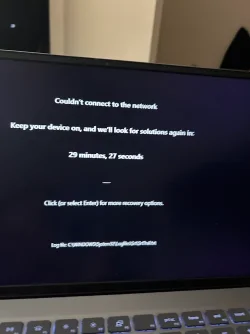
I tried setting it to default but it says it cannot connect to wifi. Then this is the mode it goes into. See attachment. I will try to remove the cmos battery tomorrow. I am so bummed it was fine before it did that automatic bios update, :tears::tears:
 

Attachments

  • IMG_7623.webp
    IMG_7623.webp
    36.9 KB · Views: 4

My Computer My Computer

At a glance

Windows 11 Home16
OS
Windows 11 Home
Computer type
Laptop
Manufacturer/Model
Dell Latitud 3510
Memory
16
Screen Resolution
1920 X 1200 X 60 hertz
Keyboard
Standard PS/2 Keyboard
Internet Speed
5G
Browser
Firefox
Antivirus
Windows defender
Please search for logfiles\srt\srttrail.txt > post a share link


After posting a share link > open Windows RE > type: bcdedit /set recoveryenabled no > reboot > post an image or share link displaying any error code and / or message


(options: nine, eight, and seven)


If unable to open Windows RE with hard reboot then create a bootable Windows 11 MCT to follow the above steps.

Find a flash drive that you can format and a working Windows computer.


Create a bootable Windows Media Creation Tool (MCT) (Windows 11 iso):


Last edited:

My Computer My Computer

At a glance

Windows 10Intel(R) Core(TM) i7-4800MQ CPU @ 2.70GHz16 GB Total: Manufacturer : Samsung MemoryTyp...NVIDIA Quadro K3100M; Intel(R) HD Graphics 4600
OS
Windows 10
Computer type
Laptop
Manufacturer/Model
HP
CPU
Intel(R) Core(TM) i7-4800MQ CPU @ 2.70GHz
Motherboard
Product : 190A Version : KBC Version 94.56
Memory
16 GB Total: Manufacturer : Samsung MemoryType : DDR3 FormFactor : SODIMM Capacity : 8GB Speed : 1600
Graphics Card(s)
NVIDIA Quadro K3100M; Intel(R) HD Graphics 4600
Sound Card
IDT High Definition Audio CODEC; PNP Device ID HDAUDIO\FUNC_01&VEN_111D&DEV_76E0
Hard Drives
Model Hitachi HTS727575A9E364
Antivirus
Microsoft Defender
Other Info
Mobile Workstation
Back
Top Bottom