Bios Update Crash cannot recover Black screen


Steadyone

Well-known member
Local time
2:41 PM
Posts
39
OS
Windows 11 Home
Hi all I Black screen issues. I have a Dell Inspiron 2510 16 gigs. Windows 11 Home. Dell ha automatic support and assist well it updated Firmware Bios and it just crashed my computer. I have tried going into recovery boot and hit recovery and it wont go into recovery it keeps saying, " Ran into a problem need to recover." It just keeps going around in circles. Then I tried to roll back bios and nothing it would say again, " Ran into a problem and then it would go around in circles again. It is crazy! I tried so many things and I am so stir crazy right now. I also did a boot able Dell recovery tool to see if it would allow the Laptop to recover. Nope, says the same thing, "This computer ran into a problem and goes around and around to try and fix it Again!.. ARGH!


Any help would be appreciated


Thanks
 

My Computer

System One

  • OS
    Windows 11 Home
    Computer type
    Laptop
    Manufacturer/Model
    Dell Latitud 3510
    Memory
    16
    Screen Resolution
    1920 X 1200 X 60 hertz
    Keyboard
    Standard PS/2 Keyboard
    Internet Speed
    5G
    Browser
    Firefox
    Antivirus
    Windows defender

Hi all I Black screen issues. I have a Dell Inspiron 2510 16 gigs. Windows 11 Home. Dell ha automatic support and assist well it updated Firmware Bios and it just crashed my computer. I have tried going into recovery boot and hit recovery and it wont go into recovery it keeps saying, " Ran into a problem need to recover." It just keeps going around in circles. Then I tried to roll back bios and nothing it would say again, " Ran into a problem and then it would go around in circles again. It is crazy! I tried so many things and I am so stir crazy right now. I also did a boot able Dell recovery tool to see if it would allow the Laptop to recover. Nope, says the same thing, "This computer ran into a problem and goes around and around to try and fix it Again!.. ARGH!


Any help would be appreciated


Thanks
Never had that problem, but the link below should offer some beneficial advice.
 

My Computer

System One

  • OS
    Windows 11 Professional
    Computer type
    PC/Desktop
    Manufacturer/Model
    Microcenter B677
    CPU
    Intel Core i5-9400
    Motherboard
    ASRock H310CM-HDV/M.2
    Memory
    32GB
    Graphics Card(s)
    Integrated Intel UHD Graphics 630
    Sound Card
    Intel Kaby Lake - High Definition Audio / cAVS (Audio, Voice, Speech) [A0]
    Monitor(s) Displays
    LG Model: GSM59F1
    Screen Resolution
    2560x1080
    Case
    Lian Li 205M
    Antivirus
    Kaspersky AV
If it was dogged corrupted BIOS firmware upgrade, your PC will not boot i believe it's likely operating system error or corrupted BIOS settings so first reset BIOS settings to factory default by booting into BIOS setup screen.
 

My Computer

System One

  • OS
    Windows 11
    Computer type
    PC/Desktop
    Manufacturer/Model
    HP Pavilion
    CPU
    AMD Ryzen 7 5700G
    Motherboard
    Erica6
    Memory
    Micron Technology DDR4-3200 16GB
    Graphics Card(s)
    NVIDIA GeForce RTX 3060
    Sound Card
    Realtek ALC671
    Monitor(s) Displays
    Samsung SyncMaster U28E590
    Screen Resolution
    3840 x 2160
    Hard Drives
    SAMSUNG MZVLQ1T0HALB-000H1
Can you get into bios at all by hitting f2 repeatedly during boot? If you CAN get into bios, set the bios back to default (be sure and save settings) and attempt to boot into windows.

If you still CAN NOT get into bios at all, disconnect the power adapter.. Open the case and disconnect the battery. Then remove the cmos battery. Leave it out about 15 minutes. Put it all back together and try booting into bios again. Once you are in bios, set settings to default, exit bios and try booting into windows, but if you are still unable to get into bios, the bios update may have zonked the motherboard. That be the case, If help is to be had, it would be DELL.

You will never get into Windows if you are unable to get into bios.

You said:
Then I tried to roll back bios
I'm curious how you tried to do that. With Dell Devices, Dell prohibits a bios rollback if that bios update addressed CVE security issues. Every Dell bios update I have received in the last 4 years has addressed CVE issues. There's been about 20 of them and none could be rolled back.
 

My Computers

System One System Two

  • OS
    Windows 11 Pro 25H2
    Computer type
    PC/Desktop
    Manufacturer/Model
    Dell Optiplex 7080
    CPU
    i9-10900 10 core 20 threads
    Motherboard
    DELL 0J37VM
    Memory
    32 gb
    Graphics Card(s)
    none-Intel UHD Graphics 630
    Sound Card
    Integrated Realtek
    Monitor(s) Displays
    Benq 27
    Screen Resolution
    2560x1440
    Hard Drives
    2x1tb Solidigm m.2 nvme /External drives 512gb Samsung m.2 sata+2tb Kingston m2.nvme
    PSU
    500w
    Case
    MT
    Cooling
    Dell Premium
    Keyboard
    Logitech wired
    Mouse
    Logitech wireless
    Internet Speed
    so slow I'm too embarrassed to tell
    Browser
    #1 Edge #2 Firefox
    Antivirus
    Defender+MWB Premium
  • Operating System
    Windows 11 Pro 24H2 26200.8457
    Computer type
    PC/Desktop
    Manufacturer/Model
    Beelink Mini PC SER5
    CPU
    AMD Ryzen 7 6800U
    Memory
    32 gb
    Graphics card(s)
    integrated
    Sound Card
    integrated
    Monitor(s) Displays
    Benq 27
    Screen Resolution
    2560x1440
    Hard Drives
    1TB Crucial nvme
    Keyboard
    Logitech wired
    Mouse
    Logitech wireless
    Internet Speed
    still too embarrassed to tell
    Browser
    Firefox
    Antivirus
    Defender
    Other Info
    System 3 is non compliant Dell 9020 i7-4770/24gb ram Win11 PRO 26200.8457
If it was dogged corrupted BIOS firmware upgrade, your PC will not boot i believe it's likely operating system error or corrupted BIOS settings so first reset BIOS settings to factory default by booting into BIOS setup screen.
I already tried that and it kept saying ran into a problem and then it would go around in circles again. It is crazy! I
 

My Computer

System One

  • OS
    Windows 11 Home
    Computer type
    Laptop
    Manufacturer/Model
    Dell Latitud 3510
    Memory
    16
    Screen Resolution
    1920 X 1200 X 60 hertz
    Keyboard
    Standard PS/2 Keyboard
    Internet Speed
    5G
    Browser
    Firefox
    Antivirus
    Windows defender
Can you get into bios at all by hitting f2 repeatedly during boot? If you CAN get into bios, set the bios back to default (be sure and save settings) and attempt to boot into windows.

If you still CAN NOT get into bios at all, disconnect the power adapter.. Open the case and disconnect the battery. Then remove the cmos battery. Leave it out about 15 minutes. Put it all back together and try booting into bios again. Once you are in bios, set settings to default, exit bios and try booting into windows, but if you are still unable to get into bios, the bios update may have zonked the motherboard. That be the case, If help is to be had, it would be DELL.

You will never get into Windows if you are unable to get into bios.

You said:

I'm curious how you tried to do that. With Dell Devices, Dell prohibits a bios rollback if that bios update addressed CVE security issues. Every Dell bios update I have received in the last 4 years has addressed CVE issues. There's been about 20 of them and none could be rolled back.
I could not roll back. It did not work. Argh
 

My Computer

System One

  • OS
    Windows 11 Home
    Computer type
    Laptop
    Manufacturer/Model
    Dell Latitud 3510
    Memory
    16
    Screen Resolution
    1920 X 1200 X 60 hertz
    Keyboard
    Standard PS/2 Keyboard
    Internet Speed
    5G
    Browser
    Firefox
    Antivirus
    Windows defender
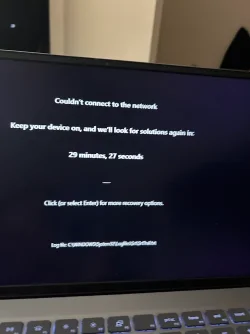
I tried setting it to default but it says it cannot connect to wifi. Then this is the mode it goes into. See attachment. I will try to remove the cmos battery tomorrow. I am so bummed it was fine before it did that automatic bios update, :tears::tears:
 

Attachments

  • IMG_7623.webp
    IMG_7623.webp
    36.9 KB · Views: 4

My Computer

System One

  • OS
    Windows 11 Home
    Computer type
    Laptop
    Manufacturer/Model
    Dell Latitud 3510
    Memory
    16
    Screen Resolution
    1920 X 1200 X 60 hertz
    Keyboard
    Standard PS/2 Keyboard
    Internet Speed
    5G
    Browser
    Firefox
    Antivirus
    Windows defender
Please search for logfiles\srt\srttrail.txt > post a share link


After posting a share link > open Windows RE > type: bcdedit /set recoveryenabled no > reboot > post an image or share link displaying any error code and / or message


(options: nine, eight, and seven)


If unable to open Windows RE with hard reboot then create a bootable Windows 11 MCT to follow the above steps.

Find a flash drive that you can format and a working Windows computer.


Create a bootable Windows Media Creation Tool (MCT) (Windows 11 iso):


Last edited:

My Computer

System One

  • OS
    Windows 10
    Computer type
    Laptop
    Manufacturer/Model
    HP
    CPU
    Intel(R) Core(TM) i7-4800MQ CPU @ 2.70GHz
    Motherboard
    Product : 190A Version : KBC Version 94.56
    Memory
    16 GB Total: Manufacturer : Samsung MemoryType : DDR3 FormFactor : SODIMM Capacity : 8GB Speed : 1600
    Graphics Card(s)
    NVIDIA Quadro K3100M; Intel(R) HD Graphics 4600
    Sound Card
    IDT High Definition Audio CODEC; PNP Device ID HDAUDIO\FUNC_01&VEN_111D&DEV_76E0
    Hard Drives
    Model Hitachi HTS727575A9E364
    Antivirus
    Microsoft Defender
    Other Info
    Mobile Workstation
Back
Top Bottom