Solved Bluetooth device disapperead


RodDam

Well-known member
Local time
12:12 AM
Posts
7
OS
Windows 11
Hi,

I have an issue with my bluetooth and I can't solve on my Windows 11.

The issue is that every time I made a call on Microsoft Teams, my Apple Airpods Max gets no sound. I have to disconnect and reconnect. But today, suddenly the earphone couldn't connect anymore. I've restarted Windows, and after this restart, the bluetooth disappeared. I tried to remove the driver via Asus app (Bluetooth_ROG_Realtek_B_V1.9.1051.3012_34192.exe), restart and reinstall, but no luck. I still can't see the bluetooth card. The bluetooth doesn't show on device manager.

Windows version:
Version 23H2 (compilacion de SO 22631.3447)

Thanks
 
Windows Build/Version
Version 23H2 (compilacion de SO 22631.3447)

My Computer My Computer

At a glance

Windows 11AMD Ryzen 7 7735HS64GB DDR5 (Crucial)AMD Radeon / RTX 4060
OS
Windows 11
Computer type
Laptop
Manufacturer/Model
Asus/FA507NV
CPU
AMD Ryzen 7 7735HS
Memory
64GB DDR5 (Crucial)
Graphics Card(s)
AMD Radeon / RTX 4060
Hi RodDam, welcome to the ElevenForums 🙏

To try and find the Bluetooth again, have you tried running the Bluetooth Diag troubleshooter?

Select Start > Settings > System > Troubleshoot > Other troubleshooters . Next to Bluetooth , select Run and follow the instructions.

I am not sure if the above is still correct for Windows 11. If not, you could place a shortcut to the Bluetooth Diagnostics on your desktop. I believe it should work to activate the troubleshooter.
(Credit to @garlin for this script)

Copy this code onto a notepad file:

Code:
Set WshShell = CreateObject("WScript.Shell")
strDesktop = WshShell.SpecialFolders("Desktop")
Set oMyShortCut = WshShell.CreateShortcut(strDesktop+"\Bluetooth Diag.lnk")
oMyShortCut.WindowStyle = 4
oMyShortcut.IconLocation = "%SystemRoot%\System32\bthudtask.exe"
oMyShortCut.TargetPath = "%SystemRoot%\System32\msdt.exe"
oMyShortCut.Arguments = "-id BluetoothDiagnostic"
oMyShortCut.WorkingDirectory = "%SystemRoot%\System32"
oMyShortCut.Save

Save the file as “BTDiag.vbs

Do so by saving the notepad file as an “all files” type so you don't have .txt at the end of the resulting file, to do so, do the following:

In the file menu on notepad, click on save as, then at the bottom near where you type the filename, you will see “save as type” select “All Files (*. *)”​
Save it to your desktop, call it “BTDiag.vbs“
Run that file (BTDiag.vbs), it will in turn save a Shortcut to the Bluetooth Diagnostics on your desktop.​
Click on that shortcut and follow the troubleshooter prompts.​
You can then delete the BTDiag.vbs file.
Hopefully it will at least find your Bluetooth again. I am not sure about the earbuds.
 
Last edited:

My Computers My Computers

  • At a glance

    Windows 11 Pro 25H2 Build 26200.8655Intel(R) Core(TM) i7-4770K CPU @ 3.50GHz32.0 GB of I forget and the box is in storage.Gigabyte nVidia GeForce GTX 1660 Super OC 6GB
    OS
    Windows 11 Pro 25H2 Build 26200.8655
    Computer type
    PC/Desktop
    Manufacturer/Model
    Sin-built 2013
    CPU
    Intel(R) Core(TM) i7-4770K CPU @ 3.50GHz
    Motherboard
    ASUS ROG Maximus VI Formula
    Memory
    32.0 GB of I forget and the box is in storage.
    Graphics Card(s)
    Gigabyte nVidia GeForce GTX 1660 Super OC 6GB
    Sound Card
    ROG SupremeFX Formula 8-Channel High Definition Audio
    Monitor(s) Displays
    5 x LG 25MS500-B - 1 x 24MK430H-B - 1 x Wacom Pro 22" Touch Screen Tablet
    Screen Resolution
    All over the place
    Hard Drives
    Too many to list. OS on Samsung 1TB 870 QVO SATA
    PSU
    Silverstone 1500
    Case
    NZXT Phantom 820 Full-Tower Case
    Cooling
    Noctua NH-D15 Elite Class Dual Tower CPU Cooler / 6 x EziDIY 120mm / 2 x Corsair 140mm somethings / 1 x 140mm Thermaltake something / 2 x 200mm Corsair.
    Keyboard
    Corsair K95 / Logitech diNovo Edge Wireless
    Mouse
    Logitech: G402 / G502 / Mx Masters / Mx Air Cordless
    Internet Speed
    2000/500Mbps
    Browser
    All sorts
    Antivirus
    Kaspersky Premium
    Other Info
    ㅤㅤㅤㅤㅤㅤㅤㅤㅤㅤㅤㅤㅤㅤㅤㅤㅤㅤㅤㅤㅤㅤㅤㅤㅤㅤㅤㅤㅤㅤㅤㅤㅤㅤㅤㅤㅤㅤㅤㅤ⠀⠀⠀⠀⠀⠀⠀⠀⠀⠀
    TP-Link BE9300 WiFi 7 Bluetooth 5.4 (Archer TBE550E)
    TP-Link TX201 V1 2.5GB Lan

    Grandstream HT812 - VoIP
    ASUS DSL-AX82U - Mesh
    ASUS RT-AC68U - Mesh
    ASUS RT-BE88U Router

    Brother MFC-L2880DW Printer

    I’m on a horse.
  • At a glance

    Windows 11 Pro 25H2 Build 26200.8655 (Wifes)13th Generation Intel® Core™ i5-1340P Process...16GB LPDDR5-52001x Intel® Iris® Xe Graphics
    Operating System
    Windows 11 Pro 25H2 Build 26200.8655 (Wifes)
    Computer type
    Laptop
    Manufacturer/Model
    LENOVO Yoga 7 14IRL8 - Type 82YL
    CPU
    13th Generation Intel® Core™ i5-1340P Processor(Core™ i5-1340P)
    Memory
    16GB LPDDR5-5200
    Graphics card(s)
    1x Intel® Iris® Xe Graphics
    Sound Card
    Optimized with Dolby Atmos®
    Screen Resolution
    QHD 2880 x 1800 OLED
    Hard Drives
    M.2 512 GB SSD PCIe
    Mouse
    Logiteck MX Master 3S
    Internet Speed
    2000/500
    Antivirus
    Defender / Malwarebytes
    Other Info
    …still on a horse.


    Wireless Network: Wi-Fi 6E 2x2 AX; Bluetooth® 5.1 or above
    Ports: 1x 1 Novo button; 2 in 1 Audio Combo jack; Micro SD Card Reader; HDMI 1.4b; 2 x USB Type-C (TBT4)
    USB 3.2 Gen 2 DP 1.4a
    PD 3.0); 1 x USB 3.2 Gen1 Type A
    Camera
    1x 1080P FHD IR/RGB Hybrid with Privacy Shutter and Dual Array Microphone
    Graphics
    1x Intel® Iris® Xe Graphics
    Monitor
    14" WUXGA
    Form Factor
    Convertible Notebook
  • Windows 11 Pro 25H2 Build 26200.8655 (Wifes)

    Yoga 7 2-in-1 14IML9 - Type 83DJ

    Processor: Intel® Core™ Ultra 7 155H Processor(Core™ Ultra 7 155H)

    Memory: 32GB LPD5X-7467

    Hard Drive: 1 TB SSD PCIe

    Wireless Network: 1x Wi-Fi 6E 2x2 AX; Bluetooth® 5.1 or above

    Ports: 1 x HDMI 2.1 TMDS; 1 x Novo Button; 1 x Combo Audio Jack
    2 x USB-C (USB 4.0)
    1 x USB-A 3.2 Gen 1

    Camera: 1080P FHD IR Hybrid with Dual Microphone

    Graphics: Intel® Arc™ Graphics

    Monitor: 14" 2.8K

    ...Where's my horse?
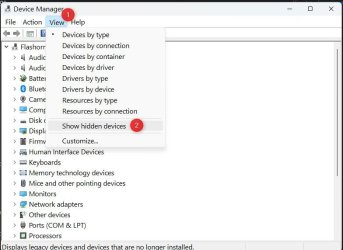
Go to Device Manager and press on the "View" button at the top left.
Click on Show Hidden Devices. See what comes up.

1713482226090.jpeg
 

My Computers My Computers

  • At a glance

    windows 11 22631.5039Core i9 12th gen 12900HK 2.9 MHz (overcloked:...32 Gigs DDR5-4800nVidia RTX 3070 Ti / 8 Gigs DDR6
    OS
    windows 11 22631.5039
    Computer type
    Laptop
    Manufacturer/Model
    MSI Raider GE76
    CPU
    Core i9 12th gen 12900HK 2.9 MHz (overcloked: 3890.48)
    Motherboard
    MSI
    Memory
    32 Gigs DDR5-4800
    Graphics Card(s)
    nVidia RTX 3070 Ti / 8 Gigs DDR6
    Sound Card
    DYNAUDIO - Steelsries Arena 7- Sound Effects by Nahimic 3
    Monitor(s) Displays
    17.3" 1920 x 1080 360 Hz 3 ms, IPS / Connected to MSI 32 inch curved @ 165 Hz
    Screen Resolution
    1920 x 1080 / Both
    Hard Drives
    Samsung 990 Pro 2TB (OS) - Solidigm P41 2TB (Storage)
    PSU
    280 watts
    Case
    MSI GE series
    Cooling
    internal
    Keyboard
    Steelseries
    Mouse
    G903 Lightspeed
    Internet Speed
    1000 Mbps
    Browser
    Firefox / Opera GX- Do not like Edge
    Antivirus
    Malwarebytes'
    Other Info
    just ask.
  • At a glance

    Windows 10 22H2Intel Core i7 7820HK 2.9 Ghz16 Gigs DDR4 2400 MhznVidia 1070 8GB RAM
    Operating System
    Windows 10 22H2
    Computer type
    Laptop
    Manufacturer/Model
    MSI GT73 7RE VR Titan
    CPU
    Intel Core i7 7820HK 2.9 Ghz
    Motherboard
    MSI
    Memory
    16 Gigs DDR4 2400 Mhz
    Graphics card(s)
    nVidia 1070 8GB RAM
    Sound Card
    DYNAUDIO / Nahimic 2
    Monitor(s) Displays
    IPS / 120HZ
    Screen Resolution
    1920x1080P
    Hard Drives
    Samsung NVME EVO 970 1TB / Samsung SSD (SATA) 1TB
    PSU
    240 watts
    Case
    MSI
    Cooling
    Internal
    Keyboard
    Steelseries
    Mouse
    Logitech G903 Lightspeed
    Internet Speed
    1 Gb/s
    Browser
    Firefox / Vivaldi
    Antivirus
    MalwareBytes'
    Other Info
    none.
I assume they will pair with another bluetooth device?
 

My Computer My Computer

At a glance

11 Pro 25H2i7-10750H16GB Samsung DDR4 3200Intel + Nvidia RTX3060 Laptop
OS
11 Pro 25H2
Computer type
Laptop
Manufacturer/Model
MSI
CPU
i7-10750H
Motherboard
MSI MS-17F5
Memory
16GB Samsung DDR4 3200
Graphics Card(s)
Intel + Nvidia RTX3060 Laptop
Sound Card
Realtek
Monitor(s) Displays
Samsung 24" Curved (HDMI)
Screen Resolution
1920x1080
Hard Drives
Sabrent Rocket Gen3 1Tb Smasung EVO 870 1TB
Antivirus
Bitdefender
Hi,

Thank you for all the replies.

To provide an update, and in case anyone else encounters the same issue, temporarily, the problem can be resolved by shutting down the laptop (while holding down the shift key), after which the Bluetooth works again.

However, I have found a newer version of the driver online, which definitively fixes the problem.
 

My Computer My Computer

At a glance

Windows 11AMD Ryzen 7 7735HS64GB DDR5 (Crucial)AMD Radeon / RTX 4060
OS
Windows 11
Computer type
Laptop
Manufacturer/Model
Asus/FA507NV
CPU
AMD Ryzen 7 7735HS
Memory
64GB DDR5 (Crucial)
Graphics Card(s)
AMD Radeon / RTX 4060

Latest Support Threads

Back
Top Bottom