Solved Can't access shares on a Windows 11 system from a Windows 10 system


Ztruker

Well-known member
Member
VIP
Local time
11:18 AM
Posts
256
Location
Space Coast of Florida
OS
Windows 11 Pro X64 25H2 Build 26200.7019
Win 10 Pro 21H1 19043.1586
ASUSTeK M4A785TD-V EVO
AMD Phenom II X4 925 Processor, 2800 Mhz, 4 Core(s), 4 Logical Processor(s)
RAM 8GB HDD 250GB
EDUP 600MBPS Dual Band USB WiFi Dongle

4 other Desktop and Laptop computers access the Windows 11 shares with no problem, just this particular system won't do it. All are setup the same way so I don't know what the cause of the problem is. When I try to access a share I get this error:
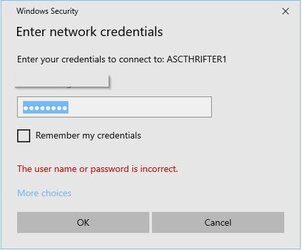
2022-04-28 13_02_49-Window.jpg

The same username and password works okay on the other systems accessing the Windows 11 computer. I use my own set of instructions to setup sharing and until now it's always worked:

2022-04-28-13_02_49-window-zip is a Word document with the instructions I use.
 

Attachments

Last edited:

My Computers My Computers

  • At a glance

    Windows 11 Pro X64 25H2 Build 26200.701912th Gen Intel Core i7-12700, 2.1Ghz32.0GB PC3-12800 DDR3 SDRAMEVGA GeForce GTX 780
    OS
    Windows 11 Pro X64 25H2 Build 26200.7019
    Computer type
    PC/Desktop
    Manufacturer/Model
    Dell Vostro 3910
    CPU
    12th Gen Intel Core i7-12700, 2.1Ghz
    Memory
    32.0GB PC3-12800 DDR3 SDRAM
    Graphics Card(s)
    EVGA GeForce GTX 780
    Sound Card
    Realtek HD Audio
    Monitor(s) Displays
    Visio 32" TV
    Screen Resolution
    1920x1080
    Hard Drives
    2TB Samsung NVME SSD 990 PRO with Heatsink
    4TB Fanxiang 2.5" SATA III SSD S101Q
    PSU
    ?
    Keyboard
    Dell USB SK-8115
    Mouse
    Microsoft Sculpt Mobile Mouse 1569
    Internet Speed
    374.10MB Down, 11.75MB Up
    Browser
    Edge - eM Client Pro for E-Mail
    Antivirus
    Windows Security
    Other Info
    Purchased December 2013, many upgrades since then
  • At a glance

    Windows 7 Pro X64Intel Core i3-3240 2X3.4Ghz8GB 2X4GB PC3 12800U DDR3ATI FireGL V3300
    Operating System
    Windows 7 Pro X64
    Computer type
    PC/Desktop
    Manufacturer/Model
    Dell Inspiron 660
    CPU
    Intel Core i3-3240 2X3.4Ghz
    Motherboard
    HP 0A68h
    Memory
    8GB 2X4GB PC3 12800U DDR3
    Graphics card(s)
    ATI FireGL V3300
    Sound Card
    Realtek HD Audio
    Monitor(s) Displays
    Acer KN242HYL 24"
    Screen Resolution
    1920X1080
    Hard Drives
    Kingston SA400S37 120GB SSD (boot)
    Toshiba DT01ACA200 2TB SATA
    Keyboard
    Dell USB (KVMS)
    Mouse
    Logitec USB (KVMS)
    Internet Speed
    481.77 UP; 23.21 DOWN
    Browser
    Seamonkey, Internet Explorer
    Antivirus
    Microsoft Security Essentials
    Other Info
    Apache Webserver since 2001
This is my ipconfig info:
Code:
C:\WINDOWS\system32>ipconfig /all

Windows IP Configuration

   Host Name . . . . . . . . . . . . : Jim-PC
   Primary Dns Suffix  . . . . . . . :
   Node Type . . . . . . . . . . . . : Hybrid
   IP Routing Enabled. . . . . . . . : No
   WINS Proxy Enabled. . . . . . . . : No

Ethernet adapter Ethernet:

   Connection-specific DNS Suffix  . :
   Description . . . . . . . . . . . : Realtek PCIe GBE Family Controller
   Physical Address. . . . . . . . . : 48-5B-39-A7-A3-BC
   DHCP Enabled. . . . . . . . . . . : Yes
   Autoconfiguration Enabled . . . . : Yes
   Link-local IPv6 Address . . . . . : fe80::23:8fe5:84a4:7a34%2(Preferred)
   IPv4 Address. . . . . . . . . . . : 172.16.103.248(Preferred)
   Subnet Mask . . . . . . . . . . . : 255.255.255.0
   Lease Obtained. . . . . . . . . . : Thursday, April 28, 2022 2:11:40 PM
   Lease Expires . . . . . . . . . . : Friday, April 29, 2022 2:11:40 PM
   Default Gateway . . . . . . . . . : 172.16.103.1
   DHCP Server . . . . . . . . . . . : 172.16.103.1
   DHCPv6 IAID . . . . . . . . . . . : 38296377
   DHCPv6 Client DUID. . . . . . . . : 00-01-00-01-28-DD-47-DD-48-5B-39-A7-A3-BC
   DNS Servers . . . . . . . . . . . : 172.16.103.1
   NetBIOS over Tcpip. . . . . . . . : Enabled

I can ping the Windows 11 computer from this Windows 10 computer:

Code:
C:\WINDOWS\system32>ping 172.16.103.251

Pinging 172.16.103.251 with 32 bytes of data:
Reply from 172.16.103.251: bytes=32 time<1ms TTL=128
 

My Computers My Computers

  • At a glance

    Windows 11 Pro X64 25H2 Build 26200.701912th Gen Intel Core i7-12700, 2.1Ghz32.0GB PC3-12800 DDR3 SDRAMEVGA GeForce GTX 780
    OS
    Windows 11 Pro X64 25H2 Build 26200.7019
    Computer type
    PC/Desktop
    Manufacturer/Model
    Dell Vostro 3910
    CPU
    12th Gen Intel Core i7-12700, 2.1Ghz
    Memory
    32.0GB PC3-12800 DDR3 SDRAM
    Graphics Card(s)
    EVGA GeForce GTX 780
    Sound Card
    Realtek HD Audio
    Monitor(s) Displays
    Visio 32" TV
    Screen Resolution
    1920x1080
    Hard Drives
    2TB Samsung NVME SSD 990 PRO with Heatsink
    4TB Fanxiang 2.5" SATA III SSD S101Q
    PSU
    ?
    Keyboard
    Dell USB SK-8115
    Mouse
    Microsoft Sculpt Mobile Mouse 1569
    Internet Speed
    374.10MB Down, 11.75MB Up
    Browser
    Edge - eM Client Pro for E-Mail
    Antivirus
    Windows Security
    Other Info
    Purchased December 2013, many upgrades since then
  • At a glance

    Windows 7 Pro X64Intel Core i3-3240 2X3.4Ghz8GB 2X4GB PC3 12800U DDR3ATI FireGL V3300
    Operating System
    Windows 7 Pro X64
    Computer type
    PC/Desktop
    Manufacturer/Model
    Dell Inspiron 660
    CPU
    Intel Core i3-3240 2X3.4Ghz
    Motherboard
    HP 0A68h
    Memory
    8GB 2X4GB PC3 12800U DDR3
    Graphics card(s)
    ATI FireGL V3300
    Sound Card
    Realtek HD Audio
    Monitor(s) Displays
    Acer KN242HYL 24"
    Screen Resolution
    1920X1080
    Hard Drives
    Kingston SA400S37 120GB SSD (boot)
    Toshiba DT01ACA200 2TB SATA
    Keyboard
    Dell USB (KVMS)
    Mouse
    Logitec USB (KVMS)
    Internet Speed
    481.77 UP; 23.21 DOWN
    Browser
    Seamonkey, Internet Explorer
    Antivirus
    Microsoft Security Essentials
    Other Info
    Apache Webserver since 2001
Windows 11 is very temperamental on shares. There appears to be something a bit screwy with credentials, eapecially if using MS accounts. I found if you run the credential manager on both pcs, and manually add the pc name, account and passwords, it sorts it. Also, it tends to fall over of no password with local account.
 
Last edited:

My Computer My Computer

At a glance

Windows 11 Pro + Win11 Canary VM.I9 13th gen i9-13900H 2.60 GHZ16 GB solderedIntegrated Intel Iris XE
OS
Windows 11 Pro + Win11 Canary VM.
Computer type
Laptop
Manufacturer/Model
ASUS Zenbook 14
CPU
I9 13th gen i9-13900H 2.60 GHZ
Motherboard
Yep, Laptop has one.
Memory
16 GB soldered
Graphics Card(s)
Integrated Intel Iris XE
Sound Card
Realtek built in
Monitor(s) Displays
laptop OLED screen
Screen Resolution
2880x1800 touchscreen
Hard Drives
1 TB NVME SSD (only weakness is only one slot)
PSU
Internal + 65W thunderbolt USB4 charger
Case
Yep, got one
Cooling
Stella Artois (UK pint cans - 568 ml) - extra cost.
Keyboard
Built in UK keybd
Mouse
Bluetooth , wireless dongled, wired
Internet Speed
900 mbs (ethernet), wifi 6 typical 350-450 mb/s both up and down
Browser
Edge
Antivirus
Defender
Other Info
TPM 2.0, 2xUSB4 thunderbolt, 1xUsb3 (usb a), 1xUsb-c, hdmi out, 3.5 mm audio out/in combo, ASUS backlit trackpad (inc. switchable number pad)

Macrium Reflect Home V8
Office 365 Family (6 users each 1TB onedrive space)
Hyper-V (a vm runs almost as fast as my older laptop)
Networking always since its inception way back with Windows for workgroups 3.11 has always had touches of "Gandalf the Wizard" about it. Usually though it eventually works. First on the windows system ensure that connectivity to the appropriate device or system works via simple ping -- if the computer name isn't picked up try the ip address.

Then ensure that the remote computer allows inbound (and if required) outbound connections. I'd assume that you've already enabled that on the local machine !!! and of course ensure Network discovery is turned on and the network is a "Private" one.

Ensure users have correct access rights on the target system(s).

Ensure devices have correct permissions to allow access.

On Local Networks ensure no machines or mobile phones etc have "grabbed" an IP address that another device wants -- I've found that switching entire system off plus routers etc often works and then restart computers individually - don't switch ANY phones etc on until all the Windows machines are up and running.

Don't start any NON Windows devices until all your Windows machines are up and running (i.e also don't start TV's, Amazon fire sticks, Sky Q boxes etc ).

(I really have 100% no idea why this sometimes works -- it seems to "just do it for me" -- I haven't got the time and skill to analyse that problem -- I just want the Network up and running properly !!!! as quick as possible).I leave the "Monday Morning Quarterbacking" to others who are experienced in this!!!.). As an "Old School Engineer" I want to get kit up and running again as quickly as possible providing it can be done safely. Once it's working then is the time to try and find out what went wrong -- no point in having systems idle for maybe days when people need them to be online again as quickly as possible.

(You might need also to enable SMB1 depending on the equipment that needs to be accessed).

Don't forget any Windows firewall rules and / or hardware rules you might have in your routers.

Programs like filezilla (free) and work on Windows as well are brilliant also for checking shared file / drive access.
In some cases depending of the direction of File transfer you might need to install and enable the OPENSSH-Server -- install from Windows add an optional feature).

I sympathsize with ANYBODY having problems with Windows Networking -- it really seems to be far more complex than it needs to be. (Perhaps that's why these guys who understand this stuff get paid really good money !!!!!!).

I'd finally suggest testing using LOCAL accounts on all windows machines -- there could be some problem in how "Logon info" is propagated to / from a remote Windows machine using an Ms account. If you can get local accounts working but not Ms account logins then you know where the problem lies. Solving it is another matter though !!!!.

Cheers
jimbo
 
Last edited:

My Computer My Computer

At a glance

Windows XP,11 Linux Fedora Rawhide pre-releas...2 X Intel i7
OS
Windows XP,11 Linux Fedora Rawhide pre-release 46
Computer type
PC/Desktop
CPU
2 X Intel i7
Screen Resolution
4KUHD X 2
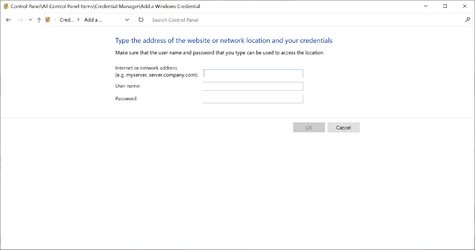
I opened Credential Manager, clicked on Windows Credentials then added a new credential.

In Internet or Network address I put name of the Windows 11 system. I added the username and password then clicked OK.
(this was the same username and password I used in Windows Credentials in my first post)

Now I can browse all shares on the Windows 11 system.
 

My Computers My Computers

  • At a glance

    Windows 11 Pro X64 25H2 Build 26200.701912th Gen Intel Core i7-12700, 2.1Ghz32.0GB PC3-12800 DDR3 SDRAMEVGA GeForce GTX 780
    OS
    Windows 11 Pro X64 25H2 Build 26200.7019
    Computer type
    PC/Desktop
    Manufacturer/Model
    Dell Vostro 3910
    CPU
    12th Gen Intel Core i7-12700, 2.1Ghz
    Memory
    32.0GB PC3-12800 DDR3 SDRAM
    Graphics Card(s)
    EVGA GeForce GTX 780
    Sound Card
    Realtek HD Audio
    Monitor(s) Displays
    Visio 32" TV
    Screen Resolution
    1920x1080
    Hard Drives
    2TB Samsung NVME SSD 990 PRO with Heatsink
    4TB Fanxiang 2.5" SATA III SSD S101Q
    PSU
    ?
    Keyboard
    Dell USB SK-8115
    Mouse
    Microsoft Sculpt Mobile Mouse 1569
    Internet Speed
    374.10MB Down, 11.75MB Up
    Browser
    Edge - eM Client Pro for E-Mail
    Antivirus
    Windows Security
    Other Info
    Purchased December 2013, many upgrades since then
  • At a glance

    Windows 7 Pro X64Intel Core i3-3240 2X3.4Ghz8GB 2X4GB PC3 12800U DDR3ATI FireGL V3300
    Operating System
    Windows 7 Pro X64
    Computer type
    PC/Desktop
    Manufacturer/Model
    Dell Inspiron 660
    CPU
    Intel Core i3-3240 2X3.4Ghz
    Motherboard
    HP 0A68h
    Memory
    8GB 2X4GB PC3 12800U DDR3
    Graphics card(s)
    ATI FireGL V3300
    Sound Card
    Realtek HD Audio
    Monitor(s) Displays
    Acer KN242HYL 24"
    Screen Resolution
    1920X1080
    Hard Drives
    Kingston SA400S37 120GB SSD (boot)
    Toshiba DT01ACA200 2TB SATA
    Keyboard
    Dell USB (KVMS)
    Mouse
    Logitec USB (KVMS)
    Internet Speed
    481.77 UP; 23.21 DOWN
    Browser
    Seamonkey, Internet Explorer
    Antivirus
    Microsoft Security Essentials
    Other Info
    Apache Webserver since 2001
Rich,

What an imaginative experiment. I'm so pleased to hear that it worked.

I have no problems sharing with any of computers but I checked my Credential manager & I have an entry for only one of my network computers there.
- I have never manually added that entry.


Perhaps your method will help others, I do hope so,
All the best,
Denis
 
Last edited:

My Computer My Computer

At a glance

Windows 11 Home x64 Version 26H2 Build 26300....
OS
Windows 11 Home x64 Version 26H2 Build 26300.9457
I'm trying to figure out exactly what to put in the windows credential manager when I add new.
1668441391818.png
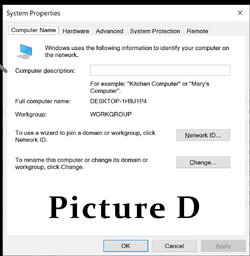
what would the network address be ? And then I would create a local account using the ten forums tutorial to create a " local " account. PictureD.jpg
I am pretty sure its going to be the local account login name the name that is used for the local user accounts desktop. So like I create a user account and it makes a folder called dons1070 under users and Im pretty sure that dons1070 will show up under network then. IM pretty sure that is how it works?? In the past however I have also seen the FULL COMPUTER NAME being used as a share name under network. Its all very confusing at times. When a person has a Microsoft account and then they start a local account will the make a new desktop ? And can a person access shares when logged into the Microsoft account. ? I do not think they can not reliably anyway.
 

My Computers My Computers

  • At a glance

    Windows 11 proProcessor 13th Gen Intel(R) Core(TM) i9-13950...64GIGNVIDIA RTX 5000 Ada Generation Laptop GPU
    OS
    Windows 11 pro
    Computer type
    Laptop
    Manufacturer/Model
    Precision 7780
    CPU
    Processor 13th Gen Intel(R) Core(TM) i9-13950HX, 2200 M
    Motherboard
    Dell calls it the “system board” in the service manual.
    Memory
    64GIG
    Graphics Card(s)
    NVIDIA RTX 5000 Ada Generation Laptop GPU
    Sound Card
    NVIDIA HIGH DEFINITION AUDIO
    Monitor(s) Displays
    Samsung and a HP Monitor
    Screen Resolution
    Resolution 3840 x 2160 x 60 hertz
    Hard Drives
    3 1T NVME and 1 223 Gb
    PSU
    External
    Case
    Laptop
    Cooling
    Dual fans
    Keyboard
    LOGI REMOTE KEYBOARD
    Mouse
    LOGI REMOTE MOUSE
    Internet Speed
    538 Mbps 163 Mbps upload
    Browser
    Duck, Chrome, Edge, Opra
    Antivirus
    Norton Antivirus
  • At a glance

    WIN 11 PRORTX ADA 500032
    Operating System
    WIN 11 PRO
    Computer type
    Laptop
    Manufacturer/Model
    HP
    CPU
    RTX ADA 5000
    Memory
    32
    Monitor(s) Displays
    MY BIG SCREEN TV
    Screen Resolution
    3840 X 2016
    Hard Drives
    2 NVME
    Keyboard
    REMOTE USB
    Mouse
    REMOTE USB LOGI
    Internet Speed
    FIBER TO MY DOOR
    Browser
    DUCK FIREFOX CHROME OPRA
    Antivirus
    NORTON
Back
Top Bottom