Solved Can't rename hard drives


russ8585

Member
Local time
10:53 PM
Posts
15
OS
Windows 11 Home
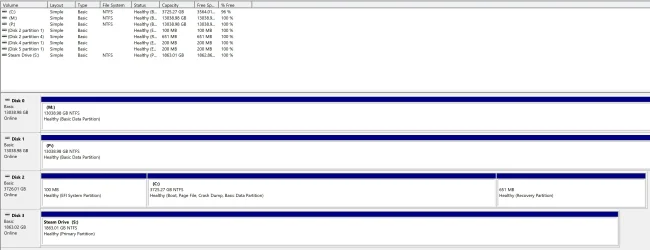
I have 2 internal Satahard drives (Label M and P) which are labelled as “Local Drive”. No matter what Itry they will not rename.

Tried the following:

  • Rename via Explorer
  • Right click, Properties
  • Disk Management(including charging drive letter)
  • Disk List
I even cleaned &reformatted using Disk List, then rename with Disk Management. Ifound this did allow me to rename but after shutdown they went backto Local Drive.
I have a second M2 drive which I have been able to rename with no issues (Steam Drive. Label S)

Any ideas?
 

Attachments
  • Screenshot 1.webp
    Screenshot 1.webp
    122.9 KB · Views: 4
  • Screenshot 2.webp
    Screenshot 2.webp
    180.6 KB · Views: 3

My Computer

System One

  • OS
    Windows 11 Home
    Computer type
    PC/Desktop
    CPU
    AMD Ryzen 9 9950X3D 4.3 GHz 16-Core Processor
    Motherboard
    Gigabyte X870E AORUS ELITE WIFI7 ATX AM5
    Memory
    Patriot Viper Venom 64 GB (2 x 32 GB) DDR5-6400 CL32
    Graphics Card(s)
    Gigabyte GAMING OC Radeon RX 9070 XT 16 GB
    Sound Card
    N/A
    Monitor(s) Displays
    3x 4K Samsung & 1x 1080p Arzopa
    Screen Resolution
    2160p
    Hard Drives
    OS Drive: Samsung 990 EVO Plus 4 TB M.2-2280 PCIe 5.0 X2 NVME Solid State Drive
    Second Drive: Sabrent Rocket Q 2 TB M.2-2280 PCIe 3.0 X4 NVME Solid State Drive
    Backup Drives (internal): 2x Seagate 14TB 7200 RPM
    PSU
    Corsair RM850x (2024) 850 W Fully Modular ATX
    Cooling
    Noctua NH-D9L 46.44 CFM CPU Cooler
    Browser
    FireFox

My Computers

System One System Two

  • OS
    Windows 11 Pro 25H2 Build 26200.8655
    Computer type
    PC/Desktop
    Manufacturer/Model
    Sin-built 2013
    CPU
    Intel(R) Core(TM) i7-4770K CPU @ 3.50GHz
    Motherboard
    ASUS ROG Maximus VI Formula
    Memory
    32.0 GB of I forget and the box is in storage.
    Graphics Card(s)
    Gigabyte nVidia GeForce GTX 1660 Super OC 6GB
    Sound Card
    Onboard thingy
    Monitor(s) Displays
    5 x LG 25MS500-B - 1 x 24MK430H-B - 1 x Wacom Pro 22" Touch Screen Tablet
    Screen Resolution
    All over the place
    Hard Drives
    Too many to list.
    OS on Samsung 1TB 870 QVO SATA
    PSU
    Silverstone 1500
    Case
    NZXT Phantom 820 Full-Tower Case
    Cooling
    Noctua NH-D15 Elite Class Dual Tower CPU Cooler / 6 x EziDIY 120mm / 2 x Corsair 140mm somethings / 1 x 140mm Thermaltake something / 2 x 200mm Corsair.
    Keyboard
    Corsair K95 / Logitech diNovo Edge Wireless
    Mouse
    Logitech: G402 / G502 / Mx Masters / Mx Air Cordless
    Internet Speed
    2000/500Mbps
    Browser
    All sorts
    Antivirus
    Kaspersky Premium
    Other Info
    ㅤㅤㅤㅤㅤㅤㅤㅤㅤㅤㅤㅤㅤㅤㅤㅤㅤㅤㅤㅤㅤㅤㅤㅤㅤㅤㅤㅤㅤㅤㅤㅤㅤㅤㅤㅤㅤㅤㅤㅤ⠀⠀⠀⠀⠀⠀⠀⠀⠀⠀
    TP-Link BE9300 WiFi 7 Bluetooth 5.4 (Archer TBE550E)
    TP-Link TX201 V1 2.5GB Lan

    Grandstream HT812 - VoIP
    ASUS DSL-AX82U - Mesh
    ASUS RT-AC68U - Mesh
    ASUS RT-BE88U Router

    Brother MFC-L2880DW Printer

    I’m on a horse.
  • Operating System
    Windows 11 Pro 25H2 Build 26200.8655
    Computer type
    Laptop
    Manufacturer/Model
    LENOVO Yoga 7 14IRL8 - 7i EVO OLED 14" Touchscreen i5 12 Core 16GB/512GB
    CPU
    Intel Core 12th Gen i5-1240P Processor (1.7 - 4.4GHz)
    Memory
    16GB LPDDR5 RAM
    Graphics card(s)
    Intel Iris Xe Graphics Processor
    Sound Card
    Optimized with Dolby Atmos®
    Screen Resolution
    QHD 2880 x 1800 OLED
    Hard Drives
    M.2 512GB
    Antivirus
    Defender / Malwarebytes
    Other Info
    …still on a horse.
I was going to suggest Minitool as well but @antspants beat me to it. I'm glad to have seen @garlin answer. He taught me something new today, but then he does that quite often.
 

My Computers

System One System Two

  • OS
    Windows 11 Pro 25H2 26200.8655
    Computer type
    PC/Desktop
    Manufacturer/Model
    Dell Optiplex 7080
    CPU
    i9-10900 10 core 20 threads
    Motherboard
    DELL 0J37VM
    Memory
    32 gb
    Graphics Card(s)
    none-Intel UHD Graphics 630
    Sound Card
    Integrated Realtek
    Monitor(s) Displays
    Benq 27
    Screen Resolution
    2560x1440
    Hard Drives
    2x1tb Solidigm m.2 nvme /External drives 512gb Samsung m.2 sata+2tb Kingston m2.nvme
    PSU
    500w
    Case
    MT
    Cooling
    Dell Premium
    Keyboard
    Logitech wired
    Mouse
    Logitech wireless
    Internet Speed
    so slow I'm too embarrassed to tell
    Browser
    #1 Edge #2 Firefox
    Antivirus
    Defender+MWB Premium
  • Operating System
    Windows 11 Pro 24H2 26200.8457
    Computer type
    PC/Desktop
    Manufacturer/Model
    Beelink Mini PC SER5
    CPU
    AMD Ryzen 7 6800U
    Memory
    32 gb
    Graphics card(s)
    integrated
    Sound Card
    integrated
    Monitor(s) Displays
    Benq 27
    Screen Resolution
    2560x1440
    Hard Drives
    1TB Crucial nvme
    Keyboard
    Logitech wired
    Mouse
    Logitech wireless
    Internet Speed
    still too embarrassed to tell
    Browser
    Firefox
    Antivirus
    Defender
    Other Info
    System 3 is non compliant Dell 9020 i7-4770/24gb ram Win11 PRO 26200.8457
I've always used File Explorer, select drive, right click, Properties.
In General tab type here what you want the label to be, click Apply.

1744704679496.webp
 

My Computers

System One System Two

  • OS
    Win 11 Pro 25H2 26200.8655
    Computer type
    PC/Desktop
    Manufacturer/Model
    Self Built
    CPU
    Intel® Core™ i7-14700K
    Motherboard
    ASUS TUF Z690-PLUS WIFI BIOS 4505 11/29/25
    Memory
    G.SKILL Ripjaws S5 Series 64GB (2 x 32GB) DDR5
    Graphics Card(s)
    ASUS GeForce RTX 4070 Super 12GB
    Sound Card
    Sound Blaster AE-5 Plus
    Monitor(s) Displays
    ASUS TUF Gaming 27" 2K HDR Gaming
    Screen Resolution
    2560 x 1440
    Hard Drives
    Samsung 990 Pro 1TB NVMe (Win 11 25H2)
    SK hynix P41 500GB NVMe 25H2 DEV/Games
    SK hynix P41 2TB NVMe (x3)
    Crucial P3 Plus 4TB
    PSU
    Corsair RM850x Shift
    Case
    Antec Dark Phantom DP502 FLUX
    Cooling
    Corsair Nautilus 360 RS AIO
    Keyboard
    Logitech MK 320
    Mouse
    Razer Basilisk V3
    Internet Speed
    350Mbs
    Browser
    Firefox
    Antivirus
    Winows Security
    Other Info
    MR 8.1 Home

    System 3 Specs
    Win 11 Pro 25H2 26200.8655
    ASUS PRIME Z370-P II BIOS 3004 7/12/21
    Intel Core i7-8700 CPU @ 3.20GHz
    32GB DDR4 RAM (4x8)
    iGPU Intel UHD Graphics 630
  • Operating System
    Win 11 Pro 25H2 26200.8655
    Computer type
    PC/Desktop
    Manufacturer/Model
    Self Built
    CPU
    Intel Core i7-11700F
    Motherboard
    Asus TUF Gaming Z590 Plus WiFi (BIOS 2803)
    Memory
    64 GB DDR4
    Graphics card(s)
    MSI GeForce RTX 3060 Ventus 2X 12GB
    Sound Card
    SoundBlaster Audigy Fx V2
    Monitor(s) Displays
    Samsung F27T350
    Screen Resolution
    1920x1080
    Hard Drives
    Samsung 980 Pro 1TB
    Samsung 970 EVO Plus 2TB
    Samsung 870 EVO 500GB SSD
    PSU
    Corsair HX750
    Case
    Cougar MX330-G Window
    Cooling
    Thermalright Frozen Edge 240 Black AIO
    Internet Speed
    350Mbps
    Browser
    Firefox
    Antivirus
    Windows Security
From the CMD prompt:

label M: "My Files"
label P: "Other Files"
Hi garlin,

I haven't tried it yet, but is this from the command prompt directly or do I have to go into DiskPart?

Kind regards,

tecknot
 

My Computer

System One

  • OS
    Windows 11 Pro 25H2 build 26200.8457
    Computer type
    Laptop
    Manufacturer/Model
    Lenovo ThinkPad Workstation P72
    CPU
    Intel i7 8750H @ 2.2 GHz
    Motherboard
    Lenovo 01YU291
    Memory
    16 GB (all Samsung) DDR4-3200 SODIMM (non-ECC) PCIe 3
    Graphics Card(s)
    Intel UHD Graphics 630 & NVIDIA Quadro P600
    Sound Card
    Realtek ALC3286 & Focusrite Saffire 24 Pro DSP
    Monitor(s) Displays
    17.3"
    Screen Resolution
    3840x2160
    Hard Drives
    1TB SSD Samsung 860 EVO SATA 3
    1TB SSD Samsung 970 EVO M.2 NVMe PCIe 3 x 4
    2TB SSD Samsung 990 PRO M.2 NVMe PCIe 3 x 4
    PSU
    230W
    Cooling
    fan
    Keyboard
    UltraNav
    Mouse
    Kensington wireless Orbit
    Internet Speed
    640Mbps
    Browser
    DuckDuckGo and Firefox
    Antivirus
    Defender
    Other Info
    CM246 Chipset
Garlin appears to be offline, so I'll chime in. label is a command available in cmd. It's actually an .exe.

Code:
> label /?
Creates, changes, or deletes the volume label of a disk.

LABEL [drive:][label]
LABEL [/MP] [volume] [label]

  drive:          Specifies the drive letter of a drive.
  label           Specifies the label of the volume.
  /MP             Specifies that the volume should be treated as a
                  mount point or volume name.
  volume          Specifies the drive letter (followed by a colon),
                  mount point, or volume name.  If volume name is specified,
                  the /MP flag is unnecessary.
 

My Computer

System One

  • OS
    Windows 11 Pro 25H2
    Computer type
    PC/Desktop
    Manufacturer/Model
    Intel NUC12WSHi7
    CPU
    12th Gen Core i7-1260P
    Motherboard
    NUC12WSBi7
    Memory
    64 GB Micron PC4-25600
    Graphics Card(s)
    Intel Iris Xe Graphics
    Sound Card
    on-board Realtek HD Audio
    Monitor(s) Displays
    Dell U3219Q
    Screen Resolution
    3840 x 2160
    Hard Drives
    Samsung SSD 990 PRO 1TB
    Crucial MX500 2 TB
    Antivirus
    Microsoft Defender
Garlin appears to be offline, so I'll chime in. label is a command available in cmd. It's actually an .exe.

Code:
> label /?
Creates, changes, or deletes the volume label of a disk.

LABEL [drive:][label]
LABEL [/MP] [volume] [label]

  drive:          Specifies the drive letter of a drive.
  label           Specifies the label of the volume.
  /MP             Specifies that the volume should be treated as a
                  mount point or volume name.
  volume          Specifies the drive letter (followed by a colon),
                  mount point, or volume name.  If volume name is specified,
                  the /MP flag is unnecessary.
Cool. Thanks, pseymour. Appreciate it.

Kind regards,

tecknot
 

My Computer

System One

  • OS
    Windows 11 Pro 25H2 build 26200.8457
    Computer type
    Laptop
    Manufacturer/Model
    Lenovo ThinkPad Workstation P72
    CPU
    Intel i7 8750H @ 2.2 GHz
    Motherboard
    Lenovo 01YU291
    Memory
    16 GB (all Samsung) DDR4-3200 SODIMM (non-ECC) PCIe 3
    Graphics Card(s)
    Intel UHD Graphics 630 & NVIDIA Quadro P600
    Sound Card
    Realtek ALC3286 & Focusrite Saffire 24 Pro DSP
    Monitor(s) Displays
    17.3"
    Screen Resolution
    3840x2160
    Hard Drives
    1TB SSD Samsung 860 EVO SATA 3
    1TB SSD Samsung 970 EVO M.2 NVMe PCIe 3 x 4
    2TB SSD Samsung 990 PRO M.2 NVMe PCIe 3 x 4
    PSU
    230W
    Cooling
    fan
    Keyboard
    UltraNav
    Mouse
    Kensington wireless Orbit
    Internet Speed
    640Mbps
    Browser
    DuckDuckGo and Firefox
    Antivirus
    Defender
    Other Info
    CM246 Chipset
Plot thicknes. I tired CMD and nothing changed.
Installed MiniTool and it shows the drives with the correct labels. However all drives still show as local disk in Explorer. In fact my S Drive has now changed to local disk too.
 

Attachments

  • Screenshot 1.webp
    Screenshot 1.webp
    18.5 KB · Views: 3
  • Screenshot 2.webp
    Screenshot 2.webp
    38.5 KB · Views: 3

My Computer

System One

  • OS
    Windows 11 Home
    Computer type
    PC/Desktop
    CPU
    AMD Ryzen 9 9950X3D 4.3 GHz 16-Core Processor
    Motherboard
    Gigabyte X870E AORUS ELITE WIFI7 ATX AM5
    Memory
    Patriot Viper Venom 64 GB (2 x 32 GB) DDR5-6400 CL32
    Graphics Card(s)
    Gigabyte GAMING OC Radeon RX 9070 XT 16 GB
    Sound Card
    N/A
    Monitor(s) Displays
    3x 4K Samsung & 1x 1080p Arzopa
    Screen Resolution
    2160p
    Hard Drives
    OS Drive: Samsung 990 EVO Plus 4 TB M.2-2280 PCIe 5.0 X2 NVME Solid State Drive
    Second Drive: Sabrent Rocket Q 2 TB M.2-2280 PCIe 3.0 X4 NVME Solid State Drive
    Backup Drives (internal): 2x Seagate 14TB 7200 RPM
    PSU
    Corsair RM850x (2024) 850 W Fully Modular ATX
    Cooling
    Noctua NH-D9L 46.44 CFM CPU Cooler
    Browser
    FireFox
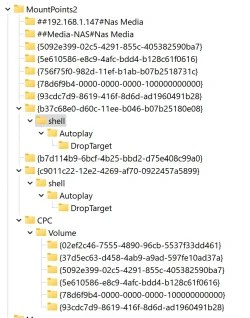
Do you have anything weird going on the mount points key in the registry? For example, at

HKEY_CURRENT_USER\Software\Microsoft\Windows\CurrentVersion\Explorer\MountPoints2\M

for the M drive, or \P for the P drive?
 

My Computer

System One

  • OS
    Windows 11 Pro 25H2
    Computer type
    PC/Desktop
    Manufacturer/Model
    Intel NUC12WSHi7
    CPU
    12th Gen Core i7-1260P
    Motherboard
    NUC12WSBi7
    Memory
    64 GB Micron PC4-25600
    Graphics Card(s)
    Intel Iris Xe Graphics
    Sound Card
    on-board Realtek HD Audio
    Monitor(s) Displays
    Dell U3219Q
    Screen Resolution
    3840 x 2160
    Hard Drives
    Samsung SSD 990 PRO 1TB
    Crucial MX500 2 TB
    Antivirus
    Microsoft Defender
Check if there's an autorun.inf file on those drives.
Code:
[autorun]
OPEN=start.exe
ICON=myicon.ico
LABEL=My Volume
 

My Computer

System One

  • OS
    Windows 7
Do you have anything weird going on the mount points key in the registry? For example, at

HKEY_CURRENT_USER\Software\Microsoft\Windows\CurrentVersion\Explorer\MountPoints2\M

for the M drive, or \P for the P drive?

Nothing stands out?
 

Attachments

  • Screenshot 2025-04-16 185912.webp
    Screenshot 2025-04-16 185912.webp
    104.8 KB · Views: 5

My Computer

System One

  • OS
    Windows 11 Home
    Computer type
    PC/Desktop
    CPU
    AMD Ryzen 9 9950X3D 4.3 GHz 16-Core Processor
    Motherboard
    Gigabyte X870E AORUS ELITE WIFI7 ATX AM5
    Memory
    Patriot Viper Venom 64 GB (2 x 32 GB) DDR5-6400 CL32
    Graphics Card(s)
    Gigabyte GAMING OC Radeon RX 9070 XT 16 GB
    Sound Card
    N/A
    Monitor(s) Displays
    3x 4K Samsung & 1x 1080p Arzopa
    Screen Resolution
    2160p
    Hard Drives
    OS Drive: Samsung 990 EVO Plus 4 TB M.2-2280 PCIe 5.0 X2 NVME Solid State Drive
    Second Drive: Sabrent Rocket Q 2 TB M.2-2280 PCIe 3.0 X4 NVME Solid State Drive
    Backup Drives (internal): 2x Seagate 14TB 7200 RPM
    PSU
    Corsair RM850x (2024) 850 W Fully Modular ATX
    Cooling
    Noctua NH-D9L 46.44 CFM CPU Cooler
    Browser
    FireFox
Check if there's an autorun.inf file on those drives.
Code:
[autorun]
OPEN=start.exe
ICON=myicon.ico
LABEL=My Volume
No. None of the drives have that.
 

My Computer

System One

  • OS
    Windows 11 Home
    Computer type
    PC/Desktop
    CPU
    AMD Ryzen 9 9950X3D 4.3 GHz 16-Core Processor
    Motherboard
    Gigabyte X870E AORUS ELITE WIFI7 ATX AM5
    Memory
    Patriot Viper Venom 64 GB (2 x 32 GB) DDR5-6400 CL32
    Graphics Card(s)
    Gigabyte GAMING OC Radeon RX 9070 XT 16 GB
    Sound Card
    N/A
    Monitor(s) Displays
    3x 4K Samsung & 1x 1080p Arzopa
    Screen Resolution
    2160p
    Hard Drives
    OS Drive: Samsung 990 EVO Plus 4 TB M.2-2280 PCIe 5.0 X2 NVME Solid State Drive
    Second Drive: Sabrent Rocket Q 2 TB M.2-2280 PCIe 3.0 X4 NVME Solid State Drive
    Backup Drives (internal): 2x Seagate 14TB 7200 RPM
    PSU
    Corsair RM850x (2024) 850 W Fully Modular ATX
    Cooling
    Noctua NH-D9L 46.44 CFM CPU Cooler
    Browser
    FireFox

My Computers

System One System Two

  • OS
    Windows 11 Pro 25H2 26200.8655
    Computer type
    PC/Desktop
    Manufacturer/Model
    Dell Optiplex 7080
    CPU
    i9-10900 10 core 20 threads
    Motherboard
    DELL 0J37VM
    Memory
    32 gb
    Graphics Card(s)
    none-Intel UHD Graphics 630
    Sound Card
    Integrated Realtek
    Monitor(s) Displays
    Benq 27
    Screen Resolution
    2560x1440
    Hard Drives
    2x1tb Solidigm m.2 nvme /External drives 512gb Samsung m.2 sata+2tb Kingston m2.nvme
    PSU
    500w
    Case
    MT
    Cooling
    Dell Premium
    Keyboard
    Logitech wired
    Mouse
    Logitech wireless
    Internet Speed
    so slow I'm too embarrassed to tell
    Browser
    #1 Edge #2 Firefox
    Antivirus
    Defender+MWB Premium
  • Operating System
    Windows 11 Pro 24H2 26200.8457
    Computer type
    PC/Desktop
    Manufacturer/Model
    Beelink Mini PC SER5
    CPU
    AMD Ryzen 7 6800U
    Memory
    32 gb
    Graphics card(s)
    integrated
    Sound Card
    integrated
    Monitor(s) Displays
    Benq 27
    Screen Resolution
    2560x1440
    Hard Drives
    1TB Crucial nvme
    Keyboard
    Logitech wired
    Mouse
    Logitech wireless
    Internet Speed
    still too embarrassed to tell
    Browser
    Firefox
    Antivirus
    Defender
    Other Info
    System 3 is non compliant Dell 9020 i7-4770/24gb ram Win11 PRO 26200.8457
Scroll down, there should be some drive letters at the bottom of MountPoints2. Do they have a DefaultIcon setting underneath?
There isn't. See screen shot
 

Attachments

  • Screenshot 2025-04-16 185912.webp
    Screenshot 2025-04-16 185912.webp
    104.8 KB · Views: 3

My Computer

System One

  • OS
    Windows 11 Home
    Computer type
    PC/Desktop
    CPU
    AMD Ryzen 9 9950X3D 4.3 GHz 16-Core Processor
    Motherboard
    Gigabyte X870E AORUS ELITE WIFI7 ATX AM5
    Memory
    Patriot Viper Venom 64 GB (2 x 32 GB) DDR5-6400 CL32
    Graphics Card(s)
    Gigabyte GAMING OC Radeon RX 9070 XT 16 GB
    Sound Card
    N/A
    Monitor(s) Displays
    3x 4K Samsung & 1x 1080p Arzopa
    Screen Resolution
    2160p
    Hard Drives
    OS Drive: Samsung 990 EVO Plus 4 TB M.2-2280 PCIe 5.0 X2 NVME Solid State Drive
    Second Drive: Sabrent Rocket Q 2 TB M.2-2280 PCIe 3.0 X4 NVME Solid State Drive
    Backup Drives (internal): 2x Seagate 14TB 7200 RPM
    PSU
    Corsair RM850x (2024) 850 W Fully Modular ATX
    Cooling
    Noctua NH-D9L 46.44 CFM CPU Cooler
    Browser
    FireFox

My Computer

System One

  • OS
    Windows 11 Home
    Computer type
    PC/Desktop
    CPU
    AMD Ryzen 9 9950X3D 4.3 GHz 16-Core Processor
    Motherboard
    Gigabyte X870E AORUS ELITE WIFI7 ATX AM5
    Memory
    Patriot Viper Venom 64 GB (2 x 32 GB) DDR5-6400 CL32
    Graphics Card(s)
    Gigabyte GAMING OC Radeon RX 9070 XT 16 GB
    Sound Card
    N/A
    Monitor(s) Displays
    3x 4K Samsung & 1x 1080p Arzopa
    Screen Resolution
    2160p
    Hard Drives
    OS Drive: Samsung 990 EVO Plus 4 TB M.2-2280 PCIe 5.0 X2 NVME Solid State Drive
    Second Drive: Sabrent Rocket Q 2 TB M.2-2280 PCIe 3.0 X4 NVME Solid State Drive
    Backup Drives (internal): 2x Seagate 14TB 7200 RPM
    PSU
    Corsair RM850x (2024) 850 W Fully Modular ATX
    Cooling
    Noctua NH-D9L 46.44 CFM CPU Cooler
    Browser
    FireFox
Im still having issues this with. I noticed that 2 external hard drives do not have this problem (only my internal ones). I changed the ownership of the internal ones to my account only. Could this be the issue?
 

My Computer

System One

  • OS
    Windows 11 Home
    Computer type
    PC/Desktop
    CPU
    AMD Ryzen 9 9950X3D 4.3 GHz 16-Core Processor
    Motherboard
    Gigabyte X870E AORUS ELITE WIFI7 ATX AM5
    Memory
    Patriot Viper Venom 64 GB (2 x 32 GB) DDR5-6400 CL32
    Graphics Card(s)
    Gigabyte GAMING OC Radeon RX 9070 XT 16 GB
    Sound Card
    N/A
    Monitor(s) Displays
    3x 4K Samsung & 1x 1080p Arzopa
    Screen Resolution
    2160p
    Hard Drives
    OS Drive: Samsung 990 EVO Plus 4 TB M.2-2280 PCIe 5.0 X2 NVME Solid State Drive
    Second Drive: Sabrent Rocket Q 2 TB M.2-2280 PCIe 3.0 X4 NVME Solid State Drive
    Backup Drives (internal): 2x Seagate 14TB 7200 RPM
    PSU
    Corsair RM850x (2024) 850 W Fully Modular ATX
    Cooling
    Noctua NH-D9L 46.44 CFM CPU Cooler
    Browser
    FireFox
I changed the ownership of the internal ones to my account only. Could this be the issue?
Are you saying you took ownership of all your system files on your C: drive. Oh I hope not.
 

My Computers

System One System Two

  • OS
    Windows 11 Pro 25H2 26200.8655
    Computer type
    PC/Desktop
    Manufacturer/Model
    Dell Optiplex 7080
    CPU
    i9-10900 10 core 20 threads
    Motherboard
    DELL 0J37VM
    Memory
    32 gb
    Graphics Card(s)
    none-Intel UHD Graphics 630
    Sound Card
    Integrated Realtek
    Monitor(s) Displays
    Benq 27
    Screen Resolution
    2560x1440
    Hard Drives
    2x1tb Solidigm m.2 nvme /External drives 512gb Samsung m.2 sata+2tb Kingston m2.nvme
    PSU
    500w
    Case
    MT
    Cooling
    Dell Premium
    Keyboard
    Logitech wired
    Mouse
    Logitech wireless
    Internet Speed
    so slow I'm too embarrassed to tell
    Browser
    #1 Edge #2 Firefox
    Antivirus
    Defender+MWB Premium
  • Operating System
    Windows 11 Pro 24H2 26200.8457
    Computer type
    PC/Desktop
    Manufacturer/Model
    Beelink Mini PC SER5
    CPU
    AMD Ryzen 7 6800U
    Memory
    32 gb
    Graphics card(s)
    integrated
    Sound Card
    integrated
    Monitor(s) Displays
    Benq 27
    Screen Resolution
    2560x1440
    Hard Drives
    1TB Crucial nvme
    Keyboard
    Logitech wired
    Mouse
    Logitech wireless
    Internet Speed
    still too embarrassed to tell
    Browser
    Firefox
    Antivirus
    Defender
    Other Info
    System 3 is non compliant Dell 9020 i7-4770/24gb ram Win11 PRO 26200.8457

My Computer

System One

  • OS
    Windows 11 Home
    Computer type
    PC/Desktop
    CPU
    AMD Ryzen 9 9950X3D 4.3 GHz 16-Core Processor
    Motherboard
    Gigabyte X870E AORUS ELITE WIFI7 ATX AM5
    Memory
    Patriot Viper Venom 64 GB (2 x 32 GB) DDR5-6400 CL32
    Graphics Card(s)
    Gigabyte GAMING OC Radeon RX 9070 XT 16 GB
    Sound Card
    N/A
    Monitor(s) Displays
    3x 4K Samsung & 1x 1080p Arzopa
    Screen Resolution
    2160p
    Hard Drives
    OS Drive: Samsung 990 EVO Plus 4 TB M.2-2280 PCIe 5.0 X2 NVME Solid State Drive
    Second Drive: Sabrent Rocket Q 2 TB M.2-2280 PCIe 3.0 X4 NVME Solid State Drive
    Backup Drives (internal): 2x Seagate 14TB 7200 RPM
    PSU
    Corsair RM850x (2024) 850 W Fully Modular ATX
    Cooling
    Noctua NH-D9L 46.44 CFM CPU Cooler
    Browser
    FireFox

Latest Support Threads

Back
Top Bottom