Can't run Windows setup


The logs also reported:

No mountpoint found for:
Windows Recovery Environment (Windows RE) and system reset configuration


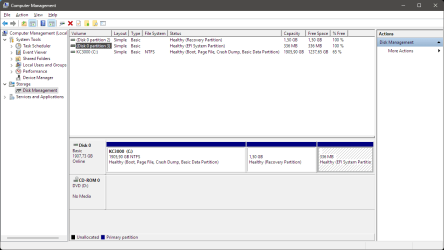
1) Open disk management> post images or share links


2) Run: disk partition information > post a share link


3) Run Tuneup plus > post a share link


My Computer My Computer

At a glance

Windows 10Intel(R) Core(TM) i7-4800MQ CPU @ 2.70GHz16 GB Total: Manufacturer : Samsung MemoryTyp...NVIDIA Quadro K3100M; Intel(R) HD Graphics 4600
OS
Windows 10
Computer type
Laptop
Manufacturer/Model
HP
CPU
Intel(R) Core(TM) i7-4800MQ CPU @ 2.70GHz
Motherboard
Product : 190A Version : KBC Version 94.56
Memory
16 GB Total: Manufacturer : Samsung MemoryType : DDR3 FormFactor : SODIMM Capacity : 8GB Speed : 1600
Graphics Card(s)
NVIDIA Quadro K3100M; Intel(R) HD Graphics 4600
Sound Card
IDT High Definition Audio CODEC; PNP Device ID HDAUDIO\FUNC_01&VEN_111D&DEV_76E0
Hard Drives
Model Hitachi HTS727575A9E364
Antivirus
Microsoft Defender
Other Info
Mobile Workstation
Needless to say that for an in-place upgrade/repair or upgrade to a higher version the language of the ISO must match the installed language of Windows, any language packs added after installation don't count, you need the original language.
 

My Computers My Computers

  • At a glance

    Windows 11 Pro 23H2 (5699), 25H2 (8875)Mobile DualCore Intel Core 2 Duo T7250, 2000 MHz4GBMobile Intel(R) GMA 4500M (Mobile 4 series)
    OS
    Windows 11 Pro 23H2 (5699), 25H2 (8875)
    Computer type
    Laptop
    Manufacturer/Model
    Acer Extensa 5630EZ
    CPU
    Mobile DualCore Intel Core 2 Duo T7250, 2000 MHz
    Motherboard
    Acer Extensa 5630
    Memory
    4GB
    Graphics Card(s)
    Mobile Intel(R) GMA 4500M (Mobile 4 series)
    Sound Card
    Realtek ALC268 @ Intel 82801IB ICH9 - High Definition Audio Controller
    Monitor(s) Displays
    1
    Screen Resolution
    1280x800
    Hard Drives
    Samsung SSD 850 EVO 250GB SATA Device (250 GB, SATA-III)
    Internet Speed
    VDSL 50 Mbps
    Browser
    MICROSOFT EDGE
    Antivirus
    WINDOWS DEFENDER
    Other Info
    Legacy MBR installation, no TPM, no Secure Boot, no WDDM 2.0 graphics drivers, no SSE4.2, cannot get more unsupported ;) This is only my test laptop. I had installed Windows 11 here before upgrading my main PC. For my main PC I use everyday see my 2nd system specs.
  • At a glance

    Windows 11 Pro v25H2 (build 26200.8875)Intel Core-i7 3770 3.40GHz s1155 (3rd generat...2x Kingston Hyper-X Blu 8GB DDR3-1600GIGABYTE GeForce RTX 3050 WINDFORCE OC V2 6GB...
    Operating System
    Windows 11 Pro v25H2 (build 26200.8875)
    Computer type
    PC/Desktop
    Manufacturer/Model
    Custom-built PC
    CPU
    Intel Core-i7 3770 3.40GHz s1155 (3rd generation)
    Motherboard
    Asus P8H61 s1155 ATX
    Memory
    2x Kingston Hyper-X Blu 8GB DDR3-1600
    Graphics card(s)
    GIGABYTE GeForce RTX 3050 WINDFORCE OC V2 6GB (GV-N3050WF2OCV2-6GD)
    Sound Card
    Realtek HD audio (ALC887)
    Monitor(s) Displays
    Sony Bravia KDL-19L4000 19" LCD TV via VGA
    Screen Resolution
    1440x900 32-bit 60Hz
    Hard Drives
    WD Blue SA510 2.5 1000GB SSD as system disk, Western Digital Caviar Purple 4TB SATA III (WD40PURZ) as second
    PSU
    Thermaltake Litepower RGB 550W Full Wired
    Case
    SUPERCASE MIDI-TOWER
    Cooling
    Deepcool Gamma Archer CPU cooler, 1x 8cm fan at the back
    Keyboard
    Mitsumi 101-key PS/2
    Mouse
    Sunnyline OptiEye PS/2
    Internet Speed
    100Mbps
    Browser
    Microsoft Edge, Mozilla Firefox
    Antivirus
    Microsoft Windows Defender
    Other Info
    Legacy BIOS (MBR) installation, no TPM, no Secure Boot, WDDM 3.0 graphics drivers, WEI score 7.4
Windows Recovery Environment (Windows RE) and system reset configuration
1) Open disk management> post images or share links
I believe the Windows RE was on C: partition. After some tinkering I think that is correctly on a separate partition. (Or maybe not?)
1731058843521.png
2) Run: disk partition information > post a share link
DiskParInfo.log
Run Tuneup plus > post a share link
Tuneup_log 2024-11-08 at 11-38-44.zip
 

Attachments

  • 1731058442840.png
    1731058442840.png
    19.3 KB · Views: 2

My Computer My Computer

At a glance

Windows 11Intel i5 14600KF32GB G.Skill Ripjaws V 4000MT/s at 3600MT/s 1...MSI GeForce RTX 3070 GAMING Z TRIO
OS
Windows 11
Computer type
PC/Desktop
CPU
Intel i5 14600KF
Motherboard
MSI PRO Z690-A DDR4
Memory
32GB G.Skill Ripjaws V 4000MT/s at 3600MT/s 14-13-13-26-230
Graphics Card(s)
MSI GeForce RTX 3070 GAMING Z TRIO
Sound Card
Fosi Audio DAC-Q4
Monitor(s) Displays
Dell Alienware AW2725DF
Screen Resolution
1440p
Hard Drives
Kingston KC3000 2TB
PSU
Adata XPG Core Reactor 850W
Case
Deepcool E-Shield
Cooling
Arctic Liquid Freezer II 360
Keyboard
Mechanical
Mouse
Razer Basilisk V3
Internet Speed
200/50 Mbps
Browser
Chrome
Needless to say that for an in-place upgrade/repair or upgrade to a higher version the language of the ISO must match the installed language of Windows, any language packs added after installation don't count, you need the original language.
Yes I've alawys installed En/Us version, only localization (date format, keyboard layout etc.) is in my native language/format.
 

My Computer My Computer

At a glance

Windows 11Intel i5 14600KF32GB G.Skill Ripjaws V 4000MT/s at 3600MT/s 1...MSI GeForce RTX 3070 GAMING Z TRIO
OS
Windows 11
Computer type
PC/Desktop
CPU
Intel i5 14600KF
Motherboard
MSI PRO Z690-A DDR4
Memory
32GB G.Skill Ripjaws V 4000MT/s at 3600MT/s 14-13-13-26-230
Graphics Card(s)
MSI GeForce RTX 3070 GAMING Z TRIO
Sound Card
Fosi Audio DAC-Q4
Monitor(s) Displays
Dell Alienware AW2725DF
Screen Resolution
1440p
Hard Drives
Kingston KC3000 2TB
PSU
Adata XPG Core Reactor 850W
Case
Deepcool E-Shield
Cooling
Arctic Liquid Freezer II 360
Keyboard
Mechanical
Mouse
Razer Basilisk V3
Internet Speed
200/50 Mbps
Browser
Chrome
Then the installation you try to upgrade has some issues. Run the sfc and dism commands in an elevated Command Prompt to fix them, I don't remember the syntax.
By the way 1731072748603.png

The Directory of Wim file is correct. Just the DISM command runs about to 55+% and then ends with the given error codes.
 

My Computer My Computer

At a glance

Windows 11Intel i5 14600KF32GB G.Skill Ripjaws V 4000MT/s at 3600MT/s 1...MSI GeForce RTX 3070 GAMING Z TRIO
OS
Windows 11
Computer type
PC/Desktop
CPU
Intel i5 14600KF
Motherboard
MSI PRO Z690-A DDR4
Memory
32GB G.Skill Ripjaws V 4000MT/s at 3600MT/s 14-13-13-26-230
Graphics Card(s)
MSI GeForce RTX 3070 GAMING Z TRIO
Sound Card
Fosi Audio DAC-Q4
Monitor(s) Displays
Dell Alienware AW2725DF
Screen Resolution
1440p
Hard Drives
Kingston KC3000 2TB
PSU
Adata XPG Core Reactor 850W
Case
Deepcool E-Shield
Cooling
Arctic Liquid Freezer II 360
Keyboard
Mechanical
Mouse
Razer Basilisk V3
Internet Speed
200/50 Mbps
Browser
Chrome
What had happened that the partition architecture was modified?

Windows > recovery > system


What had happened to the reserved partition?

How come the system partition is not on the left side of the windows partition?


1) Please reboot > run Tuneup plus > post a share link


2) Run the net framework troubleshooter:


3) Reboot into safe mode with networking (Ethernet) (shift + restart) > run Tuneup plus > post a share link


Code:
2024-11-08 11:32:53, Info                  CSI    000005a4 [SR] Could not reproject corrupted file \??\C:\WINDOWS\Microsoft.NET\Framework\v4.0.30319\WPF\\GlobalUserInterface.CompositeFont; source file in store is also corrupted
2024-11-08 11:32:53, Info                  CSI    000005a7 [SR] Could not reproject corrupted file \??\C:\WINDOWS\Microsoft.NET\Framework\v4.0.30319\WPF\\GlobalMonospace.CompositeFont; source file in store is also corrupted
2024-11-08 11:32:53, Info                  CSI    000005aa [SR] Could not reproject corrupted file \??\C:\WINDOWS\Microsoft.NET\Framework\v4.0.30319\WPF\\GlobalSerif.CompositeFont; source file in store is also corrupted
2024-11-08 11:32:53, Info                  CSI    000005ad [SR] Could not reproject corrupted file \??\C:\WINDOWS\Microsoft.NET\Framework\v4.0.30319\WPF\\GlobalSansSerif.CompositeFont; source file in store is also corrupted
 

My Computer My Computer

At a glance

Windows 10Intel(R) Core(TM) i7-4800MQ CPU @ 2.70GHz16 GB Total: Manufacturer : Samsung MemoryTyp...NVIDIA Quadro K3100M; Intel(R) HD Graphics 4600
OS
Windows 10
Computer type
Laptop
Manufacturer/Model
HP
CPU
Intel(R) Core(TM) i7-4800MQ CPU @ 2.70GHz
Motherboard
Product : 190A Version : KBC Version 94.56
Memory
16 GB Total: Manufacturer : Samsung MemoryType : DDR3 FormFactor : SODIMM Capacity : 8GB Speed : 1600
Graphics Card(s)
NVIDIA Quadro K3100M; Intel(R) HD Graphics 4600
Sound Card
IDT High Definition Audio CODEC; PNP Device ID HDAUDIO\FUNC_01&VEN_111D&DEV_76E0
Hard Drives
Model Hitachi HTS727575A9E364
Antivirus
Microsoft Defender
Other Info
Mobile Workstation
What had happened that the partition architecture was modified?

Windows > recovery > system


What had happened to the reserved partition?

How come the system partition is not on the left side of the windows partition?
You mean what would happen with "Reset this PC"? It wants to do a clean install.
Tried to move EFI partition to front, but when using "shrink" command in diskpart, it created the empty space after the C partition. But as I've gathered the EFI does not have to be the first partition in case of 2TB drives.

1) Please reboot > run Tuneup plus > post a share link
Tuneup_log 2024-11-09 at 18-56-11.zip

2) Run the net framework troubleshooter:
It spawned a .cab file.

3) Reboot into safe mode with networking (Ethernet) (shift + restart) > run Tuneup plus > post a share link
Tuneup_log 2024-11-09 at 19-02-26.zip


I think It's far over my head an I just try to use the OS, as it most part works just fine.
 

My Computer My Computer

At a glance

Windows 11Intel i5 14600KF32GB G.Skill Ripjaws V 4000MT/s at 3600MT/s 1...MSI GeForce RTX 3070 GAMING Z TRIO
OS
Windows 11
Computer type
PC/Desktop
CPU
Intel i5 14600KF
Motherboard
MSI PRO Z690-A DDR4
Memory
32GB G.Skill Ripjaws V 4000MT/s at 3600MT/s 14-13-13-26-230
Graphics Card(s)
MSI GeForce RTX 3070 GAMING Z TRIO
Sound Card
Fosi Audio DAC-Q4
Monitor(s) Displays
Dell Alienware AW2725DF
Screen Resolution
1440p
Hard Drives
Kingston KC3000 2TB
PSU
Adata XPG Core Reactor 850W
Case
Deepcool E-Shield
Cooling
Arctic Liquid Freezer II 360
Keyboard
Mechanical
Mouse
Razer Basilisk V3
Internet Speed
200/50 Mbps
Browser
Chrome
This is the default Windows partition layout for BIOS UEFI drive GPT:

diagram of default partition layout: system, msr, windows, and recovery


The current computer drive partition layout is: Windows | Recovery | System


MSR was deleted.

System was moved from one side to the other side.


At sometime the layout was modified.

What had happened?


Shutdown the computer then power on. (not a restart)

Repeat the computer shutdown then power on. (not a restart)


Run Tuneup plus > post a share link


Code:
Beginning system scan.
This process will take some time.
There is a system repair pending which requires reboot to complete.
Restart Windows and run sfc again.


Code:
2024-11-09 19:01:33, Info                  CSI    00000223 [SR]
Unable to complete Verify and Repair transaction because some of the files that need to be repaired are in use.
A reboot is required to complete this operation.
 

My Computer My Computer

At a glance

Windows 10Intel(R) Core(TM) i7-4800MQ CPU @ 2.70GHz16 GB Total: Manufacturer : Samsung MemoryTyp...NVIDIA Quadro K3100M; Intel(R) HD Graphics 4600
OS
Windows 10
Computer type
Laptop
Manufacturer/Model
HP
CPU
Intel(R) Core(TM) i7-4800MQ CPU @ 2.70GHz
Motherboard
Product : 190A Version : KBC Version 94.56
Memory
16 GB Total: Manufacturer : Samsung MemoryType : DDR3 FormFactor : SODIMM Capacity : 8GB Speed : 1600
Graphics Card(s)
NVIDIA Quadro K3100M; Intel(R) HD Graphics 4600
Sound Card
IDT High Definition Audio CODEC; PNP Device ID HDAUDIO\FUNC_01&VEN_111D&DEV_76E0
Hard Drives
Model Hitachi HTS727575A9E364
Antivirus
Microsoft Defender
Other Info
Mobile Workstation
The current computer drive partition layout is: Windows | Recovery | System


MSR was deleted.
Could the issues be caused because of the incorrect sequence of the partition layout?
I recreated the MSR, but the shrink command again created available space after the C partition, so the layout looks like this now:
1731239449712.png

Shutdown the computer then power on. (not a restart)

Repeat the computer shutdown then power on. (not a restart)


Run Tuneup plus > post a share link
Tuneup_log 2024-11-10 at 13-56-47.zip
 

My Computer My Computer

At a glance

Windows 11Intel i5 14600KF32GB G.Skill Ripjaws V 4000MT/s at 3600MT/s 1...MSI GeForce RTX 3070 GAMING Z TRIO
OS
Windows 11
Computer type
PC/Desktop
CPU
Intel i5 14600KF
Motherboard
MSI PRO Z690-A DDR4
Memory
32GB G.Skill Ripjaws V 4000MT/s at 3600MT/s 14-13-13-26-230
Graphics Card(s)
MSI GeForce RTX 3070 GAMING Z TRIO
Sound Card
Fosi Audio DAC-Q4
Monitor(s) Displays
Dell Alienware AW2725DF
Screen Resolution
1440p
Hard Drives
Kingston KC3000 2TB
PSU
Adata XPG Core Reactor 850W
Case
Deepcool E-Shield
Cooling
Arctic Liquid Freezer II 360
Keyboard
Mechanical
Mouse
Razer Basilisk V3
Internet Speed
200/50 Mbps
Browser
Chrome

My Computer My Computer

At a glance

Windows 11Intel i5 14600KF32GB G.Skill Ripjaws V 4000MT/s at 3600MT/s 1...MSI GeForce RTX 3070 GAMING Z TRIO
OS
Windows 11
Computer type
PC/Desktop
CPU
Intel i5 14600KF
Motherboard
MSI PRO Z690-A DDR4
Memory
32GB G.Skill Ripjaws V 4000MT/s at 3600MT/s 14-13-13-26-230
Graphics Card(s)
MSI GeForce RTX 3070 GAMING Z TRIO
Sound Card
Fosi Audio DAC-Q4
Monitor(s) Displays
Dell Alienware AW2725DF
Screen Resolution
1440p
Hard Drives
Kingston KC3000 2TB
PSU
Adata XPG Core Reactor 850W
Case
Deepcool E-Shield
Cooling
Arctic Liquid Freezer II 360
Keyboard
Mechanical
Mouse
Razer Basilisk V3
Internet Speed
200/50 Mbps
Browser
Chrome
1) Find a flash drive that you can format (> or = 8 GB)


2) Create a new bootable Windows 11 Media Creation Tool (MCT) (Windows 11 iso)


3) Boot to the MCT > perform a startup repair


4) Boot to the MCT > command prompt > type: sfc /scannow

take pictures > post images or share links


5) Boot into safe mode with networking (Ethernet) > run Tuneup plus > post a share link


6) Normal boot > run: https://download.microsoft.com/down...25-48B8-830C-AE19CAF038F1/NetFxRepairTool.exe


7) Reboot > run Tuneup plus > post a share link


Code:
    Started on 10.11.2024 at 13:56:11,61

        [SFC /ScanNow]

Beginning system scan.  This process will take some time.
There is a system repair pending which requires reboot to complete.  Restart
Windows and run sfc again.


Code:
Unable to complete Verify and Repair transaction because some of the files that need to be repaired are in use.
A reboot is required to complete this operation.
 

My Computer My Computer

At a glance

Windows 10Intel(R) Core(TM) i7-4800MQ CPU @ 2.70GHz16 GB Total: Manufacturer : Samsung MemoryTyp...NVIDIA Quadro K3100M; Intel(R) HD Graphics 4600
OS
Windows 10
Computer type
Laptop
Manufacturer/Model
HP
CPU
Intel(R) Core(TM) i7-4800MQ CPU @ 2.70GHz
Motherboard
Product : 190A Version : KBC Version 94.56
Memory
16 GB Total: Manufacturer : Samsung MemoryType : DDR3 FormFactor : SODIMM Capacity : 8GB Speed : 1600
Graphics Card(s)
NVIDIA Quadro K3100M; Intel(R) HD Graphics 4600
Sound Card
IDT High Definition Audio CODEC; PNP Device ID HDAUDIO\FUNC_01&VEN_111D&DEV_76E0
Hard Drives
Model Hitachi HTS727575A9E364
Antivirus
Microsoft Defender
Other Info
Mobile Workstation

Running sfc /scannow won't work from USB. The right syntax is

sfc /scannow /offbootdir=d:\ /offwindir=d:\windows

Replace d: with the appropriate drive letter to refer to your Windows disk as seen from the USB.
 

My Computers My Computers

  • At a glance

    Windows 11 Pro 23H2 (5699), 25H2 (8875)Mobile DualCore Intel Core 2 Duo T7250, 2000 MHz4GBMobile Intel(R) GMA 4500M (Mobile 4 series)
    OS
    Windows 11 Pro 23H2 (5699), 25H2 (8875)
    Computer type
    Laptop
    Manufacturer/Model
    Acer Extensa 5630EZ
    CPU
    Mobile DualCore Intel Core 2 Duo T7250, 2000 MHz
    Motherboard
    Acer Extensa 5630
    Memory
    4GB
    Graphics Card(s)
    Mobile Intel(R) GMA 4500M (Mobile 4 series)
    Sound Card
    Realtek ALC268 @ Intel 82801IB ICH9 - High Definition Audio Controller
    Monitor(s) Displays
    1
    Screen Resolution
    1280x800
    Hard Drives
    Samsung SSD 850 EVO 250GB SATA Device (250 GB, SATA-III)
    Internet Speed
    VDSL 50 Mbps
    Browser
    MICROSOFT EDGE
    Antivirus
    WINDOWS DEFENDER
    Other Info
    Legacy MBR installation, no TPM, no Secure Boot, no WDDM 2.0 graphics drivers, no SSE4.2, cannot get more unsupported ;) This is only my test laptop. I had installed Windows 11 here before upgrading my main PC. For my main PC I use everyday see my 2nd system specs.
  • At a glance

    Windows 11 Pro v25H2 (build 26200.8875)Intel Core-i7 3770 3.40GHz s1155 (3rd generat...2x Kingston Hyper-X Blu 8GB DDR3-1600GIGABYTE GeForce RTX 3050 WINDFORCE OC V2 6GB...
    Operating System
    Windows 11 Pro v25H2 (build 26200.8875)
    Computer type
    PC/Desktop
    Manufacturer/Model
    Custom-built PC
    CPU
    Intel Core-i7 3770 3.40GHz s1155 (3rd generation)
    Motherboard
    Asus P8H61 s1155 ATX
    Memory
    2x Kingston Hyper-X Blu 8GB DDR3-1600
    Graphics card(s)
    GIGABYTE GeForce RTX 3050 WINDFORCE OC V2 6GB (GV-N3050WF2OCV2-6GD)
    Sound Card
    Realtek HD audio (ALC887)
    Monitor(s) Displays
    Sony Bravia KDL-19L4000 19" LCD TV via VGA
    Screen Resolution
    1440x900 32-bit 60Hz
    Hard Drives
    WD Blue SA510 2.5 1000GB SSD as system disk, Western Digital Caviar Purple 4TB SATA III (WD40PURZ) as second
    PSU
    Thermaltake Litepower RGB 550W Full Wired
    Case
    SUPERCASE MIDI-TOWER
    Cooling
    Deepcool Gamma Archer CPU cooler, 1x 8cm fan at the back
    Keyboard
    Mitsumi 101-key PS/2
    Mouse
    Sunnyline OptiEye PS/2
    Internet Speed
    100Mbps
    Browser
    Microsoft Edge, Mozilla Firefox
    Antivirus
    Microsoft Windows Defender
    Other Info
    Legacy BIOS (MBR) installation, no TPM, no Secure Boot, WDDM 3.0 graphics drivers, WEI score 7.4
For post #31 step #4 post any error message or code.

In addition to spapakons's post:

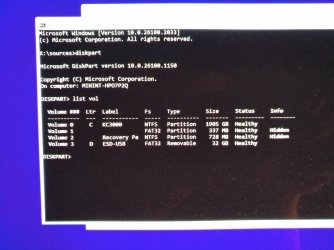
RE command prompt:

Type:


diskpart
lis vol
exit

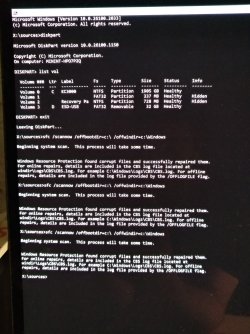
sfc /scannow /offbootdir=E:\ /offwindir=W:\Windows

E: (change to the bootable drive letter)
W: (change to the Windows drive letter)

Post share links.

Repeat this scannow command 3 times if it displays: Windows Resource Protection found corrupt files but was unable to fix some of them.
 

My Computer My Computer

At a glance

Windows 10Intel(R) Core(TM) i7-4800MQ CPU @ 2.70GHz16 GB Total: Manufacturer : Samsung MemoryTyp...NVIDIA Quadro K3100M; Intel(R) HD Graphics 4600
OS
Windows 10
Computer type
Laptop
Manufacturer/Model
HP
CPU
Intel(R) Core(TM) i7-4800MQ CPU @ 2.70GHz
Motherboard
Product : 190A Version : KBC Version 94.56
Memory
16 GB Total: Manufacturer : Samsung MemoryType : DDR3 FormFactor : SODIMM Capacity : 8GB Speed : 1600
Graphics Card(s)
NVIDIA Quadro K3100M; Intel(R) HD Graphics 4600
Sound Card
IDT High Definition Audio CODEC; PNP Device ID HDAUDIO\FUNC_01&VEN_111D&DEV_76E0
Hard Drives
Model Hitachi HTS727575A9E364
Antivirus
Microsoft Defender
Other Info
Mobile Workstation

1731317058299.jpeg
1731317072452.jpeg
1731317084521.jpeg
 

My Computer My Computer

At a glance

Windows 11Intel i5 14600KF32GB G.Skill Ripjaws V 4000MT/s at 3600MT/s 1...MSI GeForce RTX 3070 GAMING Z TRIO
OS
Windows 11
Computer type
PC/Desktop
CPU
Intel i5 14600KF
Motherboard
MSI PRO Z690-A DDR4
Memory
32GB G.Skill Ripjaws V 4000MT/s at 3600MT/s 14-13-13-26-230
Graphics Card(s)
MSI GeForce RTX 3070 GAMING Z TRIO
Sound Card
Fosi Audio DAC-Q4
Monitor(s) Displays
Dell Alienware AW2725DF
Screen Resolution
1440p
Hard Drives
Kingston KC3000 2TB
PSU
Adata XPG Core Reactor 850W
Case
Deepcool E-Shield
Cooling
Arctic Liquid Freezer II 360
Keyboard
Mechanical
Mouse
Razer Basilisk V3
Internet Speed
200/50 Mbps
Browser
Chrome
Did it work after repair of the system files?
 

My Computers My Computers

  • At a glance

    Windows 11 Pro 23H2 (5699), 25H2 (8875)Mobile DualCore Intel Core 2 Duo T7250, 2000 MHz4GBMobile Intel(R) GMA 4500M (Mobile 4 series)
    OS
    Windows 11 Pro 23H2 (5699), 25H2 (8875)
    Computer type
    Laptop
    Manufacturer/Model
    Acer Extensa 5630EZ
    CPU
    Mobile DualCore Intel Core 2 Duo T7250, 2000 MHz
    Motherboard
    Acer Extensa 5630
    Memory
    4GB
    Graphics Card(s)
    Mobile Intel(R) GMA 4500M (Mobile 4 series)
    Sound Card
    Realtek ALC268 @ Intel 82801IB ICH9 - High Definition Audio Controller
    Monitor(s) Displays
    1
    Screen Resolution
    1280x800
    Hard Drives
    Samsung SSD 850 EVO 250GB SATA Device (250 GB, SATA-III)
    Internet Speed
    VDSL 50 Mbps
    Browser
    MICROSOFT EDGE
    Antivirus
    WINDOWS DEFENDER
    Other Info
    Legacy MBR installation, no TPM, no Secure Boot, no WDDM 2.0 graphics drivers, no SSE4.2, cannot get more unsupported ;) This is only my test laptop. I had installed Windows 11 here before upgrading my main PC. For my main PC I use everyday see my 2nd system specs.
  • At a glance

    Windows 11 Pro v25H2 (build 26200.8875)Intel Core-i7 3770 3.40GHz s1155 (3rd generat...2x Kingston Hyper-X Blu 8GB DDR3-1600GIGABYTE GeForce RTX 3050 WINDFORCE OC V2 6GB...
    Operating System
    Windows 11 Pro v25H2 (build 26200.8875)
    Computer type
    PC/Desktop
    Manufacturer/Model
    Custom-built PC
    CPU
    Intel Core-i7 3770 3.40GHz s1155 (3rd generation)
    Motherboard
    Asus P8H61 s1155 ATX
    Memory
    2x Kingston Hyper-X Blu 8GB DDR3-1600
    Graphics card(s)
    GIGABYTE GeForce RTX 3050 WINDFORCE OC V2 6GB (GV-N3050WF2OCV2-6GD)
    Sound Card
    Realtek HD audio (ALC887)
    Monitor(s) Displays
    Sony Bravia KDL-19L4000 19" LCD TV via VGA
    Screen Resolution
    1440x900 32-bit 60Hz
    Hard Drives
    WD Blue SA510 2.5 1000GB SSD as system disk, Western Digital Caviar Purple 4TB SATA III (WD40PURZ) as second
    PSU
    Thermaltake Litepower RGB 550W Full Wired
    Case
    SUPERCASE MIDI-TOWER
    Cooling
    Deepcool Gamma Archer CPU cooler, 1x 8cm fan at the back
    Keyboard
    Mitsumi 101-key PS/2
    Mouse
    Sunnyline OptiEye PS/2
    Internet Speed
    100Mbps
    Browser
    Microsoft Edge, Mozilla Firefox
    Antivirus
    Microsoft Windows Defender
    Other Info
    Legacy BIOS (MBR) installation, no TPM, no Secure Boot, WDDM 3.0 graphics drivers, WEI score 7.4
Did it work after repair of the system files?
Everything is as it was before - SFC is reporting success in every run after each boot or running multiple times.
Can't run setup from ISO or virtual drive.
Windows update to latest 11 Canary fails.
 

My Computer My Computer

At a glance

Windows 11Intel i5 14600KF32GB G.Skill Ripjaws V 4000MT/s at 3600MT/s 1...MSI GeForce RTX 3070 GAMING Z TRIO
OS
Windows 11
Computer type
PC/Desktop
CPU
Intel i5 14600KF
Motherboard
MSI PRO Z690-A DDR4
Memory
32GB G.Skill Ripjaws V 4000MT/s at 3600MT/s 14-13-13-26-230
Graphics Card(s)
MSI GeForce RTX 3070 GAMING Z TRIO
Sound Card
Fosi Audio DAC-Q4
Monitor(s) Displays
Dell Alienware AW2725DF
Screen Resolution
1440p
Hard Drives
Kingston KC3000 2TB
PSU
Adata XPG Core Reactor 850W
Case
Deepcool E-Shield
Cooling
Arctic Liquid Freezer II 360
Keyboard
Mechanical
Mouse
Razer Basilisk V3
Internet Speed
200/50 Mbps
Browser
Chrome
Hey,

When I have a mess like that, I make a system backup.
Then I do a fresh install where I delete all partitions that have a relation with the system. So not e.g. a D:\DATA partition.
Then I let it install just the first things and abort after it has created the new system partitions in the right place.
Now reinstall from backup only the C:\ partition and I'm good to go. 20 minutes in all.

Maybe the powershell jockeys over here can do it faster and in a more professional way, but this is my escape.

Ciao, Han
 

My Computers My Computers

  • At a glance

    WIN 11 24H2i7-8550U16 GB lpddr3
    OS
    WIN 11 24H2
    Computer type
    Laptop
    Manufacturer/Model
    Lenovo Thinpad X1 Yoga 3gen
    CPU
    i7-8550U
    Memory
    16 GB lpddr3
    Screen Resolution
    2560x1440
    Hard Drives
    NVME SSD 2TB Samsung PM981
    Mouse
    Logitech M720
    Internet Speed
    350 Mbps down and up from 500 advertised on WiFi
    Browser
    Firefox
    Antivirus
    Windows Security, Malwarebytes
    Other Info
    Acronis TrueImage 2019
  • At a glance

    Win 11 24H2i7-8700T32 GB DDR4
    Operating System
    Win 11 24H2
    Computer type
    PC/Desktop
    Manufacturer/Model
    Lenovo Tiny M920x
    CPU
    i7-8700T
    Memory
    32 GB DDR4
    Sound Card
    MOTU M4
    Monitor(s) Displays
    DELL P2418D
    Screen Resolution
    2560 x 1440
    Hard Drives
    NVME SSD 2TB Samsung PM981a
    NVME SSD 1TB Samsung PM981a
    SSD Sandisk 1T Sata
    Mouse
    Logitech M590
    Browser
    Firefox
    Antivirus
    Windows Security, Malwarebytes
    Other Info
    Acronis TrueImage 2019
When available update the progress with steps in post #31.
 

My Computer My Computer

At a glance

Windows 10Intel(R) Core(TM) i7-4800MQ CPU @ 2.70GHz16 GB Total: Manufacturer : Samsung MemoryTyp...NVIDIA Quadro K3100M; Intel(R) HD Graphics 4600
OS
Windows 10
Computer type
Laptop
Manufacturer/Model
HP
CPU
Intel(R) Core(TM) i7-4800MQ CPU @ 2.70GHz
Motherboard
Product : 190A Version : KBC Version 94.56
Memory
16 GB Total: Manufacturer : Samsung MemoryType : DDR3 FormFactor : SODIMM Capacity : 8GB Speed : 1600
Graphics Card(s)
NVIDIA Quadro K3100M; Intel(R) HD Graphics 4600
Sound Card
IDT High Definition Audio CODEC; PNP Device ID HDAUDIO\FUNC_01&VEN_111D&DEV_76E0
Hard Drives
Model Hitachi HTS727575A9E364
Antivirus
Microsoft Defender
Other Info
Mobile Workstation

When available update the progress with steps in post #31.
Sorry, got short attention span.
In the post 34# I think I did what you asked me in #31, only steps 1-4 though.
Do they all have to be done one after another or can I continue from step 5-7?

Thanks for your help by the way!
 

My Computer My Computer

At a glance

Windows 11Intel i5 14600KF32GB G.Skill Ripjaws V 4000MT/s at 3600MT/s 1...MSI GeForce RTX 3070 GAMING Z TRIO
OS
Windows 11
Computer type
PC/Desktop
CPU
Intel i5 14600KF
Motherboard
MSI PRO Z690-A DDR4
Memory
32GB G.Skill Ripjaws V 4000MT/s at 3600MT/s 14-13-13-26-230
Graphics Card(s)
MSI GeForce RTX 3070 GAMING Z TRIO
Sound Card
Fosi Audio DAC-Q4
Monitor(s) Displays
Dell Alienware AW2725DF
Screen Resolution
1440p
Hard Drives
Kingston KC3000 2TB
PSU
Adata XPG Core Reactor 850W
Case
Deepcool E-Shield
Cooling
Arctic Liquid Freezer II 360
Keyboard
Mechanical
Mouse
Razer Basilisk V3
Internet Speed
200/50 Mbps
Browser
Chrome
Please post a new Tuneup plus into the newest post.
 

My Computer My Computer

At a glance

Windows 10Intel(R) Core(TM) i7-4800MQ CPU @ 2.70GHz16 GB Total: Manufacturer : Samsung MemoryTyp...NVIDIA Quadro K3100M; Intel(R) HD Graphics 4600
OS
Windows 10
Computer type
Laptop
Manufacturer/Model
HP
CPU
Intel(R) Core(TM) i7-4800MQ CPU @ 2.70GHz
Motherboard
Product : 190A Version : KBC Version 94.56
Memory
16 GB Total: Manufacturer : Samsung MemoryType : DDR3 FormFactor : SODIMM Capacity : 8GB Speed : 1600
Graphics Card(s)
NVIDIA Quadro K3100M; Intel(R) HD Graphics 4600
Sound Card
IDT High Definition Audio CODEC; PNP Device ID HDAUDIO\FUNC_01&VEN_111D&DEV_76E0
Hard Drives
Model Hitachi HTS727575A9E364
Antivirus
Microsoft Defender
Other Info
Mobile Workstation

Latest Support Threads

Back
Top Bottom