Solved Can't update Windows Defender - Windows 11


WiktorWdowiak

Active member
Local time
1:39 AM
Posts
47
Location
Poland
OS
Windows 11 Home Canary Insider Preview x64
Hello!
After update 22000.132, I can't update Windows Defender.
I thought that it's an bug, and next update (22000.160) will fix it, but it didn't

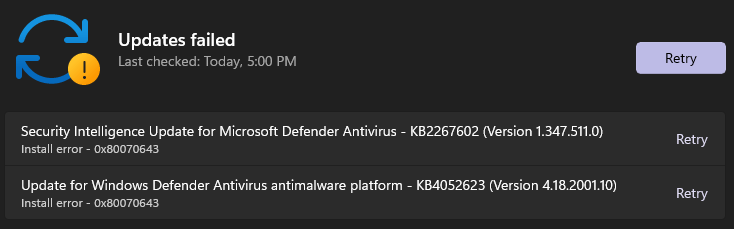
This is what is displaying when I try to update Windows Defender:
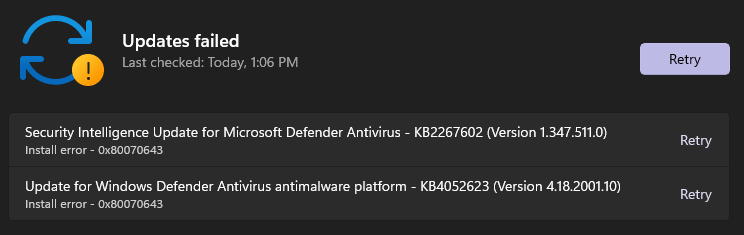
1630062671009.png

Do you guys know what can I do, to make Windows Defender finally update?

NOTE: I can't really do a clean install
 
Windows Build/Version
21H2 (OS Build: 22000.160)

My Computer My Computer

At a glance

Windows 11 Home Canary Insider Preview x64Intel(R) Core(TM) i5-10300H20GB4095MB NVIDIA GeForce GTX 1650 Ti (HP), Intel...
OS
Windows 11 Home Canary Insider Preview x64
Computer type
Laptop
Manufacturer/Model
HP Pavilion 16-a0030nw
CPU
Intel(R) Core(TM) i5-10300H
Motherboard
HP 87AE (U3E1)
Memory
20GB
Graphics Card(s)
4095MB NVIDIA GeForce GTX 1650 Ti (HP), Intel UHD Graphics (HP) (SLI Disabled)
Sound Card
Realtek High Definition Audio
Monitor(s) Displays
Generic PnP Monitor (1920x1080@60Hz)
Screen Resolution
1920x1080
Hard Drives
476GB INTEL SSDPEKNW512G8H (Unknown (SSD))
PSU
DEFAULT
Case
LAPTOP
Cooling
DEFAULT
Keyboard
DEFAULT
Mouse
Tracer Keybox II, Touchpad
Internet Speed
~10MB/s
Browser
Microsoft Edge Canary
Antivirus
Windows Defender

My Computer My Computer

At a glance

Windows 11 23H2Intel i7-7700k16 GBIntel 630 onboard
OS
Windows 11 23H2
Computer type
PC/Desktop
Manufacturer/Model
Assembled
CPU
Intel i7-7700k
Motherboard
Asrock Z270 Taichi
Memory
16 GB
Graphics Card(s)
Intel 630 onboard
Sound Card
Onboard
Monitor(s) Displays
Benq 1080p
Screen Resolution
1920*1080
Hard Drives
NVMe, SSD and HDD
Case
Cooler Master
Keyboard
Asus wireless
Mouse
Asus Wireless
Internet Speed
75 Mbps
Browser
Chrome, Edge, Arc
Antivirus
Windows Defender

Use Windows Update Troubleshooter.


  • Right-click on Start button and pick Settings
  • Go to System > Troubleshoot > Other troubleshooters
  • Click on Windows Update and select Run


Download Windows updates manually.


  • Go to the official Microsoft update catalog;
  • Enter a specific update code, for example, KB4481031
  • Select the correct version and click Download
  • Click on the link and Windows will update your computer


Resetting the Windows Update components can usually solve these types of issues.


My Computer My Computer

At a glance

Windows 11AMD Ryzen 7 5700GMicron Technology DDR4-3200 16GBNVIDIA GeForce RTX 3060
OS
Windows 11
Computer type
PC/Desktop
Manufacturer/Model
HP Pavilion
CPU
AMD Ryzen 7 5700G
Motherboard
Erica6
Memory
Micron Technology DDR4-3200 16GB
Graphics Card(s)
NVIDIA GeForce RTX 3060
Sound Card
Realtek ALC671
Monitor(s) Displays
Samsung SyncMaster U28E590
Screen Resolution
3840 x 2160
Hard Drives
SAMSUNG MZVLQ1T0HALB-000H1
You could also try to reset Win Security. All Apps- right click Windows Security, more, app settings- reset or try repair.
 

My Computers My Computers

  • At a glance

    Win 11 ProAMD Ryzen™ 7 7730U24GB Dual-Channel DDR4 @ 1596MHz (22-22-22-52)512MB ATI AMD Radeon Graphics (ASUStek Comput...
    OS
    Win 11 Pro
    Computer type
    Laptop
    Manufacturer/Model
    ASUS Vivobook
    CPU
    AMD Ryzen™ 7 7730U
    Motherboard
    M1605YA
    Memory
    24GB Dual-Channel DDR4 @ 1596MHz (22-22-22-52)
    Graphics Card(s)
    512MB ATI AMD Radeon Graphics (ASUStek Computer Inc)
    Monitor(s) Displays
    Generic PnP Monitor (1920x1200@60Hz) - P1 PLUS (1920x1080@59Hz)
    Screen Resolution
    1920 X 1200
    Hard Drives
    953GB Western Digital WD
    PSU
    45 Watts
    Mouse
    Lenovo Bluetooth.
    Internet Speed
    500 Mbps
    Browser
    Edge
    Antivirus
    Defender
  • At a glance

    Windows 11AMD Ryzen 7 5800H / 3.2 GHz32 GB DDR4 SDRAM 3200 MHzNVIDIA GeForce RTX 3060 6 GB GDDR6 SDRAM
    Operating System
    Windows 11
    Computer type
    Laptop
    Manufacturer/Model
    ACER NITRO
    CPU
    AMD Ryzen 7 5800H / 3.2 GHz
    Motherboard
    CZ Scala_CAS (FP6)
    Memory
    32 GB DDR4 SDRAM 3200 MHz
    Graphics card(s)
    NVIDIA GeForce RTX 3060 6 GB GDDR6 SDRAM
    Sound Card
    Realtek Audio. NVIDIA High Definition Audio
    Monitor(s) Displays
    15.6" LED backlight 1920 x 1080 (Full HD) 144 Hz
    Screen Resolution
    1920 x 1080 (Full HD)
    Hard Drives
    Samsung 970 Evo Plus 2TB NVMe M.2
    PSU
    180 Watt, 19.5 V
    Mouse
    Lenovo Bluetooth
    Internet Speed
    500 Mbps
    Browser
    Edge
    Antivirus
    Defender
Can you try this ?
I tried

Trigger a definition update for Windows Defender Antivirus using command prompt​

And this is what displayed, when I used those commands in cmd (With Admin Privilages):
"%ProgramFiles%\Windows Defender\MpCmdRun.exe" -removedefinitions -dynamicsignatures:
Service Version: 0.0.0.0
Engine Version: 0.0.0.0

No engine/signature is currently loaded.

"%ProgramFiles%\Windows Defender\MpCmdRun.exe" -SignatureUpdate:
Signature update started . . .
Service Version: 0.0.0.0
Engine Version: 0.0.0.0
ERROR: Signature Update failed with hr=0x800106ba
CmdTool: Failed with hr = 0x800106ba. Check C:\Users\gamin\AppData\Local\Temp\MpCmdRun.log for more information
 

My Computer My Computer

At a glance

Windows 11 Home Canary Insider Preview x64Intel(R) Core(TM) i5-10300H20GB4095MB NVIDIA GeForce GTX 1650 Ti (HP), Intel...
OS
Windows 11 Home Canary Insider Preview x64
Computer type
Laptop
Manufacturer/Model
HP Pavilion 16-a0030nw
CPU
Intel(R) Core(TM) i5-10300H
Motherboard
HP 87AE (U3E1)
Memory
20GB
Graphics Card(s)
4095MB NVIDIA GeForce GTX 1650 Ti (HP), Intel UHD Graphics (HP) (SLI Disabled)
Sound Card
Realtek High Definition Audio
Monitor(s) Displays
Generic PnP Monitor (1920x1080@60Hz)
Screen Resolution
1920x1080
Hard Drives
476GB INTEL SSDPEKNW512G8H (Unknown (SSD))
PSU
DEFAULT
Case
LAPTOP
Cooling
DEFAULT
Keyboard
DEFAULT
Mouse
Tracer Keybox II, Touchpad
Internet Speed
~10MB/s
Browser
Microsoft Edge Canary
Antivirus
Windows Defender
Use Windows Update Troubleshooter.


  • Right-click on Start button and pick Settings
  • Go to System > Troubleshoot > Other troubleshooters
  • Click on Windows Update and select Run


Download Windows updates manually.


  • Go to the official Microsoft update catalog;
  • Enter a specific update code, for example, KB4481031
  • Select the correct version and click Download
  • Click on the link and Windows will update your computer


Resetting the Windows Update components can usually solve these types of issues.

I tried that, but it's not a Windows Update problem.
Other updates install normally
 

My Computer My Computer

At a glance

Windows 11 Home Canary Insider Preview x64Intel(R) Core(TM) i5-10300H20GB4095MB NVIDIA GeForce GTX 1650 Ti (HP), Intel...
OS
Windows 11 Home Canary Insider Preview x64
Computer type
Laptop
Manufacturer/Model
HP Pavilion 16-a0030nw
CPU
Intel(R) Core(TM) i5-10300H
Motherboard
HP 87AE (U3E1)
Memory
20GB
Graphics Card(s)
4095MB NVIDIA GeForce GTX 1650 Ti (HP), Intel UHD Graphics (HP) (SLI Disabled)
Sound Card
Realtek High Definition Audio
Monitor(s) Displays
Generic PnP Monitor (1920x1080@60Hz)
Screen Resolution
1920x1080
Hard Drives
476GB INTEL SSDPEKNW512G8H (Unknown (SSD))
PSU
DEFAULT
Case
LAPTOP
Cooling
DEFAULT
Keyboard
DEFAULT
Mouse
Tracer Keybox II, Touchpad
Internet Speed
~10MB/s
Browser
Microsoft Edge Canary
Antivirus
Windows Defender
Use Windows Update Troubleshooter.


  • Right-click on Start button and pick Settings
  • Go to System > Troubleshoot > Other troubleshooters
  • Click on Windows Update and select Run


Download Windows updates manually.


  • Go to the official Microsoft update catalog;
  • Enter a specific update code, for example, KB4481031
  • Select the correct version and click Download
  • Click on the link and Windows will update your computer


Resetting the Windows Update components can usually solve these types of issues.

1630076330302.png
 

My Computer My Computer

At a glance

Windows 11 Home Canary Insider Preview x64Intel(R) Core(TM) i5-10300H20GB4095MB NVIDIA GeForce GTX 1650 Ti (HP), Intel...
OS
Windows 11 Home Canary Insider Preview x64
Computer type
Laptop
Manufacturer/Model
HP Pavilion 16-a0030nw
CPU
Intel(R) Core(TM) i5-10300H
Motherboard
HP 87AE (U3E1)
Memory
20GB
Graphics Card(s)
4095MB NVIDIA GeForce GTX 1650 Ti (HP), Intel UHD Graphics (HP) (SLI Disabled)
Sound Card
Realtek High Definition Audio
Monitor(s) Displays
Generic PnP Monitor (1920x1080@60Hz)
Screen Resolution
1920x1080
Hard Drives
476GB INTEL SSDPEKNW512G8H (Unknown (SSD))
PSU
DEFAULT
Case
LAPTOP
Cooling
DEFAULT
Keyboard
DEFAULT
Mouse
Tracer Keybox II, Touchpad
Internet Speed
~10MB/s
Browser
Microsoft Edge Canary
Antivirus
Windows Defender
You could also try to reset Win Security. All Apps- right click Windows Security, more, app settings- reset or try repair.
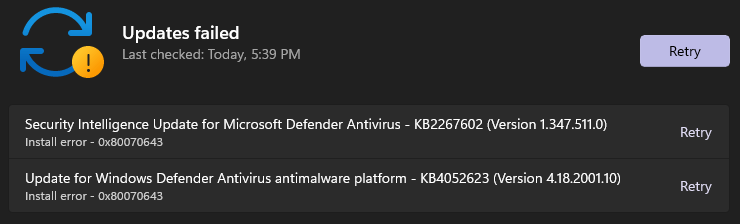
I made that, but when I tried to update again, I still have errors:
1630076452022.png
 

My Computer My Computer

At a glance

Windows 11 Home Canary Insider Preview x64Intel(R) Core(TM) i5-10300H20GB4095MB NVIDIA GeForce GTX 1650 Ti (HP), Intel...
OS
Windows 11 Home Canary Insider Preview x64
Computer type
Laptop
Manufacturer/Model
HP Pavilion 16-a0030nw
CPU
Intel(R) Core(TM) i5-10300H
Motherboard
HP 87AE (U3E1)
Memory
20GB
Graphics Card(s)
4095MB NVIDIA GeForce GTX 1650 Ti (HP), Intel UHD Graphics (HP) (SLI Disabled)
Sound Card
Realtek High Definition Audio
Monitor(s) Displays
Generic PnP Monitor (1920x1080@60Hz)
Screen Resolution
1920x1080
Hard Drives
476GB INTEL SSDPEKNW512G8H (Unknown (SSD))
PSU
DEFAULT
Case
LAPTOP
Cooling
DEFAULT
Keyboard
DEFAULT
Mouse
Tracer Keybox II, Touchpad
Internet Speed
~10MB/s
Browser
Microsoft Edge Canary
Antivirus
Windows Defender

My Computers My Computers

  • At a glance

    Win 11 ProAMD Ryzen™ 7 7730U24GB Dual-Channel DDR4 @ 1596MHz (22-22-22-52)512MB ATI AMD Radeon Graphics (ASUStek Comput...
    OS
    Win 11 Pro
    Computer type
    Laptop
    Manufacturer/Model
    ASUS Vivobook
    CPU
    AMD Ryzen™ 7 7730U
    Motherboard
    M1605YA
    Memory
    24GB Dual-Channel DDR4 @ 1596MHz (22-22-22-52)
    Graphics Card(s)
    512MB ATI AMD Radeon Graphics (ASUStek Computer Inc)
    Monitor(s) Displays
    Generic PnP Monitor (1920x1200@60Hz) - P1 PLUS (1920x1080@59Hz)
    Screen Resolution
    1920 X 1200
    Hard Drives
    953GB Western Digital WD
    PSU
    45 Watts
    Mouse
    Lenovo Bluetooth.
    Internet Speed
    500 Mbps
    Browser
    Edge
    Antivirus
    Defender
  • At a glance

    Windows 11AMD Ryzen 7 5800H / 3.2 GHz32 GB DDR4 SDRAM 3200 MHzNVIDIA GeForce RTX 3060 6 GB GDDR6 SDRAM
    Operating System
    Windows 11
    Computer type
    Laptop
    Manufacturer/Model
    ACER NITRO
    CPU
    AMD Ryzen 7 5800H / 3.2 GHz
    Motherboard
    CZ Scala_CAS (FP6)
    Memory
    32 GB DDR4 SDRAM 3200 MHz
    Graphics card(s)
    NVIDIA GeForce RTX 3060 6 GB GDDR6 SDRAM
    Sound Card
    Realtek Audio. NVIDIA High Definition Audio
    Monitor(s) Displays
    15.6" LED backlight 1920 x 1080 (Full HD) 144 Hz
    Screen Resolution
    1920 x 1080 (Full HD)
    Hard Drives
    Samsung 970 Evo Plus 2TB NVMe M.2
    PSU
    180 Watt, 19.5 V
    Mouse
    Lenovo Bluetooth
    Internet Speed
    500 Mbps
    Browser
    Edge
    Antivirus
    Defender
So it's proved it's a win update error. As @FreeBooter suggested last in his post to reset WU will work.
I did reset Windows Security, but it didn't worked.
I did run Windows Update Troubleshooter, but it also didn't work
I even tried to download update manually, but it also didn't work
 

My Computer My Computer

At a glance

Windows 11 Home Canary Insider Preview x64Intel(R) Core(TM) i5-10300H20GB4095MB NVIDIA GeForce GTX 1650 Ti (HP), Intel...
OS
Windows 11 Home Canary Insider Preview x64
Computer type
Laptop
Manufacturer/Model
HP Pavilion 16-a0030nw
CPU
Intel(R) Core(TM) i5-10300H
Motherboard
HP 87AE (U3E1)
Memory
20GB
Graphics Card(s)
4095MB NVIDIA GeForce GTX 1650 Ti (HP), Intel UHD Graphics (HP) (SLI Disabled)
Sound Card
Realtek High Definition Audio
Monitor(s) Displays
Generic PnP Monitor (1920x1080@60Hz)
Screen Resolution
1920x1080
Hard Drives
476GB INTEL SSDPEKNW512G8H (Unknown (SSD))
PSU
DEFAULT
Case
LAPTOP
Cooling
DEFAULT
Keyboard
DEFAULT
Mouse
Tracer Keybox II, Touchpad
Internet Speed
~10MB/s
Browser
Microsoft Edge Canary
Antivirus
Windows Defender
I did reset Windows Security, but it didn't worked.
I did run Windows Update Troubleshooter, but it also didn't work
I even tried to download update manually, but it also didn't work
See post #3

1630078035539.png
 

My Computers My Computers

  • At a glance

    Win 11 ProAMD Ryzen™ 7 7730U24GB Dual-Channel DDR4 @ 1596MHz (22-22-22-52)512MB ATI AMD Radeon Graphics (ASUStek Comput...
    OS
    Win 11 Pro
    Computer type
    Laptop
    Manufacturer/Model
    ASUS Vivobook
    CPU
    AMD Ryzen™ 7 7730U
    Motherboard
    M1605YA
    Memory
    24GB Dual-Channel DDR4 @ 1596MHz (22-22-22-52)
    Graphics Card(s)
    512MB ATI AMD Radeon Graphics (ASUStek Computer Inc)
    Monitor(s) Displays
    Generic PnP Monitor (1920x1200@60Hz) - P1 PLUS (1920x1080@59Hz)
    Screen Resolution
    1920 X 1200
    Hard Drives
    953GB Western Digital WD
    PSU
    45 Watts
    Mouse
    Lenovo Bluetooth.
    Internet Speed
    500 Mbps
    Browser
    Edge
    Antivirus
    Defender
  • At a glance

    Windows 11AMD Ryzen 7 5800H / 3.2 GHz32 GB DDR4 SDRAM 3200 MHzNVIDIA GeForce RTX 3060 6 GB GDDR6 SDRAM
    Operating System
    Windows 11
    Computer type
    Laptop
    Manufacturer/Model
    ACER NITRO
    CPU
    AMD Ryzen 7 5800H / 3.2 GHz
    Motherboard
    CZ Scala_CAS (FP6)
    Memory
    32 GB DDR4 SDRAM 3200 MHz
    Graphics card(s)
    NVIDIA GeForce RTX 3060 6 GB GDDR6 SDRAM
    Sound Card
    Realtek Audio. NVIDIA High Definition Audio
    Monitor(s) Displays
    15.6" LED backlight 1920 x 1080 (Full HD) 144 Hz
    Screen Resolution
    1920 x 1080 (Full HD)
    Hard Drives
    Samsung 970 Evo Plus 2TB NVMe M.2
    PSU
    180 Watt, 19.5 V
    Mouse
    Lenovo Bluetooth
    Internet Speed
    500 Mbps
    Browser
    Edge
    Antivirus
    Defender
I did reset/reregister right now, then restarted my computer, and I still have 0x80070643 errors:

1630078820656.png

I did also check Windows Security app, and I only have these options:

1630078889408.png

I got this feeling that something is missing here, but I don't really remember
 

My Computer My Computer

At a glance

Windows 11 Home Canary Insider Preview x64Intel(R) Core(TM) i5-10300H20GB4095MB NVIDIA GeForce GTX 1650 Ti (HP), Intel...
OS
Windows 11 Home Canary Insider Preview x64
Computer type
Laptop
Manufacturer/Model
HP Pavilion 16-a0030nw
CPU
Intel(R) Core(TM) i5-10300H
Motherboard
HP 87AE (U3E1)
Memory
20GB
Graphics Card(s)
4095MB NVIDIA GeForce GTX 1650 Ti (HP), Intel UHD Graphics (HP) (SLI Disabled)
Sound Card
Realtek High Definition Audio
Monitor(s) Displays
Generic PnP Monitor (1920x1080@60Hz)
Screen Resolution
1920x1080
Hard Drives
476GB INTEL SSDPEKNW512G8H (Unknown (SSD))
PSU
DEFAULT
Case
LAPTOP
Cooling
DEFAULT
Keyboard
DEFAULT
Mouse
Tracer Keybox II, Touchpad
Internet Speed
~10MB/s
Browser
Microsoft Edge Canary
Antivirus
Windows Defender
Try manually updating from within Windows Security. Virus and threat protection and scroll down to Virus and threat protection updates and click the link for Protection updates.
 

My Computers My Computers

  • At a glance

    Win 11 ProAMD Ryzen™ 7 7730U24GB Dual-Channel DDR4 @ 1596MHz (22-22-22-52)512MB ATI AMD Radeon Graphics (ASUStek Comput...
    OS
    Win 11 Pro
    Computer type
    Laptop
    Manufacturer/Model
    ASUS Vivobook
    CPU
    AMD Ryzen™ 7 7730U
    Motherboard
    M1605YA
    Memory
    24GB Dual-Channel DDR4 @ 1596MHz (22-22-22-52)
    Graphics Card(s)
    512MB ATI AMD Radeon Graphics (ASUStek Computer Inc)
    Monitor(s) Displays
    Generic PnP Monitor (1920x1200@60Hz) - P1 PLUS (1920x1080@59Hz)
    Screen Resolution
    1920 X 1200
    Hard Drives
    953GB Western Digital WD
    PSU
    45 Watts
    Mouse
    Lenovo Bluetooth.
    Internet Speed
    500 Mbps
    Browser
    Edge
    Antivirus
    Defender
  • At a glance

    Windows 11AMD Ryzen 7 5800H / 3.2 GHz32 GB DDR4 SDRAM 3200 MHzNVIDIA GeForce RTX 3060 6 GB GDDR6 SDRAM
    Operating System
    Windows 11
    Computer type
    Laptop
    Manufacturer/Model
    ACER NITRO
    CPU
    AMD Ryzen 7 5800H / 3.2 GHz
    Motherboard
    CZ Scala_CAS (FP6)
    Memory
    32 GB DDR4 SDRAM 3200 MHz
    Graphics card(s)
    NVIDIA GeForce RTX 3060 6 GB GDDR6 SDRAM
    Sound Card
    Realtek Audio. NVIDIA High Definition Audio
    Monitor(s) Displays
    15.6" LED backlight 1920 x 1080 (Full HD) 144 Hz
    Screen Resolution
    1920 x 1080 (Full HD)
    Hard Drives
    Samsung 970 Evo Plus 2TB NVMe M.2
    PSU
    180 Watt, 19.5 V
    Mouse
    Lenovo Bluetooth
    Internet Speed
    500 Mbps
    Browser
    Edge
    Antivirus
    Defender
Try manually updating from within Windows Security. Virus and threat protection and scroll down to Virus and threat protection updates and click the link for Protection updates.
The problem is, I don't have tab Virus and threat protection in Windows Security:

1630081769389.png
 

My Computer My Computer

At a glance

Windows 11 Home Canary Insider Preview x64Intel(R) Core(TM) i5-10300H20GB4095MB NVIDIA GeForce GTX 1650 Ti (HP), Intel...
OS
Windows 11 Home Canary Insider Preview x64
Computer type
Laptop
Manufacturer/Model
HP Pavilion 16-a0030nw
CPU
Intel(R) Core(TM) i5-10300H
Motherboard
HP 87AE (U3E1)
Memory
20GB
Graphics Card(s)
4095MB NVIDIA GeForce GTX 1650 Ti (HP), Intel UHD Graphics (HP) (SLI Disabled)
Sound Card
Realtek High Definition Audio
Monitor(s) Displays
Generic PnP Monitor (1920x1080@60Hz)
Screen Resolution
1920x1080
Hard Drives
476GB INTEL SSDPEKNW512G8H (Unknown (SSD))
PSU
DEFAULT
Case
LAPTOP
Cooling
DEFAULT
Keyboard
DEFAULT
Mouse
Tracer Keybox II, Touchpad
Internet Speed
~10MB/s
Browser
Microsoft Edge Canary
Antivirus
Windows Defender
Missed it first time :(
As you have the Home version try the registry fix in @Brink 's tutorial here.
 

My Computers My Computers

  • At a glance

    Win 11 ProAMD Ryzen™ 7 7730U24GB Dual-Channel DDR4 @ 1596MHz (22-22-22-52)512MB ATI AMD Radeon Graphics (ASUStek Comput...
    OS
    Win 11 Pro
    Computer type
    Laptop
    Manufacturer/Model
    ASUS Vivobook
    CPU
    AMD Ryzen™ 7 7730U
    Motherboard
    M1605YA
    Memory
    24GB Dual-Channel DDR4 @ 1596MHz (22-22-22-52)
    Graphics Card(s)
    512MB ATI AMD Radeon Graphics (ASUStek Computer Inc)
    Monitor(s) Displays
    Generic PnP Monitor (1920x1200@60Hz) - P1 PLUS (1920x1080@59Hz)
    Screen Resolution
    1920 X 1200
    Hard Drives
    953GB Western Digital WD
    PSU
    45 Watts
    Mouse
    Lenovo Bluetooth.
    Internet Speed
    500 Mbps
    Browser
    Edge
    Antivirus
    Defender
  • At a glance

    Windows 11AMD Ryzen 7 5800H / 3.2 GHz32 GB DDR4 SDRAM 3200 MHzNVIDIA GeForce RTX 3060 6 GB GDDR6 SDRAM
    Operating System
    Windows 11
    Computer type
    Laptop
    Manufacturer/Model
    ACER NITRO
    CPU
    AMD Ryzen 7 5800H / 3.2 GHz
    Motherboard
    CZ Scala_CAS (FP6)
    Memory
    32 GB DDR4 SDRAM 3200 MHz
    Graphics card(s)
    NVIDIA GeForce RTX 3060 6 GB GDDR6 SDRAM
    Sound Card
    Realtek Audio. NVIDIA High Definition Audio
    Monitor(s) Displays
    15.6" LED backlight 1920 x 1080 (Full HD) 144 Hz
    Screen Resolution
    1920 x 1080 (Full HD)
    Hard Drives
    Samsung 970 Evo Plus 2TB NVMe M.2
    PSU
    180 Watt, 19.5 V
    Mouse
    Lenovo Bluetooth
    Internet Speed
    500 Mbps
    Browser
    Edge
    Antivirus
    Defender


My Computer My Computer

At a glance

Windows 11AMD Ryzen 7 5700GMicron Technology DDR4-3200 16GBNVIDIA GeForce RTX 3060
OS
Windows 11
Computer type
PC/Desktop
Manufacturer/Model
HP Pavilion
CPU
AMD Ryzen 7 5700G
Motherboard
Erica6
Memory
Micron Technology DDR4-3200 16GB
Graphics Card(s)
NVIDIA GeForce RTX 3060
Sound Card
Realtek ALC671
Monitor(s) Displays
Samsung SyncMaster U28E590
Screen Resolution
3840 x 2160
Hard Drives
SAMSUNG MZVLQ1T0HALB-000H1

My Computer My Computer

At a glance

Windows 11 Home Canary Insider Preview x64Intel(R) Core(TM) i5-10300H20GB4095MB NVIDIA GeForce GTX 1650 Ti (HP), Intel...
OS
Windows 11 Home Canary Insider Preview x64
Computer type
Laptop
Manufacturer/Model
HP Pavilion 16-a0030nw
CPU
Intel(R) Core(TM) i5-10300H
Motherboard
HP 87AE (U3E1)
Memory
20GB
Graphics Card(s)
4095MB NVIDIA GeForce GTX 1650 Ti (HP), Intel UHD Graphics (HP) (SLI Disabled)
Sound Card
Realtek High Definition Audio
Monitor(s) Displays
Generic PnP Monitor (1920x1080@60Hz)
Screen Resolution
1920x1080
Hard Drives
476GB INTEL SSDPEKNW512G8H (Unknown (SSD))
PSU
DEFAULT
Case
LAPTOP
Cooling
DEFAULT
Keyboard
DEFAULT
Mouse
Tracer Keybox II, Touchpad
Internet Speed
~10MB/s
Browser
Microsoft Edge Canary
Antivirus
Windows Defender

Can I use UUP Dump for In-place Upgrade?
 

My Computer My Computer

At a glance

Windows 11 Home Canary Insider Preview x64Intel(R) Core(TM) i5-10300H20GB4095MB NVIDIA GeForce GTX 1650 Ti (HP), Intel...
OS
Windows 11 Home Canary Insider Preview x64
Computer type
Laptop
Manufacturer/Model
HP Pavilion 16-a0030nw
CPU
Intel(R) Core(TM) i5-10300H
Motherboard
HP 87AE (U3E1)
Memory
20GB
Graphics Card(s)
4095MB NVIDIA GeForce GTX 1650 Ti (HP), Intel UHD Graphics (HP) (SLI Disabled)
Sound Card
Realtek High Definition Audio
Monitor(s) Displays
Generic PnP Monitor (1920x1080@60Hz)
Screen Resolution
1920x1080
Hard Drives
476GB INTEL SSDPEKNW512G8H (Unknown (SSD))
PSU
DEFAULT
Case
LAPTOP
Cooling
DEFAULT
Keyboard
DEFAULT
Mouse
Tracer Keybox II, Touchpad
Internet Speed
~10MB/s
Browser
Microsoft Edge Canary
Antivirus
Windows Defender

My Computer My Computer

At a glance

Windows 11AMD Ryzen 7 5700GMicron Technology DDR4-3200 16GBNVIDIA GeForce RTX 3060
OS
Windows 11
Computer type
PC/Desktop
Manufacturer/Model
HP Pavilion
CPU
AMD Ryzen 7 5700G
Motherboard
Erica6
Memory
Micron Technology DDR4-3200 16GB
Graphics Card(s)
NVIDIA GeForce RTX 3060
Sound Card
Realtek ALC671
Monitor(s) Displays
Samsung SyncMaster U28E590
Screen Resolution
3840 x 2160
Hard Drives
SAMSUNG MZVLQ1T0HALB-000H1
Can I use UUP Dump for In-place Upgrade?
I'm assuming the reg fix didn't work?
Hopefully the in-place upgrade will work for you. It didn't with my issue with Defender but that's another story.
 

My Computers My Computers

  • At a glance

    Win 11 ProAMD Ryzen™ 7 7730U24GB Dual-Channel DDR4 @ 1596MHz (22-22-22-52)512MB ATI AMD Radeon Graphics (ASUStek Comput...
    OS
    Win 11 Pro
    Computer type
    Laptop
    Manufacturer/Model
    ASUS Vivobook
    CPU
    AMD Ryzen™ 7 7730U
    Motherboard
    M1605YA
    Memory
    24GB Dual-Channel DDR4 @ 1596MHz (22-22-22-52)
    Graphics Card(s)
    512MB ATI AMD Radeon Graphics (ASUStek Computer Inc)
    Monitor(s) Displays
    Generic PnP Monitor (1920x1200@60Hz) - P1 PLUS (1920x1080@59Hz)
    Screen Resolution
    1920 X 1200
    Hard Drives
    953GB Western Digital WD
    PSU
    45 Watts
    Mouse
    Lenovo Bluetooth.
    Internet Speed
    500 Mbps
    Browser
    Edge
    Antivirus
    Defender
  • At a glance

    Windows 11AMD Ryzen 7 5800H / 3.2 GHz32 GB DDR4 SDRAM 3200 MHzNVIDIA GeForce RTX 3060 6 GB GDDR6 SDRAM
    Operating System
    Windows 11
    Computer type
    Laptop
    Manufacturer/Model
    ACER NITRO
    CPU
    AMD Ryzen 7 5800H / 3.2 GHz
    Motherboard
    CZ Scala_CAS (FP6)
    Memory
    32 GB DDR4 SDRAM 3200 MHz
    Graphics card(s)
    NVIDIA GeForce RTX 3060 6 GB GDDR6 SDRAM
    Sound Card
    Realtek Audio. NVIDIA High Definition Audio
    Monitor(s) Displays
    15.6" LED backlight 1920 x 1080 (Full HD) 144 Hz
    Screen Resolution
    1920 x 1080 (Full HD)
    Hard Drives
    Samsung 970 Evo Plus 2TB NVMe M.2
    PSU
    180 Watt, 19.5 V
    Mouse
    Lenovo Bluetooth
    Internet Speed
    500 Mbps
    Browser
    Edge
    Antivirus
    Defender
Back
Top Bottom