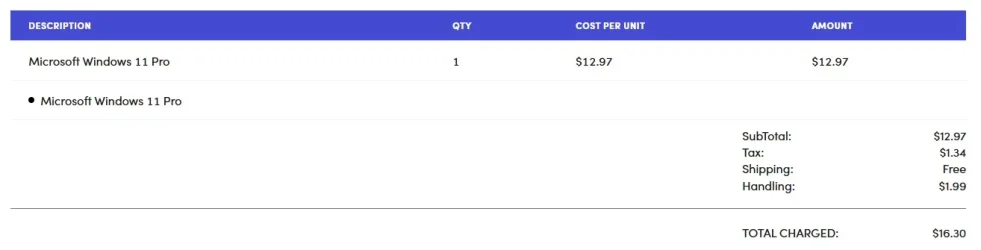
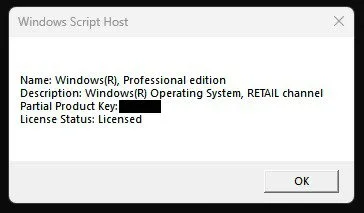
Cheap licenses real or fake?


I'm tempted to conclude that only buying from Microsoft is legit for sure.
 

My Computer

System One

  • OS
    Windows 7 Service Pack 1 64 bit
I just don't get excited over it at an 8 dollar replacement licence.
That's the way I look at it. Cheap can be a bargain...or cheap can be worthless. I've bought stuff over my many years of life that has resulted in both.
It's "Buyer Beware " since there ain't no guarantees.
 

My Computers

System One System Two

  • OS
    Windows 11 Pro 25H2
    Computer type
    PC/Desktop
    Manufacturer/Model
    Dell Optiplex 7080
    CPU
    i9-10900 10 core 20 threads
    Motherboard
    DELL 0J37VM
    Memory
    32 gb
    Graphics Card(s)
    none-Intel UHD Graphics 630
    Sound Card
    Integrated Realtek
    Monitor(s) Displays
    Benq 27
    Screen Resolution
    2560x1440
    Hard Drives
    2x1tb Solidigm m.2 nvme /External drives 512gb Samsung m.2 sata+2tb Kingston m2.nvme
    PSU
    500w
    Case
    MT
    Cooling
    Dell Premium
    Keyboard
    Logitech wired
    Mouse
    Logitech wireless
    Internet Speed
    so slow I'm too embarrassed to tell
    Browser
    #1 Edge #2 Firefox
    Antivirus
    Defender+MWB Premium
  • Operating System
    Windows 11 Pro 24H2 26200.8457
    Computer type
    PC/Desktop
    Manufacturer/Model
    Beelink Mini PC SER5
    CPU
    AMD Ryzen 7 6800U
    Memory
    32 gb
    Graphics card(s)
    integrated
    Sound Card
    integrated
    Monitor(s) Displays
    Benq 27
    Screen Resolution
    2560x1440
    Hard Drives
    1TB Crucial nvme
    Keyboard
    Logitech wired
    Mouse
    Logitech wireless
    Internet Speed
    still too embarrassed to tell
    Browser
    Firefox
    Antivirus
    Defender
    Other Info
    System 3 is non compliant Dell 9020 i7-4770/24gb ram Win11 PRO 26200.8457
I doubt you can buy Microsoft Windows and Office retail keys at a discount price. The only way to buy legitimate retail license is directly from Microsoft. There may be other official ways to buy Windows and Office but Microsoft hasn't provided a easy way to find them.

Note Microsoft provides special Retail volume keys for use by computer developers having a subscription. They are not to be resold. However, may of these keys probably end up being resold online. Also, these special Retail keys are like volume MAK keys because one key can be used to activate Windows or Office on multiple computers. For example, one key might be able to be used up to a 100 times before it is blocked by the activation servers.

You can buy cheap keys from a number of online sellers. They may be one of these special retail keys, an OEM key, or volume key. It is up to each person whether they want to take a chance on a cheap key or pay full price.

Note if one of these cheap keys does not work then many online sellers will replace them without question. Then you probably need to activate the product maybe within 30 days or the seller may not honor that offer.

BTW, over the last maybe 10 years I have purchased a number of cheap keys. A few keys failed to activate again several years after purchase. Since the keys were so cheap I just bought another one.

Also, I have had official retail keys fail activation several years after purchase. This includes Windows, Office, and software sold by companies like Adobe.

For example, last year after reinstalling Windows 11 my copy of Adobe Photoshop Elements 11 would no longer activate. Adobe support would not help me because that version was no longer supported. I had to buy a new copy of Adobe Photoshop Elements 2024. Note starting with Adobe Photoshop Elements 2025 the activation only lasts 3 years. After that you have to maybe buy a new license assuming they are available. They like a lot of companies really want you to buy monthly/yearly subscriptions. Microsoft really wants you to buy a Microsoft 365 subscription instead of Office 2021 or 2024. If they could they would make you buy a Windows subscription also.

You can buy the following Retail perpetual keys directly from the Microsoft store.

===================================================
Windows 11 Home (Download or USB) - $139.00
---------------------------------------------------------------------------------------
Windows 11 Pro (Download or USB) - $199.99
===================================================
Office Professional 2021 - $439.99
* One-time purchase for 1 PC
* Classic 2021 versions of Word, Excel, PowerPoint, and Outlook, plus Publisher and Access
* Microsoft support included for first 60 days at no extra cost
* Compatible with Windows 11 and Windows 10*
* Works with Microsoft Teams
---------------------------------------------------------------------------------------
Office Home 2024 (formerly Home & Student) - $179.99
* One-time purchase for 1 PC or Mac
* Classic 2024 desktop versions of Word, Excel, PowerPoint, and OneNote
* Access to support resources
* Compatible with Windows 11, Windows 10, or macOS*
* For non-commercial use
* Works with Microsoft Teams
---------------------------------------------------------------------------------------
Office Home & Business 2024 - $249.99
* One-time purchase for 1 PC or Mac
* Classic 2024 desktop versions of Word, Excel, PowerPoint, Outlook, and OneNote
* Access to support resources
* Compatible with Windows 11, Windows 10, or macOS*
* Works with Microsoft Teams
===================================================

 
Last edited:

My Computers

System One System Two

  • OS
    Windows 11 Pro 25H2 (26200.6901)
    Computer type
    Laptop
    Manufacturer/Model
    ASUS TUF Gaming A15 (2022)
    CPU
    AMD Ryzen 7 6800H with Radeon 680M GPU (486MB RAM)
    Memory
    Crucial DDR5-4800 (2400MHz) 32GB (2 x 16GB)
    Graphics Card(s)
    NVIDIA RTX 3060 Laptop (6GB RAM)
    Sound Card
    n/a
    Monitor(s) Displays
    15.6-inch
    Screen Resolution
    1920x1080 300Hz
    Hard Drives
    2 x Samsung 990 Evo Plus (2TB M.2 NVME SSD)
    PSU
    n/a
    Mouse
    Wireless Mouse M510
    Internet Speed
    2100Mbps/300Mbps
    Browser
    Firefox
    Antivirus
    Malwarebytes
  • Operating System
    Windows 11 Pro 25H2 (26200.8246)
    Computer type
    PC/Desktop
    Manufacturer/Model
    Custom build
    CPU
    AMD Ryzen 7 5700X3D
    Motherboard
    ASUS ROG Strix B550-F Gaming WiFi II
    Memory
    G.SKILL Flare X 32GB (2x16GB) DDR4
    Graphics card(s)
    ASUS ROG-STRIX-RTX3060TI-08G-V2-GAMING (RTX 3060-Ti, 8GB RAM)
    Monitor(s) Displays
    Samsung G50D IPS 27"
    Screen Resolution
    1440p/180Hz
    Hard Drives
    SAMSUNG 990 EVO Plus (2TB] M.2 NVME SSD
    SAMSUNG 990 EVO Plus (4TB) M.2 NVME SSD
    PSU
    Corsair RM750x (750 watts)
    Case
    Cooler Master MasterCase 5
    Cooling
    Scythe Mugen 6
    Keyboard
    Logitech K520 (MK540 keyboard/mouse combo)
    Mouse
    Logitech M310 (MK540 keyboard/mouse combo)
    Internet Speed
    2100 Mbps down / 300 Mbps up
    Browser
    Firefox, Edge, Chrome
    Antivirus
    Malwarebytes (Premium)
    Other Info
    ASUS Blu-ray Burner BW-16D1HT (SATA) || Western Digital Easystore 20TB USB 3.0 external hard drive used with Acronis True Image 2025 backup software || HP OfficeJet Pro 6975 Printer/Scanner
Note Microsoft provides special Retail volume keys for use by computer developers having a subscription. They are not to be resold. However, may of these keys probably end up being resold online. Also, these special Retail keys are like volume MAK keys because one key can be used to activate Windows or Office on multiple computers. For example, one key might be able to be used up to a 100 times before it is blocked by the activation servers.

That explains something, thanks.
 

My Computer

System One

  • OS
    Windows 7 Service Pack 1 64 bit
My pre-built came with Win 11 Home. For personal reasons I prefer Pro, so I've gone to a couple of known sites and tried several of the sub-$10 keys. They have all worked for me, but only one key (and unfortunately I can't remember the name of the vendor) came back from PID checking as Retail instead of OEM and the Retail is the one I currently use.

The OEM keys all worked the first time I used them, but after multiple reinstalls over the years they stopped working which caused me to go to a different vendor and get a different key.

All in all I still haven't paid the equivalent of the retail price for my Win 11 Pro, but I have bought several OEM keys that have all worked for differing amounts of time.

My opinion is that purchasing from some of these sites is ok but a crap-shoot as to type and duration of key.
 

My Computer

System One

  • OS
    Windows 11 Pro 25H2 (26200.8457)
    Computer type
    PC/Desktop
    Manufacturer/Model
    Pre-built
    CPU
    AMD Ryzen 7 7800X3D
    Motherboard
    MSI Pro B650-VC WiFi
    Memory
    32gb Team Group (T-Force) DDR5-6000
    Graphics Card(s)
    Zotac nVidia GeForce RTX 4070 SUPER - 12gb
    Sound Card
    Sound BlasterX G6
    Monitor(s) Displays
    Koorui G2421V and ViewSonic VX2453
    Screen Resolution
    P:2560x1440 S:1920x1080
    Hard Drives
    WD Blue SN5000 - 500gb NVME
    WD Blue SN580 - 2TB NVME
    Seagate 4TB HDD - ST4000VN008-2DR166
    Keyboard
    Mountain Everest
    Mouse
    Logitech G502 Hero
    Internet Speed
    T-Mobile Home Internet
    Browser
    Firefox
    Other Info
    QNAP TS-469 Pro NAS
    TP-Link W7200 (2 unit mesh network)
    Elgato Streamdeck
Hello, how can I understand if a retailer is authorized or not?
...
Like they say, it doesn't matter much who you buy it from: if MS allows activation it's a legit key. But that is the only way you know, and even from a seller with a good reputation you can get a key that's been previously activated. But that good reputation is earned when you shoot them back an e-mail and they send you another key that works. It may activate but several hours later be revoked: that's happened to me twice with Stack Social. I sent them an email and each time they sent a good key within the hour.

And BTW, I also got my license revoked with BIOS update but on a Gigabyte motherboard. Very annoying.
 
Last edited:

My Computers

System One System Two

  • OS
    Windows 11 Pro
    Computer type
    PC/Desktop
    Manufacturer/Model
    DIY
    CPU
    Ryzen 7 5800X
    Motherboard
    Gigabyte B550M Aorus Pro
    Memory
    GSkill 3200, 2x8GB
    Graphics Card(s)
    MSI RX 6800 XT Gaming Z
    Sound Card
    on-board Realtek
    Monitor(s) Displays
    MSI 180hz
    Screen Resolution
    1440p
    Hard Drives
    Samsung 980 Pro, Samsung 870 Evo, generic PCIe NVME, WD 1TB 2.5" laptop spinner
    PSU
    Corsair RM 650
    Case
    mATX
    Cooling
    BeQuiet 240mm AIO and a bunch of case fans
    Keyboard
    one that clacks softly
    Mouse
    logitech
    Internet Speed
    bunches of bps
    Browser
    Firefox
    Antivirus
    Windows' own
  • Operating System
    Win11 Pro
    Computer type
    PC/Desktop
    Manufacturer/Model
    DIY
    CPU
    Ryzen 7 1700
    Motherboard
    GA-AB350M G-3
    Memory
    16GB DDR4
    Graphics card(s)
    RX-480
    Sound Card
    In-Built Realtek
    Monitor(s) Displays
    Samsung
    Screen Resolution
    1440p
    Hard Drives
    NVME/SSD's
    PSU
    Thermaltake BX1 550W
    Case
    Some junky thing
    Cooling
    ThermalTake Assassin(?)
    Browser
    FF/Edge
    Antivirus
    Whatever Windows does
    Other Info
    Secure Boot enabled updated to 2023 CA keys, TPM2.0 enabled with system drive Bitlocker'd.
If you're concerned and can afford it, buy a legit key for 250 bucks..., if you're damn near broke and need a key badly, roll the dice and take your chances. 🤷‍♂️
 

My Computers

System One System Two

  • OS
    Windows 11 Pro
    Computer type
    PC/Desktop
    Manufacturer/Model
    ASUS ROG Strix
  • Operating System
    Windows 11 Pro
    Computer type
    Laptop
    Manufacturer/Model
    ASUS VivoBook
Maybe the physical DVD with the code hidden under a scratch area is some sort of guarantee.
 

My Computer

System One

  • OS
    Windows 7 Service Pack 1 64 bit
It's a common issue on MSI motherboards. It's happened to me twice. I just don't get excited over it at an 8 dollar replacement licence.
Any idea why? Any CPUs/Chipets in particular?
 

My Computer

System One

  • OS
    Windows 11 2H25
    Computer type
    PC/Desktop
    Manufacturer/Model
    DIY
    CPU
    AMD 9900X
    Motherboard
    MSI X870E Carbon
    Memory
    64 GB
    Graphics Card(s)
    AMD 9070 XT
    Sound Card
    built-in
    Monitor(s) Displays
    Dell 24"
    Hard Drives
    Sabrent 1 TB NVMe, 4 x SSD (need to check models), 4 x 3.5" HDD, 8-16 TB, all WD
    PSU
    Seasonic 850
    Case
    Fractal Design North XL (which I likw)
    Cooling
    Corsair AIO for CPU, fans for case
    Keyboard
    Das Keyboard 4
    Mouse
    Corsair M65 (white)
    Internet Speed
    1 TB download
    Browser
    Firefox
    Antivirus
    Bitdefender
    Other Info
    Also have Lenovo T14S laptop (me) and Lenovo Slim 71 (wife)
Starting with Windows 7 Retail I was able to replace all relevant hardware and end with Windows 11 without buying a new license for Windows.

Notes

Computer #1 -
* Note Windows 7 Ultimate came with both 32-bit and 64-bit DVDs
* Computer would no longer boot.
Computer #2 -
* Replaced motherboard, CPU, and RAM with totally different ones.
* Kept original 3 SSDs and GPU
* Windows 10 reactivated OK despite totally different hardware.
Computer #3 -
* Upgraded CPU
* Cloned 1st two 2.5" SATA DVDs to two M.2 NVME SSDs.
* Replaced SATA SSDs with NVME ones; did not use SATA SSD #3
* Instead of upgrading to Windows 11, did clean install

Hardware and operating systems

Computer #1: original
MBD: Gigabyte GA-990FXA-UD3 rev. 1.0
CPU: AMD FX-8350 AM3+
RAM: GSkill F3-12800CL9D-8GBXL 8GB (2 x 4GB) DDR3
GPU: ASUS ROG STRIX-GTX1060-6G-GAMING
DK1: 1TB Samsung 870 EVO (2.5" SATA SSD)
DK2: 1TB Samsung 870 EVO (2.5" SATA SSD)
DK3: 1TB Samsung 870 EVO (2.5" SATA SSD)
OS1: Windows 7 Ultimate Retail (32-bit)
OS2: Windows 7 Ultimate Retail (64-bit) clean install
OS3: Windows 10 Pro (free upgrade)
Computer #2: after motherboard, CPU, and RAM replaced
MBD: ASUS PRIME X370-PRO
CPU: AMD Ryzen 7 1700X AM4
RAM: Corsair Vengeance LPX 16GB (2 x 8GB) DDR 4 2666
GPU: ASUS ROG STRIX-GTX1060-6G-GAMING
DK1: 1TB Samsung 870 EVO (2.5" SATA SSD)
DK2: 1TB Samsung 870 EVO (2.5" SATA SSD)
DK3: 1TB Samsung 870 EVO (2.5" SATA SSD)
O/S: Windows 10 Pro - reactivated
Computer #3: after CPU and SSDs replaced;
MBD: ASUS PRIME X370-PRO
CPU: AMD Ryzen 7 3700X AM4
RAM: Corsair Vengeance LPX 16GB (2 x 8GB) DDR 4 2666
GPU: ASUS ROG STRIX-GTX1060-6G-GAMING
DK1: 2TB XPG SX8200 Pro (M.2 NVME SSD)
DK2: 2TB ntel 660p (M.2 NVME SSD)
O/S: Windows 11 Pro - clean install
 

My Computers

System One System Two

  • OS
    Windows 11 Pro 25H2 (26200.6901)
    Computer type
    Laptop
    Manufacturer/Model
    ASUS TUF Gaming A15 (2022)
    CPU
    AMD Ryzen 7 6800H with Radeon 680M GPU (486MB RAM)
    Memory
    Crucial DDR5-4800 (2400MHz) 32GB (2 x 16GB)
    Graphics Card(s)
    NVIDIA RTX 3060 Laptop (6GB RAM)
    Sound Card
    n/a
    Monitor(s) Displays
    15.6-inch
    Screen Resolution
    1920x1080 300Hz
    Hard Drives
    2 x Samsung 990 Evo Plus (2TB M.2 NVME SSD)
    PSU
    n/a
    Mouse
    Wireless Mouse M510
    Internet Speed
    2100Mbps/300Mbps
    Browser
    Firefox
    Antivirus
    Malwarebytes
  • Operating System
    Windows 11 Pro 25H2 (26200.8246)
    Computer type
    PC/Desktop
    Manufacturer/Model
    Custom build
    CPU
    AMD Ryzen 7 5700X3D
    Motherboard
    ASUS ROG Strix B550-F Gaming WiFi II
    Memory
    G.SKILL Flare X 32GB (2x16GB) DDR4
    Graphics card(s)
    ASUS ROG-STRIX-RTX3060TI-08G-V2-GAMING (RTX 3060-Ti, 8GB RAM)
    Monitor(s) Displays
    Samsung G50D IPS 27"
    Screen Resolution
    1440p/180Hz
    Hard Drives
    SAMSUNG 990 EVO Plus (2TB] M.2 NVME SSD
    SAMSUNG 990 EVO Plus (4TB) M.2 NVME SSD
    PSU
    Corsair RM750x (750 watts)
    Case
    Cooler Master MasterCase 5
    Cooling
    Scythe Mugen 6
    Keyboard
    Logitech K520 (MK540 keyboard/mouse combo)
    Mouse
    Logitech M310 (MK540 keyboard/mouse combo)
    Internet Speed
    2100 Mbps down / 300 Mbps up
    Browser
    Firefox, Edge, Chrome
    Antivirus
    Malwarebytes (Premium)
    Other Info
    ASUS Blu-ray Burner BW-16D1HT (SATA) || Western Digital Easystore 20TB USB 3.0 external hard drive used with Acronis True Image 2025 backup software || HP OfficeJet Pro 6975 Printer/Scanner
Any idea why? Any CPUs/Chipets in particular?
I genuinely have no idea 🤷‍♂️ A friend of mine told me about it and then I saw posts on Reddit and then the MSI Global forum, people complaining. I didn't really take much interest to be honest as the cost of the replacement keys is so inexpensive. I've updated the BIOS on my desktop PC motherboard seven times since I built it back in 2021. At least I don't have the same problem with my MSI laptop as that came pre-installed with W11 Home and it's only had one BIOS update in the 2 years I've had it.
 

My Computer

System One

  • OS
    Windows 11 Pro 25H2
    Computer type
    PC/Desktop
    Manufacturer/Model
    MSI
    CPU
    Intel i5 10400
    Motherboard
    B560M PRO-VDH WiFi BIOS 1.A1
    Memory
    x2 8gb Corsair Vengeance LPX 3600
    Graphics Card(s)
    Intel(R) UHD Graphics 630
    Sound Card
    Realtek onboard AL897
    Monitor(s) Displays
    MSI MAG Artymis 242C
    Screen Resolution
    1920 x 1080
    Hard Drives
    Samsung 970 Evo Plus 500gb
    PSU
    EVGA SuperNova 650w G3
    Case
    Gaming case
    Keyboard
    MSI GK20
    Mouse
    MSI Versa 300
    Internet Speed
    500mbps
    Browser
    Brave
    Antivirus
    Bitdefender
    Other Info
    MSI Herald BE9400 WiFi PCIe
Stack Social sells retail keys. Today I bought "MS Office 2021 Professional + Windows 11 Pro" bundle at a very cheap bundle price. I got Retail keys for both and Office 2021 Pro is also registered with my MS Account. But these licenses are per machine licenses and cannot be transferred to other machines. If your machine dies, your licenses for this machine die, too.
 

My Computers

System One System Two

  • OS
    Windows 11 Pro build 26200.8524
    Computer type
    PC/Desktop
    Manufacturer/Model
    Home Built
    CPU
    Intel i7-4790
    Motherboard
    Asus H97 Pro Gamer with add-on TPM1.2 module
    Memory
    Teams DDR3-1600 4x4 GB
    Graphics Card(s)
    MSI Nvidia GeForce GTX 1050Ti
    Sound Card
    Realtek ALC1150
    Monitor(s) Displays
    Dell P2425D
    Screen Resolution
    2560 by 1440 pixels
    Hard Drives
    Corsair NVMe M.2 Core XT 1000 GB (Windows 11 v.25H2); Samsung SATA Evo 870 500 GB (Windows 11 v.25H2);
    PSU
    Corsair HX850
    Case
    Gigabyte Solo 210
    Cooling
    Zalman CNPS7X Tower
    Keyboard
    Microsoft AIO Wireless (includes touchpad)
    Mouse
    HP S1000 Plus Wireless
    Internet Speed
    500 Mb fiber optic
    Browser
    Chrome; MS Edge
    Antivirus
    Windows Defender
  • Operating System
    MacOS 12 Monterey
    Computer type
    Laptop
    Manufacturer/Model
    Apple Macbook Air
    CPU
    Intel Core i5
    Memory
    8 GB
    Graphics card(s)
    Intel integrated
    Screen Resolution
    1440 by 900 pixels
    Hard Drives
    128 GB
    Keyboard
    Built-in
    Mouse
    Microsoft Wireless
    Internet Speed
    802.11 ac
    Browser
    Chrome; Safari
    Antivirus
    N/A
And those of us who do as @suatcini54 does, accept that as part and parcel of upgrades etc. I accept that every BIOS update I do, I end up having to buy another licence key, but it really doesn't bother me at 8 dollars a kick.
 

My Computer

System One

  • OS
    Windows 11 Pro 25H2
    Computer type
    PC/Desktop
    Manufacturer/Model
    MSI
    CPU
    Intel i5 10400
    Motherboard
    B560M PRO-VDH WiFi BIOS 1.A1
    Memory
    x2 8gb Corsair Vengeance LPX 3600
    Graphics Card(s)
    Intel(R) UHD Graphics 630
    Sound Card
    Realtek onboard AL897
    Monitor(s) Displays
    MSI MAG Artymis 242C
    Screen Resolution
    1920 x 1080
    Hard Drives
    Samsung 970 Evo Plus 500gb
    PSU
    EVGA SuperNova 650w G3
    Case
    Gaming case
    Keyboard
    MSI GK20
    Mouse
    MSI Versa 300
    Internet Speed
    500mbps
    Browser
    Brave
    Antivirus
    Bitdefender
    Other Info
    MSI Herald BE9400 WiFi PCIe
And those of us who do as @suatcini54 does, accept that as part and parcel of upgrades etc. I accept that every BIOS update I do, I end up having to buy another licence key, but it really doesn't bother me at 8 dollars a kick.
I did not know BIOS updates invalidated MS licenses. Fortunately, last BIOS updates for my M/Cs have been stopped ages ago.

Thanks for sharing your experiences, anyway.
 

My Computers

System One System Two

  • OS
    Windows 11 Pro build 26200.8524
    Computer type
    PC/Desktop
    Manufacturer/Model
    Home Built
    CPU
    Intel i7-4790
    Motherboard
    Asus H97 Pro Gamer with add-on TPM1.2 module
    Memory
    Teams DDR3-1600 4x4 GB
    Graphics Card(s)
    MSI Nvidia GeForce GTX 1050Ti
    Sound Card
    Realtek ALC1150
    Monitor(s) Displays
    Dell P2425D
    Screen Resolution
    2560 by 1440 pixels
    Hard Drives
    Corsair NVMe M.2 Core XT 1000 GB (Windows 11 v.25H2); Samsung SATA Evo 870 500 GB (Windows 11 v.25H2);
    PSU
    Corsair HX850
    Case
    Gigabyte Solo 210
    Cooling
    Zalman CNPS7X Tower
    Keyboard
    Microsoft AIO Wireless (includes touchpad)
    Mouse
    HP S1000 Plus Wireless
    Internet Speed
    500 Mb fiber optic
    Browser
    Chrome; MS Edge
    Antivirus
    Windows Defender
  • Operating System
    MacOS 12 Monterey
    Computer type
    Laptop
    Manufacturer/Model
    Apple Macbook Air
    CPU
    Intel Core i5
    Memory
    8 GB
    Graphics card(s)
    Intel integrated
    Screen Resolution
    1440 by 900 pixels
    Hard Drives
    128 GB
    Keyboard
    Built-in
    Mouse
    Microsoft Wireless
    Internet Speed
    802.11 ac
    Browser
    Chrome; Safari
    Antivirus
    N/A
They usually work for a reasonably long period -- but at $8 - 20 a pop who cares !!! - If this was a really serious problem for Ms these keys would be blocked very quickly. Ms makes 99% of its profits now from corporate deals, cloud services, consultancy services and subscription payments -- the amount of effort involved into tracking down the (in terms of actual number of people and businesses paying for things) very few number of individual people using these isn't worth the trouble these days.

Cheers
jimbo
 

My Computer

System One

  • OS
    Windows XP,11 Linux Fedora Rawhide pre-release 45
    Computer type
    PC/Desktop
    CPU
    2 X Intel i7
    Screen Resolution
    4KUHD X 2
I did not know BIOS updates invalidated MS licenses. Fortunately, last BIOS updates for my M/Cs have been stopped ages ago.

Thanks for sharing your experiences, anyway.
BIOS updates don't necessarily invalidate MS licence keys, it can literally be down to the make of the motherboard. Mine is MSI and it's happened to me a few times after BIOS updates. I stopped caring long ago 😆
 

My Computer

System One

  • OS
    Windows 11 Pro 25H2
    Computer type
    PC/Desktop
    Manufacturer/Model
    MSI
    CPU
    Intel i5 10400
    Motherboard
    B560M PRO-VDH WiFi BIOS 1.A1
    Memory
    x2 8gb Corsair Vengeance LPX 3600
    Graphics Card(s)
    Intel(R) UHD Graphics 630
    Sound Card
    Realtek onboard AL897
    Monitor(s) Displays
    MSI MAG Artymis 242C
    Screen Resolution
    1920 x 1080
    Hard Drives
    Samsung 970 Evo Plus 500gb
    PSU
    EVGA SuperNova 650w G3
    Case
    Gaming case
    Keyboard
    MSI GK20
    Mouse
    MSI Versa 300
    Internet Speed
    500mbps
    Browser
    Brave
    Antivirus
    Bitdefender
    Other Info
    MSI Herald BE9400 WiFi PCIe
I have Gigabyte motherboards in two computers, a Lenovo computer, a Nimo laptop, and a AceMagic Mini PC. All have received BIOS updates without affecting the Windows license in any way. I have had a BIOS update invalidate my passcode and have to set it up again, that's pretty much it.
 

My Computers

System One System Two

  • OS
    Win 11 Pro 25H2, Build 26200.8524
    Computer type
    PC/Desktop
    Manufacturer/Model
    Home Brew
    CPU
    Intel Core i5 14500
    Motherboard
    Gigabyte B760M G P WIFI
    Memory
    64GB DDR4
    Graphics Card(s)
    GeForce RTX 4060
    Sound Card
    Chipset Realtek
    Monitor(s) Displays
    LG 45" Ultragear, Acer 24" 1080p
    Screen Resolution
    5120x1440, 1920x1080
    Hard Drives
    Crucial P310 2TB 2280 PCIe Gen4 3D NAND NVMe M.2 SSD (O/S)
    Silicon Power 2TB US75 NVMe PCIe Gen4 M.2 2280 SSD (backup)
    Crucial BX500 2TB 3D NAND (2nd backup)
    Seagate 4TB Ironwolf, rotating HDD archive files
    External off-line backup Drives: 2 NVMe 4TB drives in external enclosures
    PSU
    Thermaltake Toughpower GF3 750W
    Case
    LIAN LI LANCOOL 216 E-ATX PC Case
    Cooling
    Lots of fans!
    Keyboard
    Microsoft Comfort Curve 2000
    Mouse
    Logitech G305
    Internet Speed
    Verizon FiOS 1GB
    Browser
    Firefox
    Antivirus
    Malware Bytes & Windows Defender Security
  • Operating System
    Win 11 Pro 25H2, Build 26200.8524
    Computer type
    PC/Desktop
    Manufacturer/Model
    Home Brew
    CPU
    Intel Core i5 14400
    Motherboard
    Gigabyte B760M DS3H AX
    Memory
    32GB DDR5
    Graphics card(s)
    Intel 700 Embedded GPU
    Sound Card
    Realtek Embedded
    Monitor(s) Displays
    27" HP 1080p
    Screen Resolution
    1920x1080
    Hard Drives
    Crucial P310 2TB 2280 PCIe Gen4 eD NAND PCIe SSD
    Samsung EVO 990 2TB NVMe Gen4 SSD
    Samsung 2TB SATA SSD
    PSU
    Thermaltake Smart BM3 650W
    Case
    Okinos Micro ATX Case
    Cooling
    Fans
    Keyboard
    Microsoft Comfort Curve 2000
    Mouse
    Logitech G305
    Internet Speed
    Verizon FiOS 1GB
    Browser
    Firefox
    Antivirus
    Malware Bytes & Windows Defender Security
I did not know BIOS updates invalidated MS licenses. Fortunately, last BIOS updates for my M/Cs have been stopped ages ago.

Thanks for sharing your experiences, anyway.
I don't think it's supposed to, not even for OEM licenses which are limited to the specific motherboard it is installed and activated on. But something must happen occasionally with some (hopefully rare) BIOS updates that changes the way it identifies to the validation routine. With a retail license you could probably contact Microsoft Support and try to work through re-activating it on that motherboard.

As far as I know most retail licenses are transferrable but it has to de-activated on the system first. There is a procedure for it but I don't bother when I move to a new system since these keys are so cheap... and didn't bother with munging through Microsoft's pitiful online support either when I lost the activation after a BIOS update for the same reason.
 
Last edited:

My Computers

System One System Two

  • OS
    Windows 11 Pro
    Computer type
    PC/Desktop
    Manufacturer/Model
    DIY
    CPU
    Ryzen 7 5800X
    Motherboard
    Gigabyte B550M Aorus Pro
    Memory
    GSkill 3200, 2x8GB
    Graphics Card(s)
    MSI RX 6800 XT Gaming Z
    Sound Card
    on-board Realtek
    Monitor(s) Displays
    MSI 180hz
    Screen Resolution
    1440p
    Hard Drives
    Samsung 980 Pro, Samsung 870 Evo, generic PCIe NVME, WD 1TB 2.5" laptop spinner
    PSU
    Corsair RM 650
    Case
    mATX
    Cooling
    BeQuiet 240mm AIO and a bunch of case fans
    Keyboard
    one that clacks softly
    Mouse
    logitech
    Internet Speed
    bunches of bps
    Browser
    Firefox
    Antivirus
    Windows' own
  • Operating System
    Win11 Pro
    Computer type
    PC/Desktop
    Manufacturer/Model
    DIY
    CPU
    Ryzen 7 1700
    Motherboard
    GA-AB350M G-3
    Memory
    16GB DDR4
    Graphics card(s)
    RX-480
    Sound Card
    In-Built Realtek
    Monitor(s) Displays
    Samsung
    Screen Resolution
    1440p
    Hard Drives
    NVME/SSD's
    PSU
    Thermaltake BX1 550W
    Case
    Some junky thing
    Cooling
    ThermalTake Assassin(?)
    Browser
    FF/Edge
    Antivirus
    Whatever Windows does
    Other Info
    Secure Boot enabled updated to 2023 CA keys, TPM2.0 enabled with system drive Bitlocker'd.
can be checked with microsoft pid checker

in the "Software Package" dropdown select Windows 10 / Server 2016 (10240)
paste in the key and click check
I tried three valid Win11 Pro keys, all of them get the same error.

1778513638233.webp
 

My Computers

System One System Two

  • OS
    Win 11 Pro 25H2, Build 26200.8524
    Computer type
    PC/Desktop
    Manufacturer/Model
    Home Brew
    CPU
    Intel Core i5 14500
    Motherboard
    Gigabyte B760M G P WIFI
    Memory
    64GB DDR4
    Graphics Card(s)
    GeForce RTX 4060
    Sound Card
    Chipset Realtek
    Monitor(s) Displays
    LG 45" Ultragear, Acer 24" 1080p
    Screen Resolution
    5120x1440, 1920x1080
    Hard Drives
    Crucial P310 2TB 2280 PCIe Gen4 3D NAND NVMe M.2 SSD (O/S)
    Silicon Power 2TB US75 NVMe PCIe Gen4 M.2 2280 SSD (backup)
    Crucial BX500 2TB 3D NAND (2nd backup)
    Seagate 4TB Ironwolf, rotating HDD archive files
    External off-line backup Drives: 2 NVMe 4TB drives in external enclosures
    PSU
    Thermaltake Toughpower GF3 750W
    Case
    LIAN LI LANCOOL 216 E-ATX PC Case
    Cooling
    Lots of fans!
    Keyboard
    Microsoft Comfort Curve 2000
    Mouse
    Logitech G305
    Internet Speed
    Verizon FiOS 1GB
    Browser
    Firefox
    Antivirus
    Malware Bytes & Windows Defender Security
  • Operating System
    Win 11 Pro 25H2, Build 26200.8524
    Computer type
    PC/Desktop
    Manufacturer/Model
    Home Brew
    CPU
    Intel Core i5 14400
    Motherboard
    Gigabyte B760M DS3H AX
    Memory
    32GB DDR5
    Graphics card(s)
    Intel 700 Embedded GPU
    Sound Card
    Realtek Embedded
    Monitor(s) Displays
    27" HP 1080p
    Screen Resolution
    1920x1080
    Hard Drives
    Crucial P310 2TB 2280 PCIe Gen4 eD NAND PCIe SSD
    Samsung EVO 990 2TB NVMe Gen4 SSD
    Samsung 2TB SATA SSD
    PSU
    Thermaltake Smart BM3 650W
    Case
    Okinos Micro ATX Case
    Cooling
    Fans
    Keyboard
    Microsoft Comfort Curve 2000
    Mouse
    Logitech G305
    Internet Speed
    Verizon FiOS 1GB
    Browser
    Firefox
    Antivirus
    Malware Bytes & Windows Defender Security

Latest Support Threads

Back
Top Bottom