Windows Update Clear Windows Update History in Windows 11

  • Thread starter Thread starter Brink
  • Start date Published: Start date Updated Updated:

Windows_Update_banner.png

This tutorial will show you how to clear the Windows Update history on your Windows 11 PC.

Windows Update keeps Windows 11 updated by automatically downloading and installing the latest updates, drivers, and hotfixes released by Microsoft.

Reference:

You can view Windows Update history to see which Feature Updates, Quality Updates, Driver Updates, Definition Updates, and Other Updates have been installed and when on your Windows 11 computer.

Sometimes you may need or want to clear your Windows Update history on demand.


You must be signed in as an administrator to clear the Windows Update history.


EXAMPLE: Windows Update history before and after cleared

Windows_Update_history.png
Windows_Update_history_cleared.png


Here's How:

1 Click/tap on the download button below to download the Clear_Windows_Update_history_in_Windows11.zip file.


(Contents of BAT file for reference)
Code:
@echo off
powershell -windowstyle hidden -command "Start-Process cmd -ArgumentList '/s,/c,net stop usosvc & net stop wuauserv & del %systemroot%\SoftwareDistribution\DataStore\Logs\edb.log & del /f /q C:\ProgramData\USOPrivate\UpdateStore\* & net start usosvc & net start wuauserv & UsoClient.exe RefreshSettings' -Verb runAs"

2 Save the ZIP file to your desktop.

3 Unblock the ZIP file.

4 Extract the BAT file from the ZIP file.

5 Run the .bat file.

6 If prompted by UAC, click/tap on Yes to approve run as administrator.

7 You will now see a command prompt quickly open and close to clear Windows Update history.


That's it,
Shawn Brink


Attachments

Last edited:
Hi,
This is nice
Using the upgrade I still show some win-10 updates lol
 

My Computer My Computer

At a glance

Win-7-10-11Pro's10900k & 9940x & 5930kTrident-Z Royal 4000c16 2x16gb & Trident-Z 36...Titan Xp & 1080ti FTW3 & evga 980ti gaming
OS
Win-7-10-11Pro's
Computer type
PC/Desktop
Manufacturer/Model
Acer 17" Nitro 7840sn/ 2x16gb 5600c40/ 4060/ stock 1tb-os/ 4tb sn850x
CPU
10900k & 9940x & 5930k
Motherboard
z490-Apex & x299-Apex & x99-Sabertooth
Memory
Trident-Z Royal 4000c16 2x16gb & Trident-Z 3600c16 4x8gb & 3200c14 4x8gb
Graphics Card(s)
Titan Xp & 1080ti FTW3 & evga 980ti gaming
Sound Card
Onboard Realtek x3
Monitor(s) Displays
1-AOC G2460PG 24"G-Sync 144Hz/ 2nd 1-ASUS VG248QE 24"/ 3rd LG 43" series
Screen Resolution
1920-1080 not sure what the t.v is besides 43" class scales from 1920-1080 perfectly
Hard Drives
2-WD-sn850x 4tb/ 970evo+500gb/ 980 pro 2tb.
PSU
1000p2 & 1200p2 & 850p2
Case
D450 x2 & 1 Test bench in cherry Entertainment center
Cooling
Custom water loops x3 with 2x mora 360mm rads only 980ti gaming air cooled
Keyboard
G710+x3
Mouse
Redragon x3
Internet Speed
xfinity gigabyte
Browser
Firefox
Antivirus
mbam pro
Hello,
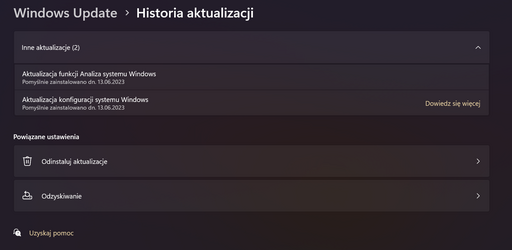
How to delete Driver Updates History? Couldn't be cleared with this tool.

Screenshot 2024-08-10 193942.png
 

My Computer My Computer

At a glance

Windows 11
OS
Windows 11
Computer type
PC/Desktop
Worked perfectly!
 

My Computer My Computer

At a glance

Windows 11 Proi7-1195G716GB DDR4 512GB SSDIris Xe
OS
Windows 11 Pro
Computer type
Laptop
Manufacturer/Model
HP
CPU
i7-1195G7
Memory
16GB DDR4 512GB SSD
Graphics Card(s)
Iris Xe
Back
Top Bottom