Solved clearing out tabbed notepad!


ALANGR

New member
Local time
6:40 PM
Posts
4
OS
windows version 24H2 (OS Build 26100.4652
Very new to W11 and I was using notepad as usual. I then realised that the new version was tabbed. OK as far as it goes and I have found the setting and gone back to each new file in a new window. Good. But in the background my earlier tabs can still be seen. with contents.

How can I clear these away and just have a good old-fashioned notepad?

Thanks for any comments
 
Windows Build/Version
W11 24H2 (OSBuild 26100.4652)

My Computer

System One

  • OS
    windows version 24H2 (OS Build 26100.4652
    Computer type
    PC/Desktop
    Memory
    32768MB RAM
    Graphics Card(s)
    NVIDIA GeForce GTX 1050 Ti
    Sound Card
    LG IPS FULLHD (NVIDIA High Definition Audio)
    Monitor(s) Displays
    LG IPS FULLHD
    Screen Resolution
    1920 x 1080(p) (60.000Hz)
    Hard Drives
    Samsung SSD 970 EVO 1TB, WDC WD10EZEX-08WN4A0
    Keyboard
    Logitec
    Mouse
    Logitec
    Internet Speed
    c~~450/220 Mbps
    Browser
    Firefox/duckduckgo
    Antivirus
    ESET
Hi, welcome.


My Computers

System One System Two

  • OS
    Windows 11 Pro 25H2 Build 26200.8655
    Computer type
    PC/Desktop
    Manufacturer/Model
    Sin-built 2013
    CPU
    Intel(R) Core(TM) i7-4770K CPU @ 3.50GHz
    Motherboard
    ASUS ROG Maximus VI Formula
    Memory
    32.0 GB of I forget and the box is in storage.
    Graphics Card(s)
    Gigabyte nVidia GeForce GTX 1660 Super OC 6GB
    Sound Card
    Onboard thingy
    Monitor(s) Displays
    5 x LG 25MS500-B - 1 x 24MK430H-B - 1 x Wacom Pro 22" Touch Screen Tablet
    Screen Resolution
    All over the place
    Hard Drives
    Too many to list.
    OS on Samsung 1TB 870 QVO SATA
    PSU
    Silverstone 1500
    Case
    NZXT Phantom 820 Full-Tower Case
    Cooling
    Noctua NH-D15 Elite Class Dual Tower CPU Cooler / 6 x EziDIY 120mm / 2 x Corsair 140mm somethings / 1 x 140mm Thermaltake something / 2 x 200mm Corsair.
    Keyboard
    Corsair K95 / Logitech diNovo Edge Wireless
    Mouse
    Logitech: G402 / G502 / Mx Masters / Mx Air Cordless
    Internet Speed
    2000/500Mbps
    Browser
    All sorts
    Antivirus
    Kaspersky Premium
    Other Info
    ㅤㅤㅤㅤㅤㅤㅤㅤㅤㅤㅤㅤㅤㅤㅤㅤㅤㅤㅤㅤㅤㅤㅤㅤㅤㅤㅤㅤㅤㅤㅤㅤㅤㅤㅤㅤㅤㅤㅤㅤ⠀⠀⠀⠀⠀⠀⠀⠀⠀⠀
    TP-Link BE9300 WiFi 7 Bluetooth 5.4 (Archer TBE550E)
    TP-Link TX201 V1 2.5GB Lan

    Grandstream HT812 - VoIP
    ASUS DSL-AX82U - Mesh
    ASUS RT-AC68U - Mesh
    ASUS RT-BE88U Router

    Brother MFC-L2880DW Printer

    I’m on a horse.
  • Operating System
    Windows 11 Pro 25H2 Build 26200.8655
    Computer type
    Laptop
    Manufacturer/Model
    LENOVO Yoga 7 14IRL8 - 7i EVO OLED 14" Touchscreen i5 12 Core 16GB/512GB
    CPU
    Intel Core 12th Gen i5-1240P Processor (1.7 - 4.4GHz)
    Memory
    16GB LPDDR5 RAM
    Graphics card(s)
    Intel Iris Xe Graphics Processor
    Sound Card
    Optimized with Dolby Atmos®
    Screen Resolution
    QHD 2880 x 1800 OLED
    Hard Drives
    M.2 512GB
    Antivirus
    Defender / Malwarebytes
    Other Info
    …still on a horse.
But in the background my earlier tabs can still be seen. with contents.

How can I clear these away and just have a good old-fashioned notepad?
Right-click on a tab then select Close other tabs.
 

My Computer

System One

  • OS
    Windows 11
    Computer type
    Laptop
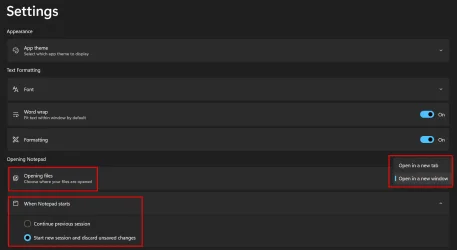
You may also just want to take a look at the settings for the new notepad to make it behave more like the old version...

Im2.webp
 

My Computers

System One System Two

  • OS
    Win11 Pro 25H2 (RTM+)
    Computer type
    PC/Desktop
    Manufacturer/Model
    Acemagic
    CPU
    Intel i7-14650HX
    Memory
    32 GB
    Graphics Card(s)
    No GPU - Built-in Intel Graphics
    Sound Card
    Integrated
    Monitor(s) Displays
    Varies as machine will often be moved to locations with different monitors
    Screen Resolution
    Varies
    Hard Drives
    1 x 1TB Gen 4 NVMe SSD
    PSU
    120W Power Brick
    Keyboard
    Corsair K70 Max RGB Magnetic Keyboard
    Mouse
    Logitech MX Master 3
    Internet Speed
    1Gb Up / 1 Gb Down
    Browser
    Edge
    Antivirus
    Windows Defender
  • Operating System
    Win11 Pro 25H2 (RTM+)
    Computer type
    Laptop
    Manufacturer/Model
    Lenovo ThinkBook 13x Gen 2
    CPU
    Intel i7-1255U
    Memory
    16 GB
    Graphics card(s)
    Intel Iris Xe Graphics
    Sound Card
    Realtek® ALC3306-CG codec
    Monitor(s) Displays
    13.3-inch IPS Display
    Screen Resolution
    WQXGA (2560 x 1600)
    Hard Drives
    2 TB 4 x 4 NVMe SSD
    PSU
    USB-C / Thunderbolt 4 Power / Charging
    Keyboard
    Backlit, spill resistant keyboard
    Mouse
    Buttonless Glass Precision Touchpad
    Internet Speed
    1Gb Up / 1Gb Down
    Browser
    Edge
    Antivirus
    Windows Defender
    Other Info
    WiFi 6e / Bluetooth 5.1 / Facial Recognition / Fingerprint Sensor / ToF (Time of Flight) Human Presence Sensor
And also thanks to hsehestedt; I had found and changed some of the settings but not all...

Thanks, appreciated.
 

My Computer

System One

  • OS
    windows version 24H2 (OS Build 26100.4652
    Computer type
    PC/Desktop
    Memory
    32768MB RAM
    Graphics Card(s)
    NVIDIA GeForce GTX 1050 Ti
    Sound Card
    LG IPS FULLHD (NVIDIA High Definition Audio)
    Monitor(s) Displays
    LG IPS FULLHD
    Screen Resolution
    1920 x 1080(p) (60.000Hz)
    Hard Drives
    Samsung SSD 970 EVO 1TB, WDC WD10EZEX-08WN4A0
    Keyboard
    Logitec
    Mouse
    Logitec
    Internet Speed
    c~~450/220 Mbps
    Browser
    Firefox/duckduckgo
    Antivirus
    ESET
Back
Top Bottom