Connect Samsung mobile to HP Computer to copy files & folders.


polli

Well-known member
Local time
12:55 PM
Posts
203
OS
Windows 11 Home. Win Version 23H2
I have recently reset my PC.
Before that I could use an android file Explorer app to view 1 folder on my PC.
To transfer a few files occasionally.
However it is now not available. It was very handy before to transfer photos etc to my PC from my phone.
Now I end up emailing them.
 

My Computer

System One

  • OS
    Windows 11 Home. Win Version 23H2
    Computer type
    PC/Desktop
    Manufacturer/Model
    HP
    Hard Drives
    windows C Drive
    D Drive is SSD
    Browser
    Chrome
you if have a data/charging cable you can plug that into the computer and transfer files/photos
data/charging cables are thicker cables then just a charging cable, more wires
most phones come with a charging cable only so wont be able to transfer data.
best of luck Steve ..
 

My Computers

System One System Two

  • OS
    Windows 11 Home
    Computer type
    PC/Desktop
    Manufacturer/Model
    HP 24" AiO
    CPU
    Ryzen 7 5825u
    Motherboard
    HP
    Memory
    64GB DDR4 3200
    Graphics Card(s)
    Ryzen 7 5825u
    Sound Card
    RealTek
    Monitor(s) Displays
    24" HP AiO
    Screen Resolution
    1920 x 1080 @60 Hz
    Hard Drives
    1TB WD Blue SN580 M2 SSD Partitioned.
    2x 1TB USB HDD External Backup/Storage.
    PSU
    90W external power brick
    Case
    24" All in One
    Cooling
    Default Air Cooling
    Keyboard
    HP WiFi UK extended
    Mouse
    HP WiFi 3 Button
    Internet Speed
    1GB full fibre
    Browser
    Edge & Firefox
    Antivirus
    AVG Internet Security/Windows Defender
    Other Info
    Mainly Open Source Software
  • Operating System
    Ubuntu 22.04.5 LTS
    Computer type
    Laptop
    Manufacturer/Model
    Dell 13" Latitude 2017
    CPU
    i5 7200u
    Motherboard
    Dell
    Memory
    16GB DDR4
    Graphics card(s)
    Intel
    Sound Card
    Intel
    Monitor(s) Displays
    13" Dell Laptop
    Hard Drives
    250GB Crucial 2.5" SSD
    Mouse
    Generic WiFi 3 button
    Internet Speed
    WiFi only
    Browser
    Firefox
    Antivirus
    ClamAV TK
    Other Info
    Mainly Open Source Software
you if have a data/charging cable you can plug that into the computer and transfer files/photos
data/charging cables are thicker cables then just a charging cable, more wires
most phones come with a charging cable only so wont be able to transfer data.
best of luck Steve ..
Tried that but nothing happened. Maybe I have the wrong cable. But before I only needed to switch pc on and sit on sofa and it worked straightaway. But no menu comes up on my mobile now.
 

My Computer

System One

  • OS
    Windows 11 Home. Win Version 23H2
    Computer type
    PC/Desktop
    Manufacturer/Model
    HP
    Hard Drives
    windows C Drive
    D Drive is SSD
    Browser
    Chrome
you could try bluetooth but i have always found that slow and cumbersome
worth a try if you haven't got the correct cable.
best of luck Steve ..
 

My Computers

System One System Two

  • OS
    Windows 11 Home
    Computer type
    PC/Desktop
    Manufacturer/Model
    HP 24" AiO
    CPU
    Ryzen 7 5825u
    Motherboard
    HP
    Memory
    64GB DDR4 3200
    Graphics Card(s)
    Ryzen 7 5825u
    Sound Card
    RealTek
    Monitor(s) Displays
    24" HP AiO
    Screen Resolution
    1920 x 1080 @60 Hz
    Hard Drives
    1TB WD Blue SN580 M2 SSD Partitioned.
    2x 1TB USB HDD External Backup/Storage.
    PSU
    90W external power brick
    Case
    24" All in One
    Cooling
    Default Air Cooling
    Keyboard
    HP WiFi UK extended
    Mouse
    HP WiFi 3 Button
    Internet Speed
    1GB full fibre
    Browser
    Edge & Firefox
    Antivirus
    AVG Internet Security/Windows Defender
    Other Info
    Mainly Open Source Software
  • Operating System
    Ubuntu 22.04.5 LTS
    Computer type
    Laptop
    Manufacturer/Model
    Dell 13" Latitude 2017
    CPU
    i5 7200u
    Motherboard
    Dell
    Memory
    16GB DDR4
    Graphics card(s)
    Intel
    Sound Card
    Intel
    Monitor(s) Displays
    13" Dell Laptop
    Hard Drives
    250GB Crucial 2.5" SSD
    Mouse
    Generic WiFi 3 button
    Internet Speed
    WiFi only
    Browser
    Firefox
    Antivirus
    ClamAV TK
    Other Info
    Mainly Open Source Software
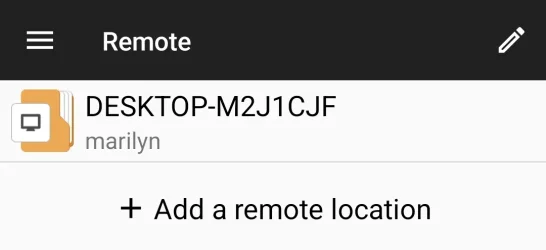
This is what I used to click on. But not working now. Think it's something on the PC different now
 

Attachments

  • Screenshot_File Manager +.webp
    Screenshot_File Manager +.webp
    13.8 KB · Views: 2

My Computer

System One

  • OS
    Windows 11 Home. Win Version 23H2
    Computer type
    PC/Desktop
    Manufacturer/Model
    HP
    Hard Drives
    windows C Drive
    D Drive is SSD
    Browser
    Chrome
As long as you have internet access in both the computer and the cellphone, it's easy.
Get the Send Anywhere installers (the freebie version is more than enough) for Windows, Android or whatever else.
Info and links at send-anywhere.com.

Basically it has 2 major tabs. Send and Receive.
On the sending machine you open the Send tab and drop in it any files, folders, archives and what have you.
It gives you a number with a few digits in it and you have 10 minutes to use it.
On the receiving machine(s), you open the Receive tab and enter that number. The download starts and you have your files.
Pretty convenient. Much faster than bluetooth and the machines could be anywhere in the world.
 

My Computer

System One

  • OS
    Windows 11 Pro for Workstations 25H2 26200.8524
    Computer type
    PC/Desktop
    Manufacturer/Model
    ASRock
    CPU
    6C+4c Intel 13th Gen Intel(R) Core(TM) i5-13400, 4100 M
    Motherboard
    ASRock B660M-HDV
    Memory
    64 GB
    Graphics Card(s)
    NVIDIA GeForce RTX 4060, Intel UHD Graphics 730
    Sound Card
    Realtek
    Monitor(s) Displays
    AOC 24V2W1G5
    Screen Resolution
    1920x1080
    Hard Drives
    Samsung SSD 990 Pro with Heatsink
    Keyboard
    Logitech
    Mouse
    Logitech
    Internet Speed
    1GB
    Antivirus
    Windows Defender
As long as you have internet access in both the computer and the cellphone, it's easy.
Get the Send Anywhere installers (the freebie version is more than enough) for Windows, Android or whatever else.
Info and links at send-anywhere.com.

Basically it has 2 major tabs. Send and Receive.
On the sending machine you open the Send tab and drop in it any files, folders, archives and what have you.
It gives you a number with a few digits in it and you have 10 minutes to use it.
On the receiving machine(s), you open the Receive tab and enter that number. The download starts and you have your files.
Pretty convenient. Much faster than bluetooth and the machines could be anywhere in the world.
Sounds interesting never heard of it. I thought the problem was something to do with no sharing tab now on my win 11 folders since I reset? I've learnt to to mess with windows to find out.
Resetting my pc gave me lots of problems .
 

My Computer

System One

  • OS
    Windows 11 Home. Win Version 23H2
    Computer type
    PC/Desktop
    Manufacturer/Model
    HP
    Hard Drives
    windows C Drive
    D Drive is SSD
    Browser
    Chrome
Maybe I have the wrong cable
You could test its data capabilities by rigging it up to connect a USB stick so you could see its contents.


Denis
 

My Computer

System One

  • OS
    Windows 11 Home x64 Version 25H2 Build 26200.8037

My Computer

System One

  • OS
    Windows 11 Pro 26200.8457
    Computer type
    PC/Desktop
    Manufacturer/Model
    Home Built
    CPU
    Ryzen 5 5600G
    Motherboard
    ASUS X470 Prime Pro
    Memory
    24GB
    Monitor(s) Displays
    Alienware 2518HF
    Screen Resolution
    1920 x 1080
    Hard Drives
    Boot: NVME WDC WDS500G; ASUS M.2 Riser card with 3 additional NVME drives
    Various Internal SDD (Samsung and WDC) and HDD drives mostly Western Digital
    PSU
    Seasonic Focus Gold 650W
    Case
    Corsair 200R
    Cooling
    Noctua PWM fans x 3
    Keyboard
    Corsair K60 SE Pro
    Mouse
    Corsair Dark Core RGB Pro SE
    Internet Speed
    500/500
    Browser
    MS Edge
    Antivirus
    Malwarebytes Premium
I could use an android file Explorer app to view 1 folder on my PC
I suspect that the app is no longer on your phone or that it requires a client app that is no longer on your computer.


Denis
 

My Computer

System One

  • OS
    Windows 11 Home x64 Version 25H2 Build 26200.8037
Last edited:

My Computer

System One

  • OS
    Windows 11 Home x64 Version 25H2 Build 26200.8037

My Computer

System One

  • OS
    Windows 11 Home. Win Version 23H2
    Computer type
    PC/Desktop
    Manufacturer/Model
    HP
    Hard Drives
    windows C Drive
    D Drive is SSD
    Browser
    Chrome
Assuming Phone connected to USB cable, supplied cable does data, also connected via WiFi.
Settings > Connections > Wi-Fi.

PC:
Start Phone Link.

Samsung Phone:
Settings > Connected devices > Link to Windows On >
Should see PC name below click on Access PC.
Should have a send files button near the top.

You may have to change USB settings > This Device > Transferring images, but mine works with just the Charging phone only.

On PC:
select File > Right click > Send to My Phone.

In Windows File Explorer you should see Phone > Internal storage > Download > Received from PC > PC name > xyz.png

Obviously also you can go via My Files on the Phone.
You may need to give permissions/sharing etc.

Avoid Bluetooth which is much more faffing around.
 

My Computer

System One

  • OS
    Windows 11
All Samsung phones starting with UI 6.0 Android 14 have an Auto Block option located in setting / Security and Privacy. If on it may force your USB connection to charging only. Also there are options in the developer area that may effect your USB if you have changed them.
 

My Computer

System One

  • OS
    Windows 11 & Zorin Pro
    Computer type
    Laptop
    Manufacturer/Model
    Asus Rog Strix G16
    CPU
    Intel® Core™ Ultra 9 Processor 275HX 2.7 GHz
    Motherboard
    AsusteK Computer
    Memory
    32 gb
    Graphics Card(s)
    NVIDIA® GeForce RTX™ 5060 Laptop GPU
    Sound Card
    Realtek High Definition Audio
    Monitor(s) Displays
    Laptop 16 inch
    Screen Resolution
    2560 X 1600
    Hard Drives
    Boot: Samsung 9100 NVME 2 TB Microsoft Storage Controller: Standard NVM Express Driver: Microsoft 6/21/2006. No SATA/AHCI on my motherboard or in bios
    Mouse
    Pad
    Browser
    Google Chrome
    Antivirus
    Microsoft
    Other Info
    Printer: HP Color LaserJet MFP M477dw
I have recently reset my PC.
Before that I could use an android file Explorer app to view 1 folder on my PC.
To transfer a few files occasionally.
However it is now not available. It was very handy before to transfer photos etc to my PC from my phone.
Now I end up emailing them.
Either quick share, or windows phone link.

Because it's only occasionally i would need to transfer. Don't want all.my phone files on my pc

You don't have to transfer anything / everything. You can choose when you want to transfer a file.
 

My Computers

System One System Two

  • OS
    Windows 11 Pro
    Computer type
    PC/Desktop
    Manufacturer/Model
    Custom Built
    CPU
    Ryzen 7 5700 X3D
    Motherboard
    MSI MPG B550 GAMING PLUS
    Memory
    64 GB DDR4 3600mhz Gskill Ripjaws V
    Graphics Card(s)
    RTX 4070 Super , 12GB VRAM Asus EVO Overclock
    Monitor(s) Displays
    Gigabyte M27Q (rev. 2.0) 2560 x 1440 @ 170hz HDR
    Hard Drives
    2TB Samsung nvme ssd
    4TB Western Digital nvme ssd
    PSU
    CORSAIR RMx SHIFT Series™ RM750x 80 PLUS Gold Fully Modular ATX Power Supply
    Case
    CORSAIR 3500X ARGB Mid-Tower ATX PC Case – Black
    Cooling
    ID-COOLING FROSTFLOW X 240 CPU Water Cooler
    Keyboard
    Logitech G213
    Mouse
    Logitech G203
    Internet Speed
    1.2gbps Fiber 😎
  • Operating System
    Chrome OS
    Computer type
    Laptop
    Manufacturer/Model
    HP Chromebook
    CPU
    Intel Pentium Quad Core
    Memory
    4GB LPDDR4
    Monitor(s) Displays
    14 Inch HD SVA anti glare micro edge display
    Hard Drives
    64 GB emmc

My Computers

System One System Two

  • OS
    Windows 11 Pro 25H2 (26200.6901)
    Computer type
    Laptop
    Manufacturer/Model
    ASUS TUF Gaming A15 (2022)
    CPU
    AMD Ryzen 7 6800H with Radeon 680M GPU (486MB RAM)
    Memory
    Crucial DDR5-4800 (2400MHz) 32GB (2 x 16GB)
    Graphics Card(s)
    NVIDIA RTX 3060 Laptop (6GB RAM)
    Sound Card
    n/a
    Monitor(s) Displays
    15.6-inch
    Screen Resolution
    1920x1080 300Hz
    Hard Drives
    2 x Samsung 990 Evo Plus (2TB M.2 NVME SSD)
    PSU
    n/a
    Mouse
    Wireless Mouse M510
    Internet Speed
    2100Mbps/300Mbps
    Browser
    Firefox
    Antivirus
    Malwarebytes
  • Operating System
    Windows 11 Pro 25H2 (26200.8246)
    Computer type
    PC/Desktop
    Manufacturer/Model
    Custom build
    CPU
    AMD Ryzen 7 5700X3D
    Motherboard
    ASUS ROG Strix B550-F Gaming WiFi II
    Memory
    G.SKILL Flare X 32GB (2x16GB) DDR4
    Graphics card(s)
    ASUS ROG-STRIX-RTX3060TI-08G-V2-GAMING (RTX 3060-Ti, 8GB RAM)
    Monitor(s) Displays
    Samsung G50D IPS 27"
    Screen Resolution
    1440p/180Hz
    Hard Drives
    SAMSUNG 990 EVO Plus (2TB] M.2 NVME SSD
    SAMSUNG 990 EVO Plus (4TB) M.2 NVME SSD
    PSU
    Corsair RM750x (750 watts)
    Case
    Cooler Master MasterCase 5
    Cooling
    Scythe Mugen 6
    Keyboard
    Logitech K520 (MK540 keyboard/mouse combo)
    Mouse
    Logitech M310 (MK540 keyboard/mouse combo)
    Internet Speed
    2100 Mbps down / 300 Mbps up
    Browser
    Firefox, Edge, Chrome
    Antivirus
    Malwarebytes (Premium)
    Other Info
    ASUS Blu-ray Burner BW-16D1HT (SATA) || Western Digital Easystore 20TB USB 3.0 external hard drive used with Acronis True Image 2025 backup software || HP OfficeJet Pro 6975 Printer/Scanner
As long as you have internet access in both the computer and the cellphone, it's easy.
Get the Send Anywhere installers (the freebie version is more than enough) for Windows, Android or whatever else.
Info and links at send-anywhere.com.

Basically it has 2 major tabs. Send and Receive.
On the sending machine you open the Send tab and drop in it any files, folders, archives and what have you.
It gives you a number with a few digits in it and you have 10 minutes to use it.
On the receiving machine(s), you open the Receive tab and enter that number. The download starts and you have your files.
Pretty convenient. Much faster than bluetooth and the machines could be anywhere in the world.
Couldn't figure that one out sorry kanenas
 

My Computer

System One

  • OS
    Windows 11 Home. Win Version 23H2
    Computer type
    PC/Desktop
    Manufacturer/Model
    HP
    Hard Drives
    windows C Drive
    D Drive is SSD
    Browser
    Chrome
Just want it how it was before I reset pc. But it wasnt to be
 

My Computer

System One

  • OS
    Windows 11 Home. Win Version 23H2
    Computer type
    PC/Desktop
    Manufacturer/Model
    HP
    Hard Drives
    windows C Drive
    D Drive is SSD
    Browser
    Chrome
All Samsung phones starting with UI 6.0 Android 14 have an Auto Block option located in setting / Security and Privacy. If on it may force your USB connection to charging only. Also there are options in the developer area that may effect your USB if you have changed them.
Maybe that's it then
All I want is to be the same as before reset.
I enabled a folder on my pc to be shared. ( Added new photos videoes docs to it. I have File Manager+App.)
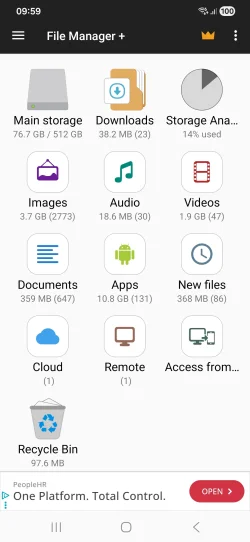
In File Manager + Remote appeared an option to click on.
Then I clicked on Remote Location. And the shared folder opened.
I browsed it, and added some files to phone , tablet etc.
Without accesing anything else on my pc.
It was just there I didn't set anything up to connect.

Never knew how...and I still don't lol


However since I reset my pc when i click on Remote Location nothing happens now.
I just want to access 1 shared folder on my pc from my mobile. But am stuck.
 

My Computer

System One

  • OS
    Windows 11 Home. Win Version 23H2
    Computer type
    PC/Desktop
    Manufacturer/Model
    HP
    Hard Drives
    windows C Drive
    D Drive is SSD
    Browser
    Chrome
This is my mobile homescreen.
 

Attachments

  • Screenshot_20260521_095942_File Manager +.webp
    Screenshot_20260521_095942_File Manager +.webp
    78.7 KB · Views: 2

My Computer

System One

  • OS
    Windows 11 Home. Win Version 23H2
    Computer type
    PC/Desktop
    Manufacturer/Model
    HP
    Hard Drives
    windows C Drive
    D Drive is SSD
    Browser
    Chrome
Back
Top Bottom