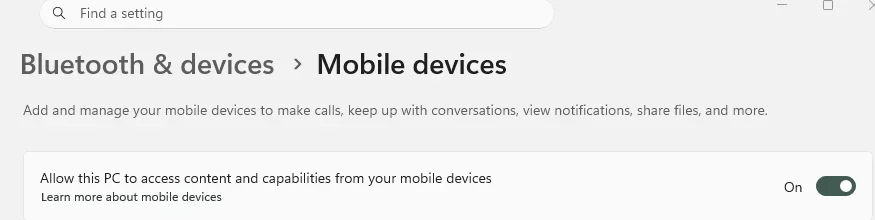
Connect Samsung mobile to HP Computer to copy files & folders.


All you need is the Phone Link App on Windows PC, and Windows Link on your Phone.
Both are standard, already installed on Windows PC/Phone.

The file(s) go to the respective standard Download folders on both.
No need for setting up shared folders, which is another way I guess.

Phone > Settings > Security and privacy > Auto Blocker is On.

File Manager + Google alternative File Manager with Ads. I just use what is already there My Files.
 

My Computer

System One

  • OS
    Windows 11
Will try that. Need something really simple and easy to do. Just was to access 1 pc folder from my phone. Not all the phone or pc files connected
Where is Windows Link on my mobile? Also where on pc?
 

My Computer

System One

  • OS
    Windows 11 Home. Win Version 23H2
    Computer type
    PC/Desktop
    Manufacturer/Model
    HP
    Hard Drives
    windows C Drive
    D Drive is SSD
    Browser
    Chrome
Using a USB cable is by far the easiest for your described usage, this post by @Edwin should help set it up...


My Computer

System One

  • OS
    windows 11 Pro
    Computer type
    Laptop
    Manufacturer/Model
    Dell XPS 15 9510
    CPU
    11th Gen Intel(R) Core(TM) i7-11800H @ 2.30GHz (16 CPUs
    Memory
    16 GB
    Graphics Card(s)
    NVIDIA GeForce RTX 3050 Ti
    Hard Drives
    512GB Solid State Drive
    Browser
    Firefox
you if have a data/charging cable you can plug that into the computer and transfer files/photos
data/charging cables are thicker cables then just a charging cable, more wires
most phones come with a charging cable only so wont be able to transfer data.
best of luck Steve ..
This is what I am now doing, it seems the only option. But need to figure out the option I always had before I reset pc.
I used to be able to switch pc on and sit anywhere in my house and click on File Manager + App on my mobile. Then Remote and a Remote Location came up
But nothing there now. Is there an easier way to access it?
I have the pc folder I always put files to hare set up as Shared as before.
 

My Computer

System One

  • OS
    Windows 11 Home. Win Version 23H2
    Computer type
    PC/Desktop
    Manufacturer/Model
    HP
    Hard Drives
    windows C Drive
    D Drive is SSD
    Browser
    Chrome
Will try that. Need something really simple and easy to do. Just was to access 1 pc folder from my phone. Not all the phone or pc files connected
Where is Windows Link on my mobile? Also where on pc?

PC > Settings > All Apps > Phone Link > Open.

Phone > Settings > Apps > Link to Windows > Open.

They both have the same Icon.

PC > Start > Downloads.
Phone > Internal Storage > Download, Expand.
People usually know additional folders like DCIM > Camera for images from Camera.

All standard stuff.

We do not how you had it before using your File Manager+ alternative.
Does not show Camera Folder, but does Downloads folder.
That seems odd to me and it has Ads, confusingly it seems to be using different folder names.

"Not all the phone or pc files connected"
You could say the same thing about File Manager+
Either which way they are not All connected.
 

My Computer

System One

  • OS
    Windows 11
To access SMB fileshares over your home network through Wi-Fi, the best free app for Android that I am aware of is still Cx File Explorer.

On a side note, for sharing of files via FTP or FTP over SSL/TLS (FTPS) on Android, use the (also free) WiFi FTP Server app. Use it with something like WinSCP or FileZilla on Windows. Both are free and can support FTPS. For connecting to shares securely over the internet, FTPS is the way to go. If you only want to share files locally on your (protected) home network in an environment where you can trust all the devices that have access to the home network, just stick to the SMB option (see above).

On another side note, the USB port on my Samsung Galaxy A56 EE phone is limited to USB 2.0. The Wi-Fi 6 option has 2×2 MIMO and a channel width of 80MHz (HE80), which is still waa-aaaa-aaaaaaay faster than USB 2.0. (Even, under somewhat-below average Wi-Fi 6 conditions.) So, no need to get a cable IMO.
 

My Computers

System One System Two

  • OS
    11 Home
    Computer type
    Laptop
    Manufacturer/Model
    Asus TUF Gaming F16 (2024)
    CPU
    i7 13650HX
    Memory
    16GB DDR5
    Graphics Card(s)
    GeForce RTX 4060 Mobile
    Sound Card
    Eastern Electric MiniMax DAC Supreme; Emotiva UMC-200; Astell & Kern AK240
    Monitor(s) Displays
    Sony Bravia XR-55X90J
    Screen Resolution
    3840×2160
    Hard Drives
    512GB SSD internal
    37TB external
    PSU
    Li-ion
    Cooling
    2× Arc Flow Fans, 4× exhaust vents, 5× heatpipes
    Keyboard
    Logitech K800
    Mouse
    Logitech G402
    Internet Speed
    30Mbit/s up, 500Mbit/s down
    Browser
    FF
    Antivirus
    What's an antivirus?
  • Operating System
    11 Home
    Computer type
    Laptop
    Manufacturer/Model
    Medion S15450
    CPU
    i5 1135G7
    Memory
    16GB DDR4
    Graphics card(s)
    Intel Iris Xe
    Sound Card
    Eastern Electric MiniMax DAC Supreme; Emotiva UMC-200; Astell & Kern AK240
    Monitor(s) Displays
    Sony Bravia XR-55X90J
    Screen Resolution
    3840×2160
    Hard Drives
    2TB SSD internal
    37TB external
    PSU
    Li-ion
    Keyboard
    Logitech K800
    Mouse
    Logitech G402
    Internet Speed
    30Mbit/s up, 500Mbit/s down
    Browser
    FF

My Computer

System One

  • OS
    Windows 7/11
    Computer type
    PC/Desktop
    Manufacturer/Model
    HP/Lenovo/Asus
    CPU
    Intel i7-11800H
    Motherboard
    Lenovo Legion 5i Pro Gen 6
    Memory
    32GB DDR4 3200MHz
    Graphics Card(s)
    NVIDIA GeForce RTX 3070
    Monitor(s) Displays
    LG 35WN65C-B
    Screen Resolution
    3440 x 1440
    Hard Drives
    1TB PCIe SSD
    Other Info
    Edition Windows 11 Pro
    Version 25H2
    Installed on ‎12/‎12/‎2025
    OS build 26200.7462

Attachments

  • add mobile device.webp
    add mobile device.webp
    11.8 KB · Views: 1

My Computers

System One System Two

  • OS
    Windows 11 Home 25H2 26200.8524
    Computer type
    PC/Desktop
    Manufacturer/Model
    HP Pavilion TP01-2xxx
    CPU
    AMD Ryzen 3 5300G
    Memory
    8gb
    Graphics Card(s)
    Radeon Graphics 4.00GHZ
    Monitor(s) Displays
    ViewSonic
    Keyboard
    HP
    Mouse
    wireless Microsoft
    Browser
    FireFox
    Antivirus
    Avira
  • Operating System
    Updated Windows 10 to 11 25H2 26200.8524
    Computer type
    PC/Desktop
    Manufacturer/Model
    HP
    CPU
    Intel Core i3 8100 @3.60 GHz
    Motherboard
    HP 8653 (U3E1)
    Memory
    8.GB
    Graphics card(s)
    Intel UHD 360 (HP)
    Sound Card
    Realtek High Def
    Monitor(s) Displays
    ViewSonic
    Other Info
    #3 System: HP laptop Windows 25H2 11Pro 26200.7840
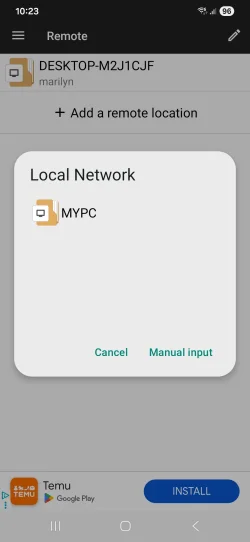
Back to using the cable again. Though now set up network sharing and in File Explorer + on my mobile again it has finally found my pc name.

However it will not find my computer details. It says SMB & now found Computer Display name and host.
But will not accept username and password.
So getting nearer lol
What do I do now?
 
Last edited:

My Computer

System One

  • OS
    Windows 11 Home. Win Version 23H2
    Computer type
    PC/Desktop
    Manufacturer/Model
    HP
    Hard Drives
    windows C Drive
    D Drive is SSD
    Browser
    Chrome
This is what shows now,so getting nearer
But it will not accept name and password so cannot go any further
 

Attachments

  • Screenshot_20260603_102329_File Manager +.webp
    Screenshot_20260603_102329_File Manager +.webp
    36.5 KB · Views: 1

My Computer

System One

  • OS
    Windows 11 Home. Win Version 23H2
    Computer type
    PC/Desktop
    Manufacturer/Model
    HP
    Hard Drives
    windows C Drive
    D Drive is SSD
    Browser
    Chrome

Latest Support Threads

Back
Top Bottom