Windows Insider Blog
Hello Windows Insiders, we are excited to begin rolling out a new update for the Microsoft Copilot app on Windows that introduces the following changes and improvements:
Semantic file search*, available on Copilot+ PCs, is a smarter and faster way to find your files using natural language. With today’s update, you can now leverage the power of improved search capabilities right from the Copilot on Windows app. This provides yet another way to find your documents and photos on your PC without having to remember the exact file names or exact words in file content. For example, you can find images by typing “find images of bridges at sunset on my PC”, find your resume documents with similar terms like “find my cv” or describing content of the file that you’re looking for like “find the file with the chicken tostada recipe”. You can adjust your permissions for what Copilot can access, retrieve, or read in Copilot Settings under Permission settings.

Search Local Files using Copilot app on Windows 11
This tutorial will show you how to search for local files using the Copilot app on your Windows 11 PC. Starting with Copilot version 1.25034.133.0, Microsoft is gradually rolling out File search across all Insider Channels. You can now find, open and ask questions about the contents of a file...
 www.elevenforum.com

Enable or Disable File Search and File Read in Copilot on Windows 11
This tutorial will show you how to turn on or off File Search and File Read in Copilot for your account in Windows 11. Starting with Copilot version 1.25034.133.0, Microsoft is gradually rolling out File search across all Insider Channels. You can now find, open and ask questions about the...
www.elevenforum.com
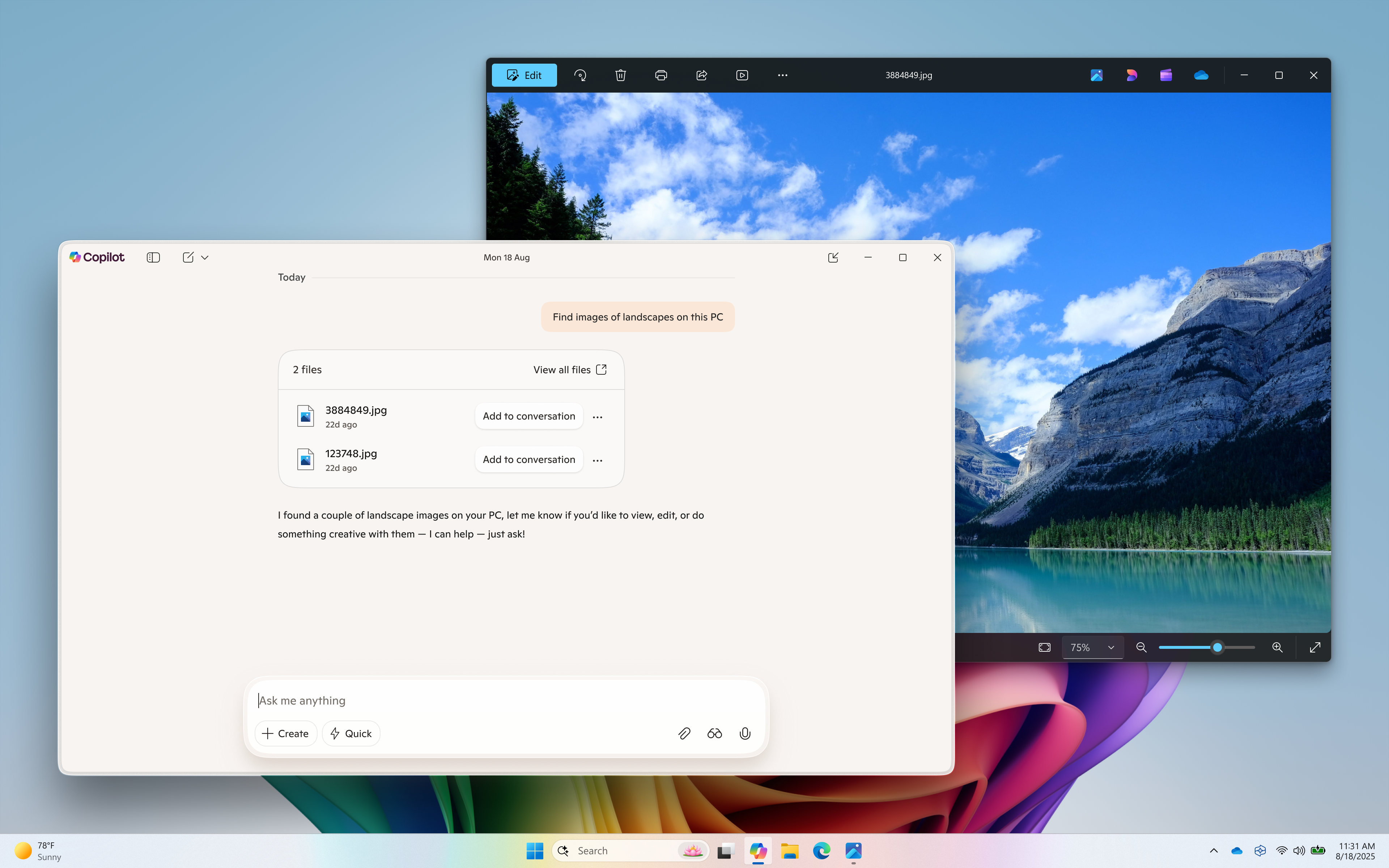
Semantic file search (available on Copilot+ PC) helps find images of a landscape.
The new Copilot home experience brings your recent apps, files and conversations into Copilot and at your fingertips.
Now it’s easier to get guided help: when you click on a recent application in the “get guided help with your apps” section, a Vision session will begin to help you get started. Or you can have Copilot take action on a recent document or photo – click the file of choice in the left pane and it’s uploaded to the Copilot chat window. From there you can have Copilot summarize the content, identify objects in an image, or just chat about it.

Open Home Page in Copilot App in Windows 11
This tutorial will show you how to open the Home page in the Copilot app for your account in Windows 11. The Microsoft Copilot app is your everyday AI companion that helps you to be smarter, more productive, more creative, and more connected to the people and things around you. Whether you want...
www.elevenforum.com
How does Copilot know what files I have?
Copilot shows you files you’ve recently opened on your device by referencing the standard Windows “Recent” folder. Like any application on Windows, Copilot can show those recent files used by apps like Word or Photos to help you quickly find your work. These are local files stored on your computer, and Copilot doesn’t scan your entire system or upload anything automatically.
Only files that are compatible with Copilot** and have been recently accessed will appear in the list. If you choose to attach a file and send it to Copilot, that action gives Copilot permission to process it — nothing is shared unless you explicitly do so.

Enable or Disable Show Recent Files on Copilot Home Page in Windows 11
This tutorial will show you how to turn on or off displaying recent files on the home page of the Copilot app for your account in Windows 11. The Microsoft Copilot app is your everyday AI companion that helps you to be smarter, more productive, more creative, and more connected to the people...
www.elevenforum.com
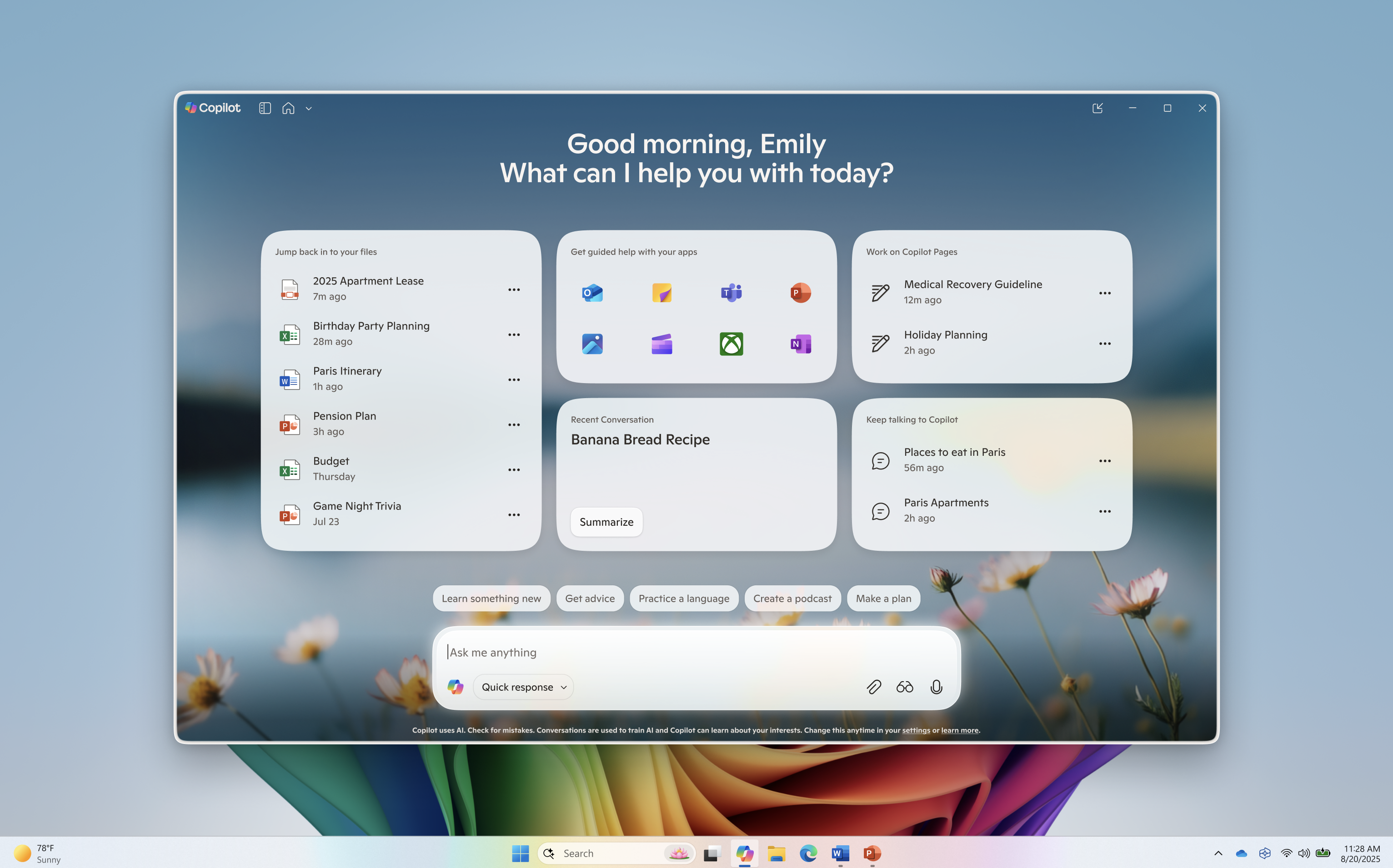
Redesigned Copilot on Windows home.
Use Vision to get real-time guidance on what’s on your screen or attach a file to your Copilot conversation for summaries, insights, and helpful pointers. Whether you’re planning, creating, or catching up, Copilot is ready to help you.

Use Copilot Vision to Share App or Screen with Copilot in Windows 11
This tutorial will show you how to use the Copilot Vision feature in Microsoft Edge and Copilot app to share screen with Copilot on Windows 10 and Windows 11. The Copilot feature in this tutorial is no longer available. Copilot Vision on Windows lets you share any browser or app window on your...
www.elevenforum.com
This Copilot app update (version 1.25082.132.0 and higher) is beginning to roll out across all Insider Channels via the Microsoft Store. The above-mentioned features are gradually rolling out so not all Insiders will get the update right away. We are excited to be previewing improvements with our Insiders to ensure all our customers have a great Copilot experience on Windows.
FEEDBACK: Please provide feedback directly within the Copilot app by clicking on your profile icon and choosing “Give feedback”.
Thanks,
Microsoft Copilot Team
* Works with specific text, image, and document formats only; optimized for select languages (English, Chinese (Simplified), French, German, Japanese, and Spanish). See aka.ms/copilotpluspcs.
** File types currently supported for file upload include .png, .jpeg, .svg, .pdf, .docx, .xlsx, .csv, .json, and .txt.
Source:

Copilot on Windows: Semantic Search and new home begin rolling out to Windows Insiders
Hello Windows Insiders, we are excited to begin rolling out a new update for the Microsoft Copilot app on Windows that introduces the following changes and improvements: Semantic file search*, available on Copilot+ PCs, is a smarter
 blogs.windows.com
Last edited:


 .
.