Insider Copilot on Windows: Semantic Search and new home begin rolling out to Windows 11 Insiders


 Windows Insider Blog

Hello Windows Insiders, we are excited to begin rolling out a new update for the Microsoft Copilot app on Windows that introduces the following changes and improvements:

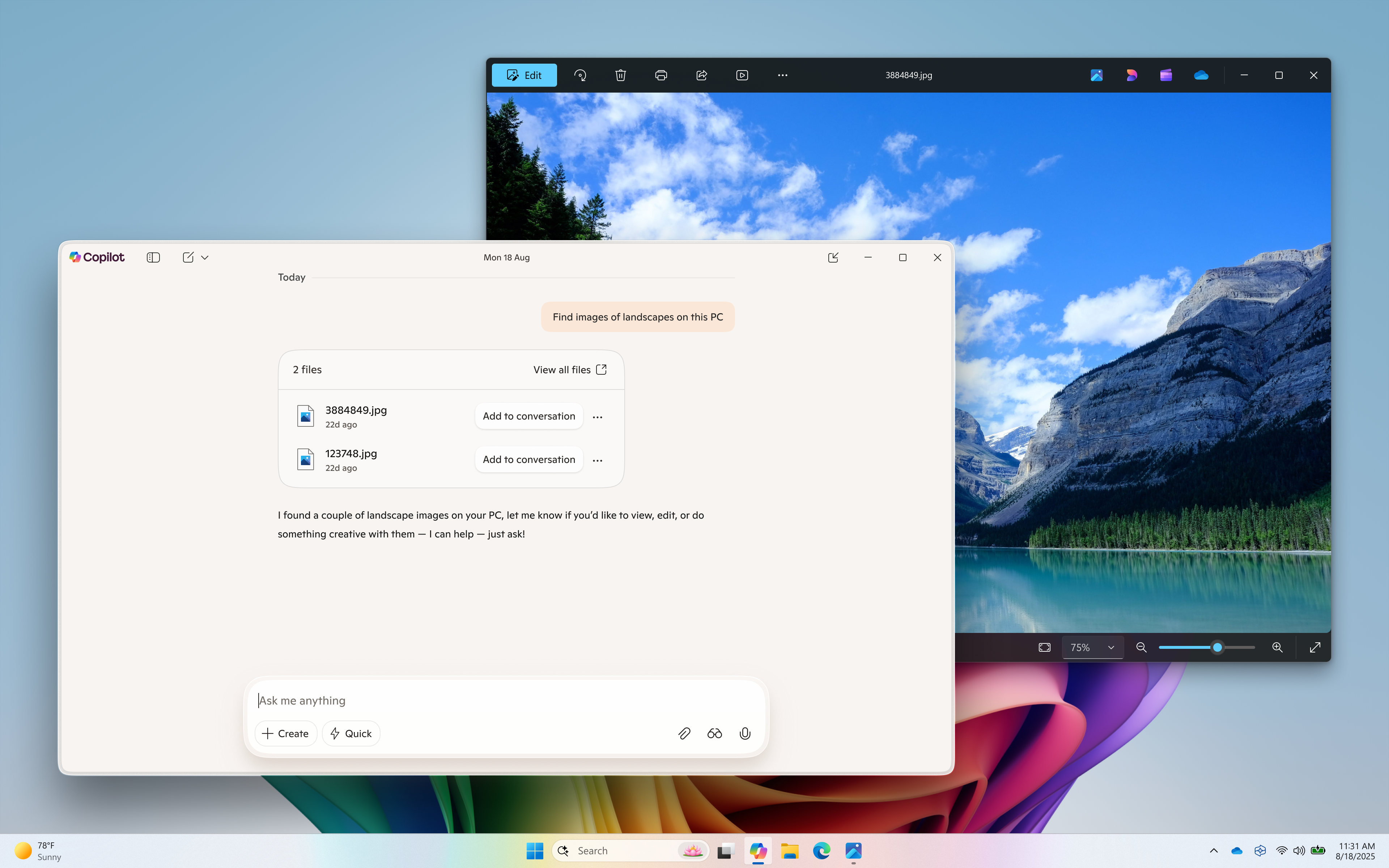
Semantic file search*, available on Copilot+ PCs, is a smarter and faster way to find your files using natural language. With today’s update, you can now leverage the power of improved search capabilities right from the Copilot on Windows app. This provides yet another way to find your documents and photos on your PC without having to remember the exact file names or exact words in file content. For example, you can find images by typing “find images of bridges at sunset on my PC”, find your resume documents with similar terms like “find my cv” or describing content of the file that you’re looking for like “find the file with the chicken tostada recipe”. You can adjust your permissions for what Copilot can access, retrieve, or read in Copilot Settings under Permission settings.


Semantic file search (available on Copilot+ PC) helps find images of a landscape.

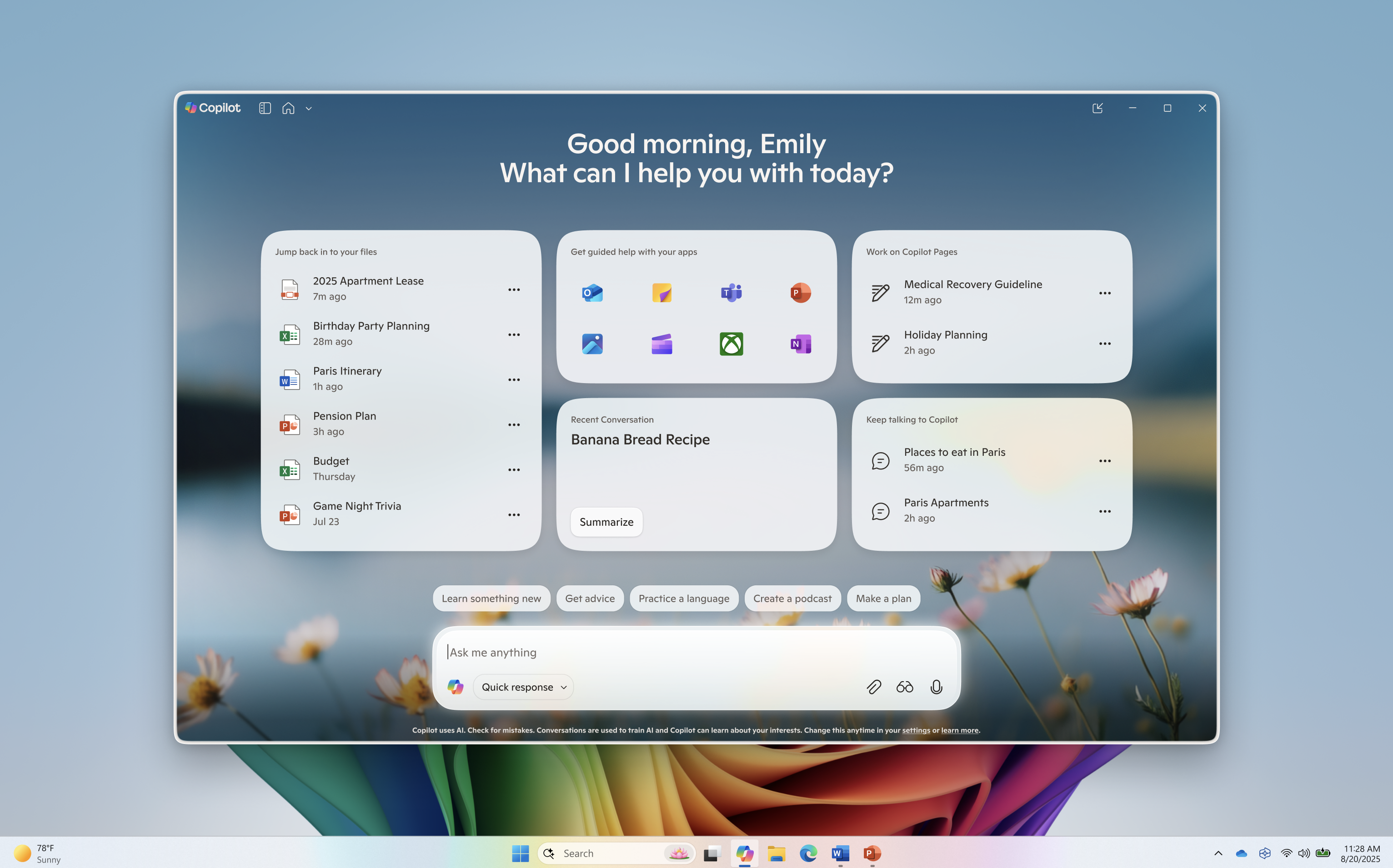
The new Copilot home experience brings your recent apps, files and conversations into Copilot and at your fingertips.

Now it’s easier to get guided help: when you click on a recent application in the “get guided help with your apps” section, a Vision session will begin to help you get started. Or you can have Copilot take action on a recent document or photo – click the file of choice in the left pane and it’s uploaded to the Copilot chat window. From there you can have Copilot summarize the content, identify objects in an image, or just chat about it.


How does Copilot know what files I have?

Copilot shows you files you’ve recently opened on your device by referencing the standard Windows “Recent” folder. Like any application on Windows, Copilot can show those recent files used by apps like Word or Photos to help you quickly find your work. These are local files stored on your computer, and Copilot doesn’t scan your entire system or upload anything automatically.

Only files that are compatible with Copilot** and have been recently accessed will appear in the list. If you choose to attach a file and send it to Copilot, that action gives Copilot permission to process it — nothing is shared unless you explicitly do so.


Redesigned Copilot on Windows home.

Use Vision to get real-time guidance on what’s on your screen or attach a file to your Copilot conversation for summaries, insights, and helpful pointers. Whether you’re planning, creating, or catching up, Copilot is ready to help you.


This Copilot app update (version 1.25082.132.0 and higher) is beginning to roll out across all Insider Channels via the Microsoft Store. The above-mentioned features are gradually rolling out so not all Insiders will get the update right away. We are excited to be previewing improvements with our Insiders to ensure all our customers have a great Copilot experience on Windows.

FEEDBACK: Please provide feedback directly within the Copilot app by clicking on your profile icon and choosing “Give feedback”.

Thanks,
Microsoft Copilot Team

* Works with specific text, image, and document formats only; optimized for select languages (English, Chinese (Simplified), French, German, Japanese, and Spanish). See aka.ms/copilotpluspcs.
** File types currently supported for file upload include .png, .jpeg, .svg, .pdf, .docx, .xlsx, .csv, .json, and .txt.


 Source:

 
Last edited:
Everytime try to quit the App via the icon in the taskbar the program will not quit but silently crash, and report the following 2 errors in Event Viewer:

Faulting application name: Copilot.exe, version: 1.25082.132.0, time stamp: 0x67ab0000
Faulting module name: System.Private.CoreLib.dll, version: 9.0.325.11113, time stamp: 0xee6e5a73
Exception code: 0x80131623
Fault offset: 0x00000000004ba623
Faulting process id: 0x2950
Faulting application start time: 0x1DC1270870969AE
Faulting application path: C:\Program Files\WindowsApps\Microsoft.Copilot_1.25082.132.0_x64__8wekyb3d8bbwe\Copilot.exe
Faulting module path: C:\Program Files\WindowsApps\Microsoft.Copilot_1.25082.132.0_x64__8wekyb3d8bbwe\System.Private.CoreLib.dll
Report Id: 2be92138-66fd-4a4c-8a37-77933b107f8c
Faulting package full name: Microsoft.Copilot_1.25082.132.0_x64__8wekyb3d8bbwe
Faulting package-relative application ID: App

and

Application: Copilot.exe
CoreCLR Version: 9.0.325.11113
.NET Version: 9.0.3
Description: The application requested process termination through System.Environment.FailFast.
Message: at Windows.AgentEnvironment.AgentEnvironmentManager.Shutdown() in /_/Src/Components/AgentEnvironment/Windows.AgentEnvironment/AgentEnvironmentManager.cs:line 283
at CopilotNative.AgentEnvironment.Services.AgentEnvironmentService.DisposeAsync()
at System.Runtime.CompilerServices.AsyncTaskMethodBuilder`1.AsyncStateMachineBox`1.ExecutionContextCallback(Object s)
at System.Threading.ExecutionContext.RunInternal(ExecutionContext executionContext, ContextCallback callback, Object state)
at System.Runtime.CompilerServices.AsyncTaskMethodBuilder`1.AsyncStateMachineBox`1.MoveNext(Thread threadPoolThread)
at System.Runtime.CompilerServices.AsyncTaskMethodBuilder`1.AsyncStateMachineBox`1.MoveNext()
at CopilotNative.Core.UX.DispatcherQueueSynchronizationContext.<>c__DisplayClass2_0.<Post>b__0(Object s)
at System.Threading.ExecutionContext.RunInternal(ExecutionContext executionContext, ContextCallback callback, Object state)
at ABI.Microsoft.UI.Dispatching.DispatcherQueueHandler.Do_Abi_Invoke(IntPtr thisPtr)
at ABI.Microsoft.UI.Xaml.IApplicationStaticsMethods.Start(IObjectReference _obj, ApplicationInitializationCallback callback)
at Microsoft.UI.Xaml.Application.Start(ApplicationInitializationCallback callback)
at CopilotNative.Core.UX.Extensions.IHostExtensions.RunApplication(IHost host, Func`1 app)
at CopilotNative.Program.Main(String[] args)

Description: The process was terminated due to an unhandled exception.System.Diagnostics.DebugProvider+DebugAssertException: at Windows.AgentEnvironment.AgentEnvironmentManager.Shutdown() in /_/Src/Components/AgentEnvironment/Windows.AgentEnvironment/AgentEnvironmentManager.cs:line 283
at CopilotNative.AgentEnvironment.Services.AgentEnvironmentService.DisposeAsync()
at System.Runtime.CompilerServices.AsyncTaskMethodBuilder`1.AsyncStateMachineBox`1.ExecutionContextCallback(Object s)
at System.Threading.ExecutionContext.RunInternal(ExecutionContext executionContext, ContextCallback callback, Object state)
at System.Runtime.CompilerServices.AsyncTaskMethodBuilder`1.AsyncStateMachineBox`1.MoveNext(Thread threadPoolThread)
at System.Runtime.CompilerServices.AsyncTaskMethodBuilder`1.AsyncStateMachineBox`1.MoveNext()
at CopilotNative.Core.UX.DispatcherQueueSynchronizationContext.<>c__DisplayClass2_0.<Post>b__0(Object s)
at System.Threading.ExecutionContext.RunInternal(ExecutionContext executionContext, ContextCallback callback, Object state)
at ABI.Microsoft.UI.Dispatching.DispatcherQueueHandler.Do_Abi_Invoke(IntPtr thisPtr)
at ABI.Microsoft.UI.Xaml.IApplicationStaticsMethods.Start(IObjectReference _obj, ApplicationInitializationCallback callback)
at Microsoft.UI.Xaml.Application.Start(ApplicationInitializationCallback callback)
at CopilotNative.Core.UX.Extensions.IHostExtensions.RunApplication(IHost host, Func`1 app)
at CopilotNative.Program.Main(String[] args)

Stack:
at System.Environment.FailFast(System.Runtime.CompilerServices.StackCrawlMarkHandle, System.String, System.Runtime.CompilerServices.ObjectHandleOnStack, System.String)
at System.Environment.FailFast(System.Threading.StackCrawlMark ByRef, System.String, System.Exception, System.String)
at System.Environment.FailFast(System.String, System.Exception, System.String)
at System.Diagnostics.DebugProvider.FailCore(System.String, System.String, System.String, System.String)
at System.Diagnostics.TraceInternal.Fail(System.String)
at Windows.AgentEnvironment.AgentEnvironmentManager.Shutdown()
at CopilotNative.AgentEnvironment.Services.AgentEnvironmentService+<DisposeAsync>d__25.MoveNext()
at System.Runtime.CompilerServices.AsyncTaskMethodBuilder`1+AsyncStateMachineBox`1[[System.Threading.Tasks.VoidTaskResult, System.Private.CoreLib, Version=9.0.0.0, Culture=neutral, PublicKeyToken=7cec85d7bea7798e],[CopilotNative.AgentEnvironment.Services.AgentEnvironmentService+<DisposeAsync>d__25, CopilotNative.AgentEnvironment, Version=1.25082.132.0, Culture=neutral, PublicKeyToken=null]].ExecutionContextCallback(System.Object)
at System.Threading.ExecutionContext.RunInternal(System.Threading.ExecutionContext, System.Threading.ContextCallback, System.Object)
at System.Runtime.CompilerServices.AsyncTaskMethodBuilder`1+AsyncStateMachineBox`1[[System.Threading.Tasks.VoidTaskResult, System.Private.CoreLib, Version=9.0.0.0, Culture=neutral, PublicKeyToken=7cec85d7bea7798e],[CopilotNative.AgentEnvironment.Services.AgentEnvironmentService+<DisposeAsync>d__25, CopilotNative.AgentEnvironment, Version=1.25082.132.0, Culture=neutral, PublicKeyToken=null]].MoveNext(System.Threading.Thread)
at System.Runtime.CompilerServices.AsyncTaskMethodBuilder`1+AsyncStateMachineBox`1[[System.Threading.Tasks.VoidTaskResult, System.Private.CoreLib, Version=9.0.0.0, Culture=neutral, PublicKeyToken=7cec85d7bea7798e],[CopilotNative.AgentEnvironment.Services.AgentEnvironmentService+<DisposeAsync>d__25, CopilotNative.AgentEnvironment, Version=1.25082.132.0, Culture=neutral, PublicKeyToken=null]].MoveNext()
at CopilotNative.Core.UX.DispatcherQueueSynchronizationContext+<>c__DisplayClass2_0.<Post>b__0(System.Object)
at System.Threading.ExecutionContext.RunInternal(System.Threading.ExecutionContext, System.Threading.ContextCallback, System.Object)
at ABI.Microsoft.UI.Dispatching.DispatcherQueueHandler.Do_Abi_Invoke(IntPtr)
at ABI.Microsoft.UI.Xaml.IApplicationStaticsMethods.Start(WinRT.IObjectReference, Microsoft.UI.Xaml.ApplicationInitializationCallback)
at Microsoft.UI.Xaml.Application.Start(Microsoft.UI.Xaml.ApplicationInitializationCallback)
at CopilotNative.Core.UX.Extensions.IHostExtensions.RunApplication(Microsoft.Extensions.Hosting.IHost, System.Func`1<CopilotNative.Core.UX.UXHostApplication>)
at CopilotNative.Program.Main(System.String[])


This did not happen before this build
 

My Computers

System One System Two

  • OS
    Windows 11 25H2
    Computer type
    PC/Desktop
    Manufacturer/Model
    Custom Built
    CPU
    Intel i9 14900KF
    Motherboard
    ASUS Z790 ProArt Creator WiFi
    Memory
    64GB Corsair Vengeance RGB
    Graphics Card(s)
    MSI 4090 Suprim X
    Sound Card
    Onboard
    Monitor(s) Displays
    1 x Asus 24". 1 x Asus 32"
    Screen Resolution
    1920 x 1080 & 2560 x 1440
    Hard Drives
    Multiple
    PSU
    Corsair 1200HX
    Case
    Corsair 7000D RGB
    Cooling
    Corsair H150I Capellix XT
    Keyboard
    Corsair K70 RGB PRO
    Mouse
    Corsair M55 RGB Pro
    Internet Speed
    1000Mbps
    Browser
    Edge
    Antivirus
    Windows Default
  • Operating System
    Windows 11 25H2
    Computer type
    PC/Desktop
    Manufacturer/Model
    Custom Built
    CPU
    Intel i7 6800K
    Motherboard
    ASUS Z99 Deluxe
    Memory
    32GB DDR4 (Corsair)
    Graphics card(s)
    ASUS GTX 1080ti
    Sound Card
    Onboard
    Monitor(s) Displays
    1x Viewsonic 24" 1x LG 19"
    Screen Resolution
    1920 x 1080 & 1600 x 900
    Hard Drives
    3 x SATA SSD
    PSU
    650W Gigabyte Bronze
    Case
    Coolermaster HAF-X
    Cooling
    Noctua NH-15 Chroma black
    Keyboard
    Generic RGB
    Mouse
    Microsoft Basic
    Internet Speed
    1000Mbps
    Browser
    Edge
    Antivirus
    Windows Default
Everytime try to quit the App via the icon in the taskbar the program will not quit but silently crash, and report the following 2 errors in Event Viewer:

Faulting application name: Copilot.exe, version: 1.25082.132.0, time stamp: 0x67ab0000
Faulting module name: System.Private.CoreLib.dll, version: 9.0.325.11113, time stamp: 0xee6e5a73
Exception code: 0x80131623
Fault offset: 0x00000000004ba623
Faulting process id: 0x2950
Faulting application start time: 0x1DC1270870969AE
Faulting application path: C:\Program Files\WindowsApps\Microsoft.Copilot_1.25082.132.0_x64__8wekyb3d8bbwe\Copilot.exe
Faulting module path: C:\Program Files\WindowsApps\Microsoft.Copilot_1.25082.132.0_x64__8wekyb3d8bbwe\System.Private.CoreLib.dll
Report Id: 2be92138-66fd-4a4c-8a37-77933b107f8c
Faulting package full name: Microsoft.Copilot_1.25082.132.0_x64__8wekyb3d8bbwe
Faulting package-relative application ID: App

and

Application: Copilot.exe
CoreCLR Version: 9.0.325.11113
.NET Version: 9.0.3
Description: The application requested process termination through System.Environment.FailFast.
Message: at Windows.AgentEnvironment.AgentEnvironmentManager.Shutdown() in /_/Src/Components/AgentEnvironment/Windows.AgentEnvironment/AgentEnvironmentManager.cs:line 283
at CopilotNative.AgentEnvironment.Services.AgentEnvironmentService.DisposeAsync()
at System.Runtime.CompilerServices.AsyncTaskMethodBuilder`1.AsyncStateMachineBox`1.ExecutionContextCallback(Object s)
at System.Threading.ExecutionContext.RunInternal(ExecutionContext executionContext, ContextCallback callback, Object state)
at System.Runtime.CompilerServices.AsyncTaskMethodBuilder`1.AsyncStateMachineBox`1.MoveNext(Thread threadPoolThread)
at System.Runtime.CompilerServices.AsyncTaskMethodBuilder`1.AsyncStateMachineBox`1.MoveNext()
at CopilotNative.Core.UX.DispatcherQueueSynchronizationContext.<>c__DisplayClass2_0.<Post>b__0(Object s)
at System.Threading.ExecutionContext.RunInternal(ExecutionContext executionContext, ContextCallback callback, Object state)
at ABI.Microsoft.UI.Dispatching.DispatcherQueueHandler.Do_Abi_Invoke(IntPtr thisPtr)
at ABI.Microsoft.UI.Xaml.IApplicationStaticsMethods.Start(IObjectReference _obj, ApplicationInitializationCallback callback)
at Microsoft.UI.Xaml.Application.Start(ApplicationInitializationCallback callback)
at CopilotNative.Core.UX.Extensions.IHostExtensions.RunApplication(IHost host, Func`1 app)
at CopilotNative.Program.Main(String[] args)

Description: The process was terminated due to an unhandled exception.System.Diagnostics.DebugProvider+DebugAssertException: at Windows.AgentEnvironment.AgentEnvironmentManager.Shutdown() in /_/Src/Components/AgentEnvironment/Windows.AgentEnvironment/AgentEnvironmentManager.cs:line 283
at CopilotNative.AgentEnvironment.Services.AgentEnvironmentService.DisposeAsync()
at System.Runtime.CompilerServices.AsyncTaskMethodBuilder`1.AsyncStateMachineBox`1.ExecutionContextCallback(Object s)
at System.Threading.ExecutionContext.RunInternal(ExecutionContext executionContext, ContextCallback callback, Object state)
at System.Runtime.CompilerServices.AsyncTaskMethodBuilder`1.AsyncStateMachineBox`1.MoveNext(Thread threadPoolThread)
at System.Runtime.CompilerServices.AsyncTaskMethodBuilder`1.AsyncStateMachineBox`1.MoveNext()
at CopilotNative.Core.UX.DispatcherQueueSynchronizationContext.<>c__DisplayClass2_0.<Post>b__0(Object s)
at System.Threading.ExecutionContext.RunInternal(ExecutionContext executionContext, ContextCallback callback, Object state)
at ABI.Microsoft.UI.Dispatching.DispatcherQueueHandler.Do_Abi_Invoke(IntPtr thisPtr)
at ABI.Microsoft.UI.Xaml.IApplicationStaticsMethods.Start(IObjectReference _obj, ApplicationInitializationCallback callback)
at Microsoft.UI.Xaml.Application.Start(ApplicationInitializationCallback callback)
at CopilotNative.Core.UX.Extensions.IHostExtensions.RunApplication(IHost host, Func`1 app)
at CopilotNative.Program.Main(String[] args)

Stack:
at System.Environment.FailFast(System.Runtime.CompilerServices.StackCrawlMarkHandle, System.String, System.Runtime.CompilerServices.ObjectHandleOnStack, System.String)
at System.Environment.FailFast(System.Threading.StackCrawlMark ByRef, System.String, System.Exception, System.String)
at System.Environment.FailFast(System.String, System.Exception, System.String)
at System.Diagnostics.DebugProvider.FailCore(System.String, System.String, System.String, System.String)
at System.Diagnostics.TraceInternal.Fail(System.String)
at Windows.AgentEnvironment.AgentEnvironmentManager.Shutdown()
at CopilotNative.AgentEnvironment.Services.AgentEnvironmentService+<DisposeAsync>d__25.MoveNext()
at System.Runtime.CompilerServices.AsyncTaskMethodBuilder`1+AsyncStateMachineBox`1[[System.Threading.Tasks.VoidTaskResult, System.Private.CoreLib, Version=9.0.0.0, Culture=neutral, PublicKeyToken=7cec85d7bea7798e],[CopilotNative.AgentEnvironment.Services.AgentEnvironmentService+<DisposeAsync>d__25, CopilotNative.AgentEnvironment, Version=1.25082.132.0, Culture=neutral, PublicKeyToken=null]].ExecutionContextCallback(System.Object)
at System.Threading.ExecutionContext.RunInternal(System.Threading.ExecutionContext, System.Threading.ContextCallback, System.Object)
at System.Runtime.CompilerServices.AsyncTaskMethodBuilder`1+AsyncStateMachineBox`1[[System.Threading.Tasks.VoidTaskResult, System.Private.CoreLib, Version=9.0.0.0, Culture=neutral, PublicKeyToken=7cec85d7bea7798e],[CopilotNative.AgentEnvironment.Services.AgentEnvironmentService+<DisposeAsync>d__25, CopilotNative.AgentEnvironment, Version=1.25082.132.0, Culture=neutral, PublicKeyToken=null]].MoveNext(System.Threading.Thread)
at System.Runtime.CompilerServices.AsyncTaskMethodBuilder`1+AsyncStateMachineBox`1[[System.Threading.Tasks.VoidTaskResult, System.Private.CoreLib, Version=9.0.0.0, Culture=neutral, PublicKeyToken=7cec85d7bea7798e],[CopilotNative.AgentEnvironment.Services.AgentEnvironmentService+<DisposeAsync>d__25, CopilotNative.AgentEnvironment, Version=1.25082.132.0, Culture=neutral, PublicKeyToken=null]].MoveNext()
at CopilotNative.Core.UX.DispatcherQueueSynchronizationContext+<>c__DisplayClass2_0.<Post>b__0(System.Object)
at System.Threading.ExecutionContext.RunInternal(System.Threading.ExecutionContext, System.Threading.ContextCallback, System.Object)
at ABI.Microsoft.UI.Dispatching.DispatcherQueueHandler.Do_Abi_Invoke(IntPtr)
at ABI.Microsoft.UI.Xaml.IApplicationStaticsMethods.Start(WinRT.IObjectReference, Microsoft.UI.Xaml.ApplicationInitializationCallback)
at Microsoft.UI.Xaml.Application.Start(Microsoft.UI.Xaml.ApplicationInitializationCallback)
at CopilotNative.Core.UX.Extensions.IHostExtensions.RunApplication(Microsoft.Extensions.Hosting.IHost, System.Func`1<CopilotNative.Core.UX.UXHostApplication>)
at CopilotNative.Program.Main(System.String[])


This did not happen before this build
Quit by System tray.
 

My Computer

System One

  • OS
    26200.8037
    Computer type
    PC/Desktop
    CPU
    i5-11400F
    Motherboard
    Gigabyte
    Memory
    32GB
    Graphics Card(s)
    Geforce GT-1030
    Keyboard
    Logitech K400
    Mouse
    Logitech M720
    Internet Speed
    600 Mb
    Browser
    Edge
Odd, I have tested this now on 4 different computers, all have the same error. Uninstalled went back to the previous version, and the error does not occur, and the program quits without issue
 

My Computers

System One System Two

  • OS
    Windows 11 25H2
    Computer type
    PC/Desktop
    Manufacturer/Model
    Custom Built
    CPU
    Intel i9 14900KF
    Motherboard
    ASUS Z790 ProArt Creator WiFi
    Memory
    64GB Corsair Vengeance RGB
    Graphics Card(s)
    MSI 4090 Suprim X
    Sound Card
    Onboard
    Monitor(s) Displays
    1 x Asus 24". 1 x Asus 32"
    Screen Resolution
    1920 x 1080 & 2560 x 1440
    Hard Drives
    Multiple
    PSU
    Corsair 1200HX
    Case
    Corsair 7000D RGB
    Cooling
    Corsair H150I Capellix XT
    Keyboard
    Corsair K70 RGB PRO
    Mouse
    Corsair M55 RGB Pro
    Internet Speed
    1000Mbps
    Browser
    Edge
    Antivirus
    Windows Default
  • Operating System
    Windows 11 25H2
    Computer type
    PC/Desktop
    Manufacturer/Model
    Custom Built
    CPU
    Intel i7 6800K
    Motherboard
    ASUS Z99 Deluxe
    Memory
    32GB DDR4 (Corsair)
    Graphics card(s)
    ASUS GTX 1080ti
    Sound Card
    Onboard
    Monitor(s) Displays
    1x Viewsonic 24" 1x LG 19"
    Screen Resolution
    1920 x 1080 & 1600 x 900
    Hard Drives
    3 x SATA SSD
    PSU
    650W Gigabyte Bronze
    Case
    Coolermaster HAF-X
    Cooling
    Noctua NH-15 Chroma black
    Keyboard
    Generic RGB
    Mouse
    Microsoft Basic
    Internet Speed
    1000Mbps
    Browser
    Edge
    Antivirus
    Windows Default
Quit by System tray.
Does you version of Copliot show the new Home page? it only seems to be that version that has the issue
 

My Computers

System One System Two

  • OS
    Windows 11 25H2
    Computer type
    PC/Desktop
    Manufacturer/Model
    Custom Built
    CPU
    Intel i9 14900KF
    Motherboard
    ASUS Z790 ProArt Creator WiFi
    Memory
    64GB Corsair Vengeance RGB
    Graphics Card(s)
    MSI 4090 Suprim X
    Sound Card
    Onboard
    Monitor(s) Displays
    1 x Asus 24". 1 x Asus 32"
    Screen Resolution
    1920 x 1080 & 2560 x 1440
    Hard Drives
    Multiple
    PSU
    Corsair 1200HX
    Case
    Corsair 7000D RGB
    Cooling
    Corsair H150I Capellix XT
    Keyboard
    Corsair K70 RGB PRO
    Mouse
    Corsair M55 RGB Pro
    Internet Speed
    1000Mbps
    Browser
    Edge
    Antivirus
    Windows Default
  • Operating System
    Windows 11 25H2
    Computer type
    PC/Desktop
    Manufacturer/Model
    Custom Built
    CPU
    Intel i7 6800K
    Motherboard
    ASUS Z99 Deluxe
    Memory
    32GB DDR4 (Corsair)
    Graphics card(s)
    ASUS GTX 1080ti
    Sound Card
    Onboard
    Monitor(s) Displays
    1x Viewsonic 24" 1x LG 19"
    Screen Resolution
    1920 x 1080 & 1600 x 900
    Hard Drives
    3 x SATA SSD
    PSU
    650W Gigabyte Bronze
    Case
    Coolermaster HAF-X
    Cooling
    Noctua NH-15 Chroma black
    Keyboard
    Generic RGB
    Mouse
    Microsoft Basic
    Internet Speed
    1000Mbps
    Browser
    Edge
    Antivirus
    Windows Default
All our work computers now have this version of the app installed, and all show the same errors in Event Viewer. This is running the release version of Windows 11 24H2.
 

My Computers

System One System Two

  • OS
    Windows 11 25H2
    Computer type
    PC/Desktop
    Manufacturer/Model
    Custom Built
    CPU
    Intel i9 14900KF
    Motherboard
    ASUS Z790 ProArt Creator WiFi
    Memory
    64GB Corsair Vengeance RGB
    Graphics Card(s)
    MSI 4090 Suprim X
    Sound Card
    Onboard
    Monitor(s) Displays
    1 x Asus 24". 1 x Asus 32"
    Screen Resolution
    1920 x 1080 & 2560 x 1440
    Hard Drives
    Multiple
    PSU
    Corsair 1200HX
    Case
    Corsair 7000D RGB
    Cooling
    Corsair H150I Capellix XT
    Keyboard
    Corsair K70 RGB PRO
    Mouse
    Corsair M55 RGB Pro
    Internet Speed
    1000Mbps
    Browser
    Edge
    Antivirus
    Windows Default
  • Operating System
    Windows 11 25H2
    Computer type
    PC/Desktop
    Manufacturer/Model
    Custom Built
    CPU
    Intel i7 6800K
    Motherboard
    ASUS Z99 Deluxe
    Memory
    32GB DDR4 (Corsair)
    Graphics card(s)
    ASUS GTX 1080ti
    Sound Card
    Onboard
    Monitor(s) Displays
    1x Viewsonic 24" 1x LG 19"
    Screen Resolution
    1920 x 1080 & 1600 x 900
    Hard Drives
    3 x SATA SSD
    PSU
    650W Gigabyte Bronze
    Case
    Coolermaster HAF-X
    Cooling
    Noctua NH-15 Chroma black
    Keyboard
    Generic RGB
    Mouse
    Microsoft Basic
    Internet Speed
    1000Mbps
    Browser
    Edge
    Antivirus
    Windows Default
Crashing issues have been fixed in the latest build 1.25082.145.0
 

My Computers

System One System Two

  • OS
    Windows 11 25H2
    Computer type
    PC/Desktop
    Manufacturer/Model
    Custom Built
    CPU
    Intel i9 14900KF
    Motherboard
    ASUS Z790 ProArt Creator WiFi
    Memory
    64GB Corsair Vengeance RGB
    Graphics Card(s)
    MSI 4090 Suprim X
    Sound Card
    Onboard
    Monitor(s) Displays
    1 x Asus 24". 1 x Asus 32"
    Screen Resolution
    1920 x 1080 & 2560 x 1440
    Hard Drives
    Multiple
    PSU
    Corsair 1200HX
    Case
    Corsair 7000D RGB
    Cooling
    Corsair H150I Capellix XT
    Keyboard
    Corsair K70 RGB PRO
    Mouse
    Corsair M55 RGB Pro
    Internet Speed
    1000Mbps
    Browser
    Edge
    Antivirus
    Windows Default
  • Operating System
    Windows 11 25H2
    Computer type
    PC/Desktop
    Manufacturer/Model
    Custom Built
    CPU
    Intel i7 6800K
    Motherboard
    ASUS Z99 Deluxe
    Memory
    32GB DDR4 (Corsair)
    Graphics card(s)
    ASUS GTX 1080ti
    Sound Card
    Onboard
    Monitor(s) Displays
    1x Viewsonic 24" 1x LG 19"
    Screen Resolution
    1920 x 1080 & 1600 x 900
    Hard Drives
    3 x SATA SSD
    PSU
    650W Gigabyte Bronze
    Case
    Coolermaster HAF-X
    Cooling
    Noctua NH-15 Chroma black
    Keyboard
    Generic RGB
    Mouse
    Microsoft Basic
    Internet Speed
    1000Mbps
    Browser
    Edge
    Antivirus
    Windows Default
I bet this is the most asked question🤣.

How do I disable copilot?
 

My Computer

System One

  • OS
    Windows 11 Pro + Win11 Canary VM.
    Computer type
    Laptop
    Manufacturer/Model
    ASUS Zenbook 14
    CPU
    I9 13th gen i9-13900H 2.60 GHZ
    Motherboard
    Yep, Laptop has one.
    Memory
    16 GB soldered
    Graphics Card(s)
    Integrated Intel Iris XE
    Sound Card
    Realtek built in
    Monitor(s) Displays
    laptop OLED screen
    Screen Resolution
    2880x1800 touchscreen
    Hard Drives
    1 TB NVME SSD (only weakness is only one slot)
    PSU
    Internal + 65W thunderbolt USB4 charger
    Case
    Yep, got one
    Cooling
    Stella Artois (UK pint cans - 568 ml) - extra cost.
    Keyboard
    Built in UK keybd
    Mouse
    Bluetooth , wireless dongled, wired
    Internet Speed
    900 mbs (ethernet), wifi 6 typical 350-450 mb/s both up and down
    Browser
    Edge
    Antivirus
    Defender
    Other Info
    TPM 2.0, 2xUSB4 thunderbolt, 1xUsb3 (usb a), 1xUsb-c, hdmi out, 3.5 mm audio out/in combo, ASUS backlit trackpad (inc. switchable number pad)

    Macrium Reflect Home V8
    Office 365 Family (6 users each 1TB onedrive space)
    Hyper-V (a vm runs almost as fast as my older laptop)
Back
Top Bottom