Daily BSOD on W11


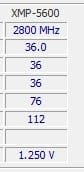
Also attaching the bios screen for RAM frequency

Cause maybe I did it wrong … I just changed the frequency and let other option by default
 

My Computer My Computer

At a glance

Windows 11Intel Core i5 13600KCorsair Vengeance Black - 2 x 16 Go (32 Go) -...Gigabyte GeForce RTX 4070 Ti GAMING OC
OS
Windows 11
Computer type
PC/Desktop
CPU
Intel Core i5 13600K
Motherboard
Asus PRIME Z790-A WIFI DDR5
Memory
Corsair Vengeance Black - 2 x 16 Go (32 Go) - DDR5 5600 MHz - CL36
Graphics Card(s)
Gigabyte GeForce RTX 4070 Ti GAMING OC
Monitor(s) Displays
AOC Q27G2U
Hard Drives
Crucial P5 Plus - 1 To
Cooling
Be Quiet Pure Loop 2 FX 240mm
Keyboard
Corsair K55 RGB Pro
Mouse
G502 Hero
Internet Speed
100 GB
Browser
Firefox
Antivirus
Kaspersky
I would update the Bios, your version is at 0602, current release for your board is 1220.
On my friends Z790, doing a bios update fixed all his BSOD he was getting and now his memory runs at XMP 3.0 DDR5600.
Before it would only work at DDR4800 with out BSOD all the time.
 

My Computer My Computer

At a glance

Windows 11 Pro 25H2Intel Alder lake i7 12700K32 Gb Corsair Vengeance LPX DDR4 3200 XMP2EVGA 3070ti FTW3 Ultra Gaming & Intel Arc
OS
Windows 11 Pro 25H2
Computer type
PC/Desktop
Manufacturer/Model
My Self
CPU
Intel Alder lake i7 12700K
Motherboard
Asus z690 Gaming WiFi D4, Bios Ver 4505
Memory
32 Gb Corsair Vengeance LPX DDR4 3200 XMP2
Graphics Card(s)
EVGA 3070ti FTW3 Ultra Gaming & Intel Arc
Sound Card
Via Display port
Monitor(s) Displays
Dell AW2723DF
Screen Resolution
2560 x 1440 @ 280Hz G-Sync mode
Hard Drives
WD Black SN850 1Tb NVME (Boot Drive)
WD BLACK SN850X + Heatsink 1Tb NVME
Samsung 870 Qvo 1Tb SSD,
Pioneer DVD-RW DVR-219L
WD Black SN850x NVME 2Tb x3
PSU
Corsair RM850
Case
Phanteks Enthoo Pro M Tempered Glass
Cooling
Be Quiet Shadow Rock 3
Keyboard
Logitech G Pro
Mouse
Logitech G903, Lightspeed + Powerplay Mat
Internet Speed
900Mb/900Mb Fritz!Box 7590ax v2
Browser
Firefox
Antivirus
MS Defender
Other Info
Logitech C930e webcam
Synology DS218 play 2 x 4Tb Synology HAT3300-4T
hey PenPusher, just upgraded my bios to 1220
I tweak the ram setup to 5600
I’m still surprised that the system is choosing by default the frequency of 4800 whereas I bought 5600…

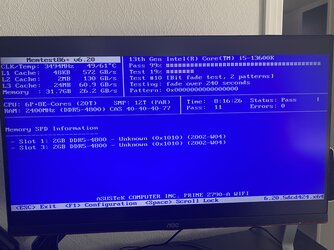
Here is the result of the memtest86+ after 11 passes (at 4800mhz apparently…..)

IMG_3837.jpeg
 

My Computer My Computer

At a glance

Windows 11Intel Core i5 13600KCorsair Vengeance Black - 2 x 16 Go (32 Go) -...Gigabyte GeForce RTX 4070 Ti GAMING OC
OS
Windows 11
Computer type
PC/Desktop
CPU
Intel Core i5 13600K
Motherboard
Asus PRIME Z790-A WIFI DDR5
Memory
Corsair Vengeance Black - 2 x 16 Go (32 Go) - DDR5 5600 MHz - CL36
Graphics Card(s)
Gigabyte GeForce RTX 4070 Ti GAMING OC
Monitor(s) Displays
AOC Q27G2U
Hard Drives
Crucial P5 Plus - 1 To
Cooling
Be Quiet Pure Loop 2 FX 240mm
Keyboard
Corsair K55 RGB Pro
Mouse
G502 Hero
Internet Speed
100 GB
Browser
Firefox
Antivirus
Kaspersky
Have you enabled XMP profile on the "EZ Mode" Bios setup screen?

Which memory slots are you using on the motherboard?
 

My Computer My Computer

At a glance

Windows 11 Pro 25H2Intel Alder lake i7 12700K32 Gb Corsair Vengeance LPX DDR4 3200 XMP2EVGA 3070ti FTW3 Ultra Gaming & Intel Arc
OS
Windows 11 Pro 25H2
Computer type
PC/Desktop
Manufacturer/Model
My Self
CPU
Intel Alder lake i7 12700K
Motherboard
Asus z690 Gaming WiFi D4, Bios Ver 4505
Memory
32 Gb Corsair Vengeance LPX DDR4 3200 XMP2
Graphics Card(s)
EVGA 3070ti FTW3 Ultra Gaming & Intel Arc
Sound Card
Via Display port
Monitor(s) Displays
Dell AW2723DF
Screen Resolution
2560 x 1440 @ 280Hz G-Sync mode
Hard Drives
WD Black SN850 1Tb NVME (Boot Drive)
WD BLACK SN850X + Heatsink 1Tb NVME
Samsung 870 Qvo 1Tb SSD,
Pioneer DVD-RW DVR-219L
WD Black SN850x NVME 2Tb x3
PSU
Corsair RM850
Case
Phanteks Enthoo Pro M Tempered Glass
Cooling
Be Quiet Shadow Rock 3
Keyboard
Logitech G Pro
Mouse
Logitech G903, Lightspeed + Powerplay Mat
Internet Speed
900Mb/900Mb Fritz!Box 7590ax v2
Browser
Firefox
Antivirus
MS Defender
Other Info
Logitech C930e webcam
Synology DS218 play 2 x 4Tb Synology HAT3300-4T
XMP is currently disabled in the bios
Slots used are Dimm_A2 and Dimm_B2
 

My Computer My Computer

At a glance

Windows 11Intel Core i5 13600KCorsair Vengeance Black - 2 x 16 Go (32 Go) -...Gigabyte GeForce RTX 4070 Ti GAMING OC
OS
Windows 11
Computer type
PC/Desktop
CPU
Intel Core i5 13600K
Motherboard
Asus PRIME Z790-A WIFI DDR5
Memory
Corsair Vengeance Black - 2 x 16 Go (32 Go) - DDR5 5600 MHz - CL36
Graphics Card(s)
Gigabyte GeForce RTX 4070 Ti GAMING OC
Monitor(s) Displays
AOC Q27G2U
Hard Drives
Crucial P5 Plus - 1 To
Cooling
Be Quiet Pure Loop 2 FX 240mm
Keyboard
Corsair K55 RGB Pro
Mouse
G502 Hero
Internet Speed
100 GB
Browser
Firefox
Antivirus
Kaspersky
Ideally you need to use 2 and 4 for best practice. To post screen shots of the Bios settings use a USB stick formatted as fat 32, then F12 key to record screen shots onto the stick.

Edit: I see you have changed the mem slots used!
DDR5-4800 is the default for these ram sticks, have you enabled XMP3.0?
 

My Computer My Computer

At a glance

Windows 11 Pro 25H2Intel Alder lake i7 12700K32 Gb Corsair Vengeance LPX DDR4 3200 XMP2EVGA 3070ti FTW3 Ultra Gaming & Intel Arc
OS
Windows 11 Pro 25H2
Computer type
PC/Desktop
Manufacturer/Model
My Self
CPU
Intel Alder lake i7 12700K
Motherboard
Asus z690 Gaming WiFi D4, Bios Ver 4505
Memory
32 Gb Corsair Vengeance LPX DDR4 3200 XMP2
Graphics Card(s)
EVGA 3070ti FTW3 Ultra Gaming & Intel Arc
Sound Card
Via Display port
Monitor(s) Displays
Dell AW2723DF
Screen Resolution
2560 x 1440 @ 280Hz G-Sync mode
Hard Drives
WD Black SN850 1Tb NVME (Boot Drive)
WD BLACK SN850X + Heatsink 1Tb NVME
Samsung 870 Qvo 1Tb SSD,
Pioneer DVD-RW DVR-219L
WD Black SN850x NVME 2Tb x3
PSU
Corsair RM850
Case
Phanteks Enthoo Pro M Tempered Glass
Cooling
Be Quiet Shadow Rock 3
Keyboard
Logitech G Pro
Mouse
Logitech G903, Lightspeed + Powerplay Mat
Internet Speed
900Mb/900Mb Fritz!Box 7590ax v2
Browser
Firefox
Antivirus
MS Defender
Other Info
Logitech C930e webcam
Synology DS218 play 2 x 4Tb Synology HAT3300-4T
In fact I'm not sure about slot numbers as in the memtest it's 1 and 3 but in the bios seems like 2 and 4 ...

Here is the screenshot 230902124208.BMP
 

My Computer My Computer

At a glance

Windows 11Intel Core i5 13600KCorsair Vengeance Black - 2 x 16 Go (32 Go) -...Gigabyte GeForce RTX 4070 Ti GAMING OC
OS
Windows 11
Computer type
PC/Desktop
CPU
Intel Core i5 13600K
Motherboard
Asus PRIME Z790-A WIFI DDR5
Memory
Corsair Vengeance Black - 2 x 16 Go (32 Go) - DDR5 5600 MHz - CL36
Graphics Card(s)
Gigabyte GeForce RTX 4070 Ti GAMING OC
Monitor(s) Displays
AOC Q27G2U
Hard Drives
Crucial P5 Plus - 1 To
Cooling
Be Quiet Pure Loop 2 FX 240mm
Keyboard
Corsair K55 RGB Pro
Mouse
G502 Hero
Internet Speed
100 GB
Browser
Firefox
Antivirus
Kaspersky

My Computer My Computer

At a glance

Windows 11Intel Core i5 13600KCorsair Vengeance Black - 2 x 16 Go (32 Go) -...Gigabyte GeForce RTX 4070 Ti GAMING OC
OS
Windows 11
Computer type
PC/Desktop
CPU
Intel Core i5 13600K
Motherboard
Asus PRIME Z790-A WIFI DDR5
Memory
Corsair Vengeance Black - 2 x 16 Go (32 Go) - DDR5 5600 MHz - CL36
Graphics Card(s)
Gigabyte GeForce RTX 4070 Ti GAMING OC
Monitor(s) Displays
AOC Q27G2U
Hard Drives
Crucial P5 Plus - 1 To
Cooling
Be Quiet Pure Loop 2 FX 240mm
Keyboard
Corsair K55 RGB Pro
Mouse
G502 Hero
Internet Speed
100 GB
Browser
Firefox
Antivirus
Kaspersky
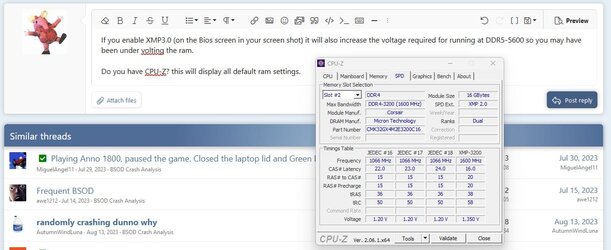
If you enable XMP3.0 (on the Bios screen in your screen shot) it will also increase the voltage required for running at DDR5-5600 so you may have been under volting the ram.

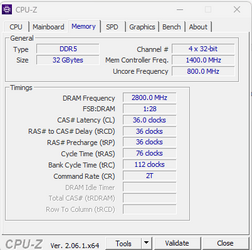
Do you have CPU-Z? this will display all default ram settings.

Screenshot 2023-09-02 115358.jpg
 

My Computer My Computer

At a glance

Windows 11 Pro 25H2Intel Alder lake i7 12700K32 Gb Corsair Vengeance LPX DDR4 3200 XMP2EVGA 3070ti FTW3 Ultra Gaming & Intel Arc
OS
Windows 11 Pro 25H2
Computer type
PC/Desktop
Manufacturer/Model
My Self
CPU
Intel Alder lake i7 12700K
Motherboard
Asus z690 Gaming WiFi D4, Bios Ver 4505
Memory
32 Gb Corsair Vengeance LPX DDR4 3200 XMP2
Graphics Card(s)
EVGA 3070ti FTW3 Ultra Gaming & Intel Arc
Sound Card
Via Display port
Monitor(s) Displays
Dell AW2723DF
Screen Resolution
2560 x 1440 @ 280Hz G-Sync mode
Hard Drives
WD Black SN850 1Tb NVME (Boot Drive)
WD BLACK SN850X + Heatsink 1Tb NVME
Samsung 870 Qvo 1Tb SSD,
Pioneer DVD-RW DVR-219L
WD Black SN850x NVME 2Tb x3
PSU
Corsair RM850
Case
Phanteks Enthoo Pro M Tempered Glass
Cooling
Be Quiet Shadow Rock 3
Keyboard
Logitech G Pro
Mouse
Logitech G903, Lightspeed + Powerplay Mat
Internet Speed
900Mb/900Mb Fritz!Box 7590ax v2
Browser
Firefox
Antivirus
MS Defender
Other Info
Logitech C930e webcam
Synology DS218 play 2 x 4Tb Synology HAT3300-4T
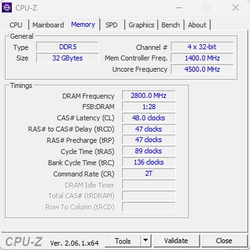
Here are the CPU Z memory screens :
1693652642618.png

1693652659832.png

So you say that I must activate/enable XMP in bios ?
 

My Computer My Computer

At a glance

Windows 11Intel Core i5 13600KCorsair Vengeance Black - 2 x 16 Go (32 Go) -...Gigabyte GeForce RTX 4070 Ti GAMING OC
OS
Windows 11
Computer type
PC/Desktop
CPU
Intel Core i5 13600K
Motherboard
Asus PRIME Z790-A WIFI DDR5
Memory
Corsair Vengeance Black - 2 x 16 Go (32 Go) - DDR5 5600 MHz - CL36
Graphics Card(s)
Gigabyte GeForce RTX 4070 Ti GAMING OC
Monitor(s) Displays
AOC Q27G2U
Hard Drives
Crucial P5 Plus - 1 To
Cooling
Be Quiet Pure Loop 2 FX 240mm
Keyboard
Corsair K55 RGB Pro
Mouse
G502 Hero
Internet Speed
100 GB
Browser
Firefox
Antivirus
Kaspersky
Yes... this will enable the optimum settings for the ram. After you set the XMP, don't touch any other Memory timing settings...
 

My Computer My Computer

At a glance

Windows 11 Pro 25H2Intel Alder lake i7 12700K32 Gb Corsair Vengeance LPX DDR4 3200 XMP2EVGA 3070ti FTW3 Ultra Gaming & Intel Arc
OS
Windows 11 Pro 25H2
Computer type
PC/Desktop
Manufacturer/Model
My Self
CPU
Intel Alder lake i7 12700K
Motherboard
Asus z690 Gaming WiFi D4, Bios Ver 4505
Memory
32 Gb Corsair Vengeance LPX DDR4 3200 XMP2
Graphics Card(s)
EVGA 3070ti FTW3 Ultra Gaming & Intel Arc
Sound Card
Via Display port
Monitor(s) Displays
Dell AW2723DF
Screen Resolution
2560 x 1440 @ 280Hz G-Sync mode
Hard Drives
WD Black SN850 1Tb NVME (Boot Drive)
WD BLACK SN850X + Heatsink 1Tb NVME
Samsung 870 Qvo 1Tb SSD,
Pioneer DVD-RW DVR-219L
WD Black SN850x NVME 2Tb x3
PSU
Corsair RM850
Case
Phanteks Enthoo Pro M Tempered Glass
Cooling
Be Quiet Shadow Rock 3
Keyboard
Logitech G Pro
Mouse
Logitech G903, Lightspeed + Powerplay Mat
Internet Speed
900Mb/900Mb Fritz!Box 7590ax v2
Browser
Firefox
Antivirus
MS Defender
Other Info
Logitech C930e webcam
Synology DS218 play 2 x 4Tb Synology HAT3300-4T
You mean other than the 5600Mhz I set up ?
Or I should put the default value for the frequency ?
 

My Computer My Computer

At a glance

Windows 11Intel Core i5 13600KCorsair Vengeance Black - 2 x 16 Go (32 Go) -...Gigabyte GeForce RTX 4070 Ti GAMING OC
OS
Windows 11
Computer type
PC/Desktop
CPU
Intel Core i5 13600K
Motherboard
Asus PRIME Z790-A WIFI DDR5
Memory
Corsair Vengeance Black - 2 x 16 Go (32 Go) - DDR5 5600 MHz - CL36
Graphics Card(s)
Gigabyte GeForce RTX 4070 Ti GAMING OC
Monitor(s) Displays
AOC Q27G2U
Hard Drives
Crucial P5 Plus - 1 To
Cooling
Be Quiet Pure Loop 2 FX 240mm
Keyboard
Corsair K55 RGB Pro
Mouse
G502 Hero
Internet Speed
100 GB
Browser
Firefox
Antivirus
Kaspersky
When you enable XMP tab, this will setup the defaults for the ram you are using, no other tweaks should be required.

Your timing here

Screenshot 2023-09-02 121749.jpg

Should look more like this

Screenshot 2023-09-02 121808.jpg
 

My Computer My Computer

At a glance

Windows 11 Pro 25H2Intel Alder lake i7 12700K32 Gb Corsair Vengeance LPX DDR4 3200 XMP2EVGA 3070ti FTW3 Ultra Gaming & Intel Arc
OS
Windows 11 Pro 25H2
Computer type
PC/Desktop
Manufacturer/Model
My Self
CPU
Intel Alder lake i7 12700K
Motherboard
Asus z690 Gaming WiFi D4, Bios Ver 4505
Memory
32 Gb Corsair Vengeance LPX DDR4 3200 XMP2
Graphics Card(s)
EVGA 3070ti FTW3 Ultra Gaming & Intel Arc
Sound Card
Via Display port
Monitor(s) Displays
Dell AW2723DF
Screen Resolution
2560 x 1440 @ 280Hz G-Sync mode
Hard Drives
WD Black SN850 1Tb NVME (Boot Drive)
WD BLACK SN850X + Heatsink 1Tb NVME
Samsung 870 Qvo 1Tb SSD,
Pioneer DVD-RW DVR-219L
WD Black SN850x NVME 2Tb x3
PSU
Corsair RM850
Case
Phanteks Enthoo Pro M Tempered Glass
Cooling
Be Quiet Shadow Rock 3
Keyboard
Logitech G Pro
Mouse
Logitech G903, Lightspeed + Powerplay Mat
Internet Speed
900Mb/900Mb Fritz!Box 7590ax v2
Browser
Firefox
Antivirus
MS Defender
Other Info
Logitech C930e webcam
Synology DS218 play 2 x 4Tb Synology HAT3300-4T
Yes I see that it's overriding everything

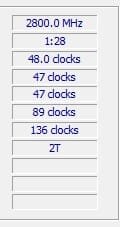
Now my setup :
1693654977254.png

Hope that every thing will work properly now ! :)
 

My Computer My Computer

At a glance

Windows 11Intel Core i5 13600KCorsair Vengeance Black - 2 x 16 Go (32 Go) -...Gigabyte GeForce RTX 4070 Ti GAMING OC
OS
Windows 11
Computer type
PC/Desktop
CPU
Intel Core i5 13600K
Motherboard
Asus PRIME Z790-A WIFI DDR5
Memory
Corsair Vengeance Black - 2 x 16 Go (32 Go) - DDR5 5600 MHz - CL36
Graphics Card(s)
Gigabyte GeForce RTX 4070 Ti GAMING OC
Monitor(s) Displays
AOC Q27G2U
Hard Drives
Crucial P5 Plus - 1 To
Cooling
Be Quiet Pure Loop 2 FX 240mm
Keyboard
Corsair K55 RGB Pro
Mouse
G502 Hero
Internet Speed
100 GB
Browser
Firefox
Antivirus
Kaspersky
Thanks again to you all
Keep you posted, will run V2 in a week or two
 

My Computer My Computer

At a glance

Windows 11Intel Core i5 13600KCorsair Vengeance Black - 2 x 16 Go (32 Go) -...Gigabyte GeForce RTX 4070 Ti GAMING OC
OS
Windows 11
Computer type
PC/Desktop
CPU
Intel Core i5 13600K
Motherboard
Asus PRIME Z790-A WIFI DDR5
Memory
Corsair Vengeance Black - 2 x 16 Go (32 Go) - DDR5 5600 MHz - CL36
Graphics Card(s)
Gigabyte GeForce RTX 4070 Ti GAMING OC
Monitor(s) Displays
AOC Q27G2U
Hard Drives
Crucial P5 Plus - 1 To
Cooling
Be Quiet Pure Loop 2 FX 240mm
Keyboard
Corsair K55 RGB Pro
Mouse
G502 Hero
Internet Speed
100 GB
Browser
Firefox
Antivirus
Kaspersky
(y)
 

My Computer My Computer

At a glance

Windows 11 Pro 25H2Intel Alder lake i7 12700K32 Gb Corsair Vengeance LPX DDR4 3200 XMP2EVGA 3070ti FTW3 Ultra Gaming & Intel Arc
OS
Windows 11 Pro 25H2
Computer type
PC/Desktop
Manufacturer/Model
My Self
CPU
Intel Alder lake i7 12700K
Motherboard
Asus z690 Gaming WiFi D4, Bios Ver 4505
Memory
32 Gb Corsair Vengeance LPX DDR4 3200 XMP2
Graphics Card(s)
EVGA 3070ti FTW3 Ultra Gaming & Intel Arc
Sound Card
Via Display port
Monitor(s) Displays
Dell AW2723DF
Screen Resolution
2560 x 1440 @ 280Hz G-Sync mode
Hard Drives
WD Black SN850 1Tb NVME (Boot Drive)
WD BLACK SN850X + Heatsink 1Tb NVME
Samsung 870 Qvo 1Tb SSD,
Pioneer DVD-RW DVR-219L
WD Black SN850x NVME 2Tb x3
PSU
Corsair RM850
Case
Phanteks Enthoo Pro M Tempered Glass
Cooling
Be Quiet Shadow Rock 3
Keyboard
Logitech G Pro
Mouse
Logitech G903, Lightspeed + Powerplay Mat
Internet Speed
900Mb/900Mb Fritz!Box 7590ax v2
Browser
Firefox
Antivirus
MS Defender
Other Info
Logitech C930e webcam
Synology DS218 play 2 x 4Tb Synology HAT3300-4T
1) Open administrative command prompt and copy and paste:

bcdedit /deletevalue {badmemory} badmemorylist

2) Post a new V2 share link into the newest post

3) Post a new tuneup plus share link into the newest post
 

My Computer My Computer

At a glance

Windows 10Intel(R) Core(TM) i7-4800MQ CPU @ 2.70GHz16 GB Total: Manufacturer : Samsung MemoryTyp...NVIDIA Quadro K3100M; Intel(R) HD Graphics 4600
OS
Windows 10
Computer type
Laptop
Manufacturer/Model
HP
CPU
Intel(R) Core(TM) i7-4800MQ CPU @ 2.70GHz
Motherboard
Product : 190A Version : KBC Version 94.56
Memory
16 GB Total: Manufacturer : Samsung MemoryType : DDR3 FormFactor : SODIMM Capacity : 8GB Speed : 1600
Graphics Card(s)
NVIDIA Quadro K3100M; Intel(R) HD Graphics 4600
Sound Card
IDT High Definition Audio CODEC; PNP Device ID HDAUDIO\FUNC_01&VEN_111D&DEV_76E0
Hard Drives
Model Hitachi HTS727575A9E364
Antivirus
Microsoft Defender
Other Info
Mobile Workstation

My Computer My Computer

At a glance

Windows 11Intel Core i5 13600KCorsair Vengeance Black - 2 x 16 Go (32 Go) -...Gigabyte GeForce RTX 4070 Ti GAMING OC
OS
Windows 11
Computer type
PC/Desktop
CPU
Intel Core i5 13600K
Motherboard
Asus PRIME Z790-A WIFI DDR5
Memory
Corsair Vengeance Black - 2 x 16 Go (32 Go) - DDR5 5600 MHz - CL36
Graphics Card(s)
Gigabyte GeForce RTX 4070 Ti GAMING OC
Monitor(s) Displays
AOC Q27G2U
Hard Drives
Crucial P5 Plus - 1 To
Cooling
Be Quiet Pure Loop 2 FX 240mm
Keyboard
Corsair K55 RGB Pro
Mouse
G502 Hero
Internet Speed
100 GB
Browser
Firefox
Antivirus
Kaspersky
Please post a new Tuneup plus share link.


Run:


Post a share link.


For any BSOD post a new V2 share link.


Code:
RAM Defects
-----------
0x1ae24f
0x2875e5
0x2af28f
0x51cacd
0x618723
0x6744a9
0x6986c6
0x6bc703
0x6d764c
0x81c50c
 
Last edited:

My Computer My Computer

At a glance

Windows 10Intel(R) Core(TM) i7-4800MQ CPU @ 2.70GHz16 GB Total: Manufacturer : Samsung MemoryTyp...NVIDIA Quadro K3100M; Intel(R) HD Graphics 4600
OS
Windows 10
Computer type
Laptop
Manufacturer/Model
HP
CPU
Intel(R) Core(TM) i7-4800MQ CPU @ 2.70GHz
Motherboard
Product : 190A Version : KBC Version 94.56
Memory
16 GB Total: Manufacturer : Samsung MemoryType : DDR3 FormFactor : SODIMM Capacity : 8GB Speed : 1600
Graphics Card(s)
NVIDIA Quadro K3100M; Intel(R) HD Graphics 4600
Sound Card
IDT High Definition Audio CODEC; PNP Device ID HDAUDIO\FUNC_01&VEN_111D&DEV_76E0
Hard Drives
Model Hitachi HTS727575A9E364
Antivirus
Microsoft Defender
Other Info
Mobile Workstation

My Computer My Computer

At a glance

Windows 11Intel Core i5 13600KCorsair Vengeance Black - 2 x 16 Go (32 Go) -...Gigabyte GeForce RTX 4070 Ti GAMING OC
OS
Windows 11
Computer type
PC/Desktop
CPU
Intel Core i5 13600K
Motherboard
Asus PRIME Z790-A WIFI DDR5
Memory
Corsair Vengeance Black - 2 x 16 Go (32 Go) - DDR5 5600 MHz - CL36
Graphics Card(s)
Gigabyte GeForce RTX 4070 Ti GAMING OC
Monitor(s) Displays
AOC Q27G2U
Hard Drives
Crucial P5 Plus - 1 To
Cooling
Be Quiet Pure Loop 2 FX 240mm
Keyboard
Corsair K55 RGB Pro
Mouse
G502 Hero
Internet Speed
100 GB
Browser
Firefox
Antivirus
Kaspersky

Latest Support Threads

Back
Top Bottom