DefenderUI Question


mccmw

Well-known member
Member
VIP
Local time
5:15 PM
Posts
496
OS
Windows 11
I have DefenderUI installed but I never had it running at start up, or actively in the background. I did make a few settings changes...but...am curious if I need to have the app running for them to be active.
 

My Computers My Computers

  • At a glance

    Windows 11Intel i7-7700K32GB 2666Mhz (Kingston Hyper X Fury)Asus Nvidia 1050Ti
    OS
    Windows 11
    Computer type
    PC/Desktop
    Manufacturer/Model
    Custom
    CPU
    Intel i7-7700K
    Motherboard
    Asus Prime Z-270A
    Memory
    32GB 2666Mhz (Kingston Hyper X Fury)
    Graphics Card(s)
    Asus Nvidia 1050Ti
    Sound Card
    N/A
    Monitor(s) Displays
    Samsung C27F390
    Screen Resolution
    1920 x 1080
    Hard Drives
    1TB Western Digital SN770 (System) and 2TB Western Digital SN770 (Storage)
    Antivirus
    Windows Security

  • At a glance

    Windows 11 Homei9-11900H32GBIntegrated Intel and Nvidia 3050Ti
    Operating System
    Windows 11 Home
    Computer type
    Laptop
    Manufacturer/Model
    Dell/XPS 15 9510
    CPU
    i9-11900H
    Motherboard
    Unknown
    Memory
    32GB
    Graphics card(s)
    Integrated Intel and Nvidia 3050Ti
    Sound Card
    Integrated (Realtek)
    Monitor(s) Displays
    None
    Screen Resolution
    1920 x 1200 (non-Touch)
    Hard Drives
    2TB SK Hynix P41 Platinum
    Antivirus
    Windows Security
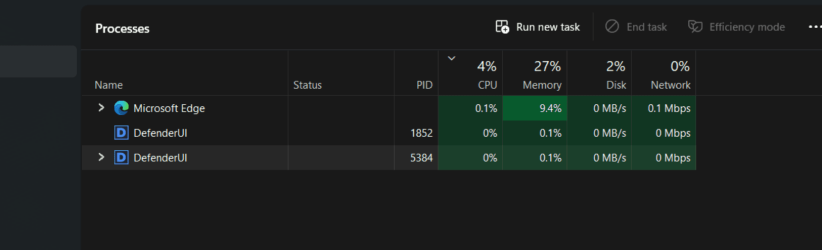
It has to be running if you want the 'DefenderUI Add Exclusion' in the context menu to work. I always have it start with Windows.

EDIT,
Doesn't use much resources.

ksnip_20241103-171757.png
 

My Computers My Computers

  • At a glance

    Win 11 ProAMD Ryzen™ 7 7730U24GB Dual-Channel DDR4 @ 1596MHz (22-22-22-52)512MB ATI AMD Radeon Graphics (ASUStek Comput...
    OS
    Win 11 Pro
    Computer type
    Laptop
    Manufacturer/Model
    ASUS Vivobook
    CPU
    AMD Ryzen™ 7 7730U
    Motherboard
    M1605YA
    Memory
    24GB Dual-Channel DDR4 @ 1596MHz (22-22-22-52)
    Graphics Card(s)
    512MB ATI AMD Radeon Graphics (ASUStek Computer Inc)
    Monitor(s) Displays
    Generic PnP Monitor (1920x1200@60Hz) - P1 PLUS (1920x1080@59Hz)
    Screen Resolution
    1920 X 1200
    Hard Drives
    953GB Western Digital WD
    PSU
    45 Watts
    Mouse
    Lenovo Bluetooth.
    Internet Speed
    500 Mbps
    Browser
    Edge
    Antivirus
    Defender
  • At a glance

    Windows 11AMD Ryzen 7 5800H / 3.2 GHz32 GB DDR4 SDRAM 3200 MHzNVIDIA GeForce RTX 3060 6 GB GDDR6 SDRAM
    Operating System
    Windows 11
    Computer type
    Laptop
    Manufacturer/Model
    ACER NITRO
    CPU
    AMD Ryzen 7 5800H / 3.2 GHz
    Motherboard
    CZ Scala_CAS (FP6)
    Memory
    32 GB DDR4 SDRAM 3200 MHz
    Graphics card(s)
    NVIDIA GeForce RTX 3060 6 GB GDDR6 SDRAM
    Sound Card
    Realtek Audio. NVIDIA High Definition Audio
    Monitor(s) Displays
    15.6" LED backlight 1920 x 1080 (Full HD) 144 Hz
    Screen Resolution
    1920 x 1080 (Full HD)
    Hard Drives
    Samsung 970 Evo Plus 2TB NVMe M.2
    PSU
    180 Watt, 19.5 V
    Mouse
    Lenovo Bluetooth
    Internet Speed
    500 Mbps
    Browser
    Edge
    Antivirus
    Defender
I have DefenderUI installed but I never had it running at start up, or actively in the background. I did make a few settings changes...but...am curious if I need to have the app running for them to be active.
Do you have another antivirus app installed?
 
Last edited:

My Computers My Computers

  • At a glance

    Windows 11 ProIntel Series 3 Core Ultra X9 388H64GB LPDDR5x 9600 MT/sIntel Arc graphics B390 Panther Lake
    OS
    Windows 11 Pro
    Computer type
    Laptop
    Manufacturer/Model
    Dell XPS 16 DA16260
    CPU
    Intel Series 3 Core Ultra X9 388H
    Memory
    64GB LPDDR5x 9600 MT/s
    Graphics Card(s)
    Intel Arc graphics B390 Panther Lake
    Monitor(s) Displays
    16" 3.2K Tandem OLED Infinity Edge
    Screen Resolution
    3200 x 2000 16:10 236 PPI
    Hard Drives
    1 Terabyte M.2 PCIe NVMe SSD
    Case
    Black Anodized Aluminum
    Cooling
    Vapor Chamber Cooling
    Mouse
    None
    Internet Speed
    942 Mbps Netgear Mesh + 2 Satellites
    Browser
    Microsoft Edge (Chromium)
    Antivirus
    Windows Security (Defender)
    Other Info
    NPU delivering 67 TOPS
    Microsoft 365 subscription
    Microsoft Office 365
    Microsoft OneDrive 1TB Cloud
    Microsoft Visual Studio
    Microsoft Visual Studio Code
    Microsoft Sysinternals Suite
    Microsoft BitLocker
    Microsoft Copilot
    Dell Support Assist
    Dell Command | Update
    Macrium Reflect X subscription
    1Password Password Manager
    Amazon Kindle for PC
    Lightroom/Photoshop subscription
    Interactive Brokers Trader Workstation
  • At a glance

    Windows 11 ProSnapdragon® X Elite (12 Core) with Hexagon NP...32GB LPDDR5x 8448 MT/sIntegrated Adreno GPU
    Operating System
    Windows 11 Pro
    Computer type
    Laptop
    Manufacturer/Model
    Microsoft Surface Laptop 7
    CPU
    Snapdragon® X Elite (12 Core) with Hexagon NPU delivering 45 TOPS
    Memory
    32GB LPDDR5x 8448 MT/s
    Graphics card(s)
    Integrated Adreno GPU
    Sound Card
    Omnisonic speakers with Dolby Atmos spatial sound
    Monitor(s) Displays
    13.8″ PixelSense Flow touchscreen 120 Hz 600 NIT
    Screen Resolution
    2304 × 1536 (201 PPI), 3:2 aspect ratio
    Hard Drives
    1 TB PCIe NVMe Gen 4 SSD
    Case
    Black Anodized Aluminum
    Cooling
    Vapor Chamber Cooling
    Mouse
    None
    Internet Speed
    942 Mbps Netgear Mesh + 2 Satellites
    Browser
    Microsoft Edge (Chromium)
    Antivirus
    Windows Security (Defender)
    Other Info
    Microsoft 365 subscription (Office)
    Microsoft Office 365
    Microsoft OneDrive 1TB Cloud
    Microsoft Visual Studio 2026
    Microsoft Visual Studio Code
    Interactive Brokers Trader Workstation
    Lightroom/Photoshop subscription
    1Password Password Manager
    Microsoft Sysinternals
    Amazon Kindle for PC
    Microsoft BitLocker
    Microsoft Copilot
I have a couple questions:

1. Is this app necessary?

2. How is it possible for a 3rd party app to take control of MS's most sacred application!?!?!?
 

My Computers My Computers

  • At a glance

    Windows 11 Pro
    OS
    Windows 11 Pro
    Computer type
    PC/Desktop
    Manufacturer/Model
    ASUS ROG Strix
  • At a glance

    Windows 11 Pro
    Operating System
    Windows 11 Pro
    Computer type
    Laptop
    Manufacturer/Model
    ASUS VivoBook
  • ASUS VivoBook 'Lite' ~ Windows 11 Home
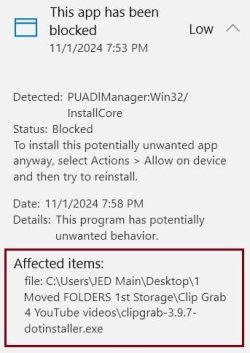
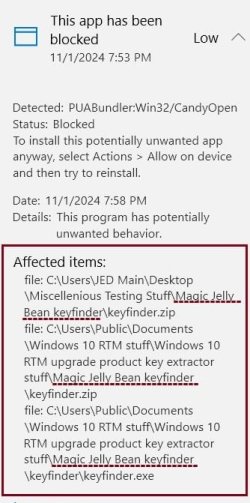
I ran a Defender 'Custom' scan yesterday after also running Norton 360 & Avast 'Free'
This is what the 1st two missed, I Blocked both.
Defender Custom_ 2aaResultsb.jpgDefender Custom_ 2bResultsb.jpg

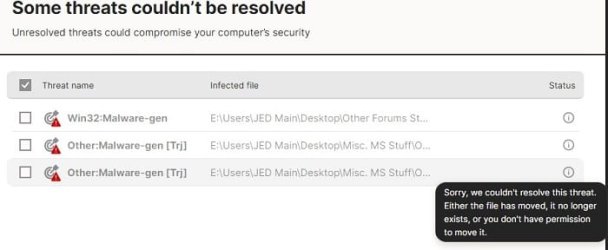
Where as Norton couldn't resolve a couple

Norton 360 Deluxe, 2024_ 8de11012024 MainOS Threats FAILED.jpg

*I like having a couple of choices.
 

My Computers My Computers

  • At a glance

    Windows 11 Proi7-12900K @ 3.2 GHz2/16 GB Critical DDR5GeForce RTX 3060 Ti
    OS
    Windows 11 Pro
    Computer type
    PC/Desktop
    Manufacturer/Model
    Self made in 2023
    CPU
    i7-12900K @ 3.2 GHz
    Motherboard
    ASUS ROG Maximus Z790 APEX
    Memory
    2/16 GB Critical DDR5
    Graphics Card(s)
    GeForce RTX 3060 Ti
    Sound Card
    On board sound
    Monitor(s) Displays
    27 inch LED
    Hard Drives
    1 TB Samsung SSD w/ 3 partitions
    250 GB Samsung SSD for WSE 2016 BU OS
    1 TB Samsung SSD (Storage)
    PSU
    RM850x SHIFT 80 PLUS Gold Fully Modular
    Case
    Fractal Design Define 7 Compact - Mid Tower
    Browser
    EDGE
  • At a glance

    Windows 11 Pro x2Core i5-1135G716GB M.2 2280 NVMe SSDIntegrated - Intel Iris Xe Graphics
    Operating System
    Windows 11 Pro x2
    Computer type
    Laptop
    Manufacturer/Model
    LG gram 15, 15.6" Laptop
    CPU
    Core i5-1135G7
    Motherboard
    LG
    Memory
    16GB M.2 2280 NVMe SSD
    Graphics card(s)
    Integrated - Intel Iris Xe Graphics
    Sound Card
    Onboard sound
    Monitor(s) Displays
    15.6" IPS Display
    Screen Resolution
    Full HD 1920 x 1080
    Hard Drives
    512 GB
    Browser
    EDGE
I have a couple questions:

1. Is this app necessary?

2. How is it possible for a 3rd party app to take control of MS's most sacred application!?!?!?
The app isn't necessary but it makes life a hell of a lot easier :cool:

It's just a better user interface for Defender. 🤷‍♂️

1730664306519.gif
 

My Computers My Computers

  • At a glance

    Win 11 ProAMD Ryzen™ 7 7730U24GB Dual-Channel DDR4 @ 1596MHz (22-22-22-52)512MB ATI AMD Radeon Graphics (ASUStek Comput...
    OS
    Win 11 Pro
    Computer type
    Laptop
    Manufacturer/Model
    ASUS Vivobook
    CPU
    AMD Ryzen™ 7 7730U
    Motherboard
    M1605YA
    Memory
    24GB Dual-Channel DDR4 @ 1596MHz (22-22-22-52)
    Graphics Card(s)
    512MB ATI AMD Radeon Graphics (ASUStek Computer Inc)
    Monitor(s) Displays
    Generic PnP Monitor (1920x1200@60Hz) - P1 PLUS (1920x1080@59Hz)
    Screen Resolution
    1920 X 1200
    Hard Drives
    953GB Western Digital WD
    PSU
    45 Watts
    Mouse
    Lenovo Bluetooth.
    Internet Speed
    500 Mbps
    Browser
    Edge
    Antivirus
    Defender
  • At a glance

    Windows 11AMD Ryzen 7 5800H / 3.2 GHz32 GB DDR4 SDRAM 3200 MHzNVIDIA GeForce RTX 3060 6 GB GDDR6 SDRAM
    Operating System
    Windows 11
    Computer type
    Laptop
    Manufacturer/Model
    ACER NITRO
    CPU
    AMD Ryzen 7 5800H / 3.2 GHz
    Motherboard
    CZ Scala_CAS (FP6)
    Memory
    32 GB DDR4 SDRAM 3200 MHz
    Graphics card(s)
    NVIDIA GeForce RTX 3060 6 GB GDDR6 SDRAM
    Sound Card
    Realtek Audio. NVIDIA High Definition Audio
    Monitor(s) Displays
    15.6" LED backlight 1920 x 1080 (Full HD) 144 Hz
    Screen Resolution
    1920 x 1080 (Full HD)
    Hard Drives
    Samsung 970 Evo Plus 2TB NVMe M.2
    PSU
    180 Watt, 19.5 V
    Mouse
    Lenovo Bluetooth
    Internet Speed
    500 Mbps
    Browser
    Edge
    Antivirus
    Defender

My Computers My Computers

  • At a glance

    Windows 11Intel i7-7700K32GB 2666Mhz (Kingston Hyper X Fury)Asus Nvidia 1050Ti
    OS
    Windows 11
    Computer type
    PC/Desktop
    Manufacturer/Model
    Custom
    CPU
    Intel i7-7700K
    Motherboard
    Asus Prime Z-270A
    Memory
    32GB 2666Mhz (Kingston Hyper X Fury)
    Graphics Card(s)
    Asus Nvidia 1050Ti
    Sound Card
    N/A
    Monitor(s) Displays
    Samsung C27F390
    Screen Resolution
    1920 x 1080
    Hard Drives
    1TB Western Digital SN770 (System) and 2TB Western Digital SN770 (Storage)
    Antivirus
    Windows Security
  • At a glance

    Windows 11 Homei9-11900H32GBIntegrated Intel and Nvidia 3050Ti
    Operating System
    Windows 11 Home
    Computer type
    Laptop
    Manufacturer/Model
    Dell/XPS 15 9510
    CPU
    i9-11900H
    Motherboard
    Unknown
    Memory
    32GB
    Graphics card(s)
    Integrated Intel and Nvidia 3050Ti
    Sound Card
    Integrated (Realtek)
    Monitor(s) Displays
    None
    Screen Resolution
    1920 x 1200 (non-Touch)
    Hard Drives
    2TB SK Hynix P41 Platinum
    Antivirus
    Windows Security
Back
Top Bottom