
Desktop PC's .. but battery warnings.


britgeezer

Well-known member
Member
Local time
2:30 AM
Posts
104
Location
New Joisey
OS
Windows 11 25H2 OS Build 26200.8117
I have 2 desktop PC's both with Gigabyte MB's and running W11.
Strange thing is that they both show battery icons and after starting my server after being away for a while I'm getting LOW battery warnings.
Is this coming via W11 or perhaps BIOS ... I see nothing in the later to suggest this feature.
 
Windows Build/Version
Windows 11 Pro 24H2 OS Build 26100.2705

My Computers

System One System Two

  • OS
    Windows 11 25H2 OS Build 26200.8117
    Computer type
    PC/Desktop
    Manufacturer/Model
    Self Build
    CPU
    Intel Core Ultra 7-265K
    Motherboard
    Gigabyte Aorus Elite WiFi7 ICE Z890
    Memory
    32GB Corsair Vengeance DDR5 PC6400
    Graphics Card(s)
    Intel ARC B580
    Sound Card
    On board
    Monitor(s) Displays
    LG
    Hard Drives
    1+2GB NVME, 2GB SSD x 2
    PSU
    MSI 650W
    Case
    Fractal Design 7 Solid
    Cooling
    Air
    Keyboard
    Logitech MX key S
    Mouse
    Logitech MX keyS
    Internet Speed
    1GB
    Browser
    Edge and Chrome
    Other Info
    Also have two Dell LT's using W11 Pro and 25H2
  • Operating System
    Windows 11 24H2 OS Build 26100.2705
    Computer type
    PC/Desktop
    Manufacturer/Model
    self build
    CPU
    AMD Ryzen 5600G
    Motherboard
    Gigabyte Aorus B550
    Memory
    32 GB Corsair Vengeance
    Graphics card(s)
    Integrated
    Sound Card
    onboard
    Monitor(s) Displays
    TV/ Monitor
    Hard Drives
    Crucial 500GB NVME
    2x 12TB Seagate spinners.
    2 x 8TB WD spinner
    PSU
    650W
    Case
    Micro ATX box
    Cooling
    Air
    Internet Speed
    1GB
    Browser
    Edge and Chrome
    Antivirus
    Malwarebytes
    Other Info
    Its my Server / occasional user.
    The 12TB drives use Stablebit Drivepool :)
Do you have a UPS?
 

My Computers

System One System Two

  • OS
    Windows11 Pro 26200.8524
    Computer type
    PC/Desktop
    Manufacturer/Model
    Dell Alienware Aurora R16
    CPU
    Intel Core i9 14900F (24 -Core, 68 MB Total Cache)
    Motherboard
    Dell Alienware
    Memory
    32GB DDR5
    Graphics Card(s)
    RTX 4080 Super w/581.95
    Sound Card
    Realtec
    Monitor(s) Displays
    Corsair XENEON 32QHD165
    Screen Resolution
    2560 X 1440
    Hard Drives
    1-2TB Samsung 990 Pro PCIe NVMe M2 SSD
    1-4TB Samsung 990 Pro PCIe NVMe M2 SSD
    PSU
    1000 Watt Platinum Dell
    Case
    Alienware
    Cooling
    Liquid Closed Loop
    Keyboard
    Logitech MK270 Wireless Keyboard
    Mouse
    Logitech MK270 Wireless
    Internet Speed
    100Gb's Down-20 Up
    Browser
    Firefox 151.0.2
    Antivirus
    Defender
    Other Info
    Very Quiet And Fast
    CyberPower UPS CP1500PFCLCD
  • Operating System
    PClinuxOS Mate (2025.7)
    Computer type
    PC/Desktop
    Manufacturer/Model
    Intel
    CPU
    13th Gen Inter(R) Core(TM) i3-1315U
    Motherboard
    Intel
    Memory
    64 GB DDR4 @3200 MHz.
    Graphics card(s)
    Internal
    Sound Card
    None
    Monitor(s) Displays
    Dell 2419HGCF
    Screen Resolution
    1920 X 1080
    Hard Drives
    SAMSUNG 980 PRO SSD 2TB, PCIe 4.0 M.2 2280
    PSU
    Chicony 30 Watt
    Case
    Small
    Keyboard
    Dell
    Mouse
    Razor
    Internet Speed
    1GB
    Browser
    Slimjet
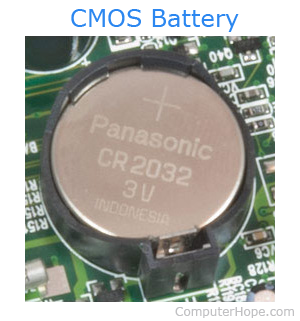
It may be related to the CMOS battery?


Please run powercfg_info > post a share link


My Computer

System One

  • OS
    Windows 10
    Computer type
    Laptop
    Manufacturer/Model
    HP
    CPU
    Intel(R) Core(TM) i7-4800MQ CPU @ 2.70GHz
    Motherboard
    Product : 190A Version : KBC Version 94.56
    Memory
    16 GB Total: Manufacturer : Samsung MemoryType : DDR3 FormFactor : SODIMM Capacity : 8GB Speed : 1600
    Graphics Card(s)
    NVIDIA Quadro K3100M; Intel(R) HD Graphics 4600
    Sound Card
    IDT High Definition Audio CODEC; PNP Device ID HDAUDIO\FUNC_01&VEN_111D&DEV_76E0
    Hard Drives
    Model Hitachi HTS727575A9E364
    Antivirus
    Microsoft Defender
    Other Info
    Mobile Workstation
I have 2 desktop PC's both with Gigabyte MB's and running W11.
Strange thing is that they both show battery icons and after starting my server after being away for a while I'm getting LOW battery warnings.
Is this coming via W11 or perhaps BIOS ... I see nothing in the later to suggest this feature.
If you can answer @Josey Wales question with a yes, install the software for UPS. That's how I solved it when I was getting a battery icon on my desktop.
 

My Computers

System One System Two

  • OS
    Windows 11 Pro 25H2
    Computer type
    PC/Desktop
    Manufacturer/Model
    PowerSpec B746
    CPU
    Intel Core i7-10700K
    Motherboard
    ASRock Z490 Phantom Gaming 4/ax
    Memory
    16GB (8GB PC4-19200 DDR4 SDRAM x2)
    Graphics Card(s)
    NVIDIA GeForce GTX 1050 TI
    Sound Card
    Realtek Audio
    Monitor(s) Displays
    #1. LG ULTRAWIDE 34" #2. AOC Q32G2WG3 32"
    Screen Resolution
    #1. 3440 X 1440 #2. 1920 x 1080
    Hard Drives
    NVMe WDC WDS100T2B0C-00PXH0 1TB
    Samsung SSD 860 EVO 1TB
    PSU
    750 Watts (62.5A)
    Case
    PowerSpec/Lian Li ATX 205
    Keyboard
    Logitech K270
    Mouse
    Logitech M185
    Browser
    Microsoft Edge and Firefox
    Antivirus
    Webroot SecureAnywhere CE 26.1
  • Operating System
    Windows 11 Canary Channel
    Computer type
    PC/Desktop
    Manufacturer/Model
    PowerSpec G156
    CPU
    Intel Core i5-8400 CPU @ 2.80GHz
    Motherboard
    AsusTeK Prime B360M-A
    Memory
    16 MB DDR 4-2666
    Monitor(s) Displays
    23" Speptre HDMI 75Hz
    Screen Resolution
    1920x1080
    Hard Drives
    Samsung 970 EVO 500GB NVMe
    Keyboard
    Logitek K270
    Mouse
    Logitek M185
    Browser
    Firefox, Edge and Edge Canary
    Antivirus
    Windows Defender
Do you have a UPS?
Yes, to both PC's. Both have new UPS batteries and pass self-test.
I have never seen a CMOS battery warning before, but will check.
Both MB's are about 12-18 months old.
The PC giving the low battery warning does have the UPS SW installed, I will check further.
Interestingly, the battery icon is now gone from my main PC where the UPS doesn't have the SW installed. Hmmm.
 
Last edited:

My Computers

System One System Two

  • OS
    Windows 11 25H2 OS Build 26200.8117
    Computer type
    PC/Desktop
    Manufacturer/Model
    Self Build
    CPU
    Intel Core Ultra 7-265K
    Motherboard
    Gigabyte Aorus Elite WiFi7 ICE Z890
    Memory
    32GB Corsair Vengeance DDR5 PC6400
    Graphics Card(s)
    Intel ARC B580
    Sound Card
    On board
    Monitor(s) Displays
    LG
    Hard Drives
    1+2GB NVME, 2GB SSD x 2
    PSU
    MSI 650W
    Case
    Fractal Design 7 Solid
    Cooling
    Air
    Keyboard
    Logitech MX key S
    Mouse
    Logitech MX keyS
    Internet Speed
    1GB
    Browser
    Edge and Chrome
    Other Info
    Also have two Dell LT's using W11 Pro and 25H2
  • Operating System
    Windows 11 24H2 OS Build 26100.2705
    Computer type
    PC/Desktop
    Manufacturer/Model
    self build
    CPU
    AMD Ryzen 5600G
    Motherboard
    Gigabyte Aorus B550
    Memory
    32 GB Corsair Vengeance
    Graphics card(s)
    Integrated
    Sound Card
    onboard
    Monitor(s) Displays
    TV/ Monitor
    Hard Drives
    Crucial 500GB NVME
    2x 12TB Seagate spinners.
    2 x 8TB WD spinner
    PSU
    650W
    Case
    Micro ATX box
    Cooling
    Air
    Internet Speed
    1GB
    Browser
    Edge and Chrome
    Antivirus
    Malwarebytes
    Other Info
    Its my Server / occasional user.
    The 12TB drives use Stablebit Drivepool :)
Yes, to both PC's. Both have new UPS batteries and pass self-test.
I have never seen a CMOS battery warning before, but will check.
Both MB's are about 12-18 months old.
The PC giving the low battery warning does have the UPS SW installed, I will check further.
Interestingly, the battery icon is now gone from my main PC where the UPS doesn't have the SW installed. Hmmm.
I have a CyberPower 1500 AMP UPS, I removed the connection to monitor the Data as it was just bloat. I can see on the front panel. It is powering 2 PC's and a Laptop & router. The software for it would not start with Windows and is really not needed.
 

My Computers

System One System Two

  • OS
    Windows11 Pro 26200.8524
    Computer type
    PC/Desktop
    Manufacturer/Model
    Dell Alienware Aurora R16
    CPU
    Intel Core i9 14900F (24 -Core, 68 MB Total Cache)
    Motherboard
    Dell Alienware
    Memory
    32GB DDR5
    Graphics Card(s)
    RTX 4080 Super w/581.95
    Sound Card
    Realtec
    Monitor(s) Displays
    Corsair XENEON 32QHD165
    Screen Resolution
    2560 X 1440
    Hard Drives
    1-2TB Samsung 990 Pro PCIe NVMe M2 SSD
    1-4TB Samsung 990 Pro PCIe NVMe M2 SSD
    PSU
    1000 Watt Platinum Dell
    Case
    Alienware
    Cooling
    Liquid Closed Loop
    Keyboard
    Logitech MK270 Wireless Keyboard
    Mouse
    Logitech MK270 Wireless
    Internet Speed
    100Gb's Down-20 Up
    Browser
    Firefox 151.0.2
    Antivirus
    Defender
    Other Info
    Very Quiet And Fast
    CyberPower UPS CP1500PFCLCD
  • Operating System
    PClinuxOS Mate (2025.7)
    Computer type
    PC/Desktop
    Manufacturer/Model
    Intel
    CPU
    13th Gen Inter(R) Core(TM) i3-1315U
    Motherboard
    Intel
    Memory
    64 GB DDR4 @3200 MHz.
    Graphics card(s)
    Internal
    Sound Card
    None
    Monitor(s) Displays
    Dell 2419HGCF
    Screen Resolution
    1920 X 1080
    Hard Drives
    SAMSUNG 980 PRO SSD 2TB, PCIe 4.0 M.2 2280
    PSU
    Chicony 30 Watt
    Case
    Small
    Keyboard
    Dell
    Mouse
    Razor
    Internet Speed
    1GB
    Browser
    Slimjet
I have a CyberPower 1500 AMP UPS, I removed the connection to monitor the Data as it was just bloat. I can see on the front panel. It is powering 2 PC's and a Laptop & router. The software for it would not start with Windows and is really not needed.
Yes, I hadn't noticed installation was not complete. It wanted powershell and other updates. I pulled the USB connection and no more battery prompts :-)
 

My Computers

System One System Two

  • OS
    Windows 11 25H2 OS Build 26200.8117
    Computer type
    PC/Desktop
    Manufacturer/Model
    Self Build
    CPU
    Intel Core Ultra 7-265K
    Motherboard
    Gigabyte Aorus Elite WiFi7 ICE Z890
    Memory
    32GB Corsair Vengeance DDR5 PC6400
    Graphics Card(s)
    Intel ARC B580
    Sound Card
    On board
    Monitor(s) Displays
    LG
    Hard Drives
    1+2GB NVME, 2GB SSD x 2
    PSU
    MSI 650W
    Case
    Fractal Design 7 Solid
    Cooling
    Air
    Keyboard
    Logitech MX key S
    Mouse
    Logitech MX keyS
    Internet Speed
    1GB
    Browser
    Edge and Chrome
    Other Info
    Also have two Dell LT's using W11 Pro and 25H2
  • Operating System
    Windows 11 24H2 OS Build 26100.2705
    Computer type
    PC/Desktop
    Manufacturer/Model
    self build
    CPU
    AMD Ryzen 5600G
    Motherboard
    Gigabyte Aorus B550
    Memory
    32 GB Corsair Vengeance
    Graphics card(s)
    Integrated
    Sound Card
    onboard
    Monitor(s) Displays
    TV/ Monitor
    Hard Drives
    Crucial 500GB NVME
    2x 12TB Seagate spinners.
    2 x 8TB WD spinner
    PSU
    650W
    Case
    Micro ATX box
    Cooling
    Air
    Internet Speed
    1GB
    Browser
    Edge and Chrome
    Antivirus
    Malwarebytes
    Other Info
    Its my Server / occasional user.
    The 12TB drives use Stablebit Drivepool :)

My Computer

System One

  • OS
    Windows 10
    Computer type
    Laptop
    Manufacturer/Model
    HP
    CPU
    Intel(R) Core(TM) i7-4800MQ CPU @ 2.70GHz
    Motherboard
    Product : 190A Version : KBC Version 94.56
    Memory
    16 GB Total: Manufacturer : Samsung MemoryType : DDR3 FormFactor : SODIMM Capacity : 8GB Speed : 1600
    Graphics Card(s)
    NVIDIA Quadro K3100M; Intel(R) HD Graphics 4600
    Sound Card
    IDT High Definition Audio CODEC; PNP Device ID HDAUDIO\FUNC_01&VEN_111D&DEV_76E0
    Hard Drives
    Model Hitachi HTS727575A9E364
    Antivirus
    Microsoft Defender
    Other Info
    Mobile Workstation

Latest Support Threads

Back
Top Bottom




