Desktop Secretary Will Not Minimise To System Tray


Chris Nicola

Well-known member
Member
Local time
6:38 PM
Posts
26
OS
Windows 10 Pro
Deaktop Secretary is an old programe by Spotmau that I like due to its simplicity. I installed it on Win 11 Pro a couple of months ago and it worked just fine. Using Task scheduler I made it run on startup and when it is minimised it went to the system tray. Note the arguement /background.

Desktop Secretary.webp

Everything worked perfectly until recently. It may have been broken by a Windows update. Now I can't find it in the system tray. If I launch it from the programe menu it works fine. But when I press the minimise button the window disappears. I can't see it in the system tray. I can find it running in Task manager, but the only way i can launch the window is from the programe list.

Is there any way I can get it to run in the system tray like before?

Kind regards
Chris
 

My Computer My Computer

At a glance

Windows 10 ProIntel i716 Gbt
OS
Windows 10 Pro
Computer type
PC/Desktop
Manufacturer/Model
Custom
CPU
Intel i7
Motherboard
Asus H31 Gamer
Memory
16 Gbt
Other than trying uninstall and re-install I have nothing else to advise. I would use Revo Uninstaller free to uninstall it, making sure to scan for and delete all leftover items Revo finds. Then restart and reinstall it. That old app dates 2008 so who knows how later versions of 11 are dealing with it.
 

My Computers My Computers

  • At a glance

    Windows 11 Pro 25H2 26200.9445i9-10900 10 core 20 threads32 gbnone-Intel UHD Graphics 630
    OS
    Windows 11 Pro 25H2 26200.9445
    Computer type
    PC/Desktop
    Manufacturer/Model
    Dell Optiplex 7080
    CPU
    i9-10900 10 core 20 threads
    Motherboard
    DELL 0J37VM
    Memory
    32 gb
    Graphics Card(s)
    none-Intel UHD Graphics 630
    Sound Card
    Integrated Realtek
    Monitor(s) Displays
    Benq 27
    Screen Resolution
    2560x1440
    Hard Drives
    2x1tb Solidigm m.2 nvme /External drives 512gb Samsung m.2 sata+2tb Kingston m2.nvme
    PSU
    500w
    Case
    MT
    Cooling
    Dell Premium
    Keyboard
    Logitech wired
    Mouse
    Logitech wireless
    Internet Speed
    so slow I'm too embarrassed to tell
    Browser
    #1 Edge #2 Firefox
    Antivirus
    Defender+MWB Premium
  • At a glance

    Windows 11 Pro 24H2 26200.9445AMD Ryzen 7 6800U32 gbintegrated
    Operating System
    Windows 11 Pro 24H2 26200.9445
    Computer type
    PC/Desktop
    Manufacturer/Model
    Beelink Mini PC SER5
    CPU
    AMD Ryzen 7 6800U
    Memory
    32 gb
    Graphics card(s)
    integrated
    Sound Card
    integrated
    Monitor(s) Displays
    Benq 27
    Screen Resolution
    2560x1440
    Hard Drives
    1TB Crucial nvme
    Keyboard
    Logitech wired
    Mouse
    Logitech wireless
    Internet Speed
    still too embarrassed to tell
    Browser
    Firefox
    Antivirus
    Defender
  • System 3 is non compliant Dell 9020 i7-4770/24gb ram Win11 PRO 26200.9445
Setting > personalize > other system tray icons

You can turn on or off what icons are listed in the taskbar

Maybe it is listed in there but is set to off.
 

My Computer My Computer

At a glance

Windows 11 Pro
OS
Windows 11 Pro
Thank you both for your replies.

glasskutter. I have already uninstaled and reinstaled but without using Revo Uninstaller. No change.

KevTech. Good suggestion. When I start the PC, using Task manager, I can see Desktop Secretary runing in the background. But its not in the system tray or anywhere else. I have to manually launch it. Desktop Swecretary is listed under taskbar system tray icons. It's always off when I start the PC. If I toggle it to on, off and on again again nothing happens. However, if I manually launch the app and then do the toggling it will appear in the system tray. But at the next startup it will be gone and I will have to go through the proocedure again.

I have a hunch that its not running as administrator anymore and that is causing the problem.

Kind regards
Chris
 

My Computer My Computer

At a glance

Windows 10 ProIntel i716 Gbt
OS
Windows 10 Pro
Computer type
PC/Desktop
Manufacturer/Model
Custom
CPU
Intel i7
Motherboard
Asus H31 Gamer
Memory
16 Gbt

My Computers My Computers

  • At a glance

    Windows 11 Enterprise 25H2 26200 7462Intel XEON E5-2699 v364GB Teamgroup UD4-3600NVIDIA GeForce GTX 1080 Ti
    OS
    Windows 11 Enterprise 25H2 26200 7462
    Computer type
    PC/Desktop
    Manufacturer/Model
    Custom Build
    CPU
    Intel XEON E5-2699 v3
    Motherboard
    ASUS X99-A
    Memory
    64GB Teamgroup UD4-3600
    Graphics Card(s)
    NVIDIA GeForce GTX 1080 Ti
    Sound Card
    Integrated
    Monitor(s) Displays
    ACER X34 Predator
    Screen Resolution
    3440 x 1440
    Hard Drives
    Crucial CT1000P 3P SSD8 1TB
    Crucial CT1000 BX500 SSD 1TB
    PSU
    GameMax Pro
    Case
    Fractal Design
    Cooling
    Corsair H110iGT + 6 140mm Fans
    Keyboard
    Corsair K4
    Mouse
    G-Skill G502
    Internet Speed
    300MBs
    Browser
    Chrome
    Antivirus
    OEM
    Other Info
    ASUS RT-AC87U Router
  • At a glance

    25H2 26200.50748GB
    Operating System
    25H2 26200.5074
    Computer type
    Laptop
    Manufacturer/Model
    ASUS X555LA
    Memory
    8GB
    Browser
    Chrome
    Antivirus
    OEM
Rollback_Jockey, thank you for the suggestion. As far as I am aware, I am using the latest version. I don't think there have been any updates since 2008.

I have a gut feeling the problem is not launching as administrator, although I have configured it to do that. In the past I used to get a UAC prompt on startup if I wanted to run this programe. Now I don't see that prompt anymore. I will keep trying.

Kind regards
Chris
 

My Computer My Computer

At a glance

Windows 10 ProIntel i716 Gbt
OS
Windows 10 Pro
Computer type
PC/Desktop
Manufacturer/Model
Custom
CPU
Intel i7
Motherboard
Asus H31 Gamer
Memory
16 Gbt
Thank you all for your help. I finally got it to work again as before. I did many things. I think the main problem was that Desktop Secretary was not launching properly on startup. I went to Task scheduler and checked all the settings by changing them and afterwards moving back to the original settings and clicking OK.

Kind regards
Chris
 

My Computer My Computer

At a glance

Windows 10 ProIntel i716 Gbt
OS
Windows 10 Pro
Computer type
PC/Desktop
Manufacturer/Model
Custom
CPU
Intel i7
Motherboard
Asus H31 Gamer
Memory
16 Gbt
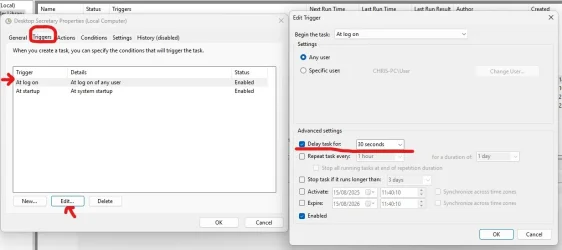
Update: Unfortunately the same problem ocurred again. After some time "Desktop Secretary" was running in the background but was missing from the system tray. After receiving some advice from a Microsoft Forum, the solution was quite simple. In Task scheduler I had to delay for 30 or 60 seconds. Now it loads properly every time without any problems. This may be helpful to anyone else experiencing similar issues with "Task Scheduler".

Kind regards
Chris
 

Attachments

  • Delay Task.webp
    Delay Task.webp
    39.7 KB · Views: 2

My Computer My Computer

At a glance

Windows 10 ProIntel i716 Gbt
OS
Windows 10 Pro
Computer type
PC/Desktop
Manufacturer/Model
Custom
CPU
Intel i7
Motherboard
Asus H31 Gamer
Memory
16 Gbt
Update: Unfortunately the same problem ocurred again. After some time "Desktop Secretary" was running in the background but was missing from the system tray. After receiving some advice from a Microsoft Forum, the solution was quite simple. In Task scheduler I had to delay for 30 or 60 seconds. Now it loads properly every time without any problems. This may be helpful to anyone else experiencing similar issues with "Task Scheduler".

Kind regards
Chris

Hi, Chris.

When creating a custom Schedule, especially one that is scheduled to run at Startup — It’s always best to add a delay (in my opinion, of course). Otherwise it’s just adding one more thing to the Startup load, which is already quite a lot.

Good job finding an answer (y)
 

My Computers My Computers

  • At a glance

    Windows 11 Pro 25H2 Build 26200.9168Intel(R) Core(TM) i7-4770K CPU @ 3.50GHz32.0 GB of I forget and the box is in storage.Gigabyte nVidia GeForce GTX 1660 Super OC 6GB
    OS
    Windows 11 Pro 25H2 Build 26200.9168
    Computer type
    PC/Desktop
    Manufacturer/Model
    Sin-built 2013
    CPU
    Intel(R) Core(TM) i7-4770K CPU @ 3.50GHz
    Motherboard
    ASUS ROG Maximus VI Formula
    Memory
    32.0 GB of I forget and the box is in storage.
    Graphics Card(s)
    Gigabyte nVidia GeForce GTX 1660 Super OC 6GB
    Sound Card
    ROG SupremeFX Formula 8-Channel High Definition Audio
    Monitor(s) Displays
    5 x LG 25MS500-B - 1 x 24MK430H-B - 1 x Wacom Pro 22" Touch Screen Tablet
    Screen Resolution
    All over the place
    Hard Drives
    Too many to list. OS on Samsung 1TB 870 QVO SATA
    PSU
    Silverstone 1500
    Case
    NZXT Phantom 820 Full-Tower Case
    Cooling
    Noctua NH-D15 Elite Class Dual Tower CPU Cooler / 6 x EziDIY 120mm / 2 x Corsair 140mm somethings / 1 x 140mm Thermaltake something / 2 x 200mm Corsair.
    Keyboard
    Corsair K95 / Logitech diNovo Edge Wireless
    Mouse
    Logitech: G402 / G502 / Mx Masters / Mx Air Cordless
    Internet Speed
    2000/500Mbps
    Browser
    All sorts
    Antivirus
    Kaspersky Premium
    Other Info
    ㅤㅤㅤㅤㅤㅤㅤㅤㅤㅤㅤㅤㅤㅤㅤㅤㅤㅤㅤㅤㅤㅤㅤㅤㅤㅤㅤㅤㅤㅤㅤㅤㅤㅤㅤㅤㅤㅤㅤㅤ⠀⠀⠀⠀⠀⠀⠀⠀⠀⠀
    TP-Link BE9300 WiFi 7 Bluetooth 5.4 (Archer TBE550E)
    TP-Link TX201 V1 2.5GB Lan

    Grandstream HT812 - VoIP
    ASUS DSL-AX82U - Mesh
    ASUS RT-AC68U - Mesh
    ASUS RT-BE88U Router

    Brother MFC-L2880DW Printer

    I’m on a horse.
  • At a glance

    Windows 11 Pro 25H2 Build 26200.9168 (Wifes)13th Generation Intel® Core™ i5-1340P Process...16GB LPDDR5-52001x Intel® Iris® Xe Graphics
    Operating System
    Windows 11 Pro 25H2 Build 26200.9168 (Wifes)
    Computer type
    Laptop
    Manufacturer/Model
    LENOVO Yoga 7 14IRL8 - Type 82YL
    CPU
    13th Generation Intel® Core™ i5-1340P Processor(Core™ i5-1340P)
    Memory
    16GB LPDDR5-5200
    Graphics card(s)
    1x Intel® Iris® Xe Graphics
    Sound Card
    Optimized with Dolby Atmos®
    Screen Resolution
    QHD 2880 x 1800 OLED
    Hard Drives
    M.2 512 GB SSD PCIe
    Mouse
    Logiteck MX Master 3S
    Internet Speed
    2000/500
    Antivirus
    Defender / Malwarebytes
    Other Info
    …still on a horse.


    Wireless Network: Wi-Fi 6E 2x2 AX; Bluetooth® 5.1 or above
    Ports: 1x 1 Novo button; 2 in 1 Audio Combo jack; Micro SD Card Reader; HDMI 1.4b; 2 x USB Type-C (TBT4)
    USB 3.2 Gen 2 DP 1.4a
    PD 3.0); 1 x USB 3.2 Gen1 Type A
    Camera
    1x 1080P FHD IR/RGB Hybrid with Privacy Shutter and Dual Array Microphone
    Graphics
    1x Intel® Iris® Xe Graphics
    Monitor
    14" WUXGA
    Form Factor
    Convertible Notebook
  • Windows 11 Pro 25H2 Build 26200.9168 (Wifes)

    Yoga 7 2-in-1 14IML9 - Type 83DJ

    Processor: Intel® Core™ Ultra 7 155H Processor(Core™ Ultra 7 155H)

    Memory: 32GB LPD5X-7467

    Hard Drive: 1 TB SSD PCIe

    Wireless Network: 1x Wi-Fi 6E 2x2 AX; Bluetooth® 5.1 or above

    Ports: 1 x HDMI 2.1 TMDS; 1 x Novo Button; 1 x Combo Audio Jack
    2 x USB-C (USB 4.0)
    1 x USB-A 3.2 Gen 1

    Camera: 1080P FHD IR Hybrid with Dual Microphone

    Graphics: Intel® Arc™ Graphics

    Monitor: 14" 2.8K

    ...Where's my horse?
Back
Top Bottom