- Local time
- 7:31 PM
- Posts
- 26
- OS
- Windows 10 Pro
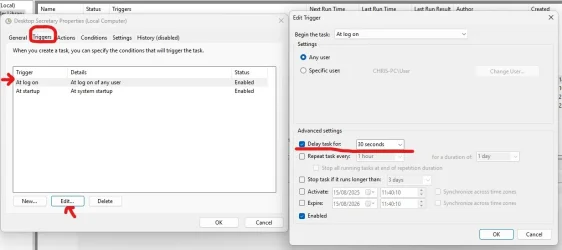
Deaktop Secretary is an old programe by Spotmau that I like due to its simplicity. I installed it on Win 11 Pro a couple of months ago and it worked just fine. Using Task scheduler I made it run on startup and when it is minimised it went to the system tray. Note the arguement /background.
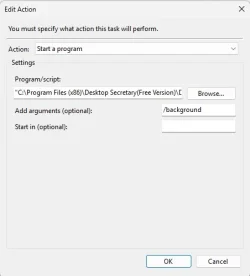
Everything worked perfectly until recently. It may have been broken by a Windows update. Now I can't find it in the system tray. If I launch it from the programe menu it works fine. But when I press the minimise button the window disappears. I can't see it in the system tray. I can find it running in Task manager, but the only way i can launch the window is from the programe list.
Is there any way I can get it to run in the system tray like before?
Kind regards
Chris
Everything worked perfectly until recently. It may have been broken by a Windows update. Now I can't find it in the system tray. If I launch it from the programe menu it works fine. But when I press the minimise button the window disappears. I can't see it in the system tray. I can find it running in Task manager, but the only way i can launch the window is from the programe list.
Is there any way I can get it to run in the system tray like before?
Kind regards
Chris
My Computer
At a glance
Windows 10 ProIntel i716 Gbt
- OS
- Windows 10 Pro
- Computer type
- PC/Desktop
- Manufacturer/Model
- Custom
- CPU
- Intel i7
- Motherboard
- Asus H31 Gamer
- Memory
- 16 Gbt