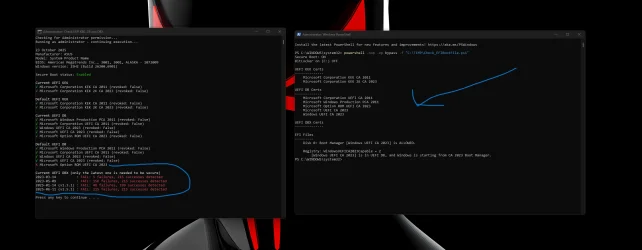
Did you manually update your Secure Boot Keys ?


My Computers

System One System Two

  • OS
    Win 11 Pro 25H2 26200.8524
    Computer type
    PC/Desktop
    Manufacturer/Model
    Self Built
    CPU
    Intel® Core™ i7-14700K
    Motherboard
    ASUS TUF Z690-PLUS WIFI BIOS 4505 11/29/25
    Memory
    G.SKILL Ripjaws S5 Series 64GB (2 x 32GB) DDR5
    Graphics Card(s)
    ASUS GeForce RTX 4070 Super 12GB
    Sound Card
    Sound Blaster AE-5 Plus
    Monitor(s) Displays
    ASUS TUF Gaming 27" 2K HDR Gaming
    Screen Resolution
    2560 x 1440
    Hard Drives
    Samsung 990 Pro 1TB NVMe (Win 11 25H2)
    SK hynix P41 500GB NVMe 25H2 DEV/Games
    SK hynix P41 2TB NVMe (x3)
    Crucial P3 Plus 4TB
    PSU
    Corsair RM850x Shift
    Case
    Antec Dark Phantom DP502 FLUX
    Cooling
    Corsair Nautilus 360 RS AIO
    Keyboard
    Logitech MK 320
    Mouse
    Razer Basilisk V3
    Internet Speed
    350Mbs
    Browser
    Firefox
    Antivirus
    Winows Security
    Other Info
    MR 8.1 Home

    System 3 Specs
    Win 11 Pro 25H2 26200.8524
    ASUS PRIME Z370-P II BIOS 3004 7/12/21
    Intel Core i7-8700 CPU @ 3.20GHz
    32GB DDR4 RAM (4x8)
    iGPU Intel UHD Graphics 630
  • Operating System
    Win 11 Pro 25H2 26200.8524
    Computer type
    PC/Desktop
    Manufacturer/Model
    Self Built
    CPU
    Intel Core i7-11700F
    Motherboard
    Asus TUF Gaming Z590 Plus WiFi (BIOS 2803)
    Memory
    64 GB DDR4
    Graphics card(s)
    MSI GeForce RTX 3060 Ventus 2X 12GB
    Sound Card
    SoundBlaster Audigy Fx V2
    Monitor(s) Displays
    Samsung F27T350
    Screen Resolution
    1920x1080
    Hard Drives
    Samsung 980 Pro 1TB
    Samsung 970 EVO Plus 2TB
    Samsung 870 EVO 500GB SSD
    PSU
    Corsair HX750
    Case
    Cougar MX330-G Window
    Cooling
    Thermalright Frozen Edge 240 Black AIO
    Internet Speed
    350Mbps
    Browser
    Firefox
    Antivirus
    Windows Security
This may be something to investigate with the experts since it may be a hard compatibility problem imposed by the processor, or just something that popped up coincidentally in the log at the same time. It might pop up if you have virtualization disabled in the BIOS CPU settings or aren't using Kernel Mode Hardware Stack protection for instance. I've updated keys in this state on my AMD system but it might be different with Intel and/or HP.

Probably start your own thread asking this question but you'll have to provide both system details and report log details.

Still, look especially for the events listed in the Microsoft Document I linked.

If the Microsoft tasks can't do the updates you could try using MOSBY to update keys. But you'd have to be able to put Secure Boot into "setup mode" in BIOS settings, or delete all the keys. That also means being able to restore default keys if things don't work right. If your BIOS doesn't give you these controls you're probably at the mercy of HP since HP and Dell's business computers typically have very few user-accessible BIOS controls that are useful.
MOSBY worked. Had to clear keys and play with secure boot settings.. Many thanks
 

My Computer

System One

  • OS
    Windows 11
    Computer type
    PC/Desktop
    Manufacturer/Model
    Asus
MOSBY worked. Had to clear keys and play with secure boot settings.. Many thanks
That's great to know, and MOSBY also has a couple of security benefits beyond simply updating with the 2023 keys. I used it on my desktop computers and then followed it with the Microsoft task so it could install the 2023 CA signed boot files.
 

My Computers

System One System Two

  • OS
    Windows 11 Pro
    Computer type
    PC/Desktop
    Manufacturer/Model
    DIY
    CPU
    Ryzen 7 5800X
    Motherboard
    Gigabyte B550M Aorus Pro
    Memory
    GSkill 3200, 2x8GB
    Graphics Card(s)
    MSI RX 6800 XT Gaming Z
    Sound Card
    on-board Realtek
    Monitor(s) Displays
    MSI 180hz
    Screen Resolution
    1440p
    Hard Drives
    Samsung 980 Pro, Samsung 870 Evo, generic PCIe NVME, WD 1TB 2.5" laptop spinner
    PSU
    Corsair RM 650
    Case
    mATX
    Cooling
    BeQuiet 240mm AIO and a bunch of case fans
    Keyboard
    one that clacks softly
    Mouse
    logitech
    Internet Speed
    bunches of bps
    Browser
    Firefox
    Antivirus
    Windows' own
  • Operating System
    Win11 Pro
    Computer type
    PC/Desktop
    Manufacturer/Model
    DIY
    CPU
    Ryzen 7 1700
    Motherboard
    GA-AB350M G-3
    Memory
    16GB DDR4
    Graphics card(s)
    RX-480
    Sound Card
    In-Built Realtek
    Monitor(s) Displays
    Samsung
    Screen Resolution
    1440p
    Hard Drives
    NVME/SSD's
    PSU
    Thermaltake BX1 550W
    Case
    Some junky thing
    Cooling
    ThermalTake Assassin(?)
    Browser
    FF/Edge
    Antivirus
    Whatever Windows does
    Other Info
    Secure Boot enabled updated to 2023 CA keys, TPM2.0 enabled with system drive Bitlocker'd.
Excellent thread , lots of useful information thanks to everyone , Guys I have a question if anyone can help me in the screenshot below what am i missing it's showing lots of red failures in the current UEFI DBX section also missing a ROM, any ideas ?? thanks!!!
 

Attachments

  • 1.webp
    1.webp
    118.1 KB · Views: 6

My Computer

System One

  • OS
    Windows 11 25H2
    Computer type
    PC/Desktop
    Manufacturer/Model
    ASUS DIY
Excellent thread , lots of useful information thanks to everyone , Guys I have a question if anyone can help me in the screenshot below what am i missing it's showing lots of red failures in the current UEFI DBX section also missing a ROM, any ideas ?? thanks!!!
Where do you get the "Check UEFI....." script that reports all the KEK, DB and DBX entries?
 

My Computers

System One System Two

  • OS
    Windows 11 Pro
    Computer type
    PC/Desktop
    Manufacturer/Model
    DIY
    CPU
    Ryzen 7 5800X
    Motherboard
    Gigabyte B550M Aorus Pro
    Memory
    GSkill 3200, 2x8GB
    Graphics Card(s)
    MSI RX 6800 XT Gaming Z
    Sound Card
    on-board Realtek
    Monitor(s) Displays
    MSI 180hz
    Screen Resolution
    1440p
    Hard Drives
    Samsung 980 Pro, Samsung 870 Evo, generic PCIe NVME, WD 1TB 2.5" laptop spinner
    PSU
    Corsair RM 650
    Case
    mATX
    Cooling
    BeQuiet 240mm AIO and a bunch of case fans
    Keyboard
    one that clacks softly
    Mouse
    logitech
    Internet Speed
    bunches of bps
    Browser
    Firefox
    Antivirus
    Windows' own
  • Operating System
    Win11 Pro
    Computer type
    PC/Desktop
    Manufacturer/Model
    DIY
    CPU
    Ryzen 7 1700
    Motherboard
    GA-AB350M G-3
    Memory
    16GB DDR4
    Graphics card(s)
    RX-480
    Sound Card
    In-Built Realtek
    Monitor(s) Displays
    Samsung
    Screen Resolution
    1440p
    Hard Drives
    NVME/SSD's
    PSU
    Thermaltake BX1 550W
    Case
    Some junky thing
    Cooling
    ThermalTake Assassin(?)
    Browser
    FF/Edge
    Antivirus
    Whatever Windows does
    Other Info
    Secure Boot enabled updated to 2023 CA keys, TPM2.0 enabled with system drive Bitlocker'd.
Excellent thread , lots of useful information thanks to everyone , Guys I have a question if anyone can help me in the screenshot below what am i missing it's showing lots of red failures in the current UEFI DBX section also missing a ROM, any ideas ?? thanks!!!
OK... so this is what I think it is telling us.

The current UEFI KEK and DB have the necessary keys, so all's good there. The Default UEFI KEK also has all the keys as BIOS defaults so it would work even after a CMOS reset; it also appears to me you have a fairly up-to-date BIOS rev.

The red X beside the OPtion ROM entry is in the DEFAULT UEFI DB section, which is probably the default keys pre-loaded in your BIOS. That means if you reset CMOS you would be missing the 2023 OpROM key so Windows would have to push it back into the DB for you. The rest of the keys are there though, especially the 2023 CA key, so it would still boot to Windows in Secure Boot.

All the red in the Current UEFI DBX I think relate to the SVN (Secure Version Number) schema that is intended to detect and prevent booting if the boot loader files have been rolled back to an earlier date to bypass Microsoft's revoking of them, usually for security reasons. How it works is a mystery. It also appears you haven't revoked the 2011 CA key; I'm also waiting for Microsoft to do it out of an abundance of caution.

Thanks for pointing me to the DL's, this thread is pretty long now and hard to find things in. This report is very useful in that it tells us what the BIOS defaults are, which lets us know if it's up to date or if we'll have problems after a CMOS reset or similar.
 
Last edited:

My Computers

System One System Two

  • OS
    Windows 11 Pro
    Computer type
    PC/Desktop
    Manufacturer/Model
    DIY
    CPU
    Ryzen 7 5800X
    Motherboard
    Gigabyte B550M Aorus Pro
    Memory
    GSkill 3200, 2x8GB
    Graphics Card(s)
    MSI RX 6800 XT Gaming Z
    Sound Card
    on-board Realtek
    Monitor(s) Displays
    MSI 180hz
    Screen Resolution
    1440p
    Hard Drives
    Samsung 980 Pro, Samsung 870 Evo, generic PCIe NVME, WD 1TB 2.5" laptop spinner
    PSU
    Corsair RM 650
    Case
    mATX
    Cooling
    BeQuiet 240mm AIO and a bunch of case fans
    Keyboard
    one that clacks softly
    Mouse
    logitech
    Internet Speed
    bunches of bps
    Browser
    Firefox
    Antivirus
    Windows' own
  • Operating System
    Win11 Pro
    Computer type
    PC/Desktop
    Manufacturer/Model
    DIY
    CPU
    Ryzen 7 1700
    Motherboard
    GA-AB350M G-3
    Memory
    16GB DDR4
    Graphics card(s)
    RX-480
    Sound Card
    In-Built Realtek
    Monitor(s) Displays
    Samsung
    Screen Resolution
    1440p
    Hard Drives
    NVME/SSD's
    PSU
    Thermaltake BX1 550W
    Case
    Some junky thing
    Cooling
    ThermalTake Assassin(?)
    Browser
    FF/Edge
    Antivirus
    Whatever Windows does
    Other Info
    Secure Boot enabled updated to 2023 CA keys, TPM2.0 enabled with system drive Bitlocker'd.
I have been poking around the EFI partition and discovered that memtest.efi and securebootrecovery.efi are still signed with the 2011 certificate. Since I have already revoked that certificate, I can no longer run memtest from Windows, and I will need to depend on backed-up Secure Boot keys if Secure Boot becomes corrupted. I just thought I would pass this along. This is what happens when one is an early adopter!
 

My Computer

System One

  • OS
    Windows 11 Pro
    Computer type
    PC/Desktop
    Manufacturer/Model
    iBUYPOWER
    CPU
    Intel i9-13900KF
    Motherboard
    ASUS ROG Maximus Z790 Hero
    Memory
    32 GB Corsair Vengeance DDR5-6000 MHz
    Graphics Card(s)
    ASUS Dual GeForce RTX 4070
    Sound Card
    none
    Monitor(s) Displays
    Dell U2412M
    Screen Resolution
    1920 x 1200
    Hard Drives
    WD Black SN850X NVMe SSD - 1 TB
    PSU
    Thermaltake Toughpower GF3 1000W
    Case
    Fractal Design Meshify 2 RGB
    Cooling
    Corsair H150i RGB Elite
    Keyboard
    Deck Hassium Pro
    Mouse
    Logitech MX Master 4
    Internet Speed
    1500 Mbps download, 40 Mbps upload
    Browser
    Firefox
    Antivirus
    Bitdefender Internet Security
if Secure Boot becomes corrupted. I

OK... so this is what I think it is telling us.

The current UEFI KEK and DB have the necessary keys, so all's good there. The Default UEFI KEK also has all the keys as BIOS defaults so it would work even after a CMOS reset; it also appears to me you have a fairly up-to-date BIOS rev.

The red X beside the OPtion ROM entry is in the DEFAULT UEFI DB section, which is probably the default keys pre-loaded in your BIOS. That means if you reset CMOS you would be missing the 2023 OpROM key so Windows would have to push it back into the DB for you. The rest of the keys are there though, especially the 2023 CA key, so it would still boot to Windows in Secure Boot.

All the red in the Current UEFI DBX I think relate to the SVN (Secure Version Number) schema that is intended to detect and prevent booting if the boot loader files have been rolled back to an earlier date to bypass Microsoft's revoking of them, usually for security reasons. How it works is a mystery. It also appears you haven't revoked the 2011 CA key. I'm also waiting for Microsoft to do it, just out of an abundance of caution.

Thanks for pointing me to the DL's, this thread is pretty long now and hard to find things in.

Thanks for the response In the same Github script I just directed you to it says this...

Re-applying the Secure Boot DBX updates​

If the Secure Boot variables were accidentally reset to default in the UEFI/BIOS settings for example, it is possible to make Windows re-apply the DBX updates that Windows had previously applied. Double-click Apply DBX update (restart required).reg and add the changes to the registry then restart Windows and wait for awhile. The DBX updates should be applied after that.


I did cleared cmos on my bios recently for overclocking non-sense so it is possible to make it re-apply again the dbx updates but i don't understand exactly how to go about it with the script and also he mentions "add the changes to the registry then restart" like what code ??

I haven't done any manual key updates or poking in the bios , nor the revoking 2011 & no SVN either since im not sure what that one does. out of fear of being locked out i guess i've got shows to watch tonight I rather not be in windows recovery mode lol.
But i do would like the fix those failures in the Current UEFI DBX if possible.
 

My Computer

System One

  • OS
    Windows 11 25H2
    Computer type
    PC/Desktop
    Manufacturer/Model
    ASUS DIY
I have been poking around the EFI partition and discovered that memtest.efi and securebootrecovery.efi are still signed with the 2011 certificate. Since I have already revoked that certificate, I can no longer run memtest from Windows, and I will need to depend on backed-up Secure Boot keys if Secure Boot becomes corrupted. I just thought I would pass this along. This is what happens when one is an early adopter!
You can update the boot files on the MEMEST boot USB drive with a simple script.
 

My Computers

System One System Two

  • OS
    Win 11 Pro 25H2, Build 26200.8524
    Computer type
    PC/Desktop
    Manufacturer/Model
    Home Brew
    CPU
    Intel Core i5 14500
    Motherboard
    Gigabyte B760M G P WIFI
    Memory
    64GB DDR4
    Graphics Card(s)
    GeForce RTX 4060
    Sound Card
    Chipset Realtek
    Monitor(s) Displays
    LG 45" Ultragear, Acer 24" 1080p
    Screen Resolution
    5120x1440, 1920x1080
    Hard Drives
    Crucial P310 2TB 2280 PCIe Gen4 3D NAND NVMe M.2 SSD (O/S)
    Silicon Power 2TB US75 NVMe PCIe Gen4 M.2 2280 SSD (backup)
    Crucial BX500 2TB 3D NAND (2nd backup)
    Seagate 4TB Ironwolf, rotating HDD archive files
    External off-line backup Drives: 2 NVMe 4TB drives in external enclosures
    PSU
    Thermaltake Toughpower GF3 750W
    Case
    LIAN LI LANCOOL 216 E-ATX PC Case
    Cooling
    Lots of fans!
    Keyboard
    Microsoft Comfort Curve 2000
    Mouse
    Logitech G305
    Internet Speed
    Verizon FiOS 1GB
    Browser
    Firefox
    Antivirus
    Malware Bytes & Windows Defender Security
  • Operating System
    Win 11 Pro 25H2, Build 26200.8524
    Computer type
    PC/Desktop
    Manufacturer/Model
    Home Brew
    CPU
    Intel Core i5 14400
    Motherboard
    Gigabyte B760M DS3H AX
    Memory
    32GB DDR5
    Graphics card(s)
    Intel 700 Embedded GPU
    Sound Card
    Realtek Embedded
    Monitor(s) Displays
    27" HP 1080p
    Screen Resolution
    1920x1080
    Hard Drives
    Crucial P310 2TB 2280 PCIe Gen4 eD NAND PCIe SSD
    Samsung EVO 990 2TB NVMe Gen4 SSD
    Samsung 2TB SATA SSD
    PSU
    Thermaltake Smart BM3 650W
    Case
    Okinos Micro ATX Case
    Cooling
    Fans
    Keyboard
    Microsoft Comfort Curve 2000
    Mouse
    Logitech G305
    Internet Speed
    Verizon FiOS 1GB
    Browser
    Firefox
    Antivirus
    Malware Bytes & Windows Defender Security
I can no longer run memtest from Windows

Windows memory testing almost always reports pass (false negatives) when memtest86+ finds errors.
 

My Computer

System One

  • OS
    Windows 10
    Computer type
    Laptop
    Manufacturer/Model
    HP
    CPU
    Intel(R) Core(TM) i7-4800MQ CPU @ 2.70GHz
    Motherboard
    Product : 190A Version : KBC Version 94.56
    Memory
    16 GB Total: Manufacturer : Samsung MemoryType : DDR3 FormFactor : SODIMM Capacity : 8GB Speed : 1600
    Graphics Card(s)
    NVIDIA Quadro K3100M; Intel(R) HD Graphics 4600
    Sound Card
    IDT High Definition Audio CODEC; PNP Device ID HDAUDIO\FUNC_01&VEN_111D&DEV_76E0
    Hard Drives
    Model Hitachi HTS727575A9E364
    Antivirus
    Microsoft Defender
    Other Info
    Mobile Workstation
.....

I haven't done any manual key updates or poking in the bios , nor the revoking 2011 & no SVN either since im not sure what that one does. out of fear of being locked out i guess i've got shows to watch tonight I rather not be in windows recovery mode lol.
But i do would like the fix those failures in the Current UEFI DBX if possible.
I'm not going to fuss over DBX red failures. Reason being it's very easy to make your system unbootable (with Secure Boot enabled) AND anything done there has to be in kept in consonance with the boot files in EFI partition. My systems have a full complement of keys in KEK and DB and boot perfectly using 2023 signed boot files, so I'm letting Microsoft manage it here on out. Which they will. They have a schedule that says they'll not start revoking the 2011 certificates until Jan of '26 so I'm going to just let them do it on their schedule.

And the SVN stuff has to be coordinated with changes to boot files, which only come through Microsoft updates. They'll push out updates to SVN that coincide with changes to boot files and keeps it both boot-able and secure. Or at least as secure as that scheme can be.

There's also something called SBAT also in DBX, it's similar to SVN but for LINUX OS's.
 
Last edited:

My Computers

System One System Two

  • OS
    Windows 11 Pro
    Computer type
    PC/Desktop
    Manufacturer/Model
    DIY
    CPU
    Ryzen 7 5800X
    Motherboard
    Gigabyte B550M Aorus Pro
    Memory
    GSkill 3200, 2x8GB
    Graphics Card(s)
    MSI RX 6800 XT Gaming Z
    Sound Card
    on-board Realtek
    Monitor(s) Displays
    MSI 180hz
    Screen Resolution
    1440p
    Hard Drives
    Samsung 980 Pro, Samsung 870 Evo, generic PCIe NVME, WD 1TB 2.5" laptop spinner
    PSU
    Corsair RM 650
    Case
    mATX
    Cooling
    BeQuiet 240mm AIO and a bunch of case fans
    Keyboard
    one that clacks softly
    Mouse
    logitech
    Internet Speed
    bunches of bps
    Browser
    Firefox
    Antivirus
    Windows' own
  • Operating System
    Win11 Pro
    Computer type
    PC/Desktop
    Manufacturer/Model
    DIY
    CPU
    Ryzen 7 1700
    Motherboard
    GA-AB350M G-3
    Memory
    16GB DDR4
    Graphics card(s)
    RX-480
    Sound Card
    In-Built Realtek
    Monitor(s) Displays
    Samsung
    Screen Resolution
    1440p
    Hard Drives
    NVME/SSD's
    PSU
    Thermaltake BX1 550W
    Case
    Some junky thing
    Cooling
    ThermalTake Assassin(?)
    Browser
    FF/Edge
    Antivirus
    Whatever Windows does
    Other Info
    Secure Boot enabled updated to 2023 CA keys, TPM2.0 enabled with system drive Bitlocker'd.
Run these two commands and see if you get Event ID 1808 under System. Worked for me.

Admin CMD Pormpt
reg add HKEY_LOCAL_MACHINE\SYSTEM\CurrentControlSet\Control\Secureboot /v AvailableUpdates /t REG_DWORD /d 0x5944 /f

Admin Powershell
Start-ScheduledTask -TaskName "\Microsoft\Windows\PI\Secure-Boot-Update"

Then reboot.

Source


View attachment 150145
ah, thanks! honestly not sure why it kept doing that... but yeah gone noww!

off that topic, i noticed that whenever the errors would happen like 3 seconds later id get this so i dont think it was any big issue tbf
1761267495124.webp
 

My Computer

System One

  • OS
    Microsoft Windows 11 Home
    Computer type
    Laptop
    Manufacturer/Model
    MSI Raiders GE68HX 13VF
    CPU
    13th Gen Intel(R) Core(TM) i9-13950HX 2.20 GHz
    Motherboard
    MS-15M2 REV:1.0
    Memory
    Max 64GB Up to DDR5-5600
    Graphics Card(s)
    Intel(R) UHD Graphics (iGPU), NVIDIA® GeForce RTX™ 4060 Laptop GPU 8GB GDDR6
    Sound Card
    Realtek(R) Audio, Intel Smart Sound
    Monitor(s) Displays
    144 hz, 8-bit
    Screen Resolution
    1920 x 1200
    Hard Drives
    NVMe Micron 2400
    PSU
    4-Cell 99.9 Battery (Whr)
    Keyboard
    Per-Key RGB Keyboard by SteelSeries
    Browser
    Google
    Antivirus
    Malwarebytes / Windows Defender
    Other Info
    I got my laptop around ~ November 2023, this is my first laptop ever
    Lacks much, if any, experience in opening up the back of it or whatnot
Hello friends.
Could any kind soul help me interpret these outputs?

3.webp

4.webp

The first print is from @garlin's script, and the second is from GitHub.
What do the red crosses in the second output mean?
There's a difference between @garlin's output and GitHub's: the KEKS 2023 don't appear in the first, but they do in the second, albeit with red crosses.
The error 1801 persists even after applying the commands suggested in recent posts.
My Dell XPS 13 9360 won't update its BIOS, so I thought I should try something.
I applied Microsoft's guide but haven't revoked any certificates yet.
However, I did apply SVN.
Any feedback would be welcome!

Greetings to all!
 

My Computer

System One

  • OS
    Windows 11 Pro 25H2
    Computer type
    Laptop
    Manufacturer/Model
    Dell XPS 13 9360
    CPU
    Intel(R) Core(TM) i7-7500U CPU @ 2.70GHz
    Memory
    8 GB
Run these two commands and see if you get Event ID 1808 under System. Worked for me.

Admin CMD Pormpt
reg add HKEY_LOCAL_MACHINE\SYSTEM\CurrentControlSet\Control\Secureboot /v AvailableUpdates /t REG_DWORD /d 0x5944 /f

Admin Powershell
Start-ScheduledTask -TaskName "\Microsoft\Windows\PI\Secure-Boot-Update"

Then reboot.

Source


View attachment 150145

Many thanks for all above, and also others's contributors input.

Just executed the above commands on my partially (in Secure Boot sense) patched Windows 11 PC - driven by annoying 1796 errors in Event Log that started appearing once I deployed October CU - with the expected (I hope!) results:

1761295777628.webp

I will do the same on my other (Windows 10) PC.
 

My Computer

System One

  • OS
    Windows 11 Home 25H2
    Computer type
    PC/Desktop
    Manufacturer/Model
    HP OMEN 30L GT13-1056na
    CPU
    Intel Core i7-11700K
    Motherboard
    OasisOC (Z590)
    Memory
    HyperX XMP RGB 48GB (2x8GB, 2x16GB)
    Graphics Card(s)
    NVIDIA GeForce RTX 3070 Ti (8 GB)
    Sound Card
    ALC3866-CG (on-board)
    Monitor(s) Displays
    HP OMEN 32
    Screen Resolution
    QHD
    Hard Drives
    WD Black 1TB PCIe NVMe
    Samsung 980 Pro 1TB PCIe NVMe
    Seagate 2TB 7200
    PSU
    Internal 800 W
    Case
    30L
    Cooling
    120mm AIO liquid cooling system
    Keyboard
    Logitech Craft
    Mouse
    Logitech MX Master 2S
    Internet Speed
    FTTC
    Browser
    FireFox Quantum
    Antivirus
    Windows Defender
    Other Info
    Logitech MX Sound
    Logitech Spotlight
    WD My Book Home Edition 2TB (Caviard, WD2002FAEX-007BA0)
    Synology DS124 16TB (WD Red Pro, WD161KFGX-68AFPN0)
    WD My Cloud 8TB (WD Red Pro, WD8005FFBX-68CAKN0)
    WD My Cloud 4TB (WD Red, WD40EFRX-68WT0N0)
Hello friends.
Could any kind soul help me interpret these outputs?
...
What do the red crosses in the second output mean?
...
I believe the red X's in the Default sections means your BIOS does not have any of the 2023 keys as defaults. That means if you ever had to do a CMOS reset you'd lose all the updated keys. Hopefully Windows will push the new keys back into BIOS for you but that's not clear from anything I've read at this point. You might go check if your system or motherboard mfr. has a BIOS update which provides the keys as defaults, it would probably be dated some time in August or later.

Your system has not been updated with the 2023 Microsoft Corporation KEK 2k CA 2023 key.

I don't know why the Microsoft task didn't push the 2023 KEK into your BIOS. You might repeat the two commands. If it still didn't do it try using MOSBY, but you'll need to find the control in BIOS settings to put your Secure Boot into setup mode or a setting control that deletes all the keys (not a revert to defaults or reset) which does the same thing. You can also look back through this thread I seem to remember somebody posting a script the pushes just the KEK into BIOS.

The first ouput shows similar to the second for contents of the current KEK and DB (that script doesn't display contents of the default variables). I'm not sure what the Windows PCA 2010 key is about since I thought we were running into expired 2011 keys. But it's in DBX, meaning trust is revoked, and your system is booting in Secure Boot just fine so all's well. The second output doesn't show it anywhere probably because its script isn't looking for it; apparently these scripts are looking for specific things and not just dumping contents.

I'm really not sure what the red in the DBX section is all about, but it might have something to do with the SVN and/or SBAT schema's for revoking older boot files. If your system is booting successfully with your current 2023 signed boot files (which it is) it's probably better to ignore it and let Microsoft manage DBX revokations as they roll out security updates. I imagine this would be useful information for IT personnel who do not let Microsoft manage their systems but roll out updates on their own schedules based on organizational needs.
 
Last edited:

My Computers

System One System Two

  • OS
    Windows 11 Pro
    Computer type
    PC/Desktop
    Manufacturer/Model
    DIY
    CPU
    Ryzen 7 5800X
    Motherboard
    Gigabyte B550M Aorus Pro
    Memory
    GSkill 3200, 2x8GB
    Graphics Card(s)
    MSI RX 6800 XT Gaming Z
    Sound Card
    on-board Realtek
    Monitor(s) Displays
    MSI 180hz
    Screen Resolution
    1440p
    Hard Drives
    Samsung 980 Pro, Samsung 870 Evo, generic PCIe NVME, WD 1TB 2.5" laptop spinner
    PSU
    Corsair RM 650
    Case
    mATX
    Cooling
    BeQuiet 240mm AIO and a bunch of case fans
    Keyboard
    one that clacks softly
    Mouse
    logitech
    Internet Speed
    bunches of bps
    Browser
    Firefox
    Antivirus
    Windows' own
  • Operating System
    Win11 Pro
    Computer type
    PC/Desktop
    Manufacturer/Model
    DIY
    CPU
    Ryzen 7 1700
    Motherboard
    GA-AB350M G-3
    Memory
    16GB DDR4
    Graphics card(s)
    RX-480
    Sound Card
    In-Built Realtek
    Monitor(s) Displays
    Samsung
    Screen Resolution
    1440p
    Hard Drives
    NVME/SSD's
    PSU
    Thermaltake BX1 550W
    Case
    Some junky thing
    Cooling
    ThermalTake Assassin(?)
    Browser
    FF/Edge
    Antivirus
    Whatever Windows does
    Other Info
    Secure Boot enabled updated to 2023 CA keys, TPM2.0 enabled with system drive Bitlocker'd.
I believe the red X's in the Default sections means your BIOS does not have any of the 2023 keys as defaults. That means if you ever had to do a CMOS reset you'd lose all the updated keys. Hopefully Windows will push the new keys back into BIOS for you but that's not clear from anything I've read at this point. You might go check if your system or motherboard mfr. has a BIOS update which provides the keys as defaults, it would probably be dated some time in August or later.

Your system has not been updated with the 2023 Microsoft Corporation KEK 2k CA 2023 key.

I don't know why the Microsoft task didn't push the 2023 KEK into your BIOS. You might repeat the two commands. If it still didn't do it try using MOSBY, but you'll need to find the control in BIOS settings to put your Secure Boot into setup mode or a setting control that deletes all the keys (not a revert to defaults or reset) which does the same thing. You can also look back through this thread I seem to remember somebody posting a script the pushes just the KEK into BIOS.

The first ouput shows similar to the second for contents of the current KEK and DB (that script doesn't display contents of the default variables). I'm not sure what the Windows PCA 2010 key is about since I thought we were running into expired 2011 keys. But it's in DBX, meaning trust is revoked, and your system is booting in Secure Boot just fine so all's well. The second output doesn't show it anywhere probably because its script isn't looking for it; apparently these scripts are looking for specific things and not just dumping contents.

I'm really not sure what the red in the DBX section is all about, but it might have something to do with the SVN and/or SBAT schema's for revoking older boot files. If your system is booting successfully with your current 2023 signed boot files (which it is) it's probably better to ignore it and let Microsoft manage DBX revokations as they roll out security updates. I imagine this would be useful information for IT personnel who do not let Microsoft manage their systems but roll out such changes on their own schedules based on organizational needs.
This topic is way beyond my limited technical knowledge.
When I start reading about running Mosby and entering setup mode on my Dell XPS 13 9360 (which is a bit awkward when it comes to using the BIOS), I get scared and afraid of bricking the PC.
I've repeated the commands several times without success.
The command in Powershell doesn't seem to execute, even though I run it as an administrator.
Maybe I'll wait a little longer before things get worse.
And yes, this is the key I need (2023 Microsoft Corporation KEK 2k CA 2023 key).
I don't know why it won't enter the BIOS.

PS - Thanks for the important and valuable help you've given.
Very grateful!

Thanks a lot! ;-)
 

My Computer

System One

  • OS
    Windows 11 Pro 25H2
    Computer type
    Laptop
    Manufacturer/Model
    Dell XPS 13 9360
    CPU
    Intel(R) Core(TM) i7-7500U CPU @ 2.70GHz
    Memory
    8 GB
I've followed all the instructions in this thread but It still "appears" that my system is using the old boot manager. But ChatGPT assures me I have the optimum setup now. Certainly \EFI\Microsoft\Boot\bootmgfw.efi is dated Sept 2025.

ChatGPT says (after we ran the suggested commands).

DescriptionPathComment
Windows Boot Manager [Production PCA 2011]\EFI\Microsoft\Boot\bootmgfw.efiLabel is legacy only; underlying EFI file is 2023-signed and trusted
Windows will not allow the description to be edited
 
Last edited:

My Computers

System One System Two

  • OS
    Windows 11 Pro 25H2 26200.8524
    Computer type
    Laptop
    Manufacturer/Model
    Acemagic LX15PRO
    CPU
    AMD Ryzen 7 5825U with Radeon Graphics
    Memory
    16GB
    Screen Resolution
    1920 x 1080
    Hard Drives
    SSD 2TB
    Internet Speed
    30 Mbps
    Browser
    Brave
    Antivirus
    Webroot Secure Anywhere
    Other Info
    System 3

    Acer Swift SF114-34 laptop
    OS Windows 11 Pro 26200.8524
    CPU Pentium Silver N6000
    RAM 4GB
    SSD Samsung 970 EVO Plus SSD 2TB (an upgrade)
  • Operating System
    Windows 11 Pro 23H2 22631.2506
    Computer type
    Laptop
    Manufacturer/Model
    HP Mini 210-1090NR PC (bought in late 2009!)
    CPU
    Atom N450 1.66GHz
    Memory
    2GB
    Browser
    Brave
    Antivirus
    Webroot
...
The command in Powershell doesn't seem to execute, even though I run it as an administrator.
....;-)
You only get a response back from the Regedit command, that sets a key value into the registry. The Powershell command to force-run the scheduled task just returns right back to the prompt with no response so it looks like it did nothing, but that's normal.

In the end, I'm not really sure if missing the 2023 KEK key is all that serious since you have all the 2023 keys in DB, suggesting they were signed using the (currently unexpired) 2011 KEK certificate. This makes sense if the purpose of the KEK is to validate any keys going into DB. It may only be a problem in some distant future should you want to append DB with a new key that can not have been signed with the (by then expired) 2011 KEK certificates. But how likely is that?

So my theory about why the KEK can't update:

In order to update the KEK it has to have been signed by the PK, or Platform Key, which supposedly you own but Dell actually does. It could be Dell never allowed signing a Microsoft 2023 KEK with their PK so it fails. (So yes, Dell screws you over here... is that a surprise?) But since Microsoft can still sign the DB keys with the 2011 KEK they keep you rolling. That's just a guess on my part, but fits what I've read of how the Chain of Trust back to the Platform Key works.

The good thing about MOSBY is it replaces the Dell-owned PK which is shared by the all the systems they build with your own unique in all the world PK it generates as you update the keys. So you've just taken true ownership of your system.
 
Last edited:

My Computers

System One System Two

  • OS
    Windows 11 Pro
    Computer type
    PC/Desktop
    Manufacturer/Model
    DIY
    CPU
    Ryzen 7 5800X
    Motherboard
    Gigabyte B550M Aorus Pro
    Memory
    GSkill 3200, 2x8GB
    Graphics Card(s)
    MSI RX 6800 XT Gaming Z
    Sound Card
    on-board Realtek
    Monitor(s) Displays
    MSI 180hz
    Screen Resolution
    1440p
    Hard Drives
    Samsung 980 Pro, Samsung 870 Evo, generic PCIe NVME, WD 1TB 2.5" laptop spinner
    PSU
    Corsair RM 650
    Case
    mATX
    Cooling
    BeQuiet 240mm AIO and a bunch of case fans
    Keyboard
    one that clacks softly
    Mouse
    logitech
    Internet Speed
    bunches of bps
    Browser
    Firefox
    Antivirus
    Windows' own
  • Operating System
    Win11 Pro
    Computer type
    PC/Desktop
    Manufacturer/Model
    DIY
    CPU
    Ryzen 7 1700
    Motherboard
    GA-AB350M G-3
    Memory
    16GB DDR4
    Graphics card(s)
    RX-480
    Sound Card
    In-Built Realtek
    Monitor(s) Displays
    Samsung
    Screen Resolution
    1440p
    Hard Drives
    NVME/SSD's
    PSU
    Thermaltake BX1 550W
    Case
    Some junky thing
    Cooling
    ThermalTake Assassin(?)
    Browser
    FF/Edge
    Antivirus
    Whatever Windows does
    Other Info
    Secure Boot enabled updated to 2023 CA keys, TPM2.0 enabled with system drive Bitlocker'd.
You only get a response back from the Regedit command, that sets a key value into the registry. The Powershell command to force-run the scheduled task just returns right back to the prompt with no response so it looks like it did nothing, but that's normal.

In the end, I'm not really sure if missing the 2023 KEK key is all that serious since you have all the 2023 keys in DB, suggesting they were signed using the (currently unexpired) 2011 KEK certificate. This makes sense if the purpose of the KEK is to validate any keys going into DB. It may only be a problem in some distant future should you want to append DB with a new key that can not have been signed with the (by then expired) 2011 KEK certificates. But how likely is that?

So my theory about why the KEK can't update:

In order to update the KEK it has to have been signed by the PK, or Platform Key, which supposedly you own but Dell actually does. It could be Dell never allowed signing a Microsoft 2023 KEK with their PK so it fails. (So yes, Dell screws you over here... is that a surprise?) But since Microsoft can still sign the DB keys with the 2011 KEK they keep you rolling. That's just a guess on my part, but fits what I've read of how the Chain of Trust back to the Platform Key works.

The good thing about MOSBY is it replaces the Dell-owned PK which is shared by the all the systems they build with your own unique in all the world PK it generates as you update the keys. So you've just taken true ownership of your system
Yes, this makes sense, although it needs confirmation:

"In the end, I'm not really sure if missing the 2023 KEK key is all that serious since you have all the 2023 keys in the database, suggesting they were signed using the (currently unexpired) 2011 KEK certificate.
This makes sense if the purpose of the KEK is to validate any keys going into the database."


Dell has already stated that there will be no new BIOS release for the XPS 13 9360, so I'm a little more concerned.


I will do this:

"Look back in this thread for a script that was posted to push the KEK certificate into the BIOS."

Thanks again!

Very grateful!
 

My Computer

System One

  • OS
    Windows 11 Pro 25H2
    Computer type
    Laptop
    Manufacturer/Model
    Dell XPS 13 9360
    CPU
    Intel(R) Core(TM) i7-7500U CPU @ 2.70GHz
    Memory
    8 GB

Latest Support Threads

Back
Top Bottom