Windows Update Disable Automatic Windows Updates in Windows 11

  • Thread starter Thread starter Brink
  • Start date Published: Start date Updated Updated:
  • Featured

Pause_updates_banner.png

This tutorial will show you how to disable Windows Update from automatically downloading and installing updates in Windows 10 and Windows 11.

Windows Update keeps Windows 11 updated by automatically downloading and installing the latest updates, drivers, and hotfixes when released by Microsoft (unless you’re on a metered connection, then updates won’t download until you get them).

Occasionally, your PC might need to restart to finish installing the updates. You can set active hours to let Windows know when you're usually using your PC to help prevent inconvenient restarts. The default active hours is 8 AM (8 on 24 hour clock) for Start time and 5 PM (17 on 24 hour clock) End time.

If wanted, you can disable automatic updates so you can manually update when you are ready to instead.


Contents

  • Option One: Disable Automatic Windows Updates by using Metered Connection
  • Option Two: (NEW) Disable Automatic Windows Updates by Pausing Updates for 20 Years
  • Option Three: (OLD) Disable Automatic Windows Updates by Pausing Updates for 20 Years


Option One

Disable Automatic Windows Updates by using Metered Connection


This option will allow you to still check for updates without some updates being automatically downloaded and installed.


1 Set your Wi-Fi or Ethernet connection to metered using an available option in the tutorials below.


Windows_Update_metered_connection.png


Option Two

(NEW) Disable Automatic Windows Updates by Pausing Updates for 20 Years


This option is only for Windows 11.

Use this option if you have the new Pick a date calendar experience to pause updates.

You can pause Windows Update for 20 years to effectively disable Windows Update until you are ready to create backups and manually resume updates and check for updates to be automatically downloaded and installed. Afterwards, you can pause Windows Update again.

You must be signed in as an administrator to use this option.


1 Open Settings (WIn+I).

2 Click/tap on Windows Update on the left side. (see screenshot below step 3)


3 Click/tap on the Pick a date button, and select any date to pause updates until. (see screenshot below)

Using "Pick a date" here is just to add the registry settings so you can change them.

It doesn't matter which date you select here since you will be manually extending the date in the steps below for how long you really want instead.



Pick_a_date_pause-1.webp

4 Close Settings.

5 Open Registry Editor (regedit.exe).

6 Navigate to the key below in the left pane of Registry Editor. (see screenshot below)

HKEY_LOCAL_MACHINE\SOFTWARE\Microsoft\WindowsUpdate\UX\Settings

Pick_a_date_pause-2.webp

7 In the right pane of the Settings key, double click/tap on the PauseFeatureUpdatesEndTime string value (REG_SZ) to modify it. (see screenshot below step 6)

8 Modify the current year (ex: "2026") in the value data to add 20 years (ex: "2046"). (see screenshot below)

Pick_a_date_pause-3.webp

9 In the right pane of the Settings key, double click/tap on the PauseQualityUpdatesEndTime string value (REG_SZ) to modify it. (see screenshot below step 6)

10 Modify the current year (ex: "2026") in the value data to add 20 years (ex: "2046"). (see screenshot below)

Pick_a_date_pause-4.webp

11 In the right pane of the Settings key, double click/tap on the PauseUpdatesExpiryTime string value (REG_SZ) to modify it. (see screenshot below step 6)

12 Modify the current year (ex: "2026") in the value data to add 20 years (ex: "2046"). (see screenshot below)

Pick_a_date_pause-5.webp

13 Verify the dates are all correct for how long you want to pause updates until. (see screenshot below)

Pick_a_date_pause-6.webp

14 You can now close Registry Editor.

15 Windows Update will now be pause for 20 years until you are ready to manually resume updates. (see screenshot below)

Paused_updates.webp


Option Three

(OLD) Disable Automatic Windows Updates by Pausing Updates for 20 Years


Use this option if you don't have the new Pick a date calendar experience to pause updates.

You can pause Windows Update for 20 years to effectively disable Windows Update until you are ready to create backups and manually resume updates and check for updates to be automatically downloaded and installed. Afterwards, you can pause Windows Update again.

You must be signed in as an administrator to use this option.


For Windows Insider builds, the FlightSettingsMaxPauseDays DWORD value used in this option will automatically get reset back to its default 7 days each time you either Check for Updates or Resume updates.


1 Click/tap on the Download button below to download the REG file below.

This REG file will set the maximum days you can pause Windows Update to 7300 days (20 years).


Set_max_days_to_pause_Windows_Updates_to_20_years.reg


(Contents of .reg file)
Code:
Windows Registry Editor Version 5.00

[HKEY_LOCAL_MACHINE\SOFTWARE\Microsoft\WindowsUpdate\UX\Settings]
"FlightSettingsMaxPauseDays"=dword:00001c84

2 Save the .reg file to your desktop.

3 If you have Smart App Control turned on, you will need to unblock the downloaded REG file.

4 Double click/tap on the downloaded .reg file to merge it.

5 When prompted, click/tap on Run, Yes (UAC), Yes, and OK to approve the merge.

6 You can now delete the downloaded .reg file if you like.

7 Open Settings (WIn+I).

8 Click/tap on Windows Update on the left side. (see screenshot below step 9)

Open Windows Update Settings

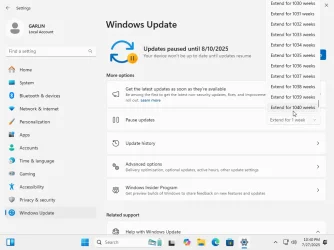
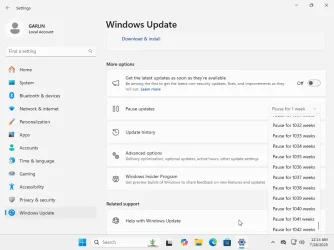
9 Select Pause for 1042 weeks (20 years) in the Pause updates drop menu. (see screenshot below)

For how to pause updates in Windows 10, see:

Pause_Windows_Updates-1.png
Pause_Windows_Updates-2.png

10 Windows Update will now be pause for 20 years until you are ready to manually resume updates. (see screenshot below)

Pause_Windows_Updates-2.png

11 You can now close Settings if you like.


That's it,
Shawn Brink


Attachments

Last edited:
Keep in mind Windows Update is typically supported until the EOL of a given Windows version.

After that, its effectively disabled unless you decide to buy extended support for your PC.
 

My Computers My Computers

  • At a glance

    Windows 11 Education For 25H2Intel® Core i7 5500u8 GBIntel HD Family Graphics 5500 AMD Firepro 4150M
    OS
    Windows 11 Education For 25H2
    Computer type
    Laptop
    Manufacturer/Model
    HP ZBook G2
    CPU
    Intel® Core i7 5500u
    Motherboard
    HP
    Memory
    8 GB
    Graphics Card(s)
    Intel HD Family Graphics 5500 AMD Firepro 4150M
    Sound Card
    Realtek High Audio
    Hard Drives
    1 TB SSD
    Mouse
    HP USB Mouse
    Antivirus
    Windows Defender
  • At a glance

    Windows 11 Pro For Workstations 25H2Xeon 1535m v632 GBAMD Quadro Pro 4100
    Operating System
    Windows 11 Pro For Workstations 25H2
    Computer type
    Laptop
    Manufacturer/Model
    HP Zbook G4
    CPU
    Xeon 1535m v6
    Motherboard
    HP
    Memory
    32 GB
    Graphics card(s)
    AMD Quadro Pro 4100
    Sound Card
    Bang and Olufson Audio
    Hard Drives
    1TB SSD
    Mouse
    HP USB Mouse
    Antivirus
    Windows Defender
Oh that's whack I love it just call it nuke mode :boom:
 

My Computer My Computer

At a glance

Win-7-10-11Pro's10900k & 9940x & 5930kTrident-Z Royal 4000c16 2x16gb & Trident-Z 36...Titan Xp & 1080ti FTW3 & evga 980ti gaming
OS
Win-7-10-11Pro's
Computer type
PC/Desktop
Manufacturer/Model
Acer 17" Nitro 7840sn/ 2x16gb 5600c40/ 4060/ stock 1tb-os/ 4tb sn850x
CPU
10900k & 9940x & 5930k
Motherboard
z490-Apex & x299-Apex & x99-Sabertooth
Memory
Trident-Z Royal 4000c16 2x16gb & Trident-Z 3600c16 4x8gb & 3200c14 4x8gb
Graphics Card(s)
Titan Xp & 1080ti FTW3 & evga 980ti gaming
Sound Card
Onboard Realtek x3
Monitor(s) Displays
1-AOC G2460PG 24"G-Sync 144Hz/ 2nd 1-ASUS VG248QE 24"/ 3rd LG 43" series
Screen Resolution
1920-1080 not sure what the t.v is besides 43" class scales from 1920-1080 perfectly
Hard Drives
2-WD-sn850x 4tb/ 970evo+500gb/ 980 pro 2tb.
PSU
1000p2 & 1200p2 & 850p2
Case
D450 x2 & 1 Test bench in cherry Entertainment center
Cooling
Custom water loops x3 with 2x mora 360mm rads only 980ti gaming air cooled
Keyboard
G710+x3
Mouse
Redragon x3
Internet Speed
xfinity gigabyte
Browser
Firefox
Antivirus
mbam pro
Tutorial updated to add option one. :alien:
 

My Computers My Computers

  • At a glance

    Windows 11 Pro for WorkstationsIntel i7-8700K 5 GHz64 GB (4x16GB) G.SKILL TridentZ RGB DDR4 3600...ASUS ROG-STRIX-GTX1080TI-O11G-GAMING (11GB GD...
    OS
    Windows 11 Pro for Workstations
    Computer type
    PC/Desktop
    Manufacturer/Model
    Custom self build
    CPU
    Intel i7-8700K 5 GHz
    Motherboard
    ASUS ROG Maximus XI Formula Z390
    Memory
    64 GB (4x16GB) G.SKILL TridentZ RGB DDR4 3600 MHz (F4-3600C18D-32GTZR)
    Graphics Card(s)
    ASUS ROG-STRIX-GTX1080TI-O11G-GAMING (11GB GDDR5X)
    Sound Card
    Integrated Digital Audio (S/PDIF)
    Monitor(s) Displays
    2 x Samsung Odyssey G75 27"
    Screen Resolution
    2560x1440
    Hard Drives
    1TB Samsung 990 PRO M.2,
    4TB Samsung 990 PRO M.2,
    TerraMaster F8 SSD Plus NAS
    PSU
    Seasonic Prime Titanium 850W
    Case
    Thermaltake Core P3 wall mounted
    Cooling
    Corsair Hydro H115i
    Keyboard
    Amazon Basics Wired Full Keyboard MD005
    Mouse
    Logitech MX Master 4
    Internet Speed
    2 Gbps Download and 100 Mbps Upload
    Browser
    Chrome and Edge
    Antivirus
    Microsoft Defender
    Other Info
    Logitech Z625 speaker system,
    Logitech BRIO 4K Pro webcam,
    HP Color LaserJet Pro MFP M477fdn,
    CyberPower CP1500PFCLCD
    Galaxy S23 Plus phone
  • At a glance

    Windows 11 ProSnapdragon X Elite (12 core) 3.42 GHz16 GB LPDDR5x-7467 MHz
    Operating System
    Windows 11 Pro
    Computer type
    Laptop
    Manufacturer/Model
    Surface Laptop 7 Copilot+ PC
    CPU
    Snapdragon X Elite (12 core) 3.42 GHz
    Memory
    16 GB LPDDR5x-7467 MHz
    Monitor(s) Displays
    15" HDR
    Screen Resolution
    2496 x 1664
    Hard Drives
    1 TB SSD
    Internet Speed
    Wi-Fi 7 and Bluetooth 5.4
    Browser
    Chrome and Edge
    Antivirus
    Microsoft Defender
Hi,
This does nothing for the updates service it still runs and runs like the energizer bunny from hell

I'll likely kill the pos in the hidden admin account lol
 

My Computer My Computer

At a glance

Win-7-10-11Pro's10900k & 9940x & 5930kTrident-Z Royal 4000c16 2x16gb & Trident-Z 36...Titan Xp & 1080ti FTW3 & evga 980ti gaming
OS
Win-7-10-11Pro's
Computer type
PC/Desktop
Manufacturer/Model
Acer 17" Nitro 7840sn/ 2x16gb 5600c40/ 4060/ stock 1tb-os/ 4tb sn850x
CPU
10900k & 9940x & 5930k
Motherboard
z490-Apex & x299-Apex & x99-Sabertooth
Memory
Trident-Z Royal 4000c16 2x16gb & Trident-Z 3600c16 4x8gb & 3200c14 4x8gb
Graphics Card(s)
Titan Xp & 1080ti FTW3 & evga 980ti gaming
Sound Card
Onboard Realtek x3
Monitor(s) Displays
1-AOC G2460PG 24"G-Sync 144Hz/ 2nd 1-ASUS VG248QE 24"/ 3rd LG 43" series
Screen Resolution
1920-1080 not sure what the t.v is besides 43" class scales from 1920-1080 perfectly
Hard Drives
2-WD-sn850x 4tb/ 970evo+500gb/ 980 pro 2tb.
PSU
1000p2 & 1200p2 & 850p2
Case
D450 x2 & 1 Test bench in cherry Entertainment center
Cooling
Custom water loops x3 with 2x mora 360mm rads only 980ti gaming air cooled
Keyboard
G710+x3
Mouse
Redragon x3
Internet Speed
xfinity gigabyte
Browser
Firefox
Antivirus
mbam pro
Tutorial updated to add option one. :alien:
what do you think about add right click:

Powershell:
$pause = (Get-Date).AddDays(35)
$pause = $pause.ToUniversalTime().ToString("yyyy-MM-ddTHH:mm:ssZ")
$pause_start = (Get-Date)
$pause_start = $pause_start.ToUniversalTime().ToString("yyyy-MM-ddTHH:mm:ssZ")


Set-ExecutionPolicy RemoteSigned -Scope Process -Force


Set-ItemProperty -Path 'HKLM:\SOFTWARE\Microsoft\WindowsUpdate\UX\Settings' -Name 'PauseUpdatesExpiryTime' -Value $pause
Set-ItemProperty -Path 'HKLM:\SOFTWARE\Microsoft\WindowsUpdate\UX\Settings' -Name 'PauseFeatureUpdatesStartTime' -Value $pause_start
Set-ItemProperty -Path 'HKLM:\SOFTWARE\Microsoft\WindowsUpdate\UX\Settings' -Name 'PauseFeatureUpdatesEndTime' -Value $pause
Set-ItemProperty -Path 'HKLM:\SOFTWARE\Microsoft\WindowsUpdate\UX\Settings' -Name 'PauseQualityUpdatesStartTime' -Value $pause_start
Set-ItemProperty -Path 'HKLM:\SOFTWARE\Microsoft\WindowsUpdate\UX\Settings' -Name 'PauseQualityUpdatesEndTime' -Value $pause
Set-ItemProperty -Path 'HKLM:\SOFTWARE\Microsoft\WindowsUpdate\UX\Settings' -Name 'PauseUpdatesStartTime' -Value $pause_start


New-Item -Path 'HKLM:\SOFTWARE\Policies\Microsoft\Windows\WindowsUpdate\AU' -Force
Set-ItemProperty -Path 'HKLM:\SOFTWARE\Policies\Microsoft\Windows\WindowsUpdate\AU' -Name 'NoAutoUpdate' -Value 1 -Type DWORD

so everytime user resume. he/she can right click suspend for 35 days only
or it can be used on scheduled task to run after 5 minuetes on system start
 

My Computer My Computer

At a glance

Windows 11 Pro 23h2 22631.2792Intel(R) Core(TM) i7-2677M CPU @ 1.80GHz6,00 GB (5,90 GB usable)Intel(R) HD Graphics 3000
OS
Windows 11 Pro 23h2 22631.2792
Computer type
Laptop
Manufacturer/Model
Toshiba Ultrabook Portege Z830 PT224L-01402S
CPU
Intel(R) Core(TM) i7-2677M CPU @ 1.80GHz
Motherboard
Portable PC (0x000003EC - 0x103CB030)
Memory
6,00 GB (5,90 GB usable)
Graphics Card(s)
Intel(R) HD Graphics 3000
Sound Card
USB Generic
Monitor(s) Displays
Built-in Laptop
Screen Resolution
1366x768
Hard Drives
Toshiba THNSNB128GMCJ 128GB PCI-E M-SATA INTERNAL Solid State Drive(SSD)
Keyboard
Using USB Port K120
Mouse
Using USB Port
Internet Speed
Broadband 50 Mb/s
Browser
Edge Stable Only
Antivirus
Microsoft Defender Only
Other Info
Screenshot Apps: Snipping Tools || I Try to use Everything from Microsoft Product
Still there isn't any permanent way to not update automatically?
 

My Computer My Computer

At a glance

Windows 7 and 11 and 12
OS
Windows 7 and 11 and 12
Computer type
PC/Desktop
Browser
Firefox
You can delay an update but you can't refuse it.

Unless Windows is EOL, there are always going to be security updates and bug fixes.
 

My Computers My Computers

  • At a glance

    Windows 11 Education For 25H2Intel® Core i7 5500u8 GBIntel HD Family Graphics 5500 AMD Firepro 4150M
    OS
    Windows 11 Education For 25H2
    Computer type
    Laptop
    Manufacturer/Model
    HP ZBook G2
    CPU
    Intel® Core i7 5500u
    Motherboard
    HP
    Memory
    8 GB
    Graphics Card(s)
    Intel HD Family Graphics 5500 AMD Firepro 4150M
    Sound Card
    Realtek High Audio
    Hard Drives
    1 TB SSD
    Mouse
    HP USB Mouse
    Antivirus
    Windows Defender
  • At a glance

    Windows 11 Pro For Workstations 25H2Xeon 1535m v632 GBAMD Quadro Pro 4100
    Operating System
    Windows 11 Pro For Workstations 25H2
    Computer type
    Laptop
    Manufacturer/Model
    HP Zbook G4
    CPU
    Xeon 1535m v6
    Motherboard
    HP
    Memory
    32 GB
    Graphics card(s)
    AMD Quadro Pro 4100
    Sound Card
    Bang and Olufson Audio
    Hard Drives
    1TB SSD
    Mouse
    HP USB Mouse
    Antivirus
    Windows Defender
Or, for us lazy Auld Fahrts, there is the "Easy User Method".....just download and run "StopUpdates10.exe" and run it to Shut OFF MS Updates.

If you ever want to resume getting Updates, just run the program again and select to turn updates back ON.

Or for the hobbyist who likes getting into the nuts and bolts of the OS, just run > services.msc and scroll down to "Windows Update" and set it to "DISABLE". Job done!

Happiness is getting NO MS Updates, that can screw up your PC.
 
Isn't there this ms patch it at future updates and re-enable by itself the automatic updates?
And isn't there a really permanent solution and not simply extended for toooooo long the pause time(That i believe at next windows update ms patch this so it isn't permanent solution for automatic windows updates.
 

My Computer My Computer

At a glance

Windows 7 and 11 and 12
OS
Windows 7 and 11 and 12
Computer type
PC/Desktop
Browser
Firefox
Isn't there this ms patch it at future updates and re-enable by itself the automatic updates?
And isn't there a really permanent solution and not simply extended for toooooo long the pause time(That i believe at next windows update ms patch this so it isn't permanent solution for automatic windows updates.
Hello Gregory, :alien:

While pausing updates for 20 years is technically not permanent, it'll still effectively permanent and longer than when Windows 11 reaches end of support.
 

My Computers My Computers

  • At a glance

    Windows 11 Pro for WorkstationsIntel i7-8700K 5 GHz64 GB (4x16GB) G.SKILL TridentZ RGB DDR4 3600...ASUS ROG-STRIX-GTX1080TI-O11G-GAMING (11GB GD...
    OS
    Windows 11 Pro for Workstations
    Computer type
    PC/Desktop
    Manufacturer/Model
    Custom self build
    CPU
    Intel i7-8700K 5 GHz
    Motherboard
    ASUS ROG Maximus XI Formula Z390
    Memory
    64 GB (4x16GB) G.SKILL TridentZ RGB DDR4 3600 MHz (F4-3600C18D-32GTZR)
    Graphics Card(s)
    ASUS ROG-STRIX-GTX1080TI-O11G-GAMING (11GB GDDR5X)
    Sound Card
    Integrated Digital Audio (S/PDIF)
    Monitor(s) Displays
    2 x Samsung Odyssey G75 27"
    Screen Resolution
    2560x1440
    Hard Drives
    1TB Samsung 990 PRO M.2,
    4TB Samsung 990 PRO M.2,
    TerraMaster F8 SSD Plus NAS
    PSU
    Seasonic Prime Titanium 850W
    Case
    Thermaltake Core P3 wall mounted
    Cooling
    Corsair Hydro H115i
    Keyboard
    Amazon Basics Wired Full Keyboard MD005
    Mouse
    Logitech MX Master 4
    Internet Speed
    2 Gbps Download and 100 Mbps Upload
    Browser
    Chrome and Edge
    Antivirus
    Microsoft Defender
    Other Info
    Logitech Z625 speaker system,
    Logitech BRIO 4K Pro webcam,
    HP Color LaserJet Pro MFP M477fdn,
    CyberPower CP1500PFCLCD
    Galaxy S23 Plus phone
  • At a glance

    Windows 11 ProSnapdragon X Elite (12 core) 3.42 GHz16 GB LPDDR5x-7467 MHz
    Operating System
    Windows 11 Pro
    Computer type
    Laptop
    Manufacturer/Model
    Surface Laptop 7 Copilot+ PC
    CPU
    Snapdragon X Elite (12 core) 3.42 GHz
    Memory
    16 GB LPDDR5x-7467 MHz
    Monitor(s) Displays
    15" HDR
    Screen Resolution
    2496 x 1664
    Hard Drives
    1 TB SSD
    Internet Speed
    Wi-Fi 7 and Bluetooth 5.4
    Browser
    Chrome and Edge
    Antivirus
    Microsoft Defender
Yes but if ms patch that and stop have the chance to can pause updates for 20 years and you can pause it only for 4-5 weeks like before.
 

My Computer My Computer

At a glance

Windows 7 and 11 and 12
OS
Windows 7 and 11 and 12
Computer type
PC/Desktop
Browser
Firefox
Yes but if ms patch that and stop have the chance to can pause updates for 20 years and you can pause it only for 4-5 weeks like before.
You'd have to unpause updates first to get updates that may include such a patch, but luckily nothing so far like that.
 

My Computers My Computers

  • At a glance

    Windows 11 Pro for WorkstationsIntel i7-8700K 5 GHz64 GB (4x16GB) G.SKILL TridentZ RGB DDR4 3600...ASUS ROG-STRIX-GTX1080TI-O11G-GAMING (11GB GD...
    OS
    Windows 11 Pro for Workstations
    Computer type
    PC/Desktop
    Manufacturer/Model
    Custom self build
    CPU
    Intel i7-8700K 5 GHz
    Motherboard
    ASUS ROG Maximus XI Formula Z390
    Memory
    64 GB (4x16GB) G.SKILL TridentZ RGB DDR4 3600 MHz (F4-3600C18D-32GTZR)
    Graphics Card(s)
    ASUS ROG-STRIX-GTX1080TI-O11G-GAMING (11GB GDDR5X)
    Sound Card
    Integrated Digital Audio (S/PDIF)
    Monitor(s) Displays
    2 x Samsung Odyssey G75 27"
    Screen Resolution
    2560x1440
    Hard Drives
    1TB Samsung 990 PRO M.2,
    4TB Samsung 990 PRO M.2,
    TerraMaster F8 SSD Plus NAS
    PSU
    Seasonic Prime Titanium 850W
    Case
    Thermaltake Core P3 wall mounted
    Cooling
    Corsair Hydro H115i
    Keyboard
    Amazon Basics Wired Full Keyboard MD005
    Mouse
    Logitech MX Master 4
    Internet Speed
    2 Gbps Download and 100 Mbps Upload
    Browser
    Chrome and Edge
    Antivirus
    Microsoft Defender
    Other Info
    Logitech Z625 speaker system,
    Logitech BRIO 4K Pro webcam,
    HP Color LaserJet Pro MFP M477fdn,
    CyberPower CP1500PFCLCD
    Galaxy S23 Plus phone
  • At a glance

    Windows 11 ProSnapdragon X Elite (12 core) 3.42 GHz16 GB LPDDR5x-7467 MHz
    Operating System
    Windows 11 Pro
    Computer type
    Laptop
    Manufacturer/Model
    Surface Laptop 7 Copilot+ PC
    CPU
    Snapdragon X Elite (12 core) 3.42 GHz
    Memory
    16 GB LPDDR5x-7467 MHz
    Monitor(s) Displays
    15" HDR
    Screen Resolution
    2496 x 1664
    Hard Drives
    1 TB SSD
    Internet Speed
    Wi-Fi 7 and Bluetooth 5.4
    Browser
    Chrome and Edge
    Antivirus
    Microsoft Defender
Please tell me how can i undo " Option Two "?
 

My Computer My Computer

At a glance

Wnidows 10 Version 21H2 Build 19045.5737Intel Core i7 8700Geil EVO Potenza AMD Red GeIL CL16-16-16 D4-2...NVIDIA Geforce GTX 1650 Super 4 GB VRAM
OS
Wnidows 10 Version 21H2 Build 19045.5737
Computer type
PC/Desktop
Manufacturer/Model
ASUS/ROG MAXIMUS XI Gene
CPU
Intel Core i7 8700
Motherboard
ASUS/ROG MAXIMUS XI Gene
Memory
Geil EVO Potenza AMD Red GeIL CL16-16-16 D4-2400 8 GB RAM DDR4 RAM Memory
Graphics Card(s)
NVIDIA Geforce GTX 1650 Super 4 GB VRAM
Sound Card
Realtek ALC1220P / ALC S1220A @ Intel Cannon Point PCH - cAVS (Audio, Voice, Speech) [B0] PCI
PSU
EVGA 750 BQ 750 Watts BRONZE POWER SUPPLY
Please tell me how can i undo " Option Two "?

Hello, :alien:

You can just resume updates like below.


My Computers My Computers

  • At a glance

    Windows 11 Pro for WorkstationsIntel i7-8700K 5 GHz64 GB (4x16GB) G.SKILL TridentZ RGB DDR4 3600...ASUS ROG-STRIX-GTX1080TI-O11G-GAMING (11GB GD...
    OS
    Windows 11 Pro for Workstations
    Computer type
    PC/Desktop
    Manufacturer/Model
    Custom self build
    CPU
    Intel i7-8700K 5 GHz
    Motherboard
    ASUS ROG Maximus XI Formula Z390
    Memory
    64 GB (4x16GB) G.SKILL TridentZ RGB DDR4 3600 MHz (F4-3600C18D-32GTZR)
    Graphics Card(s)
    ASUS ROG-STRIX-GTX1080TI-O11G-GAMING (11GB GDDR5X)
    Sound Card
    Integrated Digital Audio (S/PDIF)
    Monitor(s) Displays
    2 x Samsung Odyssey G75 27"
    Screen Resolution
    2560x1440
    Hard Drives
    1TB Samsung 990 PRO M.2,
    4TB Samsung 990 PRO M.2,
    TerraMaster F8 SSD Plus NAS
    PSU
    Seasonic Prime Titanium 850W
    Case
    Thermaltake Core P3 wall mounted
    Cooling
    Corsair Hydro H115i
    Keyboard
    Amazon Basics Wired Full Keyboard MD005
    Mouse
    Logitech MX Master 4
    Internet Speed
    2 Gbps Download and 100 Mbps Upload
    Browser
    Chrome and Edge
    Antivirus
    Microsoft Defender
    Other Info
    Logitech Z625 speaker system,
    Logitech BRIO 4K Pro webcam,
    HP Color LaserJet Pro MFP M477fdn,
    CyberPower CP1500PFCLCD
    Galaxy S23 Plus phone
  • At a glance

    Windows 11 ProSnapdragon X Elite (12 core) 3.42 GHz16 GB LPDDR5x-7467 MHz
    Operating System
    Windows 11 Pro
    Computer type
    Laptop
    Manufacturer/Model
    Surface Laptop 7 Copilot+ PC
    CPU
    Snapdragon X Elite (12 core) 3.42 GHz
    Memory
    16 GB LPDDR5x-7467 MHz
    Monitor(s) Displays
    15" HDR
    Screen Resolution
    2496 x 1664
    Hard Drives
    1 TB SSD
    Internet Speed
    Wi-Fi 7 and Bluetooth 5.4
    Browser
    Chrome and Edge
    Antivirus
    Microsoft Defender
Please tell me how can i undo " Option Two "?

Run as Administrator:
Code:
reg delete HKEY_LOCAL_MACHINE\SOFTWARE\Microsoft\WindowsUpdate\UX\Settings /v FlightSettingsMaxPauseDays /f
 

My Computer My Computer

At a glance

Windows 7
OS
Windows 7

My Computers My Computers

  • At a glance

    Win 11 Pro 25H2 26200.9457Intel® Core™ i7-14700KG.SKILL Ripjaws S5 Series 64GB (2 x 32GB) DDR5ASUS GeForce RTX 4070 Super 12GB
    OS
    Win 11 Pro 25H2 26200.9457
    Computer type
    PC/Desktop
    Manufacturer/Model
    Self Built
    CPU
    Intel® Core™ i7-14700K
    Motherboard
    ASUS TUF Z690-PLUS WIFI (BIOS 4505)
    Memory
    G.SKILL Ripjaws S5 Series 64GB (2 x 32GB) DDR5
    Graphics Card(s)
    ASUS GeForce RTX 4070 Super 12GB
    Sound Card
    Sound Blaster AE-5 Plus
    Monitor(s) Displays
    ASUS TUF Gaming 27" 2K HDR Gaming
    Screen Resolution
    2560 x 1440
    Hard Drives
    Samsung 990 Pro 1TB NVMe (Win 11 25H2)
    SK hynix P41 500GB NVMe
    SK hynix P41 2TB NVMe (x3)
    Crucial P3 Plus 4TB
    PSU
    Corsair RM850x Shift
    Case
    Antec Dark Phantom DP502 FLUX
    Cooling
    Corsair Nautilus 360 RS AIO
    Keyboard
    Logitech MK 320
    Mouse
    Razer Basilisk V3
    Internet Speed
    750Mbs
    Browser
    Firefox
    Antivirus
    Winows Security
    Other Info
    MR 8.1 Home
  • At a glance

    Win 11 Pro 25H2 26200.9457Intel Core i5-1140064 GB DDR4MSI GeForce RTX 3060 Ventus 2X 12GB
    Operating System
    Win 11 Pro 25H2 26200.9457
    Computer type
    PC/Desktop
    Manufacturer/Model
    Self Built
    CPU
    Intel Core i5-11400
    Motherboard
    Asus TUF Gaming Z590 Plus WiFi (BIOS 2803)
    Memory
    64 GB DDR4
    Graphics card(s)
    MSI GeForce RTX 3060 Ventus 2X 12GB
    Sound Card
    SoundBlaster Audigy Fx V2
    Monitor(s) Displays
    Samsung F27T350
    Screen Resolution
    1920x1080
    Hard Drives
    Samsung 980 Pro 1TB
    Samsung 970 EVO Plus 2TB
    Samsung 870 EVO 500GB SSD
    PSU
    Corsair HX750
    Case
    Cougar MX330-G Window
    Cooling
    Thermalright Frozen Edge 240 Black AIO
    Internet Speed
    350Mbps
    Browser
    Firefox
    Antivirus
    Windows Security
  • System Three
    Win 11 Pro 25H2 26200.9457
    ASUS PRIME Z370-P II BIOS 3004 7/12/21
    Intel Core i7-8700 CPU @ 3.20GHz
    32GB DDR4 RAM (4x8)
    EVGA RTX 2060 (used)
    iGPU Intel UHD Graphics 630 (backup)
    Cooler Master Hyper 212
    Mid-Tower Desktop
Hi. I tried the process for Option 2 but it didn't work (Pause updates is still greyed out). Someone mentioned elsewhere that this only works on Win 11 Pro. I have Win 11 Home (please don't laugh). Is it supposed to work for me? Thanks in advance.

Edit: I do have admin privileges.
 
Last edited:

My Computer My Computer

At a glance

Win 11 Home
OS
Win 11 Home
Computer type
PC/Desktop
Manufacturer/Model
Home built
Hi. I tried the process for Option 2 but it didn't work (Pause updates is still greyed out). Someone mentioned elsewhere that this only works on Win 11 Pro. I have Win 11 Home (please don't laugh). Is it supposed to work for me? Thanks in advance.

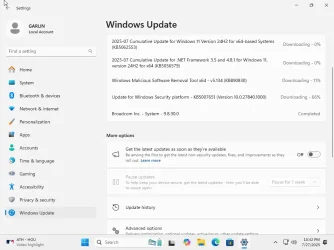
Option Two (reg file) does work on Home edition, but Pause is greyed out once Windows Update is committed to downloading & installing a set of updates. You only get to Pause when no Updates are queued.
 

Attachments

  • Windows 11 x64-2025-07-27-22-40-26.webp
    Windows 11 x64-2025-07-27-22-40-26.webp
    48.2 KB · Views: 54
  • Windows 11 x64-2025-07-27-22-42-56.webp
    Windows 11 x64-2025-07-27-22-42-56.webp
    48.1 KB · Views: 75
  • Windows 11 x64-2025-07-28-00-14-05.webp
    Windows 11 x64-2025-07-28-00-14-05.webp
    44.3 KB · Views: 54

My Computer My Computer

At a glance

Windows 7
OS
Windows 7
Option Two (reg file) does work on Home edition, but Pause is greyed out once Windows Update is committed to downloading & installing a set of updates. You only get to Pause when no Updates are queued.
Thank you so much garlin! I guess I'll have to plow through the update install and THEN delay the next one. One more question if you don't mind. When do YOU decide to update? I usually wait a couple months after a release to ensure MS works out the main bugs but that's kind of an arbitrary length of time.
 

My Computer My Computer

At a glance

Win 11 Home
OS
Win 11 Home
Computer type
PC/Desktop
Manufacturer/Model
Home built

Latest Support Threads

Back
Top Bottom