Windows Update Disable Automatic Windows Updates in Windows 11

  • Thread starter Thread starter Brink
  • Start date Published: Start date Updated Updated:
  • Featured

Pause_updates_banner.png

This tutorial will show you how to disable Windows Update from automatically downloading and installing updates in Windows 10 and Windows 11.

Windows Update keeps Windows 11 updated by automatically downloading and installing the latest updates, drivers, and hotfixes when released by Microsoft (unless you’re on a metered connection, then updates won’t download until you get them).

Occasionally, your PC might need to restart to finish installing the updates. You can set active hours to let Windows know when you're usually using your PC to help prevent inconvenient restarts. The default active hours is 8 AM (8 on 24 hour clock) for Start time and 5 PM (17 on 24 hour clock) End time.

If wanted, you can disable automatic updates so you can manually update when you are ready to instead.


Contents

  • Option One: Disable Automatic Windows Updates by using Metered Connection
  • Option Two: (NEW) Disable Automatic Windows Updates by Pausing Updates for 20 Years
  • Option Three: (OLD) Disable Automatic Windows Updates by Pausing Updates for 20 Years


Option One

Disable Automatic Windows Updates by using Metered Connection


This option will allow you to still check for updates without some updates being automatically downloaded and installed.


1 Set your Wi-Fi or Ethernet connection to metered using an available option in the tutorials below.


Windows_Update_metered_connection.png


Option Two

(NEW) Disable Automatic Windows Updates by Pausing Updates for 20 Years


This option is only for Windows 11.

Use this option if you have the new Pick a date calendar experience to pause updates.

You can pause Windows Update for 20 years to effectively disable Windows Update until you are ready to create backups and manually resume updates and check for updates to be automatically downloaded and installed. Afterwards, you can pause Windows Update again.

You must be signed in as an administrator to use this option.


1 Open Settings (WIn+I).

2 Click/tap on Windows Update on the left side. (see screenshot below step 3)


3 Click/tap on the Pick a date button, and select any date to pause updates until. (see screenshot below)

Using "Pick a date" here is just to add the registry settings so you can change them.

It doesn't matter which date you select here since you will be manually extending the date in the steps below for how long you really want instead.



Pick_a_date_pause-1.webp

4 Close Settings.

5 Open Registry Editor (regedit.exe).

6 Navigate to the key below in the left pane of Registry Editor. (see screenshot below)

HKEY_LOCAL_MACHINE\SOFTWARE\Microsoft\WindowsUpdate\UX\Settings

Pick_a_date_pause-2.webp

7 In the right pane of the Settings key, double click/tap on the PauseFeatureUpdatesEndTime string value (REG_SZ) to modify it. (see screenshot below step 6)

8 Modify the current year (ex: "2026") in the value data to add 20 years (ex: "2046"). (see screenshot below)

Pick_a_date_pause-3.webp

9 In the right pane of the Settings key, double click/tap on the PauseQualityUpdatesEndTime string value (REG_SZ) to modify it. (see screenshot below step 6)

10 Modify the current year (ex: "2026") in the value data to add 20 years (ex: "2046"). (see screenshot below)

Pick_a_date_pause-4.webp

11 In the right pane of the Settings key, double click/tap on the PauseUpdatesExpiryTime string value (REG_SZ) to modify it. (see screenshot below step 6)

12 Modify the current year (ex: "2026") in the value data to add 20 years (ex: "2046"). (see screenshot below)

Pick_a_date_pause-5.webp

13 Verify the dates are all correct for how long you want to pause updates until. (see screenshot below)

Pick_a_date_pause-6.webp

14 You can now close Registry Editor.

15 Windows Update will now be pause for 20 years until you are ready to manually resume updates. (see screenshot below)

Paused_updates.webp


Option Three

(OLD) Disable Automatic Windows Updates by Pausing Updates for 20 Years


Use this option if you don't have the new Pick a date calendar experience to pause updates.

You can pause Windows Update for 20 years to effectively disable Windows Update until you are ready to create backups and manually resume updates and check for updates to be automatically downloaded and installed. Afterwards, you can pause Windows Update again.

You must be signed in as an administrator to use this option.


For Windows Insider builds, the FlightSettingsMaxPauseDays DWORD value used in this option will automatically get reset back to its default 7 days each time you either Check for Updates or Resume updates.


1 Click/tap on the Download button below to download the REG file below.

This REG file will set the maximum days you can pause Windows Update to 7300 days (20 years).


Set_max_days_to_pause_Windows_Updates_to_20_years.reg


(Contents of .reg file)
Code:
Windows Registry Editor Version 5.00

[HKEY_LOCAL_MACHINE\SOFTWARE\Microsoft\WindowsUpdate\UX\Settings]
"FlightSettingsMaxPauseDays"=dword:00001c84

2 Save the .reg file to your desktop.

3 If you have Smart App Control turned on, you will need to unblock the downloaded REG file.

4 Double click/tap on the downloaded .reg file to merge it.

5 When prompted, click/tap on Run, Yes (UAC), Yes, and OK to approve the merge.

6 You can now delete the downloaded .reg file if you like.

7 Open Settings (WIn+I).

8 Click/tap on Windows Update on the left side. (see screenshot below step 9)

Open Windows Update Settings

9 Select Pause for 1042 weeks (20 years) in the Pause updates drop menu. (see screenshot below)

For how to pause updates in Windows 10, see:

Pause_Windows_Updates-1.png
Pause_Windows_Updates-2.png

10 Windows Update will now be pause for 20 years until you are ready to manually resume updates. (see screenshot below)

Pause_Windows_Updates-2.png

11 You can now close Settings if you like.


That's it,
Shawn Brink


Attachments

Last edited:
I allow Windows to update itself every month. But it's a personal decision based on if you're experiencing a known bug and waiting for a fix, or like to keep up with security patches. If you're a cautious person and don't tend to visit questionable sites or run dodgy software, then it's not a terrible thing to wait out a few months.
 

My Computer My Computer

At a glance

Windows 7
OS
Windows 7
I allow Windows to update itself every month. But it's a personal decision based on if you're experiencing a known bug and waiting for a fix, or like to keep up with security patches. If you're a cautious person and don't tend to visit questionable sites or run dodgy software, then it's not a terrible thing to wait out a few months.
Thank you again! I have 2 separate machines (not just monitors) and do all my browsing, music, etc. on one but this is my work machine so it's completely clean. So I think I will continue to wait a couple months. I really appreciate you time and insight!
 

My Computer My Computer

At a glance

Win 11 Home
OS
Win 11 Home
Computer type
PC/Desktop
Manufacturer/Model
Home built
The second method with registry pause for 20 years doesn't work at windows 11 ltsc 24h2.
Is there anything else i can do?
I don't want to do the first way.
 

My Computer My Computer

At a glance

Windows 7 and 11 and 12
OS
Windows 7 and 11 and 12
Computer type
PC/Desktop
Browser
Firefox
I allow Windows to update itself every month. But it's a personal decision based on if you're experiencing a known bug and waiting for a fix, or like to keep up with security patches. If you're a cautious person and don't tend to visit questionable sites or run dodgy software, then it's not a terrible thing to wait out a few months.
It grey the 1 week me to
 

My Computer My Computer

At a glance

Windows 7 and 11 and 12
OS
Windows 7 and 11 and 12
Computer type
PC/Desktop
Browser
Firefox
The second method with registry pause for 20 years doesn't work at windows 11 ltsc 24h2.
Is there anything else i can do?
I don't want to do the first way.
It grey the 1 week me to

Hello, :alien:

Usually, when you only see a grayed out "Pause for 1 week" option available, you have an Insider build installed that already has Windows Update paused.

Just to confirm, after merging the REG file from this tutorial to add the extra pause dates, did you close and reopen Settings to have the extra pause dates available (may have to resume updates first)?

Please go ahead and post a screenshot showing your Windows Update Settings page for this to see if anything may stand out.
 

My Computers My Computers

  • At a glance

    Windows 11 Pro for WorkstationsIntel i7-8700K 5 GHz64 GB (4x16GB) G.SKILL TridentZ RGB DDR4 3600...ASUS ROG-STRIX-GTX1080TI-O11G-GAMING (11GB GD...
    OS
    Windows 11 Pro for Workstations
    Computer type
    PC/Desktop
    Manufacturer/Model
    Custom self build
    CPU
    Intel i7-8700K 5 GHz
    Motherboard
    ASUS ROG Maximus XI Formula Z390
    Memory
    64 GB (4x16GB) G.SKILL TridentZ RGB DDR4 3600 MHz (F4-3600C18D-32GTZR)
    Graphics Card(s)
    ASUS ROG-STRIX-GTX1080TI-O11G-GAMING (11GB GDDR5X)
    Sound Card
    Integrated Digital Audio (S/PDIF)
    Monitor(s) Displays
    2 x Samsung Odyssey G75 27"
    Screen Resolution
    2560x1440
    Hard Drives
    1TB Samsung 990 PRO M.2,
    4TB Samsung 990 PRO M.2,
    TerraMaster F8 SSD Plus NAS
    PSU
    Seasonic Prime Titanium 850W
    Case
    Thermaltake Core P3 wall mounted
    Cooling
    Corsair Hydro H115i
    Keyboard
    Amazon Basics Wired Full Keyboard MD005
    Mouse
    Logitech MX Master 4
    Internet Speed
    2 Gbps Download and 100 Mbps Upload
    Browser
    Chrome and Edge
    Antivirus
    Microsoft Defender
    Other Info
    Logitech Z625 speaker system,
    Logitech BRIO 4K Pro webcam,
    HP Color LaserJet Pro MFP M477fdn,
    CyberPower CP1500PFCLCD
    Galaxy S23 Plus phone
  • At a glance

    Windows 11 ProSnapdragon X Elite (12 core) 3.42 GHz16 GB LPDDR5x-7467 MHz
    Operating System
    Windows 11 Pro
    Computer type
    Laptop
    Manufacturer/Model
    Surface Laptop 7 Copilot+ PC
    CPU
    Snapdragon X Elite (12 core) 3.42 GHz
    Memory
    16 GB LPDDR5x-7467 MHz
    Monitor(s) Displays
    15" HDR
    Screen Resolution
    2496 x 1664
    Hard Drives
    1 TB SSD
    Internet Speed
    Wi-Fi 7 and Bluetooth 5.4
    Browser
    Chrome and Edge
    Antivirus
    Microsoft Defender
No i don't have any insider build.
I have win11 ltsc 24h2 64bit greek.
 

My Computer My Computer

At a glance

Windows 7 and 11 and 12
OS
Windows 7 and 11 and 12
Computer type
PC/Desktop
Browser
Firefox
Why is the Group Policy method not included in the tutorial? I know it doesn't work on Home edition, but many people use something other than Home.
 

My Computer My Computer

At a glance

Windows 11
OS
Windows 11
Why is the Group Policy method not included in the tutorial? I know it doesn't work on Home edition, but many people use something other than Home.

Hello, :alien:

That method is not included since it's no longer reliable and/or doesn't work anymore.
 

My Computers My Computers

  • At a glance

    Windows 11 Pro for WorkstationsIntel i7-8700K 5 GHz64 GB (4x16GB) G.SKILL TridentZ RGB DDR4 3600...ASUS ROG-STRIX-GTX1080TI-O11G-GAMING (11GB GD...
    OS
    Windows 11 Pro for Workstations
    Computer type
    PC/Desktop
    Manufacturer/Model
    Custom self build
    CPU
    Intel i7-8700K 5 GHz
    Motherboard
    ASUS ROG Maximus XI Formula Z390
    Memory
    64 GB (4x16GB) G.SKILL TridentZ RGB DDR4 3600 MHz (F4-3600C18D-32GTZR)
    Graphics Card(s)
    ASUS ROG-STRIX-GTX1080TI-O11G-GAMING (11GB GDDR5X)
    Sound Card
    Integrated Digital Audio (S/PDIF)
    Monitor(s) Displays
    2 x Samsung Odyssey G75 27"
    Screen Resolution
    2560x1440
    Hard Drives
    1TB Samsung 990 PRO M.2,
    4TB Samsung 990 PRO M.2,
    TerraMaster F8 SSD Plus NAS
    PSU
    Seasonic Prime Titanium 850W
    Case
    Thermaltake Core P3 wall mounted
    Cooling
    Corsair Hydro H115i
    Keyboard
    Amazon Basics Wired Full Keyboard MD005
    Mouse
    Logitech MX Master 4
    Internet Speed
    2 Gbps Download and 100 Mbps Upload
    Browser
    Chrome and Edge
    Antivirus
    Microsoft Defender
    Other Info
    Logitech Z625 speaker system,
    Logitech BRIO 4K Pro webcam,
    HP Color LaserJet Pro MFP M477fdn,
    CyberPower CP1500PFCLCD
    Galaxy S23 Plus phone
  • At a glance

    Windows 11 ProSnapdragon X Elite (12 core) 3.42 GHz16 GB LPDDR5x-7467 MHz
    Operating System
    Windows 11 Pro
    Computer type
    Laptop
    Manufacturer/Model
    Surface Laptop 7 Copilot+ PC
    CPU
    Snapdragon X Elite (12 core) 3.42 GHz
    Memory
    16 GB LPDDR5x-7467 MHz
    Monitor(s) Displays
    15" HDR
    Screen Resolution
    2496 x 1664
    Hard Drives
    1 TB SSD
    Internet Speed
    Wi-Fi 7 and Bluetooth 5.4
    Browser
    Chrome and Edge
    Antivirus
    Microsoft Defender
Interesting, when did that happen? I'd like to read more about it, if you have an official source or even some forum discussion.
I know that it's been 100% reliable on Windows 10 for many years and when I sometimes used Windows 11 it worked there too.
There's also a blog post by a MS employee that says that's the way to do it on Windows 11, so I'm very surprised to read that it doesn't work anymore.
 

My Computer My Computer

At a glance

Windows 11
OS
Windows 11
I read somewhere that u could Stop Windows Update permanently by Windows Services and Group Policy Editor. After few days i saw the Windows services but it seems to revert back to its default configuration. But the Group Policy Editor seems to stop it permanently.
And i checked the Windows Update, it hasn't bugged after the setting has been turned on. The third was through Registry Editor. Which i find it boring.
And to u too, or else the Update simply seems to affect some other services and settings. Which was unnecessary. After applying the settings, i don't even
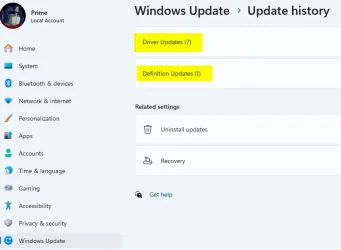
h' a single update. See the snapshot; only Driver(7) and Definition Update(1). No cumulative Updates(0)
 

Attachments

  • 2025-10-20_172803.webp
    2025-10-20_172803.webp
    19.7 KB · Views: 40

My Computer My Computer

At a glance

Windows 11 ProAMD Ryzen 5 5600GT32GBAMD Radeon RX 6500 XT
OS
Windows 11 Pro
Computer type
PC/Desktop
Manufacturer/Model
GIGABYTE B450M K-CF
CPU
AMD Ryzen 5 5600GT
Motherboard
GIGABYTE B450M K-CF
Memory
32GB
Graphics Card(s)
AMD Radeon RX 6500 XT
Monitor(s) Displays
BenQ GW2480
Screen Resolution
1600 x 900 60 Hz
Hard Drives
2TB
Keyboard
Logitech
Mouse
Dell
Internet Speed
2MB
Browser
Firefox
Interesting, when did that happen? I'd like to read more about it, if you have an official source or even some forum discussion.
I know that it's been 100% reliable on Windows 10 for many years and when I sometimes used Windows 11 it worked there too.
There's also a blog post by a MS employee that says that's the way to do it on Windows 11, so I'm very surprised to read that it doesn't work anymore.

I believe it started at least around 23H2. Nothing official to read though. It was from experience and member feedback reporting that Windows Update was not fully disabled when using that policy, and would sometime re-enable itself after an allowed update when manually using "Check for updates".

You can read more about the policy not working in Windows 10 in the feedback posts below.


The pause updates for 20 years was a workaround that effectively and completely disables automatic updates reliable so far.
 

My Computers My Computers

  • At a glance

    Windows 11 Pro for WorkstationsIntel i7-8700K 5 GHz64 GB (4x16GB) G.SKILL TridentZ RGB DDR4 3600...ASUS ROG-STRIX-GTX1080TI-O11G-GAMING (11GB GD...
    OS
    Windows 11 Pro for Workstations
    Computer type
    PC/Desktop
    Manufacturer/Model
    Custom self build
    CPU
    Intel i7-8700K 5 GHz
    Motherboard
    ASUS ROG Maximus XI Formula Z390
    Memory
    64 GB (4x16GB) G.SKILL TridentZ RGB DDR4 3600 MHz (F4-3600C18D-32GTZR)
    Graphics Card(s)
    ASUS ROG-STRIX-GTX1080TI-O11G-GAMING (11GB GDDR5X)
    Sound Card
    Integrated Digital Audio (S/PDIF)
    Monitor(s) Displays
    2 x Samsung Odyssey G75 27"
    Screen Resolution
    2560x1440
    Hard Drives
    1TB Samsung 990 PRO M.2,
    4TB Samsung 990 PRO M.2,
    TerraMaster F8 SSD Plus NAS
    PSU
    Seasonic Prime Titanium 850W
    Case
    Thermaltake Core P3 wall mounted
    Cooling
    Corsair Hydro H115i
    Keyboard
    Amazon Basics Wired Full Keyboard MD005
    Mouse
    Logitech MX Master 4
    Internet Speed
    2 Gbps Download and 100 Mbps Upload
    Browser
    Chrome and Edge
    Antivirus
    Microsoft Defender
    Other Info
    Logitech Z625 speaker system,
    Logitech BRIO 4K Pro webcam,
    HP Color LaserJet Pro MFP M477fdn,
    CyberPower CP1500PFCLCD
    Galaxy S23 Plus phone
  • At a glance

    Windows 11 ProSnapdragon X Elite (12 core) 3.42 GHz16 GB LPDDR5x-7467 MHz
    Operating System
    Windows 11 Pro
    Computer type
    Laptop
    Manufacturer/Model
    Surface Laptop 7 Copilot+ PC
    CPU
    Snapdragon X Elite (12 core) 3.42 GHz
    Memory
    16 GB LPDDR5x-7467 MHz
    Monitor(s) Displays
    15" HDR
    Screen Resolution
    2496 x 1664
    Hard Drives
    1 TB SSD
    Internet Speed
    Wi-Fi 7 and Bluetooth 5.4
    Browser
    Chrome and Edge
    Antivirus
    Microsoft Defender
I believe it started at least around 23H2. Nothing official to read though. It was from experience and member feedback reporting that Windows Update was not fully disabled when using that policy, and would sometime re-enable itself after an allowed update when manually using "Check for updates".

The pause updates for 20 years was a workaround that effectively and completely disables automatic updates reliable so far.
That 20 years extension was a wonderful thing. i am in 25H2, started from scratch. Its working.
 

My Computer My Computer

At a glance

Windows 11 ProAMD Ryzen 5 5600GT32GBAMD Radeon RX 6500 XT
OS
Windows 11 Pro
Computer type
PC/Desktop
Manufacturer/Model
GIGABYTE B450M K-CF
CPU
AMD Ryzen 5 5600GT
Motherboard
GIGABYTE B450M K-CF
Memory
32GB
Graphics Card(s)
AMD Radeon RX 6500 XT
Monitor(s) Displays
BenQ GW2480
Screen Resolution
1600 x 900 60 Hz
Hard Drives
2TB
Keyboard
Logitech
Mouse
Dell
Internet Speed
2MB
Browser
Firefox
Hi Brink, do you have a tutorial on disabling automatic restarts after updates? I want the updates, just not the unexpected restarts
 

My Computer My Computer

At a glance

Windows 11
OS
Windows 11
Hi Brink, do you have a tutorial on disabling automatic restarts after updates? I want the updates, just not the unexpected restarts

A couple to try:


My Computers My Computers

  • At a glance

    Windows 11 Pro 25H2 Build 26200.8973Intel(R) Core(TM) i7-4770K CPU @ 3.50GHz32.0 GB of I forget and the box is in storage.Gigabyte nVidia GeForce GTX 1660 Super OC 6GB
    OS
    Windows 11 Pro 25H2 Build 26200.8973
    Computer type
    PC/Desktop
    Manufacturer/Model
    Sin-built 2013
    CPU
    Intel(R) Core(TM) i7-4770K CPU @ 3.50GHz
    Motherboard
    ASUS ROG Maximus VI Formula
    Memory
    32.0 GB of I forget and the box is in storage.
    Graphics Card(s)
    Gigabyte nVidia GeForce GTX 1660 Super OC 6GB
    Sound Card
    ROG SupremeFX Formula 8-Channel High Definition Audio
    Monitor(s) Displays
    5 x LG 25MS500-B - 1 x 24MK430H-B - 1 x Wacom Pro 22" Touch Screen Tablet
    Screen Resolution
    All over the place
    Hard Drives
    Too many to list. OS on Samsung 1TB 870 QVO SATA
    PSU
    Silverstone 1500
    Case
    NZXT Phantom 820 Full-Tower Case
    Cooling
    Noctua NH-D15 Elite Class Dual Tower CPU Cooler / 6 x EziDIY 120mm / 2 x Corsair 140mm somethings / 1 x 140mm Thermaltake something / 2 x 200mm Corsair.
    Keyboard
    Corsair K95 / Logitech diNovo Edge Wireless
    Mouse
    Logitech: G402 / G502 / Mx Masters / Mx Air Cordless
    Internet Speed
    2000/500Mbps
    Browser
    All sorts
    Antivirus
    Kaspersky Premium
    Other Info
    ㅤㅤㅤㅤㅤㅤㅤㅤㅤㅤㅤㅤㅤㅤㅤㅤㅤㅤㅤㅤㅤㅤㅤㅤㅤㅤㅤㅤㅤㅤㅤㅤㅤㅤㅤㅤㅤㅤㅤㅤ⠀⠀⠀⠀⠀⠀⠀⠀⠀⠀
    TP-Link BE9300 WiFi 7 Bluetooth 5.4 (Archer TBE550E)
    TP-Link TX201 V1 2.5GB Lan

    Grandstream HT812 - VoIP
    ASUS DSL-AX82U - Mesh
    ASUS RT-AC68U - Mesh
    ASUS RT-BE88U Router

    Brother MFC-L2880DW Printer

    I’m on a horse.
  • At a glance

    Windows 11 Pro 25H2 Build 26200.8973 (Wifes)13th Generation Intel® Core™ i5-1340P Process...16GB LPDDR5-52001x Intel® Iris® Xe Graphics
    Operating System
    Windows 11 Pro 25H2 Build 26200.8973 (Wifes)
    Computer type
    Laptop
    Manufacturer/Model
    LENOVO Yoga 7 14IRL8 - Type 82YL
    CPU
    13th Generation Intel® Core™ i5-1340P Processor(Core™ i5-1340P)
    Memory
    16GB LPDDR5-5200
    Graphics card(s)
    1x Intel® Iris® Xe Graphics
    Sound Card
    Optimized with Dolby Atmos®
    Screen Resolution
    QHD 2880 x 1800 OLED
    Hard Drives
    M.2 512 GB SSD PCIe
    Mouse
    Logiteck MX Master 3S
    Internet Speed
    2000/500
    Antivirus
    Defender / Malwarebytes
    Other Info
    …still on a horse.


    Wireless Network: Wi-Fi 6E 2x2 AX; Bluetooth® 5.1 or above
    Ports: 1x 1 Novo button; 2 in 1 Audio Combo jack; Micro SD Card Reader; HDMI 1.4b; 2 x USB Type-C (TBT4)
    USB 3.2 Gen 2 DP 1.4a
    PD 3.0); 1 x USB 3.2 Gen1 Type A
    Camera
    1x 1080P FHD IR/RGB Hybrid with Privacy Shutter and Dual Array Microphone
    Graphics
    1x Intel® Iris® Xe Graphics
    Monitor
    14" WUXGA
    Form Factor
    Convertible Notebook
  • Windows 11 Pro 25H2 Build 26200.8973 (Wifes)

    Yoga 7 2-in-1 14IML9 - Type 83DJ

    Processor: Intel® Core™ Ultra 7 155H Processor(Core™ Ultra 7 155H)

    Memory: 32GB LPD5X-7467

    Hard Drive: 1 TB SSD PCIe

    Wireless Network: 1x Wi-Fi 6E 2x2 AX; Bluetooth® 5.1 or above

    Ports: 1 x HDMI 2.1 TMDS; 1 x Novo Button; 1 x Combo Audio Jack
    2 x USB-C (USB 4.0)
    1 x USB-A 3.2 Gen 1

    Camera: 1080P FHD IR Hybrid with Dual Microphone

    Graphics: Intel® Arc™ Graphics

    Monitor: 14" 2.8K

    ...Where's my horse?
after July update with this gradual rollout feature:
"[Windows Update] New! A calendar experience in Windows Update Settings (Settings > Windows Update) lets you pause updates by choosing an end date, for up to 35 days. You can extend the pause by selecting a different end date and re‑pause updates as needed."
the FlightSettingsMaxPauseDays registry setting doesn't seem to work anymore, i.e. I can't pick a date longer than 35 days in UI.
 

My Computer My Computer

At a glance

Windows
OS
Windows
after July update with this gradual rollout feature:
"[Windows Update] New! A calendar experience in Windows Update Settings (Settings > Windows Update) lets you pause updates by choosing an end date, for up to 35 days. You can extend the pause by selecting a different end date and re‑pause updates as needed."
the FlightSettingsMaxPauseDays registry setting doesn't seem to work anymore, i.e. I can't pick a date longer than 35 days in UI.

Hello, :alien:

I have a solution for this, and will be updating the tutorial soon for this.
 

My Computers My Computers

  • At a glance

    Windows 11 Pro for WorkstationsIntel i7-8700K 5 GHz64 GB (4x16GB) G.SKILL TridentZ RGB DDR4 3600...ASUS ROG-STRIX-GTX1080TI-O11G-GAMING (11GB GD...
    OS
    Windows 11 Pro for Workstations
    Computer type
    PC/Desktop
    Manufacturer/Model
    Custom self build
    CPU
    Intel i7-8700K 5 GHz
    Motherboard
    ASUS ROG Maximus XI Formula Z390
    Memory
    64 GB (4x16GB) G.SKILL TridentZ RGB DDR4 3600 MHz (F4-3600C18D-32GTZR)
    Graphics Card(s)
    ASUS ROG-STRIX-GTX1080TI-O11G-GAMING (11GB GDDR5X)
    Sound Card
    Integrated Digital Audio (S/PDIF)
    Monitor(s) Displays
    2 x Samsung Odyssey G75 27"
    Screen Resolution
    2560x1440
    Hard Drives
    1TB Samsung 990 PRO M.2,
    4TB Samsung 990 PRO M.2,
    TerraMaster F8 SSD Plus NAS
    PSU
    Seasonic Prime Titanium 850W
    Case
    Thermaltake Core P3 wall mounted
    Cooling
    Corsair Hydro H115i
    Keyboard
    Amazon Basics Wired Full Keyboard MD005
    Mouse
    Logitech MX Master 4
    Internet Speed
    2 Gbps Download and 100 Mbps Upload
    Browser
    Chrome and Edge
    Antivirus
    Microsoft Defender
    Other Info
    Logitech Z625 speaker system,
    Logitech BRIO 4K Pro webcam,
    HP Color LaserJet Pro MFP M477fdn,
    CyberPower CP1500PFCLCD
    Galaxy S23 Plus phone
  • At a glance

    Windows 11 ProSnapdragon X Elite (12 core) 3.42 GHz16 GB LPDDR5x-7467 MHz
    Operating System
    Windows 11 Pro
    Computer type
    Laptop
    Manufacturer/Model
    Surface Laptop 7 Copilot+ PC
    CPU
    Snapdragon X Elite (12 core) 3.42 GHz
    Memory
    16 GB LPDDR5x-7467 MHz
    Monitor(s) Displays
    15" HDR
    Screen Resolution
    2496 x 1664
    Hard Drives
    1 TB SSD
    Internet Speed
    Wi-Fi 7 and Bluetooth 5.4
    Browser
    Chrome and Edge
    Antivirus
    Microsoft Defender
Tutorial updated to add the new option 2 for the new "Pick a date" calendar experience to pause updates with. :alien:
 

My Computers My Computers

  • At a glance

    Windows 11 Pro for WorkstationsIntel i7-8700K 5 GHz64 GB (4x16GB) G.SKILL TridentZ RGB DDR4 3600...ASUS ROG-STRIX-GTX1080TI-O11G-GAMING (11GB GD...
    OS
    Windows 11 Pro for Workstations
    Computer type
    PC/Desktop
    Manufacturer/Model
    Custom self build
    CPU
    Intel i7-8700K 5 GHz
    Motherboard
    ASUS ROG Maximus XI Formula Z390
    Memory
    64 GB (4x16GB) G.SKILL TridentZ RGB DDR4 3600 MHz (F4-3600C18D-32GTZR)
    Graphics Card(s)
    ASUS ROG-STRIX-GTX1080TI-O11G-GAMING (11GB GDDR5X)
    Sound Card
    Integrated Digital Audio (S/PDIF)
    Monitor(s) Displays
    2 x Samsung Odyssey G75 27"
    Screen Resolution
    2560x1440
    Hard Drives
    1TB Samsung 990 PRO M.2,
    4TB Samsung 990 PRO M.2,
    TerraMaster F8 SSD Plus NAS
    PSU
    Seasonic Prime Titanium 850W
    Case
    Thermaltake Core P3 wall mounted
    Cooling
    Corsair Hydro H115i
    Keyboard
    Amazon Basics Wired Full Keyboard MD005
    Mouse
    Logitech MX Master 4
    Internet Speed
    2 Gbps Download and 100 Mbps Upload
    Browser
    Chrome and Edge
    Antivirus
    Microsoft Defender
    Other Info
    Logitech Z625 speaker system,
    Logitech BRIO 4K Pro webcam,
    HP Color LaserJet Pro MFP M477fdn,
    CyberPower CP1500PFCLCD
    Galaxy S23 Plus phone
  • At a glance

    Windows 11 ProSnapdragon X Elite (12 core) 3.42 GHz16 GB LPDDR5x-7467 MHz
    Operating System
    Windows 11 Pro
    Computer type
    Laptop
    Manufacturer/Model
    Surface Laptop 7 Copilot+ PC
    CPU
    Snapdragon X Elite (12 core) 3.42 GHz
    Memory
    16 GB LPDDR5x-7467 MHz
    Monitor(s) Displays
    15" HDR
    Screen Resolution
    2496 x 1664
    Hard Drives
    1 TB SSD
    Internet Speed
    Wi-Fi 7 and Bluetooth 5.4
    Browser
    Chrome and Edge
    Antivirus
    Microsoft Defender

Latest Support Threads

Back
Top Bottom