
Solved Dism /restorehealth not working


Hi All,
the latest update for 24H2 (Cumulative ... KB5053598 - Mar. 12) did it!
It's fixed! Dism / restorehealth works normal again.

Cheers
 

My Computer My Computer

At a glance

Windows 11 ProIntel(R) Core(TM) i9-10900K CPU @ 3.70GHz 3.7...16.0GB Dual-Channel DDR4 @ 1066MHz (15-15-15-362047MB NVIDIA GeForce RTX 2060
OS
Windows 11 Pro
Computer type
PC/Desktop
Manufacturer/Model
Custom Built
CPU
Intel(R) Core(TM) i9-10900K CPU @ 3.70GHz 3.70 GHz
Motherboard
Asus TUF GAMING Z590-PLUS (LGA1200)
Memory
16.0GB Dual-Channel DDR4 @ 1066MHz (15-15-15-36
Graphics Card(s)
2047MB NVIDIA GeForce RTX 2060
Sound Card
NVIDIA High Definition Audio - Realtek High Definition Audio
Monitor(s) Displays
Asus Pro Art PA 246 / Asus VB 195
Screen Resolution
1280 x 1024
Hard Drives
1863GB Seagate ST2000DM001-9YN164 (SATA )
238GB Samsung SSD 850 PRO 256GB (SATA (SSD)
232GB Samsung SSD 970 EVO Plus 250GB (Unknown (SSD))
Case
Corsair
Internet Speed
10 / 1
Browser
Edge
In the last two Release Public builds DISM is still broken. In the Beta 24h2 it works.
 

My Computers My Computers

  • At a glance

    Windows 11 ProIntel Core i9-14900HX32 GBIntel UHD Graphics, NVIDIA RTX 4070 Laptop
    OS
    Windows 11 Pro
    Computer type
    Laptop
    Manufacturer/Model
    Lenovo Legion 7i 16IRX9
    CPU
    Intel Core i9-14900HX
    Motherboard
    LENOVO LNVNB161216 Chipset HM 770
    Memory
    32 GB
    Graphics Card(s)
    Intel UHD Graphics, NVIDIA RTX 4070 Laptop
    Sound Card
    Realtek in-built
    Screen Resolution
    3200x2000 200% Scale
    Hard Drives
    C: HDD 1 TB SAMSUNG MZVL21T0HCLR-00BL2
    D: HDD 1 TB CRUCIAL CT1000P3PSSD8
    Antivirus
    BitDefender Free
  • At a glance

    Windows 11 ProI7 10750H32 GBIntel UHD - NVIDIA 1650 Ti Max-Q
    Operating System
    Windows 11 Pro
    Computer type
    Laptop
    Manufacturer/Model
    Lenovo ThinkPad X1 3Gen Extreme
    CPU
    I7 10750H
    Motherboard
    Intel MW-490
    Memory
    32 GB
    Graphics card(s)
    Intel UHD - NVIDIA 1650 Ti Max-Q
    Sound Card
    Realtek in-built
    Screen Resolution
    3840x2160 225% Scale
    Hard Drives
    C: WDC PC SN730 SDBQNTY-1T00-1001 (1 TB)
    D: KINGSTON SNV2S2000G (2 TB)
    Antivirus
    BitDefender
Hello,
suddenly Dism /online /cleanup-image /restorehealth is no longer working!
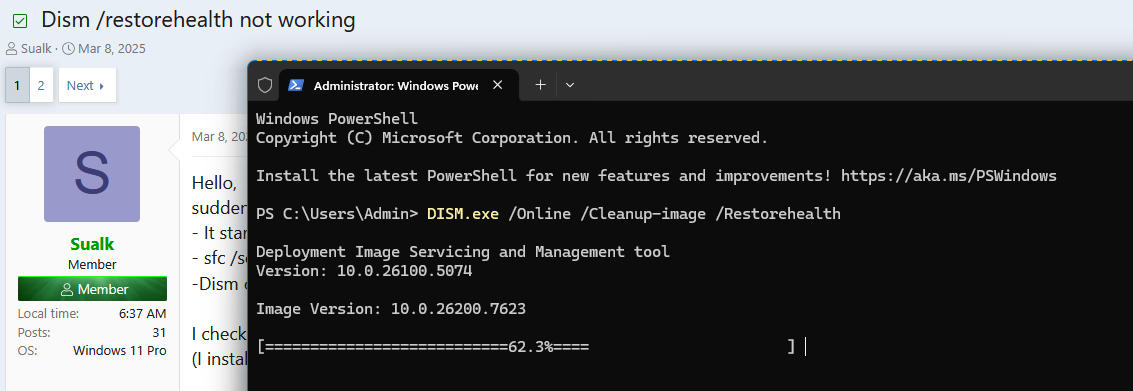
- It starts but then gets stuck at 62.3% ...
- sfc /scannow works fine ... no problems detected.
-Dism checkhealth and scanhealth also work.

I checked online with varying results ... no fix or very technical ... let alone re-install all.
(I installed 24H2 just a week ago)

Can I just ignore it since sfc works/no issues?
until Microsoft fixes it?

Any suggestions, please!

Thanks

Win11 24H2, build 26100.3323
 

My Computer My Computer

At a glance

Windows 11 ProIntel(R) Core(TM) i9-10900K CPU @ 3.70GHz 3.7...16.0GB Dual-Channel DDR4 @ 1066MHz (15-15-15-362047MB NVIDIA GeForce RTX 2060
OS
Windows 11 Pro
Computer type
PC/Desktop
Manufacturer/Model
Custom Built
CPU
Intel(R) Core(TM) i9-10900K CPU @ 3.70GHz 3.70 GHz
Motherboard
Asus TUF GAMING Z590-PLUS (LGA1200)
Memory
16.0GB Dual-Channel DDR4 @ 1066MHz (15-15-15-36
Graphics Card(s)
2047MB NVIDIA GeForce RTX 2060
Sound Card
NVIDIA High Definition Audio - Realtek High Definition Audio
Monitor(s) Displays
Asus Pro Art PA 246 / Asus VB 195
Screen Resolution
1280 x 1024
Hard Drives
1863GB Seagate ST2000DM001-9YN164 (SATA )
238GB Samsung SSD 850 PRO 256GB (SATA (SSD)
232GB Samsung SSD 970 EVO Plus 250GB (Unknown (SSD))
Case
Corsair
Internet Speed
10 / 1
Browser
Edge
Hello,
suddenly Dism /online /cleanup-image /restorehealth is no longer working!
- It starts but then gets stuck at 62.3% ...
- sfc /scannow works fine ... no problems detected.
-Dism checkhealth and scanhealth also work.

I checked online with varying results ... no fix or very technical ... let alone re-install all.
(I installed 24H2 just a week ago)

Can I just ignore it since sfc works/no issues?
until Microsoft fixes it?

Any suggestions, please!

Thanks

Win11 24H2, build 26100.3323
 

My Computer My Computer

At a glance

Windows 11 ProIntel(R) Core(TM) i9-10900K CPU @ 3.70GHz 3.7...16.0GB Dual-Channel DDR4 @ 1066MHz (15-15-15-362047MB NVIDIA GeForce RTX 2060
OS
Windows 11 Pro
Computer type
PC/Desktop
Manufacturer/Model
Custom Built
CPU
Intel(R) Core(TM) i9-10900K CPU @ 3.70GHz 3.70 GHz
Motherboard
Asus TUF GAMING Z590-PLUS (LGA1200)
Memory
16.0GB Dual-Channel DDR4 @ 1066MHz (15-15-15-36
Graphics Card(s)
2047MB NVIDIA GeForce RTX 2060
Sound Card
NVIDIA High Definition Audio - Realtek High Definition Audio
Monitor(s) Displays
Asus Pro Art PA 246 / Asus VB 195
Screen Resolution
1280 x 1024
Hard Drives
1863GB Seagate ST2000DM001-9YN164 (SATA )
238GB Samsung SSD 850 PRO 256GB (SATA (SSD)
232GB Samsung SSD 970 EVO Plus 250GB (Unknown (SSD))
Case
Corsair
Internet Speed
10 / 1
Browser
Edge
Hello All,
I know, it's been a while, but ...
as suggested a few times way back I tried the 'patience' thing.
I just let it sit where stuck, as usual at 62.3%, walked away for an hour and when I came back ... voila!!
... it had finished / task completed / 100%.
So, to be patient works.
I don't know why it takes time ... it didn't do that before 24H2 ... but at least it works.
I experienced no other negative effects throughout Win11 / sfc /scannow always good, but
it just bugs me.
Microsoft techies should, however, fix this.

Cheers
 

My Computer My Computer

At a glance

Windows 11 ProIntel(R) Core(TM) i9-10900K CPU @ 3.70GHz 3.7...16.0GB Dual-Channel DDR4 @ 1066MHz (15-15-15-362047MB NVIDIA GeForce RTX 2060
OS
Windows 11 Pro
Computer type
PC/Desktop
Manufacturer/Model
Custom Built
CPU
Intel(R) Core(TM) i9-10900K CPU @ 3.70GHz 3.70 GHz
Motherboard
Asus TUF GAMING Z590-PLUS (LGA1200)
Memory
16.0GB Dual-Channel DDR4 @ 1066MHz (15-15-15-36
Graphics Card(s)
2047MB NVIDIA GeForce RTX 2060
Sound Card
NVIDIA High Definition Audio - Realtek High Definition Audio
Monitor(s) Displays
Asus Pro Art PA 246 / Asus VB 195
Screen Resolution
1280 x 1024
Hard Drives
1863GB Seagate ST2000DM001-9YN164 (SATA )
238GB Samsung SSD 850 PRO 256GB (SATA (SSD)
232GB Samsung SSD 970 EVO Plus 250GB (Unknown (SSD))
Case
Corsair
Internet Speed
10 / 1
Browser
Edge
Ok, if you check the "similar threads" below, you'll see lots of people having the same problem.

First, Restore health freezing at 62.3%.... it's not hung, it's not frozen, it's not "stuck". If you look at your network stats in task manager you will see it's downloading files, and/or packages from Microsoft servers to replace their equivalents on your system that have been corrupted for one reason or another.

This process can take a long time. The last time I did it the throughput rate was only around 2Mb/sec which is really slow. I suspect their servers are over-subscribed accounting for the slow download speeds. Be patient, this process could take hours! Once these packages are downloaded the system will try to replace the corrupted packages on your system.

Hopefully you will get a "completed" message that says everything is OK, but sometimes you get messages that say the system could not be repaired. If you check the RESTOREHEALTH log at C:\Windows\Logs\DISM (wade through it as it's a huge file if something has failed) you will see where it failed. I have had "Source files or Packages not found", or "Source files/packages corrupted" which is scary as you'd think MS would maintain pristine baselines. What I have found is that if you try again, sometime later (maybe hours or even days) you may have a successful "rebuild", I did finally. I have no idea why this happens, I can only surmise it's being corrupted as a function of the download process or something your system may be doing in the background. I'd recommend not doing anything else while RESTOREHEALTH is running. Just be paitent and let it do it's thing.

If you do get a "successful repair" and it says everything is OK, you need to run SFC /scannow at least twice, maybe even 3 times to ensure you still have no corrupted files. You can check that log at C:\Windows\Logs\CBS, but be aware, this file and the DISM file get overwritten every time you run the commands. If you want to save these files for furthur troubleshooting purposes I'd suggest you change the file names to CBS1 or DISM1 (incrementally) so they don't get overwritten before you run RESTOREHEALTH or SCANNOW again.

I have no idea what might cause your system files to get corrupted, but it happend to me after installing an update, and it took 3 tries of RESTORE HEALTH to fix it.

Once you have a healthy system I'd recommend a backup.

Jabiru
 
Last edited:

My Computers My Computers

  • At a glance

    Host: Windows 11 Pro 24H2AMD Ryzen 9 7945HX2X 16GB DDR5-5200MTs (32GB)AMD Radeon Pro WX5100 Workstation
    OS
    Host: Windows 11 Pro 24H2
    Computer type
    PC/Desktop
    Manufacturer/Model
    Custom User Build
    CPU
    AMD Ryzen 9 7945HX
    Motherboard
    Minisforum BD795i SE
    Memory
    2X 16GB DDR5-5200MTs (32GB)
    Graphics Card(s)
    AMD Radeon Pro WX5100 Workstation
    Sound Card
    Integrated AMD High Definition Audio CODEC
    Monitor(s) Displays
    2X LG 32UN880-A
    Screen Resolution
    3840x2160
    Hard Drives
    2X NVMe 1TB SSDs
    PSU
    Corsair SF450
    Case
    Fractal Design Terra
    Cooling
    Noctua FS-A12
    Keyboard
    Logitech K270 KB/Mouse Combo
    Mouse
    Logitech K270 KB/Mouse Combo
    Internet Speed
    800Mb
    Browser
    Firefox, Edge, Edge Chromium
    Antivirus
    MalwareBytes, MS Defender
    Other Info
    2x Seagate 2TB external USB HDD, 1x 5TB external USB WD Passport HDD, 1x externql USB WD SATA 1TB Green SATA SSD
  • At a glance

    Windows 11 HomeRyzen 7 4700U @ 2GHz-->4.2GHz Boost16GB LPD DDR4XAMD Radeon (Renoir) Vega
    Operating System
    Windows 11 Home
    Computer type
    Laptop
    Manufacturer/Model
    Acer Swift 3 SF314-42 R3U5
    CPU
    Ryzen 7 4700U @ 2GHz-->4.2GHz Boost
    Motherboard
    RO Kona_RN
    Memory
    16GB LPD DDR4X
    Graphics card(s)
    AMD Radeon (Renoir) Vega
    Sound Card
    ATI/AMD Renoir/Van Gough/Cezanne/Rembrandt HD Audio Controller
    Monitor(s) Displays
    IPS LCD Integrated Chi Mei CMN14D4
    Screen Resolution
    1920x1080
    Hard Drives
    Hynix 512GB NVMe (PCIe 4.0)
    PSU
    Ext 19v
    Case
    Integrated Magnesium
    Cooling
    Therm internal fan
    Keyboard
    Integrated
    Mouse
    Jellycomb
    Internet Speed
    800MB
    Browser
    Firefox, Edge Chromium
    Antivirus
    Malwarebytes, MS Defender
    Other Info
    External USB-C 1Gb Ethernet connection
Thanks, Jabiru, for the confirmation and extra info.
Yes, it said "completed"
I ran sfc several times after that and never had any corrupted files/repairs.
So, I guess, I'm good.
However, I will run restorehealth again and see how it reacts after it completed yesterday.

Cheers
 

My Computer My Computer

At a glance

Windows 11 ProIntel(R) Core(TM) i9-10900K CPU @ 3.70GHz 3.7...16.0GB Dual-Channel DDR4 @ 1066MHz (15-15-15-362047MB NVIDIA GeForce RTX 2060
OS
Windows 11 Pro
Computer type
PC/Desktop
Manufacturer/Model
Custom Built
CPU
Intel(R) Core(TM) i9-10900K CPU @ 3.70GHz 3.70 GHz
Motherboard
Asus TUF GAMING Z590-PLUS (LGA1200)
Memory
16.0GB Dual-Channel DDR4 @ 1066MHz (15-15-15-36
Graphics Card(s)
2047MB NVIDIA GeForce RTX 2060
Sound Card
NVIDIA High Definition Audio - Realtek High Definition Audio
Monitor(s) Displays
Asus Pro Art PA 246 / Asus VB 195
Screen Resolution
1280 x 1024
Hard Drives
1863GB Seagate ST2000DM001-9YN164 (SATA )
238GB Samsung SSD 850 PRO 256GB (SATA (SSD)
232GB Samsung SSD 970 EVO Plus 250GB (Unknown (SSD))
Case
Corsair
Internet Speed
10 / 1
Browser
Edge
Just an FYI some simple mods or customizations may trigger SFC errors if it changes what's considered a system file. Case in point if you change your Windows startup sound to a custom sound file SFC will trigger an error every time and change it back to the default sound. I consider it a minor annoyance and just change it back but something to just be aware of.
 

My Computers My Computers

  • At a glance

    Windows 11 25H2Intel Core Ultra 9 275HX (24-Core)64GB DDR5 6400MT/sNVIDIA GeForce RTX 5080 and Intel UHD Graphics
    OS
    Windows 11 25H2
    Computer type
    Laptop
    Manufacturer/Model
    Alienware 18 Area-51
    CPU
    Intel Core Ultra 9 275HX (24-Core)
    Motherboard
    Alienware
    Memory
    64GB DDR5 6400MT/s
    Graphics Card(s)
    NVIDIA GeForce RTX 5080 and Intel UHD Graphics
    Sound Card
    Onboard, Realtek high-performance Audio chips (ALC3329 & ALC1708))
    Monitor(s) Displays
    300HZ 18-inch QHD 500 nit Comfort View+
    Screen Resolution
    2560 x 1600
    Hard Drives
    2TB NVMe M.2 PCIe Gen 5 SSD
    Case
    Magnesium Alloy
    Cooling
    Advanced Cryo-Tech Quad-Fan Cooling system & large vapor chamber
    Keyboard
    Cherry MX ultra low profile mechanical keyboard with per key AlienFX RGB lighting
    Mouse
    Logitech MX Master 4
    Browser
    Vivaldi (main), Firefox, Chrome, Edge
    Antivirus
    MS Defender and Malwarebytes Free
  • At a glance

    Windows 11 25H2Qualcomm Snapdragon X Elite (12 Core) ARM bas...16GB LPDDR5Qualcomm Adreno X1-85
    Operating System
    Windows 11 25H2
    Computer type
    Laptop
    Manufacturer/Model
    Microsoft Surface Laptop 7
    CPU
    Qualcomm Snapdragon X Elite (12 Core) ARM based CPU
    Motherboard
    Microsoft Corp.
    Memory
    16GB LPDDR5
    Graphics card(s)
    Qualcomm Adreno X1-85
    Sound Card
    Omnisonic speakers with Dolby Atmos spatial sound
    Monitor(s) Displays
    120 Hz 13.8-inch 600 nit PixelSense Flow touchscreen
    Screen Resolution
    2304x1536
    Hard Drives
    1TB NVMe Gen 4 SSD
    Case
    Anodized Aluminum
    Cooling
    Traditional active cooling fan system
    Keyboard
    Mechanical QWERTY, backlit when in use
    Mouse
    Logitech MX Master 4 and Surface Arc Mouse
    Browser
    Vivaldi (main), Firefox, Chrome, Edge
    Antivirus
    MS Defender and Malwarebytes Free
PS: I forgot to mention that when it got "stuck" (in the past) I restarted the computer and it showed the typical scenario after an update / restart "updates are on the way" ... so it confirms when you say 'it's not stuck ... it's downloading'

Also: just a minute ago I did the dism / restorehealth again ... it motored right through ... never stopped at 62.3% ... as it should be.

Problem solved
 

My Computer My Computer

At a glance

Windows 11 ProIntel(R) Core(TM) i9-10900K CPU @ 3.70GHz 3.7...16.0GB Dual-Channel DDR4 @ 1066MHz (15-15-15-362047MB NVIDIA GeForce RTX 2060
OS
Windows 11 Pro
Computer type
PC/Desktop
Manufacturer/Model
Custom Built
CPU
Intel(R) Core(TM) i9-10900K CPU @ 3.70GHz 3.70 GHz
Motherboard
Asus TUF GAMING Z590-PLUS (LGA1200)
Memory
16.0GB Dual-Channel DDR4 @ 1066MHz (15-15-15-36
Graphics Card(s)
2047MB NVIDIA GeForce RTX 2060
Sound Card
NVIDIA High Definition Audio - Realtek High Definition Audio
Monitor(s) Displays
Asus Pro Art PA 246 / Asus VB 195
Screen Resolution
1280 x 1024
Hard Drives
1863GB Seagate ST2000DM001-9YN164 (SATA )
238GB Samsung SSD 850 PRO 256GB (SATA (SSD)
232GB Samsung SSD 970 EVO Plus 250GB (Unknown (SSD))
Case
Corsair
Internet Speed
10 / 1
Browser
Edge
Ok, if you check the "similar threads" below, you'll see lots of people having the same problem.
I just did a dism.exe /Online /Cleanup-image /Restorehealth for the first time ever. I have never done one in my W10 either so this pause at 62.3% was new for me. I did not know how to proceed so I searched Google and learned that the pause and not only the pause but pausing at 62.3% is normal. I am replying to your post so you and other members know that this is still happening. My computer is not powerful, the whole process probably took about 25 minutes to complete. I was reading your post and I was gonna look at the Network thing you mentioned but then noticed that Restorehealth had finished with the successful result.

Bo
 

My Computer My Computer

At a glance

Windows1116GB
OS
Windows11
Computer type
PC/Desktop
Manufacturer/Model
HP
Memory
16GB
Keyboard
HP 310
Mouse
HP
Browser
Firefox
Yep that's normal.
 

My Computers My Computers

  • At a glance

    Windows 11 Enterprise 25H2 26200 7462Intel XEON E5-2699 v364GB Teamgroup UD4-3600NVIDIA GeForce GTX 1080 Ti
    OS
    Windows 11 Enterprise 25H2 26200 7462
    Computer type
    PC/Desktop
    Manufacturer/Model
    Custom Build
    CPU
    Intel XEON E5-2699 v3
    Motherboard
    ASUS X99-A
    Memory
    64GB Teamgroup UD4-3600
    Graphics Card(s)
    NVIDIA GeForce GTX 1080 Ti
    Sound Card
    Integrated
    Monitor(s) Displays
    ACER X34 Predator
    Screen Resolution
    3440 x 1440
    Hard Drives
    Crucial CT1000P 3P SSD8 1TB
    Crucial CT1000 BX500 SSD 1TB
    PSU
    GameMax Pro
    Case
    Fractal Design
    Cooling
    Corsair H110iGT + 6 140mm Fans
    Keyboard
    Corsair K4
    Mouse
    G-Skill G502
    Internet Speed
    300MBs
    Browser
    Chrome
    Antivirus
    OEM
    Other Info
    ASUS RT-AC87U Router
  • At a glance

    25H2 26200.50748GB
    Operating System
    25H2 26200.5074
    Computer type
    Laptop
    Manufacturer/Model
    ASUS X555LA
    Memory
    8GB
    Browser
    Chrome
    Antivirus
    OEM
I believe the big delay is likely downloading large updates during the process. The /Online parameter indicates it's getting anything it needs on-line. There are also options for larger organizations to get the files from a central server in their network, probably much faster. If you're Internet is slow, it can take quite a while at the 62.3% stop. I have gigabit connections, normally that delay is pretty quick, but I've seen five minutes or so at that point.
 

My Computers My Computers

  • At a glance

    Win 11 Pro 25H2, Build 26200.8894Intel Core i5 1450064GB DDR4GeForce RTX 4060
    OS
    Win 11 Pro 25H2, Build 26200.8894
    Computer type
    PC/Desktop
    Manufacturer/Model
    Home Brew
    CPU
    Intel Core i5 14500
    Motherboard
    Gigabyte B760M G P WIFI
    Memory
    64GB DDR4
    Graphics Card(s)
    GeForce RTX 4060
    Sound Card
    Chipset Realtek
    Monitor(s) Displays
    LG 45" Ultragear, Acer 24" 1080p
    Screen Resolution
    5120x1440, 1920x1080
    Hard Drives
    Crucial P310 2TB 2280 PCIe Gen4 3D NAND NVMe M.2 SSD (O/S)
    Silicon Power 2TB US75 NVMe PCIe Gen4 M.2 2280 SSD (backup)
    Crucial BX500 2TB 3D NAND (2nd backup)
    Seagate 4TB Ironwolf, rotating HDD archive files
    External off-line backup Drives: 2 NVMe 4TB drives in external enclosures
    PSU
    Thermaltake Toughpower GF3 750W
    Case
    LIAN LI LANCOOL 216 E-ATX PC Case
    Cooling
    Lots of fans!
    Keyboard
    Microsoft Comfort Curve 2000
    Mouse
    Logitech G305
    Internet Speed
    Verizon FiOS 1GB
    Browser
    Firefox
    Antivirus
    Malware Bytes & Windows Defender Security
  • At a glance

    Win 11 Pro 25H2, Build 26200.8894Intel Core i5 1440032GB DDR5Intel 700 Embedded GPU
    Operating System
    Win 11 Pro 25H2, Build 26200.8894
    Computer type
    PC/Desktop
    Manufacturer/Model
    Home Brew
    CPU
    Intel Core i5 14400
    Motherboard
    Gigabyte B760M DS3H AX
    Memory
    32GB DDR5
    Graphics card(s)
    Intel 700 Embedded GPU
    Sound Card
    Realtek Embedded
    Monitor(s) Displays
    27" HP 1080p
    Screen Resolution
    1920x1080
    Hard Drives
    Crucial P310 2TB 2280 PCIe Gen4 eD NAND PCIe SSD
    Samsung EVO 990 2TB NVMe Gen4 SSD
    Samsung 2TB SATA SSD
    PSU
    Thermaltake Smart BM3 650W
    Case
    Okinos Micro ATX Case
    Cooling
    Fans
    Keyboard
    Microsoft Comfort Curve 2000
    Mouse
    Logitech G305
    Internet Speed
    Verizon FiOS 1GB
    Browser
    Firefox
    Antivirus
    Malware Bytes & Windows Defender Security
  • Nimo N171 17" Laptop, (Intel i3-1215U, 16GB RAM, 2TB NVMe, Win11 Pro)
    Acemagic Vista Mini PC V1 (Intel N150, 16GB RAM, 1TB NVMe, Win11 Pro)
    HP ENVY h8-1540t, (24GB RAM, 2TB SSD, 2TB HDD, Win11 Pro)

My Computers My Computers

  • At a glance

    Windows 11Intel Core i5-840016GBIntel UHD Graphics 630
    OS
    Windows 11
    Computer type
    PC/Desktop
    Manufacturer/Model
    Microsoft
    CPU
    Intel Core i5-8400
    Motherboard
    ASUS PRIME H370-PLUS
    Memory
    16GB
    Graphics Card(s)
    Intel UHD Graphics 630
    Sound Card
    On board
    Monitor(s) Displays
    Samsung SyncMaster 2043BWX
    Screen Resolution
    1680 x 1050
    Hard Drives
    Samsung SSD 850 256GB
    WDC 1TB NVMe
    WD 3TB external USB drive
    PSU
    I don't remember
    Case
    Corsair something-or-other
    Cooling
    Air CPU + 2 case fans
    Keyboard
    DAS S Pro (Cherry Brown)
    Mouse
    Logitech USB of some sort
  • At a glance

    Windows 10 21H1i5-840016GBon board
    Operating System
    Windows 10 21H1
    Computer type
    PC/Desktop
    Manufacturer/Model
    Homegrown
    CPU
    i5-8400
    Motherboard
    ASUS PRIME H370-PLUS
    Memory
    16GB
    Graphics card(s)
    on board
    Sound Card
    on board
    Monitor(s) Displays
    Samsung SyncMaster 2043 BWX
    Screen Resolution
    1280 x 1024
    Hard Drives
    Samsung SSD 850 EVO 250GB, WDS100T3X0C-00SJG0
    PSU
    don't remember
    Case
    Corsair Carbide 100r
    Cooling
    stock
    Keyboard
    DAC something or other
    Mouse
    Logitech M-U-0007
    Internet Speed
    80/6 Mbs
    Browser
    FireFox
    Antivirus
    Kaspersky Internet security
I believe the big delay is likely downloading large updates during the process. The /Online parameter indicates it's getting anything it needs on-line. There are also options for larger organizations to get the files from a central server in their network, probably much faster. If you're Internet is slow, it can take quite a while at the 62.3% stop. I have gigabit connections, normally that delay is pretty quick, but I've seen five minutes or so at that point.

The /Online switch "specifies that the action is to be taken on the operating system that is currently running," not that it should get files from the Internet.


DISM will look online for files on its own, unless you specify a source, configure settings not to do that, or use the LimitAccess switch.


My Computer My Computer

At a glance

Windows 11 Enterprise 25H2 [rev. 8893]
OS
Windows 11 Enterprise 25H2 [rev. 8893]
"DISM /online" refers to working on the live Windows image.

/limitaccess is what prevents DISM from fetching temporary repair files from the web.

In previous Windows releases, DISM didn't have the ability to download a repair copy of Windows onto the local system. You were screwed if your corrupted system didn't have an already prepared ISO for DISM to read from. Now that it can download a copy, it's very helpful to non-technical users but the process takes forever to run.

DISM is severely limited in that it can only show a single progress bar, and not a longer series of messages like:

Downloading a repair copy of Windows...
1% done
25% done
100% done
Starting repairs...

So many people lose their patience and don't allow DISM to follow through to the end.
 

My Computer My Computer

At a glance

Windows 7
OS
Windows 7
Just wait it out. Meanwhile, you can run the PowerShell command below to keep an eye on whether it really is stuck or still fetching its stuff from the Microsoft server thingy at (62.3% of) the speed of a turtle. If you don't like turtles, then /restorehealth doesn't work so, it's not placebo, it's just how it was designed by Microsoft.

Get-Content C:\Windows\Logs\CBS\CBS.log -tail 10 -wait
 

My Computers My Computers

  • At a glance

    11 Homei7 13650HX16GB DDR5GeForce RTX 4060 Mobile
    OS
    11 Home
    Computer type
    Laptop
    Manufacturer/Model
    Asus TUF Gaming F16 (2024)
    CPU
    i7 13650HX
    Memory
    16GB DDR5
    Graphics Card(s)
    GeForce RTX 4060 Mobile
    Sound Card
    Eastern Electric MiniMax DAC Supreme; Emotiva UMC-200; Astell & Kern AK240
    Monitor(s) Displays
    Sony Bravia XR-55X90J
    Screen Resolution
    3840×2160
    Hard Drives
    512GB SSD internal
    37TB external
    PSU
    Li-ion
    Cooling
    2× Arc Flow Fans, 4× exhaust vents, 5× heatpipes
    Keyboard
    Logitech K800
    Mouse
    Logitech G402
    Internet Speed
    30Mbit/s up, 500Mbit/s down
    Browser
    FF
    Antivirus
    What's an antivirus?
  • At a glance

    11 Homei5 1135G716GB DDR4Intel Iris Xe
    Operating System
    11 Home
    Computer type
    Laptop
    Manufacturer/Model
    Medion S15450
    CPU
    i5 1135G7
    Memory
    16GB DDR4
    Graphics card(s)
    Intel Iris Xe
    Sound Card
    Eastern Electric MiniMax DAC Supreme; Emotiva UMC-200; Astell & Kern AK240
    Monitor(s) Displays
    Sony Bravia XR-55X90J
    Screen Resolution
    3840×2160
    Hard Drives
    2TB SSD internal
    37TB external
    PSU
    Li-ion
    Keyboard
    Logitech K800
    Mouse
    Logitech G402
    Internet Speed
    30Mbit/s up, 500Mbit/s down
    Browser
    FF
Mine is also stuck at 62.3% now. :( I guess I'll leave my PC on overnight instead of putting it on Standby.
Ia4Tw5A.png
 

My Computer My Computer

At a glance

Windows 11 Pro
OS
Windows 11 Pro
I just run this script after every patch Tuesday in Command Prompt with Admin Privileges

:: Elevation script from StackOverflow
:: How can I auto-elevate my batch file, so that it requests from UAC administrator rights if required?

:: Begin Elevation script

@ECHO OFF
setlocal EnableDelayedExpansion

::net file to test privileges, 1>NUL redirects output, 2>NUL redirects errors
NET FILE 1>NUL 2>NUL
if '%errorlevel%' == '0' ( goto START ) else ( goto getPrivileges )

:getPrivileges
if '%1'=='ELEV' ( goto START )

set "batchPath=%~f0"
set "batchArgs=ELEV"

::Add quotes to the batch path, if needed
set "script=%0"
set script=%script:"=%
IF '%0'=='!script!' ( GOTO PathQuotesDone )
set "batchPath=""%batchPath%"""
:PathQuotesDone

::Add quotes to the arguments, if needed.
:ArgLoop
IF '%1'=='' ( GOTO EndArgLoop ) else ( GOTO AddArg )
:AddArg
set "arg=%1"
set arg=%arg:"=%
IF '%1'=='!arg!' ( GOTO NoQuotes )
set "batchArgs=%batchArgs% "%1""
GOTO QuotesDone
:NoQuotes
set "batchArgs=%batchArgs% %1"
:QuotesDone
shift
GOTO ArgLoop
:EndArgLoop

::Create and run the vb script to elevate the batch file
ECHO Set UAC = CreateObject^("Shell.Application"^) > "%temp%\OEgetPrivileges.vbs"
ECHO UAC.ShellExecute "cmd", "/c ""!batchPath! !batchArgs!""", "", "runas", 1 >> "%temp%\OEgetPrivileges.vbs"
"%temp%\OEgetPrivileges.vbs"
exit /B

:START
::Remove the elevation tag and set the correct working directory
IF '%1'=='ELEV' ( shift /1 )
cd /d %~dp0

::Do your adminy thing here...

:: End Elevation Script
:: Begin cleanup script

start /B /wait rundll32.exe pnpclean.dll,RunDLL_PnpClean /drivers/maxclean
start /B /wait dism /Online /Cleanup-Image /CheckHealth
start /B /wait sfc /scannow
start /B /wait dism /Online /Cleanup-Image /RestoreHealth
start /B /wait dism /online /Cleanup-Image /Startcomponentcleanup /resetbase

pause
 

My Computer My Computer

At a glance

Windows 11 ProIntel Core i9 12900KFCorsair 64GB DDR5 Vengeance C40 5200MhzASUS GeForce RTX 3090 ROG Strix OC 24GB
OS
Windows 11 Pro
Computer type
PC/Desktop
Manufacturer/Model
Custom Build
CPU
Intel Core i9 12900KF
Motherboard
ASUS ROG Maximus Z690 Hero
Memory
Corsair 64GB DDR5 Vengeance C40 5200Mhz
Graphics Card(s)
ASUS GeForce RTX 3090 ROG Strix OC 24GB
Sound Card
OnBoard
Monitor(s) Displays
Acer Predator XB323UGP 32" QHD G-SYNC-C 144Hz 1MS IPS LED
Screen Resolution
2560 x 1440
Hard Drives
1x Samsung 980 Pro Series Gen4 250GB M.2 NVMe
1x Samsung 980 Pro Series Gen4 500GB M.2 NVMe
2x Samsung 980 Pro Series Gen4 2TB M.2 NVMe
PSU
Corsair AX1200i 1200W 80PLUS Titanium Modular
Case
Corsair 4000D Black Case w/ Tempered Glass Side Panel
Cooling
Noctua NH-U12A Chromax Black CPU Cooler, 4x Noctua 120mm Fans
Keyboard
Logitech MK545
Mouse
Logitech MX Master 3
Internet Speed
Fixed Wireless 150mbps/75mbps
Browser
Firefox
Antivirus
Kaspersky
Other Info
Thrustmaster TS-PC RACER
Fanatec CSL Elite Pedals with the Load Cell Kit
Yamaha Amp with Bose Speakers
Update: My DISM action finished about 15 minutes after I posted my screenshot.
 

My Computer My Computer

At a glance

Windows 11 Pro
OS
Windows 11 Pro
If you're wondering whether DISM restorehealth is actually doing anything sitting at 62.3% (or whatever number)...

Open a powershell command window as administrator, then paste in the following command:

Get-Content C:\Windows\Logs\CBS\CBS.log -tail 10 -wait

and leave this window open.

You may see various messages right away, or more likely if you've been waiting stuck for some time, you may see downloading message of the same item (e.g. 47 of 100, or similar) over and over every two or three seconds. MS download servers can be very very slow at times, it's not your PC.

As long as you're seeing a message issued with some frequency (new message or same downloading message) then DISM is working. Just let it run and hope it finishes in some minutes, hours, or even a few days on very old hardware.
 

My Computer My Computer

At a glance

Win1112 Gen Intel I732GIntel Iris
OS
Win11
Computer type
Laptop
Manufacturer/Model
Surface Laptop 5
CPU
12 Gen Intel I7
Memory
32G
Graphics Card(s)
Intel Iris
Sound Card
Realtek
Screen Resolution
2496x1664
Hard Drives
1T SK Hynix SSD

Latest Support Threads

Back
Top Bottom





