Does a SSD case that holds NVME drive to a SATA 3 port exist?


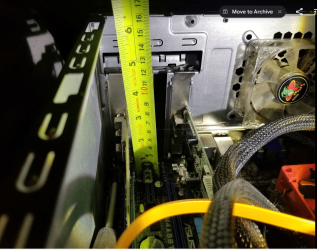
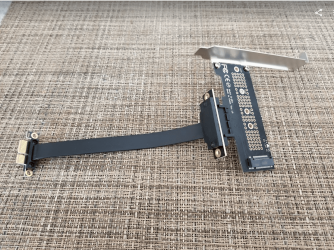
Opened case, card has 7mm space between slot top and the fan, so riser cable will fit
1709737806547.png
 

My Computer My Computer

At a glance

windows 11old AMD B958gb
OS
windows 11
Computer type
PC/Desktop
Manufacturer/Model
some kind of old ASUS MB
CPU
old AMD B95
Motherboard
ASUS
Memory
8gb
Hard Drives
ssd WD 500 gb
And maybe 15 cm cable is good
Might go smaller to 10 or bigger to 20

Cable will pass between fan and the pci tuner card going upwards and plug into the NVME adapter card, and I will have to make it so wont flop onto something shorting out.

1709737930992.png
 

My Computer My Computer

At a glance

windows 11old AMD B958gb
OS
windows 11
Computer type
PC/Desktop
Manufacturer/Model
some kind of old ASUS MB
CPU
old AMD B95
Motherboard
ASUS
Memory
8gb
Hard Drives
ssd WD 500 gb
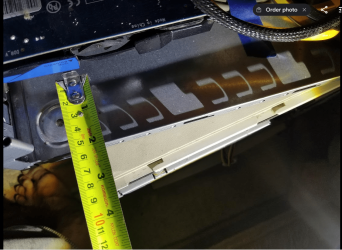
Wide case has room to fit it in
1709738206911.png
 

My Computer My Computer

At a glance

windows 11old AMD B958gb
OS
windows 11
Computer type
PC/Desktop
Manufacturer/Model
some kind of old ASUS MB
CPU
old AMD B95
Motherboard
ASUS
Memory
8gb
Hard Drives
ssd WD 500 gb
I have an old ASUS P6T DELUXE V2 LGA1366 MOTHERBOARD, it won't boot from a card with an NVMe M.2, but it does see it, and I can use it as a slave drive.
 

My Computer My Computer

At a glance

Windows XP (Stable, iconic) 7/8.1/10/ Tiny11 ...Intel i7 4790K32GB DDR3 1600 MHzATI Radeon HD 7770 2GB GDDR5
OS
Windows XP (Stable, iconic) 7/8.1/10/ Tiny11 25H2
Computer type
PC/Desktop
Manufacturer/Model
Alienware PC
CPU
Intel i7 4790K
Motherboard
ASROCK Z97 EXTREME4
Memory
32GB DDR3 1600 MHz
Graphics Card(s)
ATI Radeon HD 7770 2GB GDDR5
Sound Card
Onboard
Monitor(s) Displays
SAMSUNG UE57 Series 28-Inch 4K UHD
Hard Drives
SAMSUNG 860 EVO 250 gigabyte SSD
PSU
EVGA 850 watt
Case
Alienware Area 51 Black Tower Case
Keyboard
HyperX - Alloy Elite 2 Mechanical Gaming Keyboard.
Mouse
Microsoft Wireless
Internet Speed
1.2 GHz
Browser
Chrome..Edge..Firefox
I have an old ASUS P6T DELUXE V2 LGA1366 MOTHERBOARD, it won't boot from a card with an NVMe M.2, but it does see it, and I can use it as a slave drive.
Bios wont see but windows does AFAIK
 

My Computer My Computer

At a glance

windows 11old AMD B958gb
OS
windows 11
Computer type
PC/Desktop
Manufacturer/Model
some kind of old ASUS MB
CPU
old AMD B95
Motherboard
ASUS
Memory
8gb
Hard Drives
ssd WD 500 gb
I have seen m.2 drives to sata adapters
Have not seen NVME to Sata adapters.

I was thinking I could buy an NVME, put it into an adapter and temporarily used it as a SATA drive in an old PC (connect to mb using sata cable)
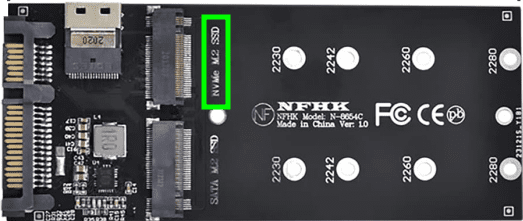
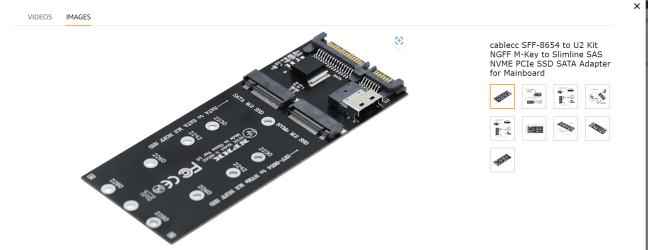
They should exist, or at least they show it. Something like this, though I haven't tested it:
1709739189044.png
 

My Computers My Computers

  • At a glance

    Windows 11 Proi3 8109U16GB DDR4 @2400Intel Iris Plus Graphics 655
    OS
    Windows 11 Pro
    Computer type
    PC/Desktop
    Manufacturer/Model
    Intel NUC
    CPU
    i3 8109U
    Motherboard
    Intel
    Memory
    16GB DDR4 @2400
    Graphics Card(s)
    Intel Iris Plus Graphics 655
    Sound Card
    Intel / Realtek HD Audio
    Monitor(s) Displays
    LG-32ML600M
    Screen Resolution
    1920x1080
    Hard Drives
    Intel SSD 250GB + Samsung QVO SSD 1TB
    PSU
    Adapter
    Cooling
    The usual NUC airflow
    Keyboard
    Logitech Orion G610
    Mouse
    SteelSeries Rival 100 Red
    Internet Speed
    Good enough
    Browser
    Chromium, Edge, Firefox
    Antivirus
    Windows Defender
  • At a glance

    CentOS 9 Stream / Alma / Rocky / FedoraIntel i7 4800MQ32GB DDR3 @1600NVIDIA Quadro K2100M
    Operating System
    CentOS 9 Stream / Alma / Rocky / Fedora
    Computer type
    Laptop
    Manufacturer/Model
    TOSHIBA
    CPU
    Intel i7 4800MQ
    Motherboard
    TOSHIBA
    Memory
    32GB DDR3 @1600
    Graphics card(s)
    NVIDIA Quadro K2100M
    Sound Card
    Realtek HD Audio
    Monitor(s) Displays
    Built-in
    Screen Resolution
    1920x1080

My Computer My Computer

At a glance

windows 11old AMD B958gb
OS
windows 11
Computer type
PC/Desktop
Manufacturer/Model
some kind of old ASUS MB
CPU
old AMD B95
Motherboard
ASUS
Memory
8gb
Hard Drives
ssd WD 500 gb
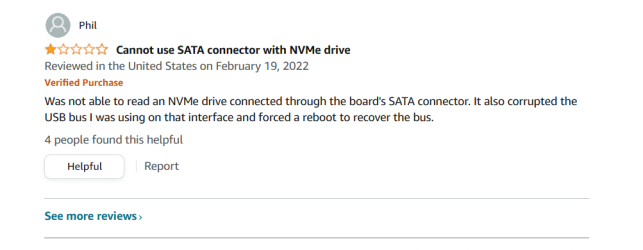
I dont know I see a review said does not work
View attachment 89333
I quote from the Amazon page:
  • One M.2 PCIe SSD in 2280, 2260, 2242 and 2230 format can be connected and used as a replacement for a 2.5″ HDD. The converter can be installed into the system internally through the SFF-8654 Slimeline interface.
  • One M.2 SATA SSD in 2280, 2260, 2242 and 2230 format can be connected and used as a replacement for a 2.5″ HDD. The converter can be installed into the system internally through the SATA 22pin interface.
Unless you have a SFF-8654 (SAS) port available, no NVME, apparently.
 

My Computers My Computers

  • At a glance

    Windows 11 26200.8728Amd Threadripper 7970X128GB (4 X 32) G.Skill DDR5 6400 (RDIMM)Gigabyte RTX 4090 OC
    OS
    Windows 11 26200.8728
    Computer type
    PC/Desktop
    Manufacturer/Model
    homebuilt
    CPU
    Amd Threadripper 7970X
    Motherboard
    Gigabyte TRX50 Aero D Rev. 1.0
    Memory
    128GB (4 X 32) G.Skill DDR5 6400 (RDIMM)
    Graphics Card(s)
    Gigabyte RTX 4090 OC
    Sound Card
    none (USB to speakers), Realtek
    Monitor(s) Displays
    Innocn 32" OLED
    Screen Resolution
    3840 X 2160 @ 60Hz
    Hard Drives
    Crucial T700 2TB M.2 NVME SSD
    WD 4TB Blue SATA SSD
    Seagate 18TB IronWolf Pro
    PSU
    BeQuiet! Straight Power 12 1500W
    Case
    Lian Li 011 Dynamic Evo XL
    Cooling
    SilverStone Technology XE360-TR5, with 3 Phanteks T30 fans
    Keyboard
    Cherry KC 500 MX LP (mechanical)
    Mouse
    Logitech M500s (wired)
    Internet Speed
    2000/250 Mbps (down/up)
    Other Info
    xFinity gateway
  • At a glance

    windows 11 26200.8728Intel I9-13900K64GB G.Skill DDR5-6000Gigabyte RTX 3090 ti
    Operating System
    windows 11 26200.8728
    Computer type
    PC/Desktop
    Manufacturer/Model
    homebuilt
    CPU
    Intel I9-13900K
    Motherboard
    Asus RoG Strix Z690-E
    Memory
    64GB G.Skill DDR5-6000
    Graphics card(s)
    Gigabyte RTX 3090 ti
    Sound Card
    built in Realtek
    Monitor(s) Displays
    Philips 27E1N8900 27" OLED
    Screen Resolution
    3840 X 2160 @60Hz
    Hard Drives
    WDC SN850 1TB
    8TB Seagate Ironwolf
    4TB Seagate Ironwolf
    PSU
    eVGA SuperNOVA 1300 GT
    Case
    Lian Li 011 Dynamic Evo
    Cooling
    Corsair iCUE H150i ELITE CAPELLIX Liquid CPU Cooler
    Keyboard
    Cherry Streaming (wired)
    Mouse
    Logitech M500s (wired)
I quote from the Amazon page:
  • One M.2 PCIe SSD in 2280, 2260, 2242 and 2230 format can be connected and used as a replacement for a 2.5″ HDD. The converter can be installed into the system internally through the SFF-8654 Slimeline interface.
  • One M.2 SATA SSD in 2280, 2260, 2242 and 2230 format can be connected and used as a replacement for a 2.5″ HDD. The converter can be installed into the system internally through the SATA 22pin interface.
Unless you have a SFF-8654 (SAS) port available, no NVME, apparently.
yes, and the picture shows NVME printed on the board. The item is deceptively marketed
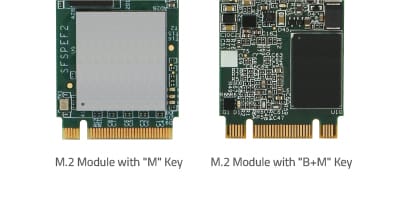
NVME are only one key, an M key only,
  • Supports M.2 modules in format 2280, 2260, 2242 and 2230 with key B or key B+M based on SATA or PCIe

1709769313566.png
 

My Computer My Computer

At a glance

windows 11old AMD B958gb
OS
windows 11
Computer type
PC/Desktop
Manufacturer/Model
some kind of old ASUS MB
CPU
old AMD B95
Motherboard
ASUS
Memory
8gb
Hard Drives
ssd WD 500 gb

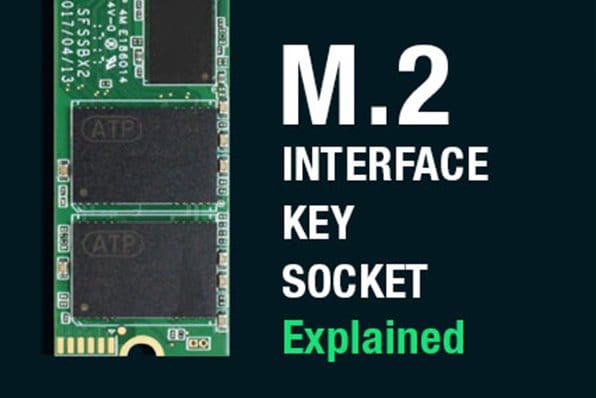
Keys and Sockets​

An M.2 SSD is "keyed" to prevent insertion of a card connector (male) to an incompatible socket (female) on the host. The M.2 specification identifies 12 key IDs on the module card and socket interface but M.2 SSDs typically use three common keys: B, M, and B+M. You will find the key type labeled on or near the edge connector (or gold fingers) of the SSD. Before deploying M.2 SSDs, determine the type of socket on the host and check the module connector keying, as each connector should be inserted only in the appropriate socket.

ATP M.2 SATA SSDs are B+M-keyed (can fit in sockets for B-keyed and M-keyed modules), while M.2 NVMe SSDs for PCIe 3.0 x4 lane are M-keyed.

de140a6027c54081bbf8f2e60c6d6562.jpg
 

My Computer My Computer

At a glance

windows 11old AMD B958gb
OS
windows 11
Computer type
PC/Desktop
Manufacturer/Model
some kind of old ASUS MB
CPU
old AMD B95
Motherboard
ASUS
Memory
8gb
Hard Drives
ssd WD 500 gb
I dont know I see a review said does not work
View attachment 89333
Indeed, this sort of items are not trustworthy.
It's more of a gamble if you're willing to spend the buck as to test it out.
Agreed on your point and with others posting on the matter, NVMe is labeled but those who got it running were probably using non NVMe drives.
So yeah risky, and without the hardware at hand to try, unknown territory.
 

My Computers My Computers

  • At a glance

    Windows 11 Proi3 8109U16GB DDR4 @2400Intel Iris Plus Graphics 655
    OS
    Windows 11 Pro
    Computer type
    PC/Desktop
    Manufacturer/Model
    Intel NUC
    CPU
    i3 8109U
    Motherboard
    Intel
    Memory
    16GB DDR4 @2400
    Graphics Card(s)
    Intel Iris Plus Graphics 655
    Sound Card
    Intel / Realtek HD Audio
    Monitor(s) Displays
    LG-32ML600M
    Screen Resolution
    1920x1080
    Hard Drives
    Intel SSD 250GB + Samsung QVO SSD 1TB
    PSU
    Adapter
    Cooling
    The usual NUC airflow
    Keyboard
    Logitech Orion G610
    Mouse
    SteelSeries Rival 100 Red
    Internet Speed
    Good enough
    Browser
    Chromium, Edge, Firefox
    Antivirus
    Windows Defender
  • At a glance

    CentOS 9 Stream / Alma / Rocky / FedoraIntel i7 4800MQ32GB DDR3 @1600NVIDIA Quadro K2100M
    Operating System
    CentOS 9 Stream / Alma / Rocky / Fedora
    Computer type
    Laptop
    Manufacturer/Model
    TOSHIBA
    CPU
    Intel i7 4800MQ
    Motherboard
    TOSHIBA
    Memory
    32GB DDR3 @1600
    Graphics card(s)
    NVIDIA Quadro K2100M
    Sound Card
    Realtek HD Audio
    Monitor(s) Displays
    Built-in
    Screen Resolution
    1920x1080
Here+s one adapter I'm using right now
1709808642931.png
Note that top one is only for M.2 SATA type, with M key and requires a separate SATA data cable to connect to MB. This is SSD in it
1709808915724.png
In other M.2 slot there's this SSD
1709809027208.png
Both work as intended.
 

My Computer My Computer

At a glance

W11 Pro and Insider DevAMD Ryzen 9 7900x2x16GB Kingston 6000MHz, Cl 32 @ 6200MHz Cl30Gigabyte Rx 6600XT Gaming OC 8G Pro
OS
W11 Pro and Insider Dev
Computer type
PC/Desktop
Manufacturer/Model
Home brewed
CPU
AMD Ryzen 9 7900x
Motherboard
ASROCK b650 PRO RS
Memory
2x16GB Kingston 6000MHz, Cl 32 @ 6200MHz Cl30
Graphics Card(s)
Gigabyte Rx 6600XT Gaming OC 8G Pro
Sound Card
MB, Realtek Ac1220p
Monitor(s) Displays
3 x 27"
Screen Resolution
1080p
Hard Drives
Kingston KC3000. 1TBSamsung 970 evo Plus 500GB, Crucial P1 NVMe 1TB, Lexar NVMe 2 TB, Silicon Power M.2 SATA 500GB
PSU
Seasonic 750W
Case
Custom Raidmax
Cooling
Arctic Liquid Freezer III 360mm
Internet Speed
20/19 mbps
Got everything yesterday, but still have not chosen an NVME drive.
I am thinking to clone new NVME with the older NVME in the dell 7530 laptop and use new drive in laptop and put old NVME in adapter on my AMD desktop.

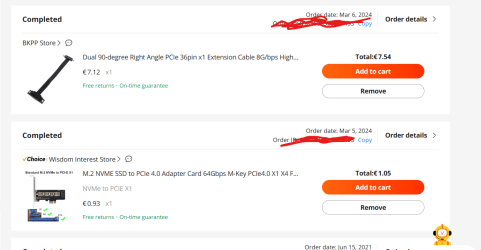
Seems perfect to me, these pieces. About 9$ on ALI Express. They buy process is smooth, and easy tracking right on their site from your orders page. Lots of various sellers were all selling the same exact items at slightly different prices. Best deal was the adapter card, I paid 1$ and free shipping, which the seller had sold 1000 of these things. And the item came fast 4 days faster than the cable.

I used Google Pay to buy them.
1710673260889.png


1710673683533.png
 

My Computer My Computer

At a glance

windows 11old AMD B958gb
OS
windows 11
Computer type
PC/Desktop
Manufacturer/Model
some kind of old ASUS MB
CPU
old AMD B95
Motherboard
ASUS
Memory
8gb
Hard Drives
ssd WD 500 gb
Bought a Micron NVME this am, non heat sink version made for laptops
I plan to swap things around
This new one goes in the laptop 7530
current 500gb DELL 7530 NVME goes in the old ASUS laptop

the WD blue 500 gb NVME currently in the ASUS will go into the adapter for the desktop

My DELL 7530 laptop has 3 NVME drive slots so will use them for cloning NVME drives
Do you need to disconnect laptop internal battery when replacing NVME?


has 5 yr warrantee, hope don't need to use it

paid $72
Crucial T500 1TB Gen4 NVMe M.2 Internal Gaming SSD, Up to 7300MB/s, Laptop & Desktop Compatible + 1mo Adobe CC All Apps - CT1000T500SSD8

better deal than $85
WD_BLACK 1TB SN850X NVMe Internal Gaming SSD Solid State Drive - Gen4 PCIe, M.2 2280, Up to 7,300 MB/s - WDS100T2X0E

 

My Computer My Computer

At a glance

windows 11old AMD B958gb
OS
windows 11
Computer type
PC/Desktop
Manufacturer/Model
some kind of old ASUS MB
CPU
old AMD B95
Motherboard
ASUS
Memory
8gb
Hard Drives
ssd WD 500 gb
Bought a Micron NVME this am, non heat sink version made for laptops
I plan to swap things around
This new one goes in the laptop 7530
current 500gb DELL 7530 NVME goes in the old ASUS laptop

the WD blue 500 gb NVME currently in the ASUS will go into the adapter for the desktop

My DELL 7530 laptop has 3 NVME drive slots so will use them for cloning NVME drives
Do you need to disconnect laptop internal battery when replacing NVME?


has 5 yr warrantee, hope don't need to use it

paid $72
Crucial T500 1TB Gen4 NVMe M.2 Internal Gaming SSD, Up to 7300MB/s, Laptop & Desktop Compatible + 1mo Adobe CC All Apps - CT1000T500SSD8

better deal than $85
WD_BLACK 1TB SN850X NVMe Internal Gaming SSD Solid State Drive - Gen4 PCIe, M.2 2280, Up to 7,300 MB/s - WDS100T2X0E
If battery is not removable, protection is already in place.
 

My Computer My Computer

At a glance

W11 Pro and Insider DevAMD Ryzen 9 7900x2x16GB Kingston 6000MHz, Cl 32 @ 6200MHz Cl30Gigabyte Rx 6600XT Gaming OC 8G Pro
OS
W11 Pro and Insider Dev
Computer type
PC/Desktop
Manufacturer/Model
Home brewed
CPU
AMD Ryzen 9 7900x
Motherboard
ASROCK b650 PRO RS
Memory
2x16GB Kingston 6000MHz, Cl 32 @ 6200MHz Cl30
Graphics Card(s)
Gigabyte Rx 6600XT Gaming OC 8G Pro
Sound Card
MB, Realtek Ac1220p
Monitor(s) Displays
3 x 27"
Screen Resolution
1080p
Hard Drives
Kingston KC3000. 1TBSamsung 970 evo Plus 500GB, Crucial P1 NVMe 1TB, Lexar NVMe 2 TB, Silicon Power M.2 SATA 500GB
PSU
Seasonic 750W
Case
Custom Raidmax
Cooling
Arctic Liquid Freezer III 360mm
Internet Speed
20/19 mbps
If battery is not removable, protection is already in place.
battery is inside under the cover.
cover has to be unscrewed and pried off back of laptop.
It does have an internal plug with wire used when replacing battery.
Typical laptop design.

Don't know but I think it may be called hot pluggable for drives, if it wont hurt anything.

Sata drives you can plugin with a desktop PC OS running, done that before.
 
Last edited:

My Computer My Computer

At a glance

windows 11old AMD B958gb
OS
windows 11
Computer type
PC/Desktop
Manufacturer/Model
some kind of old ASUS MB
CPU
old AMD B95
Motherboard
ASUS
Memory
8gb
Hard Drives
ssd WD 500 gb
No mention of needing to unplug battery cable here
Maybe just have laptop off.


My Computer My Computer

At a glance

windows 11old AMD B958gb
OS
windows 11
Computer type
PC/Desktop
Manufacturer/Model
some kind of old ASUS MB
CPU
old AMD B95
Motherboard
ASUS
Memory
8gb
Hard Drives
ssd WD 500 gb
No mention of needing to unplug battery cable here
Maybe just have laptop off.

I always unplug the battery before doing anything inside the notebook. Also, I press the
ON button for about 10 seconds to unload the Caps. Replace what you need and also
clean out the fans and exhaust vents while you're at it. When done, you'll need the power
brick to start the notebook. A anti-static bracelet would be a thing I would recommend.
 

My Computers My Computers

  • At a glance

    windows 11 22631.5039Core i9 12th gen 12900HK 2.9 MHz (overcloked:...32 Gigs DDR5-4800nVidia RTX 3070 Ti / 8 Gigs DDR6
    OS
    windows 11 22631.5039
    Computer type
    Laptop
    Manufacturer/Model
    MSI Raider GE76
    CPU
    Core i9 12th gen 12900HK 2.9 MHz (overcloked: 3890.48)
    Motherboard
    MSI
    Memory
    32 Gigs DDR5-4800
    Graphics Card(s)
    nVidia RTX 3070 Ti / 8 Gigs DDR6
    Sound Card
    DYNAUDIO - Steelsries Arena 7- Sound Effects by Nahimic 3
    Monitor(s) Displays
    17.3" 1920 x 1080 360 Hz 3 ms, IPS / Connected to MSI 32 inch curved @ 165 Hz
    Screen Resolution
    1920 x 1080 / Both
    Hard Drives
    Samsung 990 Pro 2TB (OS) - Solidigm P41 2TB (Storage)
    PSU
    280 watts
    Case
    MSI GE series
    Cooling
    internal
    Keyboard
    Steelseries
    Mouse
    G903 Lightspeed
    Internet Speed
    1000 Mbps
    Browser
    Firefox / Opera GX- Do not like Edge
    Antivirus
    Malwarebytes'
    Other Info
    just ask.
  • At a glance

    Windows 10 22H2Intel Core i7 7820HK 2.9 Ghz16 Gigs DDR4 2400 MhznVidia 1070 8GB RAM
    Operating System
    Windows 10 22H2
    Computer type
    Laptop
    Manufacturer/Model
    MSI GT73 7RE VR Titan
    CPU
    Intel Core i7 7820HK 2.9 Ghz
    Motherboard
    MSI
    Memory
    16 Gigs DDR4 2400 Mhz
    Graphics card(s)
    nVidia 1070 8GB RAM
    Sound Card
    DYNAUDIO / Nahimic 2
    Monitor(s) Displays
    IPS / 120HZ
    Screen Resolution
    1920x1080P
    Hard Drives
    Samsung NVME EVO 970 1TB / Samsung SSD (SATA) 1TB
    PSU
    240 watts
    Case
    MSI
    Cooling
    Internal
    Keyboard
    Steelseries
    Mouse
    Logitech G903 Lightspeed
    Internet Speed
    1 Gb/s
    Browser
    Firefox / Vivaldi
    Antivirus
    MalwareBytes'
    Other Info
    none.
My DELL 7530 laptop has 3 NVME drive slots so will use them for cloning NVME drives
Do you need to disconnect laptop internal battery when replacing NVME?
This may indeed work without disconnecting the battery. Just make sure you properly power off / shutdown.
Check: maybe the non-removable battery could be disabled from the BIOS (power settings). Had seen this on a Lenovo Thinkpad.
In this case I tried the swapping procedure also after laptop was powered down from OS without disconnecting the battery. I just swapped the NVMe and there were no issues afterwards.
 

My Computers My Computers

  • At a glance

    Windows 11 Proi3 8109U16GB DDR4 @2400Intel Iris Plus Graphics 655
    OS
    Windows 11 Pro
    Computer type
    PC/Desktop
    Manufacturer/Model
    Intel NUC
    CPU
    i3 8109U
    Motherboard
    Intel
    Memory
    16GB DDR4 @2400
    Graphics Card(s)
    Intel Iris Plus Graphics 655
    Sound Card
    Intel / Realtek HD Audio
    Monitor(s) Displays
    LG-32ML600M
    Screen Resolution
    1920x1080
    Hard Drives
    Intel SSD 250GB + Samsung QVO SSD 1TB
    PSU
    Adapter
    Cooling
    The usual NUC airflow
    Keyboard
    Logitech Orion G610
    Mouse
    SteelSeries Rival 100 Red
    Internet Speed
    Good enough
    Browser
    Chromium, Edge, Firefox
    Antivirus
    Windows Defender
  • At a glance

    CentOS 9 Stream / Alma / Rocky / FedoraIntel i7 4800MQ32GB DDR3 @1600NVIDIA Quadro K2100M
    Operating System
    CentOS 9 Stream / Alma / Rocky / Fedora
    Computer type
    Laptop
    Manufacturer/Model
    TOSHIBA
    CPU
    Intel i7 4800MQ
    Motherboard
    TOSHIBA
    Memory
    32GB DDR3 @1600
    Graphics card(s)
    NVIDIA Quadro K2100M
    Sound Card
    Realtek HD Audio
    Monitor(s) Displays
    Built-in
    Screen Resolution
    1920x1080
Too bad, wish I could use this kind of thing
But I then would need the angled adapter
And actually it is a PCIE x1 slot covered by the video card on my ASUS board
Other issue I dont know if the ASUS board would support this thing
It is an M4A88TD-M, I dont card about booting off it.


How would the speed of this compare to a SATA 3 interface?

View attachment 89236


x1 pcie 3.0

mp510-gab75m-pcie-x1-crystaldisk.jpg

x1 pcie 2.0


adpter-x1-on-pcie-2..0.jpg
 

My Computers My Computers

  • At a glance

    Win7,Win11i7-97002x16gb 3600mhz
    OS
    Win7,Win11
    Computer type
    PC/Desktop
    CPU
    i7-9700
    Motherboard
    gigabyte b365m ds3h
    Memory
    2x16gb 3600mhz
    Monitor(s) Displays
    benq gw2480
    PSU
    bequiet pure power 11 400CM
    Cooling
    cryorig m9i
  • At a glance

    win7,win11i5-84002x8gb 3200
    Operating System
    win7,win11
    Computer type
    PC/Desktop
    CPU
    i5-8400
    Motherboard
    gigabyte b365m ds3h
    Memory
    2x8gb 3200
    PSU
    xfx pro 450

Latest Support Threads

Back
Top Bottom