Driver problem


Harleygjc

Well-known member
Member
Local time
11:00 PM
Posts
70
OS
win 11
I have a really annoying problem I can't seem to sort and don't understand why, previous times I've updated my nvidia driver have all worked fine and have been through the geforce experience.

A week or so back I noticed a empty spot on my desktop shortcuts,traced it and found the geforce shortcut had just vanished,only to find I have the Nvida app instead,I've since tried to update the driver through that and it fails,either express or custom,I downloaded the driver direct from Nvidia and run it,still fails!! why is it not working? and is there a easy way to fix it?
 
Windows Build/Version
version 24H2 OS Build 26100.4351

My Computer My Computer

At a glance

win 11Intel Core i7-12700F16GB DDR4 3200MHzNVIDIA GeForce RTX 3060 Ti 8GB
OS
win 11
Computer type
PC/Desktop
Manufacturer/Model
PC Specialist
CPU
Intel Core i7-12700F
Motherboard
GIGABYTE B660 DS3H DDR4 (rev. 1.0) : LGA1700, DDR4, USB 3.2
Memory
16GB DDR4 3200MHz
Graphics Card(s)
NVIDIA GeForce RTX 3060 Ti 8GB
Sound Card
On-Board 5.1 High Definition Audio
Monitor(s) Displays
msi curved gaming monitor
Screen Resolution
3440x1440
Hard Drives
1TB M.2 SSD
1TB (1,000GB) SATA III 6Gb/s 7200rpm
Seagate
8Tb BarraCuda 3.5 inch Internal Hard Drive
PSU
650W POWER SUPPLY 80+ Bronze PSU
Case
cypher g70
Keyboard
steelseries apex 350
Mouse
steelseries rival 5
Internet Speed
sky full fibre ultrafast 500mb d/l
Browser
chrome
Antivirus
windows
The NVIDIA APP should now deal with updates, whats it showing under the Drivers Tab?

1749924501382.webp
 

My Computers My Computers

  • At a glance

    Windows 11 Enterprise 25H2 26200 7462Intel XEON E5-2699 v364GB Teamgroup UD4-3600NVIDIA GeForce GTX 1080 Ti
    OS
    Windows 11 Enterprise 25H2 26200 7462
    Computer type
    PC/Desktop
    Manufacturer/Model
    Custom Build
    CPU
    Intel XEON E5-2699 v3
    Motherboard
    ASUS X99-A
    Memory
    64GB Teamgroup UD4-3600
    Graphics Card(s)
    NVIDIA GeForce GTX 1080 Ti
    Sound Card
    Integrated
    Monitor(s) Displays
    ACER X34 Predator
    Screen Resolution
    3440 x 1440
    Hard Drives
    Crucial CT1000P 3P SSD8 1TB
    Crucial CT1000 BX500 SSD 1TB
    PSU
    GameMax Pro
    Case
    Fractal Design
    Cooling
    Corsair H110iGT + 6 140mm Fans
    Keyboard
    Corsair K4
    Mouse
    G-Skill G502
    Internet Speed
    300MBs
    Browser
    Chrome
    Antivirus
    OEM
    Other Info
    ASUS RT-AC87U Router
  • At a glance

    25H2 26200.50748GB
    Operating System
    25H2 26200.5074
    Computer type
    Laptop
    Manufacturer/Model
    ASUS X555LA
    Memory
    8GB
    Browser
    Chrome
    Antivirus
    OEM
Same as it always does as I've not updated for a while the latest version which 19th may 572.56 I think,I have already tried going through the nvidia app,both express and custom,fails each time.
I downloaded the drivers via nvidia and tried a manual install,same thing!! I never used to have problems.
 

My Computer My Computer

At a glance

win 11Intel Core i7-12700F16GB DDR4 3200MHzNVIDIA GeForce RTX 3060 Ti 8GB
OS
win 11
Computer type
PC/Desktop
Manufacturer/Model
PC Specialist
CPU
Intel Core i7-12700F
Motherboard
GIGABYTE B660 DS3H DDR4 (rev. 1.0) : LGA1700, DDR4, USB 3.2
Memory
16GB DDR4 3200MHz
Graphics Card(s)
NVIDIA GeForce RTX 3060 Ti 8GB
Sound Card
On-Board 5.1 High Definition Audio
Monitor(s) Displays
msi curved gaming monitor
Screen Resolution
3440x1440
Hard Drives
1TB M.2 SSD
1TB (1,000GB) SATA III 6Gb/s 7200rpm
Seagate
8Tb BarraCuda 3.5 inch Internal Hard Drive
PSU
650W POWER SUPPLY 80+ Bronze PSU
Case
cypher g70
Keyboard
steelseries apex 350
Mouse
steelseries rival 5
Internet Speed
sky full fibre ultrafast 500mb d/l
Browser
chrome
Antivirus
windows
Same as it always does as I've not updated for a while the latest version which 19th may 572.56 I think,I have already tried going through the nvidia app,both express and custom,fails each time.
I downloaded the drivers via nvidia and tried a manual install,same thing!! I never used to have problems.


DDU Instructions - Nvidia
1. First, do Option #2, step #3 and onward, here...
2. This will block MS from including drivers in Windows Updates.
3. They'll still be listed in the Optional Updates, if you ever need them.


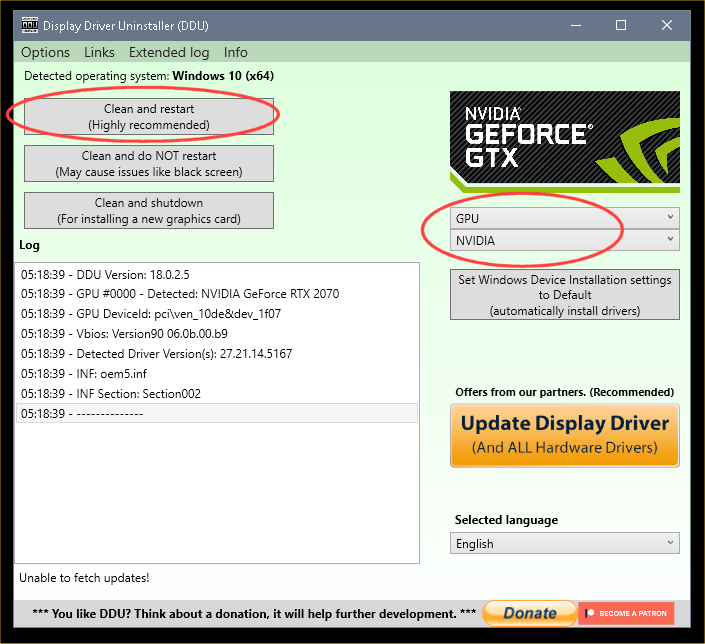
1. Get this program, here: Display Driver Uninstaller (DDU) | Wagnardsoft ...get the latest version, and save it to your desktop.
2. Get the Nvidia WHQL vid card driver here... Nvidia drivers - manual search ...save this to your desktop. Unhook the internet completely.
3. Reboot into Safe Mode and run DDU (Display Driver Uninstaller) choose the "Highly Recommend Option", and just do what it tells you.
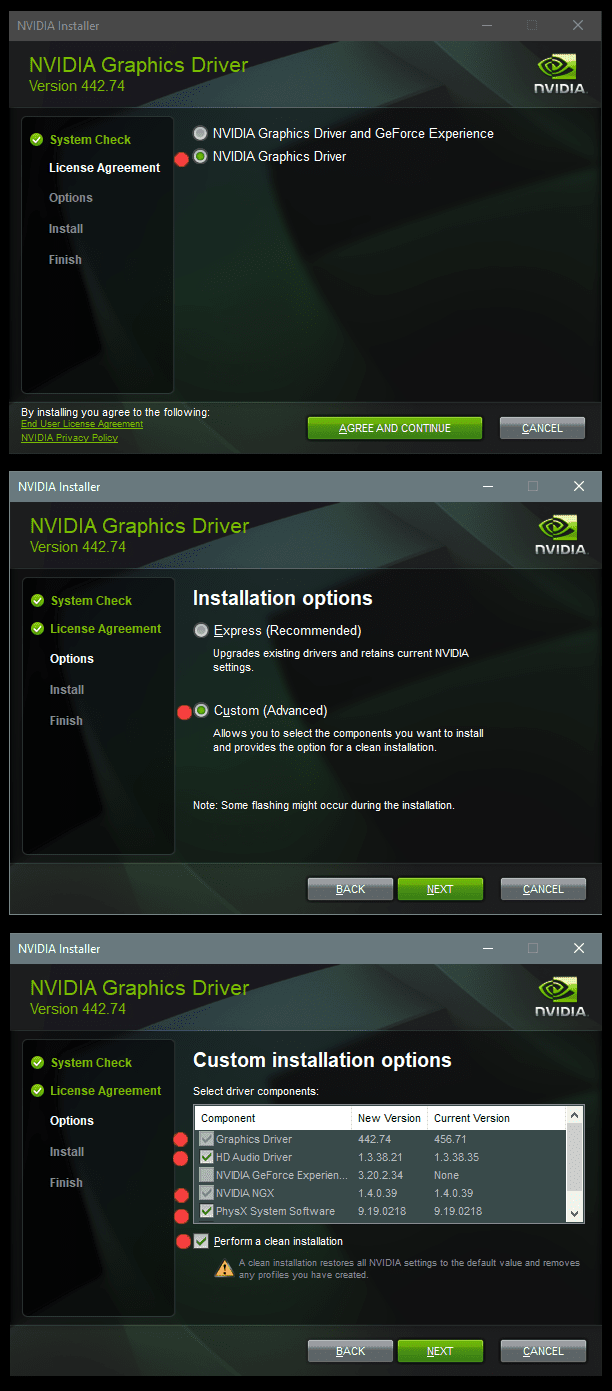
4. After it's done, reboot to normal mode, then just double click the Nvidia driver to install.
[See pics below]. If it want's to reboot, let it.
Rehook the internet.

a2onZnt.png


NjaiKLm.png
 

My Computers My Computers

  • At a glance

    Win 11 Home ♦♦♦26200.8655 ♦♦♦♦♦♦♦25H2AMD Ryzen 7 3700XG.Skill (F4-3200C14D-16GTZKW)EVGA RTX 2070 (08G-P4-2171-KR)
    OS
    Win 11 Home ♦♦♦26200.8655 ♦♦♦♦♦♦♦25H2
    Computer type
    PC/Desktop
    Manufacturer/Model
    Built by Ghot® [May 2020]
    CPU
    AMD Ryzen 7 3700X
    Motherboard
    Asus Pro WS X570-ACE (BIOS 5302)
    Memory
    G.Skill (F4-3200C14D-16GTZKW)
    Graphics Card(s)
    EVGA RTX 2070 (08G-P4-2171-KR)
    Sound Card
    Realtek ALC1220P / ALC S1220A
    Monitor(s) Displays
    Dell U3011 30"
    Screen Resolution
    2560 x 1600
    Hard Drives
    2x Samsung 860 EVO 500GB,
    WD 4TB Black FZBX - SATA III,
    WD 8TB Black FZBX - SATA III,
    DRW-24B1ST CD/DVD Burner
    PSU
    PC Power & Cooling 750W Quad EPS12V
    Case
    Cooler Master ATCS 840 Tower
    Cooling
    CM Hyper 212 EVO (push/pull)
    Keyboard
    Ducky DK9008 Shine II Blue LED
    Mouse
    Logitech Optical M-100
    Internet Speed
    300/300
    Browser
    Firefox (latest)
    Antivirus
    Bitdefender Total Security
    Other Info
    Speakers: Klipsch Pro Media 2.1
  • At a glance

    Windows XP Pro 32bit w/SP3AMD Athlon 64 X2 5000+ (OC'd @ 3.2Ghz)TWIN2X2048-6400C4DHX (2 x 1GB, DDR2 800)EVGA 256-P2-N758-TR GeForce 8600GT SSC
    Operating System
    Windows XP Pro 32bit w/SP3
    Computer type
    PC/Desktop
    Manufacturer/Model
    Built by Ghot® (not in use)
    CPU
    AMD Athlon 64 X2 5000+ (OC'd @ 3.2Ghz)
    Motherboard
    ASUS M2N32-SLI Deluxe Wireless Edition
    Memory
    TWIN2X2048-6400C4DHX (2 x 1GB, DDR2 800)
    Graphics card(s)
    EVGA 256-P2-N758-TR GeForce 8600GT SSC
    Sound Card
    Onboard
    Monitor(s) Displays
    ViewSonic G90FB Black 19" Professional (CRT)
    Screen Resolution
    up to 2048 x 1536
    Hard Drives
    WD 36GB 10,000rpm Raptor SATA
    Seagate 80GB 7200rpm SATA
    Lite-On LTR-52246S CD/RW
    Lite-On LH-18A1P CD/DVD Burner
    PSU
    PC Power & Cooling Silencer 750 Quad EPS12V
    Case
    Generic Beige case, 80mm fans
    Cooling
    ZALMAN 9500A 92mm CPU Cooler
    Keyboard
    Logitech Classic Keybooard 200
    Mouse
    Logitech Optical M-BT96a
    Internet Speed
    300/300
    Browser
    Firefox 3.x ??
    Antivirus
    Symantec (Norton)
    Other Info
    Still assembled, still runs. Haven't turned it on for 15 years?
I have high anxiety and feel a bit nervous trying this idea,what worries me is if the manual try failed what guarantees are there trying this it will work? What I don't understand is why when I tried downloading the driver and installing it it failed again,I'm worried if I try the ddu method and then a manual install again that it fails again,then I'm really stuck
 

My Computer My Computer

At a glance

win 11Intel Core i7-12700F16GB DDR4 3200MHzNVIDIA GeForce RTX 3060 Ti 8GB
OS
win 11
Computer type
PC/Desktop
Manufacturer/Model
PC Specialist
CPU
Intel Core i7-12700F
Motherboard
GIGABYTE B660 DS3H DDR4 (rev. 1.0) : LGA1700, DDR4, USB 3.2
Memory
16GB DDR4 3200MHz
Graphics Card(s)
NVIDIA GeForce RTX 3060 Ti 8GB
Sound Card
On-Board 5.1 High Definition Audio
Monitor(s) Displays
msi curved gaming monitor
Screen Resolution
3440x1440
Hard Drives
1TB M.2 SSD
1TB (1,000GB) SATA III 6Gb/s 7200rpm
Seagate
8Tb BarraCuda 3.5 inch Internal Hard Drive
PSU
650W POWER SUPPLY 80+ Bronze PSU
Case
cypher g70
Keyboard
steelseries apex 350
Mouse
steelseries rival 5
Internet Speed
sky full fibre ultrafast 500mb d/l
Browser
chrome
Antivirus
windows
@Harleygjc I just went through this on my system 2. Try an earlier version. The later versions are more for 40xx or 50xx cards.

Click on the perform clean installation check box.


My Computers My Computers

  • At a glance

    Win 11 Pro 25H2 26200.8655Intel® Core™ i7-14700KG.SKILL Ripjaws S5 Series 64GB (2 x 32GB) DDR5ASUS GeForce RTX 4070 Super 12GB
    OS
    Win 11 Pro 25H2 26200.8655
    Computer type
    PC/Desktop
    Manufacturer/Model
    Self Built
    CPU
    Intel® Core™ i7-14700K
    Motherboard
    ASUS TUF Z690-PLUS WIFI BIOS 4505 11/29/25
    Memory
    G.SKILL Ripjaws S5 Series 64GB (2 x 32GB) DDR5
    Graphics Card(s)
    ASUS GeForce RTX 4070 Super 12GB
    Sound Card
    Sound Blaster AE-5 Plus
    Monitor(s) Displays
    ASUS TUF Gaming 27" 2K HDR Gaming
    Screen Resolution
    2560 x 1440
    Hard Drives
    Samsung 990 Pro 1TB NVMe (Win 11 25H2)
    SK hynix P41 500GB NVMe 25H2 DEV/Games
    SK hynix P41 2TB NVMe (x3)
    Crucial P3 Plus 4TB
    PSU
    Corsair RM850x Shift
    Case
    Antec Dark Phantom DP502 FLUX
    Cooling
    Corsair Nautilus 360 RS AIO
    Keyboard
    Logitech MK 320
    Mouse
    Razer Basilisk V3
    Internet Speed
    750Mbs
    Browser
    Firefox
    Antivirus
    Winows Security
    Other Info
    MR 8.1 Home
  • At a glance

    Win 11 Pro 25H2 26200.8655Intel Core i7-11700F64 GB DDR4MSI GeForce RTX 3060 Ventus 2X 12GB
    Operating System
    Win 11 Pro 25H2 26200.8655
    Computer type
    PC/Desktop
    Manufacturer/Model
    Self Built
    CPU
    Intel Core i7-11700F
    Motherboard
    Asus TUF Gaming Z590 Plus WiFi (BIOS 2803)
    Memory
    64 GB DDR4
    Graphics card(s)
    MSI GeForce RTX 3060 Ventus 2X 12GB
    Sound Card
    SoundBlaster Audigy Fx V2
    Monitor(s) Displays
    Samsung F27T350
    Screen Resolution
    1920x1080
    Hard Drives
    Samsung 980 Pro 1TB
    Samsung 970 EVO Plus 2TB
    Samsung 870 EVO 500GB SSD
    PSU
    Corsair HX750
    Case
    Cougar MX330-G Window
    Cooling
    Thermalright Frozen Edge 240 Black AIO
    Internet Speed
    350Mbps
    Browser
    Firefox
    Antivirus
    Windows Security
  • System Three
    Win 11 Pro 25H2 26200.8655
    ASUS PRIME Z370-P II BIOS 3004 7/12/21
    Intel Core i7-8700 CPU @ 3.20GHz
    32GB DDR4 RAM (4x8)
    iGPU Intel UHD Graphics 630
    Mid-Tower Desktop
You're not stuck, just uninstall the bad driver, download and install an older driver, lets say 5-10 versions back.

I know games and some gamers insist you must have latest drivers.

That is nonsense, in fact the latest is much more likely to be beta-ish, and mainly for Nvidia latest video chipsets.
They will do nothing for older chipsets like your RTX 3060 Ti.

I use a RTX 3070 Ti and that is on driver 546.30 works fine and passes test checks. That is probably ~20 versions behind the latest.
So you have a vast choice of working and stable drivers.

"I can't seem to sort and don't understand why"
Reasons will be complex and not understandable for the vast majority of consumers, but for sure you can do something about it quite easily as in my 1st sentence.
 

My Computer My Computer

At a glance

Windows 11
OS
Windows 11
The thing is,I've tried,the only reason I went to upgrade is two of my steam games are now refusing to run,Doom Enternal which used to run on the driver I;m using now gives a incompatible driver and doesn't run and No Mans Sky,which has run fine on this driver for over a year now gives vulkan vkcreateinstance failed error on start,only solution I've found is to upgrade driver,but for some reason I can't either if I go through Nvidia or download manually it always fails to install,that's what I don't get,why does it always fail?
 

My Computer My Computer

At a glance

win 11Intel Core i7-12700F16GB DDR4 3200MHzNVIDIA GeForce RTX 3060 Ti 8GB
OS
win 11
Computer type
PC/Desktop
Manufacturer/Model
PC Specialist
CPU
Intel Core i7-12700F
Motherboard
GIGABYTE B660 DS3H DDR4 (rev. 1.0) : LGA1700, DDR4, USB 3.2
Memory
16GB DDR4 3200MHz
Graphics Card(s)
NVIDIA GeForce RTX 3060 Ti 8GB
Sound Card
On-Board 5.1 High Definition Audio
Monitor(s) Displays
msi curved gaming monitor
Screen Resolution
3440x1440
Hard Drives
1TB M.2 SSD
1TB (1,000GB) SATA III 6Gb/s 7200rpm
Seagate
8Tb BarraCuda 3.5 inch Internal Hard Drive
PSU
650W POWER SUPPLY 80+ Bronze PSU
Case
cypher g70
Keyboard
steelseries apex 350
Mouse
steelseries rival 5
Internet Speed
sky full fibre ultrafast 500mb d/l
Browser
chrome
Antivirus
windows
I'm not sure


New versions of the driver are implementing ray tracing support in the Vulkan API, there may be some bugs.

But everything works in the video player (driver ver. 576.40)

1.webp
 
Last edited:

My Computer My Computer

At a glance

Microsoft Windows 11 HomeIntel Core i5-13490F2 x 16 Patriot Memory (PDP Systems) PSD516G56...GIGABYTE GeForce RTX 4070 WINDFORCE OC 12G (G...
OS
Microsoft Windows 11 Home
Computer type
PC/Desktop
Manufacturer/Model
MSI MS-7D98
CPU
Intel Core i5-13490F
Motherboard
MSI B760 GAMING PLUS WIFI
Memory
2 x 16 Patriot Memory (PDP Systems) PSD516G560081 6400MT (32-37-37-74); 1.35V)
Graphics Card(s)
GIGABYTE GeForce RTX 4070 WINDFORCE OC 12G (GV-N4070WF3OC-12GD)
Sound Card
Bluetooth Аудио
Monitor(s) Displays
INNOCN 15K1F
Screen Resolution
1920 x 1080
Hard Drives
WD_BLACK SN770 250GB
KINGSTON SNV2S1000G (ELFK0S.6)
PSU
Thermaltake Toughpower GF3 1000W
Case
CG560 - DeepCool
Cooling
ID-COOLING SE-224-XTS / 2 x 140Mm Fan - rear and top; 3 x 120Mm - front
Keyboard
Corsair K70 RGB TKL
Mouse
Corsair KATAR PRO XT
Internet Speed
100 Mbps
Browser
Firefox
Antivirus
Microsoft Defender Antivirus
Other Info
https://www.userbenchmark.com/UserRun/66553205
Back
Top Bottom