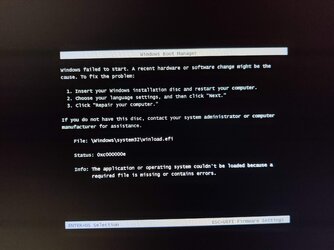
Dual Win11 / Win10 boot issue with winload.efi


ribasmudj

Well-known member
Local time
11:49 PM
Posts
13
OS
Windows 11
So I have both Win11 and 10 installed on different SSDs on my PC, and at first, I couldn't boot from one to another through advanced startup as I was gettig the blue screen with the winload.efi error, the one from this image:

IMG_20231205_010735.jpg

This screen also shows up often when booting to the other OS after selecting the other drive on the boot menu, or changing boot priority in BIOS, but it can usually be resolved by clicking the last F9 option, and then selecting the same OS again.

I was trying to resolve this through various fixes and I think I removed the Win10 installation from the system config, so now the "boot into different OS" button doesn't show up in advanced startup at all, but the other issue remains.

I understand that this may have originally happened because I didn't unplug the other drives when installing one or both system (which is insanely stupid of a requirement), but is there any way of resolving this without reinstalling them again? I've only did it a month or so ago and I won't do it again in the near future since this isn't a major issue, but it would be great to resolve it without a full reset if possible.

Also, how can I add the other OS to the advanced startup menu again if the blue screen can be resolved in the first place?
 

My Computer My Computer

At a glance

Windows 11Ryzen 7800x3DG.SKILL 32GB Ripjaws S5 DDR5 6000MHz CL30RTX 4080
OS
Windows 11
Computer type
PC/Desktop
CPU
Ryzen 7800x3D
Motherboard
Asrock B650M-HDV/M.2
Memory
G.SKILL 32GB Ripjaws S5 DDR5 6000MHz CL30
Graphics Card(s)
RTX 4080
Monitor(s) Displays
LG C1 48
Screen Resolution
3840x2160
1. Boot into the system that works and is bootable. <F9>

2. Open notepad and run
cmd (admin) and type
C:\WINDOWS\system32>bcdedit
copy the cmd contents into notepad and save as BCD1.txt

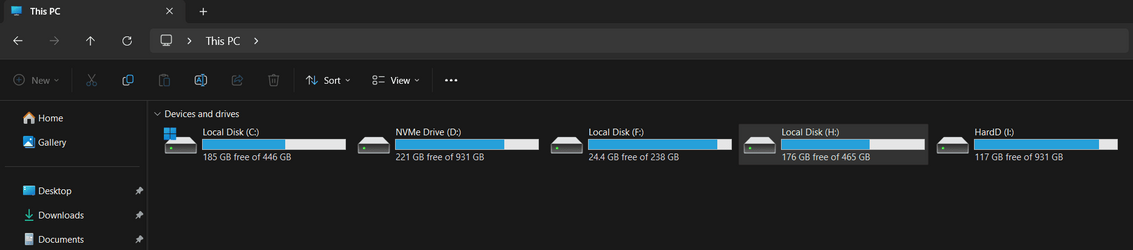
3. Run explorer.exe and take a screenshot showing the 2 disks.

4. Upload the BCD1.txt and the screenshot.

Don't touch our BIOS!

It doesn't take more than 5 minutes!
 
Last edited:

My Computer My Computer

At a glance

Windows 10Intel 6700HQ24AMD FirePro 5170M
OS
Windows 10
Computer type
Laptop
Manufacturer/Model
HP ZBook
CPU
Intel 6700HQ
Motherboard
HP
Memory
24
Graphics Card(s)
AMD FirePro 5170M
Hard Drives
Samsung SSD 860 Pro
Keyboard
yes
Mouse
yes
Other Info
19045.3803
some Red Hat workhorses
I recommend using EasyBCD to correct and setup your dual boot screen once more. There is a free version of EasyBCD available and it will do the job quite easily.


After installing EasyBCD, open it and go to the View Settings tab and check the details of the boot menu there. You should have an entry for your C:\ drive at least.

To add the second boot drive, click on Add New Entry and then select the Windows tab (if not already) and enter the drive letter of your second boot drive. E.G. D:\ You may also modify the name of your second boot entry. Then click on the green + button to add that entry to your boot menu.

Click on Edit Boot Menu to adjust the order of the menu items and to set one of them as the default. Windows will always boot into the default menu item if left unattended.

Make sure you select Use Metro bootloader, if you want to use the modern boot select screen or uncheck it if you want to use the old DOS style boot select screen. I personally prefer the old DOS style screen.

Finally, set the Count down from. Personally, I prefer to set it to 10secs, but it is up to you.

Click on Save Settings when you are done.

Now click on View Settings once more and make sure everything is in order. Go back and change things if they are not correct.

You can then reboot and try out your boot select screen. Run EasyBCD again to make any changes you feel necessary.

If you still see the BSOD when selecting one of the OS, then see this page for hints/tips on correcting the issue:


If you reset the PC, you can always reinstall EasyBCD and setup your boot screen menu again.

This is my boot screen menu as shown in View Settings:

1701755654037.png
 
Last edited:

My Computer My Computer

At a glance

Windows 11 ProRyzen 9 3900XG-Skill RipjawsV F4-3600C18 (16GB x 2)Gigabyte RX 5700 XT Gaming OC
OS
Windows 11 Pro
Computer type
PC/Desktop
CPU
Ryzen 9 3900X
Motherboard
ASUS ROG Strix X570-E Gaming
Memory
G-Skill RipjawsV F4-3600C18 (16GB x 2)
Graphics Card(s)
Gigabyte RX 5700 XT Gaming OC
Sound Card
Realtek ALC1220P
Monitor(s) Displays
ASUS VE278 (x 2)
Screen Resolution
1920x1080
Hard Drives
Samsung 850 Pro 256GB
Samsung 970 Pro NVMe 512GB (x 2)
ST10000VN0004 10TB (x 2)
ST10000VN0008 10TB (x 2)
ST4000VN000 4TB (x 2)
PSU
Corsair HX1000
Case
Corsair Carbide 400R
Cooling
AMD Wraith Prism (Stock)
Keyboard
Logitech G213
Mouse
Logitech G502
Internet Speed
100Mbps down / 40Mbps up
Browser
Firefox - Chrome - Edge
Antivirus
Windows Defender - Clamwin
In this video, i will guide on how to Fix Winload.efi is Missing or Contains Errors Message.
 

My Computer My Computer

At a glance

Windows 11AMD Ryzen 7 5700GMicron Technology DDR4-3200 16GBNVIDIA GeForce RTX 3060
OS
Windows 11
Computer type
PC/Desktop
Manufacturer/Model
HP Pavilion
CPU
AMD Ryzen 7 5700G
Motherboard
Erica6
Memory
Micron Technology DDR4-3200 16GB
Graphics Card(s)
NVIDIA GeForce RTX 3060
Sound Card
Realtek ALC671
Monitor(s) Displays
Samsung SyncMaster U28E590
Screen Resolution
3840 x 2160
Hard Drives
SAMSUNG MZVLQ1T0HALB-000H1
2. Open notepad and run
cmd (admin) and type
C:\WINDOWS\system32>bcdedit
copy the cmd contents into notepad and save as BCD1.txt
You can just pipe the output directly to a file in one command like so:

Code:
bcdedit >> %userprofile%\Desktop\BCDEdit.txt
 

My Computer My Computer

At a glance

Windows 11, Windows 10, Linux Fedora Cinnamon
OS
Windows 11, Windows 10, Linux Fedora Cinnamon
4. Upload the BCD1.txt and the screenshot.
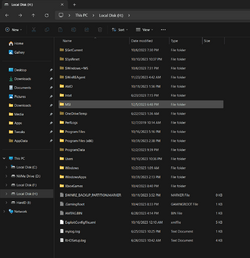
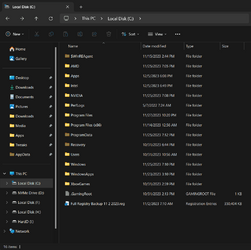
Ok so here is the txt file and the screenshot of my drives, H is the Win10 drive.
 

Attachments

  • BCDEdit.txt
    BCDEdit.txt
    1.2 KB · Views: 5
  • drives.png
    drives.png
    13 KB · Views: 5
  • Win10 drive.png
    Win10 drive.png
    42.2 KB · Views: 5
  • Win11 drive.png
    Win11 drive.png
    36 KB · Views: 5

My Computer My Computer

At a glance

Windows 11Ryzen 7800x3DG.SKILL 32GB Ripjaws S5 DDR5 6000MHz CL30RTX 4080
OS
Windows 11
Computer type
PC/Desktop
CPU
Ryzen 7800x3D
Motherboard
Asrock B650M-HDV/M.2
Memory
G.SKILL 32GB Ripjaws S5 DDR5 6000MHz CL30
Graphics Card(s)
RTX 4080
Monitor(s) Displays
LG C1 48
Screen Resolution
3840x2160
If you still see the BSOD when selecting one of the OS, then see this page for hints/tips on correcting the issue:
Thanks for writing out the steps, I downloaded EasyBCD and added the boot menu for Win10, but when rebooting into it I get the winload.efi error again but through a different screen this time, attaching the new error image below too.

I checked out the link for fixing the winload error but the download links for the file don't work, and the early steps are classic fluff steps that rarely work. Tried the repair process and the update but it didn't help.
 

Attachments

  • new winload efi error.jpg
    new winload efi error.jpg
    484.7 KB · Views: 7

My Computer My Computer

At a glance

Windows 11Ryzen 7800x3DG.SKILL 32GB Ripjaws S5 DDR5 6000MHz CL30RTX 4080
OS
Windows 11
Computer type
PC/Desktop
CPU
Ryzen 7800x3D
Motherboard
Asrock B650M-HDV/M.2
Memory
G.SKILL 32GB Ripjaws S5 DDR5 6000MHz CL30
Graphics Card(s)
RTX 4080
Monitor(s) Displays
LG C1 48
Screen Resolution
3840x2160
OK, run cmd (admin) and type
bcdboot H:\Windows

and the problem is solved! :-)

Don't install EasyBCD!
 

My Computer My Computer

At a glance

Windows 10Intel 6700HQ24AMD FirePro 5170M
OS
Windows 10
Computer type
Laptop
Manufacturer/Model
HP ZBook
CPU
Intel 6700HQ
Motherboard
HP
Memory
24
Graphics Card(s)
AMD FirePro 5170M
Hard Drives
Samsung SSD 860 Pro
Keyboard
yes
Mouse
yes
Other Info
19045.3803
some Red Hat workhorses
@POLYSIUS
He has essentially done that and after trying to boot into Windows 10 on H:\ drive he is met with the error he posted. So the issue is NOT solved yet.

@ribasmudj
Apologies for the broken links :(

Try following this video to get Windows 10 back up and running.


You will need to create a Windows 10 USB thumb drive using the Windows Media Creation tool for Windows 10 in order to follow the video.
 

My Computer My Computer

At a glance

Windows 11 ProRyzen 9 3900XG-Skill RipjawsV F4-3600C18 (16GB x 2)Gigabyte RX 5700 XT Gaming OC
OS
Windows 11 Pro
Computer type
PC/Desktop
CPU
Ryzen 9 3900X
Motherboard
ASUS ROG Strix X570-E Gaming
Memory
G-Skill RipjawsV F4-3600C18 (16GB x 2)
Graphics Card(s)
Gigabyte RX 5700 XT Gaming OC
Sound Card
Realtek ALC1220P
Monitor(s) Displays
ASUS VE278 (x 2)
Screen Resolution
1920x1080
Hard Drives
Samsung 850 Pro 256GB
Samsung 970 Pro NVMe 512GB (x 2)
ST10000VN0004 10TB (x 2)
ST10000VN0008 10TB (x 2)
ST4000VN000 4TB (x 2)
PSU
Corsair HX1000
Case
Corsair Carbide 400R
Cooling
AMD Wraith Prism (Stock)
Keyboard
Logitech G213
Mouse
Logitech G502
Internet Speed
100Mbps down / 40Mbps up
Browser
Firefox - Chrome - Edge
Antivirus
Windows Defender - Clamwin
@trumpy81
According the BCD, he can't have done that!

Run cmd (admin)
mkdir H:\scratch
DISM /Image:H:\ /ScratchDir:H:\Scratch /Cleanup-Image /Restorehealth
sfc /scannow /offbootdir=H:\ /offwindir=H:\windows /OFFLOGFILE=H:\SFClog.txt
 

My Computer My Computer

At a glance

Windows 10Intel 6700HQ24AMD FirePro 5170M
OS
Windows 10
Computer type
Laptop
Manufacturer/Model
HP ZBook
CPU
Intel 6700HQ
Motherboard
HP
Memory
24
Graphics Card(s)
AMD FirePro 5170M
Hard Drives
Samsung SSD 860 Pro
Keyboard
yes
Mouse
yes
Other Info
19045.3803
some Red Hat workhorses
You will need to create a Windows 10 USB thumb drive using the Windows Media Creation tool for Windows 10 in order to follow the video.
Sorry just to clarify this further, I can still boot into Win10 by choosing the steps I mentioned in the OP with changing the BIOS boot order or through the F11 boot menu, that works.

The winload.efi errors only show up when trying to boot to an OS from the blue screen/advanced startup OS label, the menu that has a timer to select the OS it wants to go to. This is what I wanted to resolve and to be able to boot from that menu without having to go through BIOS or reinstalling the OS.

I see that the video is extensive but I'll be sure to go through it later, just to be sure is this possible to resolve without reinstalling and resetting either Win10 or 11 fully?

Also, here's the updated BCDedit text file after adding Win10 as the boot option if it makes any difference.
 

Attachments

My Computer My Computer

At a glance

Windows 11Ryzen 7800x3DG.SKILL 32GB Ripjaws S5 DDR5 6000MHz CL30RTX 4080
OS
Windows 11
Computer type
PC/Desktop
CPU
Ryzen 7800x3D
Motherboard
Asrock B650M-HDV/M.2
Memory
G.SKILL 32GB Ripjaws S5 DDR5 6000MHz CL30
Graphics Card(s)
RTX 4080
Monitor(s) Displays
LG C1 48
Screen Resolution
3840x2160
@POLYSIUS
You missed the part where he followed my instructions AFTER he provided you with the information you requested, so yes he has done that.

@ribasmudj
If you follow the video, fingers crossed, you can simply do a System Restore on the Windows 10 installation.
 

My Computer My Computer

At a glance

Windows 11 ProRyzen 9 3900XG-Skill RipjawsV F4-3600C18 (16GB x 2)Gigabyte RX 5700 XT Gaming OC
OS
Windows 11 Pro
Computer type
PC/Desktop
CPU
Ryzen 9 3900X
Motherboard
ASUS ROG Strix X570-E Gaming
Memory
G-Skill RipjawsV F4-3600C18 (16GB x 2)
Graphics Card(s)
Gigabyte RX 5700 XT Gaming OC
Sound Card
Realtek ALC1220P
Monitor(s) Displays
ASUS VE278 (x 2)
Screen Resolution
1920x1080
Hard Drives
Samsung 850 Pro 256GB
Samsung 970 Pro NVMe 512GB (x 2)
ST10000VN0004 10TB (x 2)
ST10000VN0008 10TB (x 2)
ST4000VN000 4TB (x 2)
PSU
Corsair HX1000
Case
Corsair Carbide 400R
Cooling
AMD Wraith Prism (Stock)
Keyboard
Logitech G213
Mouse
Logitech G502
Internet Speed
100Mbps down / 40Mbps up
Browser
Firefox - Chrome - Edge
Antivirus
Windows Defender - Clamwin
Can you provide a diskmanagement screenshot showing all details.
 

My Computer My Computer

At a glance

Windows 10Intel 6700HQ24AMD FirePro 5170M
OS
Windows 10
Computer type
Laptop
Manufacturer/Model
HP ZBook
CPU
Intel 6700HQ
Motherboard
HP
Memory
24
Graphics Card(s)
AMD FirePro 5170M
Hard Drives
Samsung SSD 860 Pro
Keyboard
yes
Mouse
yes
Other Info
19045.3803
some Red Hat workhorses
You have a system with 2 bootmanagers. You didn't tell that!
 

My Computer My Computer

At a glance

Windows 10Intel 6700HQ24AMD FirePro 5170M
OS
Windows 10
Computer type
Laptop
Manufacturer/Model
HP ZBook
CPU
Intel 6700HQ
Motherboard
HP
Memory
24
Graphics Card(s)
AMD FirePro 5170M
Hard Drives
Samsung SSD 860 Pro
Keyboard
yes
Mouse
yes
Other Info
19045.3803
some Red Hat workhorses
@POLYSIUS
You really are not paying attention here.

So I have both Win11 and 10 installed on different SSDs on my PC
ribasmudj very clearly stated that he is dual booting his system in his very first post. He is only using one boot manager, Windows BCD.

His boot menu was missing, which has been addressed now by using EasyBCD to correct that issue.

He also has an issue with winload.efi when trying to boot into Windows 10 from the Windows Boot Menu (Windows BCD).

He can boot directly into Windows 10 by changing the drive boot order in the BIOS, but that is tedious to say the least, and certainly not the best way to handle the issue.

Hopefully, we are working towards solving the winload.efi issue, I just hope that video I posted actually helps. 🤞
 
Last edited:

My Computer My Computer

At a glance

Windows 11 ProRyzen 9 3900XG-Skill RipjawsV F4-3600C18 (16GB x 2)Gigabyte RX 5700 XT Gaming OC
OS
Windows 11 Pro
Computer type
PC/Desktop
CPU
Ryzen 9 3900X
Motherboard
ASUS ROG Strix X570-E Gaming
Memory
G-Skill RipjawsV F4-3600C18 (16GB x 2)
Graphics Card(s)
Gigabyte RX 5700 XT Gaming OC
Sound Card
Realtek ALC1220P
Monitor(s) Displays
ASUS VE278 (x 2)
Screen Resolution
1920x1080
Hard Drives
Samsung 850 Pro 256GB
Samsung 970 Pro NVMe 512GB (x 2)
ST10000VN0004 10TB (x 2)
ST10000VN0008 10TB (x 2)
ST4000VN000 4TB (x 2)
PSU
Corsair HX1000
Case
Corsair Carbide 400R
Cooling
AMD Wraith Prism (Stock)
Keyboard
Logitech G213
Mouse
Logitech G502
Internet Speed
100Mbps down / 40Mbps up
Browser
Firefox - Chrome - Edge
Antivirus
Windows Defender - Clamwin
1. The Easy way to ruin your BCD is EasyBCD.
2. He followed the advice of charlatans, telling that it is better to have separate ESP-Partitions.
3. He doesn't give feedback in time.
4. There is a difference between a bootmanager and a boot loader.
5. He shouldn't have a bootmanager on disk 0 / partition 2
6. I know that he used different disks for WIN 10 & 11
7. . . .
 

My Computer My Computer

At a glance

Windows 10Intel 6700HQ24AMD FirePro 5170M
OS
Windows 10
Computer type
Laptop
Manufacturer/Model
HP ZBook
CPU
Intel 6700HQ
Motherboard
HP
Memory
24
Graphics Card(s)
AMD FirePro 5170M
Hard Drives
Samsung SSD 860 Pro
Keyboard
yes
Mouse
yes
Other Info
19045.3803
some Red Hat workhorses
Back
Top Bottom