System Enable or Disable Hibernate in Windows 11

  • Thread starter Thread starter Brink
  • Start date Published: Start date Updated Updated:
  • Tags Tags
    power

Hibernate_header.webp

This tutorial will show you how to enable or disable hibernate and restore or delete the hiberfil.sys file in Windows 11.

Hibernate is a power-saving state designed primarily for laptops, and might not be available for all PCs. (For example, PCs with Modern Standby may not have hibernate available.) While sleep puts your work and settings in memory and draws a small amount of power, hibernation puts your open documents and programs on your hard disk to the hiberfile (C:\hiberfil.sys), and then turns off your computer. Hibernate uses less power than sleep and when you start up the PC again, you’re back to where you left off (though not as fast as sleep). Use hibernation when you know that you won't use your laptop or tablet for an extended period and won't have an opportunity to charge the battery during that time.
  • By default, the size of the hidden protected OS "C:\hiberfil.sys" file is 40% of the total amount of RAM installed on your computer.
  • If you disable hibernate, fast startup will also get disabled.
  • If you disable hibernate, the hiberfil.sys file will be deleted to free up hard drive space.
  • If you disable hibernate, hibernate will no longer show in the Power menu.
Fast startup requires that hibernate be enabled. If you only want to use fast startup and don't plan on using hibernate, then you can specify the hiberfile type as reduced to significantly reduce the size of the hiberfile (C:\hiberfil.sys) to about half of its full size.

If you want to use hibernate, then be sure to specify the hiberfile type as full.

Reference:

You must be signed in as an administrator to enable or disable hibernate.


A Windows device that supports Modern Standby may not have hibernate available by default.

If your system supports Modern Standby and you do not have hibernate available and want hibernate, you will need to either disable Modern Standby Network Connectivity or disable Modern Standby first, then enable hibernate.


Contents

  • Option One: Enable or Disable Hibernate using Command
  • Option Two: Enable or Disable Hibernate using REG File


Option One

Enable or Disable Hibernate using Command


1 Open Windows Terminal (Admin), and select either Windows PowerShell or Command Prompt.

2 Copy and paste the command below you want to use into Windows Terminal (Admin), and press Enter. (see screenshots below)

(Enable hibernate - default)​
powercfg -h on

OR​

(Disable hibernate)​
powercfg -h off

3 You can now close Windows Terminal (Admin) if you like.

enable_hibernate_command.png

disable_hibernate_command.png


Option Two

Enable or Disable Hibernate using REG File


1 Do step 2 (enable) or step 3 (disable) below for what you would like to do.

2 Enable Hibernate

This is the default setting.


A) Click/tap on the Download button below to download the file below, and go to step 4 below.​

Enable_Hibernate.reg


(Contents of REG file for reference)
Code:
Windows Registry Editor Version 5.00

[HKEY_LOCAL_MACHINE\SYSTEM\CurrentControlSet\Control\Power]
"HibernateEnabled"=dword:00000001
"HibernateEnabledDefault"=dword:00000001

3 Disable Hibernate

A) Click/tap on the Download button below to download the file below, and go to step 4 below.​

Disable_Hibernate.reg


(Contents of REG file for reference)
Code:
Windows Registry Editor Version 5.00

[HKEY_LOCAL_MACHINE\SYSTEM\CurrentControlSet\Control\Power]
"HibernateEnabled"=dword:00000000
"HibernateEnabledDefault"=dword:00000000

4 Save the .reg file to your desktop.

5 If you have Smart App Control turned on, you will need to unblock the downloaded REG file.

6 Double click/tap on the downloaded .reg file to merge it.

7 When prompted, click/tap on Run, Yes (UAC), Yes, and OK to approve the merge.

8 Restart the computer to apply.

9 You can now delete the downloaded .reg file if you like.

10 If you disabled hibernate, run the command below in an elevated command prompt to delete the hiberfil.sys file if wanted. (see screenshot below).

del /f /s /q /a "C:\hiberfil.sys"

Delete_hiberfil_command.webp


That's it,
Shawn Brink


Attachments

Last edited:
Hello!
I think it might be worth adding a fourth option:
In the Local Group Policy Editor, go to Computer Configuration - Administrative Templates - System - Power Management - Sleep Settings - Specify the system hibernate timeout (plugged in/on battery) - Enabled - Set to 0.
 

My Computer

System One

  • OS
    Windows 11
Hello
On Win 11 24H2 Pro 26100.7462 here. I noticed today that in my control panel - power settings the fast boot and hibernate options no longer show up, and my hiberfil.sys file is 10 days old. I tried to turn hibernate back on and got the result below:

powercfg -h on
Hibernation failed with the following error: The request is not supported.

The following items are preventing hibernation on this system.
An internal system component has disabled hibernation.
Hypervisor

Any idea what may be causing this and how to resolve it?

I'm not running any VM's or Hyper-V etc. so not sure why the reference to Hypervisor.

Thanks for your help.
 

My Computer

System One

  • OS
    Windows 11 Pro x64
    Computer type
    PC/Desktop
    Manufacturer/Model
    -
    CPU
    Intel i5-12400
    Motherboard
    MSI MAG MORTAR B660M WiFi
    Memory
    Corsair Vengeance DDR5 5200 MHz 16GB Dual Channel Kit (runs at 4800)
    Graphics Card(s)
    CPU Intel® UHD Graphics 730
    Browser
    Firefox
Hello
On Win 11 24H2 Pro 26100.7462 here. I noticed today that in my control panel - power settings the fast boot and hibernate options no longer show up, and my hiberfil.sys file is 10 days old. I tried to turn hibernate back on and got the result below:

powercfg -h on
Hibernation failed with the following error: The request is not supported.

The following items are preventing hibernation on this system.
An internal system component has disabled hibernation.
Hypervisor

Any idea what may be causing this and how to resolve it?

I'm not running any VM's or Hyper-V etc. so not sure why the reference to Hypervisor.

Thanks for your help.

Hello, :alien:

This usually happens when the hypervisor has been turned on.

As a test, run the command below in an elevated command prompt to set it back to the default "Auto".

bcdedit /set hypervisorlaunchtype auto

Restart the computer.

Now run the command below again to enable hibernate.

powercfg -h on
 

My Computers

System One System Two

  • OS
    Windows 11 Pro for Workstations
    Computer type
    PC/Desktop
    Manufacturer/Model
    Custom self build
    CPU
    Intel i7-8700K 5 GHz
    Motherboard
    ASUS ROG Maximus XI Formula Z390
    Memory
    64 GB (4x16GB) G.SKILL TridentZ RGB DDR4 3600 MHz (F4-3600C18D-32GTZR)
    Graphics Card(s)
    ASUS ROG-STRIX-GTX1080TI-O11G-GAMING (11GB GDDR5X)
    Sound Card
    Integrated Digital Audio (S/PDIF)
    Monitor(s) Displays
    2 x Samsung Odyssey G75 27"
    Screen Resolution
    2560x1440
    Hard Drives
    1TB Samsung 990 PRO M.2,
    4TB Samsung 990 PRO M.2,
    TerraMaster F8 SSD Plus NAS
    PSU
    Seasonic Prime Titanium 850W
    Case
    Thermaltake Core P3 wall mounted
    Cooling
    Corsair Hydro H115i
    Keyboard
    Amazon Basics Wired Full Keyboard MD005
    Mouse
    Logitech MX Master 4
    Internet Speed
    2 Gbps Download and 100 Mbps Upload
    Browser
    Chrome and Edge
    Antivirus
    Microsoft Defender
    Other Info
    Logitech Z625 speaker system,
    Logitech BRIO 4K Pro webcam,
    HP Color LaserJet Pro MFP M477fdn,
    CyberPower CP1500PFCLCD
    Galaxy S23 Plus phone
  • Operating System
    Windows 11 Pro
    Computer type
    Laptop
    Manufacturer/Model
    Surface Laptop 7 Copilot+ PC
    CPU
    Snapdragon X Elite (12 core) 3.42 GHz
    Memory
    16 GB LPDDR5x-7467 MHz
    Monitor(s) Displays
    15" HDR
    Screen Resolution
    2496 x 1664
    Hard Drives
    1 TB SSD
    Internet Speed
    Wi-Fi 7 and Bluetooth 5.4
    Browser
    Chrome and Edge
    Antivirus
    Microsoft Defender
Thanks Shawn
No change after doing that. The hiberfil.sys file is from first boot on 14 Dec, and later that day I disabled the TPM in my BIOS since I don't need it (I don't use Bitlocker or Windows Hello), so this may have caused the change. I found from here Disable Hyper-V to run virtualization software - Windows Client that I can check if Hypervisor is running from msiinfo32 which says it is. However, if I look in "Turn Windows Features on or off" it's not enabled and I dont have Device Guard / Creditial Guard. I do have Core Isolation enabled in Device Security but that has been in use since this system was first built.

I ran powershell (admin):

PS C:\WINDOWS\system32> Disable-WindowsOptionalFeature -Online -FeatureName Microsoft-Hyper-V-Hypervisor

Path :
Online : True
RestartNeeded : False

still can't enable hibernate, even after a restart. very weird.
 

My Computer

System One

  • OS
    Windows 11 Pro x64
    Computer type
    PC/Desktop
    Manufacturer/Model
    -
    CPU
    Intel i5-12400
    Motherboard
    MSI MAG MORTAR B660M WiFi
    Memory
    Corsair Vengeance DDR5 5200 MHz 16GB Dual Channel Kit (runs at 4800)
    Graphics Card(s)
    CPU Intel® UHD Graphics 730
    Browser
    Firefox
Thanks Shawn
No change after doing that. The hiberfil.sys file is from first boot on 14 Dec, and later that day I disabled the TPM in my BIOS since I don't need it (I don't use Bitlocker or Windows Hello), so this may have caused the change. I found from here Disable Hyper-V to run virtualization software - Windows Client that I can check if Hypervisor is running from msiinfo32 which says it is. However, if I look in "Turn Windows Features on or off" it's not enabled and I dont have Device Guard / Creditial Guard. I do have Core Isolation enabled in Device Security but that has been in use since this system was first built.

I ran powershell (admin):

PS C:\WINDOWS\system32> Disable-WindowsOptionalFeature -Online -FeatureName Microsoft-Hyper-V-Hypervisor

Path :
Online : True
RestartNeeded : False

still can't enable hibernate, even after a restart. very weird.

What does a powercfg /a command report?
 

My Computers

System One System Two

  • OS
    Windows 11 Pro for Workstations
    Computer type
    PC/Desktop
    Manufacturer/Model
    Custom self build
    CPU
    Intel i7-8700K 5 GHz
    Motherboard
    ASUS ROG Maximus XI Formula Z390
    Memory
    64 GB (4x16GB) G.SKILL TridentZ RGB DDR4 3600 MHz (F4-3600C18D-32GTZR)
    Graphics Card(s)
    ASUS ROG-STRIX-GTX1080TI-O11G-GAMING (11GB GDDR5X)
    Sound Card
    Integrated Digital Audio (S/PDIF)
    Monitor(s) Displays
    2 x Samsung Odyssey G75 27"
    Screen Resolution
    2560x1440
    Hard Drives
    1TB Samsung 990 PRO M.2,
    4TB Samsung 990 PRO M.2,
    TerraMaster F8 SSD Plus NAS
    PSU
    Seasonic Prime Titanium 850W
    Case
    Thermaltake Core P3 wall mounted
    Cooling
    Corsair Hydro H115i
    Keyboard
    Amazon Basics Wired Full Keyboard MD005
    Mouse
    Logitech MX Master 4
    Internet Speed
    2 Gbps Download and 100 Mbps Upload
    Browser
    Chrome and Edge
    Antivirus
    Microsoft Defender
    Other Info
    Logitech Z625 speaker system,
    Logitech BRIO 4K Pro webcam,
    HP Color LaserJet Pro MFP M477fdn,
    CyberPower CP1500PFCLCD
    Galaxy S23 Plus phone
  • Operating System
    Windows 11 Pro
    Computer type
    Laptop
    Manufacturer/Model
    Surface Laptop 7 Copilot+ PC
    CPU
    Snapdragon X Elite (12 core) 3.42 GHz
    Memory
    16 GB LPDDR5x-7467 MHz
    Monitor(s) Displays
    15" HDR
    Screen Resolution
    2496 x 1664
    Hard Drives
    1 TB SSD
    Internet Speed
    Wi-Fi 7 and Bluetooth 5.4
    Browser
    Chrome and Edge
    Antivirus
    Microsoft Defender
PS C:\WINDOWS\system32> powercfg -a
The following sleep states are available on this system:
Standby (S3)

The following sleep states are not available on this system:
Standby (S1)
The system firmware does not support this standby state.

Standby (S2)
The system firmware does not support this standby state.

Hibernate
An internal system component has disabled hibernation.
Hypervisor

Standby (S0 Low Power Idle)
The system firmware does not support this standby state.

Hybrid Sleep
Hibernation is not available.
The hypervisor does not support this standby state.

Fast Startup
Hibernation is not available.
 

My Computer

System One

  • OS
    Windows 11 Pro x64
    Computer type
    PC/Desktop
    Manufacturer/Model
    -
    CPU
    Intel i5-12400
    Motherboard
    MSI MAG MORTAR B660M WiFi
    Memory
    Corsair Vengeance DDR5 5200 MHz 16GB Dual Channel Kit (runs at 4800)
    Graphics Card(s)
    CPU Intel® UHD Graphics 730
    Browser
    Firefox
@tjbuc

Check to make sure HibernateEnabledDefault is set to 1 in option 3 here.

Next, double check below to make sure Virtual Machine Platform is disabled.


My Computers

System One System Two

  • OS
    Windows 11 Pro for Workstations
    Computer type
    PC/Desktop
    Manufacturer/Model
    Custom self build
    CPU
    Intel i7-8700K 5 GHz
    Motherboard
    ASUS ROG Maximus XI Formula Z390
    Memory
    64 GB (4x16GB) G.SKILL TridentZ RGB DDR4 3600 MHz (F4-3600C18D-32GTZR)
    Graphics Card(s)
    ASUS ROG-STRIX-GTX1080TI-O11G-GAMING (11GB GDDR5X)
    Sound Card
    Integrated Digital Audio (S/PDIF)
    Monitor(s) Displays
    2 x Samsung Odyssey G75 27"
    Screen Resolution
    2560x1440
    Hard Drives
    1TB Samsung 990 PRO M.2,
    4TB Samsung 990 PRO M.2,
    TerraMaster F8 SSD Plus NAS
    PSU
    Seasonic Prime Titanium 850W
    Case
    Thermaltake Core P3 wall mounted
    Cooling
    Corsair Hydro H115i
    Keyboard
    Amazon Basics Wired Full Keyboard MD005
    Mouse
    Logitech MX Master 4
    Internet Speed
    2 Gbps Download and 100 Mbps Upload
    Browser
    Chrome and Edge
    Antivirus
    Microsoft Defender
    Other Info
    Logitech Z625 speaker system,
    Logitech BRIO 4K Pro webcam,
    HP Color LaserJet Pro MFP M477fdn,
    CyberPower CP1500PFCLCD
    Galaxy S23 Plus phone
  • Operating System
    Windows 11 Pro
    Computer type
    Laptop
    Manufacturer/Model
    Surface Laptop 7 Copilot+ PC
    CPU
    Snapdragon X Elite (12 core) 3.42 GHz
    Memory
    16 GB LPDDR5x-7467 MHz
    Monitor(s) Displays
    15" HDR
    Screen Resolution
    2496 x 1664
    Hard Drives
    1 TB SSD
    Internet Speed
    Wi-Fi 7 and Bluetooth 5.4
    Browser
    Chrome and Edge
    Antivirus
    Microsoft Defender
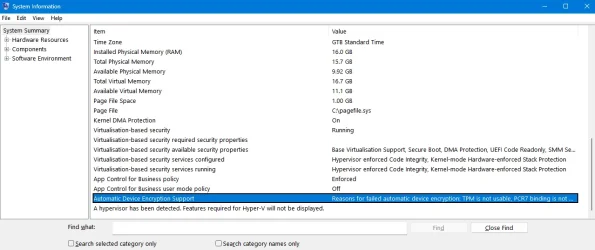
msinfo32 result here: It ;looks like the core isolation module does indeed use a hypervisor but that has always been active on this system. I will try re-enabling the TPM in the BIOS to see if the problem goes away.
 

Attachments

  • msinfo32.webp
    msinfo32.webp
    62 KB · Views: 23

My Computer

System One

  • OS
    Windows 11 Pro x64
    Computer type
    PC/Desktop
    Manufacturer/Model
    -
    CPU
    Intel i5-12400
    Motherboard
    MSI MAG MORTAR B660M WiFi
    Memory
    Corsair Vengeance DDR5 5200 MHz 16GB Dual Channel Kit (runs at 4800)
    Graphics Card(s)
    CPU Intel® UHD Graphics 730
    Browser
    Firefox
Check to make sure option HibernateEnabledDefault is set to 1 in option 3 here.
Next, double check below to make sure Virtual Machine Platform is disabled.


I already checked the registry before (and just did again) and it is currently set per your reg file in option 3 above:
[HKEY_LOCAL_MACHINE\SYSTEM\CurrentControlSet\Control\Power]<br>"HibernateEnabledDefault"=dword:00000001

and I do not have VM Platform enabled, either in Settings > System> Advanced or in Turn Windows Features on or off.

I will go to my BIOS and enable my TPM again to see what happens.. not done that yet.
 

My Computer

System One

  • OS
    Windows 11 Pro x64
    Computer type
    PC/Desktop
    Manufacturer/Model
    -
    CPU
    Intel i5-12400
    Motherboard
    MSI MAG MORTAR B660M WiFi
    Memory
    Corsair Vengeance DDR5 5200 MHz 16GB Dual Channel Kit (runs at 4800)
    Graphics Card(s)
    CPU Intel® UHD Graphics 730
    Browser
    Firefox
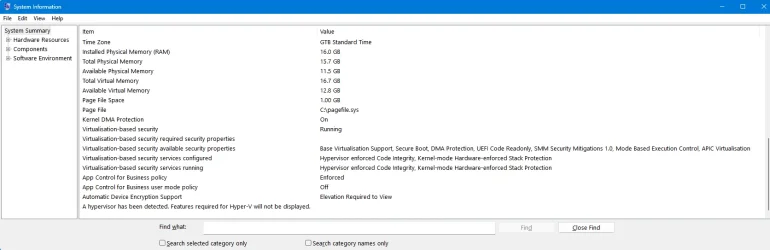
OK, so I re-enabled the TPM in my BIOS and Hiberfil.sys has updated on boot. msconfig32 now shows TPM as active. Hibernate and fast startup are now available again in power options. so this seems to be the issue. I have no idea why.
 

Attachments

  • msinfo32 with TPM enabled.webp
    msinfo32 with TPM enabled.webp
    63 KB · Views: 23

My Computer

System One

  • OS
    Windows 11 Pro x64
    Computer type
    PC/Desktop
    Manufacturer/Model
    -
    CPU
    Intel i5-12400
    Motherboard
    MSI MAG MORTAR B660M WiFi
    Memory
    Corsair Vengeance DDR5 5200 MHz 16GB Dual Channel Kit (runs at 4800)
    Graphics Card(s)
    CPU Intel® UHD Graphics 730
    Browser
    Firefox
OK, so I re-enabled the TPM in my BIOS and Hiberfil.sys has updated on boot. msconfig32 now shows TPM as active. Hibernate and fast startup are now available again in power options. so this seems to be the issue. I have no idea why.

Odd disabling the TPM was the cause, but glad you got it sorted.
 

My Computers

System One System Two

  • OS
    Windows 11 Pro for Workstations
    Computer type
    PC/Desktop
    Manufacturer/Model
    Custom self build
    CPU
    Intel i7-8700K 5 GHz
    Motherboard
    ASUS ROG Maximus XI Formula Z390
    Memory
    64 GB (4x16GB) G.SKILL TridentZ RGB DDR4 3600 MHz (F4-3600C18D-32GTZR)
    Graphics Card(s)
    ASUS ROG-STRIX-GTX1080TI-O11G-GAMING (11GB GDDR5X)
    Sound Card
    Integrated Digital Audio (S/PDIF)
    Monitor(s) Displays
    2 x Samsung Odyssey G75 27"
    Screen Resolution
    2560x1440
    Hard Drives
    1TB Samsung 990 PRO M.2,
    4TB Samsung 990 PRO M.2,
    TerraMaster F8 SSD Plus NAS
    PSU
    Seasonic Prime Titanium 850W
    Case
    Thermaltake Core P3 wall mounted
    Cooling
    Corsair Hydro H115i
    Keyboard
    Amazon Basics Wired Full Keyboard MD005
    Mouse
    Logitech MX Master 4
    Internet Speed
    2 Gbps Download and 100 Mbps Upload
    Browser
    Chrome and Edge
    Antivirus
    Microsoft Defender
    Other Info
    Logitech Z625 speaker system,
    Logitech BRIO 4K Pro webcam,
    HP Color LaserJet Pro MFP M477fdn,
    CyberPower CP1500PFCLCD
    Galaxy S23 Plus phone
  • Operating System
    Windows 11 Pro
    Computer type
    Laptop
    Manufacturer/Model
    Surface Laptop 7 Copilot+ PC
    CPU
    Snapdragon X Elite (12 core) 3.42 GHz
    Memory
    16 GB LPDDR5x-7467 MHz
    Monitor(s) Displays
    15" HDR
    Screen Resolution
    2496 x 1664
    Hard Drives
    1 TB SSD
    Internet Speed
    Wi-Fi 7 and Bluetooth 5.4
    Browser
    Chrome and Edge
    Antivirus
    Microsoft Defender
Thanks Shawn, Merry Xmas and Happy 2026 🎄🎄🎄
 

My Computer

System One

  • OS
    Windows 11 Pro x64
    Computer type
    PC/Desktop
    Manufacturer/Model
    -
    CPU
    Intel i5-12400
    Motherboard
    MSI MAG MORTAR B660M WiFi
    Memory
    Corsair Vengeance DDR5 5200 MHz 16GB Dual Channel Kit (runs at 4800)
    Graphics Card(s)
    CPU Intel® UHD Graphics 730
    Browser
    Firefox

My Computers

System One System Two

  • OS
    Windows 11 Pro for Workstations
    Computer type
    PC/Desktop
    Manufacturer/Model
    Custom self build
    CPU
    Intel i7-8700K 5 GHz
    Motherboard
    ASUS ROG Maximus XI Formula Z390
    Memory
    64 GB (4x16GB) G.SKILL TridentZ RGB DDR4 3600 MHz (F4-3600C18D-32GTZR)
    Graphics Card(s)
    ASUS ROG-STRIX-GTX1080TI-O11G-GAMING (11GB GDDR5X)
    Sound Card
    Integrated Digital Audio (S/PDIF)
    Monitor(s) Displays
    2 x Samsung Odyssey G75 27"
    Screen Resolution
    2560x1440
    Hard Drives
    1TB Samsung 990 PRO M.2,
    4TB Samsung 990 PRO M.2,
    TerraMaster F8 SSD Plus NAS
    PSU
    Seasonic Prime Titanium 850W
    Case
    Thermaltake Core P3 wall mounted
    Cooling
    Corsair Hydro H115i
    Keyboard
    Amazon Basics Wired Full Keyboard MD005
    Mouse
    Logitech MX Master 4
    Internet Speed
    2 Gbps Download and 100 Mbps Upload
    Browser
    Chrome and Edge
    Antivirus
    Microsoft Defender
    Other Info
    Logitech Z625 speaker system,
    Logitech BRIO 4K Pro webcam,
    HP Color LaserJet Pro MFP M477fdn,
    CyberPower CP1500PFCLCD
    Galaxy S23 Plus phone
  • Operating System
    Windows 11 Pro
    Computer type
    Laptop
    Manufacturer/Model
    Surface Laptop 7 Copilot+ PC
    CPU
    Snapdragon X Elite (12 core) 3.42 GHz
    Memory
    16 GB LPDDR5x-7467 MHz
    Monitor(s) Displays
    15" HDR
    Screen Resolution
    2496 x 1664
    Hard Drives
    1 TB SSD
    Internet Speed
    Wi-Fi 7 and Bluetooth 5.4
    Browser
    Chrome and Edge
    Antivirus
    Microsoft Defender
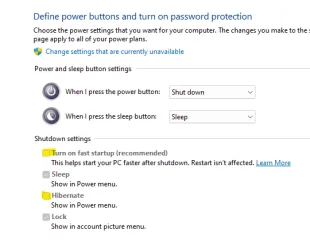
I guess i found out too late. i thought by disabling hibernate and fast start up in Control Panel here:
1767135338278.webp

, that it would disable Hibernate. Why did MS design it like this? Is the control panel basically just hiding the button? what's the point lol.
 

My Computer

System One

  • OS
    11, (10 as a test secondary)
    Computer type
    PC/Desktop
    CPU
    AMD Ryzen 9 7950X3D
    Motherboard
    MSI MPG X670E CARBON WIFI
    Memory
    Kingston FURY Beast 32 GB (2 x 16 GB) DDR5-5600 CL36
    Graphics Card(s)
    RTX 5080
    Hard Drives
    C drive: Samsung SSD 870 EVO 4TB (win 11)
    C Drive: Hitachi HTS545032B9A300 (win 10)
    -WD WD1002FAEX 1tb
    -Seagate ST3160812AS 160 gb
    PSU
    SeaSonic PRIME 1300 Gold 1300 W 80+ Gold
    Case
    Phanteks Enthoo Pro Tempered Glass ATX Full Tower Case
    Cooling
    Noctua NH-D15S
windows deletes hiberfil.sys = about 6Gb+ of space returned plus a little bit less drive activity.
 

My Computer

System One

  • OS
    Win11
    Computer type
    PC/Desktop
    Manufacturer/Model
    Mine 1.5
    CPU
    7800X3D
    Motherboard
    ASUS B650 Tuf with wifi.
    Memory
    32gb G.Skill
    Graphics Card(s)
    4070 Ti Super
    Monitor(s) Displays
    1x Nixeus NX_EDG27, 2x Dell S2440L (16:9)
    Screen Resolution
    1440p
    Hard Drives
    C:\NVME (500GB), D:\Seagate (2TB), E:\ & F:\ SSD 990EVO (1TB)
    PSU
    Corsair HX1000i
    Case
    Phanteks Enthoo Primo w/10 140mm SP Fans
    Cooling
    Artic TF2 420
    Keyboard
    Corsair 1000
    Mouse
    Steel Series Prime Wireless
    Internet Speed
    20 MB/s
    Browser
    Firefox 64
    Antivirus
    not telling!
    Other Info
    https://i.imgur.com/aoz3vWY.jpg?2
@imeem


No one knows why MS does the things it does.
But... here's ten points for filling out your computer specs. :-)


Here's some things that you may find useful...


My Computers

System One System Two

  • OS
    Win 11 Home ♦♦♦26200.8457 ♦♦♦♦♦♦♦25H2
    Computer type
    PC/Desktop
    Manufacturer/Model
    Built by Ghot® [May 2020]
    CPU
    AMD Ryzen 7 3700X
    Motherboard
    Asus Pro WS X570-ACE (BIOS 5302)
    Memory
    G.Skill (F4-3200C14D-16GTZKW)
    Graphics Card(s)
    EVGA RTX 2070 (08G-P4-2171-KR)
    Sound Card
    Realtek ALC1220P / ALC S1220A
    Monitor(s) Displays
    Dell U3011 30"
    Screen Resolution
    2560 x 1600
    Hard Drives
    2x Samsung 860 EVO 500GB,
    WD 4TB Black FZBX - SATA III,
    WD 8TB Black FZBX - SATA III,
    DRW-24B1ST CD/DVD Burner
    PSU
    PC Power & Cooling 750W Quad EPS12V
    Case
    Cooler Master ATCS 840 Tower
    Cooling
    CM Hyper 212 EVO (push/pull)
    Keyboard
    Ducky DK9008 Shine II Blue LED
    Mouse
    Logitech Optical M-100
    Internet Speed
    300/300
    Browser
    Firefox (latest)
    Antivirus
    Bitdefender Total Security
    Other Info
    Speakers: Klipsch Pro Media 2.1
  • Operating System
    Windows XP Pro 32bit w/SP3
    Computer type
    PC/Desktop
    Manufacturer/Model
    Built by Ghot® (not in use)
    CPU
    AMD Athlon 64 X2 5000+ (OC'd @ 3.2Ghz)
    Motherboard
    ASUS M2N32-SLI Deluxe Wireless Edition
    Memory
    TWIN2X2048-6400C4DHX (2 x 1GB, DDR2 800)
    Graphics card(s)
    EVGA 256-P2-N758-TR GeForce 8600GT SSC
    Sound Card
    Onboard
    Monitor(s) Displays
    ViewSonic G90FB Black 19" Professional (CRT)
    Screen Resolution
    up to 2048 x 1536
    Hard Drives
    WD 36GB 10,000rpm Raptor SATA
    Seagate 80GB 7200rpm SATA
    Lite-On LTR-52246S CD/RW
    Lite-On LH-18A1P CD/DVD Burner
    PSU
    PC Power & Cooling Silencer 750 Quad EPS12V
    Case
    Generic Beige case, 80mm fans
    Cooling
    ZALMAN 9500A 92mm CPU Cooler
    Keyboard
    Logitech Classic Keybooard 200
    Mouse
    Logitech Optical M-BT96a
    Internet Speed
    300/300
    Browser
    Firefox 3.x ??
    Antivirus
    Symantec (Norton)
    Other Info
    Still assembled, still runs. Haven't turned it on for 15 years?
Hi Shawn
Can you please confirm the following from my tests.

In the key: [HKEY_LOCAL_MACHINE\SYSTEM\CurrentControlSet\Control\Power
using Option 1 is changing the value for HibernateEnabled, where:
Value 1 = hibernate is enabled and hiberfil.sys exists
Value 0 = hibernate is disabled and hiberfil.sys is deleted

Using Option 2 on the other hand does not seem to change the status of hibernate.
In other words, regardless of the value for HibernateEnabledDefault (0 or 1), the status of hibernate is determined by the value for HibernateEnabled.

My questions:
1. Should the REG files in Option Two change the value for HibernateEnabled and NOT HibernateEnabledDefault?
2. What does the value for HibernateEnabledDefault affect? What does it do? In one of the comments I saw HibernateEnabledDefault mentioned in the context of Option 3 but Option 3 does not exist anymore.

Thanks.
 

My Computer

System One

  • OS
    Windows 11 Pro
    Computer type
    PC/Desktop
    Manufacturer/Model
    Beelink U59
    Other Info
    Build 22621.1194
Hi Shawn
Can you please confirm the following from my tests.

In the key: [HKEY_LOCAL_MACHINE\SYSTEM\CurrentControlSet\Control\Power
using Option 1 is changing the value for HibernateEnabled, where:
Value 1 = hibernate is enabled and hiberfil.sys exists
Value 0 = hibernate is disabled and hiberfil.sys is deleted

Using Option 2 on the other hand does not seem to change the status of hibernate.
In other words, regardless of the value for HibernateEnabledDefault (0 or 1), the status of hibernate is determined by the value for HibernateEnabled.

My questions:
1. Should the REG files in Option Two change the value for HibernateEnabled and NOT HibernateEnabledDefault?
2. What does the value for HibernateEnabledDefault affect? What does it do? In one of the comments I saw HibernateEnabledDefault mentioned in the context of Option 3 but Option 3 does not exist anymore.

Thanks.

Hey mate, :alien:

That option 3 reference is just option 2 now.

Just to confirm, did you restart the computer to apply after changing the HibernateEnabledDefault DWORD value?

I went ahead and added the HibernateEnabled DWORD to the REG files to be thorough.
 

My Computers

System One System Two

  • OS
    Windows 11 Pro for Workstations
    Computer type
    PC/Desktop
    Manufacturer/Model
    Custom self build
    CPU
    Intel i7-8700K 5 GHz
    Motherboard
    ASUS ROG Maximus XI Formula Z390
    Memory
    64 GB (4x16GB) G.SKILL TridentZ RGB DDR4 3600 MHz (F4-3600C18D-32GTZR)
    Graphics Card(s)
    ASUS ROG-STRIX-GTX1080TI-O11G-GAMING (11GB GDDR5X)
    Sound Card
    Integrated Digital Audio (S/PDIF)
    Monitor(s) Displays
    2 x Samsung Odyssey G75 27"
    Screen Resolution
    2560x1440
    Hard Drives
    1TB Samsung 990 PRO M.2,
    4TB Samsung 990 PRO M.2,
    TerraMaster F8 SSD Plus NAS
    PSU
    Seasonic Prime Titanium 850W
    Case
    Thermaltake Core P3 wall mounted
    Cooling
    Corsair Hydro H115i
    Keyboard
    Amazon Basics Wired Full Keyboard MD005
    Mouse
    Logitech MX Master 4
    Internet Speed
    2 Gbps Download and 100 Mbps Upload
    Browser
    Chrome and Edge
    Antivirus
    Microsoft Defender
    Other Info
    Logitech Z625 speaker system,
    Logitech BRIO 4K Pro webcam,
    HP Color LaserJet Pro MFP M477fdn,
    CyberPower CP1500PFCLCD
    Galaxy S23 Plus phone
  • Operating System
    Windows 11 Pro
    Computer type
    Laptop
    Manufacturer/Model
    Surface Laptop 7 Copilot+ PC
    CPU
    Snapdragon X Elite (12 core) 3.42 GHz
    Memory
    16 GB LPDDR5x-7467 MHz
    Monitor(s) Displays
    15" HDR
    Screen Resolution
    2496 x 1664
    Hard Drives
    1 TB SSD
    Internet Speed
    Wi-Fi 7 and Bluetooth 5.4
    Browser
    Chrome and Edge
    Antivirus
    Microsoft Defender
Hey mate, :alien:

That option 3 reference is just option 2 now.

Just to confirm, did you restart the computer to apply after changing the HibernateEnabledDefault DWORD value?

I went ahead and added the HibernateEnabled DWORD to the REG files to be thorough.

I confirm that I restarted the computer after applying a REG file.
To make sure that I did not screw up my tests, I went ahead and ran many more tests with the results below.

I note that before starting the tests I disabled Fast Startup so it will not affect hiberfil.sys file (like Reduced size).
Also, in the tests below, I used your latest updated REG files which include the HibernateEnabled DWORD.
Finally, I note that in the table below, HE=HibernateEnabled DWORD and HED=HibernateEnabledDefault DWORD.

Test results:
1769432518266.webp

My observations:
[1]
The highlighted lines are where the action (powercfg.exe or applying a REG file) has failed.
In Test4, DISABLE via REG file failed completely.
In test9 and Test10, both powercfg.exe and the REG file produced weird results: [powercfg.exe -a] reporting Hibernate is not available when the hiberfil.sys file exists! How is this possible?!
[2]
powercfg.exe never changes the HED DWORD. This is why in my initial post I implied that the value of the HED DWORD does not seem to affect the status of Hibernate and therefore it should not be in the REG files. I am still not sure what this DWORD does or affects.
[3] The REG ENABLE file seems to work; However, the REG DISABLE file fails every time or most of the time.

My conclusions: From other tests as well which I am not showing here, the powercfg.exe command seems to work every time UNTIL you start mixing it up with applying REG files as shown above. If the effect of the REG files was identical to the effect of the powercfg.exe command, the above failures would not and should not have happened.

Maybe you see something I am not?
 

My Computer

System One

  • OS
    Windows 11 Pro
    Computer type
    PC/Desktop
    Manufacturer/Model
    Beelink U59
    Other Info
    Build 22621.1194

Latest Support Threads

Back
Top Bottom