Bug Cut and paste is glitching and not working.


Alex_S_MrBison

MrBison Alex
Member
VIP
Local time
1:38 PM
Posts
261
Location
Brazil
OS
Windows 11, Pro for Workstations 23H2
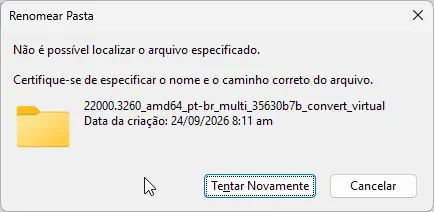
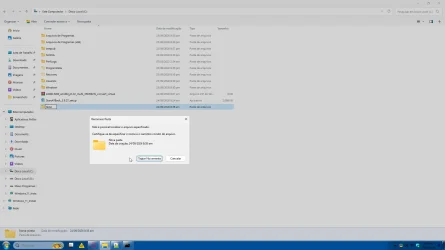
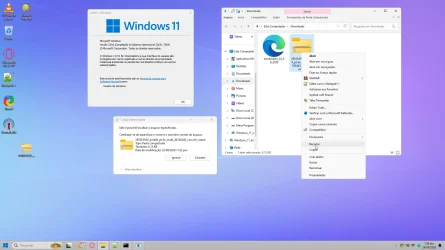
Cut and paste is glitching and not working; it says the specified file cannot be found. The same thing happens when renaming a folder.
However, copying and pasting the file works.

When I create a new folder and try to rename it, it also says the folder doesn't exist; it doesn't work when extracting from WinRAR and trying to rename it either, It says the specified file cannot be found. sgsBHkTgSQ.webp
7ALUmbrzcD.webpexplorer_rNXvIukVGC.webp
 
Windows Build/Version
23H2 22631.7584
Last edited:

My Computer My Computer

At a glance

Windows 11, Pro for Workstations 23H2core 2 duo E74004G DDR2NVIDIA Geforce 6200 TurboCache
OS
Windows 11, Pro for Workstations 23H2
Computer type
PC/Desktop
Manufacturer/Model
Custom
CPU
core 2 duo E7400
Motherboard
MSI G31M3-L V2 (MS-7529)
Memory
4G DDR2
Graphics Card(s)
NVIDIA Geforce 6200 TurboCache
Sound Card
None
Monitor(s) Displays
Philips TV 43PFG5102/78
Screen Resolution
1920x1080
Hard Drives
HDD: Old 930gb, Second HDD 698gb
PSU
300W
Case
Goldship
Cooling
default
Keyboard
Exbom
Mouse
Exbom
Internet Speed
600mb
Browser
Opera
Antivirus
Windows Segurity
Other Info
I no longer have my old computer—the one with the Ryzen 5500, GeForce 1650 Super, and 16GB of DDR4 3200 MHz RAM.
Have you tried Ctrl-C & Ctrl-V to cut and paste to see if it works that way?
 

My Computer My Computer

At a glance

W11
OS
W11
Computer type
PC/Desktop
Manufacturer/Model
2 HP Desktops, 1 Dell Desktop, 2 Dell XPS Laptops, 1 HP Laptop
Keyboard
Logitech
Mouse
Logitech MX Master 4 & 3
Internet Speed
500 mps
Browser
Firefox
Antivirus
Bitdefender
Have you tried Ctrl-C & Ctrl-V to cut and paste to see if it works that way?
ctrl X , or ctrl C and ctrl V , works
 

My Computer My Computer

At a glance

Windows 11, Pro for Workstations 23H2core 2 duo E74004G DDR2NVIDIA Geforce 6200 TurboCache
OS
Windows 11, Pro for Workstations 23H2
Computer type
PC/Desktop
Manufacturer/Model
Custom
CPU
core 2 duo E7400
Motherboard
MSI G31M3-L V2 (MS-7529)
Memory
4G DDR2
Graphics Card(s)
NVIDIA Geforce 6200 TurboCache
Sound Card
None
Monitor(s) Displays
Philips TV 43PFG5102/78
Screen Resolution
1920x1080
Hard Drives
HDD: Old 930gb, Second HDD 698gb
PSU
300W
Case
Goldship
Cooling
default
Keyboard
Exbom
Mouse
Exbom
Internet Speed
600mb
Browser
Opera
Antivirus
Windows Segurity
Other Info
I no longer have my old computer—the one with the Ryzen 5500, GeForce 1650 Super, and 16GB of DDR4 3200 MHz RAM.
Before you go any further, right click on a blank are and select Refresh just in case that's all that's getting in your way.


Denis
 

My Computer My Computer

At a glance

Windows 11 Home x64 Version 26H2 Build 26300....
OS
Windows 11 Home x64 Version 26H2 Build 26300.9457

My Computer My Computer

At a glance

W11
OS
W11
Computer type
PC/Desktop
Manufacturer/Model
2 HP Desktops, 1 Dell Desktop, 2 Dell XPS Laptops, 1 HP Laptop
Keyboard
Logitech
Mouse
Logitech MX Master 4 & 3
Internet Speed
500 mps
Browser
Firefox
Antivirus
Bitdefender
I have two suspects: the recent version of StartAllBack and Winaero Tweaker.
I'll need StartAllBack version 3.8 (from July 31, 2024)
and an older version of Winaero Tweaker—I still need to look into that.
 

My Computer My Computer

At a glance

Windows 11, Pro for Workstations 23H2core 2 duo E74004G DDR2NVIDIA Geforce 6200 TurboCache
OS
Windows 11, Pro for Workstations 23H2
Computer type
PC/Desktop
Manufacturer/Model
Custom
CPU
core 2 duo E7400
Motherboard
MSI G31M3-L V2 (MS-7529)
Memory
4G DDR2
Graphics Card(s)
NVIDIA Geforce 6200 TurboCache
Sound Card
None
Monitor(s) Displays
Philips TV 43PFG5102/78
Screen Resolution
1920x1080
Hard Drives
HDD: Old 930gb, Second HDD 698gb
PSU
300W
Case
Goldship
Cooling
default
Keyboard
Exbom
Mouse
Exbom
Internet Speed
600mb
Browser
Opera
Antivirus
Windows Segurity
Other Info
I no longer have my old computer—the one with the Ryzen 5500, GeForce 1650 Super, and 16GB of DDR4 3200 MHz RAM.
Go to Task Manager>Startup Apps and disable all non Microsoft Apps from auto starting.
Power off shutdown and restart.
In Terminal]admin] type in and run---dism /online /cleanup-image /restorehealth---and when finished,type in and run ---sfc scannow---
Do you still have the problem?
 

My Computer My Computer

At a glance

win 10amd ryzen 5-2600ng skill sniper x 16gbnvidea gtx 1050
OS
win 10
Computer type
PC/Desktop
Manufacturer/Model
home built
CPU
amd ryzen 5-2600
Motherboard
gigabyte b450m-ds3h
Memory
ng skill sniper x 16gb
Graphics Card(s)
nvidea gtx 1050
Monitor(s) Displays
benq fp 92
Hard Drives
samsung 860 evo 500gb m2 ssd
PSU
antec ea550g
Case
nzxt noctis 450
Browser
edge
Thanks everyone, but I solved it by formatting and installing fewer modifications. Much appreciated.
 

My Computer My Computer

At a glance

Windows 11, Pro for Workstations 23H2core 2 duo E74004G DDR2NVIDIA Geforce 6200 TurboCache
OS
Windows 11, Pro for Workstations 23H2
Computer type
PC/Desktop
Manufacturer/Model
Custom
CPU
core 2 duo E7400
Motherboard
MSI G31M3-L V2 (MS-7529)
Memory
4G DDR2
Graphics Card(s)
NVIDIA Geforce 6200 TurboCache
Sound Card
None
Monitor(s) Displays
Philips TV 43PFG5102/78
Screen Resolution
1920x1080
Hard Drives
HDD: Old 930gb, Second HDD 698gb
PSU
300W
Case
Goldship
Cooling
default
Keyboard
Exbom
Mouse
Exbom
Internet Speed
600mb
Browser
Opera
Antivirus
Windows Segurity
Other Info
I no longer have my old computer—the one with the Ryzen 5500, GeForce 1650 Super, and 16GB of DDR4 3200 MHz RAM.
Moving forward, knowing what modifications you have made will help us to help you - and keep us from spinning our wheels ;-)
 

My Computer My Computer

At a glance

W11
OS
W11
Computer type
PC/Desktop
Manufacturer/Model
2 HP Desktops, 1 Dell Desktop, 2 Dell XPS Laptops, 1 HP Laptop
Keyboard
Logitech
Mouse
Logitech MX Master 4 & 3
Internet Speed
500 mps
Browser
Firefox
Antivirus
Bitdefender
Moving forward, knowing what modifications you have made will help us to help you - and keep us from spinning our wheels ;-)
This time I'm only using StartAllBack—I didn't use the files to bring back the "This PC" folders. I also stopped using Winaero Tweaker; maybe the registry changes and the tweaker were conflicting and messing things up.
 

My Computer My Computer

At a glance

Windows 11, Pro for Workstations 23H2core 2 duo E74004G DDR2NVIDIA Geforce 6200 TurboCache
OS
Windows 11, Pro for Workstations 23H2
Computer type
PC/Desktop
Manufacturer/Model
Custom
CPU
core 2 duo E7400
Motherboard
MSI G31M3-L V2 (MS-7529)
Memory
4G DDR2
Graphics Card(s)
NVIDIA Geforce 6200 TurboCache
Sound Card
None
Monitor(s) Displays
Philips TV 43PFG5102/78
Screen Resolution
1920x1080
Hard Drives
HDD: Old 930gb, Second HDD 698gb
PSU
300W
Case
Goldship
Cooling
default
Keyboard
Exbom
Mouse
Exbom
Internet Speed
600mb
Browser
Opera
Antivirus
Windows Segurity
Other Info
I no longer have my old computer—the one with the Ryzen 5500, GeForce 1650 Super, and 16GB of DDR4 3200 MHz RAM.
Back
Top Bottom