System Enable or Disable Snap Layouts for Maximize Button in Windows 11

  • Thread starter Thread starter Brink
  • Start date Published: Start date Updated Updated:
  • Tags Tags
    snap

Snap_banner.png

This tutorial will show you how to enable or disable showing snap layouts when hovering over a maximize button for your account in Windows 11.

The Snap windows feature in Windows allows you to automatically resize and arrange windows on your screen.

Windows 11 includes a Snap Layouts feature that allows you to select how to snap the current window.

Just hover your mouse over a window’s maximize button to see available snap layouts, then click on a zone to snap the window. You’ll then be guided to snap windows to the rest of the zones within the layout with guided snap assist. For smaller screens, you’ll be offered a set of 4 snap layouts. You can also invoke the snap layouts flyout with the Win + Z keyboard shortcut.

Starting with Windows 11 build 22000.65, available snap layouts when using smaller PCs in portrait orientation have been optimized for that posture. You can now choose to snap three apps on top of each other, instead of four quadrants.

Starting with Windows 11 build 22557, Microsoft added a new way to snap windows into snap layouts that works wonderfully with both touch and mouse! To try it out, just drag a window to the top of the screen to reveal the snap layouts, drop the window on top of a zone to snap it, and use snap assist to finish building your layout.

Starting with Windows 11 build 22593, if you press Win+Z to open snap layouts, all the layouts will now show associated numbers, so you can quickly use the number keys to select the desired layout.

Starting with Windows 11 build 22631.3374, Microsoft is trying out suggestions in Snap Layouts that help you instantly snap multiple app windows together. When hovering over the Minimize or Maximize button on an app (or WIN + Z) to launch the layout box, you will see app icons displayed in various layout options to help recommend the best layout option that works best.
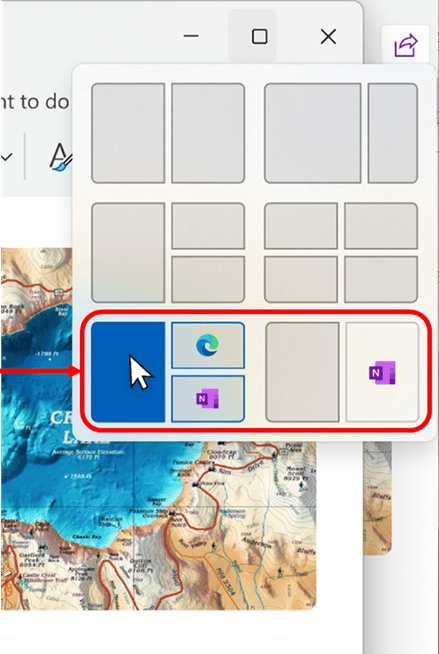
Suggestions in Snap Layouts.


Starting with Windows 11 build 22635.4371 (Beta), Microsoft is trying out a behind-the-scenes change to improve what apps are suggested for snapping in snap layouts. Try out snapping different apps and let Microsoft know if you see improvements in what apps you see suggested.

Starting with Windows 11 build 22635.4805 (Beta 23H2) and build 26120.3281 (Beta/Dev 24H2), Microsoft is introducing an improvement to Snap in Windows 11 aimed at driving contextual learning and discovery of the feature. Inline messaging will now appear when you accidentally invoke the Snap Bar when dragging an app to the top middle of your desktop or Snap Flyout when hovering over the Minimize or Maximize button of an app. This messaging is designed to provide guidance on snapping app windows and educating users on the keyboard shortcuts for quickly snapping app windows in the future. Microsoft is trying several variants of this experience out.


Contents

  • Option One: Enable or Disable Snap Layouts for Maximize Button in Settings
  • Option Two: Enable or Disable Snap Layouts for Maximize Button using REG file
  • Option Three: Enable or Disable Snap Layouts for Maximize Button in Registry Editor


EXAMPLE: Snap layouts when hovering over a maximize button

snap_layouts_when_hover_over_maximize_button.jpg


Option One

Enable or Disable Snap Layouts for Maximize Button in Settings


1 Open Settings (Win+I).

2 Click/tap on System on the left side, and click/tap on Multitasking on the right side. (see screenshot below)

Open Multitasking settings

Show_snap_layouts_when_hover_over_maximize_button_Settings-1.png

3 Click/tap on Snap windows on the right side to expand it open. (see screenshot below step 4)

4 Check (enable - default) or Uncheck (disable) Show snap layouts when I hover over a window’s maximize button for what you want on the right side.

The Show snap layouts when I hover over a window’s maximize button setting will be disabled and grayed out if Snap windows is not turned on.


Show_snap_layouts_when_hover_over_maximize_button_Settings-2.webp

5 You can now close Settings if you like.


Option Two

Enable or Disable Snap Layouts for Maximize Button using REG file


This option will not work when Administrator protection is turned on.


1 Do step 2 (enable) or step 3 (disable) below for what you would like to do.

2 To Enable Snap Layouts for Maximize Button

This is the default setting.


A) Click/tap on the Download button below to download the file below, and go to step 4 below.​

Enable_show_snap_layouts_when_hover_over_maximize_button_in_Windows_11.reg


(Contents of REG file for reference)
Code:
Windows Registry Editor Version 5.00

[HKEY_CURRENT_USER\Control Panel\Desktop]
"WindowArrangementActive"="1"

[HKEY_CURRENT_USER\Software\Microsoft\Windows\CurrentVersion\Explorer\Advanced]
"EnableSnapAssistFlyout"=dword:00000001

3 To Disable Snap Layouts for Maximize Button

A) Click/tap on the Download button below to download the file below, and go to step 4 below.​

Disable_show_snap_layouts_when_hover_over_maximize_button_in_Windows_11.reg


(Contents of REG file for reference)
Code:
Windows Registry Editor Version 5.00

[HKEY_CURRENT_USER\Software\Microsoft\Windows\CurrentVersion\Explorer\Advanced]
"EnableSnapAssistFlyout"=dword:00000000

4 Save the .reg file to your desktop.

5 If you have Smart App Control turned on, you will need to unblock the downloaded REG file.

6 Double click/tap on the downloaded .reg file to merge it.

7 When prompted, click/tap on Run, Yes (UAC), Yes, and OK to approve the merge.

8 Either sign out and sign in or restart the computer to apply.

9 You can now delete the downloaded .reg file if you like.


Option Three

Enable or Disable Snap Layouts for Maximize Button in Registry Editor


1 Open Registry Editor (regedit.exe).

2 Navigate to the key location below in the left pane of Registry Editor. (see screenshot below step 3)

HKEY_USERS\<SID>\Software\Microsoft\Windows\CurrentVersion\Explorer\Advanced

Substitute <SID> in the key path above with the actual SID for the account you want to apply this to.

For example:
HKEY_USERS\S-1-5-21-2498639629-3946114050-4100787084-1001\Software\Microsoft\Windows\CurrentVersion\Explorer\Advanced


3 In the right pane of the Advanced key, double click/tap on the EnableSnapAssistFlyout DWORD to modify it. (see screenshot below)

EnableSnapAssistFlyout-1.webp

4 Enter 0 (disable) or 1 (enable - default) for what you want, and click/tap on OK. (see screenshot below)

EnableSnapAssistFlyout-2.webp

5 Either sign out and sign in or restart the computer to apply.

6 You can now close Registry Editor if you like.


That's it,
Shawn Brink


Attachments

Last edited:

I really like this!!!
 

My Computers My Computers

  • At a glance

    Windows 11 WorkstationRyzen 9 5950XCorsair Vengeance RGB PRO Black 64GB (4x16GB)...ASUS AMD Radeon RX 6900 XT 16GB ROG Strix LC OC
    OS
    Windows 11 Workstation
    Computer type
    PC/Desktop
    Manufacturer/Model
    doofenshmirtz evil incorporated
    CPU
    Ryzen 9 5950X
    Motherboard
    Asus ROG Crosshair VIII Formula
    Memory
    Corsair Vengeance RGB PRO Black 64GB (4x16GB) 3600MHz AMD Ryzen Tuned DDR4
    Graphics Card(s)
    ASUS AMD Radeon RX 6900 XT 16GB ROG Strix LC OC
    Sound Card
    Sound BlasterX Katana
    Monitor(s) Displays
    3 x27" Dell U2724D & 1 x 34" Dell U3415W
    Hard Drives
    Samsung 980 Pro 1TB M.2 2280 PCI-e 4.0 x4 NVMe Solid State
    Drive
    PSU
    ASUS ROG THOR 850W 80 Plus Platinum
    Case
    ASUS ROG Strix Helios Midi-Tower ARGB Gaming Case
    Cooling
    ASUS ROG Strix LC Performance RGB AIO CPU Liquid Cooler - 360mm
    Keyboard
    Logi Ergo
    Mouse
    Logitech MX Vertical
    Internet Speed
    1000/200 Mbps
    Browser
    Chrome
    Antivirus
    Windows Defender, Malwarebytes Pro
    Other Info
    HP M281 Printer
    Logitech Brio Stream webcam
    Logitech G Yeti orb mic
  • At a glance

    Windows 11 ProSnapdragon X2 Plus64GB
    Operating System
    Windows 11 Pro
    Computer type
    Laptop
    Manufacturer/Model
    Surface Laptop
    CPU
    Snapdragon X2 Plus
    Memory
    64GB
    Monitor(s) Displays
    15"
  • Nothing to see here.

My Computers My Computers

  • At a glance

    Windows 11 Pro for WorkstationsIntel i7-8700K 5 GHz64 GB (4x16GB) G.SKILL TridentZ RGB DDR4 3600...ASUS ROG-STRIX-GTX1080TI-O11G-GAMING (11GB GD...
    OS
    Windows 11 Pro for Workstations
    Computer type
    PC/Desktop
    Manufacturer/Model
    Custom self build
    CPU
    Intel i7-8700K 5 GHz
    Motherboard
    ASUS ROG Maximus XI Formula Z390
    Memory
    64 GB (4x16GB) G.SKILL TridentZ RGB DDR4 3600 MHz (F4-3600C18D-32GTZR)
    Graphics Card(s)
    ASUS ROG-STRIX-GTX1080TI-O11G-GAMING (11GB GDDR5X)
    Sound Card
    Integrated Digital Audio (S/PDIF)
    Monitor(s) Displays
    2 x Samsung Odyssey G75 27"
    Screen Resolution
    2560x1440
    Hard Drives
    1TB Samsung 990 PRO M.2,
    4TB Samsung 990 PRO M.2,
    TerraMaster F8 SSD Plus NAS
    PSU
    Seasonic Prime Titanium 850W
    Case
    Thermaltake Core P3 wall mounted
    Cooling
    Corsair Hydro H115i
    Keyboard
    Amazon Basics Wired Full Keyboard MD005
    Mouse
    Logitech MX Master 4
    Internet Speed
    2 Gbps Download and 100 Mbps Upload
    Browser
    Chrome and Edge
    Antivirus
    Microsoft Defender
    Other Info
    Logitech Z625 speaker system,
    Logitech BRIO 4K Pro webcam,
    HP Color LaserJet Pro MFP M477fdn,
    CyberPower CP1500PFCLCD
    Galaxy S23 Plus phone
  • At a glance

    Windows 11 ProSnapdragon X Elite (12 core) 3.42 GHz16 GB LPDDR5x-7467 MHz
    Operating System
    Windows 11 Pro
    Computer type
    Laptop
    Manufacturer/Model
    Surface Laptop 7 Copilot+ PC
    CPU
    Snapdragon X Elite (12 core) 3.42 GHz
    Memory
    16 GB LPDDR5x-7467 MHz
    Monitor(s) Displays
    15" HDR
    Screen Resolution
    2496 x 1664
    Hard Drives
    1 TB SSD
    Internet Speed
    Wi-Fi 7 and Bluetooth 5.4
    Browser
    Chrome and Edge
    Antivirus
    Microsoft Defender
I just tested it and I liked!
Is it there another way out of it beside maximizing or closing?
 

My Computer My Computer

At a glance

Windows 11Intel® Xeon® X5690 3.47GHz Six-CoreG.Skill PC3-12800 1600MHz 24GBNVIDIA GeForce GTX 1050
OS
Windows 11
Computer type
PC/Desktop
Manufacturer/Model
Asus/Custom Build
CPU
Intel® Xeon® X5690 3.47GHz Six-Core
Motherboard
Asus P6T Deluxe v2
Memory
G.Skill PC3-12800 1600MHz 24GB
Graphics Card(s)
NVIDIA GeForce GTX 1050
Sound Card
SoundMAX ADI AD2000B HD Audio
Monitor(s) Displays
Acer T232HL Touch Screen
Screen Resolution
1920 x 1080 @ 60Hz
Hard Drives
6 Crucial MX500 SSD 1TB each.
PSU
Thermaltake Toughpower Gold 850W
Case
Thermaltake Armor VA8000SWA
Cooling
Thermaltake Air Cooling System
Keyboard
Illuminated Multimedia LED Keyboard
Mouse
M16 Dual Mode Illuminated Mouse - Bluetooth / 2.4 GHz Mode
Internet Speed
800 Mbps
Browser
Edge / Opera / Vivaldi / Chrome / Firefox / Brave
Antivirus
Windows Defender Security
Hi

I have checked all these settings and everything is enabled, yet I do not see the Snap Layout panel. Also the key combination WIN+Z does nothing

Any ideas?

Update: I just made a clean install of Windows 11 and now Snap Layouts works fine
 
Last edited:

My Computer My Computer

At a glance

Windows 11i9-9900KCorsair Vengeance LPC 2x16GB, DDR4-3000ASUS RTX TUF 3080
OS
Windows 11
Computer type
PC/Desktop
Manufacturer/Model
Custom Build
CPU
i9-9900K
Motherboard
ASUS ROG Maximus XI Formula
Memory
Corsair Vengeance LPC 2x16GB, DDR4-3000
Graphics Card(s)
ASUS RTX TUF 3080
Sound Card
Onboard
Monitor(s) Displays
Samsung LC49RG9
Screen Resolution
5120 x 1440
Hard Drives
Samsung SSD M.2 970 PRO 512GB, Samsung SSD M.2 950 PRO 256GB, Samsung SSD 860 QVO 1TB, Samsung SSD 840 256GB
Cooling
ASUS ROG STRIX LC 240
Keyboard
Logitech MX Keys
Mouse
Logitech MX Master 3
Internet Speed
1Gbit/s
This is so cool, thank you for sharing.
 

My Computer My Computer

At a glance

Windows 11i7-10750H @ 2.60GHz16GB
OS
Windows 11
Computer type
Laptop
Manufacturer/Model
Acer Nitro 5
CPU
i7-10750H @ 2.60GHz
Memory
16GB
Monitor(s) Displays
15.6" Laptop + 24" MSI external curved
Screen Resolution
1920x1080
Hard Drives
512GB SSD + 2TB HDD
Mouse
Logitech G Gaming
Internet Speed
Wireless Broadband
Browser
Chrome
Antivirus
Windows Defender
I find this a really useful new feature, but I have found one (and just the one) app where it doesn't appear. Hover over the Maximise button in Firefox 92 and the only thing that pops up is the word 'Maximise'.

1631564816104.png


It can't be that an app needs to be 'Windows 11 aware' as it works in other apps that pre-date W11, such as VLC.

1631564884777.png
 

My Computers My Computers

  • At a glance

    Windows 11 HomeAMD Athlon Silver 3050U8GBRadeon Graphics
    OS
    Windows 11 Home
    Computer type
    Laptop
    Manufacturer/Model
    Acer Aspire 3 A315-23-R9VY
    CPU
    AMD Athlon Silver 3050U
    Memory
    8GB
    Graphics Card(s)
    Radeon Graphics
    Monitor(s) Displays
    laptop screen
    Screen Resolution
    1366x768 native resolution, up to 2560x1440 with Radeon Virtual Super Resolution
    Hard Drives
    1TB Samsung EVO 870 SSD (from April 2026: 250GB EVO 850)
    Internet Speed
    150 Mbps
    Browser
    Edge, Firefox
    Antivirus
    Defender
    Other Info
    UPDATE - 11 April 2026: due to lid hinges starting to break up this laptop has been retired from active duty. The OS with all software and files has been migrated to my System Seven in 'Other systems' to carry on as my general purpose 'main machine'.

    I've now clean installed 25H2 and used Garlin's scripts to update Secure Boot to CA 2023 and revoke the PCA 2011 certificates. It's new role is to test secure boot issues.

    Info for 2021-2026:
    fully 'Windows 11 ready' laptop. Windows 10 C: partition migrated from my old unsupported 'main machine' then upgraded to 11. A test migration ran Insider builds for 2 months. When 11 was released on 5th October 2021 it was re-imaged back to 10 and was offered the upgrade in Windows Update on 20th October. Windows Update offered the 22H2 Feature Update on 20th September 2022. It got the 23H2 Feature Update on 4th November 2023 through Windows Update, 24H2 on 3rd October 2024 through Windows Update by setting the Target Release Version for 24H2, and 25H2 on 30th September 2025 through Windows Update by setting the Target Release Version for 25H2.
  • At a glance

    Windows 11 ProIntel® Core™ i5-520M8GB(integrated graphics) Intel HD Graphics
    Operating System
    Windows 11 Pro
    Computer type
    Laptop
    Manufacturer/Model
    Dell Latitude E4310
    CPU
    Intel® Core™ i5-520M
    Motherboard
    0T6M8G
    Memory
    8GB
    Graphics card(s)
    (integrated graphics) Intel HD Graphics
    Screen Resolution
    1366x768
    Hard Drives
    500GB Crucial MX500 SSD
    Browser
    Firefox, Edge
    Antivirus
    Defender
    Other Info
    unsupported machine: Legacy bios, MBR, TPM 1.2, upgraded from W10 to W11 using W10/W11 hybrid install media workaround.

    In-place upgrade to 22H2 using ISO and a workaround.
    Feature Update to 23H2 by manually installing the Enablement Package.
    In-place upgrade to 24H2 using hybrid 23H2/24H2 install media.
    Upgraded to 25H2 by Enablement Package.

    Also running Insider Experimental 263xx and 29xxx builds and Windows 10 as native boot .vhdx.
  • My SYSTEM THREE is a Dell Latitude 5410, i7-10610U, 32GB RAM, 512GB NVMe ssd, supported device running Windows 11 Pro.

    My SYSTEM FOUR was a 2-in-1 convertible Lenovo Yoga 11e (1st gen) type 20DA, Celeron N2930, 8GB RAM, 256GB ssd. Unsupported device. This has now been sold. It has been replaced by my System Eight.

    My SYSTEM FIVE is a Dell Latitude 3190 2-in-1, Pentium Silver N5030, 8GB RAM, 1TB NVMe ssd, supported device running Windows 11 Pro, plus Insider Beta, Experimental 263xx and 29xxx builds (and a few others) as a native boot .vhdx.

    My SYSTEM SIX is a Dell Latitude 5550, Core Ultra 7 165H, 64GB RAM, 1TB NVMe SSD, supported device, Windows 11 Pro, Hyper-V host machine. Updated to 25H2 on 30th September 2025.

    My SYSTEM SEVEN is a Lenovo Thinkpad T580, 1920x1080 touchscreen, Intel Core i7-8650U, 16GB RAM, 512GB NVMe SSD + 2nd 512GB NVMe SSD, a supported device for Windows 11. This is my current general purpose 'main machine'. The installed Windows 11 Home from my System One has been migrated to this machine. As its new home has an existing digital licence for Pro I've been able to upgrade the migrated OS from Home to Pro.

    My SYSTEM EIGHT is a 2-in-1 convertible Lenovo Yoga 11e (5th gen) type 20LN, Celeron N4120, 8GB RAM, 512GB NVMe ssd, a supported device for Windows 11. Currently running Windows 11 Pro, plus Insider Beta, Experimental 263xx and 29xxx builds as native boot vhdx.
Tutorial updated to add option three. :alien:
 

My Computers My Computers

  • At a glance

    Windows 11 Pro for WorkstationsIntel i7-8700K 5 GHz64 GB (4x16GB) G.SKILL TridentZ RGB DDR4 3600...ASUS ROG-STRIX-GTX1080TI-O11G-GAMING (11GB GD...
    OS
    Windows 11 Pro for Workstations
    Computer type
    PC/Desktop
    Manufacturer/Model
    Custom self build
    CPU
    Intel i7-8700K 5 GHz
    Motherboard
    ASUS ROG Maximus XI Formula Z390
    Memory
    64 GB (4x16GB) G.SKILL TridentZ RGB DDR4 3600 MHz (F4-3600C18D-32GTZR)
    Graphics Card(s)
    ASUS ROG-STRIX-GTX1080TI-O11G-GAMING (11GB GDDR5X)
    Sound Card
    Integrated Digital Audio (S/PDIF)
    Monitor(s) Displays
    2 x Samsung Odyssey G75 27"
    Screen Resolution
    2560x1440
    Hard Drives
    1TB Samsung 990 PRO M.2,
    4TB Samsung 990 PRO M.2,
    TerraMaster F8 SSD Plus NAS
    PSU
    Seasonic Prime Titanium 850W
    Case
    Thermaltake Core P3 wall mounted
    Cooling
    Corsair Hydro H115i
    Keyboard
    Amazon Basics Wired Full Keyboard MD005
    Mouse
    Logitech MX Master 4
    Internet Speed
    2 Gbps Download and 100 Mbps Upload
    Browser
    Chrome and Edge
    Antivirus
    Microsoft Defender
    Other Info
    Logitech Z625 speaker system,
    Logitech BRIO 4K Pro webcam,
    HP Color LaserJet Pro MFP M477fdn,
    CyberPower CP1500PFCLCD
    Galaxy S23 Plus phone
  • At a glance

    Windows 11 ProSnapdragon X Elite (12 core) 3.42 GHz16 GB LPDDR5x-7467 MHz
    Operating System
    Windows 11 Pro
    Computer type
    Laptop
    Manufacturer/Model
    Surface Laptop 7 Copilot+ PC
    CPU
    Snapdragon X Elite (12 core) 3.42 GHz
    Memory
    16 GB LPDDR5x-7467 MHz
    Monitor(s) Displays
    15" HDR
    Screen Resolution
    2496 x 1664
    Hard Drives
    1 TB SSD
    Internet Speed
    Wi-Fi 7 and Bluetooth 5.4
    Browser
    Chrome and Edge
    Antivirus
    Microsoft Defender
Hey @Brink — might you know how to "remove delay" from popup when you mouse over the maximize icon in window bar?

I know WIN + Z activates the popup manually, NEAR INSTANTLY, but no matter what regedit keys I seem to edit/create none of them work... I even tried different values in-between restarts like 0, 50, 100 and what not.

Thanks for tutorial!!
 

My Computer My Computer

At a glance

Windows AtlasIntel Core i3 14100F 3.50 GHz Raptor Lake 10nm32.0GB Dual-Channel DDR4 @ 1596MHz (22-22-22-52)NVIDIA GeForce RTX 3060 (ASUStek Computer Inc)
OS
Windows Atlas
Computer type
PC/Desktop
CPU
Intel Core i3 14100F 3.50 GHz Raptor Lake 10nm
Motherboard
MSI PRO B760M-P DDR4 (MS-7E02) (U3E1)
Memory
32.0GB Dual-Channel DDR4 @ 1596MHz (22-22-22-52)
Graphics Card(s)
NVIDIA GeForce RTX 3060 (ASUStek Computer Inc)
Monitor(s) Displays
Acer XV271U M3
Screen Resolution
2560x1440
Hard Drives
465GB Patriot P400L 500GB
3GB USB Flash Memory USB Device
Case
Custom Wooden Box
Keyboard
Corsair Harpoon
Mouse
Corsair Harpoon
Internet Speed
$30/mt Xfinity - Fast.com 470 Mbps
Browser
Throium/Floorp
Other Info
Klipsche Pro Media 2.1 ARE NICE!!!
Hey @Brink — might you know how to "remove delay" from popup when you mouse over the maximize icon in window bar?

I know WIN + Z activates the popup manually, NEAR INSTANTLY, but no matter what regedit keys I seem to edit/create none of them work... I even tried different values in-between restarts like 0, 50, 100 and what not.

Thanks for tutorial!!

Hello, and welcome to the forum. :alien:

I haven't seen anything so far for changing the hover delay time, but you can test to see if turning off animation effects below may help some.


My Computers My Computers

  • At a glance

    Windows 11 Pro for WorkstationsIntel i7-8700K 5 GHz64 GB (4x16GB) G.SKILL TridentZ RGB DDR4 3600...ASUS ROG-STRIX-GTX1080TI-O11G-GAMING (11GB GD...
    OS
    Windows 11 Pro for Workstations
    Computer type
    PC/Desktop
    Manufacturer/Model
    Custom self build
    CPU
    Intel i7-8700K 5 GHz
    Motherboard
    ASUS ROG Maximus XI Formula Z390
    Memory
    64 GB (4x16GB) G.SKILL TridentZ RGB DDR4 3600 MHz (F4-3600C18D-32GTZR)
    Graphics Card(s)
    ASUS ROG-STRIX-GTX1080TI-O11G-GAMING (11GB GDDR5X)
    Sound Card
    Integrated Digital Audio (S/PDIF)
    Monitor(s) Displays
    2 x Samsung Odyssey G75 27"
    Screen Resolution
    2560x1440
    Hard Drives
    1TB Samsung 990 PRO M.2,
    4TB Samsung 990 PRO M.2,
    TerraMaster F8 SSD Plus NAS
    PSU
    Seasonic Prime Titanium 850W
    Case
    Thermaltake Core P3 wall mounted
    Cooling
    Corsair Hydro H115i
    Keyboard
    Amazon Basics Wired Full Keyboard MD005
    Mouse
    Logitech MX Master 4
    Internet Speed
    2 Gbps Download and 100 Mbps Upload
    Browser
    Chrome and Edge
    Antivirus
    Microsoft Defender
    Other Info
    Logitech Z625 speaker system,
    Logitech BRIO 4K Pro webcam,
    HP Color LaserJet Pro MFP M477fdn,
    CyberPower CP1500PFCLCD
    Galaxy S23 Plus phone
  • At a glance

    Windows 11 ProSnapdragon X Elite (12 core) 3.42 GHz16 GB LPDDR5x-7467 MHz
    Operating System
    Windows 11 Pro
    Computer type
    Laptop
    Manufacturer/Model
    Surface Laptop 7 Copilot+ PC
    CPU
    Snapdragon X Elite (12 core) 3.42 GHz
    Memory
    16 GB LPDDR5x-7467 MHz
    Monitor(s) Displays
    15" HDR
    Screen Resolution
    2496 x 1664
    Hard Drives
    1 TB SSD
    Internet Speed
    Wi-Fi 7 and Bluetooth 5.4
    Browser
    Chrome and Edge
    Antivirus
    Microsoft Defender
Thanks!!

Nice try, but nothing.. still has a horrendous 3s lag delay. All good... best of luck to you.
 

My Computer My Computer

At a glance

Windows AtlasIntel Core i3 14100F 3.50 GHz Raptor Lake 10nm32.0GB Dual-Channel DDR4 @ 1596MHz (22-22-22-52)NVIDIA GeForce RTX 3060 (ASUStek Computer Inc)
OS
Windows Atlas
Computer type
PC/Desktop
CPU
Intel Core i3 14100F 3.50 GHz Raptor Lake 10nm
Motherboard
MSI PRO B760M-P DDR4 (MS-7E02) (U3E1)
Memory
32.0GB Dual-Channel DDR4 @ 1596MHz (22-22-22-52)
Graphics Card(s)
NVIDIA GeForce RTX 3060 (ASUStek Computer Inc)
Monitor(s) Displays
Acer XV271U M3
Screen Resolution
2560x1440
Hard Drives
465GB Patriot P400L 500GB
3GB USB Flash Memory USB Device
Case
Custom Wooden Box
Keyboard
Corsair Harpoon
Mouse
Corsair Harpoon
Internet Speed
$30/mt Xfinity - Fast.com 470 Mbps
Browser
Throium/Floorp
Other Info
Klipsche Pro Media 2.1 ARE NICE!!!

Latest Support Threads

Back
Top Bottom