Devices Enable or Disable Use Print Screen Key to Open Screen Snipping in Windows 11


Print_Screen_banner.webp

This tutorial will show you how to turn on or off to use the Print Screen key to open screen snipping for your account in Windows 11.

The Snipping Tool app includes a built-in screen recorder and allows you to quickly take and annotate screenshots, photos and other images with your pen, touch, or mouse and save, paste or share with other apps.

If you like, you can use the Print Screen key to open screen snipping.

If you turn off Use the Print screen button to open screen snipping, a screenshot of your display(s) will be taken and saved to the Clipboard when you press the Print Screen key.

If you turn on Use the Print screen button to open screen snipping, screen snipping will open when you press the Print Screen key.

Starting with Windows 11 build 22621.1928, pressing the print screen key will now open Snipping Tool by default.


If you have a screenshot or imaging app installed, the app could override and use the Print Screen key instead.

Based on other app settings, you might need to restart your computer to apply turning this on or off.


Contents

  • Option One: Turn On or Off Use Print Screen Key to Open Screen Snipping in Settings
  • Option Two: Turn On or Off Use Print Screen Key to Open Screen Snipping using a REG file


Option One

Turn On or Off Use Print Screen Key to Open Screen Snipping in Settings


1 Open Settings (Win+I).

2 Click/tap on Bluetooth & devices on the left side, and click/tap on Keyboard on the right side. (see screenshot below)


Snip_Screen_Print_Screen_key-1.webp

3 Under Shortcuts and hotkeys, turn On (default) or Off Use the Print screen key to open screen capture for what you want.

Snip_Screen_Print_Screen_key-2.webp

4 You can now close Settings if you like.


Option Two

Enable or Disable Snap Layouts for Maximize Button using a REG file


1 Do step 2 (on) or step 3 (off) below for what you would like to do.

2 To Turn On Use Print Screen Key to Open Screen Snipping

This is the default setting.


A) Click/tap on the Download button below to download the file below, and go to step 4 below.​

Turn_ON_use_Print_Screen_button_to_open_screen_snipping.reg


(Contents of REG file for reference)
Code:
Windows Registry Editor Version 5.00

[HKEY_CURRENT_USER\Control Panel\Keyboard]
"PrintScreenKeyForSnippingEnabled"=dword:00000001

3 To Turn Off Use Print Screen Key to Open Screen Snipping

A) Click/tap on the Download button below to download the file below, and go to step 4 below.​

Turn_OFF_use_Print_Screen_button_to_open_screen_snipping.reg


(Contents of REG file for reference)
Code:
Windows Registry Editor Version 5.00

[HKEY_CURRENT_USER\Control Panel\Keyboard]
"PrintScreenKeyForSnippingEnabled"=dword:00000000

4 Save the .reg file to your desktop.

5 If you have Smart App Control turned on, you will need to unblock the downloaded REG file.

6 Double click/tap on the downloaded .reg file to merge it.

7 When prompted, click/tap on Run, Yes (UAC), Yes, and OK to approve the merge.

8 You can now delete the downloaded .reg file if you like.


That's it,
Shawn Brink


Attachments

Last edited:
This no longer works in WIN11
there is no way to disable the built in OS native print screen key mapping, or to remove the snipping tool completely.
PrintScreen key is now owned by the OS
 

My Computer

System One

  • OS
    Win11
This no longer works in WIN11
there is no way to disable the built in OS native print screen key mapping, or to remove the snipping tool completely.
PrintScreen key is now owned by the OS

Hello, :alien:

This will only turn on or off having the Print Screen key only used by Screen Snipping for the Snipping Tool app.
 

My Computers

System One System Two

  • OS
    Windows 11 Pro for Workstations
    Computer type
    PC/Desktop
    Manufacturer/Model
    Custom self build
    CPU
    Intel i7-8700K 5 GHz
    Motherboard
    ASUS ROG Maximus XI Formula Z390
    Memory
    64 GB (4x16GB) G.SKILL TridentZ RGB DDR4 3600 MHz (F4-3600C18D-32GTZR)
    Graphics Card(s)
    ASUS ROG-STRIX-GTX1080TI-O11G-GAMING (11GB GDDR5X)
    Sound Card
    Integrated Digital Audio (S/PDIF)
    Monitor(s) Displays
    2 x Samsung Odyssey G75 27"
    Screen Resolution
    2560x1440
    Hard Drives
    1TB Samsung 990 PRO M.2,
    4TB Samsung 990 PRO M.2,
    TerraMaster F8 SSD Plus NAS
    PSU
    Seasonic Prime Titanium 850W
    Case
    Thermaltake Core P3 wall mounted
    Cooling
    Corsair Hydro H115i
    Keyboard
    Amazon Basics Wired Full Keyboard MD005
    Mouse
    Logitech MX Master 4
    Internet Speed
    2 Gbps Download and 100 Mbps Upload
    Browser
    Chrome and Edge
    Antivirus
    Microsoft Defender
    Other Info
    Logitech Z625 speaker system,
    Logitech BRIO 4K Pro webcam,
    HP Color LaserJet Pro MFP M477fdn,
    CyberPower CP1500PFCLCD
    Galaxy S23 Plus phone
  • Operating System
    Windows 11 Pro
    Computer type
    Laptop
    Manufacturer/Model
    Surface Laptop 7 Copilot+ PC
    CPU
    Snapdragon X Elite (12 core) 3.42 GHz
    Memory
    16 GB LPDDR5x-7467 MHz
    Monitor(s) Displays
    15" HDR
    Screen Resolution
    2496 x 1664
    Hard Drives
    1 TB SSD
    Internet Speed
    Wi-Fi 7 and Bluetooth 5.4
    Browser
    Chrome and Edge
    Antivirus
    Microsoft Defender
Even though I don't have the Snipping Tool App installed (Just Driver "Apps", basically, though I see two others my memory says "Get Started" caused issues if removed, Windows Back Up has reappeared, and I use Macrium for that task)
2023-10-16 09_50_23-Apps.jpg


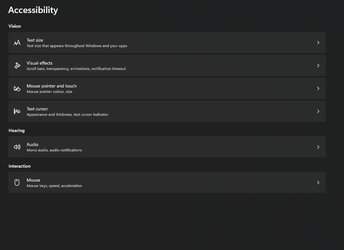
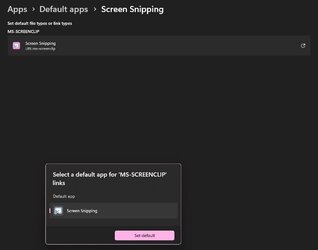
Today, I discovered a recent update hijacked the Print Screen, I suspect with one of those obnoxious MS- links that you can't remove, caveat being my W11 Pro is highly customised, and can't be used as a typical use case, I update my Build using NTLite, not Windows Update.
Edition Windows 11 Pro
Version 22H2
Installed on ‎07/‎05/‎2023
OS build 22621.2428
Experience Windows Feature Experience Pack 1000.22674.1000.0
I don't have those Accessibility settings either (My Keyboard is still old control panel)
2023-10-16 10_09_28-AccessibilitySettings.jpg 2023-10-16 09_47_24-Screen Snipping.JPG

Tried this using the registry "fix", and after a restart, my Screenshot tool I've used for many years works with PrtScn again.
GitHub - greenshot/greenshot: Greenshot for Windows

Seems like I had just the Screen Recorder part reinstalled, without the Snipping tool, but this fix still worked for me via registry.
 

My Computer

System One

  • OS
    Windows 11 Pro v23H2 b22631.5624 NTLite 2023-05-07
    Computer type
    PC/Desktop
    Manufacturer/Model
    Uhuru N'Uru PC
    CPU
    AMD Ryzen 7 7800X3D, 4.2GHz Turbo 5.0GHz [2023-04-17]
    Motherboard
    Asus ROG Crosshair X670E Hero – UEFI BIOS v1410 Beta [2023-04-18]
    Memory
    64GB (2x32GB) GSkill Trident Z5 Neo DDR5-6000 CL30-40-40-96 – F5-6000J3040G32GX2-TZ5N [2023-04-21]
    Graphics Card(s)
    EVGA GeForce RTX 3080Ti FTW3 Ultra Gaming, 12GB GDDR6X, iCX3 – 12G-P5-3967-KR [2021-11-24]
    Sound Card
    Onboard Mobo Audio: ROG SupremeFX 7.1 HD Audio
    Monitor(s) Displays
    MSI MPG 321URX 4k QD-OLED - 31.5” - 240Hz, VRR: <20-240Hz [2024-11-10] + 2×Dell U2711 A12 – 27” 1440p 60Hz [2013-04-03]
    Screen Resolution
    7680×1440 = 3×(2560×1440) – Game on PG329Q only.
    Hard Drives
    M.2 NVMe: (4 slots, 1 used)
    2TB – WD Black SN750 – WDS200T3XHC [2020-07-10]
    SATA 3: (6 slots)
    SSD: (1.75TB Total)
    1TB – Samsung 850 Pro – MZ-7KE1T0BW [2018-03-28]
    512GB – Samsung 840 Pro – MZ-7TD500BW [2013-04-03]
    256GB – OCZ Vertex 4 – VTX4-25SAT3-256G [2013-04-03]
    HDD: (22TB Total)
    8TB – Seagate BarraCuda – ST8000DM004 [2021-04-25]
    8TB – Seagate BarraCuda – ST8000DM004 [2021-04-25]
    6TB – Western Digital WD6002FZWX Black [2017-07-08]
    PSU
    1200W – Corsair Professional Series AX1200 Full Modular, 80 Plus Gold – CMPSU-1200AXUK [2013-04-03]
    Case
    Corsair Obsidian Series 650D All Black Mid Tower Case – CC650DW-1 [2013-04-03]
    Cooling
    Arctic Liquid Freezer II 360, All-In-One Hydro CPU Cooler, 3x120mm PWM Fan, Aluminium/Copper – 7L7H8 [2023-04-22] + 3×Noctua F12 Industrial IP67 PW, 120mm – NF-F12-IPPC-2000-IP67-PWM [2018-03-28]
    Keyboard
    Corsair Vengeance K90 Performance with MX Red Mechanical Switches [2013-04-03]
    Mouse
    Logitech G502 Hero High Performance Wired Gaming Mouse [2022-01-22]
    Internet Speed
    Download = 1,130Mbps (141.25 MB/s), Upload = 52Mbps (6.5 MB/s), UK law allows, ISPs exploit
    Browser
    Pale Moon
    Antivirus
    Basically myself as Comodo Internet Security set to ask my permission on 1st Access
    Other Info
    Audio-Technica ATH-M50X Studio Monitor Professional Headphones - Black [2021-02-25] + Backup Set [2017-10-26]
I'm having an issue. . . Mine is turned on, but when I hit the PrtScn button, it goes full screen and it didn't used to do that. I'm not sure what happened
 

My Computers

System One System Two

  • OS
    Windows 11 Pro x64 24H2 v26200.5074
    Computer type
    PC/Desktop
    Manufacturer/Model
    Built Myself in 2025
    CPU
    AMD Ryzen 9 3600X 12-Core @ 3.80GHz
    Motherboard
    MSI X570 Gaming Plus
    Memory
    Corsair 32GB DDR4
    Graphics Card(s)
    EVGA GeForce gtx 1660 Super
    Sound Card
    On Board
    Monitor(s) Displays
    2 X AOC 27" , Dell 27"
    Screen Resolution
    1920 X 1080
    Hard Drives
    ~~~~~~~~~~~~~~~~~~~~~~~~~~
    ~ P34A60 512GB NVMe PCIe Gen3x4 M.2
    ~ 6TB Toshiba HDD
    ~ 6TB HDD (Backup)
    ~ SanDisk 250GB SSD
    ~ 2 X 1TB HDD
    ~~~~~~~~~~
    PSU
    eVGA 750w G+
    Case
    GAMDIAS White ATX Mid Tower Gaming Computer PC Case w/Tempered Glass
    Cooling
    AMD Wraith Prism
    Keyboard
    Nulea RT05 Wireless Ergonomic
    Mouse
    Nulea MD280 Wireless Vertical Mouse
    Internet Speed
    761Mbps (Download) / 692Mbps (Upload)
    Browser
    Firefox
    Antivirus
    Malwarebytes
    Other Info
    *This is my Main Computer That I use*
  • Operating System
    Windows 11 Pro x64 24H2 v26100.2894
    Computer type
    PC/Desktop
    CPU
    AMD Ryzen 7 1800X @ 3.60Ghz
    Motherboard
    Asus Crosshair VI Hero
    Memory
    16GB
    Graphics card(s)
    AMD RX580
    Sound Card
    onBoard
    Monitor(s) Displays
    LG 27UK650-W 27", eMachine 22"
    Screen Resolution
    1920 X 1080
    Hard Drives
    250GB SSD
    PSU
    CORSAIR RM850
    Case
    GAMDIAS Black ATX Mid Tower Gaming Computer PC Case w/Tempered Glass
    Cooling
    Liquid
    Keyboard
    Nulea RT05 Wireless Ergonomic
    Mouse
    Nulea MD280 Wireless Vertical Mouse
    Internet Speed
    752Mbps (Download) / 537Mbps (Upload)
    Browser
    Firefox
    Antivirus
    Malwarebytes
    Other Info
    I use this computer for photo/video editing and to track severe weather
I'm having an issue. . . Mine is turned on, but when I hit the PrtScn button, it goes full screen and it didn't used to do that. I'm not sure what happened

Hello mate, :alien:

Does pressing the Print Screen key open the Snipping Tool to then allow you to select this below?


new_snipping_tool-png.74763
 

My Computers

System One System Two

  • OS
    Windows 11 Pro for Workstations
    Computer type
    PC/Desktop
    Manufacturer/Model
    Custom self build
    CPU
    Intel i7-8700K 5 GHz
    Motherboard
    ASUS ROG Maximus XI Formula Z390
    Memory
    64 GB (4x16GB) G.SKILL TridentZ RGB DDR4 3600 MHz (F4-3600C18D-32GTZR)
    Graphics Card(s)
    ASUS ROG-STRIX-GTX1080TI-O11G-GAMING (11GB GDDR5X)
    Sound Card
    Integrated Digital Audio (S/PDIF)
    Monitor(s) Displays
    2 x Samsung Odyssey G75 27"
    Screen Resolution
    2560x1440
    Hard Drives
    1TB Samsung 990 PRO M.2,
    4TB Samsung 990 PRO M.2,
    TerraMaster F8 SSD Plus NAS
    PSU
    Seasonic Prime Titanium 850W
    Case
    Thermaltake Core P3 wall mounted
    Cooling
    Corsair Hydro H115i
    Keyboard
    Amazon Basics Wired Full Keyboard MD005
    Mouse
    Logitech MX Master 4
    Internet Speed
    2 Gbps Download and 100 Mbps Upload
    Browser
    Chrome and Edge
    Antivirus
    Microsoft Defender
    Other Info
    Logitech Z625 speaker system,
    Logitech BRIO 4K Pro webcam,
    HP Color LaserJet Pro MFP M477fdn,
    CyberPower CP1500PFCLCD
    Galaxy S23 Plus phone
  • Operating System
    Windows 11 Pro
    Computer type
    Laptop
    Manufacturer/Model
    Surface Laptop 7 Copilot+ PC
    CPU
    Snapdragon X Elite (12 core) 3.42 GHz
    Memory
    16 GB LPDDR5x-7467 MHz
    Monitor(s) Displays
    15" HDR
    Screen Resolution
    2496 x 1664
    Hard Drives
    1 TB SSD
    Internet Speed
    Wi-Fi 7 and Bluetooth 5.4
    Browser
    Chrome and Edge
    Antivirus
    Microsoft Defender
Hello mate, :alien:

Does pressing the Print Screen key open the Snipping Tool to then allow you to select this below?


new_snipping_tool-png.74763
No, but I figured it out. I had to disable the Function Keys, by holding down the Fn key and pressing the ESC key. . . . Everything works now
 

My Computers

System One System Two

  • OS
    Windows 11 Pro x64 24H2 v26200.5074
    Computer type
    PC/Desktop
    Manufacturer/Model
    Built Myself in 2025
    CPU
    AMD Ryzen 9 3600X 12-Core @ 3.80GHz
    Motherboard
    MSI X570 Gaming Plus
    Memory
    Corsair 32GB DDR4
    Graphics Card(s)
    EVGA GeForce gtx 1660 Super
    Sound Card
    On Board
    Monitor(s) Displays
    2 X AOC 27" , Dell 27"
    Screen Resolution
    1920 X 1080
    Hard Drives
    ~~~~~~~~~~~~~~~~~~~~~~~~~~
    ~ P34A60 512GB NVMe PCIe Gen3x4 M.2
    ~ 6TB Toshiba HDD
    ~ 6TB HDD (Backup)
    ~ SanDisk 250GB SSD
    ~ 2 X 1TB HDD
    ~~~~~~~~~~
    PSU
    eVGA 750w G+
    Case
    GAMDIAS White ATX Mid Tower Gaming Computer PC Case w/Tempered Glass
    Cooling
    AMD Wraith Prism
    Keyboard
    Nulea RT05 Wireless Ergonomic
    Mouse
    Nulea MD280 Wireless Vertical Mouse
    Internet Speed
    761Mbps (Download) / 692Mbps (Upload)
    Browser
    Firefox
    Antivirus
    Malwarebytes
    Other Info
    *This is my Main Computer That I use*
  • Operating System
    Windows 11 Pro x64 24H2 v26100.2894
    Computer type
    PC/Desktop
    CPU
    AMD Ryzen 7 1800X @ 3.60Ghz
    Motherboard
    Asus Crosshair VI Hero
    Memory
    16GB
    Graphics card(s)
    AMD RX580
    Sound Card
    onBoard
    Monitor(s) Displays
    LG 27UK650-W 27", eMachine 22"
    Screen Resolution
    1920 X 1080
    Hard Drives
    250GB SSD
    PSU
    CORSAIR RM850
    Case
    GAMDIAS Black ATX Mid Tower Gaming Computer PC Case w/Tempered Glass
    Cooling
    Liquid
    Keyboard
    Nulea RT05 Wireless Ergonomic
    Mouse
    Nulea MD280 Wireless Vertical Mouse
    Internet Speed
    752Mbps (Download) / 537Mbps (Upload)
    Browser
    Firefox
    Antivirus
    Malwarebytes
    Other Info
    I use this computer for photo/video editing and to track severe weather
No, but I figured it out. I had to disable the Function Keys, by holding down the Fn key and pressing the ESC key. . . . Everything works now
:shawn:
 

My Computers

System One System Two

  • OS
    Windows 11 Pro for Workstations
    Computer type
    PC/Desktop
    Manufacturer/Model
    Custom self build
    CPU
    Intel i7-8700K 5 GHz
    Motherboard
    ASUS ROG Maximus XI Formula Z390
    Memory
    64 GB (4x16GB) G.SKILL TridentZ RGB DDR4 3600 MHz (F4-3600C18D-32GTZR)
    Graphics Card(s)
    ASUS ROG-STRIX-GTX1080TI-O11G-GAMING (11GB GDDR5X)
    Sound Card
    Integrated Digital Audio (S/PDIF)
    Monitor(s) Displays
    2 x Samsung Odyssey G75 27"
    Screen Resolution
    2560x1440
    Hard Drives
    1TB Samsung 990 PRO M.2,
    4TB Samsung 990 PRO M.2,
    TerraMaster F8 SSD Plus NAS
    PSU
    Seasonic Prime Titanium 850W
    Case
    Thermaltake Core P3 wall mounted
    Cooling
    Corsair Hydro H115i
    Keyboard
    Amazon Basics Wired Full Keyboard MD005
    Mouse
    Logitech MX Master 4
    Internet Speed
    2 Gbps Download and 100 Mbps Upload
    Browser
    Chrome and Edge
    Antivirus
    Microsoft Defender
    Other Info
    Logitech Z625 speaker system,
    Logitech BRIO 4K Pro webcam,
    HP Color LaserJet Pro MFP M477fdn,
    CyberPower CP1500PFCLCD
    Galaxy S23 Plus phone
  • Operating System
    Windows 11 Pro
    Computer type
    Laptop
    Manufacturer/Model
    Surface Laptop 7 Copilot+ PC
    CPU
    Snapdragon X Elite (12 core) 3.42 GHz
    Memory
    16 GB LPDDR5x-7467 MHz
    Monitor(s) Displays
    15" HDR
    Screen Resolution
    2496 x 1664
    Hard Drives
    1 TB SSD
    Internet Speed
    Wi-Fi 7 and Bluetooth 5.4
    Browser
    Chrome and Edge
    Antivirus
    Microsoft Defender
having this issue currently, before it used to work in fullscreen games never had the issue holding FN and prnt screen would open snipping tool and id be happy but right now its doing absolutely nothing and im unsure how to get that back all i see in the settings now is

1765296415894.webp


and not the use the print screen to open snipping tool toggle.

any ideas!?
 

My Computer

System One

  • OS
    Windows 11 25H2.
    Computer type
    PC/Desktop
    CPU
    5900x
    Motherboard
    b550
    Memory
    16gb ddr4 OC 3800.
    Graphics Card(s)
    9070xt
having this issue currently, before it used to work in fullscreen games never had the issue holding FN and prnt screen would open snipping tool and id be happy but right now its doing absolutely nothing and im unsure how to get that back all i see in the settings now is

View attachment 156199

and not the use the print screen to open snipping tool toggle.

any ideas!?

Hello, :alien:

This is the current wording for this setting, but it should still open the Snipping Tool app when turned on.

:win: + Print Screen is for screen capture without the Snipping Tool if that's what you wanted.

 

My Computers

System One System Two

  • OS
    Windows 11 Pro for Workstations
    Computer type
    PC/Desktop
    Manufacturer/Model
    Custom self build
    CPU
    Intel i7-8700K 5 GHz
    Motherboard
    ASUS ROG Maximus XI Formula Z390
    Memory
    64 GB (4x16GB) G.SKILL TridentZ RGB DDR4 3600 MHz (F4-3600C18D-32GTZR)
    Graphics Card(s)
    ASUS ROG-STRIX-GTX1080TI-O11G-GAMING (11GB GDDR5X)
    Sound Card
    Integrated Digital Audio (S/PDIF)
    Monitor(s) Displays
    2 x Samsung Odyssey G75 27"
    Screen Resolution
    2560x1440
    Hard Drives
    1TB Samsung 990 PRO M.2,
    4TB Samsung 990 PRO M.2,
    TerraMaster F8 SSD Plus NAS
    PSU
    Seasonic Prime Titanium 850W
    Case
    Thermaltake Core P3 wall mounted
    Cooling
    Corsair Hydro H115i
    Keyboard
    Amazon Basics Wired Full Keyboard MD005
    Mouse
    Logitech MX Master 4
    Internet Speed
    2 Gbps Download and 100 Mbps Upload
    Browser
    Chrome and Edge
    Antivirus
    Microsoft Defender
    Other Info
    Logitech Z625 speaker system,
    Logitech BRIO 4K Pro webcam,
    HP Color LaserJet Pro MFP M477fdn,
    CyberPower CP1500PFCLCD
    Galaxy S23 Plus phone
  • Operating System
    Windows 11 Pro
    Computer type
    Laptop
    Manufacturer/Model
    Surface Laptop 7 Copilot+ PC
    CPU
    Snapdragon X Elite (12 core) 3.42 GHz
    Memory
    16 GB LPDDR5x-7467 MHz
    Monitor(s) Displays
    15" HDR
    Screen Resolution
    2496 x 1664
    Hard Drives
    1 TB SSD
    Internet Speed
    Wi-Fi 7 and Bluetooth 5.4
    Browser
    Chrome and Edge
    Antivirus
    Microsoft Defender
Hello, :alien:

This is the current wording for this setting, but it should still open the Snipping Tool app when turned on.

:win: + Print Screen is for screen capture without the Snipping Tool if that's what you wanted.
Appreciate your response but unfortunately not what i was looking for, i used to be able to go into a fullscreen game press my FN key with prnt screen and it would open it up so i could then snipp what i wanted without the need to press :win: + shift + S.

now every time i press it when in a game it gets completely ignored unless i press the :win: + shift + S :(
 

My Computer

System One

  • OS
    Windows 11 25H2.
    Computer type
    PC/Desktop
    CPU
    5900x
    Motherboard
    b550
    Memory
    16gb ddr4 OC 3800.
    Graphics Card(s)
    9070xt
Appreciate your response but unfortunately not what i was looking for, i used to be able to go into a fullscreen game press my FN key with prnt screen and it would open it up so i could then snipp what i wanted without the need to press :win: + shift + S.

now every time i press it when in a game it gets completely ignored unless i press the :win: + shift + S :(

You might see if a game setting may be causing an issue/conflict with the Print Screen key.
 

My Computers

System One System Two

  • OS
    Windows 11 Pro for Workstations
    Computer type
    PC/Desktop
    Manufacturer/Model
    Custom self build
    CPU
    Intel i7-8700K 5 GHz
    Motherboard
    ASUS ROG Maximus XI Formula Z390
    Memory
    64 GB (4x16GB) G.SKILL TridentZ RGB DDR4 3600 MHz (F4-3600C18D-32GTZR)
    Graphics Card(s)
    ASUS ROG-STRIX-GTX1080TI-O11G-GAMING (11GB GDDR5X)
    Sound Card
    Integrated Digital Audio (S/PDIF)
    Monitor(s) Displays
    2 x Samsung Odyssey G75 27"
    Screen Resolution
    2560x1440
    Hard Drives
    1TB Samsung 990 PRO M.2,
    4TB Samsung 990 PRO M.2,
    TerraMaster F8 SSD Plus NAS
    PSU
    Seasonic Prime Titanium 850W
    Case
    Thermaltake Core P3 wall mounted
    Cooling
    Corsair Hydro H115i
    Keyboard
    Amazon Basics Wired Full Keyboard MD005
    Mouse
    Logitech MX Master 4
    Internet Speed
    2 Gbps Download and 100 Mbps Upload
    Browser
    Chrome and Edge
    Antivirus
    Microsoft Defender
    Other Info
    Logitech Z625 speaker system,
    Logitech BRIO 4K Pro webcam,
    HP Color LaserJet Pro MFP M477fdn,
    CyberPower CP1500PFCLCD
    Galaxy S23 Plus phone
  • Operating System
    Windows 11 Pro
    Computer type
    Laptop
    Manufacturer/Model
    Surface Laptop 7 Copilot+ PC
    CPU
    Snapdragon X Elite (12 core) 3.42 GHz
    Memory
    16 GB LPDDR5x-7467 MHz
    Monitor(s) Displays
    15" HDR
    Screen Resolution
    2496 x 1664
    Hard Drives
    1 TB SSD
    Internet Speed
    Wi-Fi 7 and Bluetooth 5.4
    Browser
    Chrome and Edge
    Antivirus
    Microsoft Defender
Yeah the game in mind is deadlock, ive used it before to a point the normal print screen function used to work, but now yeah just doesn't wanna know :(
 

My Computer

System One

  • OS
    Windows 11 25H2.
    Computer type
    PC/Desktop
    CPU
    5900x
    Motherboard
    b550
    Memory
    16gb ddr4 OC 3800.
    Graphics Card(s)
    9070xt
Yeah the game in mind is deadlock, ive used it before to a point the normal print screen function used to work, but now yeah just doesn't wanna know :(

Could be a bug. You can try the shortcut again after installing the next Windows Update to test.
 

My Computers

System One System Two

  • OS
    Windows 11 Pro for Workstations
    Computer type
    PC/Desktop
    Manufacturer/Model
    Custom self build
    CPU
    Intel i7-8700K 5 GHz
    Motherboard
    ASUS ROG Maximus XI Formula Z390
    Memory
    64 GB (4x16GB) G.SKILL TridentZ RGB DDR4 3600 MHz (F4-3600C18D-32GTZR)
    Graphics Card(s)
    ASUS ROG-STRIX-GTX1080TI-O11G-GAMING (11GB GDDR5X)
    Sound Card
    Integrated Digital Audio (S/PDIF)
    Monitor(s) Displays
    2 x Samsung Odyssey G75 27"
    Screen Resolution
    2560x1440
    Hard Drives
    1TB Samsung 990 PRO M.2,
    4TB Samsung 990 PRO M.2,
    TerraMaster F8 SSD Plus NAS
    PSU
    Seasonic Prime Titanium 850W
    Case
    Thermaltake Core P3 wall mounted
    Cooling
    Corsair Hydro H115i
    Keyboard
    Amazon Basics Wired Full Keyboard MD005
    Mouse
    Logitech MX Master 4
    Internet Speed
    2 Gbps Download and 100 Mbps Upload
    Browser
    Chrome and Edge
    Antivirus
    Microsoft Defender
    Other Info
    Logitech Z625 speaker system,
    Logitech BRIO 4K Pro webcam,
    HP Color LaserJet Pro MFP M477fdn,
    CyberPower CP1500PFCLCD
    Galaxy S23 Plus phone
  • Operating System
    Windows 11 Pro
    Computer type
    Laptop
    Manufacturer/Model
    Surface Laptop 7 Copilot+ PC
    CPU
    Snapdragon X Elite (12 core) 3.42 GHz
    Memory
    16 GB LPDDR5x-7467 MHz
    Monitor(s) Displays
    15" HDR
    Screen Resolution
    2496 x 1664
    Hard Drives
    1 TB SSD
    Internet Speed
    Wi-Fi 7 and Bluetooth 5.4
    Browser
    Chrome and Edge
    Antivirus
    Microsoft Defender
Back
Top Bottom