Solved Erratic network connection


Polonut

Active member
Member
Local time
7:11 AM
Posts
20
OS
Windows 11 Pro
Hi everyone
My equipment has not been altered or changed for a very long time.
At start up, or a return from sleep, connection to the net has been instant - until about three months ago.
When PC returns from sleep - most times it will not re connect. When looking at the 'network available' and clicking on connect, it says unable to connect to this network.
When I restart the PC, it does connect without any issues.
I have been a TalkTalk customer for 10 years, and never had any issues (guess I am one of the few lucky ones!) I am on fibre 150 with eero router. I use a TP link AC1300 usb wireless adapter. I have other adapters, which do not alter this issue. I have checked my DNS settings which are set at auto.
When the connection is made - performance is exemplary.
Advice/guidance would be most appreciated. THANKS
C
 

My Computer My Computer

At a glance

Windows 11 ProIntel i5-33468Gbinternal
OS
Windows 11 Pro
Computer type
PC/Desktop
Manufacturer/Model
Self built
CPU
Intel i5-3346
Motherboard
gigabyte H61-s2pv rev2.2
Memory
8Gb
Graphics Card(s)
internal
Sound Card
internal
Monitor(s) Displays
philips 226e9q
Screen Resolution
1920 x 1080
Hard Drives
Samsung evo 860 - WD 500Gb - seagate 2 TB
PSU
500watt
Case
ANTEC
Cooling
standard
Keyboard
standard querty ps2
Mouse
GX Trust REDEX 11
Internet Speed
150 full fibre
Browser
Google
Antivirus
Webroot secureanywhere

Hi,

Before looking into anything else, I have to let you know that running Win 11 Pro with only 8 Gigs of RAM seems somewhat challenging.
When did you build this rig? IMHO, I would recommend a minimum RAM of 16 Gig for the OS used.

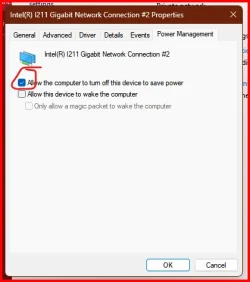
Also, be sure to go into the network adapter settings and make certain that you have Un-checked the box shown in the attached screen snip. You can get there with-->Control Panel>Network and Sharing>select your Ethernet adapter shown>Properties>Configure>Power Management.

Hope this helps.
 

Attachments

  • Network Adapter Settings.webp
    Network Adapter Settings.webp
    15.9 KB · Views: 3

My Computer My Computer

At a glance

Windows 11 Pro 26200.8875Ryzen 5 5600G24GB
OS
Windows 11 Pro 26200.8875
Computer type
PC/Desktop
Manufacturer/Model
Home Built
CPU
Ryzen 5 5600G
Motherboard
ASUS X470 Prime Pro
Memory
24GB
Monitor(s) Displays
Alienware 2518HF
Screen Resolution
1920 x 1080
Hard Drives
Boot: NVME WDC WDS500G; ASUS M.2 Riser card with 3 additional NVME drives
Various Internal SDD (Samsung and WDC) and HDD drives mostly Western Digital
PSU
Seasonic Focus Gold 650W
Case
Corsair 200R
Cooling
Noctua PWM fans x 3
Keyboard
Corsair K60 SE Pro
Mouse
Corsair Dark Core RGB Pro SE
Internet Speed
500/500
Browser
MS Edge
Antivirus
Malwarebytes Premium
I run Win 11 with 4GB, so I don't think this is the problem.

Whenever I have network issues, I see if my phone has good internet. If it does, I know it's a Windows issue, not a router or ISP one.
 

My Computers My Computers

  • At a glance

    Windows 11 Pro 25H2 26200.8894AMD Ryzen 7 5825U with Radeon Graphics16GB
    OS
    Windows 11 Pro 25H2 26200.8894
    Computer type
    Laptop
    Manufacturer/Model
    Acemagic LX15PRO
    CPU
    AMD Ryzen 7 5825U with Radeon Graphics
    Motherboard
    BIOS CT_BI_AMI_LX15PRO_AB8139_A-004
    Memory
    16GB
    Screen Resolution
    1920 x 1080
    Hard Drives
    SSD 2TB
    Internet Speed
    30 Mbps
    Browser
    Brave
    Antivirus
    Webroot SecureAnywhere Complete beta
  • At a glance

    Windows 11 Pro 23H2 22631.2506Atom N450 1.66GHz2GB
    Operating System
    Windows 11 Pro 23H2 22631.2506
    Computer type
    Laptop
    Manufacturer/Model
    HP Mini 210-1090NR PC (bought in late 2009!)
    CPU
    Atom N450 1.66GHz
    Memory
    2GB
    Browser
    Brave
    Antivirus
    Webroot
  • Acer Swift SF114-34 laptop
    OS Windows 11 Pro 26200.8894
    CPU Pentium Silver N6000
    RAM 4GB
    BIOS v1.17
    SSD Samsung 970 EVO Plus SSD 2TB (an upgrade)
Personally, I find it very complicated and quite annoying to troubleshoot internet connections. So I am running this whenever I have connection problems. In the contrary to what they say, I am ticking all the boxes and run the program. I had no bad experience with this approach so far and I have used the program often. But please read every line before running the program and untick if necessary: perhaps you have specific firewall rules or added some lines to the host file, etc. After running, if some lines throw out errors you may ignore them. This being said, I would however respect their further advice and create a system restore point first.
 

My Computer My Computer

At a glance

Windows 11Intel Core i3 12 100 12th generationKingston DDR4-3200 16 GBytesIntel UHD 730
OS
Windows 11
Computer type
PC/Desktop
Manufacturer/Model
Gigabyte H610M H V2 DDR4 (Rev. 1.0)
CPU
Intel Core i3 12 100 12th generation
Motherboard
American Megatrend F34
Memory
Kingston DDR4-3200 16 GBytes
Graphics Card(s)
Intel UHD 730
It may be this Windows 11 setting that is trying to conserve power when your laptop is idle.


My Computer My Computer

At a glance

Windows 11 & Zorin ProIntel® Core™ Ultra 9 Processor 275HX 2.7 GHz32 gbNVIDIA® GeForce RTX™ 5060 Laptop GPU
OS
Windows 11 & Zorin Pro
Computer type
Laptop
Manufacturer/Model
Asus Rog Strix G16
CPU
Intel® Core™ Ultra 9 Processor 275HX 2.7 GHz
Motherboard
AsusteK Computer
Memory
32 gb
Graphics Card(s)
NVIDIA® GeForce RTX™ 5060 Laptop GPU
Sound Card
Realtek High Definition Audio
Monitor(s) Displays
Laptop 16 inch
Screen Resolution
2560 X 1600
Hard Drives
Boot: Samsung 9100 NVME 2 TB Microsoft Storage Controller: Standard NVM Express Driver: Microsoft 6/21/2006. No SATA/AHCI on my motherboard or in bios
Mouse
Pad
Browser
Google Chrome
Antivirus
Microsoft
Other Info
Printer: HP Color LaserJet MFP M477dw
Rizone Complete Internet Repair (v11.1.3.6518) was last updated on 10 December 2024.
 

My Computers My Computers

  • At a glance

    Windows 11 Pro 25H2 26200.8894AMD Ryzen 7 5825U with Radeon Graphics16GB
    OS
    Windows 11 Pro 25H2 26200.8894
    Computer type
    Laptop
    Manufacturer/Model
    Acemagic LX15PRO
    CPU
    AMD Ryzen 7 5825U with Radeon Graphics
    Motherboard
    BIOS CT_BI_AMI_LX15PRO_AB8139_A-004
    Memory
    16GB
    Screen Resolution
    1920 x 1080
    Hard Drives
    SSD 2TB
    Internet Speed
    30 Mbps
    Browser
    Brave
    Antivirus
    Webroot SecureAnywhere Complete beta
  • At a glance

    Windows 11 Pro 23H2 22631.2506Atom N450 1.66GHz2GB
    Operating System
    Windows 11 Pro 23H2 22631.2506
    Computer type
    Laptop
    Manufacturer/Model
    HP Mini 210-1090NR PC (bought in late 2009!)
    CPU
    Atom N450 1.66GHz
    Memory
    2GB
    Browser
    Brave
    Antivirus
    Webroot
  • Acer Swift SF114-34 laptop
    OS Windows 11 Pro 26200.8894
    CPU Pentium Silver N6000
    RAM 4GB
    BIOS v1.17
    SSD Samsung 970 EVO Plus SSD 2TB (an upgrade)
best software / firmware is the files from the company that sold and or made your laptop and parts. if it is dell get the files from dell, etc.. motherboard files, network files, etc.. they should make it run it's best.. in your case TP link. But you may also consider making sure your other computer hardware firmware is not corrupt. Also, not sure if you are wireless, if so try wired connection and see if it work better. Or the other way around. Just as a test.
 

My Computer My Computer

At a glance

Win11i9-1390064 GBNvidia RTX 5070 TI OC
OS
Win11
Computer type
PC/Desktop
Manufacturer/Model
Asus Home built
CPU
i9-13900
Motherboard
ASUS Strix Z790-H
Memory
64 GB
Graphics Card(s)
Nvidia RTX 5070 TI OC
Monitor(s) Displays
Sony 55"
Hard Drives
SSD
PSU
850 watt EVGA
Case
Cooler Master Haf 932
Cooling
CoolerMaster
Keyboard
RedDragon
Mouse
CoolerMaster
Internet Speed
300/300
Antivirus
Defender
Other Info
VR, Virtual Reality
Hi Guys
many thanks for your responses. Firstly some further comments etc.
1 - Re Ram - I have three PC's with 8Gb ram + 2 laptops, all on windows 11 with no problems as far as I can judge, all fast with no other issues. Its just one of the three PC's with this irritation non connect problem
2 - Yes I am connected by wireless USB, and because of the eero router / distance from the offending PC, I cannot use the ethernet option.
3 - I have made sure the relevant properties icon tick is not 'on'
4 - I did try the fix all app (thanks for the recommendation) this had no effect AND it did alter some other settings as I found out.
5 - in regard to the enable/disable selective suspend - I am in a quandary on this one - there is an element of ambiguity here (and I am thick possibly)
It shows disabled - is that the case? or do I have to push/click to reach disabled??
6 - it is this one PC that has issues, and the use of USB cards is current - I have switched my USB card to another (spare that I had.)
7 - Yes, good idea retired at 44 - I will go to the TP website and get the 'Real' driver and see what happens.
Thanks everyone, will keep you posted. All further comments welcomed.
C
 

My Computer My Computer

At a glance

Windows 11 ProIntel i5-33468Gbinternal
OS
Windows 11 Pro
Computer type
PC/Desktop
Manufacturer/Model
Self built
CPU
Intel i5-3346
Motherboard
gigabyte H61-s2pv rev2.2
Memory
8Gb
Graphics Card(s)
internal
Sound Card
internal
Monitor(s) Displays
philips 226e9q
Screen Resolution
1920 x 1080
Hard Drives
Samsung evo 860 - WD 500Gb - seagate 2 TB
PSU
500watt
Case
ANTEC
Cooling
standard
Keyboard
standard querty ps2
Mouse
GX Trust REDEX 11
Internet Speed
150 full fibre
Browser
Google
Antivirus
Webroot secureanywhere

Some progress made - all seems to be well at the moment.
Not sure what made the difference however
Was it the change of my pci/usb card?
OR Retired at 44's suggestion to check the drivers? I remembered that some time ago, I did update the TP-link drivers to latest available.
I looked out the original dvd, and installed the original drivers (very dated ) and all has worked ok since. !!!!!
Fluke (?) possibly, but I will leave for several days and report back. Happy days
C
 

My Computer My Computer

At a glance

Windows 11 ProIntel i5-33468Gbinternal
OS
Windows 11 Pro
Computer type
PC/Desktop
Manufacturer/Model
Self built
CPU
Intel i5-3346
Motherboard
gigabyte H61-s2pv rev2.2
Memory
8Gb
Graphics Card(s)
internal
Sound Card
internal
Monitor(s) Displays
philips 226e9q
Screen Resolution
1920 x 1080
Hard Drives
Samsung evo 860 - WD 500Gb - seagate 2 TB
PSU
500watt
Case
ANTEC
Cooling
standard
Keyboard
standard querty ps2
Mouse
GX Trust REDEX 11
Internet Speed
150 full fibre
Browser
Google
Antivirus
Webroot secureanywhere

My Computer My Computer

At a glance

W11 Pro x64 ongoing Canary 29500 latest buildsIntel i58GbIntel HD Graphics
OS
W11 Pro x64 ongoing Canary 29500 latest builds
Computer type
Laptop
Manufacturer/Model
Dell 7760 Mobile Precision 17"
CPU
Intel i5
Motherboard
Unknown
Memory
8Gb
Graphics Card(s)
Intel HD Graphics
Sound Card
Realtek
Monitor(s) Displays
Internal
Hard Drives
2 x 256Gb SSD
PSU
Dell 240 watt
Mouse
Dell Premier Bluetooth
Internet Speed
50Mbps
Browser
Edge
Antivirus
Default Microsoft Security
Pleased to report, that after several days, all is working as it should
Different pci/usb card OR earlier TP link drivers (?) who knows !!!
Thanks everyone for your input
C
 

My Computer My Computer

At a glance

Windows 11 ProIntel i5-33468Gbinternal
OS
Windows 11 Pro
Computer type
PC/Desktop
Manufacturer/Model
Self built
CPU
Intel i5-3346
Motherboard
gigabyte H61-s2pv rev2.2
Memory
8Gb
Graphics Card(s)
internal
Sound Card
internal
Monitor(s) Displays
philips 226e9q
Screen Resolution
1920 x 1080
Hard Drives
Samsung evo 860 - WD 500Gb - seagate 2 TB
PSU
500watt
Case
ANTEC
Cooling
standard
Keyboard
standard querty ps2
Mouse
GX Trust REDEX 11
Internet Speed
150 full fibre
Browser
Google
Antivirus
Webroot secureanywhere

Back
Top Bottom