Hassie54
Member
error code 0X00000000000000000 could not write to memory.
I get this code as soon as I install it in Windows 11. This message pops up for a while after every boot.
Already in new memory and different HDD, but that doesn't help.
Empty the laptop and put Chome Flex on it, no errors.
later also put Linux on it, no memory problem. I would think it is a Windows 11 problem.
Here's the link to my dump file
Meet Google Drive – One place for all your files
Anyone know a solution?
I get this code as soon as I install it in Windows 11. This message pops up for a while after every boot.
Already in new memory and different HDD, but that doesn't help.
Empty the laptop and put Chome Flex on it, no errors.
later also put Linux on it, no memory problem. I would think it is a Windows 11 problem.
Here's the link to my dump file
Meet Google Drive – One place for all your files
Anyone know a solution?
- Windows Build/Version
- Windows 11 Pro 21H2 (22000.527
Last edited:
My Computer
At a glance
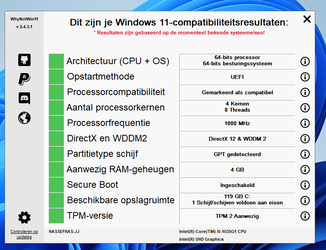
Wondows 11 Pro 21h2Intel(R) Core(TM) i5-1035G1 CPU @ 1.00GHz 1.2...8gbintel uhd
- OS
- Wondows 11 Pro 21h2
- Computer type
- Laptop
- Manufacturer/Model
- hp
- CPU
- Intel(R) Core(TM) i5-1035G1 CPU @ 1.00GHz 1.20 GHz
- Motherboard
- ?
- Memory
- 8gb
- Graphics Card(s)
- intel uhd
- Sound Card
- realtek
- Other Info
- HP Notebook 15s-fq1442nd