Face Recognition Not Turning On


I'm going into settings-accounts-passkeys clicking on the ... and I get
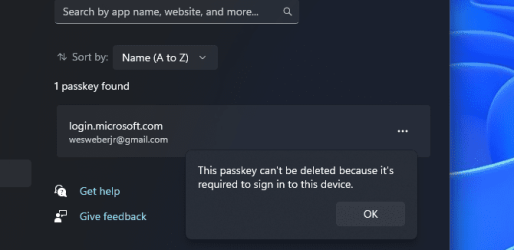
1714507676986.png
If I do a Safe Boot will it allow me to delete the passkey?
 

My Computer My Computer

At a glance

windows 11Intel(R) Core(TM) i7-13700KF LGA1700 CPU @ 3....CORSAIR Vengeance 64GB (2 x 32GB) DDR5 DRAM 5...Zotac Gaming Geforce RTX 4070 twin edge 12GB ...
OS
windows 11
Computer type
PC/Desktop
Manufacturer/Model
Home Built
CPU
Intel(R) Core(TM) i7-13700KF LGA1700 CPU @ 3.4GHz max
Motherboard
Gigabyte Z790 Aorus Elite AX (rev.1.1)
Memory
CORSAIR Vengeance 64GB (2 x 32GB) DDR5 DRAM 5200MT/s
Graphics Card(s)
Zotac Gaming Geforce RTX 4070 twin edge 12GB 192bit GDDR6X
Sound Card
n/a
Monitor(s) Displays
1. ASUS VK246 TFT LCD 24" wide 3440x1440 2.Dell 2005fpw 1680x1050
Screen Resolution
1. 3440 x 1440 2. 1680 x 1050
Hard Drives
WDC WD850x 1TB Series M2 2280 1TB
WDC WD 850x 2TB
WDC WD2001fzex 2TB
PSU
Corsiar RM1000x
Case
Phanteks Enthoo Pro
Cooling
EX-Nucleus AIO CR360 Lux D-RBG
Keyboard
Razer Blackwidow Elite
Mouse
Razer Deathadder
Internet Speed
500G/s
Browser
Floop
Antivirus
Microsoft Defender

My Computers My Computers

  • At a glance

    Windows 11 ProRyzen 7 5700 X3D64 GB DDR4 3600mhz Gskill Ripjaws VRTX 4070 Super , 12GB VRAM Asus EVO Overclock
    OS
    Windows 11 Pro
    Computer type
    PC/Desktop
    Manufacturer/Model
    Custom Built
    CPU
    Ryzen 7 5700 X3D
    Motherboard
    MSI MPG B550 GAMING PLUS
    Memory
    64 GB DDR4 3600mhz Gskill Ripjaws V
    Graphics Card(s)
    RTX 4070 Super , 12GB VRAM Asus EVO Overclock
    Monitor(s) Displays
    Gigabyte M27Q (rev. 2.0) 2560 x 1440 @ 170hz HDR
    Hard Drives
    2TB Samsung nvme ssd
    4TB Western Digital nvme ssd
    PSU
    CORSAIR RMx SHIFT Series™ RM750x 80 PLUS Gold Fully Modular ATX Power Supply
    Case
    CORSAIR 3500X ARGB Mid-Tower ATX PC Case – Black
    Cooling
    ID-COOLING FROSTFLOW X 240 CPU Water Cooler
    Keyboard
    Logitech G213
    Mouse
    Logitech G203
    Internet Speed
    1.2gbps Fiber 😎
  • At a glance

    Chrome OSIntel Pentium Quad Core4GB LPDDR4
    Operating System
    Chrome OS
    Computer type
    Laptop
    Manufacturer/Model
    HP Chromebook
    CPU
    Intel Pentium Quad Core
    Memory
    4GB LPDDR4
    Monitor(s) Displays
    14 Inch HD SVA anti glare micro edge display
    Hard Drives
    64 GB emmc
Frustrating morning. Went into my Microsoft account, no reference to any passkey settings, so I changed the password. I also changed my net.live account password. That didn't fix anything.
Followed the instructions for removing the PIN , accounts>sign-in-options>PIN button, didn't show the screen that has the remove PIN option, I the "Making sure it's you" box with a PIN entry field, under the field has a message "I forgot my PIN". If I enter my PIN it goes back to the Sign-in Options menu box. If I choose "I Forgot my PIN" ir loops back to the "Making sure it's you" box.

No progress.
 

My Computer My Computer

At a glance

windows 11Intel(R) Core(TM) i7-13700KF LGA1700 CPU @ 3....CORSAIR Vengeance 64GB (2 x 32GB) DDR5 DRAM 5...Zotac Gaming Geforce RTX 4070 twin edge 12GB ...
OS
windows 11
Computer type
PC/Desktop
Manufacturer/Model
Home Built
CPU
Intel(R) Core(TM) i7-13700KF LGA1700 CPU @ 3.4GHz max
Motherboard
Gigabyte Z790 Aorus Elite AX (rev.1.1)
Memory
CORSAIR Vengeance 64GB (2 x 32GB) DDR5 DRAM 5200MT/s
Graphics Card(s)
Zotac Gaming Geforce RTX 4070 twin edge 12GB 192bit GDDR6X
Sound Card
n/a
Monitor(s) Displays
1. ASUS VK246 TFT LCD 24" wide 3440x1440 2.Dell 2005fpw 1680x1050
Screen Resolution
1. 3440 x 1440 2. 1680 x 1050
Hard Drives
WDC WD850x 1TB Series M2 2280 1TB
WDC WD 850x 2TB
WDC WD2001fzex 2TB
PSU
Corsiar RM1000x
Case
Phanteks Enthoo Pro
Cooling
EX-Nucleus AIO CR360 Lux D-RBG
Keyboard
Razer Blackwidow Elite
Mouse
Razer Deathadder
Internet Speed
500G/s
Browser
Floop
Antivirus
Microsoft Defender
that doesn't make much sense, are you sure you are logging in using the same microsoft account as the computer?

You can also try creating another user account and see if signing into that account fixes the issue. Then you can delete the other account.

Lets also try switching your microsoft account to a local account


Then you can rejoin it to a microsoft account later.
 

My Computers My Computers

  • At a glance

    Windows 11 ProRyzen 7 5700 X3D64 GB DDR4 3600mhz Gskill Ripjaws VRTX 4070 Super , 12GB VRAM Asus EVO Overclock
    OS
    Windows 11 Pro
    Computer type
    PC/Desktop
    Manufacturer/Model
    Custom Built
    CPU
    Ryzen 7 5700 X3D
    Motherboard
    MSI MPG B550 GAMING PLUS
    Memory
    64 GB DDR4 3600mhz Gskill Ripjaws V
    Graphics Card(s)
    RTX 4070 Super , 12GB VRAM Asus EVO Overclock
    Monitor(s) Displays
    Gigabyte M27Q (rev. 2.0) 2560 x 1440 @ 170hz HDR
    Hard Drives
    2TB Samsung nvme ssd
    4TB Western Digital nvme ssd
    PSU
    CORSAIR RMx SHIFT Series™ RM750x 80 PLUS Gold Fully Modular ATX Power Supply
    Case
    CORSAIR 3500X ARGB Mid-Tower ATX PC Case – Black
    Cooling
    ID-COOLING FROSTFLOW X 240 CPU Water Cooler
    Keyboard
    Logitech G213
    Mouse
    Logitech G203
    Internet Speed
    1.2gbps Fiber 😎
  • At a glance

    Chrome OSIntel Pentium Quad Core4GB LPDDR4
    Operating System
    Chrome OS
    Computer type
    Laptop
    Manufacturer/Model
    HP Chromebook
    CPU
    Intel Pentium Quad Core
    Memory
    4GB LPDDR4
    Monitor(s) Displays
    14 Inch HD SVA anti glare micro edge display
    Hard Drives
    64 GB emmc
I know this sounds weird, but my Windows 11 changed by itself to doing Hello using a PIN. I could choose Face, but I had to do that manually. I was playing with Dynamic Lock as I was investigating, and it told me I couldn't use Dynamic Lock because Bluetooth was turned of. Even though my camera is USB, Face started working as the default after I turned Bluetooth on. Sounds like a bug, but turning on Bluetooth fixed my problem.
 

My Computer My Computer

At a glance

Windows 11 Pro
OS
Windows 11 Pro
Computer type
PC/Desktop
Manufacturer/Model
Home built i9
I know this sounds weird, but my Windows 11 changed by itself to doing Hello using a PIN. I could choose Face, but I had to do that manually. I was playing with Dynamic Lock as I was investigating, and it told me I couldn't use Dynamic Lock because Bluetooth was turned of. Even though my camera is USB, Face started working as the default after I turned Bluetooth on. Sounds like a bug, but turning on Bluetooth fixed my problem.
Hmm.....passkeys do like having bluetooth turned on.....interesting.
 

My Computers My Computers

  • At a glance

    Windows 11 ProRyzen 7 5700 X3D64 GB DDR4 3600mhz Gskill Ripjaws VRTX 4070 Super , 12GB VRAM Asus EVO Overclock
    OS
    Windows 11 Pro
    Computer type
    PC/Desktop
    Manufacturer/Model
    Custom Built
    CPU
    Ryzen 7 5700 X3D
    Motherboard
    MSI MPG B550 GAMING PLUS
    Memory
    64 GB DDR4 3600mhz Gskill Ripjaws V
    Graphics Card(s)
    RTX 4070 Super , 12GB VRAM Asus EVO Overclock
    Monitor(s) Displays
    Gigabyte M27Q (rev. 2.0) 2560 x 1440 @ 170hz HDR
    Hard Drives
    2TB Samsung nvme ssd
    4TB Western Digital nvme ssd
    PSU
    CORSAIR RMx SHIFT Series™ RM750x 80 PLUS Gold Fully Modular ATX Power Supply
    Case
    CORSAIR 3500X ARGB Mid-Tower ATX PC Case – Black
    Cooling
    ID-COOLING FROSTFLOW X 240 CPU Water Cooler
    Keyboard
    Logitech G213
    Mouse
    Logitech G203
    Internet Speed
    1.2gbps Fiber 😎
  • At a glance

    Chrome OSIntel Pentium Quad Core4GB LPDDR4
    Operating System
    Chrome OS
    Computer type
    Laptop
    Manufacturer/Model
    HP Chromebook
    CPU
    Intel Pentium Quad Core
    Memory
    4GB LPDDR4
    Monitor(s) Displays
    14 Inch HD SVA anti glare micro edge display
    Hard Drives
    64 GB emmc

Latest Support Threads

Back
Top Bottom