File Explorer issue


zswobbie

Well-known member
Member
Local time
12:25 PM
Posts
35
OS
W11 24H2
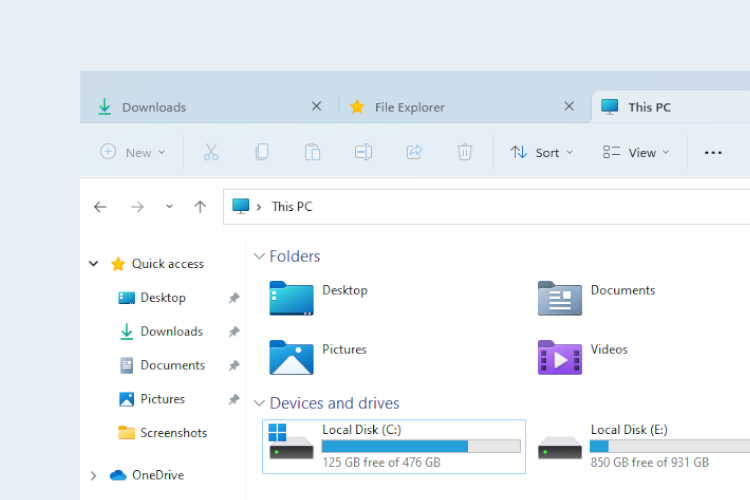
I'm running Windows 11 24H2 & am having an issue with File Explorer.
It opens with the normal drive listings, library's etc on the left, the right shows contents thereoff, all normal so far.

I have no tabs, only 4 menu's at the top left. File, Edit, View & Tools. Files show very basic stuff, Edit- copy & paste, View- almost like desktop icon options, & Tools only shows network stuff.
1736578724749.webp


When I maximise, I get < - back to home, an up arrow, & a pull down selection for Drives.


1736578685689.webp

Any ideas? At the moment, I'm using OneCommander.
I've tried checking for corrupt files, nothing helps.
 

My Computer My Computer

At a glance

W11 24H2Ryzen 716GbAMD Radeon & NVIDIA GeForce RTX 3050
OS
W11 24H2
Computer type
Laptop
Manufacturer/Model
ASUS A 14
CPU
Ryzen 7
Memory
16Gb
Graphics Card(s)
AMD Radeon & NVIDIA GeForce RTX 3050
Hard Drives
500GB SSD & 2 TB portable
Browser
Edge
Antivirus
Defender
You can use vivetool to enable File Explorer tab or perform in-place upgrade of Windows 11.


My Computer My Computer

At a glance

Windows 11AMD Ryzen 7 5700GMicron Technology DDR4-3200 16GBNVIDIA GeForce RTX 3060
OS
Windows 11
Computer type
PC/Desktop
Manufacturer/Model
HP Pavilion
CPU
AMD Ryzen 7 5700G
Motherboard
Erica6
Memory
Micron Technology DDR4-3200 16GB
Graphics Card(s)
NVIDIA GeForce RTX 3060
Sound Card
Realtek ALC671
Monitor(s) Displays
Samsung SyncMaster U28E590
Screen Resolution
3840 x 2160
Hard Drives
SAMSUNG MZVLQ1T0HALB-000H1
Nope, That did not work.
 

My Computer My Computer

At a glance

W11 24H2Ryzen 716GbAMD Radeon & NVIDIA GeForce RTX 3050
OS
W11 24H2
Computer type
Laptop
Manufacturer/Model
ASUS A 14
CPU
Ryzen 7
Memory
16Gb
Graphics Card(s)
AMD Radeon & NVIDIA GeForce RTX 3050
Hard Drives
500GB SSD & 2 TB portable
Browser
Edge
Antivirus
Defender
Try performing in-place repair install.

You can also perform in-place upgrade of Windows 11. In-place upgrade is to use to replace the current operating system files on your computer. Unlike a clean installation of Windows, you can start a Windows in-place upgrade when your OS is still running. And an in-place upgrade can keep your files, settings, & apps during the upgrade process. You can perform a Windows 11 in-place upgrade is to use the Windows 11 Media Creation Tool. Make sure to select Upgrade this PC now and click Next. Follow the on-screen guide to perform a Windows 11 in-place upgrade.


My Computer My Computer

At a glance

Windows 11AMD Ryzen 7 5700GMicron Technology DDR4-3200 16GBNVIDIA GeForce RTX 3060
OS
Windows 11
Computer type
PC/Desktop
Manufacturer/Model
HP Pavilion
CPU
AMD Ryzen 7 5700G
Motherboard
Erica6
Memory
Micron Technology DDR4-3200 16GB
Graphics Card(s)
NVIDIA GeForce RTX 3060
Sound Card
Realtek ALC671
Monitor(s) Displays
Samsung SyncMaster U28E590
Screen Resolution
3840 x 2160
Hard Drives
SAMSUNG MZVLQ1T0HALB-000H1
You have a theme applied…
 

My Computer My Computer

At a glance

Windows 11 Pro
OS
Windows 11 Pro
I'm using OneCommander.
If you're using OneComander and lost tabs, then the problem is with onecommander as you are no longer using file explorer. I suggest you uninstall Onecommander and restart.
 

My Computers My Computers

  • At a glance

    Windows 11 Pro 25H2 26200.8655i9-10900 10 core 20 threads32 gbnone-Intel UHD Graphics 630
    OS
    Windows 11 Pro 25H2 26200.8655
    Computer type
    PC/Desktop
    Manufacturer/Model
    Dell Optiplex 7080
    CPU
    i9-10900 10 core 20 threads
    Motherboard
    DELL 0J37VM
    Memory
    32 gb
    Graphics Card(s)
    none-Intel UHD Graphics 630
    Sound Card
    Integrated Realtek
    Monitor(s) Displays
    Benq 27
    Screen Resolution
    2560x1440
    Hard Drives
    2x1tb Solidigm m.2 nvme /External drives 512gb Samsung m.2 sata+2tb Kingston m2.nvme
    PSU
    500w
    Case
    MT
    Cooling
    Dell Premium
    Keyboard
    Logitech wired
    Mouse
    Logitech wireless
    Internet Speed
    so slow I'm too embarrassed to tell
    Browser
    #1 Edge #2 Firefox
    Antivirus
    Defender+MWB Premium
  • At a glance

    Windows 11 Pro 24H2 26200.8457AMD Ryzen 7 6800U32 gbintegrated
    Operating System
    Windows 11 Pro 24H2 26200.8457
    Computer type
    PC/Desktop
    Manufacturer/Model
    Beelink Mini PC SER5
    CPU
    AMD Ryzen 7 6800U
    Memory
    32 gb
    Graphics card(s)
    integrated
    Sound Card
    integrated
    Monitor(s) Displays
    Benq 27
    Screen Resolution
    2560x1440
    Hard Drives
    1TB Crucial nvme
    Keyboard
    Logitech wired
    Mouse
    Logitech wireless
    Internet Speed
    still too embarrassed to tell
    Browser
    Firefox
    Antivirus
    Defender
    Other Info
    System 3 is non compliant Dell 9020 i7-4770/24gb ram Win11 PRO 26200.8457
I took the statement "At the moment, I'm using OneCommander" to mean the OP is using that tool in the meantime. I could be wrong.
 

My Computer My Computer

At a glance

Windows 10/11
OS
Windows 10/11
Computer type
Laptop
Manufacturer/Model
Acer
o mean the OP is using that tool in the meantime.
After re-reading, I do believe you may be correct. To the OP, it would be interesting to know if this issue exists in another user account. If it works correctly in another account, then it would point to one of 3 things, either some tweak or change you have made in your account, third party software, or file corruption within your account. Enable the hidden administrator and restart. Login to that account long enought to test with. Once it is proven, disable hidden administrator as it is meant to be used for troubleshooting, not daily use.


My Computers My Computers

  • At a glance

    Windows 11 Pro 25H2 26200.8655i9-10900 10 core 20 threads32 gbnone-Intel UHD Graphics 630
    OS
    Windows 11 Pro 25H2 26200.8655
    Computer type
    PC/Desktop
    Manufacturer/Model
    Dell Optiplex 7080
    CPU
    i9-10900 10 core 20 threads
    Motherboard
    DELL 0J37VM
    Memory
    32 gb
    Graphics Card(s)
    none-Intel UHD Graphics 630
    Sound Card
    Integrated Realtek
    Monitor(s) Displays
    Benq 27
    Screen Resolution
    2560x1440
    Hard Drives
    2x1tb Solidigm m.2 nvme /External drives 512gb Samsung m.2 sata+2tb Kingston m2.nvme
    PSU
    500w
    Case
    MT
    Cooling
    Dell Premium
    Keyboard
    Logitech wired
    Mouse
    Logitech wireless
    Internet Speed
    so slow I'm too embarrassed to tell
    Browser
    #1 Edge #2 Firefox
    Antivirus
    Defender+MWB Premium
  • At a glance

    Windows 11 Pro 24H2 26200.8457AMD Ryzen 7 6800U32 gbintegrated
    Operating System
    Windows 11 Pro 24H2 26200.8457
    Computer type
    PC/Desktop
    Manufacturer/Model
    Beelink Mini PC SER5
    CPU
    AMD Ryzen 7 6800U
    Memory
    32 gb
    Graphics card(s)
    integrated
    Sound Card
    integrated
    Monitor(s) Displays
    Benq 27
    Screen Resolution
    2560x1440
    Hard Drives
    1TB Crucial nvme
    Keyboard
    Logitech wired
    Mouse
    Logitech wireless
    Internet Speed
    still too embarrassed to tell
    Browser
    Firefox
    Antivirus
    Defender
    Other Info
    System 3 is non compliant Dell 9020 i7-4770/24gb ram Win11 PRO 26200.8457
Back
Top Bottom