

Tomo53
Well-known member
- Local time
- 7:13 PM
- Posts
- 42
- OS
- Windows 11 Home
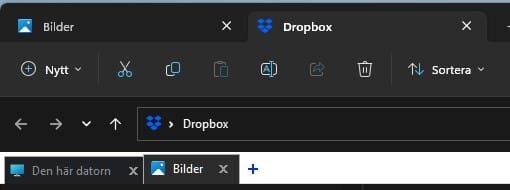
I have astrange issues in windows 11 file explorer. Earlier I installed Powertoys to try out. A new feature then was tabs in file explorer. After a while I uninstalled it. Later on Windows was updated with just tabs in file explorer. Worked nice in my other computers. In my main and latest computer I now have tabs where it should be and also have tabs as in the picture below. The top tab is after windows update. The lower one is from Powertoys and that one I can´t get rid of. This one open up folder list and I can choose one. Is there anyone who can clear this? I can´t find a way to reset file exlorer without reinstall windows, and I don´t want to do that since everything is working beside this issue.
Attachments
My Computer
At a glance
Windows 11 HomeAMD Ryzen 7 9800 X3D 4.7 GHz32 GBPower Color Radeon RX 9070 XT 16 GB Reaper
- OS
- Windows 11 Home
- Computer type
- PC/Desktop
- Manufacturer/Model
- Taurus Hardcore Gaming
- CPU
- AMD Ryzen 7 9800 X3D 4.7 GHz
- Motherboard
- Asus TUF Gaming B650-E Wifi
- Memory
- 32 GB
- Graphics Card(s)
- Power Color Radeon RX 9070 XT 16 GB Reaper
- Sound Card
- Realtek
- Monitor(s) Displays
- Dell 4K
- Screen Resolution
- 3840 x 2160
- Hard Drives
- 2 x Kingston NV3 M.2 NVMe Gen 4 2TB
- PSU
- Corsair 850W
- Case
- Taurus Gaming Case RGB
- Cooling
- Cooler Master Hyper 212 Black Edition
- Keyboard
- Logitech MX
- Mouse
- Logitech Master MX
- Internet Speed
- 100/100 Gbit
- Browser
- Chrome
- Antivirus
- MS Defender






