
Solved File explorer tabs issues


Tomo53

Well-known member
Local time
5:22 AM
Posts
42
OS
Windows 11 Home
I have astrange issues in windows 11 file explorer. Earlier I installed Powertoys to try out. A new feature then was tabs in file explorer. After a while I uninstalled it. Later on Windows was updated with just tabs in file explorer. Worked nice in my other computers. In my main and latest computer I now have tabs where it should be and also have tabs as in the picture below. The top tab is after windows update. The lower one is from Powertoys and that one I can´t get rid of. This one open up folder list and I can choose one. Is there anyone who can clear this? I can´t find a way to reset file exlorer without reinstall windows, and I don´t want to do that since everything is working beside this issue.
 

Attachments
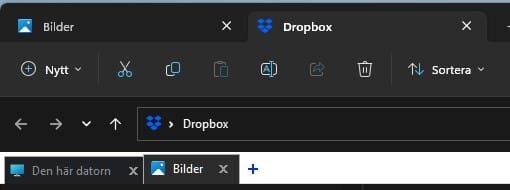
  • Skärmbild 2023-05-11 103104.jpg
    Skärmbild 2023-05-11 103104.jpg
    8.6 KB · Views: 5

My Computer

System One

  • OS
    Windows 11 Home
    Computer type
    PC/Desktop
    Manufacturer/Model
    Taurus Hardcore Gaming
    CPU
    AMD Ryzen 7 9800 X3D 4.7 GHz
    Motherboard
    Asus TUF Gaming B650-E Wifi
    Memory
    32 GB
    Graphics Card(s)
    Power Color Radeon RX 9070 XT 16 GB Reaper
    Sound Card
    Realtek
    Monitor(s) Displays
    Dell 4K
    Screen Resolution
    3840 x 2160
    Hard Drives
    2 x Kingston NV3 M.2 NVMe Gen 4 2TB
    PSU
    Corsair 850W
    Case
    Taurus Gaming Case RGB
    Cooling
    Cooler Master Hyper 212 Black Edition
    Keyboard
    Logitech MX
    Mouse
    Logitech Master MX
    Internet Speed
    100/100 Gbit
    Browser
    Chrome
    Antivirus
    MS Defender
Do you want to disable tabs on File Explorer?
 

My Computer

System One

  • OS
    Windows 11
    Computer type
    PC/Desktop
    Manufacturer/Model
    HP Pavilion
    CPU
    AMD Ryzen 7 5700G
    Motherboard
    Erica6
    Memory
    Micron Technology DDR4-3200 16GB
    Graphics Card(s)
    NVIDIA GeForce RTX 3060
    Sound Card
    Realtek ALC671
    Monitor(s) Displays
    Samsung SyncMaster U28E590
    Screen Resolution
    3840 x 2160
    Hard Drives
    SAMSUNG MZVLQ1T0HALB-000H1
Not really, just want the top tab as it should be. The lower tab should not be there at all if I am correct. My other computers has only the the top tab.
 

My Computer

System One

  • OS
    Windows 11 Home
    Computer type
    PC/Desktop
    Manufacturer/Model
    Taurus Hardcore Gaming
    CPU
    AMD Ryzen 7 9800 X3D 4.7 GHz
    Motherboard
    Asus TUF Gaming B650-E Wifi
    Memory
    32 GB
    Graphics Card(s)
    Power Color Radeon RX 9070 XT 16 GB Reaper
    Sound Card
    Realtek
    Monitor(s) Displays
    Dell 4K
    Screen Resolution
    3840 x 2160
    Hard Drives
    2 x Kingston NV3 M.2 NVMe Gen 4 2TB
    PSU
    Corsair 850W
    Case
    Taurus Gaming Case RGB
    Cooling
    Cooler Master Hyper 212 Black Edition
    Keyboard
    Logitech MX
    Mouse
    Logitech Master MX
    Internet Speed
    100/100 Gbit
    Browser
    Chrome
    Antivirus
    MS Defender
Yes, top tab is default for File Explorer, see executing Sfc /Scannow command from Command Prompt will help.
 

My Computer

System One

  • OS
    Windows 11
    Computer type
    PC/Desktop
    Manufacturer/Model
    HP Pavilion
    CPU
    AMD Ryzen 7 5700G
    Motherboard
    Erica6
    Memory
    Micron Technology DDR4-3200 16GB
    Graphics Card(s)
    NVIDIA GeForce RTX 3060
    Sound Card
    Realtek ALC671
    Monitor(s) Displays
    Samsung SyncMaster U28E590
    Screen Resolution
    3840 x 2160
    Hard Drives
    SAMSUNG MZVLQ1T0HALB-000H1
Tried it. "Windows Resource Protection did not find any integrity violations." No chance to get rid of the lower tabs? When using more than on computer it is just confusing with file explorer that look different. I can live with it but it would be nice to have it as it should be.
 

My Computer

System One

  • OS
    Windows 11 Home
    Computer type
    PC/Desktop
    Manufacturer/Model
    Taurus Hardcore Gaming
    CPU
    AMD Ryzen 7 9800 X3D 4.7 GHz
    Motherboard
    Asus TUF Gaming B650-E Wifi
    Memory
    32 GB
    Graphics Card(s)
    Power Color Radeon RX 9070 XT 16 GB Reaper
    Sound Card
    Realtek
    Monitor(s) Displays
    Dell 4K
    Screen Resolution
    3840 x 2160
    Hard Drives
    2 x Kingston NV3 M.2 NVMe Gen 4 2TB
    PSU
    Corsair 850W
    Case
    Taurus Gaming Case RGB
    Cooling
    Cooler Master Hyper 212 Black Edition
    Keyboard
    Logitech MX
    Mouse
    Logitech Master MX
    Internet Speed
    100/100 Gbit
    Browser
    Chrome
    Antivirus
    MS Defender
In this video, i will show you how to repair install of Windows 11 by performing an in-place upgrade without losing anything.


My Computer

System One

  • OS
    Windows 11
    Computer type
    PC/Desktop
    Manufacturer/Model
    HP Pavilion
    CPU
    AMD Ryzen 7 5700G
    Motherboard
    Erica6
    Memory
    Micron Technology DDR4-3200 16GB
    Graphics Card(s)
    NVIDIA GeForce RTX 3060
    Sound Card
    Realtek ALC671
    Monitor(s) Displays
    Samsung SyncMaster U28E590
    Screen Resolution
    3840 x 2160
    Hard Drives
    SAMSUNG MZVLQ1T0HALB-000H1
I knew that options. Was hoping for maybe just a reg file change or something easy fix. Soon or later I will do a reinstall. Right now it is not a big issue so I will keep for now. Thanks anyway!
 

My Computer

System One

  • OS
    Windows 11 Home
    Computer type
    PC/Desktop
    Manufacturer/Model
    Taurus Hardcore Gaming
    CPU
    AMD Ryzen 7 9800 X3D 4.7 GHz
    Motherboard
    Asus TUF Gaming B650-E Wifi
    Memory
    32 GB
    Graphics Card(s)
    Power Color Radeon RX 9070 XT 16 GB Reaper
    Sound Card
    Realtek
    Monitor(s) Displays
    Dell 4K
    Screen Resolution
    3840 x 2160
    Hard Drives
    2 x Kingston NV3 M.2 NVMe Gen 4 2TB
    PSU
    Corsair 850W
    Case
    Taurus Gaming Case RGB
    Cooling
    Cooler Master Hyper 212 Black Edition
    Keyboard
    Logitech MX
    Mouse
    Logitech Master MX
    Internet Speed
    100/100 Gbit
    Browser
    Chrome
    Antivirus
    MS Defender
You can try System restore points to restore your computer in to date, there was no problem.
 

My Computer

System One

  • OS
    Windows 11
    Computer type
    PC/Desktop
    Manufacturer/Model
    HP Pavilion
    CPU
    AMD Ryzen 7 5700G
    Motherboard
    Erica6
    Memory
    Micron Technology DDR4-3200 16GB
    Graphics Card(s)
    NVIDIA GeForce RTX 3060
    Sound Card
    Realtek ALC671
    Monitor(s) Displays
    Samsung SyncMaster U28E590
    Screen Resolution
    3840 x 2160
    Hard Drives
    SAMSUNG MZVLQ1T0HALB-000H1
I tried that earlier but same.
 

My Computer

System One

  • OS
    Windows 11 Home
    Computer type
    PC/Desktop
    Manufacturer/Model
    Taurus Hardcore Gaming
    CPU
    AMD Ryzen 7 9800 X3D 4.7 GHz
    Motherboard
    Asus TUF Gaming B650-E Wifi
    Memory
    32 GB
    Graphics Card(s)
    Power Color Radeon RX 9070 XT 16 GB Reaper
    Sound Card
    Realtek
    Monitor(s) Displays
    Dell 4K
    Screen Resolution
    3840 x 2160
    Hard Drives
    2 x Kingston NV3 M.2 NVMe Gen 4 2TB
    PSU
    Corsair 850W
    Case
    Taurus Gaming Case RGB
    Cooling
    Cooler Master Hyper 212 Black Edition
    Keyboard
    Logitech MX
    Mouse
    Logitech Master MX
    Internet Speed
    100/100 Gbit
    Browser
    Chrome
    Antivirus
    MS Defender
Why not try repair install, you won't lose anything.
 

My Computer

System One

  • OS
    Windows 11
    Computer type
    PC/Desktop
    Manufacturer/Model
    HP Pavilion
    CPU
    AMD Ryzen 7 5700G
    Motherboard
    Erica6
    Memory
    Micron Technology DDR4-3200 16GB
    Graphics Card(s)
    NVIDIA GeForce RTX 3060
    Sound Card
    Realtek ALC671
    Monitor(s) Displays
    Samsung SyncMaster U28E590
    Screen Resolution
    3840 x 2160
    Hard Drives
    SAMSUNG MZVLQ1T0HALB-000H1
I will.
 

My Computer

System One

  • OS
    Windows 11 Home
    Computer type
    PC/Desktop
    Manufacturer/Model
    Taurus Hardcore Gaming
    CPU
    AMD Ryzen 7 9800 X3D 4.7 GHz
    Motherboard
    Asus TUF Gaming B650-E Wifi
    Memory
    32 GB
    Graphics Card(s)
    Power Color Radeon RX 9070 XT 16 GB Reaper
    Sound Card
    Realtek
    Monitor(s) Displays
    Dell 4K
    Screen Resolution
    3840 x 2160
    Hard Drives
    2 x Kingston NV3 M.2 NVMe Gen 4 2TB
    PSU
    Corsair 850W
    Case
    Taurus Gaming Case RGB
    Cooling
    Cooler Master Hyper 212 Black Edition
    Keyboard
    Logitech MX
    Mouse
    Logitech Master MX
    Internet Speed
    100/100 Gbit
    Browser
    Chrome
    Antivirus
    MS Defender
Let us know how it went.
 

My Computer

System One

  • OS
    Windows 11
    Computer type
    PC/Desktop
    Manufacturer/Model
    HP Pavilion
    CPU
    AMD Ryzen 7 5700G
    Motherboard
    Erica6
    Memory
    Micron Technology DDR4-3200 16GB
    Graphics Card(s)
    NVIDIA GeForce RTX 3060
    Sound Card
    Realtek ALC671
    Monitor(s) Displays
    Samsung SyncMaster U28E590
    Screen Resolution
    3840 x 2160
    Hard Drives
    SAMSUNG MZVLQ1T0HALB-000H1
I will keep you posted. (y)
 

My Computer

System One

  • OS
    Windows 11 Home
    Computer type
    PC/Desktop
    Manufacturer/Model
    Taurus Hardcore Gaming
    CPU
    AMD Ryzen 7 9800 X3D 4.7 GHz
    Motherboard
    Asus TUF Gaming B650-E Wifi
    Memory
    32 GB
    Graphics Card(s)
    Power Color Radeon RX 9070 XT 16 GB Reaper
    Sound Card
    Realtek
    Monitor(s) Displays
    Dell 4K
    Screen Resolution
    3840 x 2160
    Hard Drives
    2 x Kingston NV3 M.2 NVMe Gen 4 2TB
    PSU
    Corsair 850W
    Case
    Taurus Gaming Case RGB
    Cooling
    Cooler Master Hyper 212 Black Edition
    Keyboard
    Logitech MX
    Mouse
    Logitech Master MX
    Internet Speed
    100/100 Gbit
    Browser
    Chrome
    Antivirus
    MS Defender
Done. It works now as it should. Now I have to reinstall flight simulator. But it is ok.
 

My Computer

System One

  • OS
    Windows 11 Home
    Computer type
    PC/Desktop
    Manufacturer/Model
    Taurus Hardcore Gaming
    CPU
    AMD Ryzen 7 9800 X3D 4.7 GHz
    Motherboard
    Asus TUF Gaming B650-E Wifi
    Memory
    32 GB
    Graphics Card(s)
    Power Color Radeon RX 9070 XT 16 GB Reaper
    Sound Card
    Realtek
    Monitor(s) Displays
    Dell 4K
    Screen Resolution
    3840 x 2160
    Hard Drives
    2 x Kingston NV3 M.2 NVMe Gen 4 2TB
    PSU
    Corsair 850W
    Case
    Taurus Gaming Case RGB
    Cooling
    Cooler Master Hyper 212 Black Edition
    Keyboard
    Logitech MX
    Mouse
    Logitech Master MX
    Internet Speed
    100/100 Gbit
    Browser
    Chrome
    Antivirus
    MS Defender
I'm glad to know your problem resolved.
 

My Computer

System One

  • OS
    Windows 11
    Computer type
    PC/Desktop
    Manufacturer/Model
    HP Pavilion
    CPU
    AMD Ryzen 7 5700G
    Motherboard
    Erica6
    Memory
    Micron Technology DDR4-3200 16GB
    Graphics Card(s)
    NVIDIA GeForce RTX 3060
    Sound Card
    Realtek ALC671
    Monitor(s) Displays
    Samsung SyncMaster U28E590
    Screen Resolution
    3840 x 2160
    Hard Drives
    SAMSUNG MZVLQ1T0HALB-000H1

Latest Support Threads

Back
Top Bottom




