Fonts not rendering correctly


Simon64

New member
Local time
12:17 AM
Posts
5
OS
Windows 11
I was hanging onto Windows 10 for grim death, but finally took the plunge and upgraded my Dell laptop to Windows 11 the other day. The upgrade itself seemed to go OK, and all my programs appear to be intact. I was dismayed to see the Quick Launch toolbar had been removed, but I found an app to replace that, and I can cope with any other minor changes.

My fonts, however, were all set back to the default Windows font, which I don't like, so as always, I used Winaero Tweaker to change some of them. The problem is, text doesn't seem to be rendering correctly. If I use Verdana 10 Bold for title bars, the text just looks messy and blurred, although the non-bold is better, and looks OK in menus and as Icon titles.

General Windows text also looks incorrect and, not exactly blurred, but appears cut off on one side. The best way I can describe it is that it looks like pixels are missing from the left hand side of text, and the rest of the pixels in the text appear to be misaligned.

So I reverted back to the default font, and still text doesn't look right, with that, kind of, misalignment effect throughout the menus and Settings screens.

I've seen posts on Google about changing the scale from 125%, and back again, but mine is already set at 100%, which appears to be the default setting. I also tried changing the display resolution but that hasn't really solved anything either.

So, I'm a bit stuck and would appreciate any help. I also have another PC which is still on Windows 10, and I'm reluctant to upgrade if the fonts on that are also likely to be messed up.

Thanks.
 

My Computer My Computer

At a glance

Windows 11
OS
Windows 11
Computer type
Laptop
Manufacturer/Model
Dell
For the first half of the problem, try to see if you can find another Bold font similar to the "Verdana 10 Bold" font that works well (using Winaero Tweaker), and see if you can adjust to that.
[Personally, I use Segoe UI, Bold, 12, font for Title Bars, (using Winaero Tweaker)].

The second part, can you post a screenshot of the misaligned font that you mention?
 

My Computer My Computer

At a glance

Windows 11
OS
Windows 11
Computer type
PC/Desktop
Manufacturer/Model
Custom Built
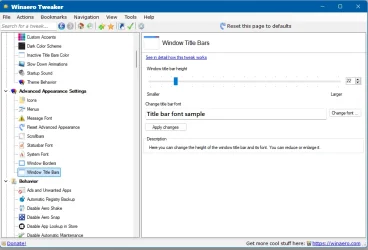
Here's a screenshot of the Winaero Tweaker window. As can be seen, the font in the title bar looks nothing like the chosen font.

Untitled-2.webp

As for the second issue, I've just switched the laptop on and all the fonts are reset to the default again, which is really annoying, so I'm going to have to experiment with that again. It seems, generally, bold fonts are rendering TOO bold.

Just to add, when I'm typing a post on here it's not bold, but when it's posted, it is. Is that normal for this forum?
 

My Computer My Computer

At a glance

Windows 11
OS
Windows 11
Computer type
Laptop
Manufacturer/Model
Dell
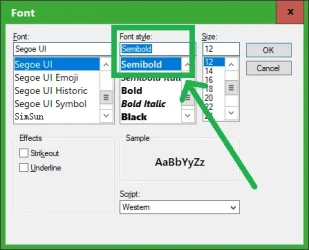
There's a "Semibold" setting in Winaero Tweaker. Try that:

1760992449308.webp
 

My Computer My Computer

At a glance

Windows 11
OS
Windows 11
Computer type
PC/Desktop
Manufacturer/Model
Custom Built
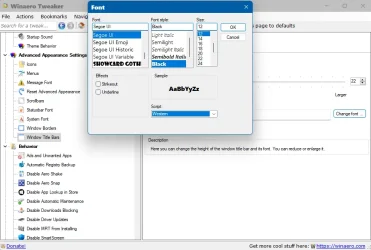
I haven't got Semibold on my version, just Semibold Italic, and I don't want that.

Untitled-3.webp

And anyway, shouldn't it display the font I've chosen without fiddling about trying to find one it likes?
 

My Computer My Computer

At a glance

Windows 11
OS
Windows 11
Computer type
Laptop
Manufacturer/Model
Dell
And anyway, shouldn't it display the font I've chosen without fiddling about trying to find one it likes?

I don't know why it's doing that. I was hoping maybe the "Semibold" font would be a good fix.
Try updating your Winaero Tweaker to the latest version, maybe you have an outdated version of it. If you already have the latest version, then I don't know what you don't have the "Semibold" option.
 

My Computer My Computer

At a glance

Windows 11
OS
Windows 11
Computer type
PC/Desktop
Manufacturer/Model
Custom Built
I think I have the latest version, but it's actually quite difficult to find an installation link for, as the one at winaero.com seems to be permanently broken.
 

My Computer My Computer

At a glance

Windows 11
OS
Windows 11
Computer type
Laptop
Manufacturer/Model
Dell
I think I have the latest version, but it's actually quite difficult to find an installation link for, as the one at winaero.com seems to be permanently broken.
winaerotweaker.com
 

My Computer My Computer

At a glance

Windows 11
OS
Windows 11
Computer type
PC/Desktop
Manufacturer/Model
Custom Built
What is the model # of your Dell Laptop?
Go here Drivers & Downloads | Dell US
and type in your Service Tag or Make and Model # of your Dell Laptop.
Download the GPU (Video) driver for your model.
 

My Computer My Computer

At a glance

Windows 11 Pro Insider 64 bit 25H2 26200.5742Intel Core i7 9700K 3.6016 GBnVidia GEForce RTX 2060 Super
OS
Windows 11 Pro Insider 64 bit 25H2 26200.5742
Computer type
PC/Desktop
Manufacturer/Model
Gigabyte Z390 UD
CPU
Intel Core i7 9700K 3.60
Motherboard
Gigabyte Z390 UD
Memory
16 GB
Graphics Card(s)
nVidia GEForce RTX 2060 Super
Sound Card
onboard
Monitor(s) Displays
Two 27" Dell 4K monitors
Screen Resolution
3840 x 2160
Hard Drives
M.2 NVME SSD, 500 GB; Two 2TB Mechanical HDD's
PSU
850w PSU
Case
Cyberpower PC
Cooling
Water cooled
Keyboard
Backlit Cyberpower gaming keyboard
Mouse
Backlit Cyberpower gaming mouse
Internet Speed
1 GB mbps
Browser
Brave
Antivirus
Windows Security
Thanks guys, I've given up for the night now, and will try again tomorrow. I didn't have Segoe UI Semibold on my system for some reason, so I download and installed the font. Using Winaero Tweaker, I could then select Segoe UI Semibold, but it keeps displaying the Italic version in the Title Bar, so I'm just at a loss. I'll have a look at those other recommended apps in the morning.

Why does bloody Microsoft have to make things so annoying? 😡
 

My Computer My Computer

At a glance

Windows 11
OS
Windows 11
Computer type
Laptop
Manufacturer/Model
Dell
hey i was dealing same problem. I figured it out issue was my display driver. I had to try few old win 8 drivers and run them in compatilibity mode. I am surprised they work flawless. If your system is not new this might be the issue of blurry text. If your system is new well u still can try some old display drivers from manufacturer
 

My Computers My Computers

  • At a glance

    windows 11 home 23H2 22631.6199Intel core i7 (2nd gen) Turbo 3.10 ghz6gbAmd Radeon HD 7400m 1GB & Intel hd graphics
    OS
    windows 11 home 23H2 22631.6199
    Computer type
    Laptop
    Manufacturer/Model
    HP
    CPU
    Intel core i7 (2nd gen) Turbo 3.10 ghz
    Memory
    6gb
    Graphics Card(s)
    Amd Radeon HD 7400m 1GB & Intel hd graphics
    Sound Card
    BeatsAudio
    Hard Drives
    128gb SSD
  • At a glance

    macOS SequoiaM1 3.2 ghz8gb onboardigpu
    Operating System
    macOS Sequoia
    Computer type
    PC/Desktop
    Manufacturer/Model
    iMac 24"
    CPU
    M1 3.2 ghz
    Memory
    8gb onboard
    Graphics card(s)
    igpu
    Monitor(s) Displays
    Retina 4.5K
    Screen Resolution
    4480x2520
    Hard Drives
    512gb SSD
I install Microsoft Segoe UI for the system and apps.
 

My Computers My Computers

  • At a glance

    Windows 11 Education For 25H2Intel® Core i7 5500u8 GBIntel HD Family Graphics 5500 AMD Firepro 4150M
    OS
    Windows 11 Education For 25H2
    Computer type
    Laptop
    Manufacturer/Model
    HP ZBook G2
    CPU
    Intel® Core i7 5500u
    Motherboard
    HP
    Memory
    8 GB
    Graphics Card(s)
    Intel HD Family Graphics 5500 AMD Firepro 4150M
    Sound Card
    Realtek High Audio
    Hard Drives
    1 TB SSD
    Mouse
    HP USB Mouse
    Antivirus
    Windows Defender
  • At a glance

    Windows 11 Pro For Workstations 25H2Xeon 1535m v632 GBAMD Quadro Pro 4100
    Operating System
    Windows 11 Pro For Workstations 25H2
    Computer type
    Laptop
    Manufacturer/Model
    HP Zbook G4
    CPU
    Xeon 1535m v6
    Motherboard
    HP
    Memory
    32 GB
    Graphics card(s)
    AMD Quadro Pro 4100
    Sound Card
    Bang and Olufson Audio
    Hard Drives
    1TB SSD
    Mouse
    HP USB Mouse
    Antivirus
    Windows Defender
 

My Computers My Computers

  • At a glance

    Windows 11 Pro 25H2 26200.8875i9-10900 10 core 20 threads32 gbnone-Intel UHD Graphics 630
    OS
    Windows 11 Pro 25H2 26200.8875
    Computer type
    PC/Desktop
    Manufacturer/Model
    Dell Optiplex 7080
    CPU
    i9-10900 10 core 20 threads
    Motherboard
    DELL 0J37VM
    Memory
    32 gb
    Graphics Card(s)
    none-Intel UHD Graphics 630
    Sound Card
    Integrated Realtek
    Monitor(s) Displays
    Benq 27
    Screen Resolution
    2560x1440
    Hard Drives
    2x1tb Solidigm m.2 nvme /External drives 512gb Samsung m.2 sata+2tb Kingston m2.nvme
    PSU
    500w
    Case
    MT
    Cooling
    Dell Premium
    Keyboard
    Logitech wired
    Mouse
    Logitech wireless
    Internet Speed
    so slow I'm too embarrassed to tell
    Browser
    #1 Edge #2 Firefox
    Antivirus
    Defender+MWB Premium
  • At a glance

    Windows 11 Pro 24H2 26200.8875AMD Ryzen 7 6800U32 gbintegrated
    Operating System
    Windows 11 Pro 24H2 26200.8875
    Computer type
    PC/Desktop
    Manufacturer/Model
    Beelink Mini PC SER5
    CPU
    AMD Ryzen 7 6800U
    Memory
    32 gb
    Graphics card(s)
    integrated
    Sound Card
    integrated
    Monitor(s) Displays
    Benq 27
    Screen Resolution
    2560x1440
    Hard Drives
    1TB Crucial nvme
    Keyboard
    Logitech wired
    Mouse
    Logitech wireless
    Internet Speed
    still too embarrassed to tell
    Browser
    Firefox
    Antivirus
    Defender
    Other Info
    System 3 is non compliant Dell 9020 i7-4770/24gb ram Win11 PRO 26200.8875
Back
Top Bottom