Solved garlin's PowerShell scripts for updating Secure Boot CA 2023


I ran the Check-UEFI check and it shows my 2011 Cert as still active even though I revoked it months ago.
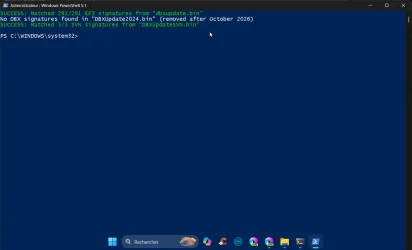
So I ran the Check-DBX check and I get this.

1792591735813.webp


If they're removed after Oct, why is this an error?
 

My Computers My Computers

  • At a glance

    Win 11 Pro 26H2, Build 26300.9711Intel Core i5 14500, 14th Generation64GB DDR4GeForce RTX 4060
    OS
    Win 11 Pro 26H2, Build 26300.9711
    Computer type
    PC/Desktop
    Manufacturer/Model
    Home Brew
    CPU
    Intel Core i5 14500, 14th Generation
    Motherboard
    Gigabyte B760M G P WIFI
    Memory
    64GB DDR4
    Graphics Card(s)
    GeForce RTX 4060
    Sound Card
    Chipset Realtek
    Monitor(s) Displays
    LG 45" Ultragear & Acer 24" 1080p
    Screen Resolution
    5120x1440 & 1920x1080
    Hard Drives
    Crucial P310 2TB 2280 PCIe Gen4 3D NAND NVMe M.2 SSD (O/S)
    Silicon Power 2TB US75 NVMe PCIe Gen4 M.2 2280 SSD (backup)
    Crucial BX500 2TB 3D NAND (2nd backup)
    Seagate 4TB Ironwolf, rotating HDD secondary backup
    External off-line backup Drives: 2 NVMe 4TB drives in external enclosures
    PSU
    Thermaltake Toughpower GF3 750W
    Case
    LIAN LI LANCOOL 216 E-ATX PC Case
    Cooling
    Lots of fans!
    Keyboard
    Microsoft Comfort Curve 2000
    Mouse
    Logitech G305
    Internet Speed
    Verizon FiOS 1GB
    Browser
    Firefox
    Antivirus
    MalwareBytes & Windows Defender Security
  • At a glance

    Win 11 Pro 25H2, Build 26300.9550Intel Core i5 1440032GB DDR5Intel 700 Embedded GPU
    Operating System
    Win 11 Pro 25H2, Build 26300.9550
    Computer type
    PC/Desktop
    Manufacturer/Model
    Home Brew
    CPU
    Intel Core i5 14400
    Motherboard
    Gigabyte B760M DS3H AX
    Memory
    32GB DDR5
    Graphics card(s)
    Intel 700 Embedded GPU
    Sound Card
    Realtek Embedded
    Monitor(s) Displays
    27" HP 1080p
    Screen Resolution
    1920x1080
    Hard Drives
    Crucial P310 2TB NVMe Gen4 SSD
    Samsung EVO 990 2TB NVMe Gen4 SSD
    Samsung 2TB SATA SSD
    Seagate 4TB Ironwolf, rotating HDD secondary backup
    PSU
    Thermaltake Smart BM3 650W
    Case
    Okinos Micro ATX Case
    Cooling
    Fans
    Keyboard
    Microsoft Comfort Curve 2000
    Mouse
    Logitech G305
    Internet Speed
    Verizon FiOS 1GB
    Browser
    Firefox
    Antivirus
    Malware Bytes & Windows Defender Security
  • Nimo N171 17" Laptop, (Intel i3-1215U, 16GB RAM, 2TB NVMe, Win11 Pro)
    Acemagic Vista Mini PC V1 (Intel N150, 16GB RAM, 1TB NVMe, Win11 Pro)
    HP ENVY h8-1540t, (24GB RAM, 2TB SSD, 2TB HDD, Win11 Pro)
The first line, currently in red, should be in green with 291/291 signatures. That is what I have.
 

My Computer My Computer

At a glance

windows 11
OS
windows 11
like this;-)
 

Attachments

  • powershell_YUTraZ5BwV.webp
    powershell_YUTraZ5BwV.webp
    34 KB · Views: 1

My Computer My Computer

At a glance

windows 11 25H224GBiris xe
OS
windows 11 25H2
Computer type
Laptop
Manufacturer/Model
ASUS Vivobook 15 (X1504)
Motherboard
Intel Alder Lake-P PCH
Memory
24GB
Graphics Card(s)
iris xe
Sound Card
realtek
Screen Resolution
1920X1080
Hard Drives
Samsung SSD 990 PRO 1TB
Browser
edge
Antivirus
eset anti virus
I am working on updating the certs on my notebook (see signature) for quite a while now and it is a PITA. Before going into details too much and probably wasting your time, my simple question is: is it possible to update the 2023 KEK manually because stupid manufacturer did not provide a signed PK / KEK to MS to deploy?

Crippled UEFI (Aptio) does not allow any kind of key management and so i am either stuck on default secure boot keys (with 2011 KEK) or stuck in secure boot setup mode with 2023 certs (after update script) but with no chance to switch to any working secure boot mode (user / custom etc) without getting "secure boot violation" at boot up.
There's four methods of adding Secure Boot certs (ranked in order of least to most obtrusive):

1. BIOS update with CA 2023 certs in factory defaults (best option)
2. OEM submits a signed KEK CA 2023 to MS, and the Secure Boot update task can install it.
3. Manual key enrollment of KEK CA 2023 from the UEFI setup menu.
4. Deleting all keys, and installing a replacement set.

For the first two methods, your PC OEM or their BIOS provider needs to help out. If you don't have the option for Manual key enrollment, you need to check if your UEFI supports a Custom mode. Sometimes the Custom mode is enabled only if you Delete All Keys or you set a BIOS admin password.

When you delete all keys, the Platform Key is cleared and this allows a new set of certs to be installed. Assuming this works, run the update script and it will detect this mode. The script will download and install the Windows OEM Devices keys as a replacement set. This is a last resort, assuming the first three methods are not available to you.

Some BIOS implementations are more bare-bones than others.
 

My Computer My Computer

At a glance

Windows 7
OS
Windows 7
So far, all the Builds that are not in the blocked ranges, booted just fine.
The last one I tried on purpose is in the blocked range. and it just turns off the PC if I try booting from it.
No problem booting the same media on another machine that has not that SKuSiPolicy.p7b.

Edit:
I think it is interesting that with the ranges that are blocked they force a PC power off without giving any error message. 😵‍💫😂🤷‍♂️
That's kinda weird. Windows is supposed to display the digital signature is invalid for winload.efi. If you can't read the message, how would you know what the problem is?
 

My Computer My Computer

At a glance

Windows 7
OS
Windows 7
I ran the Check-UEFI check and it shows my 2011 Cert as still active even though I revoked it months ago.
So I ran the Check-DBX check and I get this.
1. dbxupdate.bin has 15 missing EFI signatures your DBX variable doesn't currently have. You should run "Update-UEFI.bat -Revoke" to add the missing signatures.

2. DBXUpdate2024.bin used to have a "starter set" of 3 SVN's bundled along with the PCA 2011 cert. In the Oct 2026 CU, MS removed these obsolete SVN's so they're no longer included in this file. For users who have not updated to Oct 2026, or running on an End-of-Life Windows which stopped updating before this month, this file will be the older version which still has the SVN's.

3. DBXupdateSVN.bin contains the latest SVN's, which is why DBXUpdate2024.bin no longer needs to include an older set of them. The cleanup of DBXUpdate2024.bin is for administrative reasons, it doesn't affect any Secure Boot functionality.
 

My Computer My Computer

At a glance

Windows 7
OS
Windows 7
1. dbxupdate.bin has 15 missing EFI signatures your DBX variable doesn't currently have. You should run "Update-UEFI.bat -Revoke" to add the missing signatures.

2. DBXUpdate2024.bin used to have a "starter set" of 3 SVN's bundled along with the PCA 2011 cert. In the Oct 2026 CU, MS removed these obsolete SVN's so they're no longer included in this file. For users who have not updated to Oct 2026, or running on an End-of-Life Windows which stopped updating before this month, this file will be the older version which still has the SVN's.

3. DBXupdateSVN.bin contains the latest SVN's, which is why DBXUpdate2024.bin no longer needs to include an older set of them. The cleanup of DBXUpdate2024.bin is for administrative reasons, it doesn't affect any Secure Boot functionality.
Hmm... I did the October updates, but the update batch fixed it anyway. I was surprised that was complaining, I thought that was behind me.
Thanks. 😊
 

My Computers My Computers

  • At a glance

    Win 11 Pro 26H2, Build 26300.9711Intel Core i5 14500, 14th Generation64GB DDR4GeForce RTX 4060
    OS
    Win 11 Pro 26H2, Build 26300.9711
    Computer type
    PC/Desktop
    Manufacturer/Model
    Home Brew
    CPU
    Intel Core i5 14500, 14th Generation
    Motherboard
    Gigabyte B760M G P WIFI
    Memory
    64GB DDR4
    Graphics Card(s)
    GeForce RTX 4060
    Sound Card
    Chipset Realtek
    Monitor(s) Displays
    LG 45" Ultragear & Acer 24" 1080p
    Screen Resolution
    5120x1440 & 1920x1080
    Hard Drives
    Crucial P310 2TB 2280 PCIe Gen4 3D NAND NVMe M.2 SSD (O/S)
    Silicon Power 2TB US75 NVMe PCIe Gen4 M.2 2280 SSD (backup)
    Crucial BX500 2TB 3D NAND (2nd backup)
    Seagate 4TB Ironwolf, rotating HDD secondary backup
    External off-line backup Drives: 2 NVMe 4TB drives in external enclosures
    PSU
    Thermaltake Toughpower GF3 750W
    Case
    LIAN LI LANCOOL 216 E-ATX PC Case
    Cooling
    Lots of fans!
    Keyboard
    Microsoft Comfort Curve 2000
    Mouse
    Logitech G305
    Internet Speed
    Verizon FiOS 1GB
    Browser
    Firefox
    Antivirus
    MalwareBytes & Windows Defender Security
  • At a glance

    Win 11 Pro 25H2, Build 26300.9550Intel Core i5 1440032GB DDR5Intel 700 Embedded GPU
    Operating System
    Win 11 Pro 25H2, Build 26300.9550
    Computer type
    PC/Desktop
    Manufacturer/Model
    Home Brew
    CPU
    Intel Core i5 14400
    Motherboard
    Gigabyte B760M DS3H AX
    Memory
    32GB DDR5
    Graphics card(s)
    Intel 700 Embedded GPU
    Sound Card
    Realtek Embedded
    Monitor(s) Displays
    27" HP 1080p
    Screen Resolution
    1920x1080
    Hard Drives
    Crucial P310 2TB NVMe Gen4 SSD
    Samsung EVO 990 2TB NVMe Gen4 SSD
    Samsung 2TB SATA SSD
    Seagate 4TB Ironwolf, rotating HDD secondary backup
    PSU
    Thermaltake Smart BM3 650W
    Case
    Okinos Micro ATX Case
    Cooling
    Fans
    Keyboard
    Microsoft Comfort Curve 2000
    Mouse
    Logitech G305
    Internet Speed
    Verizon FiOS 1GB
    Browser
    Firefox
    Antivirus
    Malware Bytes & Windows Defender Security
  • Nimo N171 17" Laptop, (Intel i3-1215U, 16GB RAM, 2TB NVMe, Win11 Pro)
    Acemagic Vista Mini PC V1 (Intel N150, 16GB RAM, 1TB NVMe, Win11 Pro)
    HP ENVY h8-1540t, (24GB RAM, 2TB SSD, 2TB HDD, Win11 Pro)
The Secure Boot task doesn't automatically perform revocation tasks (which includes adding new DBX entries). You have to force it using an AvailableUpdates reg value, or running something like the update script.

I believe MS is still paranoid about forced revocations because non-technical users aren't aware of what changes that will bring (possibly banning your bootable ISO or USB drive).
 

My Computer My Computer

At a glance

Windows 7
OS
Windows 7
The Secure Boot task doesn't automatically perform revocation tasks (which includes adding new DBX entries). You have to force it using an AvailableUpdates reg value, or running something like the update script.

I believe MS is still paranoid about forced revocations because non-technical users aren't aware of what changes that will bring (possibly banning your bootable ISO or USB drive).
I had thought that when I revoked the 2011 Cert several months ago that would be the end for it. I still don't quite understand why that arises from the dead again. 🤣
 

My Computers My Computers

  • At a glance

    Win 11 Pro 26H2, Build 26300.9711Intel Core i5 14500, 14th Generation64GB DDR4GeForce RTX 4060
    OS
    Win 11 Pro 26H2, Build 26300.9711
    Computer type
    PC/Desktop
    Manufacturer/Model
    Home Brew
    CPU
    Intel Core i5 14500, 14th Generation
    Motherboard
    Gigabyte B760M G P WIFI
    Memory
    64GB DDR4
    Graphics Card(s)
    GeForce RTX 4060
    Sound Card
    Chipset Realtek
    Monitor(s) Displays
    LG 45" Ultragear & Acer 24" 1080p
    Screen Resolution
    5120x1440 & 1920x1080
    Hard Drives
    Crucial P310 2TB 2280 PCIe Gen4 3D NAND NVMe M.2 SSD (O/S)
    Silicon Power 2TB US75 NVMe PCIe Gen4 M.2 2280 SSD (backup)
    Crucial BX500 2TB 3D NAND (2nd backup)
    Seagate 4TB Ironwolf, rotating HDD secondary backup
    External off-line backup Drives: 2 NVMe 4TB drives in external enclosures
    PSU
    Thermaltake Toughpower GF3 750W
    Case
    LIAN LI LANCOOL 216 E-ATX PC Case
    Cooling
    Lots of fans!
    Keyboard
    Microsoft Comfort Curve 2000
    Mouse
    Logitech G305
    Internet Speed
    Verizon FiOS 1GB
    Browser
    Firefox
    Antivirus
    MalwareBytes & Windows Defender Security
  • At a glance

    Win 11 Pro 25H2, Build 26300.9550Intel Core i5 1440032GB DDR5Intel 700 Embedded GPU
    Operating System
    Win 11 Pro 25H2, Build 26300.9550
    Computer type
    PC/Desktop
    Manufacturer/Model
    Home Brew
    CPU
    Intel Core i5 14400
    Motherboard
    Gigabyte B760M DS3H AX
    Memory
    32GB DDR5
    Graphics card(s)
    Intel 700 Embedded GPU
    Sound Card
    Realtek Embedded
    Monitor(s) Displays
    27" HP 1080p
    Screen Resolution
    1920x1080
    Hard Drives
    Crucial P310 2TB NVMe Gen4 SSD
    Samsung EVO 990 2TB NVMe Gen4 SSD
    Samsung 2TB SATA SSD
    Seagate 4TB Ironwolf, rotating HDD secondary backup
    PSU
    Thermaltake Smart BM3 650W
    Case
    Okinos Micro ATX Case
    Cooling
    Fans
    Keyboard
    Microsoft Comfort Curve 2000
    Mouse
    Logitech G305
    Internet Speed
    Verizon FiOS 1GB
    Browser
    Firefox
    Antivirus
    Malware Bytes & Windows Defender Security
  • Nimo N171 17" Laptop, (Intel i3-1215U, 16GB RAM, 2TB NVMe, Win11 Pro)
    Acemagic Vista Mini PC V1 (Intel N150, 16GB RAM, 1TB NVMe, Win11 Pro)
    HP ENVY h8-1540t, (24GB RAM, 2TB SSD, 2TB HDD, Win11 Pro)
MS will add more EFI entries to dbxupdate.bin over time, which is a list of banned EFI boot files for Windows, Linux or whatever EFI-level tools are flagged as insecure (known security hole). The pace of new Windows or Linux boot file entries has dramatically slowed down by the introduction of SVN (for Windows) and SBAT (for Linux). But it's entirely possible that other banned files which don't fall into either category are added.

The net change is 15 EFI entries got added to the list since you initially performed the revocation (months ago). But also the overall file shrank by 154 entries when MS cleaned up the dbxupdate.bin file. Which is why you're missing DBX entries, but at the same time the file has less total entries than when you performed the revocation.
 

My Computer My Computer

At a glance

Windows 7
OS
Windows 7
MS will add more EFI entries to dbxupdate.bin over time, which is a list of banned EFI boot files for Windows, Linux or whatever EFI-level tools are flagged as insecure (known security hole). The pace of new Windows or Linux boot file entries has dramatically slowed down by the introduction of SVN (for Windows) and SBAT (for Linux). But it's entirely possible that other banned files which don't fall into either category are added.

The net change is 15 EFI entries got added to the list since you initially performed the revocation (months ago). But also the overall file shrank by 154 entries when MS cleaned up the dbxupdate.bin file. Which is why you're missing DBX entries, but at the same time the file has less total entries than when you performed the revocation.
@garlin
We can use your script force update of DBX / revocations.
Windows secure boot scheduled task should also take of it over time but it might take longer and a few reboots.
If we don't want to wait, that's when we can use your update with -revoke again to force immediate update.
Correct ?
 

My Computers My Computers

  • At a glance

    Windows 1132GB
    OS
    Windows 11
    Computer type
    PC/Desktop
    Manufacturer/Model
    Dell 3910
    Memory
    32GB
  • At a glance

    Windows 1116GB
    Operating System
    Windows 11
    Computer type
    Tablet
    Manufacturer/Model
    Surface Pro 9
    Memory
    16GB
The update script can perform all of the following tasks:

(by default)- Add OEM's signed KEK CA 2023 cert if it's been submitted to MS
- Add CA 2023 DB certs if a KEK CA 2023 is already installed
- Add the Windows OEM Devices keys if UEFI is in Setup mode
- Update the boot manager (when needed) on the EFI volume
- Update the SkuSiPolicy file if one already exists on the EFI volume
-SkuSiPolicy- Install the SkuSiPolicy file if none exists on the EFI volume
-Revoke- Revoke the PCA 2011 cert
- Add the latest SVN to DBX
- Add any missing EFI signatures from dbxupdate.bin
-RevokeNoDBX- Revoke the PCA 2011 cert without adding any EFI signatures
- Add the latest SVN to DBX
-Latest- Download the latest dbxupdate.bin & DBXUpdateSVN.bin from the MS GitHub repo, and apply them
-BootMedia- Update the boot manager file on USB media (but not update the boot or install WIM's)

What it cannot do by itself:
- Add the SBAT variable because it's a privileged secure operation (script must call the Secure Boot task for this step)

Right now, unless you update AvailableUpdates to specific hex values, the Secure Boot task will only perform the same steps as the update script's default steps. Any step that can block Windows or a boot USB from booting can be considered a "revocation" action. Because it revokes something that would have worked before you made any changes.

Adding the CA 2023 certs or installing a boot manager with a higher SVN than the DBX (if it exists) is not considered a revoke action, because these changes don't prevent an older version of the boot file from working. Windows will not (at this time), do anything which will deliberately lock you out of booting. You must request the Secure Boot task to execute a revocation action thru defined AvailableUpdates values.

It's not clear if MS will move ahead and make revocation mandatory. That was the original indication, but no further guidance has appeared on what happens next. If MS doesn't make a policy change now, it could wait until 27H2 since it's a different OS. Different OS = different rules.
 

My Computer My Computer

At a glance

Windows 7
OS
Windows 7
MS will add more EFI entries to dbxupdate.bin over time, which is a list of banned EFI boot files for Windows, Linux or whatever EFI-level tools are flagged as insecure (known security hole). The pace of new Windows or Linux boot file entries has dramatically slowed down by the introduction of SVN (for Windows) and SBAT (for Linux). But it's entirely possible that other banned files which don't fall into either category are added.

The net change is 15 EFI entries got added to the list since you initially performed the revocation (months ago). But also the overall file shrank by 154 entries when MS cleaned up the dbxupdate.bin file. Which is why you're missing DBX entries, but at the same time the file has less total entries than when you performed the revocation.
@garlin,
I just went through a weird situation on a multiboot machine when I tried to test the SkuSiPolicy.p7b 3.0.0.19.
After testing that, I deleted it from EFI\microsoft\boot to allow the multiboot to work, then I found out that the Dell XPS 8940 firmware copied that policy in the firmware and it was still enforcing it and blocking some of my installation USB media that are in the blocked ranges.
The problem is that there is no easy way to remove the copy of of the policy from the firmware, the only way on that machine is by resetting the BIOS to the factory settings. At that point I could not boot any of my systems because they all have the CA 2023 updates and I could not manually add the
Microsoft Corporation KEK 2K CA 2023 to the BIOS. It has to be done by Windows, but only when Secure boot is enabled.
To make the story short, I had to do a clean install of 26300.9711 with Secure boot enabled and then let Windows do the updates for CA 2023.
When that was finally done, I could restore the backup of my original system and now everything is back to normal.
It is a weird behavior of the Dell XPS 8940, and perhaps also other models. 🤷‍♂️
It sure took a long time to figure that out and then find a way to get the machine back to the same working condition that it was before this experiment.
I'm sure glad that it is now done and everything is back to normal. 🤞
After all this, I decided not to revoke the CA 2011 on this machine, given that the official Microsoft installation media still uses that CA 2011.
 

My Computer My Computer

At a glance

Windows 11 Pro 25H2Intel I9-9900K64GBNVIDIA RTX 2060
OS
Windows 11 Pro 25H2
Computer type
PC/Desktop
Manufacturer/Model
Dell XPS 8930
CPU
Intel I9-9900K
Memory
64GB
Graphics Card(s)
NVIDIA RTX 2060
Sound Card
NVIDIA High Definition Audio
Monitor(s) Displays
4k Samsung
Screen Resolution
3840 x 2160
Hard Drives
512GB NVMe, ADATA SU 800, 2TB HDD
The normal way to clear the SkuSiPolicy enforcement:

1. Disable Secure Boot.

2. Boot Windows. Mount the EFI volume and delete SkuSiPolicy:
Code:
mountvol S: /s
del S:\EFI\Microsoft\Boot\SkuSiPolicy.p7b

3. Shutdown Windows.

4. Enable Secure Boot.

If you skip the steps, Windows thinks an attacker is trying to bypass security. When Windows boots, it checks if Secure Boot is enabled or not. If it's disabled, it will clear the hidden UEFI secure variable setting which locks in SkuSiPolicy enforcement for the next reboot.
 

My Computer My Computer

At a glance

Windows 7
OS
Windows 7
The normal way to clear the SkuSiPolicy enforcement:

1. Disable Secure Boot.

2. Boot Windows. Mount the EFI volume and delete SkuSiPolicy:
Code:
mountvol S: /s
del S:\EFI\Microsoft\Boot\SkuSiPolicy.p7b

3. Shutdown Windows.

4. Enable Secure Boot.

If you skip the steps, Windows thinks an attacker is trying to bypass security. When Windows boots, it checks if Secure Boot is enabled or not. If it's disabled, it will clear the hidden UEFI secure variable setting which locks in SkuSiPolicy enforcement for the next reboot.
I did that, but this is a different case; a copy of the policy gets saved in the firmware of the DELL XPS 8940. 😵‍💫🤷‍♂️
 

My Computer My Computer

At a glance

Windows 11 Pro 25H2Intel I9-9900K64GBNVIDIA RTX 2060
OS
Windows 11 Pro 25H2
Computer type
PC/Desktop
Manufacturer/Model
Dell XPS 8930
CPU
Intel I9-9900K
Memory
64GB
Graphics Card(s)
NVIDIA RTX 2060
Sound Card
NVIDIA High Definition Audio
Monitor(s) Displays
4k Samsung
Screen Resolution
3840 x 2160
Hard Drives
512GB NVMe, ADATA SU 800, 2TB HDD
I did that, but this is a different case; a copy of the policy gets saved in the firmware of the DELL XPS 8940. 😵‍💫🤷‍♂️
It is not inside the firmware or BIOS but in the same NVRAM area where the description region, Intel ME/AMD PSP region, BIOS and the variable store (Stores e.g. the PK Keys.) It's a pity that DELL uses his own layout because I have seen so much dealing with correction on the part of Microsoft updates and DELL machines. Also HP have some issues but DELL sticks out. These are things where a DELL customer not looking forward to it. Not a judgement but just an observation.
 

My Computers My Computers

  • At a glance

    Win 11 Pro 26H2 Build 26300.9711, Zorin OS ProIntel® Core™ i7-12700KF 12th Gen. (S1700)32GB DDR5 5600-36 Vengeance (2x16)PCIe4.0 Asus NVIDIA RTX3060Ti
    OS
    Win 11 Pro 26H2 Build 26300.9711, Zorin OS Pro
    Computer type
    PC/Desktop
    Manufacturer/Model
    Self built
    CPU
    Intel® Core™ i7-12700KF 12th Gen. (S1700)
    Motherboard
    ASUS Prime Z690-A, BIOS v4505 (Z690 Intel Chipset)
    Memory
    32GB DDR5 5600-36 Vengeance (2x16)
    Graphics Card(s)
    PCIe4.0 Asus NVIDIA RTX3060Ti
    Sound Card
    Onboard; Realtek
    Monitor(s) Displays
    34" LG 34UC79G-B Curved 21:9 144Hz
    Screen Resolution
    2560x1080 (No HDR)
    Hard Drives
    250Gb Samsung 870PRO NVMe (Win 11 Pro)
    1Tb Samsung 980PRO NVMe
    1Tb Samsung 970EVO NVMe
    2Tb Samsung 990PRO NVMe with heatsink.
    4Tb WDC WD40EZRZ Blue SATA (Int.)
    4Tb WDC WD40EZRZ Blue SATA (Int.)
    3Tb WDC WD30EFRZ Red SATA (Int.)
    256Gb Samsung 840PRO SSD (RHEL 9,5)
    256Gb Samsung 850PRO SSD (Zorin OS Pro 18)
    PSU
    Coolermaster 850W V2 Gold with internal 12cm exaust fan
    Case
    Be-Quiet Pure Base 600.
    Cooling
    3x Be-Quiet! 12/14cm "Silent Wings 4" casefans, 1x Arctic Freezer i35 CPU towerblock with fan.
    Keyboard
    Steelseries APEX 7 keyboard.
    Mouse
    Logitech G-502 Hero
    Internet Speed
    1Gb
    Browser
    Brave
    Antivirus
    F-Secure
    Other Info
    No Noise system.
    256Gb Kingston Travler USB 3.0 drive.
    64Gb Sandisk USB 3.2 drive. (Ventoy)
    8Gb Philips USB 3.0 drive. (Win. Inst.)
    8Gb Philips USB 3.0 drive. (Rescue disk)
    2Tb WD USB 3.0 Passport drive.
    USB Ext. 500Gb WD SATA drive.
    External USB 3.0 C.A. CD/DVD* burner.
  • At a glance

    Windows 11 Pro 26H2Intel® Core™ i7-6700K 6th Gen. (S1151)32Gb DDR4 2400 Corsair Vengeance (4x8)ASUS GeForce GTX1080
    Operating System
    Windows 11 Pro 26H2
    Computer type
    PC/Desktop
    Manufacturer/Model
    Selfbuild
    CPU
    Intel® Core™ i7-6700K 6th Gen. (S1151)
    Motherboard
    ASUS Maximus VIII Ranger (Intel Chipset Z170)
    Memory
    32Gb DDR4 2400 Corsair Vengeance (4x8)
    Graphics card(s)
    ASUS GeForce GTX1080
    Sound Card
    Onboard; Realtek
    Monitor(s) Displays
    LG IPS277L 27" WideLED, IPS
    Screen Resolution
    1920x1080
    Hard Drives
    Samsung 850 Pro SSD
    PSU
    Zalman ZM600-HP with internal exhaust fan. Heatpipes & Modular cables.
    Case
    Cooler Master Aero
    Cooling
    Scythe Mugen 4 dual fan towerblock.
    Keyboard
    Red Dragon
    Mouse
    Red Dragon
    Internet Speed
    1Gb
    Browser
    Brave
    Antivirus
    F-Secure
Back
Top Bottom