
Solved Google's Play Store App


Pnokio

Well-known member
Member
Local time
7:57 AM
Posts
360
Location
Scotland UK
OS
Windows 11 Home 25H2 64-Bit
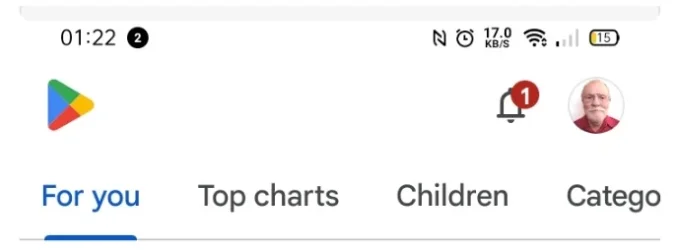
On my Android phone there is a notification I am unable to clear. I have tried everything I can think of including Google Help without success.
Maybe the question was too difficult or still trying to find how to clear it.
Can anyone here do it?
-
PS1.webp
 

My Computer My Computer

At a glance

Windows 11 Home 25H2 64-BitIntel(R) Core(TM) i5-1035G1 CPU @ 1.00GHz 1.1...8.00GB HDDStandard Monitor on Intel UHD Graphics
OS
Windows 11 Home 25H2 64-Bit
Computer type
Laptop
Manufacturer/Model
asus f515ja
CPU
Intel(R) Core(TM) i5-1035G1 CPU @ 1.00GHz 1.19 GHz
Motherboard
ASUSTeK COMPUTER INC. X515JA (U3E1)
Memory
8.00GB HDD
Graphics Card(s)
Standard Monitor on Intel UHD Graphics
Sound Card
Realtek HDA
Screen Resolution
1366 x 768 x 60
Hard Drives
1HDD 2 Partitions
Mouse
Logitech Cordless
Internet Speed
38mbps
Browser
Chrome+FF
Antivirus
Malwarebytes (Premium)
Other Info
When I find it.
What’s the notification? Or are you saying there isn’t actually one there when you tap the bell icon?
 

My Computer My Computer

At a glance

Windows 11 Pro
OS
Windows 11 Pro
There is a 'RED' 1 on the Bell that I cant remove.
 

My Computer My Computer

At a glance

Windows 11 Home 25H2 64-BitIntel(R) Core(TM) i5-1035G1 CPU @ 1.00GHz 1.1...8.00GB HDDStandard Monitor on Intel UHD Graphics
OS
Windows 11 Home 25H2 64-Bit
Computer type
Laptop
Manufacturer/Model
asus f515ja
CPU
Intel(R) Core(TM) i5-1035G1 CPU @ 1.00GHz 1.19 GHz
Motherboard
ASUSTeK COMPUTER INC. X515JA (U3E1)
Memory
8.00GB HDD
Graphics Card(s)
Standard Monitor on Intel UHD Graphics
Sound Card
Realtek HDA
Screen Resolution
1366 x 768 x 60
Hard Drives
1HDD 2 Partitions
Mouse
Logitech Cordless
Internet Speed
38mbps
Browser
Chrome+FF
Antivirus
Malwarebytes (Premium)
Other Info
When I find it.
I understand. What shows when you tap the bell? That should show you the notification… what shows?
 

My Computer My Computer

At a glance

Windows 11 Pro
OS
Windows 11 Pro
I have just remembered how I previously solved a different problem. I deleted and replaced my Account now the Bell is on its own. Thanks for your rapid response, bye bye till the next time.
 

My Computer My Computer

At a glance

Windows 11 Home 25H2 64-BitIntel(R) Core(TM) i5-1035G1 CPU @ 1.00GHz 1.1...8.00GB HDDStandard Monitor on Intel UHD Graphics
OS
Windows 11 Home 25H2 64-Bit
Computer type
Laptop
Manufacturer/Model
asus f515ja
CPU
Intel(R) Core(TM) i5-1035G1 CPU @ 1.00GHz 1.19 GHz
Motherboard
ASUSTeK COMPUTER INC. X515JA (U3E1)
Memory
8.00GB HDD
Graphics Card(s)
Standard Monitor on Intel UHD Graphics
Sound Card
Realtek HDA
Screen Resolution
1366 x 768 x 60
Hard Drives
1HDD 2 Partitions
Mouse
Logitech Cordless
Internet Speed
38mbps
Browser
Chrome+FF
Antivirus
Malwarebytes (Premium)
Other Info
When I find it.
Did you click on the Bell icon? That will take you to another page.
 

My Computer My Computer

At a glance

Win 7/10/11
OS
Win 7/10/11
Computer type
PC/Desktop
Other Info
I'm a computer enthusiast so have quite a few systems that I run. More like an advanced hobby.
It resolves spontaneously
 

My Computer My Computer

At a glance

Windows 11 Home - 26200.8246 - 25H2Ryzen 5500U
OS
Windows 11 Home - 26200.8246 - 25H2
Computer type
Laptop
Manufacturer/Model
Huawei Matebook D15 Ryzen 5500U 8GB / 512 SSD, Windows 11 Home Single Language
CPU
Ryzen 5500U
Keyboard
Logitech K380, G15
Mouse
Logi m350, Everest SM-620, Logitech G9, Lecoo WS210
Browser
Chrome (Desktop), Vivaldi (Mobile)
Antivirus
Windows Security, (Alternative Eset)
Back
Top Bottom




